Digr ● Local-first music player · v0.1.0-alpha.3

Music wasn't meant to disappear into an algorithm.

A desktop music player for Windows and macOS that brings your collection, playlists, casts and discoveries together in one place. Built for people who own music — not rent it.

Coming to Windows and macOS

Digr — Now Playing
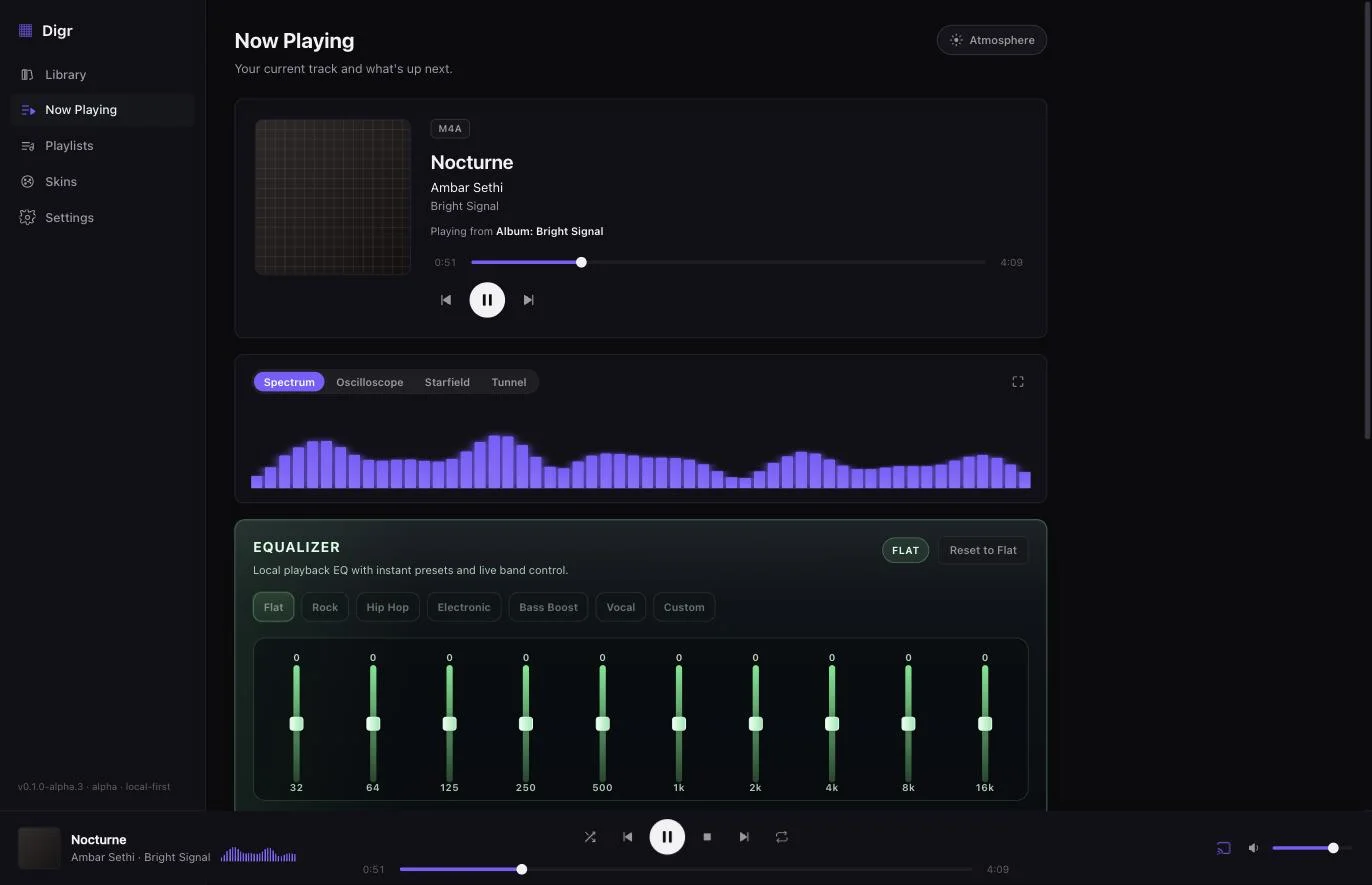
Digr running on macOS: a sidebar listing Library, Now Playing, Playlists, Skins and Settings; the Now Playing view showing album art, the track Nocturne by Ambar Sethi tagged M4A, a transport with scrubber, a live spectrum visualiser and a ten-band equaliser.

A library is not a feed. A collection is not content.

Streaming asks “here's what everyone likes.” Digr asks something quieter and far more interesting — what do you like?

The crowd has a feed. You have a collection: ripped, tagged, hunted-down, arranged in folders only you understand. Digr respects that. It reads your files where they live and gets out of the way.

/Music/Japan/City Pop/1984/218
/Lossless/Boards of Canada/FLAC/94
/DJ/Edits/_unsorted/1,471
/Vinyl Rips/24bit/332

01 / Library

Your whole collection, in one crate.

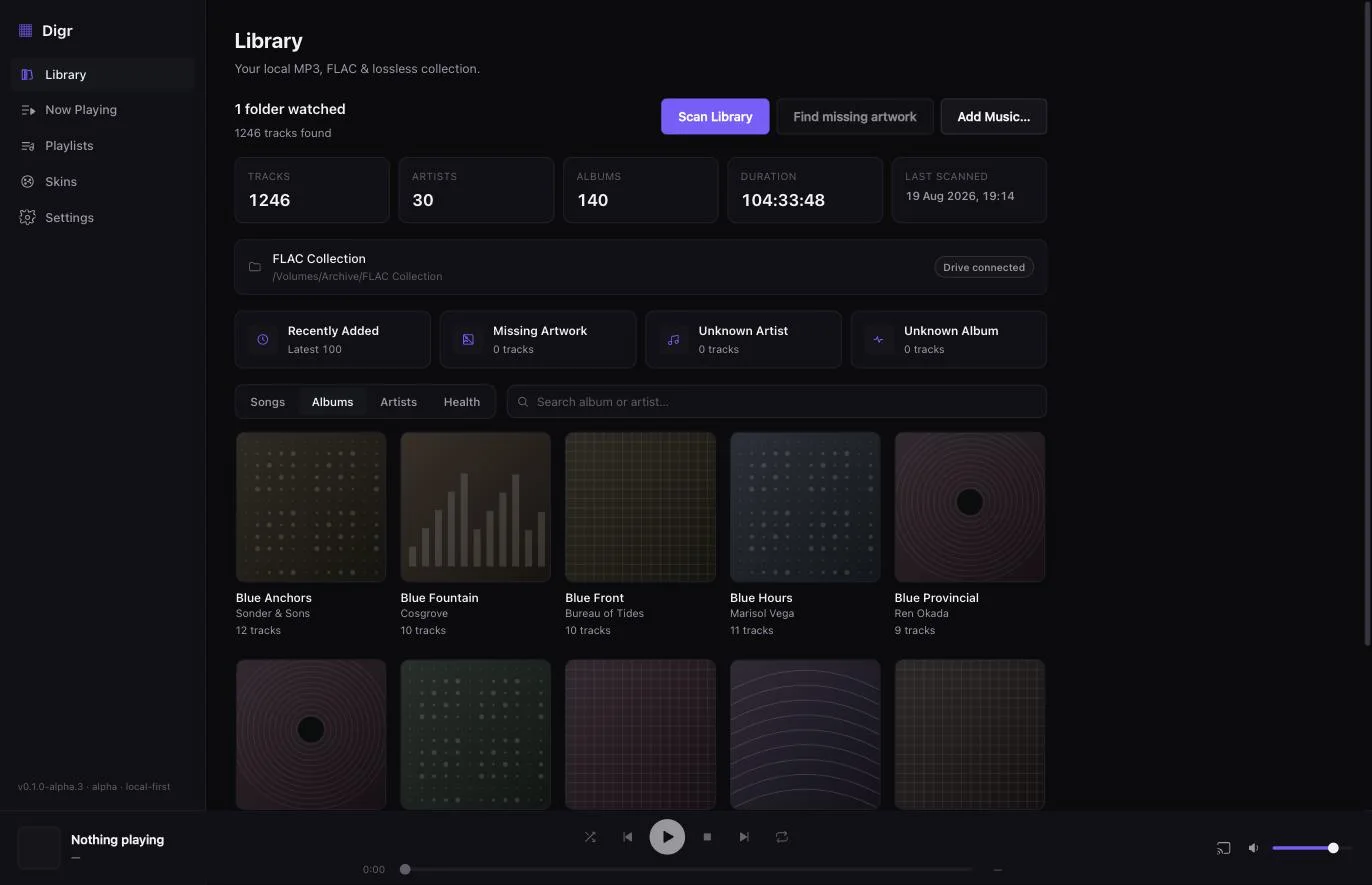
Point Digr at a folder. It scans every track, reads the tags, pulls the artwork, and indexes the lot — locally, instantly, no upload.

  • ARemembered folders. Add a root once. Rescan brings in what's new — no re-import dance, no second copy of your music.
  • BReal metadata. Browse by track, album or artist, read straight from your tags.
  • CSurvives a missing drive. Unplug the external and your library stays intact — Digr finds it again when it's back.

Tracks, albums and artists are virtualised, so a 25,000-track library scrolls without stutter. Scanning is manual today — Digr does not watch the filesystem yet, and automatic watch folders are the next thing being built.

Digr — Library
Digr's Library view: a header reading 1,246 tracks, 30 artists, 140 albums and 104 hours, a watched folder on a connected external drive, and a grid of album covers below.

02 / Now Playing

Now playing, in full resolution.

A player that treats a track like an object worth looking at — artwork at size, a live visualiser, the container named in the corner, and what's coming next right underneath.

  • AReal-time visualisers. Spectrum, oscilloscope, starfield and tunnel — drawn from the actual signal, not faked from a loop. Full-screen when you want the room to notice.
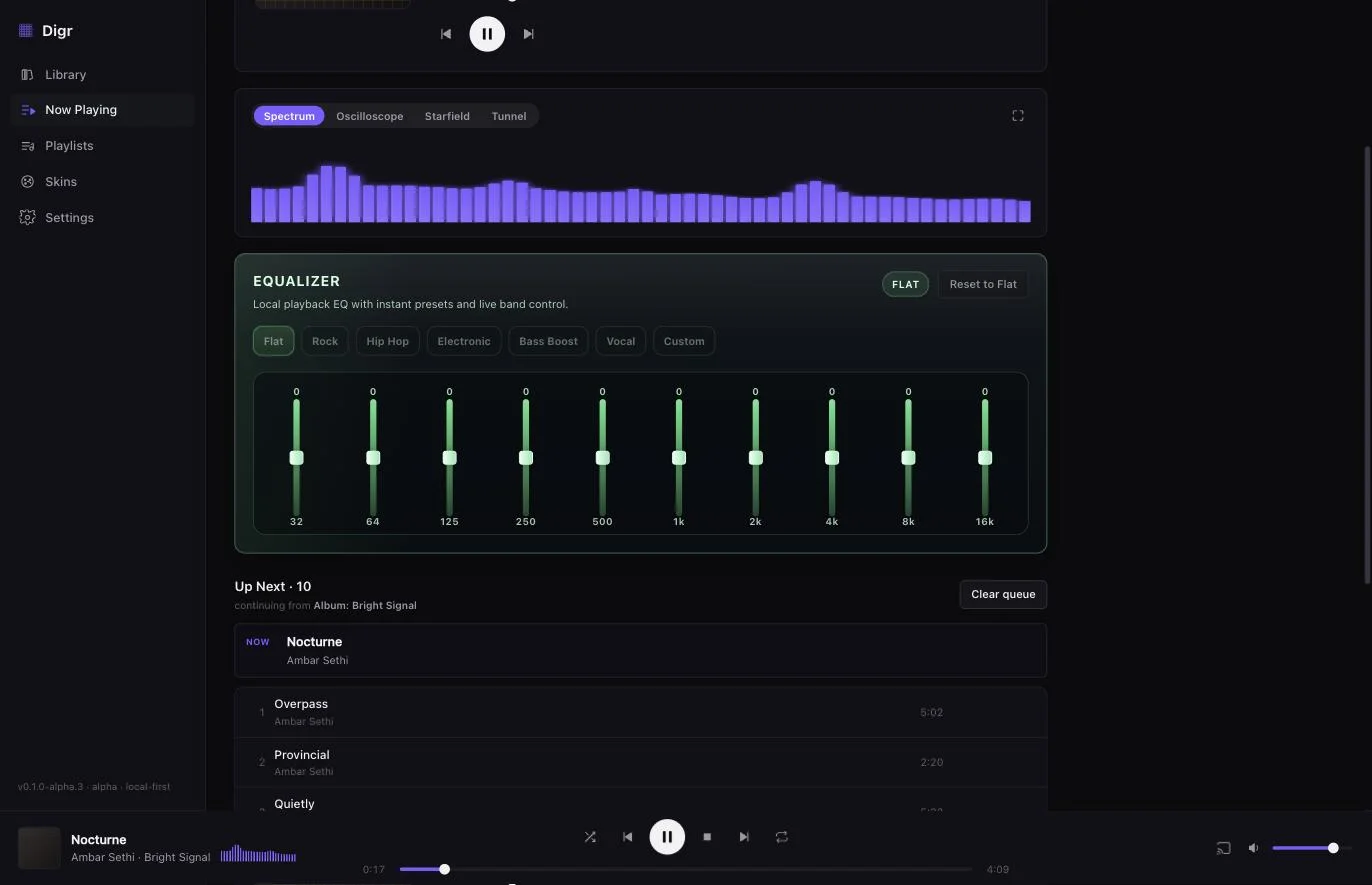
  • BA ten-band EQ. Presets that mean something, or drag the sliders yourself. It remembers where you left them.
  • COne queue, one truth. Play an album, artist or playlist and it keeps going through that source. A file that won't load stops with a reason instead of skipping past it.
Digr — Now Playing
Digr's Now Playing view scrolled down: the spectrum visualiser with Oscilloscope, Starfield and Tunnel alongside it; the ten-band equaliser from 32 Hz to 16 kHz with Flat, Rock, Hip Hop, Electronic, Bass Boost, Vocal and Custom presets; and an Up Next queue of ten tracks continuing from an album.

03 / Cast

Send it to any room.

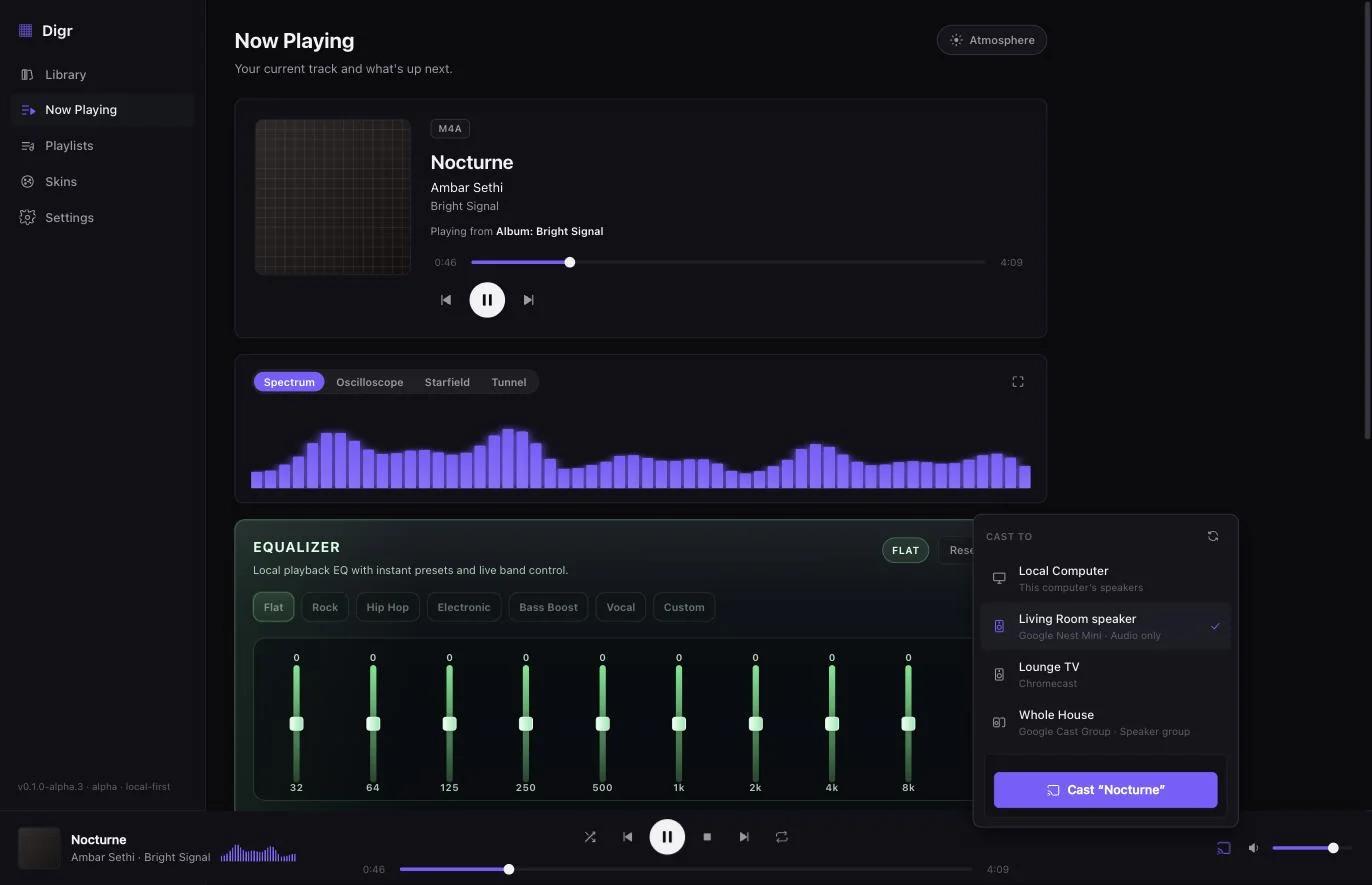
Digr finds the Google Cast speakers on your network and hands off without a beat. Speakers, TVs and whole-house groups turn up on their own — pick one, the sound follows.

  • AChromecast & Google Home. Discovered automatically over your LAN — nothing to configure.
  • BYour original files. Streamed straight off your disk by a local server. No silent re-encode to 128k.
  • CThe queue never forks. While casting, Digr still owns the queue, shuffle and repeat — disconnect and local playback picks up on the same track.

Google Cast is the one protocol Digr speaks today. AirPlay, DLNA/UPnP and OpenHome are on the roadmap, not in the alpha.

Digr — Cast
Digr's cast picker open over the Now Playing view, listing this computer alongside a Google Nest Mini, a Chromecast and a whole-house speaker group, with a button to cast the current track.

04 / Skins

Re-theme the whole app, live.

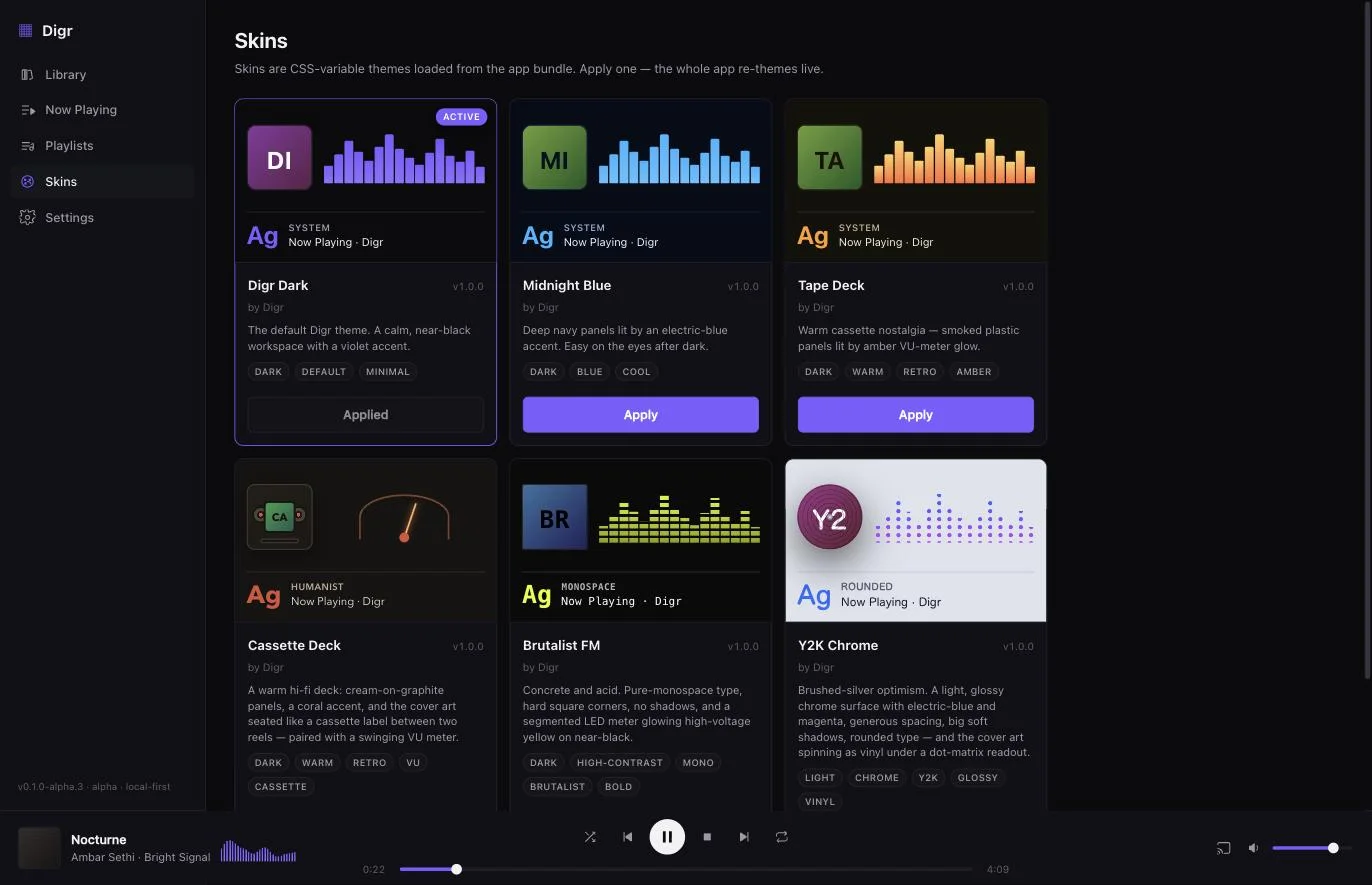
Six skins ship with the alpha — a validated set of colour tokens plus a handful of structural choices, never arbitrary behaviour. Apply one and the whole app changes in place, no restart.

↳ Try one. Each swatch below is a real bundled skin, and picking it paints this page in that skin's own accent.

Digr — Skins
Digr's Skins view: six cards for the bundled skins — Digr Dark, Midnight Blue, Tape Deck, Cassette Deck, Brutalist FM and Y2K Chrome — each previewing that skin's cover-art framing, visualiser style and typeface, with Digr Dark marked active.

05 / Formats

Still buying FLACs? You're among friends.

Digr reads your tags, artwork and durations straight out of the file. No transcoding, no “upgrade for hi-fi,” no asterisks.

MP3FLACALACM4AAACWAVOGG

All indexed with full metadata. OGG depends on your system's codecs for playback — Digr tells you per track rather than failing silently.


06 / The Story

Music software peaked in spirit twenty years ago. Digr is what happened next.

Not nostalgia. Not a retro skin. A timeline where the players we loved never lost their way — and kept evolving into something impossibly polished.

1997
Winamp
It really whipped. Skins, playlists, an EQ you respected.
2001
iTunes
The library as a place. Then it grew into a store and forgot.
2010s
MusicBee
The faithful kept the flame — power-user depth, quietly.
Now
Digr
The future that music software was supposed to become.
Digr Free · Local-first · No account

Your collection deserves better.

Be first through the door.

Get launch access and meaningful release notes. No spam. Unsubscribe anytime. Privacy.

v0.1.0-alpha.3 · Coming to Windows and macOS

Digr is coming to Windows and macOS, and nothing has been published for download yet. Join the waitlist and we'll email you when there's something real to install. Getting both launch builds ready — Apple signing and notarisation for macOS, release validation for Windows — is the first thing on the roadmap.