What Digr does, and where it's going.

Two halves, kept apart on purpose. Everything under Available now is working in 0.1.0-alpha.3 and traceable to code in the app. Everything after it is the roadmap — 185 planned capabilities grouped into 27 initiatives, with horizons that get vaguer the further out they go, because that is the truth about them.

macOS 11 Big Sur or later · Apple silicon · Free and Pro

Available now

Working in the alpha.

40 capabilities shipping in 0.1.0-alpha.3. Every one of them is part of Digr Free, and stays there — Pro is built on top of this list, never carved out of it.

Platform

  • A native desktop application A real Mac app — Tauri, with a React and TypeScript interface over a Rust core. Not a web page in a window, and not an Electron install measured in hundreds of megabytes.
  • Local-first, with no account No sign-in, no cloud library, no telemetry. Playback works with the network switched off, and the only outbound requests are casting on your own LAN and an update check you press yourself.
  • Your files are only ever read Scanning opens your audio files to read tags and artwork and never writes to them. Nothing is copied, renamed, moved or re-tagged. Remove Digr and your collection is byte-for-byte as it was.
  • Settings and state that persist Watched folders, skin, equaliser curve, shuffle and repeat all survive a quit. Digr's own data lives in one application-support folder you can delete without touching a single track.
  • macOS on Apple silicon Built and tested on macOS 11 Big Sur or later, with a stable bundle identifier — which matters more than it sounds, because changing one after release strands every installed copy.
  • Diagnostics you can export A log buffer that records playback, scan and cast failures in production rather than only in development, and writes them to a plain-text file you can read before attaching it to a bug report.
  • Signed in-app update foundation Every build produces a minisign-verified update payload beside the DMG, and the app checks a manifest on Digr's public download repository. It starts working end to end with the first published release.

Library

  • As many local folders as you like Add a root once and it is remembered. Scanning walks it recursively on a background thread, with throttled progress so the interface never blocks and cancelling keeps whatever was already indexed.
  • A SQLite index on your own disk A real database with schema migrations and batched writes, not a JSON blob. It is a cache derived from your files — delete it and a rescan rebuilds it exactly.
  • Fast and Full scan modes Fast reads tags only. Full reads tags and artwork. A library imported in Fast mode can have its covers filled in later by a cancellable background backfill.
  • Every common container, indexed MP3, FLAC, WAV, AAC, M4A, ALAC and OGG are read for tags, artwork and duration and filed into the library whatever your machine can decode.
  • Survives a disconnected drive Unplugging an external marks its root offline instead of deleting 20,000 tracks. When it returns, Digr matches the volume by identifier or name, rewrites the indexed paths and remaps anything queued.
  • Pruning that can't run away with your library Tracks that have genuinely gone are removed after a scan; a root that couldn't be fully read is never pruned at all. The distinction is regression-tested, because getting it wrong once costs somebody their library.
  • Library health views Missing files, likely duplicates, tracks with no artwork, unknown artist and unknown album — the categories that actually predict a collection going bad. Inspect-only: nothing is edited or deleted.
  • Large-library rendering Tracks, albums and artists are virtualised, so a 25,000-track library scrolls without stutter instead of paginating.

Browsing

  • Tracks, Albums and Artists Grouped from your own tags, with album identity keyed on album artist so a compilation stays one record instead of forty. Multi-disc sets order by disc and then by track.
  • Search across the library Filter tracks, albums and artists by title, artist or album as you type.
  • Play context Starting a track from a list, album, artist or playlist continues through that source rather than stopping at the end of one file.
  • A library summary that means something Track, artist and album counts, total duration, the folders being watched and when each was last scanned — on the page you land on, not buried in a settings pane.
  • Sensible fallbacks for bad tags Missing and placeholder metadata resolves to a readable label rather than a blank row, and the same rules drive the health views so the two never disagree.

Metadata & artwork

  • Tags read straight from the file Title, artist, album, year, genre, disc and track number and duration, read locally with lofty. No lookup service is contacted and nothing about your library leaves the machine.
  • Embedded and folder artwork Covers come from inside the file or from a sidecar image next to it, whichever exists, and the folder case is handled per directory rather than per track.
  • Content-addressed artwork cache Extracted covers are hashed and cached on disk, so the same art shared by forty tracks is stored once. Tracks with none get a generated placeholder rather than a hole in the grid.

Playback

  • Local playback, straight off disk Files are handed to the system media stack through Tauri's asset protocol — no bytes pass through JavaScript, and nothing is copied or converted on the way.
  • Full transport Play, pause, stop, seek, volume, next and previous, with shuffle and repeat off, all or one. Shuffle reorders what's upcoming without disturbing what's playing.
  • Failures that hold their ground A track that won't load stops with a specific reason — missing, unsupported, corrupt, unreadable — and does not skip forward, so one bad file can't walk your whole library while you're out of the room.
  • A ten-band equaliser 32 Hz to 16 kHz with six presets and a custom curve, applied to local playback and remembered between launches.
  • Media keys and the macOS Now Playing panel Hardware transport keys work, and the system panel shows artwork with a live scrubber — including while casting.

Queue & playlists

  • One queue with one cursor The loaded track is derived from the queue position, so the two cannot disagree. Play Next, Add to Queue, reorder, remove and clear all operate on that single list.
  • Where the queue came from The queue remembers what generated it and what has already played, so "continuing from Album: Bright Signal" is a fact on screen rather than something you have to reconstruct.
  • Local playlists Create, rename and delete, with ordered membership persisted in SQLite. Play one and the queue continues through it.

Cast

  • Google Cast, discovered automatically Chromecasts, Google Home speakers and speaker groups appear over mDNS with nothing to configure. The resolver is bundled, so it doesn't depend on the operating system's Bonjour stack.
  • Your original files, not a re-encode A local server streams the actual file to the device with correct MIME types and Range support. Paths never appear in a URL — each track gets an unguessable token — and nothing leaves your network.
  • The queue never forks While casting, the local engine is silenced but still owns the queue, shuffle and repeat. Albums and playlists progress on the device, and disconnecting resumes local playback on the same track, paused.
  • Volume that follows the device Receiver volume and mute, group master volume, and a fixed-volume receiver correctly shown as fixed rather than a slider that silently does nothing.
  • Recovery, not a spinner A receiver that is powered off, taken over by another app or disappears from the network is detected and reported, and Digr hands playback back rather than hanging.

Presentation

  • Six bundled skins, switched live Digr Dark, Midnight Blue, Tape Deck, Cassette Deck, Brutalist FM and Y2K Chrome. Apply one and the whole app changes in place — no restart — and the choice persists.
  • A declarative skin engine A skin is a validated manifest of colour tokens plus a closed set of presentation choices: artwork framing, corner radius, shadow weight, layout density and a typography pack. It selects from known options and can never supply behaviour.
  • Four visualisers Spectrum, oscilloscope, starfield and tunnel, driven by a real Web Audio analyser rather than a canned loop — with a cast-safe mode for when the audio is leaving the machine.
  • Fullscreen visualiser and Atmosphere Take the visualiser full screen, or dim the room's worth of interface around the artwork when the music is the point.

Formats

  • Indexed with full metadata MP3, FLAC, ALAC, M4A, AAC, WAV, OGG — read for tags, artwork and duration, and filed into the library whatever your system can play.
  • Plays locally on macOS MP3, FLAC, ALAC, M4A, AAC, WAV. Decoding is the operating system's job today, so OGG depends on your machine's codecs — and when a file can't be decoded, Digr says so on that track rather than skipping it in silence.
  • Cast without transcoding Whatever plays locally is streamed to a Cast device as the original file. There is no re-encode step, silent or otherwise.
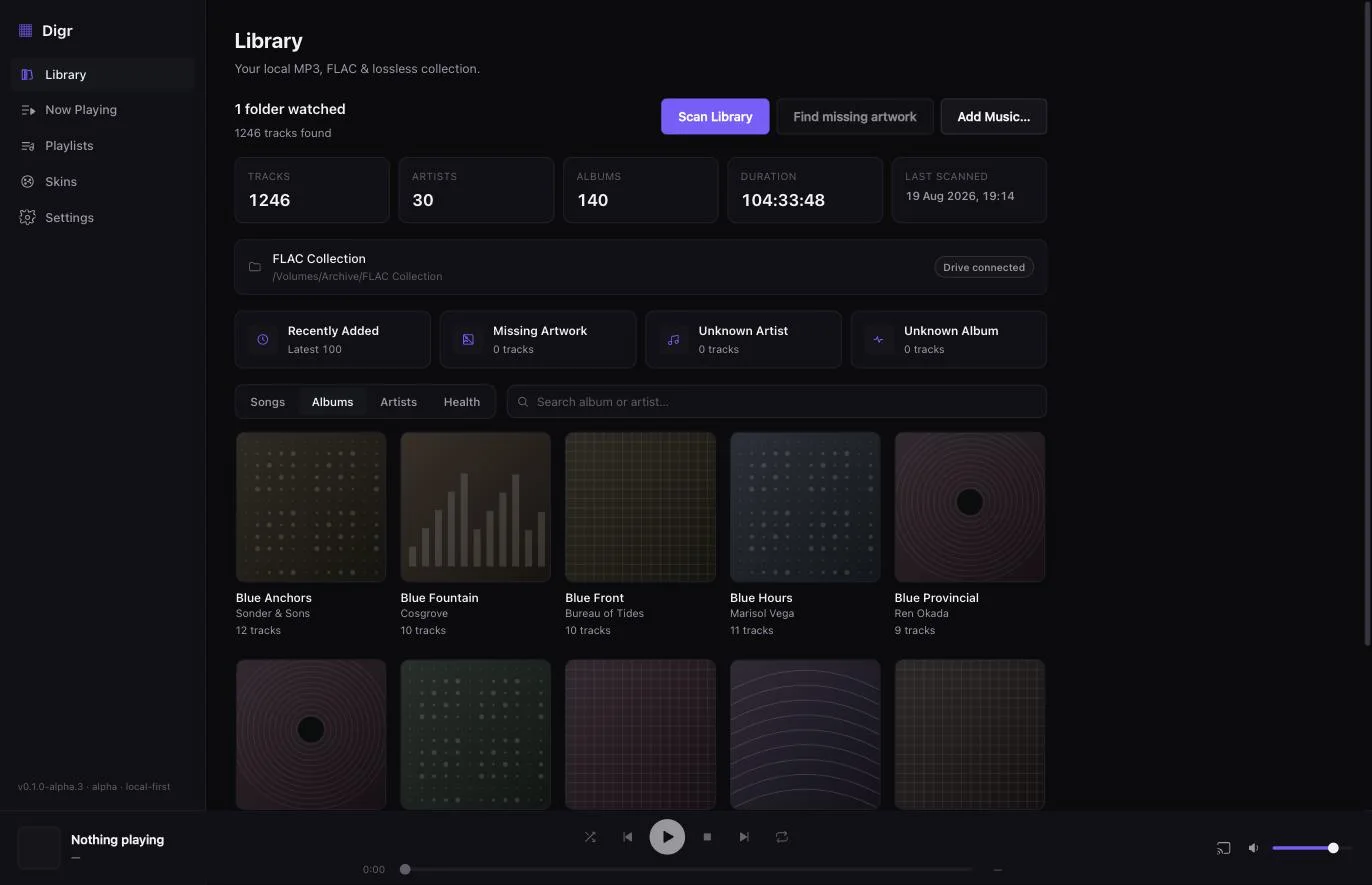
Digr — Library
Digr's Library view: a header reading 1,246 tracks, 30 artists, 140 albums and 104 hours, one watched folder on a connected external drive, quick filters for recently added and missing artwork, and a grid of album covers below.

Digr 0.1.0-alpha.3, running. Everything above this line is on that screen; everything below it isn't there yet.

Next 3 months

The run that's already started.

The immediate development sequence, in roughly the order it will be worked. This is the shortest and most reliable part of the roadmap for the obvious reason: it is the part already being built.

Core Platform

A download macOS actually trusts

The build is finished and ad-hoc signed, which Gatekeeper quarantines — a stranger who downloads it is told the app is damaged. Apple Developer ID signing and notarisation are the last thing between the current build and a public release, and everything downstream is already wired.

A credentials task rather than an engineering one. Until it lands, this site offers no download at all rather than a broken one.

What's in it 6 capabilities
  • Apple Developer ID signing in the release workflow
  • Notarisation and stapling
  • A published release with a downloadable DMG
  • First end-to-end in-app update, from one published version to the next
  • Automatic update checks per supported platform
  • Installer and packaging verification before each release
Free Library

A library that keeps itself up to date

Today, new files appear after you ask for a rescan. Digr should watch the folders you gave it and reconcile as things change — including the awkward case of a file still being copied in, which must not be indexed half-written.

What's in it 6 capabilities
  • Automatic filesystem watching on every watched folder
  • Stable-file detection, so a file still being copied is left alone until it settles
  • Incremental rescanning by size and modification time rather than a full re-walk
  • Automatic reconciliation of added, changed, moved and deleted files
  • Scan exclusions for folders you never want indexed
  • Scheduled background scans
Core Library

Big libraries and awkward drives

The scanner and index were built for this, and the disconnected-drive case is already handled and regression-tested. What is left is validation at a scale most players never see, and the messier storage people actually keep music on.

What's in it 5 capabilities
  • Validation against libraries of 100,000 tracks and beyond
  • Wider large-library hardening across scanning, indexing and rendering
  • Wider removable-drive hardening
  • Network share and NAS recovery, including reconnect and path rewriting
  • Partial-scan safety under every failure mode a drive can produce
3–6 months

Next, once that run lands.

The major blocks queued behind the immediate run. Sequenced and scoped, without a date — a plan this far out that named a week would be a plan making things up.

Free Metadata

Metadata you can actually fix

Digr reads your tags and, today, never writes them. That changes carefully: explicit editing you asked for, a lookup that proposes rather than imposes, and every change undoable. The everyday version of this is Free — fixing a wrong album title is not a premium feature.

What's in it 8 capabilities
  • Manual metadata editing for a track, an album or a selection
  • Safe explicit tag writing — only what you confirmed, only when you confirm it
  • MusicBrainz lookup for releases and recordings
  • Confidence scoring on every proposed match
  • An ambiguous-release chooser, rather than picking one and hoping
  • Cover Art Archive artwork lookup
  • Manual artwork replacement from a local file
  • Undoable metadata changes
Free Cast & network

Casting that knows what the speaker can do

Digr streams your original file untouched, which is right until the receiver can't decode it — and then it simply fails. Asking the device what it supports, and converting only when there is no alternative, turns that into a file that plays.

What's in it 6 capabilities
  • Receiver capability detection
  • Automatic compatibility transcoding, only where the receiver cannot decode the original
  • A lossless Cast path wherever the receiver supports one
  • Cast buffering controls
  • Cast diagnostics surfaced in the app rather than only in a log
  • Clear indication of when a stream was converted and why
Free Cast & network

Continuous Cast

A Cast receiver is handed one track at a time, which is why there is a pause between them. Pre-loading the next track on the device closes that gap and makes an album on a smart speaker behave like an album.

What's in it 3 capabilities
  • Continuous Cast — the next track queued on the receiver before the current one ends
  • Gapless playback on smart speakers where the receiver supports it
  • Correct handling of shuffle, repeat and queue edits mid-session
6–12 months

The bigger systems.

Substantial pieces of product rather than features: importing discs, the health and repair suite, more platforms. Each one is several months of work in its own right.

Free Discs

Put a CD in and get your CD

A complete standard import workflow, in the app, with nothing to install first. Insert a disc, see the right album, choose the tracks, and end up with tagged files in your library — that whole path is Free, because ripping your own CDs is not an advanced use of a music player.

The ripping engine ships with Digr. You should never be asked to install FFmpeg or cdparanoia by hand.

What's in it 15 capabilities
  • Optical drive detection
  • Audio CD detection, with an Audio CD source in the sidebar
  • TOC reading, with track list and durations
  • MusicBrainz Disc ID lookup
  • Automatic metadata lookup, with a release and pressing chooser
  • Cover Art Archive artwork for the identified release
  • Metadata editing before the rip starts
  • Track selection
  • FLAC output by default
  • MP3 and AAC output, with ALAC and WAV to follow
  • Destination folder, and filename and folder templates
  • Per-track and overall progress, with cancel and retry
  • Automatic insertion into the Digr library, and a jump to the imported album
  • Optional eject when the rip finishes
  • A bundled ripping engine, natively integrated
Pro Library

Library Health, grown up

The five health views in the alpha become a real diagnostic and repair suite: what is wrong, how much disk it is costing you, what a fix would do, and an undo. It is the clearest thing Pro is for — deep collection management, on top of a player that already works.

Nothing here ever deletes a file on its own. Every repair is previewed, applied on your instruction, and reversible.

What's in it 15 capabilities
  • Expanded health overview across the whole library
  • Missing artwork, missing metadata and low-quality file detection
  • Corrupt and unreadable file detection
  • FLAC integrity validation
  • Mixed-format and mixed-sample-rate album detection
  • Oversized and undersized artwork detection
  • Album completeness checks
  • Orphan database record detection
  • Filename collision detection
  • Suspicious lossy-to-lossless transcode detection
  • Byte-identical duplicate detection
  • Safe duplicate review, with storage savings estimates
  • Batch repair with a preview of every change
  • Repair undo
  • A repair queue for working through a large collection
Free Audio

Sessions and playlists that travel

Quitting Digr currently forgets what was queued. It should come back exactly as you left it — and your playlists should be able to leave, because a playlist you cannot export is a playlist held hostage.

What's in it 4 capabilities
  • Queue and session restoration across restarts
  • M3U and M3U8 import
  • Playlist export
  • Smart playlists built on saved rules
Free Library

More ways into your own collection

Tracks, albums and artists is the right foundation and a thin set of doors. A large collection wants genre, composer, pressing, saved filters, and the simple lists people reach for constantly — what's new, what you keep going back to.

What's in it 13 capabilities
  • Richer album detail views
  • Richer artist views
  • Genre browsing
  • Composer browsing
  • Edition and pressing browsing
  • Advanced filters
  • Saved smart views
  • Recently Added
  • Recently Played
  • Most Played
  • Local listening history, held on your machine
  • Playlist artwork
  • Playlist folders
Core Platform

Windows, then Linux

Digr is a Tauri application, so both are buildable today — what neither has is a build that has been packaged, signed, and tested against real audio hardware. That is the work, and it is planned rather than dismissed.

macOS stays the lead platform. A Windows build ships when it is genuinely as reliable as the Mac one, not on the day it first compiles.

What's in it 6 capabilities
  • A Windows production build
  • Windows packaging and installer testing
  • Windows audio output and codec validation
  • A Linux production build, later
  • Linux audio integration
  • Automatic updates on every supported platform
Free Presentation

The Classic skin, and skins from your own disk

A skeuomorphic hardware skin with bevelled chrome, an LCD readout and a working shade mode — costed in three stages against the current engine, because it needs new presentation primitives rather than new configuration. Alongside it, the skin engine opens up to skins you didn't get from us.

What's in it 9 capabilities
  • The Classic skin
  • Working shade and compact modes
  • A mini-player mode
  • User skins loaded from a folder on disk, through the same validator
  • Skin import and export
  • A skin creator and editor
  • More visualiser styles — mirrored, radial, dot-matrix
  • Calmer and reduced-motion visualiser options
  • Album-art visual effects
Longer term

Real plans, no responsible window.

Intended, specified in enough detail to cost, and dependent on the systems above landing first. Listed so you know they are on the map — not so you can plan around them.

Pro Discs

Rips you can prove

Secure ripping is the flagship Pro pillar: read every sector until it agrees with itself, calibrate the drive's offset, and check the result against other people's rips of the same pressing. An archival master and a portable copy come out of one pass, with a log that says what happened.

AccurateRip access is a commercial and licensing dependency, not an engineering one. The archival pipeline lands either way; the verification badge waits on terms, and this site will not imply otherwise before then.

What's in it 13 capabilities
  • Secure mode with repeated reads
  • Suspicious-sector rereads
  • Drive read-offset calibration
  • AccurateRip integration and confidence reporting
  • Per-track verification results
  • C2 error pointer support where the drive provides it
  • Detailed rip logs, and rip-log export
  • Archive plus Portable Copy in a single pass
  • A FLAC archival master with an AAC or MP3 derivative
  • A tracked master and derivative relationship, and regeneration of derivatives
  • Pregap preservation and HTOA support
  • Enhanced and data-session handling
  • Cue sheet generation
Pro Metadata

Duplicates found by listening, not by filename

Acoustic fingerprinting tells you that two files are the same recording even when the tags disagree — and, more usefully, that two files are different masterings even when the tags match. Filename and tag comparison cannot do either.

What's in it 7 capabilities
  • Chromaprint-based acoustic analysis
  • Exact audio duplicate detection on decoded audio
  • Same-recording detection across differing tags
  • Remaster and edition distinction
  • Similar-recording classification
  • AcoustID-assisted metadata matching
  • Safe duplicate recommendations, reviewed before anything happens
Pro Audio

Advanced DSP

The ten-band graphic EQ stays in Free. Above it: a proper parametric equaliser with frequency, gain and Q per band, filter types, headroom protection, and profiles per output — the tools for correcting a specific pair of headphones rather than nudging the bass.

Digr-only, applied to Digr's own playback. A system-wide equaliser is a different product and is not what this is.

What's in it 7 capabilities
  • Parametric EQ with frequency, gain and Q controls
  • Shelf, peak and filter types
  • EQ headroom protection against clipping
  • Headphone profiles
  • Speaker profiles
  • AutoEQ-compatible profile import
  • Output-specific DSP settings
Pro Audio

Loudness and dynamics analysis

Measure a track or an album properly — integrated loudness, loudness range, true peak, clipping, crest factor — and show it as a profile rather than a single mystery number. Analysis feeds the non-destructive normalisation in Free rather than replacing it.

These are EBU R128 measurements and will be named as such. None of them is a universal "dynamic range score", and calling one that would be inventing a standard.

What's in it 9 capabilities
  • Integrated LUFS measurement
  • Album loudness measurement
  • ReplayGain analysis
  • Loudness Range
  • True peak measurement
  • Clipping detection
  • Crest factor
  • A dynamic-range profile per track and per album
  • Waveform generation
Pro Audio

Signal Chain

What actually happened to the audio between the file and the speaker: what was decoded, what was resampled, where the bit depth changed, whether anything was transcoded, and what the receiver said it could take. Most players simply do not tell you, and for a lossless collection that is the interesting question.

Where a stage cannot be established, Signal Chain will say so. It will not print "bit-perfect" over a path it cannot actually verify.

What's in it 11 capabilities
  • Source codec, sample rate and bit depth display
  • A direct versus transcoded indicator
  • Full signal-chain visualisation
  • The decode stage
  • The DSP stage
  • Resampling and bit-depth change indicators
  • Transcoding details, when transcoding happened
  • Receiver capability display
  • A verified lossless-path badge, only where the path is genuinely known
  • An explicit unknown-stage warning
  • Saved playback-path diagnostics
Tier TBD Cast & network

Network audio beyond Google Cast

Google Cast is the only protocol Digr speaks today. It is not intended to be the only one it ever speaks: AirPlay, DLNA/UPnP and OpenHome are all on the roadmap, along with proper handling of the speaker groups each ecosystem defines.

Each of these is a protocol implementation with its own certification, discovery and licensing questions, which is why none of them carries a date. What Digr will not promise is homemade synchronised playback across brands that were never designed to sync.

What's in it 4 capabilities
  • AirPlay output
  • DLNA and UPnP output
  • OpenHome support
  • Native ecosystem speaker groups
Free Audio

The local audio path, tightened

Playback today is handed to the system media stack, which is why it is dependable and why a live album has a seam between tracks. A Digr-side decode and mixing path fixes gapless, brings OGG in from the cold, and makes sample-rate handling something Digr decides rather than inherits.

What's in it 8 capabilities
  • Truly gapless local playback
  • Optional crossfade
  • ReplayGain support
  • Non-destructive loudness normalisation
  • A native decoder for containers macOS won't play
  • Automatic sample-rate switching
  • Advanced output-device selection
  • Per-device playback preferences
Free Presentation

Lyrics, from your own files first

Embedded lyrics and .lrc files next to your tracks, synchronised and full screen, with an offset control for the ones that were timed badly. Local first — this works with no service involved.

What's in it 5 capabilities
  • Embedded static lyrics
  • Local .lrc lyrics files
  • Synchronised local lyrics
  • A timing offset control
  • Fullscreen lyrics
Free Platform

Shortcuts, deep links and a remote on your own network

Ways to drive Digr from outside its own window: system-level shortcuts on each platform, a URL scheme, and a small web remote served on your LAN so the phone in your hand can skip a track.

What's in it 6 capabilities
  • Global keyboard shortcuts
  • macOS Shortcuts actions
  • Windows command-line integration
  • Linux MPRIS support
  • digr:// deep links
  • A local-network web remote
Pro Metadata

Provenance and the Pressing Passport

Where each file in your collection came from, and which pressing it is — the rip, the drive, the verification result, the release. For a collection assembled over twenty years, that history is part of the collection, and no player currently keeps it.

What's in it 5 capabilities
  • Collection provenance records
  • The Pressing Passport — identified pressing and edition per album
  • Metadata rules and templates
  • Batch metadata review and repair
  • Advanced archival workflows built on the above
Research

Open questions.

Ideas that need a protocol, a licence, an architecture decision or a commercial agreement validated before anyone can honestly call them planned. Some will ship. Some will turn out to be a bad idea, and that is what research is for.

Tier TBD Cast & network

Digr on more than one device

A small Digr endpoint that another Digr could stream to is the only honest route to multi-room that Digr controls end to end — and the only one where claiming synchronisation would be true. Open questions: transport, clock sync, discovery, and whether it earns its maintenance.

What's in it 4 capabilities
  • A Digr Receiver system
  • A cross-device remote architecture
  • A companion mobile remote
  • Per-speaker volume inside a speaker group
Tier TBD Cast & network

Voice control

Asking a speaker to play something out of a local library means either a cloud skill with an account behind it, or a local intent path with far less reach. Both are being looked at. Neither is planned, and the first one is in obvious tension with the rest of this product.

What's in it 3 capabilities
  • Alexa playback and integration
  • Google Assistant integration
  • A custom voice integration
Tier TBD Audio

Exclusive and bit-perfect local output

Taking exclusive control of a converter and bypassing the system mixer, so the samples arriving at the DAC are the samples in the file. Genuinely wanted by some listeners, and genuinely hard to do honestly — which is why it is here rather than in a feature list.

What's in it 2 capabilities
  • Exclusive-mode local output
  • Bit-perfect output verification
Tier TBD Library

How a collection is modelled

A recording that appears on an album, two compilations and a soundtrack is currently either four files or one file filed once. Modelling a single audio asset with several release appearances is probably the right answer, and it is a significant change to the index rather than a feature.

What's in it 3 capabilities
  • One audio asset with multiple album appearances
  • Deduplication that keeps every appearance intact
  • Index-point preservation from a rip
Tier TBD Presentation

The parts that depend on somebody else

Two things people ask for that are not really engineering questions. Online lyrics are a licensing question, and unlicensed scraping is not on the table. A place to share skins is a hosting, moderation and trust question, even though a skin can never supply behaviour.

What's in it 2 capabilities
  • Licensed online lyrics lookup
  • A community skin directory
Not planned

And the honest no's.

Deliberate decisions rather than unfunded wishes. Windows, Linux, tag editing, AirPlay and UPnP/DLNA used to be on this list; every one of them is now a roadmap item above.

  • Homemade synchronised playback across brands Digr will support each ecosystem's own speaker groups. It will not invent a cross-brand sync layer over protocols that were never designed to keep time with each other and then pretend the result is in sync.
  • A system-wide equaliser Digr's DSP applies to Digr's playback. Processing every other application's audio is an audio driver, not a music player, and shipping one is a different project.
  • Automatic destructive de-duplication Duplicate detection will get very good. It will never delete files on its own. Every removal is reviewed, previewed and reversible — an algorithm confidently deleting the wrong master is unrecoverable.
  • Mass metadata overwrite without review No "fix my whole library" button that rewrites forty thousand files from a lookup service. Batch editing means batch review, then a change you confirmed and can undo.
  • Universal bit-perfect wireless claims Digr will report the signal path it can actually verify. It will not print a lossless badge over a wireless chain whose final stage it cannot see.
  • A cloud-first streaming library No accounts, no server-side library, no catalogue to rent. Not an omission — the point.
  • Intel Macs, iOS and iPadOS The Mac build targets Apple silicon; a universal binary is possible but not currently planned. iOS and iPadOS are not on the roadmap at all — a phone app is a different product with a different architecture.

Horizons here are directional, not contractual: they describe the order of work and the rough scale of it, and nothing on this page is a delivery commitment. What has already landed is written up version by version in the changelog.