Music folder structure: a layout that survives every tool
A practical music folder structure for local libraries: album artist, album with its year, and zero-padded tracks, plus the awkward cases and characters that break a copy.
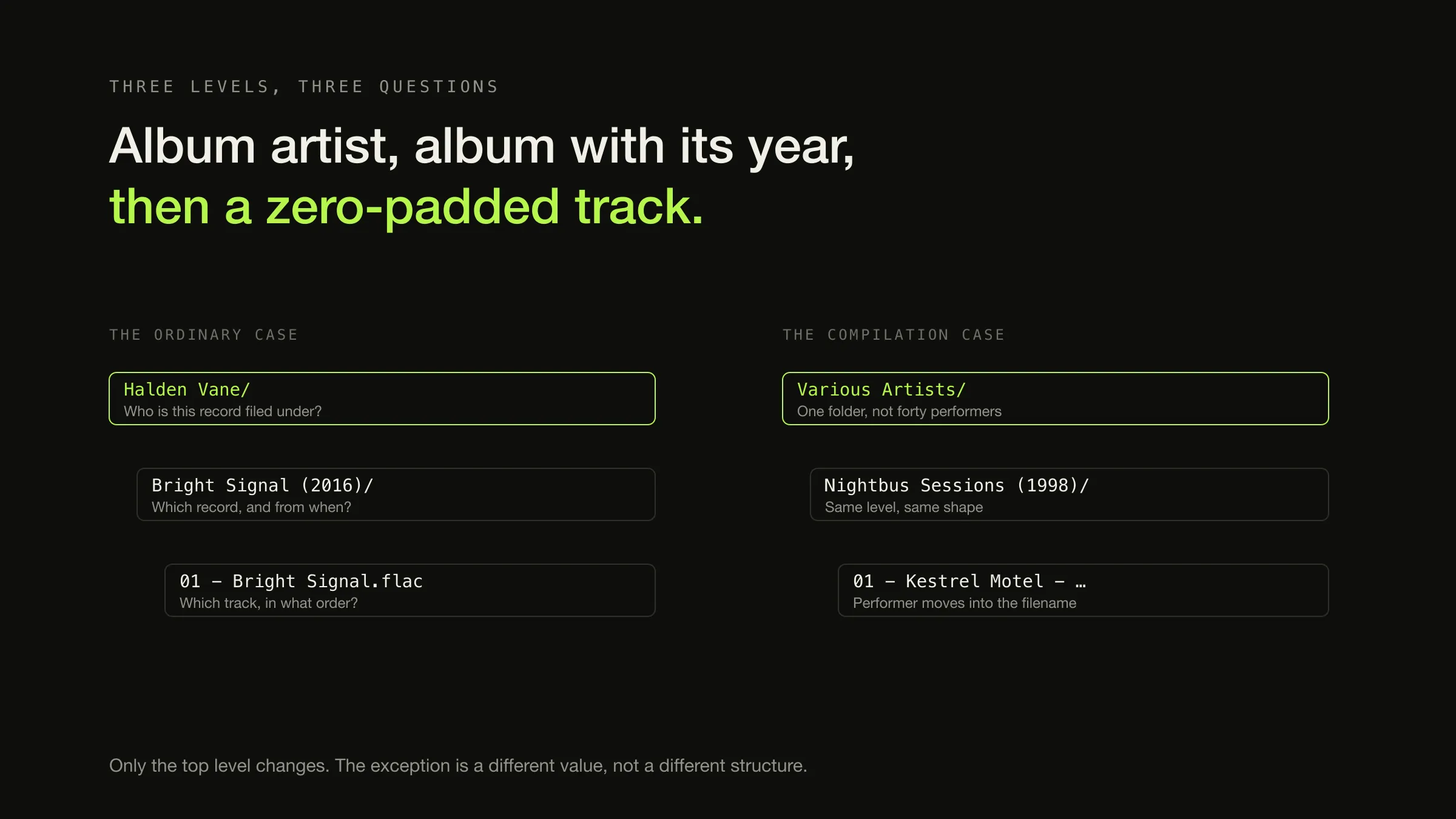
A layout that survives contact with other software has three levels: the album artist, then the album with its release year, then a zero-padded track number and title.
Halden Vane/Bright Signal (2016)/01 - Bright Signal.flacThat is the default, and it is worth being clear about why. Not because a player needs it — no scanner-based player does — and not because it is elegant. Because it is the layout the standard tools already assume, it reads correctly to a human with no software at all, and it restores one album from a backup without a database. Folders are for the cases where nothing is running. For the larger question of keeping a collection coherent across drives and years, continue with how to organise a large local music library.
The three-level shape is the easy part. What separates a layout that lasts from one that quietly rots is having decided, in advance, where the compilation goes.
Why album artist, and why the year at the album level
Two of the three decisions above can be argued from a tool’s own documentation rather than from taste.
MusicBrainz Picard is the tagger most collections eventually pass through, and its file-naming documentation describes its move operation as putting files “to new directories, based on a specified parent directory and subdirectories, typically based on album artist name and release title”. That is album-artist-then-release, in the words of the software that does it.
Picard’s own naming tutorial builds this script:
$if2(%albumartist%,%artist%) - \(YYYY\) %album%/$num(%tracknumber%,2) - %title%Three things worth extracting from it, and one honest disagreement.
- Album artist, with the track artist as a fallback.
$if2takes the first value that is not empty. Album artist first is what keeps a compilation together, and it is the same field that does the same job inside the tags. - The year on the album level, in brackets. Not on the artist level, where it means nothing, and not omitted, where an alphabetical listing of an artist’s work tells you nothing about the order it was made in.
- Track numbers padded to two digits.
$num(%tracknumber%,2)exists because10 - Tracksorts before2 - Trackin every file browser ever written. - The disagreement: Picard’s tutorial puts artist and album in one combined
folder —
Halden Vane - (2016) Bright Signal— rather than two levels. That is a real alternative and it is not wrong. Two levels wins when you want to see everything by one artist in one place, which is most of the time; one level wins when the collection is browsed by album and the artist folders would be mostly singletons.
The tree, including the parts that do not fit
An example with only Artist/Album/Track in it proves nothing, because that case
was never hard. Here is the same layout carrying the cases that actually cause
trouble:
Music/
├── Halden Vane/
│   ├── Bright Signal (2016)/
│   │   ├── 01 - Bright Signal.flac
│   │   ├── 02 - Slow Ascent.flac
│   │   └── cover.jpg
│   └── Longwave (2019) [Deluxe Edition]/
│       ├── 01 - Longwave.flac
│       └── 14 - Longwave (Demo).flac
├── Various Artists/
│   ├── Nightbus Sessions (1998)/
│   │   ├── 01 - Kestrel Motel - Departure.flac
│   │   └── 02 - Halden Vane - Bright Signal.flac
│   └── Salt Lake — Soundtrack (2004)/
│       └── 01 - Kestrel Motel - Salt Lake.flac
├── Marisol Ferrer/
│   └── Coastline — Original Score (2009)/
│       └── 01 - Main Titles.flac
├── The Aubrey Set/
│   ├── The Radio Recordings (2011)/
│   │   ├── 1-01 - First Session.flac
│   │   └── 2-01 - Second Session.flac
│   └── Live at the Fold (2014)/
│       └── 01 - Longwave (Live).flac
├── Kestrel Motel/
│   └── Departure (2017) [Single]/
│       └── 01 - Departure.flac
└── _inbox/
Nine decisions are visible in that listing — a deluxe edition, a compilation, two kinds of soundtrack, a multi-disc release, a live album, a single, and an inbox — and every one of them is a rule rather than a case-by-case judgement, which is the whole point.
The three cases that break a naive layout
-
A compilation
Various Artists/Album (Year)/
01 - Kestrel Motel - Departure.flac
Filed under one folder, not under each performer, or a forty-track compilation becomes forty folders holding one file. This is the case where the performer does belong in the filename, because the folder no longer names them and a person reading the directory has nowhere else to look.
-
A multi-disc release
Artist/Album (Year)/
1-01 · 1-02 … 2-01 · 2-02
One folder, disc number carried in the filename. The release is one thing on disk because it is one thing in a player, and a flat sort still comes out in the right order. Disc subfolders are for box sets large enough that eighty files in one folder is the worse problem.
-
A soundtrack
Depends on who made it
Various Artists/… or Composer/…
A songs compilation from a film is a compilation and goes under Various Artists. A score by one composer is that composer's record and goes under their name. The awkwardness people report with soundtracks is almost always these two being treated as one category.
The full set, with the reason attached:
| Case | Folder treatment | Why |
|---|---|---|
| Compilation | Various Artists/Album (Year)/, performer in the filename | One record stays one folder; the performer stays visible to a human |
| Various-artists soundtrack | Same as a compilation | It is a compilation that happens to come from a film |
| Single-composer score | Composer/Title — Original Score (Year)/ | It is one artist’s record, and filing it under Various Artists loses that |
| Multi-disc release | One album folder, 1-01 / 2-01 filenames | The release is one unit; a flat sort still orders correctly |
| Box set, many discs | One album folder with Disc 1/, Disc 2/ inside | Past roughly three discs, a flat folder is the bigger problem |
| Deluxe or reissue | Separate album folder, edition in brackets | Two editions are two records with different track lists |
| Single or EP | Album folder as normal, [Single] or [EP] in brackets | Keeps it out of the album list mentally without a separate tree |
| Live album | Normal album folder under the artist | It is a release; Live as a top-level folder splits an artist in two |
| Artist renamed | One folder under the current name | Two folders for one artist is the failure the folder was meant to prevent |
| Two albums, same title | Disambiguate with the year already in the name | Longwave (2019) and Longwave (2024) never collide |
| Not yet decided | _inbox/, with a standing appointment | An inbox is a queue; a folder called _unsorted with 1,400 files in it is a landfill |
One thing deliberately absent from that table: a rule that puts anything
outside the artist tree. Top-level Live, Singles and Edits folders are a
reasonable system —
the pillar article makes that case
— but they trade one problem for another, because now an artist’s work is in two
places and you have to remember which. Both answers work. Pick the one you will
still be applying in three years.
Filename rules, and the ones that break a copy
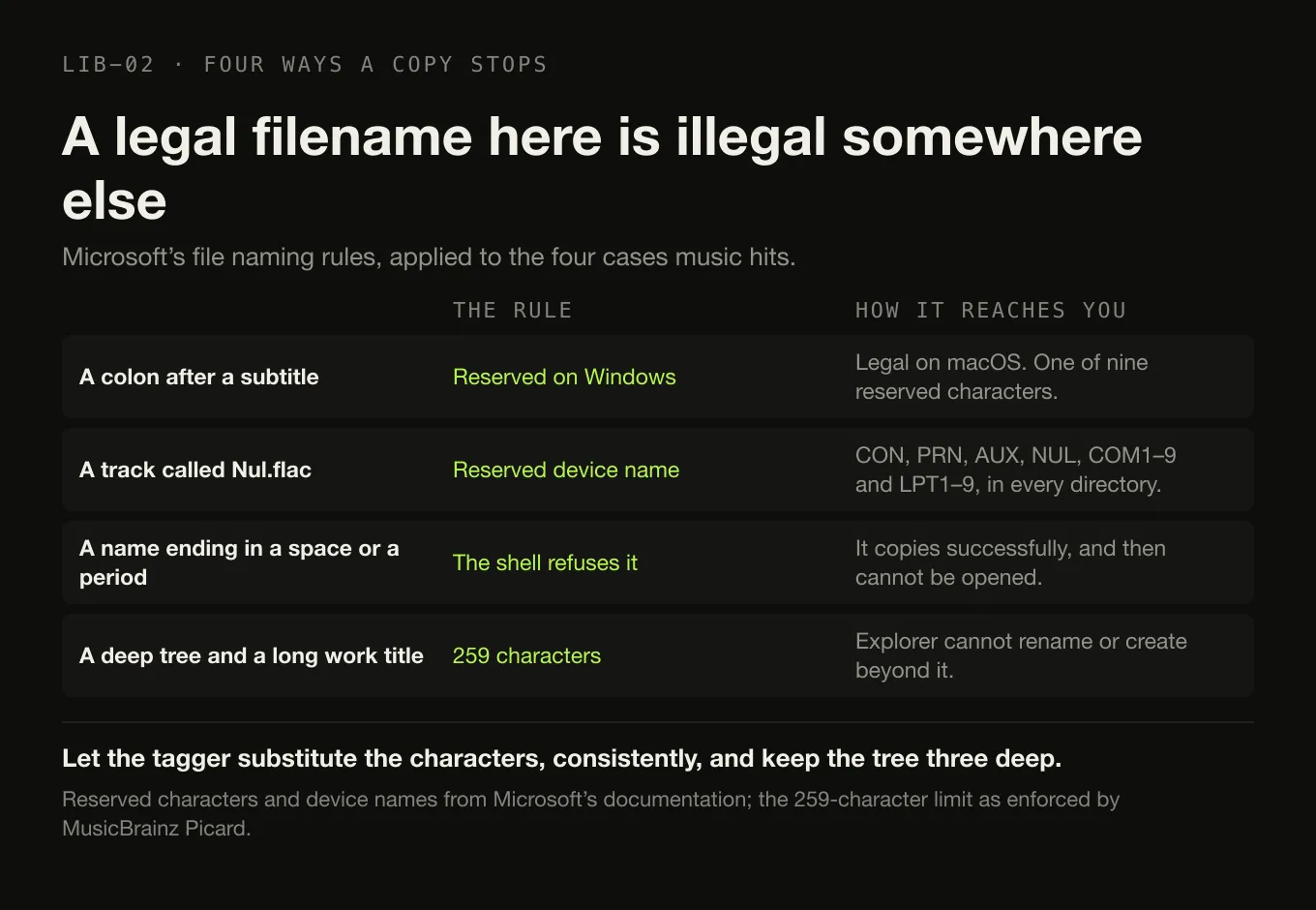
A folder name is a filesystem path before it is a label, and a name that is legal where you created it can be illegal where you are copying it. Microsoft’s file naming documentation is the authority here, and three of its rules matter for music.
Nine characters are reserved on Windows — < > : " / \ | ?
* — along with the NUL character and control codes 1 through 31. A colon is the
one that catches people: it is perfectly legal in a macOS filename and it is what
half the album titles in the world use after a subtitle.
Reserved device names still exist. CON, PRN, AUX, NUL, COM1 through
COM9 and LPT1 through LPT9 are reserved “in every directory”, and Microsoft
notes that “NUL.txt and NUL.tar.gz are both equivalent to NUL”. A track called
Aux.flac is fine; a track called Nul.flac is a bad afternoon.
Do not end a name with a space or a period. Microsoft’s wording is that “although the underlying file system may support such names, the Windows shell and user interface does not” — which is exactly the kind of thing that copies successfully and then cannot be opened.
Then there is length. Picard enforces a 259-character path limit when its Windows-compatibility option is on, and offers an explicit opt-out with a warning attached: enabling long paths “might cause files being saved with path names exceeding the 259 character limit traditionally imposed by the Windows API”, and “Windows Explorer cannot rename files with long path names or create new files inside folders if the resulting path length would exceed the length limit”. This is the mechanism behind a failure people meet as a copy that stopped in the middle: a deep tree, a long classical work title, a performer credit in the filename, and the path ran out.
The practical version of all of that is four rules:
- Let the tagger substitute the characters, consistently. Picard’s Windows compatibility option “tells Picard to replace all Windows-incompatible characters with an underscore”, and since version 2.9 you can choose the replacement. Any consistent substitution is better than a mixture.
- Leave accents alone unless you have a reason. Picard can “replace non-ASCII characters with their ASCII equivalent”, which is occasionally necessary for an old device and otherwise throws away information about somebody’s name.
- Keep the depth at three. Artist, album, file. Every extra level is characters spent against a limit for no browsing benefit.
- Do not duplicate the tag set in the filename. Track number, title, and the performer only where the folder does not already say it. A filename carrying artist, album, year, disc, track and title is a name nobody can read and a path budget spent on information already inside the file.
Folders and tags answer different questions
This is the distinction the subject actually turns on, and it is not a contest.
Three questions, three places, one of which disappears
Folders The authoritative answer. A path is what a restore, a sync, a shell script and a stranger with a borrowed drive all use.
Tags No answer at all. A tag does not know where its file is, and does not change when the file moves.
Folders A guess, and one that survives badly. Parsing an album name out of a directory is what software does when the tags failed.
Tags The authoritative answer. Album artist, album, disc and track are inside the file and travel with it.
Folders Nothing, correctly. This is not filesystem information.
Tags Some of it can live here, and what does not lives in an application's own database — which is the one of the three places that leaves when the application does.
The compilation problem is the clearest example. A compilation exploding into
forty one-track albums is a tag failure — an empty album artist field — and
no folder layout fixes it. Filing that compilation under Various Artists
protects the filesystem view of it, which is a different benefit: it means the
record is still one thing when you look at the drive.
Where it is reasonable to do something else
There is no universally correct structure, and two alternatives are principled rather than eccentric.
Classical, filed by composer. Composer/Work/Performer is closer to how the
music is actually identified — the composition is the primary entity and the
performance is an instance of it — and the artist-and-album model genuinely does
not fit. The cost is that every tool you meet assumes the other model, so you are
choosing to translate at every boundary. A common compromise files under composer
at the top level and keeps Work — Performer (Year) as the album folder, which
keeps the three-level shape while changing what the levels mean.
Filed by label and catalogue number. For a collector whose unit of interest is
the pressing rather than the album, Label/Catalogue — Title/ is a real system,
and it is the only one that makes two pressings of the same record trivially
distinguishable on disk. The cost is that nothing else in the world files music
this way.
Both are defensible. What is not defensible is half of either — a tree where some records are filed by composer and some by performer is worse than consistently choosing the wrong one, because the rule for finding something is now “remember”.
What a player should do with your folders
Ideally, read them and leave them alone.
Digr adds a folder as a watched root and walks it recursively, however it is
arranged: there is no required layout, no prescribed depth, and no Music folder
it insists on. Everything you see in the app — the album list, the artist list,
disc ordering within a multi-disc release — is grouped from the tags inside your
files, with album identity keyed on album artist so a compilation stays one
record rather than forty.
And it does not reorganise anything. Scanning opens your files to read tags and artwork and never writes to them: nothing is copied, renamed, moved or re-tagged, so removing Digr leaves the collection byte-for-byte as it was. That is a deliberate boundary rather than a missing feature — the arrangement of a collection somebody has curated for twenty years is not a thing a newly installed application should have opinions about. Reorganising is a tagger’s job, on your instruction, with a preview. Everything the scanner does read and index today is written down, and moving a file is not on the list.
Which is also the reason a layout is worth the effort at all. The structure has to be good enough to survive the software, because the collection is meant to outlast every application that reads it — and because the copy you restore from is a folder tree, not a database.
The short version
Album Artist/Album (Year)/NN - Title.ext. Three levels, no more.- Album artist at the top, always. It is what holds a compilation together, on disk and in tags.
- Zero-pad the track numbers.
01, not1. - One folder per release, with the disc number in the filename; subfolders only for large box sets.
- Decide the awkward cases once and write the rule down. The rot is not caused by the hard records, it is caused by re-deciding.
- Avoid the nine reserved characters and keep paths short, because the day that matters is the day you are copying the drive.
- Folders are for humans and other tools. Tags are for players. Neither substitutes for the other.
Sources
- File Naming Options — MusicBrainz Picard — “‘Move Files’ refers to Picard moving files to new directories, based on a specified parent directory and subdirectories, typically based on album artist name and release title”, and that moving and renaming happen only when those options are selected
- Writing a File Naming Script — MusicBrainz Picard — the tutorial’s finished script,
$if2(%albumartist%,%artist%)for the album-artist fallback, the bracketed four-digit year taken from the release date, and$num(%tracknumber%,2)for zero padding - File Naming Compatibility Options — MusicBrainz Picard — Windows compatibility replacing “all Windows-incompatible characters with an underscore” and enabled by default on Windows with no option to disable; configurable replacements since version 2.9; the 259-character path limit and the warning attached to lifting it; and the non-ASCII replacement option
- Naming Files, Paths, and Namespaces — Microsoft Learn — the nine reserved characters and the control-code range, the reserved device names and their reservation “in every directory” including
NUL.txt, the prohibition on trailing spaces and periods, andMAX_PATHas 260 characters before Windows 10 version 1607 - Digr — features — watched folders scanned recursively whatever their arrangement, grouping from tags with album identity keyed on album artist, multi-disc sets ordered by disc then track, and audio files opened read-only with nothing copied, renamed, moved or re-tagged
Common questions
What is the best music folder structure?
Album artist, then album with its release year, then a zero-padded track number and title: Halden Vane/Bright Signal (2016)/01 - Bright Signal.flac. It is not the best imaginable layout, and there is no such thing — it is the one the standard tools already assume, which matters more. MusicBrainz Picard describes its own move operation as based on a parent directory and subdirectories typically taken from album artist name and release title.
Should the year go in the album folder name?
Yes, in the album folder rather than the artist folder, and as a four-digit year in brackets. You will want an artist’s records in chronological order far more often than you will want to browse a year across all artists, and putting the year at the album level gets you that for free from an alphabetical sort. Picard’s own file-naming tutorial builds exactly this: album artist, then the year in brackets with the album title.
Where should compilations go in a folder structure?
Under a single Various Artists folder, with the album folder named for the compilation. The reason is the same reason the album artist tag exists: if each track is filed under its own performer, one forty-track compilation becomes forty folders holding one track each. The track artist still belongs in the filename for a compilation, because it is the only place a human reading the folder can see who is playing.
Do folders still matter if my tags are correct?
Yes, but not for browsing. Every modern player builds its album and artist lists from tags, so a good folder layout buys you nothing there. What it buys is everything that happens outside a player: reading a drive on a machine with no music software installed, restoring a single album from a backup, handing a folder to a different application, and understanding your own collection in ten years. Folders answer where the file is; tags answer what the recording is.
How should I organise a multi-disc album?
Keep one folder for the release and put the disc number in the filename — 1-01, 2-01 — so the album stays a single unit on disk the way it is a single unit in a player. Reserve Disc 1 and Disc 2 subfolders for genuinely large box sets, where one flat folder of eighty files is worse. Either way the disc ordering a player shows comes from the disc number tag, not from the folder.
Which characters should I avoid in music filenames?
The nine Windows reserves — less-than, greater-than, colon, double quote, forward slash, backslash, pipe, question mark and asterisk — plus trailing spaces and trailing periods, which Microsoft documents as unsupported by the Windows shell. Avoid the reserved device names CON, PRN, AUX, NUL, COM1 to COM9 and LPT1 to LPT9 as well: they are reserved in every directory, and even NUL.txt resolves to the device. A colon in an album title is the one that catches most people, because it is legal on macOS and not on a Windows or exFAT destination.
- folder structure
- organisation
- filenames
- compilations
- multi-disc
- MusicBrainz Picard