How to organise a large local music library without losing your mind
A practical system for folder structure, tagging and artwork that survives 50,000 tracks, several drives and a decade of accumulation — plus the jobs worth automating and the ones worth doing by hand.
A large music library goes wrong slowly. Nothing breaks; it just gets a little
harder to find anything, until one day you have four copies of the same album,
an artist split across six spellings, and a folder called _unsorted with 1,400
files in it.
The system below is what survives that, and it is four decisions rather than a methodology: one folder shape, three tag fields, one home for the records that do not fit, and one canonical copy. Everything after that is ten minutes a month. It is deliberately boring, because the exciting systems are the ones people abandon.
1. Pick one folder structure and never deviate
Artist/Album (Year)/01 - Track.flacThat’s it. Not because it is the best possible structure — because it is the one almost every tool, ripper and player already assumes. Deviating buys you very little and costs you every time you use something new.
Three clarifications that prevent most of the pain:
Use the album artist, not the track artist, for the folder. A compilation where every track has a different artist should sit under one folder, not scatter across forty. This single decision prevents the “one album, forty folders” problem that makes a library unbrowsable.
Put the year in the album folder, not the artist folder. You will want to sort an artist’s records chronologically far more often than you will want to browse a year.
Keep the characters boring. A folder name is a filesystem path before it is a label. Colons, slashes, question marks and asterisks are illegal or reserved somewhere — a name that is fine on macOS can refuse to copy to a Windows machine or an exFAT backup drive, which is a problem you discover during a restore. Let your tagger substitute them, and let it do so consistently. The same goes for trailing spaces and very long paths.
Those three clarifications cover most collections. The layout in full, with the compilations, box sets and soundtracks that do not fit it, goes through the awkward cases one at a time and names which characters and path lengths actually break a copy.
2. Three tag fields do all the work
Modern players read tags, not filenames. Get these three right and almost everything else sorts itself out.
| Field | What it does | What happens when it is wrong |
|---|---|---|
| Album artist | Groups the tracks of one record together | Blank, and most players fall back to the track artist — a 40-track compilation becomes 40 one-track albums |
| Album | Names the record; must match exactly across every track, punctuation included | “Vol. 2” and “Vol 2” are two different albums to a computer, so half the record goes missing from the other half |
| Track number | Orders the record, with disc number where there is more than one disc | Disc two starts at track one and interleaves with disc one |
The tag system differs by format — FLAC uses Vorbis comments, MP3 uses ID3, ALAC and AAC use MP4 atoms — but all three carry these fields, and every decent tagger presents them the same way. Which frame or field each one is, and where the three systems disagree, is worth knowing the first time a tag survives in one application and not another. Which format you are tagging changes how comfortable the job is, not what the job is.
Everything else — genre, composer, comments, mood, your own star ratings — is optional. Genre in particular is worth deciding about once: either you commit to a small controlled vocabulary you actually maintain, or you accept whatever your ripper wrote and never sort by it. The middle path, where you half-maintain forty overlapping genres, is the worst of both.
3. Give the awkward records a home before you need one
Every collection has files that do not fit Artist/Album: DJ edits, single
tracks, live bootlegs, vinyl rips awaiting a tracklist, promo downloads. They
are the source of most library rot, because each one is a small decision
deferred.
Decide the list up front. A small number of top-level folders alongside your
main tree — something like Singles, Live, Edits, Vinyl Rips — works
because it turns “where does this go?” into a choice from a short list rather
than an open question. What matters is not the specific names but that the list
is short and you stop adding to it.
Keep _unsorted if you like, but treat it as an inbox with a standing
appointment, not a folder.
4. Artwork: embedded, or a cover.jpg next to the tracks
Two conventions exist. Embedded artwork lives inside each audio file, in an
ID3 APIC frame, a FLAC picture block or an MP4 atom depending on the format.
Folder artwork is a cover.jpg or folder.jpg sitting next to the tracks.
Embedded travels with the file, which matters if you move single tracks around or sync to a phone. Folder art is easier to replace in bulk and does not inflate every file. Most players read both, and most rippers can write both.
The specific choice matters less than the consistency. A library where half the albums have embedded art and half have folder art will show you gaps that are not really gaps, depending on which player you are using that week.
Whichever you pick, prefer roughly square images in the 600–1000px range. Larger looks identical in every interface and multiplies your library size for nothing. The two storage mechanisms measured against each other puts numbers on that: the same cover was 80 KB at 500 pixels and 1.22 MB at 2849, which is 13.4 MB an album of difference once it is inside every track.
5. Keep exactly one canonical copy
The single most common cause of a library going bad is a second copy of the same music somewhere else — an old iTunes folder, a rip from a previous machine, a downloads folder you never emptied.
One canonical tree. Everything else is either a backup — a full copy, kept deliberately, on a different disk — or garbage. There is no third category, and treating one as if it were is how you end up with four copies of an album and no idea which one has the right tags.
That distinction is also what makes the collection protectable: a backup scheme sized to a real library starts by assuming there is exactly one thing to back up.
6. What to automate, and what to do by hand
Automate: file naming and folder structure from tags, batch tag find-and-replace, artwork fetching, and duplicate detection. These are mechanical and a tagger will do them in bulk far more reliably than you will.
The standard tool for this is MusicBrainz Picard, a cross-platform tagger
powered by the MusicBrainz database. Its useful trick on an untidy collection is
AcoustID fingerprinting: it can identify a file by the audio itself, even
when the file carries no metadata at all, and then rename and refile it from the
corrected tags. On a folder of track01.mp3 from three machines ago, nothing
else comes close.
What MusicBrainz actually is, and why it is not the thing doing the listening
is worth ten minutes before you let any tagger write from it — the release you
own and the release it matched are frequently not the same object.
Do by hand: deciding the canonical spelling of an artist’s name, resolving what an untitled bootleg actually is, and choosing which of two masterings to keep. These are judgement calls, and automating them means encoding a guess 40,000 times.
7. Ten minutes a month of maintenance
- Sweep the inbox. Empty
_unsorted, or whatever yours is called. - Look for missing artwork. It is the fastest proxy for “recently added and never tidied.”
- Look for unknown artist or unknown album. Almost always a tagging failure from a recent import.
- Look for duplicates. Usually a re-rip or a re-download you forgot about.
- Check the backup ran. The only item on this list that is not cosmetic.
Ten minutes a month keeps a 50,000-track library in a state where a rebuild is never necessary. Skipping it for two years does not.
Where a player fits, and where it does not
A player cannot make these decisions for you, but it can make the maintenance visible.
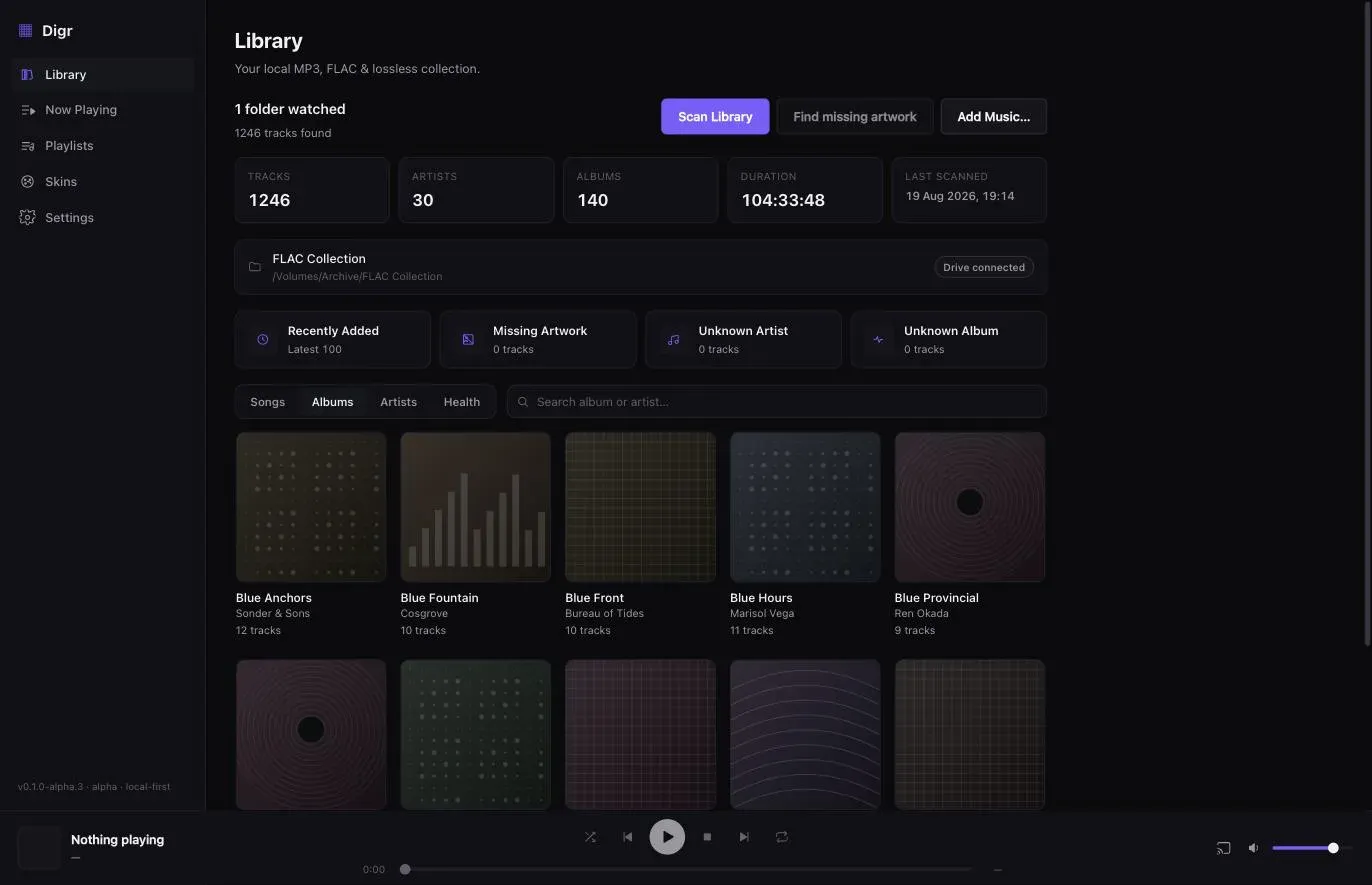
Digr’s library health view surfaces exactly the four cosmetic checks above — missing files, duplicates, tracks with no artwork, unknown artist and unknown album — because those are the categories that actually predict a library going bad.
It also does one thing that matters specifically for libraries on external drives: unplugging the drive marks that root as disconnected rather than deleting its tracks, and when the drive comes back it is matched by volume identifier and the indexed paths are rewritten in place. A library that quietly loses 20,000 tracks because a USB cable was knocked is not a library problem, it is a software problem — and it is a common one.
Digr reads your tags and, in the current alpha, never writes to your audio files at all — so the organising above stays entirely in your hands, and in your tag editor. Explicit, reviewable, undoable tag editing inside Digr is a 3–6 month roadmap item, planned as part of Digr Free; a button that silently rewrites forty thousand files is not. Until then, the safe order for repairing metadata — which starts by working out whether the tag is actually the thing that is wrong — is the process the health views feed into.
If the tag editor is the missing piece, it is worth choosing deliberately: the local player comparison has a column for which of these applications write to your files and which never touch them, and the dedicated library managers are compared separately because the two strongest of them do not play music at all.
Once the layout above is settled, the remaining question is whether the software will still be usable at your size. What each vendor actually publishes about large libraries is short, dated, and mostly consists of vendors publishing nothing.
Sources
- MusicBrainz Picard — a cross-platform tagger powered by the MusicBrainz database, identifying files by AcoustID audio fingerprint and renaming them from the corrected tags
- Digr — features and roadmap — the library health view, external-drive reconnection by volume identifier, and the current alpha’s read-only treatment of your audio files
Common questions
What is the best folder structure for a music library?
Artist/Album (Year)/01 - Track.flac, using the album artist rather than the track artist for the top-level folder. It is not the best imaginable structure; it is the one almost every ripper, tagger and player already assumes, which matters far more. Consistency beats cleverness — the cost of a bespoke layout is paid every time you introduce a new piece of software.
What is the difference between artist and album artist?
The artist tag names who performed a track; the album artist tag names who the record is filed under. On a compilation every track has a different artist but one album artist, usually Various Artists, and that field is what keeps the record together. When album artist is empty, most players fall back to the track artist — which is exactly how one compilation becomes forty one-track albums.
Should album art be embedded in the files or saved as cover.jpg?
Either, as long as you pick one and apply it everywhere. Embedded artwork travels with the file when you move or sync a single track; a cover.jpg alongside the tracks is easier to replace in bulk and does not inflate every file. Most players read both. A library where half the albums use each convention will show gaps that are not really gaps, depending on which player you opened.
How large should album artwork be?
Roughly square, somewhere in the 600 to 1000 pixel range. Anything larger looks identical in every player interface and multiplies the size of your library for nothing — an extra megabyte of artwork embedded in each of forty thousand tracks is forty gigabytes spent on pixels no interface displays.
Is it worth using MusicBrainz Picard on an existing collection?
Yes, for bulk work. Picard is a cross-platform tagger powered by the MusicBrainz database that can identify files by AcoustID audio fingerprint even when they carry no metadata at all, and rename and refile them from the corrected tags. Use it for the mechanical majority and keep the judgement calls — which spelling of an artist name is canonical, which of two masterings to keep — for yourself.
How often should I tidy a large music library?
About ten minutes a month is enough to keep a 50,000-track library from degrading. Empty whatever your inbox folder is called, look for missing artwork, look for unknown artist and unknown album, look for duplicates, and confirm the backup ran. Skipping it for two years is what turns maintenance into a rebuild.
- organisation
- metadata
- tagging
- artwork
- MusicBrainz Picard
- album artist