What ReplayGain does, and why album gain is the setting to get right
ReplayGain writes a loudness measurement into a tag and the player applies it at playback, leaving the samples untouched. Track and album mode worked through on a three-track example.
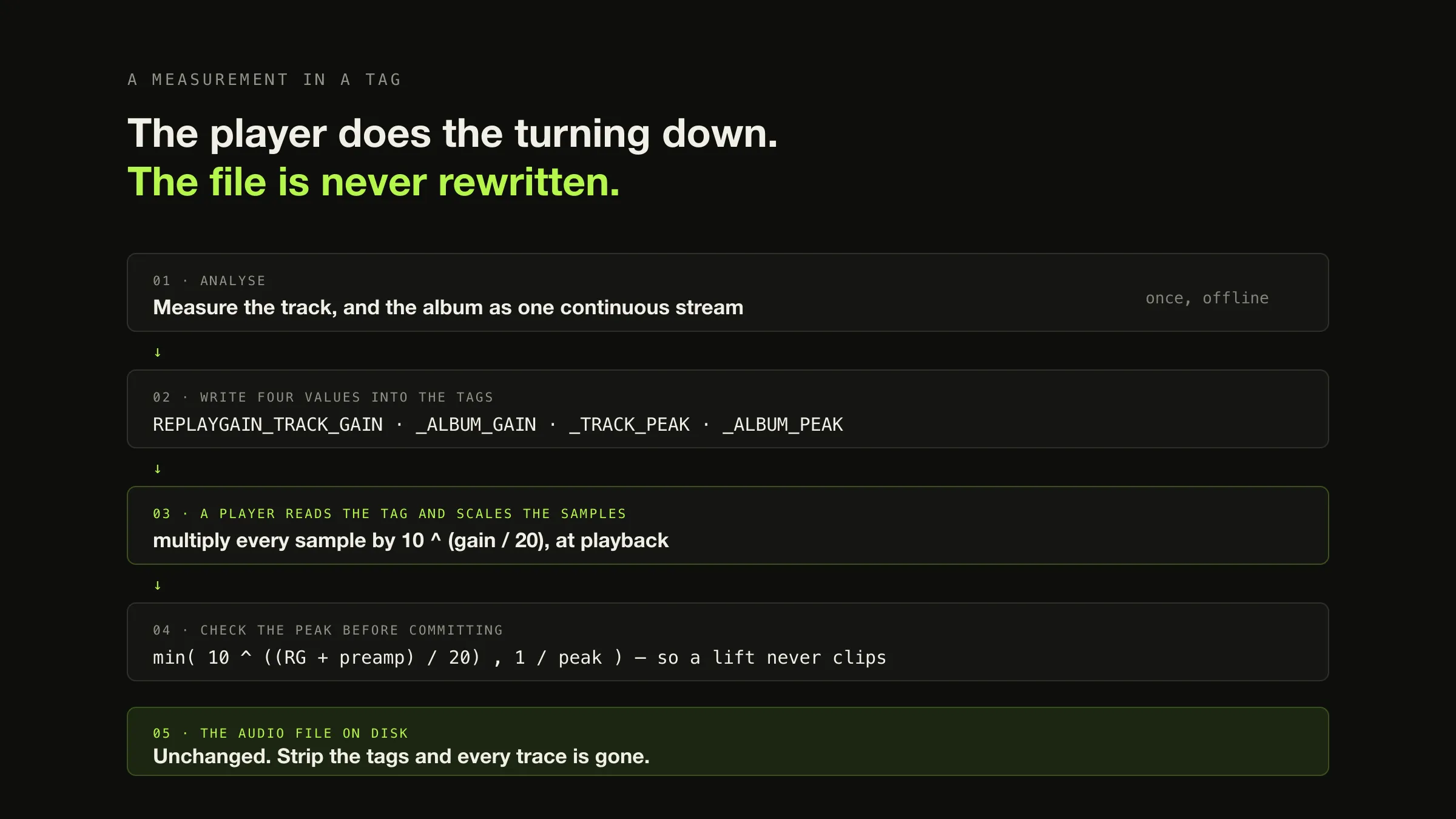
ReplayGain stores a loudness measurement as metadata rather than rewriting the audio. An analysis pass measures how loud a track is against a defined reference level, works out the difference in decibels, and writes that number into the file’s tags along with the peak level. A compatible player reads the tag and adjusts playback gain — which, in the specification’s words, means “multiplying each sample value by a constant value”. Nothing on disk changes, so the whole thing is reversible: switch it off and you are back where you started.
That much is easy. The part worth your attention is the choice underneath it. ReplayGain stores two gains per file — one for the track alone, one for the album it belongs to — and picking the wrong one takes a record built around a quiet opening and flattens it. Below, that is computed rather than described: three tracks, a 23 dB architectural difference, and what each mode does to it.
Why peak normalisation was never going to work
The problem ReplayGain exists to solve is stated plainly in the specification: although most recordings are normalised to use the full peak amplitude, “once this peak amplitude is reached, perceived loudness can be further increased through signal-processing techniques such as dynamic range compression and equalization”, so “the loudness of a given album has more to do with the year of issue or the whim of the producer than the intended emotional effect”.
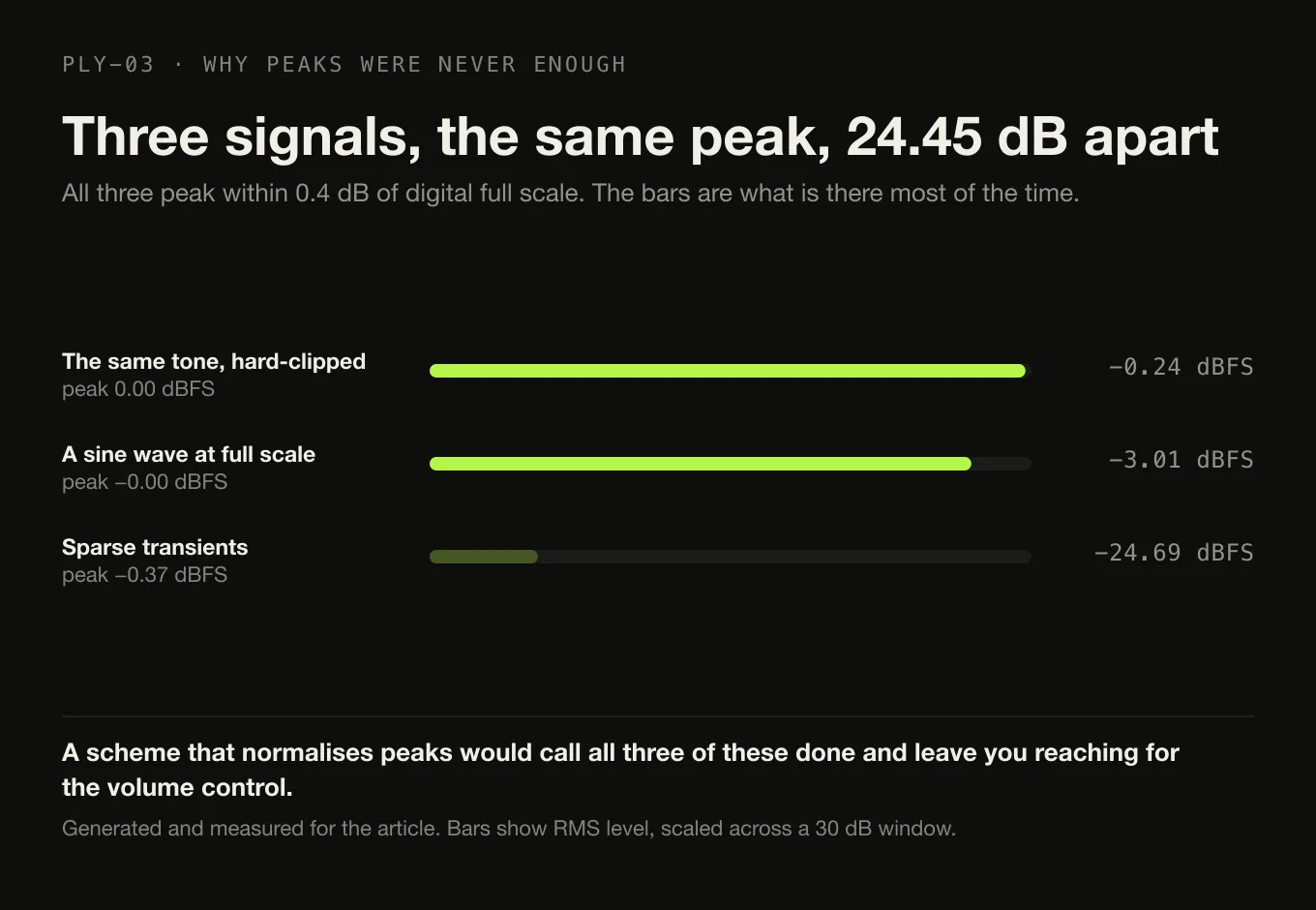
Here is that as numbers. Three signals, generated and measured for this article, all peaking within 0.4 dB of digital full scale:
| Signal | Sample peak | Level (RMS) |
|---|---|---|
| A sine wave at full scale | −0.00 dBFS | −3.01 dBFS |
| The same tone, hard-clipped | 0.00 dBFS | −0.24 dBFS |
| Sparse transients | −0.37 dBFS | −24.69 dBFS |
Identical peaks. 24.45 dB between the loudest and the quietest. A normalisation scheme that works on peaks would call all three of these done and leave you reaching for the volume control. Something has to measure the part of the signal that is actually there most of the time.
What the reference level really is, and why “89 dB” needs a footnote
Almost every write-up of ReplayGain quotes an 89 dB reference. It is a real number from the real specification, and it is not a loudness target — it is a playback sound-pressure level on a calibrated system, and the distinction matters if you ever try to compare it with anything modern.
The original specification builds it from a film-industry calibration: SMPTE defines that “a single channel pink noise signal with an RMS level of -20 dB relative to a full-scale sinusoid should be reproduced at 83 dB SPL”. ReplayGain adopts the same idea with more headroom, calibrating instead to pink noise “with an RMS level of -14 dB relative to a full-scale sinusoid”. Then the arithmetic: “By the SMPTE definition, the 83 dB SPL reference corresponds to -20FS dB system headroom. The -14 dB headroom used by ReplayGain therefore corresponds to an 89 dB SPL playback level on a SMPTE calibrated system and so is said to be operating with an 89 dB reference level.”
So 89 dB SPL describes how loud a correctly calibrated room would be, not how loud a file is.
The current proposal has moved on. The ReplayGain 2.0 specification replaces the original measurement chain — an equal-loudness filter, 50 ms RMS blocks and a 95th-percentile statistic — with the industry standard: “Recent RG implementations use BS.1770 for loudness measurement”, a K-weighted RMS measurement with a gating function, expressed in LUFS, “Loudness Units [relative to] Full Scale”. And it states the reference in those units: “In order to maintain backwards compatibility with classic RG, newer RG uses a -18 LUFS reference, which based on lots of music, can give similar loudness compared to classic RG.”
Two pieces of honesty about that source, because you will trip over both if you go and read it:
- It is a proposal, not a settled standard. The page carries an “Under Construction” banner, most recently dated 22 January 2026. Quote it as the current direction of travel, which it is, rather than as a ratified spec.
- It is internally inconsistent about the reference. The reference-level section says −18 LUFS. The pre-amplification and clipping-prevention sections further down still describe “ReplayGain’s suggestion of a -14 dB average playback level”, carried over from the 2011 revision. Both numbers are in the same document, describing the same calibration in two different conventions.
None of which changes the mechanism. The gain is simply the reference minus the
measurement — RG = Lr − L — so a track quieter than the reference gets a
positive gain and a track louder than it gets an attenuation.
Track gain and album gain, computed
This is the setting people get wrong and then blame the standard for. The specification is unusually direct about why both exist:
The problem with a track-by-track approach is that tracks which should be quiet in the context of the album on which they reside will be brought up to the level of all the rest… For serious listening, it does not respect the intent of the artist or mastering engineer; a tender ballad track will be blasting at the same loudness as a hard rock track on the same album.
Album gain is measured differently from track gain in one specific way: the album is measured “with all tracks concatenated to make one long audio file”, and the single resulting number is stored on every track.
Here is what that does. A three-track album was generated for this article — a quiet 30-second intro, a loud 240-second main track, a quiet 45-second outro — and measured per track and as one continuous stream.
One album, two modes, computed
Intro −23.17 dB below the main track. A deliberate, structural quietness.
Main the reference point, 0.00 dB.
Outro −20.24 dB below the main track.
Gains applied Intro +11.03 dB · Main −12.14 dB · Outro +8.11 dB. Three different numbers, one per track.
Result Intro 0.00 dB · Main 0.00 dB · Outro 0.00 dB. All three now equally loud.
What happened The 23 dB the record was built around is gone. Correct for shuffled listening. Wrong for this album.
Gain applied −10.97 dB. One number, on all three tracks.
Result Intro −23.17 dB · Main 0.00 dB · Outro −20.24 dB.
What happened Identical to the source relationships, to the hundredth of a decibel — while the album as a whole moved 10.97 dB to sit alongside your other records.
The practical rule falls straight out of that. Use album gain if you listen to albums. Use track gain if you mostly shuffle across a mixed collection. If your player offers both, it will also tell you what to do when one is missing — the specification says that if only one of the two is present, “the player should use the one that is available”.
Peak values, and why the gain you asked for is sometimes not the gain you get
The two peak fields are the least explained part of ReplayGain and the reason players sometimes appear to ignore their own settings. The peak “is used to predict whether the required replay gain adjustment will cause clipping during playback”, and it is “stored as a floating point number, where 1.0 represents digital full scale”.
Work an example — the sparse-transient signal from earlier, which is quiet on average and peaks almost at full scale:
measured level    -24.69 dBFS      peak 0.958682  (-0.37 dBFS)
replay gain       -18 - (-24.69)  = +6.69 dB      -> linear factor 2.159
peak after gain   0.958682 x 2.159 = 2.070        -> +6.32 dBFS
The gain the measurement asks for would push the peaks 6.32 dB past full scale, which is clipping — a severe distortion, and worse than the loudness imbalance it was trying to fix. The specification gives players two ways out: limit the signal just below full scale, or temporarily reduce the gain. The second is expressed as a single combined factor:
min( 10^((RG + preamp)/20) , 1/peak )
min( 2.159 , 1/0.958682 = 1.043 ) = 1.043   ->  +0.37 dB applied, not +6.69 dB
Six decibels of the requested lift is withheld, deliberately, and the file is played almost unchanged. It is the correct behaviour and it looks exactly like a bug. Note also the specification’s instruction for a missing peak field: “If peak level metadata is unavailable, the player should assume a peak level of 1.0” — the pessimistic assumption, so nothing gets lifted into clipping on a guess.
One more wrinkle from the spec, worth knowing if you ever see a peak above 1.0: lossy audio “does not exist as a sequence of samples until it is decoded”, and psychoacoustic coding of a heavily limited file “can lead to sample values larger than digital full scale upon decoding”. A peak of 1.04 in an MP3’s tags is not a bug in the scanner.
Where the tags live
Four keys, and the value formats are part of the convention rather than left to the tool:
| Metadata | Key | Value format |
|---|---|---|
| Track replay gain | REPLAYGAIN_TRACK_GAIN | [-]a.bb dB — decibels, two decimal places, a space before dB |
| Peak track amplitude | REPLAYGAIN_TRACK_PEAK | c.dddddd — a decimal, 1.000000 is full scale, no unit |
| Album replay gain | REPLAYGAIN_ALBUM_GAIN | [-]a.bb dB |
| Peak album amplitude | REPLAYGAIN_ALBUM_PEAK | c.dddddd |
They are stored in whichever tagging system the container uses — ID3v2 TXXX
frames for MP3, Vorbis comments for FLAC and Ogg, APEv2 for Monkey’s Audio and
WavPack. That mapping is the same one
every other tag in your library follows,
and the reason the same information has three homes.
Opus is the exception, and deliberately so. RFC 7845 defines its own pair —
R128_TRACK_GAIN, “representing the volume shift needed to normalize the track’s
volume during isolated playback”, and R128_ALBUM_GAIN, for “the overall volume
when played as part of a particular collection of tracks” — as “a Q7.8
fixed-point number in dB” following EBU R128 rather than ReplayGain’s own
reference, and it requires that a player “MUST apply those gains in addition to
the ‘output gain’ value” already in the stream header. Same idea, different
names, different reference, and a player has to know which it is looking at.
ReplayGain, destructive normalisation, and what streaming services do
Three things get called “volume normalisation” and only one of them is reversible.
| Rewrites the samples? | Preserves album dynamics? | Needs player support? | Reversible? | |
|---|---|---|---|---|
| ReplayGain tags | No | Yes, in album mode | Yes — a player that ignores the tags does nothing | Yes — turn it off, or strip the tags |
| Destructive normalisation | Yes, permanently | Only if applied per album by hand | No | No — the original samples are gone unless you kept a copy |
| Streaming loudness normalisation | No | Depends on the service | Not your player’s job | Not yours to control |
Streaming services are conceptually related and mechanically different, and they do not read your tags. Spotify’s own documentation is precise: it normalises to “-14 dB LUFS, according to the ITU 1770 standard”; “Loudness normalization is applied during playback. We measure loudness levels during the upload process, but we don’t process or change your audio tracks before playback”; listeners can pick Loud at −11, Normal at −14 or Quiet at −19 dB LUFS; it will “leave 1 dB headroom for lossy encodings”; and “The web player and 3rd party devices (like TVs or speakers) don’t use loudness normalization.” That is its own system, computed on its own servers, against its own target.
Apple’s equivalent is Sound Check, which Apple describes as setting “all songs and music videos to always play at the same volume”, found under Music > Settings > Playback. Apple publishes no mechanism beyond that sentence, so nothing more should be claimed for it — and in particular it is not ReplayGain.
Two boundaries worth drawing while we are here. Loudness normalisation is not an equaliser: an equaliser changes the balance between frequencies, and ReplayGain applies one constant to everything. And gain is a different stage from bit depth: the specification notes in passing that after any such multiplication “it’s a good idea to dither the result”, which is a real consideration and belongs with the sample rate and bit depth discussion rather than here. Where in the chain the multiply happens is the signal path question.
Where Digr is, precisely
Digr does not read, write, analyse or apply ReplayGain today. Not in any form, not for local playback, not while casting. Digr’s ten-band equaliser is applied to local playback and remembered between launches, and that is a different thing entirely — it changes the balance between frequency bands, not the overall level against a reference.
Two separate pieces of planned work would change that, and they sit in different products:
- Applying ReplayGain is planned Digr Free. “ReplayGain support” and “non-destructive loudness normalisation” are named items in the longer-term audio-engine work — the same Digr-side decode and mixing path that would make local playback gapless. Reading a tag and multiplying by a constant needs to happen somewhere Digr controls, and today Digr hands playback to the system media stack.
- Measuring your files is planned Digr Pro. “ReplayGain analysis” belongs to the planned loudness and dynamics analysis, alongside integrated LUFS, album loudness measurement, loudness range, true peak, clipping detection and crest factor. That initiative carries its own caveat: these are EBU R128 measurements and will be named as such, and none of them is a universal “dynamic range score” — calling one that would be inventing a standard. Its stated relationship to the Free half is that analysis “feeds the non-destructive normalisation in Free rather than replacing it”.
Neither has a date, and the split is the honest one: applying somebody else’s measurement is cheap, and producing the measurement is the expensive half. Note also what analysis does not imply — Digr only ever reads your audio files, so a future analysis pass is a measurement, not a re-tagging campaign.
What works today is the short list, and ReplayGain is not on it.
The short version
- ReplayGain is a measurement in a tag, applied by the player. The samples on disk are never rewritten, so it is reversible.
- Peak normalisation cannot do this job. Three signals measured here peak within 0.4 dB of each other and differ by 24.45 dB in level.
- 89 dB is a playback SPL on a SMPTE-calibrated system, derived from a pink noise reference 14 dB below a full-scale sinusoid — not a loudness target.
- The current proposal uses BS.1770 and a −18 LUFS reference, and is still marked under construction, and is internally inconsistent about that number.
- Album gain applies one constant to every track, so the intervals inside the record survive exactly. Computed here: −23.17 dB before, −23.17 dB after.
- Track gain flattens those intervals to zero. Right for shuffle, wrong for an album with a quiet intro.
- The peak fields exist to predict clipping, and are why a player sometimes applies +0.37 dB when the tag says +6.69 dB.
- Streaming services run their own normalisation and do not read your tags.
- Digr does none of this yet. Application is planned Free, analysis is planned Pro, and neither has a date.
If ReplayGain is the capability that decides your next player, which software actually supports it records what each vendor documents — and which of them document nothing at all.
Sources
- Hydrogenaudio — ReplayGain 2.0 specification — the current proposal, carrying an “Under Construction” banner dated 22 January 2026. “Recent RG implementations use BS.1770 for loudness measurement”; units “Loudness Units [relative to] Full Scale (LUFS)”; “newer RG uses a -18 LUFS reference”;
RG = Lr − L; album gain measured “with all tracks concatenated to make one long audio file”; the album-versus-track rationale including “a tender ballad track will be blasting at the same loudness as a hard rock track on the same album”; peak “stored as a floating point number, where 1.0 represents digital full scale” and used “to predict whether the required replay gain adjustment will cause clipping during playback”; the four tag keys and their value formats; “Scaling the audio data simply means multiplying each sample value by a constant value”; the fallback “the player should use the one that is available”; “If peak level metadata is unavailable, the player should assume a peak level of 1.0”; the combined clipping-prevention factormin(10^((RG+preamp)/20), 1/peak); the note that coded audio “can lead to sample values larger than digital full scale upon decoding”; and the dither footnote. The-14 dB average playback levelwording quoted in this article is from the same page’s pre-amplification and clipping sections, which retain the older convention - Hydrogenaudio — Original ReplayGain specification — the SMPTE calibration, “a single channel pink noise signal with an RMS level of -20 dB relative to a full-scale sinusoid should be reproduced at 83 dB SPL”; ReplayGain’s own reference of pink noise “with an RMS level of -14 dB relative to a full-scale sinusoid”; and the derivation of the 89 dB figure, quoted in full in the body
- ITU-R BS.1770-5 — the loudness measurement standard the ReplayGain 2.0 proposal adopts, cited by that proposal. Named here for what LUFS is; the standard itself is not summarised
- RFC 7845 — Ogg Encapsulation for the Opus Audio Codec —
R128_TRACK_GAINas “the volume shift needed to normalize the track’s volume during isolated playback”,R128_ALBUM_GAINfor “the overall volume when played as part of a particular collection of tracks”, both “a Q7.8 fixed-point number in dB”, and the requirement that a player “MUST apply those gains in addition to the ‘output gain’ value” - Spotify — Loudness normalization — “-14 dB LUFS, according to the ITU 1770 standard”; “Loudness normalization is applied during playback. We measure loudness levels during the upload process, but we don’t process or change your audio tracks before playback”; the Loud, Normal and Quiet presets at −11, −14 and −19; “we leave 1 dB headroom for lossy encodings”; and “The web player and 3rd party devices (like TVs or speakers) don’t use loudness normalization”
- Apple — Adjust the volume in Music on Mac — Sound Check described by Apple as setting “all songs and music videos to always play at the same volume”, via “Choose Music > Settings, click Playback, then select Sound Check”
- Digr — features and roadmap — ReplayGain absent from the shipping capability list; “ReplayGain support” and “non-destructive loudness normalisation” as planned Free items in the longer-term audio-engine initiative; “ReplayGain analysis” as a planned Pro item in the loudness and dynamics analysis, with its EBU R128 caveat and its stated relationship to the Free half
- The measurements and arithmetic in this article were produced on 2026-08-26 in Python’s standard library, on signals generated for the purpose. They are level measurements in dBFS — sample peak and RMS — and are not BS.1770 loudness measurements: no compliant K-weighted, gated implementation was written and none is claimed. The three-track example is presented for the relationships between its tracks, which are unaffected by which loudness measure supplies the input, and every gain shown is the specification’s own
Lr − LwithLr = −18. No commercial recording was measured, and no claim is made about any genre or era
Common questions
What is ReplayGain?
ReplayGain is a convention for storing a loudness measurement in an audio file’s tags so that a player can adjust playback volume automatically. Analysis measures how loud a track or an album is relative to a defined reference level, and writes the difference — a gain in decibels — into the file as metadata, along with the peak level. A compatible player reads that value and scales the audio as it plays. The audio samples themselves are never rewritten.
Does ReplayGain change my audio files?
It writes tags, and it does not touch the audio. Applying the gain, in the specification’s own words, means multiplying each sample value by a constant during playback — the constant being ten raised to the gain divided by twenty. Because the samples on disk are unchanged, the whole thing is reversible: turn the setting off and playback returns to exactly what it was, and stripping the tags removes every trace. That is the difference between ReplayGain and destructive normalisation, which rewrites the samples permanently.
Should I use track gain or album gain?
Album gain, if you listen to albums. It applies one adjustment to every track on the record, so the loudness relationships the artist built stay exactly as they were while the album as a whole is brought into line with your other albums. Track gain makes every track equally loud, which is right for shuffled listening across a mixed collection and wrong for any record with a quiet intro, an interlude or a deliberately restrained closing track — it flattens those differences to nothing.
What are the REPLAYGAIN tags in my music files?
Four values, written by an analysis tool and read by a player: REPLAYGAIN_TRACK_GAIN and REPLAYGAIN_ALBUM_GAIN, each an adjustment in decibels formatted like “-7.29 dB”, and REPLAYGAIN_TRACK_PEAK and REPLAYGAIN_ALBUM_PEAK, each a decimal where 1.000000 means digital full scale. The gains tell a player how much to turn the audio up or down; the peaks let it work out in advance whether doing so would clip. They live in ID3v2, Vorbis comments or APEv2 depending on the format.
Do Spotify and Apple Music use ReplayGain?
No — they run their own loudness normalisation, which is conceptually related and mechanically different. Spotify says it normalises to “-14 dB LUFS, according to the ITU 1770 standard”, that normalisation “is applied during playback”, and that it measures on upload but does not “process or change your audio tracks before playback”. Apple offers Sound Check, which it describes as setting “all songs and music videos to always play at the same volume”. Neither reads or writes ReplayGain tags in your files.
Does Digr support ReplayGain?
Not today. Digr does not read, write, analyse or apply ReplayGain in any form at present. Two separate pieces of planned work would change that: applying ReplayGain and non-destructive loudness normalisation are named items in the longer-term audio-engine work for Digr Free, and ReplayGain analysis — measuring your files in the first place — belongs to the planned Digr Pro loudness and dynamics analysis. Neither has a date against it.
- ReplayGain
- loudness normalisation
- album gain
- track gain
- LUFS
- BS.1770
- dBFS
- clipping