Best FLAC players: which software manages a FLAC library, not just opens one
Ten applications compared on what they do with a FLAC collection — tag writing, artwork, gapless, ReplayGain and getting the file to a speaker — rather than on whether they can open the format.
Opening a FLAC and managing a FLAC library are different jobs, and only one of them is hard. Nearly every application on this page plays FLAC; VLC plays it, foobar2000 plays it, so does the free player that came with your operating system. What separates them is what happens to the other nine hundred and ninety-nine files: whether the player can write a Vorbis comment, whether it reads ReplayGain tags, whether an album that was recorded continuously plays without gaps, and what it sends to a speaker in another room.
If you need to repair a FLAC library, the answers are foobar2000 (free, gapless, full ReplayGain, four platforms), Swinsian on macOS, MusicBee on Windows, or Strawberry if MusicBrainz lookup matters. If you only need to play FLAC, almost anything will do and you should stop reading.
Competitor facts and prices in this article were checked on 27 August 2026, each against that product’s own documentation. Sources are listed at the foot.
Who publishes the FLAC roundups you are reading
Look at who is answering this question. On the day this was written, the first screen for “best flac player” included pages published by a media-player vendor, a data-recovery company, a video-editing software company and a format-conversion company, plus a digital-audio-player retailer and a directory.
That is not an accusation. It is a fact about incentives worth holding while you read: a page published by a company that sells a converter will tend to arrive at converting, and a page published by a company that sells hardware will tend to arrive at a device. Two of the results on that screen were dedicated audio player hardware rather than software at all, which is a change since this cluster was planned in the same month.
The practical consequence for you is narrower: those pages compare whether things open FLAC, because that is the comparison that makes every product look equivalent. This one compares what they do afterwards.
FLAC support is the entry condition, not the comparison
Here is the table those pages could have written. Every cell is from that
product’s own documentation; Unverified means the vendor does not document it
and this article will not fill it in.
| Plays FLAC | Writes FLAC tags | Gapless | ReplayGain | FLAC to a network speaker | Platforms | Licence | |
|---|---|---|---|---|---|---|---|
| foobar2000 | Yes | Yes — advanced tagging | Yes | Yes — full support | Components only, unverified | Windows 7+, macOS 11+, Android, iOS | Freeware |
| Swinsian | Yes — first in its own format list | Yes — regex find and replace | Yes | Recognises ReplayGain and SoundCheck | AirPlay | macOS 10.13+ | $34.95 one-time |
| MusicBee | Yes | Yes — auto-tagging | Yes | Unverified | Unverified | Windows | Free |
| Strawberry | Yes | Yes, plus MusicBrainz retrieval | Not stated | Not stated | Not stated | Linux; macOS 14+ and Windows 10+ for sponsors | GPL, with a sponsorship condition |
| JRiver Media Center | Yes | Yes | Not stated | Not stated | DLNA | Windows, Mac, Linux | $124.98 per major version |
| Audirvāna | Yes | Not stated | Not stated | Not stated | USB DAC and wireless connection | macOS 10.15+, Windows 10 64-bit, Linux | Subscription or perpetual |
| Roon | Yes | Not stated | Not stated | Not stated | Chromecast — 48 kHz on most devices | Server on Windows, macOS 12+, Linux, NAS | Subscription or lifetime |
| Doppler | Yes | Yes — metadata editing | Not stated | Not stated | Not stated | macOS 11+, iOS 26+ | $30 USD one-time |
| VLC | Yes | Not a library manager on its own feature page | Not stated | Not stated | Chromecast, per the 3.0 release notes | Everything | Free |
| Digr | Yes | No | No | No | Google Cast — the original file | macOS 11+, Apple silicon only. Alpha | Free; Pro not purchasable |
The second column is the one that separates these products. A FLAC file stores its metadata as Vorbis comments, and an application that reads them but cannot write them can show you that four hundred albums have no album artist without being able to do anything about it. Six of the ten write tags. Digr does not, which is the row it loses most visibly on this page.
Two entries need their footnote in the open. MusicBee’s own site refused this environment on the day of writing, so its ReplayGain and casting behaviour is published above as unverified rather than assumed — it is a well-regarded free player and this is a statement about a web server, not about the software. VLC’s current features page does not mention Chromecast at all; the citable statement is the VLC 3.0 release announcement, which says VLC “can stream to Chromecast devices, even in formats not supported natively” — the last clause meaning it may transcode.
What a FLAC library actually asks of a player
Five jobs. Every one of them is invisible in a features list that stops at “supports FLAC”.
Five demands a thousand FLAC files make
Why it breaks FLAC stores metadata as Vorbis comments. A player that assumes ID3 will show blanks, and a rip that wrote ID3 into a FLAC will look fine in one application and empty in another.
Everything here reads them. This is the part that is genuinely solved.
Six of ten do it foobar2000, Swinsian, MusicBee, Strawberry, JRiver and Doppler.
Digr does not, at all It reads and never writes. If your library needs repairing rather than browsing, this is the wrong application today.
Album artist is the field that matters Without it a forty-track compilation becomes forty one-track albums, in any player.
Gapless is separate A continuous recording needs the player to join tracks, and the container has nothing to do with it.
ReplayGain is tags plus a player that reads them foobar2000 states full support; Swinsian recognises ReplayGain and SoundCheck.
Unverified elsewhere Most vendors on this page simply do not document it, and the table says so rather than guessing.
Google publishes a ceiling FLAC up to 96 kHz/24-bit on its Cast audio devices, and no ALAC at all.
Roon publishes a narrower one Chromecast Audio to 96 kHz/24-bit, other Chromecast devices to 48 kHz.
Getting a FLAC to a speaker
This is the part of a FLAC library that goes wrong last and hurts most, because the constraint belongs to a device you already bought.
One 24-bit FLAC, three places it can be stopped
Stage one
The file on your disk FLAC, whatever sample rate and bit depth the rip or the download produced. Nothing has happened to it yet.Handed to
Stage two
The player Either it sends the original file, or it converts. Digr sends the original with the correct MIME type. VLC’s own release notes say it can stream “even in formats not supported natively”, which means converting. A server-based product decides this for you.Fetched by
Stage three
The Cast receiver Google lists FLAC to 96 kHz/24-bit, MP3, LC-AAC, HE-AAC, Opus, Vorbis and WAV for its audio devices. No ALAC. Roon documents 48 kHz as the limit on most Chromecast devices, with Chromecast Audio the exception at 96/24.The practical rule: a 24/96 FLAC is the highest a Google Cast audio device is documented to take, and only some of them. Above that, something in the chain is converting — and if nothing is, the track simply will not play.
Which software to use for that specific job is a shortlist of its own, and how Google Cast actually works explains why the receiver’s codec list is a hard constraint rather than a preference.
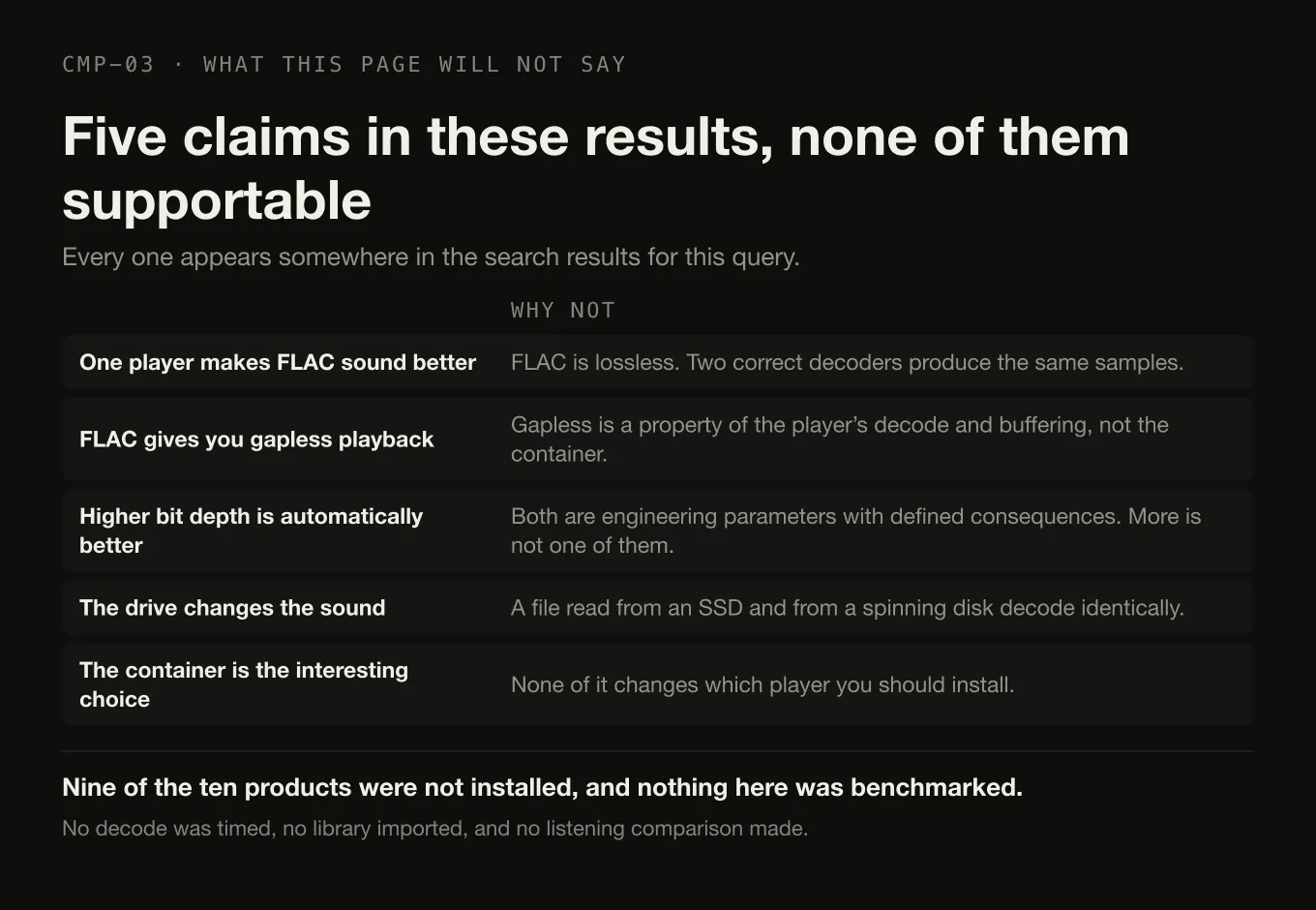
Five things this article will not tell you
Every one of these appears somewhere in the results for this query, and none of them is supportable.
- That one player makes FLAC sound better than another. FLAC is lossless. Two correct decoders produce the same samples, and the lossless-versus-lossy question is where the audible differences actually live.
- That FLAC gives you gapless playback. Gapless is a property of the player’s decode and buffering. What gapless actually is explains why the container is irrelevant to it.
- That a higher bit depth or sample rate is automatically better. Sample rate and bit depth are engineering parameters with defined consequences, and “more” is not one of them.
- That the drive changes the sound. It does not. A file read from an SSD and the same file read from a spinning disk decode identically — although what a FLAC library costs in disk is a real number worth knowing before you rip four hundred discs.
- That the container is the interesting choice. The seven formats compared covers what FLAC is and what it is not, and none of it changes which player you should install.
- That any of this was benchmarked here. Nine of the ten products were not installed. No decode was timed, no library was imported, and no listening comparison was made — there is nothing audible to compare.
What each one is for
foobar2000 is the reflexive recommendation and it deserves to be. Free, version 2.25.10 on Windows and macOS with a 2.26 preview dated August 2026, gapless playback and full ReplayGain support in the base product, advanced tagging, and builds for four platforms. If you want the FLAC capabilities other players charge for and you are willing to spend an evening on the interface, this is the answer and nothing on this page beats it on value.
Swinsian is the macOS choice when you want the tag editor to be good rather than adequate: find-and-replace with regex support, expanded classical fields in version 3, folder watching, a duplicate finder, gapless playback, and FLAC listed first among thirteen formats. $34.95 once.
MusicBee is the Windows equivalent and is free. Gapless playback and auto-tagging are documented by the vendor; its ReplayGain and casting behaviour could not be verified today and is published as unverified.
Strawberry is the one to pick if the repair job needs a database behind it: it edits tags and retrieves them from MusicBrainz, and it handles FLAC, WavPack, Ogg Vorbis, Monkey’s Audio and eight others. The GPL licence is not the whole story — the vendor states that macOS and Windows builds are restricted to sponsors at 7 USD per month, and macOS 14 Sonoma is the floor.
JRiver Media Center is the answer when FLAC is one of several media types on one machine, at $124.98 for a Master Licence valid for a single major version across Windows, Mac and Linux. Audirvāna is for a reader whose FLAC library is attached to a USB DAC, with a library browser the vendor documents past 500,000 tracks. Roon is the server answer, and it is the only vendor here that publishes its own Chromecast sample-rate limits, which is to its credit. Doppler plays FLAC and edits metadata on a Mac and an iPhone for $30 USD once. VLC opens the file and is not a library manager, which is the honest description rather than a criticism.
Where Digr is with FLAC
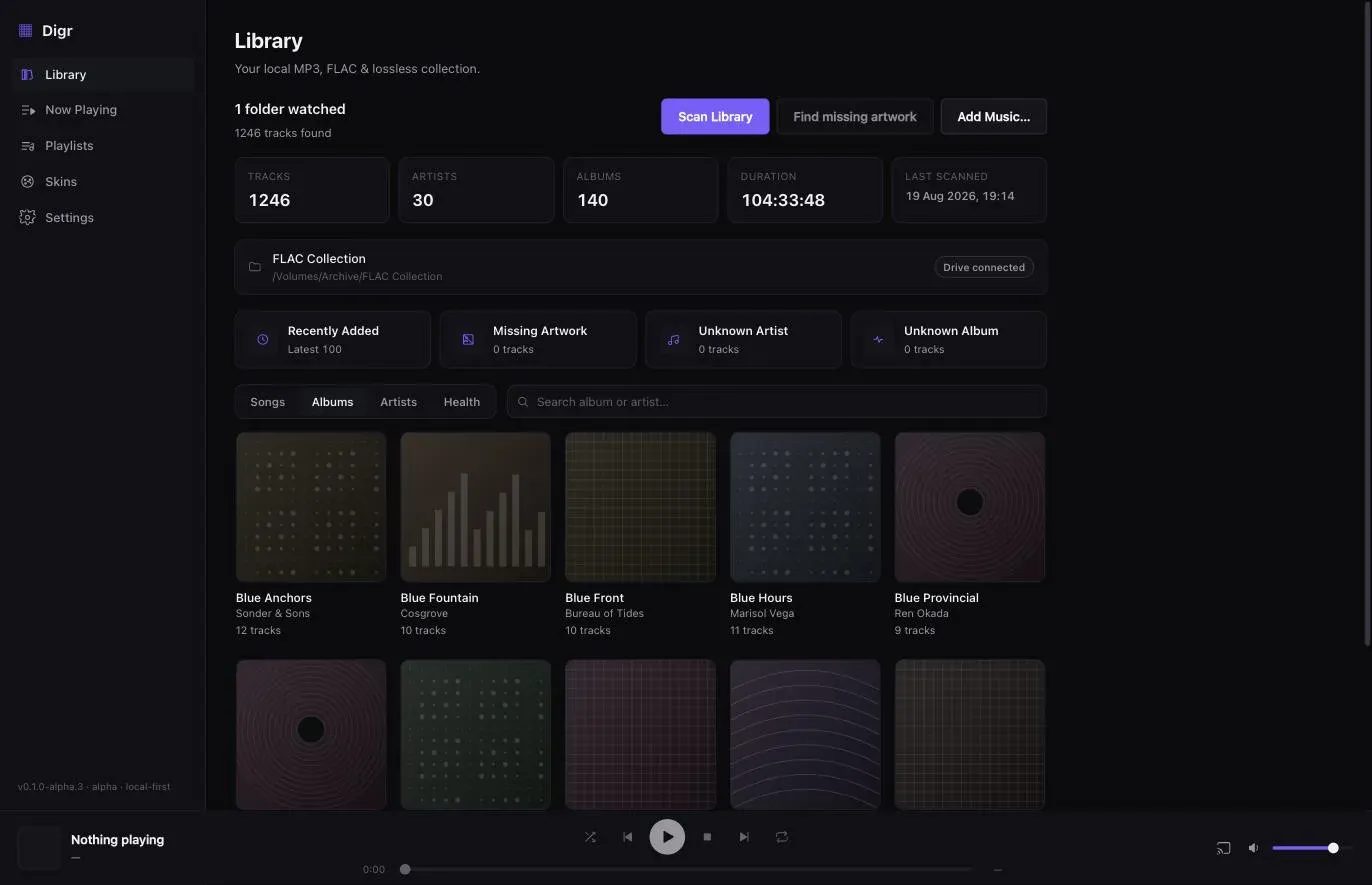
Digr indexes and plays FLAC, and casts it without touching it.
What that means precisely. FLAC is in the list of containers the scanner
indexes and in the list macOS decodes for local playback — the decode comes from
the system media stack, so that is a platform fact rather than a Digr feature.
Tags and artwork are read out of the file and no lookup service is contacted.
When casting to a Google Cast device, a local media server on your machine hands
the receiver the original .flac file with audio/flac as its MIME type, HTTP
Range support so the device can seek, and an unguessable token in the URL in
place of the file path. Nothing is re-encoded.
What it cannot do, on this page’s own terms. It cannot write a Vorbis comment. It has no gapless playback and no ReplayGain. It cannot look anything up in MusicBrainz. It is macOS 11 or later on Apple silicon only, and it is an alpha. Digr Pro is not purchasable — there is no checkout and no licence system in the application.
Metadata editing with MusicBrainz lookup, gapless local playback and ReplayGain are all named roadmap items with no dates attached. None of them is counted anywhere in the table above, because a comparison that scores intentions is not a comparison.
So: if your FLAC library is in good order and you want it read, played and cast without anything modifying it, Digr does that. What Digr does today is published in full. If your FLAC library needs repairing, buy Swinsian or install foobar2000 — the repair itself is a method rather than a purchase, and either of those tools will carry it out.
The short version
- FLAC playback is table stakes. Nine of ten products here play it; Apple’s Music app does not list it among the formats it imports.
- Tag writing is the real comparison. foobar2000, Swinsian, MusicBee, Strawberry, JRiver and Doppler write tags. Digr does not.
- Free and complete: foobar2000 — gapless, full ReplayGain, four platforms.
- macOS, paid, best tag editor: Swinsian, $34.95 once.
- MusicBrainz repair: Strawberry, with the sponsorship condition on its macOS and Windows builds.
- Cast ceiling: Google documents FLAC to 96 kHz/24-bit and no ALAC; Roon documents 48 kHz on most Chromecast devices.
- No player changes how a FLAC sounds. Anything claiming otherwise is selling something.
- Digr: plays and casts FLAC untouched, cannot edit a tag, no gapless, no ReplayGain, Apple silicon only, alpha.
For the wider question of which application should own your library at all, the platform-neutral category comparison sorts the same products by architecture. On a Mac specifically, foobar2000’s macOS build compared with Digr counts how many of its components actually target a Mac, and the macOS shortlist adds the Apple silicon and Music app detail. And if the FLAC in question is going onto an Apple device rather than a Google one, FLAC against ALAC is the decision to make first.
Sources
Checked 27 August 2026, each against the vendor’s own site or documentation. No roundup, directory, forum or review was used as a source for any capability or price.
- foobar2000 — “Gapless playback”; “Full ReplayGain support”; “Advanced tagging capabilities”; “an advanced freeware audio player”; builds for Windows, macOS, Android and iOS
- foobar2000 for macOS and for Windows — version “2.25.10” on both; “macOS 11 ‘Big Sur’ or newer” on an “Intel or Apple Silicon processor”; “Windows 7 or newer”; and the 2.26 preview dated 5 August 2026
- Swinsian — the format list beginning “Flac, MP3, AAC, ALAC, Ogg Vorbis, WMA, WAV, Opus, AC3, AIFF, MusePack, DSF, and APE”; “Find and replace tag editing, with regex support”; “Gapless playback”; “Playback over AirPlay”; “Buy for $34.95”
- Swinsian 3, 19 August 2025 — ReplayGain and SoundCheck recognition; the expanded classical tagging fields; “native support for Apple Silicon and Intel Macs”; “a minimum of macOS 10.13”
- Strawberry — “Edit tags on audio files”; “Automatically retrieve tags from MusicBrainz”; the supported format list including “WAV, FLAC, WavPack, Ogg Vorbis, Speex, MPC, TrueAudio, AIFF, MP4, MP3, ASF and Monkey’s Audio”; “macOS 14 (Sonoma) or higher”; “Windows 10 or higher”; “Strawberry is free software released under GPL”; “Access to macOS and Windows releases are currently restricted to sponsors, a 7 USD monthly sponsorship is required for new subscribers”
- JRiver Media Center — purchase — Master Licence “$124.98”, “valid for a single major version for all available Operating Systems”; Windows or Mac “$99.98”; Linux “$79.98”
- Audirvāna — Studio compared with Origin — “Library manager & browser (>500K tracks)”; “USB DAC and wireless connection”; Origin’s exclusion of “Online metadata recovery (universal track ID identification)”
- Audirvāna — requirements — “macOS 10.15 or newer”; “Windows 10 64-bit 1809”; Linux via Debian or RPM package
- Roon — Chromecast support — “Chromecast Audio supports high-resolution music (up to 96kHz/24-bit), while other Chromecast devices support a sample rate up to 48kHz”, and the supported device list
- Roon — minimum requirements — server on Windows 10 or later, macOS 12+, Linux and NAS; “A free Roon account is required”
- Doppler — “MP3, AAC and M4A as well as high-quality lossless formats like FLAC, ALAC and WAV”; “$30 USD”; “macOS 11 Big Sur or newer”
- VLC 3.0 release notes — “Can stream to Chromecast devices, even in formats not supported natively”
- VLC — features — the current feature list, which covers formats, hardware decoding and inputs and does not mention Chromecast
- Google Cast — supported media — for Cast audio devices: “FLAC (up to 96kHz/24-bit)”, HE-AAC, LC-AAC, MP3, Opus, Vorbis and “WAV (LPCM)”. Neither ALAC nor AIFF appears
- Apple — convert music file formats — the formats Apple names are AAC, AIFF, Apple Lossless, MP3 and WAV, plus HE-AAC. FLAC does not appear
- MusicBee —
getmusicbee.comreturned HTTP 403 to this environment on 27 August 2026; gapless playback and auto-tagging come from the vendor’s own copy, and its ReplayGain and casting behaviour is published above as unverified - Digr — features and current capabilities and Digr — pricing — FLAC indexed and played, cast as the original file with
audio/flacand Range support, tags read and never written, and no gapless or ReplayGain. Digr Pro is not purchasable
Common questions
Does every music player support FLAC?
Almost every dedicated music player does, but not everything does. The notable exception on a Mac is Apple’s Music app: the formats Apple names for importing and converting are AAC, AIFF, Apple Lossless, MP3, WAV and HE-AAC, and FLAC is not among them. Everything else compared here — foobar2000, Swinsian, MusicBee, Strawberry, JRiver, Audirvāna, Roon, Doppler, VLC and Digr — plays FLAC, which is why FLAC support is a starting condition rather than a way to choose between them.
Do FLAC players sound different from each other?
No, and no page that says otherwise can support it. FLAC is lossless, so any correct decoder reconstructs the same samples from the same file; two players that both decode a FLAC and send it out untouched are sending identical audio. Real differences exist further down the chain — resampling, volume handling, the output device, whether anything is transcoded on the way to a speaker — and those are properties of the playback path rather than of the format or of a brand.
Do I need ReplayGain and gapless playback in a FLAC player?
It depends on the collection. Gapless playback matters if you own live albums, DJ mixes or classical works where the music runs across track boundaries; without it the player inserts a short silence at each join. ReplayGain matters if you play across many albums in one sitting and are tired of reaching for the volume control. If you mostly play one album at a time and none of them are continuous recordings, neither column should decide your choice.
Which FLAC players can actually edit FLAC tags?
On the vendors’ own documentation, checked on 27 August 2026: foobar2000 states advanced tagging capabilities, Swinsian offers find-and-replace tag editing with regex support, MusicBee has auto-tagging, Strawberry edits tags and can retrieve them from MusicBrainz, JRiver Media Center has tagging as a documented function, and Doppler edits song and album metadata. Digr reads tags and never writes them, which means it cannot repair a FLAC library — only show you what is wrong with one.
Can I cast FLAC to a Google speaker?
Yes, within limits Google publishes. Google lists FLAC up to 96 kHz and 24-bit among the codecs its Cast audio devices support, alongside MP3, LC-AAC, HE-AAC, Opus, Vorbis and WAV. ALAC is not on that list, so an Apple Lossless library will not cast to a Google device without conversion. Roon separately documents that Chromecast Audio handles up to 96 kHz/24-bit while other Chromecast devices are limited to 48 kHz, so a 24/192 file will be converted or refused somewhere in the chain.
- FLAC
- FLAC player
- Vorbis comments
- ReplayGain
- gapless
- foobar2000
- Swinsian
- Strawberry
- Google Cast