What actually happens between a music file and your speakers
The path from a file on disk to sound in a room is seven stages long, and most of them are invisible. Here is each one, what it can change, and what you can actually verify.
Pressing play looks like one action. It is seven, and they happen in a fixed order.
Your player reads the file, a decoder turns the codec stream inside it into PCM samples, the player may process those samples, the operating system mixes them with everything else and matches them to the output device’s sample rate, a digital-to-analogue converter turns the numbers into a voltage, an amplifier makes that voltage strong enough to be useful, and a loudspeaker turns it into moving air. Every stage can change the audio. Most of them, most of the time, do not.
The reason to know the chain is not audiophile hygiene. It is that when playback goes wrong — silence, a click, the wrong volume, a file that will not play at all — the fix depends entirely on which stage failed, and the symptoms are almost identical from the outside.
One track, seven stages
1 · The file
A container holding a codec stream Bytes on disk. The container carries tags and artwork alongside the audio; the codec stream is the audio itself, in whatever form the encoder left it.Read from disk
2 · Decode
Codec stream becomes PCM samples The one stage where the format still matters. After this, FLAC and MP3 are both just numbers — different numbers, but the same kind of thing.Numbers, at some rate and depth
3 · Process
Volume, equalisation, any other DSP Optional, and skipped entirely on a flat, full-volume path. Every filter here changes the samples deliberately.Handed to the operating system
4 · Mix and match
The system audio layer Your music, a notification and a video call all end up in one stream at one sample rate. Anything that does not already match gets resampled.One stream, one rate, one device
5 · Convert
Digital to analogue Numbers become a voltage. Built into the laptop, the headphone dongle, the amplifier or a box of its own — but always present, because a speaker cannot be driven by arithmetic.A small analogue signal
6 · Amplify
Enough power to move something The converter produces a signal measured in volts and no current worth speaking of. An amplifier supplies the power a driver needs.Watts into a load
7 · Transduce
Electricity becomes air pressure A coil in a magnetic field moves a cone or a diaphragm. By a wide margin the least accurate component in the chain, and the one people argue about least.Stage 1: the file is a container with a codec stream in it
A music file is a wrapper around encoded audio plus everything that is not audio: tags, artwork, track numbers, chapter marks.
This distinction is the first place playback goes wrong, because the extension
describes the wrapper and not the contents. An .m4a file holds either ALAC,
which is lossless, or AAC, which is not. An .ogg file usually holds Vorbis but
may hold Opus or even FLAC. A player that can read a container’s tags has not
proved it can decode what is inside it —
which is why “supported formats” is two lists, not one.
Nothing is decoded yet at this stage. The player has read some metadata and opened a byte stream.
Stage 2: the decoder turns the codec stream into PCM
A decoder reconstructs PCM samples from a compressed stream. That is its entire job, and everything downstream depends on it having a decoder for that particular codec at all.
- A lossless decoder — FLAC, ALAC — reconstructs the original samples exactly. Decode the same FLAC file twice on two machines and you get identical numbers.
- A lossy decoder — MP3, AAC, Vorbis — reconstructs an approximation, because the encoder threw part of the signal away permanently. What it threw away, and why, is its own article.
- An uncompressed file — WAV, AIFF — needs no decoding worth the name. The samples are already there; the player reads them out of the file.
The failure mode here is total rather than subtle. A missing decoder does not produce degraded audio, it produces an error or silence. When a file plays perfectly on one machine and not at all on another, stage 2 is where to look first.
What PCM actually is
PCM — pulse-code modulation — is audio stored as plain numbers. The amplitude of the waveform is measured at a fixed rate, each measurement is recorded with a fixed number of bits, and the measurements are interleaved per channel.
CD audio is 44,100 measurements a second, 16 bits each, two channels. Three properties describe any PCM stream:
- Sample rate — measurements per second, in hertz. This sets the highest frequency that can be represented, which is half the sample rate. Xiph.Org’s Monty Montgomery puts the underlying result plainly: “All signals with content entirely below the Nyquist frequency (half the sampling rate) are captured perfectly and completely by sampling.” Sample rate and bit depth, explained properly derives what each number does and does not buy.
- Bit depth — bits per measurement, which sets how finely each one is recorded and therefore the noise floor. The same article’s position on distribution formats is equally direct: “16 bits is enough to store all we can hear, and will be enough forever.”
- Channel layout — how many streams and what they mean. Two, for almost all music.
From here to the converter, the audio is just this. That is why arguments about file formats stop being interesting after stage 2: two files that decode to the same samples are, from stage 3 onward, indistinguishable in principle and in practice.
Stage 3: processing, if there is any
This is the optional stage, and it is the one under the player’s control.
Volume is multiplication. Reducing digital volume scales every sample towards zero, which is exact and slightly reduces the effective resolution; raising it above unity is what causes clipping, because samples cannot exceed full scale.
Equalisation applies filters that change the level of particular frequency bands. It genuinely alters the samples — an equaliser that did not would not be doing anything — and a boosted band on a track already mastered close to full scale is the commonest cause of distortion that appears only on loud passages.
Other DSP — crossfade, loudness normalisation, room correction, upsampling — is the same story: deliberate arithmetic, applied on purpose, producing different numbers. The most common of those in a local library is the gain a ReplayGain tag asks for, which is one multiplication against a measurement stored in the file rather than a filter, and is applied here rather than written back to disk.
What happens between two tracks is a property of this stage and the two after it rather than of the files. Whether the next track is decoded and buffered before the current one ends, and whether the output stream is torn down at the boundary, is the whole of why gapless playback keeps breaking.
The honest thing to say about this stage is that it is usually empty. A flat equaliser and full digital volume means the samples that came out of the decoder are the samples handed to the operating system.
Stage 4: the operating system mixes, and matches the device
Your player is not the only thing making noise. A notification, a video call and a browser tab all want the same output device, so the operating system runs an audio layer that combines them.
On macOS that layer is Core Audio. Apple’s own description of the audio hardware abstraction layer is that it “provides a device-independent, driver-independent interface to hardware”, and that data passing through it “undergoes format conversion if necessary”. Windows and Linux have equivalents with different names and the same responsibilities.
Two things happen here that people are frequently surprised by.
Resampling. The output device runs at one sample rate at a time. If it is set to 48 kHz and your file is 44.1 kHz, something has to convert — and it will, silently. Resampling is a well-understood operation and a competent implementation is inaudible, but it is a genuine change to the numbers, and it is the stage most often meant when somebody says the audio “is not bit-perfect”.
Mixing. Combining several streams necessarily involves scaling them, which means the samples reaching the converter are not the samples any one application produced.
Neither is a fault. Both are the price of a machine that can play music and also tell you the kettle app has finished. Avoiding them means taking exclusive control of the device, which is a real capability on every desktop platform and a deliberate choice rather than a default.
Stage 5: the converter turns numbers into a voltage
A digital-to-analogue converter takes the stream of PCM values and produces a continuously varying voltage. That voltage is the analogue audio signal.
Everything before this point is arithmetic and can, in principle, be reproduced exactly by any competent implementation. Everything after it is physics, where “exactly” stops being available and “measurably close” is the best on offer.
Every playback device has a converter. A phone has one, a laptop has one, a USB-C headphone adapter has one, an amplifier with a digital input has one. A separate box is a better-engineered instance of a component you already own, not an additional stage in the chain.
The one genuinely counter-intuitive thing here is that feeding a converter a higher sample rate is not automatically better. Monty Montgomery’s argument against distributing music at 192 kHz is not about the file: it is about what ultrasonic content does at the analogue end. “If the same transducer reproduces ultrasonics along with audible content, any nonlinearity will shift some of the ultrasonic content down into the audible range as an uncontrolled spray of intermodulation distortion products covering the entire audible spectrum.” The extra bandwidth can make things worse, in equipment that is not perfectly linear, which is all equipment.
Stages 6 and 7: amplification, and moving air
The converter’s output is a small signal — volts, and effectively no current. An amplifier supplies the power a driver needs to move.
A loudspeaker or a pair of headphones then converts that electrical power into air pressure by moving a cone or a diaphragm in a magnetic field. This is, by a very wide margin, the least accurate stage in the entire chain. A converter that measured as badly as a good loudspeaker would be considered broken.
Which is the useful thing to take away from the whole exercise: the two stages with the largest effect on what you actually hear are the transducer and the room it is in, and they are the two nobody argues about on the internet.
What each stage can change, and whether you can see it
| Stage | What it can change | Can you observe it? |
|---|---|---|
| 1 · File | Nothing. It is storage | Yes — the container and codec are readable from the file |
| 2 · Decode | Reconstructs samples; lossy formats reconstruct an approximation | Partly — the codec is known, the decoder’s output usually is not exposed |
| 3 · Process | Deliberate changes: gain, filters, normalisation | Yes, if the player tells you. This is the player’s own stage |
| 4 · Mix and match | Resampling, mixing, system volume | Rarely from inside an application. The OS owns it |
| 5 · Convert | Numbers become voltage. Accuracy varies by device | Only by measurement |
| 6 · Amplify | Gain, and whatever distortion the amplifier adds | Only by measurement |
| 7 · Transduce | Frequency response, distortion, dispersion, the room | Only by measurement, and the room dominates |
The pattern is worth stating explicitly: observability drops off a cliff after stage 3. A player can tell you what it decoded and what it did to the result. Past that, it is asking the operating system politely, and past stage 4 it is not in the conversation at all.
That is the honest reason to be sceptical of a “bit-perfect” badge. Achieving bit-perfect output — no resampling, no mixing, no volume scaling between the decoder and the converter — is a solved engineering problem. Verifying it from inside an application, across an arbitrary output device, is not.
Where the chain actually breaks
Four failures cover most of what people meet.
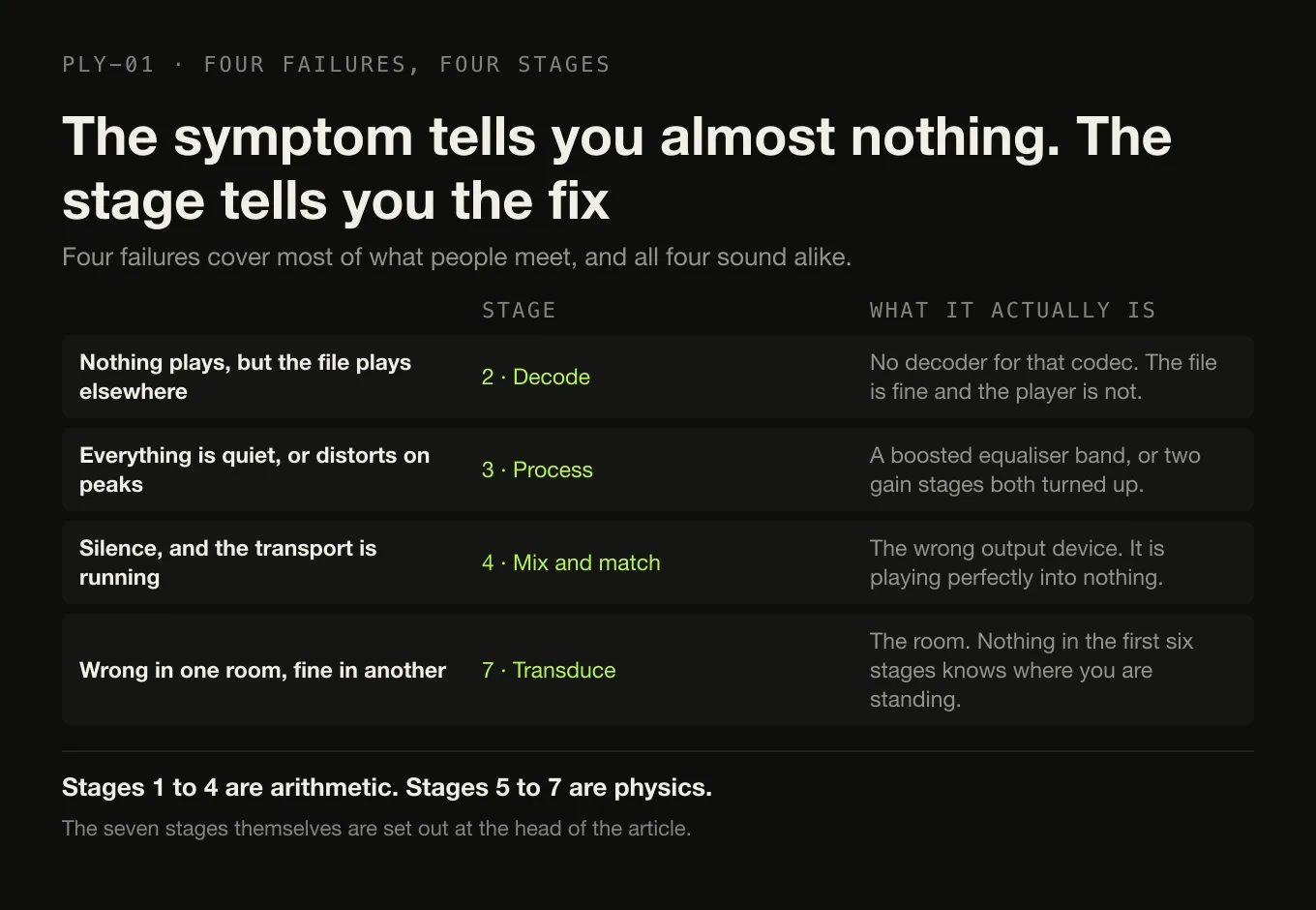
No decoder for that codec. Total failure, at stage 2. The file plays elsewhere, so it is assumed to be fine, and the player is assumed to be broken. Both are true.
Everything is quiet, or distorted on peaks. Stage 3, almost always: an equaliser with a boosted band, or two gain stages both turned up.
The wrong output device. Stage 4. The audio is playing perfectly into something that is not connected to a speaker.
It sounds wrong in one room and fine in another. Stage 7, and the room. Nothing in the first six stages knows where you are standing.
Where Digr sits in this chain today
Being specific, because a vague answer here is worth nothing.
Digr hands local playback to the system. Files are passed to the macOS media stack through Tauri’s asset protocol — no bytes travel through JavaScript, and nothing is copied or converted on the way. Stage 2 therefore happens in the operating system’s decoders, which is why Digr plays MP3, FLAC, ALAC, M4A, AAC and WAV and does not play OGG: it indexes the container either way, and decoding is not its to do.
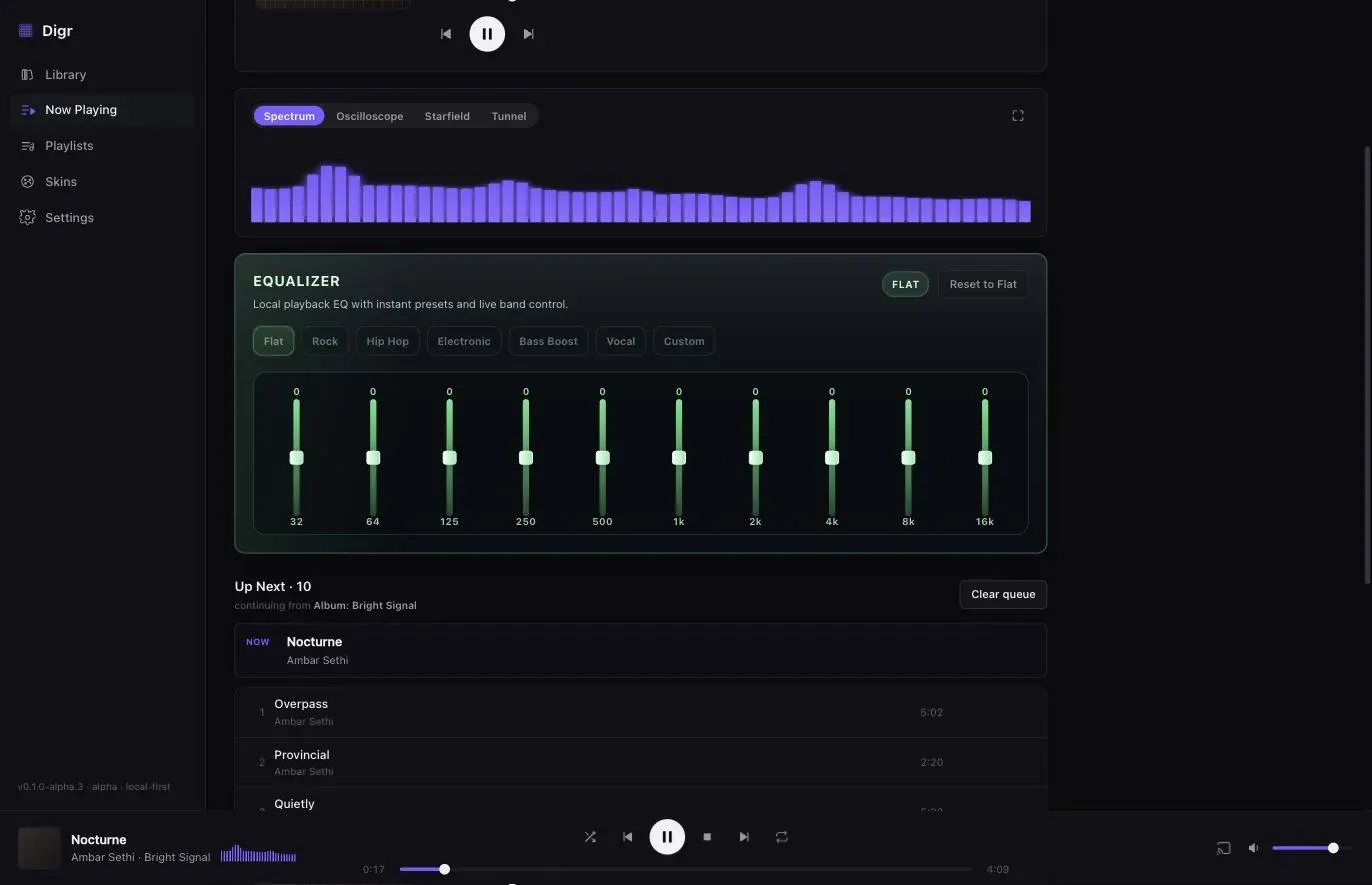
Digr owns stage 3, and only stage 3. There is a ten-band equaliser, 32 Hz to 16 kHz, with six presets and a custom curve, applied to local playback and remembered between launches. The visualisers are driven by a real analyser on the same signal rather than a canned animation.
Digr does not currently show you any of the rest. It does not display the decoded sample rate or bit depth, it does not report whether the operating system resampled anything, and it does not tell you which output device the audio ended up at. A feature that would — Signal Chain — is a named longer-term roadmap item, planned for Digr Pro, and nothing about it exists in the current alpha. Its specification is deliberately narrow on exactly the point this article has been making: where a stage cannot be established, it is required to say so rather than print a badge over a path it cannot see.
Casting changes the picture completely, because the receiving device does the decoding. Google Cast puts stages 2 to 7 inside the speaker, which is why a format the receiver cannot decode fails there rather than on your machine, and the three network protocols split those stages differently — on AirPlay the decode stays on your machine and the speaker only moves air.
The short version
Read, decode, process, mix, convert, amplify, move air. The first four stages are arithmetic that any competent implementation gets exactly right. The last three are physics, where the loudspeaker and the room account for more of what you hear than every other stage put together.
Most of the chain is boring, and boring is the correct state for it to be in.
Sources
- Core Audio Essentials — Apple on the audio hardware abstraction layer as a device-independent interface, and format conversion within it
- 24/192 Music Downloads are Very Silly Indeed — Chris Montgomery, Xiph.Org: sampling below the Nyquist frequency, 16-bit sufficiency for distribution, and intermodulation distortion from ultrasonic content
- FLAC FAQ — lossless decoding reconstructing the original samples exactly
- Digr — features and roadmap — local playback through the system media stack, the ten-band equaliser, and Signal Chain as a longer-term Pro item that does not exist today
Common questions
What does an audio decoder actually do?
It turns compressed data back into PCM samples. A decoder reads the codec stream inside the file — FLAC, MP3, AAC, ALAC, Vorbis — and reconstructs a list of numbers describing the waveform, one per channel per sampling instant. A lossless decoder reconstructs the original samples exactly. A lossy decoder reconstructs an approximation, because the encoder discarded part of the signal permanently.
What is PCM audio?
PCM, or pulse-code modulation, is audio stored as plain numbers: the amplitude of the waveform measured at a fixed rate, with a fixed number of bits per measurement. CD audio is 44,100 measurements a second, 16 bits each, two channels. Almost every stage after the decoder works on PCM, which is why formats stop mattering once decoding has happened.
When does resampling happen during playback?
Whenever the sample rate of the audio does not match the rate the output device is currently running at. The operating system mixes every application into one stream at one rate, so a 48 kHz system output playing a 44.1 kHz file resamples it. Resampling is a well-understood arithmetic operation and a competent implementation is inaudible, but it does mean the samples leaving your machine are not the samples in the file.
Does an equaliser change the audio signal?
Yes, and that is the point of it. An equaliser applies filters that alter the level of particular frequency bands, so the samples after the equaliser are genuinely different numbers from the samples before it. A flat equaliser setting should leave them alone. This is also why a boosted band can clip: adding gain to a signal already near full scale has nowhere to go.
What does a DAC do?
A digital-to-analogue converter turns the stream of PCM numbers into a continuously varying voltage. That voltage is the analogue audio signal, and everything after it — amplifier, cable, loudspeaker — is physics rather than arithmetic. Every playback device has one, including a phone and a laptop; a separate box is a better-engineered version of a component you already own.
What does bit-perfect playback mean?
That the samples arriving at the converter are the samples in the file, with no resampling, no volume scaling and no mixing in between. Achieving it usually means taking exclusive control of the output device so the system mixer is bypassed. Verifying it is harder than achieving it, which is why an honest player reports the stages it can actually observe rather than printing a badge over the ones it cannot.
- PCM
- decoding
- DAC
- resampling
- signal path
- DSP
- Core Audio