Album artwork: embedded, folder.jpg, or both
Where cover art actually lives, which filenames software looks for and on whose authority, what embedding costs measured at four real resolutions, and why keeping both is the safest default.
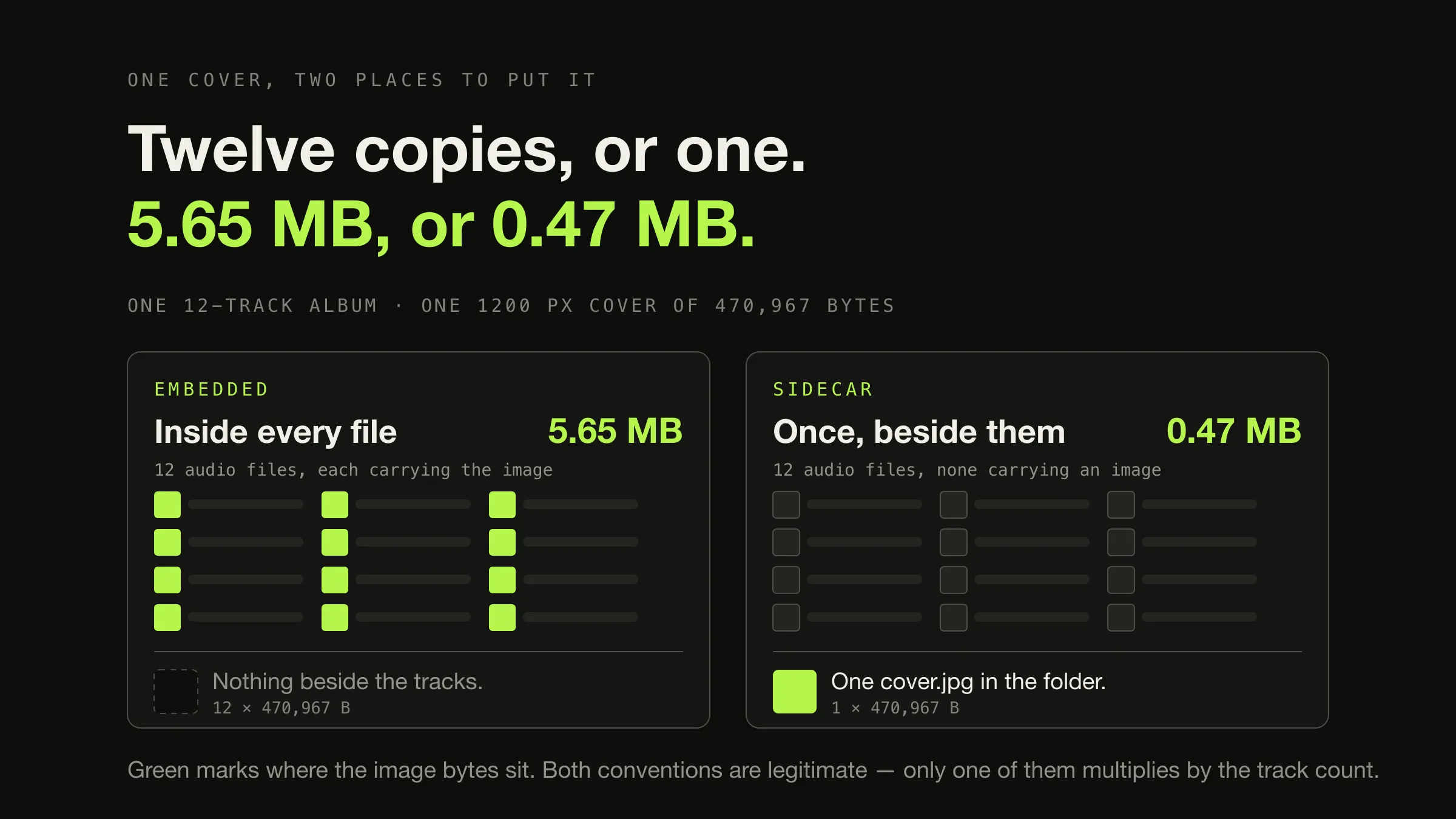
Album artwork lives in one of two places, and the practical answer is usually
both. Embedded artwork is stored inside each audio file’s own metadata — an
APIC frame in ID3, a PICTURE block in FLAC, a covr atom in MP4. Sidecar
artwork is an ordinary image file sitting beside the tracks, conventionally
named cover.jpg or folder.jpg. Embedding travels with the file and duplicates
the image once per track; a sidecar is stored once per album and depends on the
player bothering to look for it.
The size difference is not academic. One real front cover, measured at the resolutions its archive actually publishes, is 21,942 bytes at 250 pixels and 1,220,361 bytes at 2849 pixels — and embedded in a twelve-track album that larger figure becomes 14.6 MB of artwork instead of 1.2 MB. So the decision worth making carefully is not which mechanism to use. It is what resolution to put inside the files.
The two places a cover can be
Embedded artwork is image data carried inside the audio file, in whichever field that container defines for pictures. The mechanism is per format and the field names differ per format, but the shape is the same everywhere: a small header saying what kind of image this is, then the bytes of a JPEG or a PNG.
ID3 calls it an attached picture. The specification lays the frame out as a text encoding, a MIME type, a picture type, a description and then the picture data, and says that “the ‘image/png’ or ‘image/jpeg’ picture format should be used when interoperability is wanted”. It also allows more than one: “there may be several pictures attached to one file, each in their individual ‘APIC’ frame, but only one with the same content descriptor.”
FLAC’s equivalent is the PICTURE metadata block, standardised in RFC 9639,
which “contains image data of a picture in some way belonging to the audio
contained in the FLAC file”. It carries the same idea with more structure — an
explicit width, height, colour depth and picture type — and permits the same
plurality: “a FLAC file MAY contain one or more picture metadata blocks.” Both
specifications single out the same two types for special treatment, allowing only
one file icon and one general file icon per file, while front and back covers can
repeat.
Sidecar artwork is a separate image in the album’s folder. There is no field, no header and no specification — it is a JPEG on disk, and the only thing making it artwork is that some application went looking for a file with that name. That absence of a specification is the source of every filename argument in the next section, and it is also the mechanism’s main virtue: an ordinary image file can be opened, replaced, resized or previewed by anything on the machine, including the file manager.
Which filename, and on whose authority
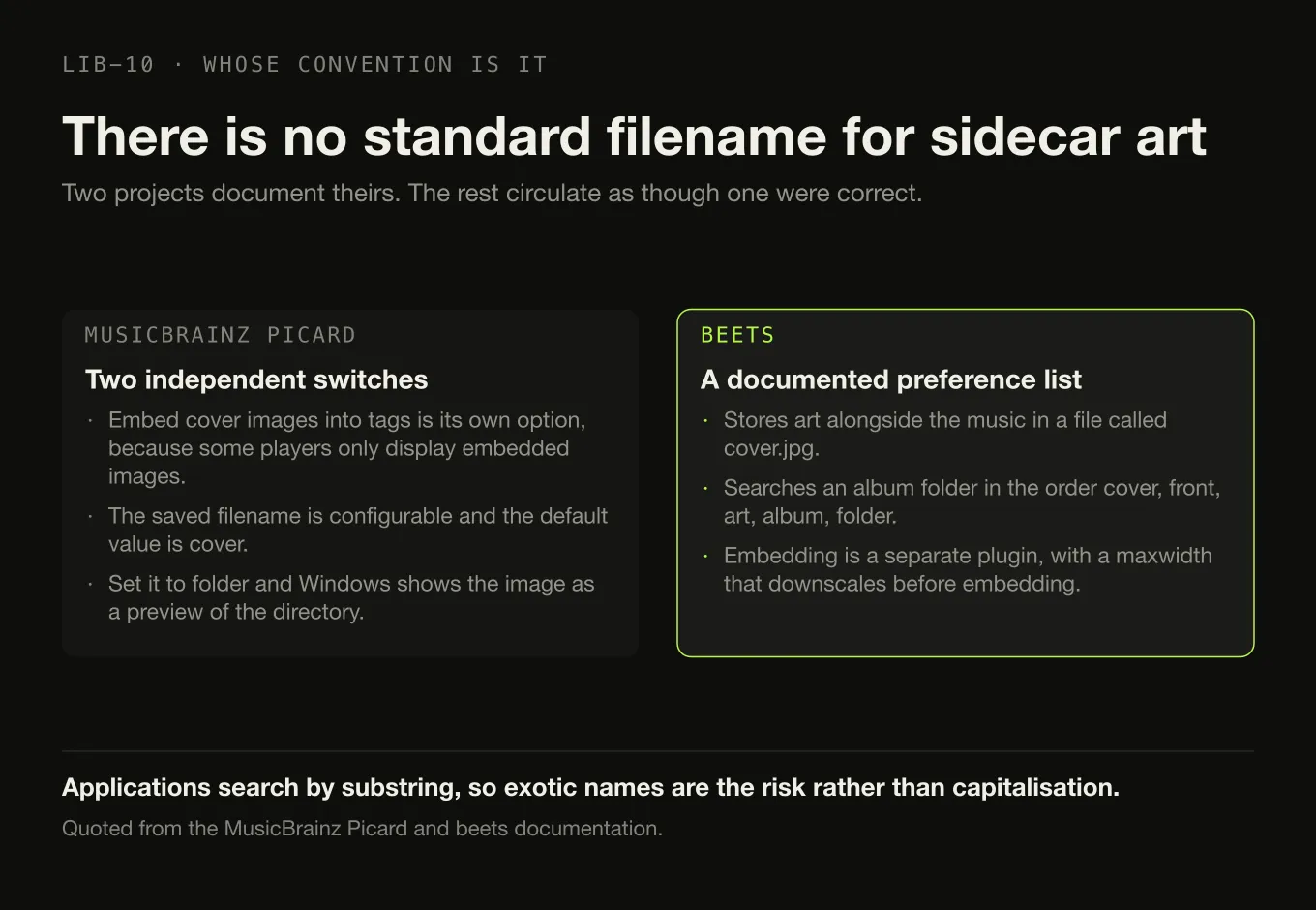
There is no standard filename for sidecar album art. cover.jpg,
folder.jpg, front.jpg and albumart.jpg all circulate as though one of them
were correct. None is. They are the defaults of particular applications, and the
only honest way to state a convention is to name whose it is.
Two projects document theirs precisely, which makes them worth quoting rather than paraphrasing.
MusicBrainz Picard treats the two mechanisms as independent switches. Its
cover-art options include Embed cover images into tags, described as follows:
“While this will use more storage space than storing it as a separate image file
in the same directory, some music players will only display embedded images and
don’t find the separate files.” Separately, it can save the image as a file, and
the name it uses is configurable: “the default value is cover”, with a note
that “if you change this to folder, Windows will display the image as a preview
of the containing directory”.
beets documents both sides too. Its artwork plugin “stores album art image
files alongside the music files for an album in a file called cover.jpg”, and
when it searches an album folder for art already present it works through a
documented preference list — the default cover_names value is
cover front art album folder. Embedding is a separate plugin, and it exists
partly to resize: its maxwidth option is “a maximum width to downscale images
before embedding them (the original image file is not altered)”.
Three things follow from those two paragraphs, and they matter more than the filename itself.
coveris the most widely-defaulted name, andfolderbuys you a directory preview on Windows. Either is defensible.cover.jpgis the safer default if you have no Windows machines in the picture.- Applications search by substring, not by exact match. A file called
front-cover-1200.jpgmatches beets’coverandfrontentries. Exotic names are the risk, not capitalisation. - Downscaling on the way into the file is an established workflow, not a compromise. The most-used tagging tools ship the option.
Why the same album shows different art in different applications
Because a cover can be in three places, and every application decides for itself which to look at first.
Where one album’s cover can be, and who reads what
-
1 · Inside each file
01.flac … 12.flac
12 × PICTURE block
Travels with the file. Survives being copied out of the folder, synced to a phone, or handed to an application that never sees the directory. Twelve copies of one image, and changing it means rewriting twelve audio files.
-
2 · Beside the files
cover.jpg
1 × JPEG on disk
One image, replaceable by dragging a new file over it, and readable by every image viewer and file manager on the machine. Invisible to anything that receives a single track without its folder.
-
3 · Not in the folder
The player’s own cache
1 × extracted copy, per application
Built during a scan from whichever of the two above the application found. It is a derived copy: correct until either source changes, and the usual explanation for an album still showing artwork you deleted, or the wrong cover entirely.
That structure explains the symptoms without any need for folklore.
- Art missing in one application and present in another. The application showing nothing reads only one of the two mechanisms, and your library uses the other. This is by far the most common case and it is not a bug in either program.
- The wrong cover, or a cover you deleted. Almost always location three. The cache is derived, so the fix is to correct the source and make the application rebuild — which is the beginning of a longer procedure covered in diagnosing and repairing incorrect metadata.
- Art on some tracks of an album and not others. Embedded art is per file, so a partially-tagged album genuinely is partially tagged. A sidecar cannot produce this symptom, which makes it a useful diagnostic.
- Art appearing hours after an import. Some libraries index tags first and artwork later, on purpose, so the collection is browsable before every cover has been read.
What embedding costs, measured
The cost of embedding a picture is the size of the picture, in every file, plus a few dozen bytes of structure. That is not an estimate.
Embedding a cover into a FLAC track and measuring the file before and after gave
the same answer four times: the file grew by the image’s byte count plus
exactly 46 bytes. RFC 9639’s field layout predicts precisely that — a 4-byte
block header, a 4-byte picture type, a 4-byte media-type length, the ten bytes of
image/jpeg, a 4-byte description length, four 4-byte fields for width, height,
colour depth and colour count, and a 4-byte data length. Specification and
measurement agree to the byte, which is a rare luxury and worth using: for
planning purposes, embedded artwork costs the image and nothing else.
So the interesting number is the image. Here is one real front cover at the four resolutions its archive publishes, measured rather than assumed:
One cover, four real renditions, and what each costs an album
-
250 × 246
21,942 bytes
12 tracks embedded → 0.26 MB
Thumbnail-grade. Visibly soft the moment a player shows the cover larger than a list row.
-
500 × 493
80,541 bytes
12 tracks embedded → 0.97 MB
Fine in every list and grid, and adequate for most now-playing panels. A defensible embedded size for a large library.
-
1200 × 1182
470,967 bytes
12 tracks embedded → 5.65 MB
Comfortable at any size a music player will ever draw, including full screen on a laptop display.
-
2849 × 2807
1,220,361 bytes
12 tracks embedded → 14.64 MB
A scan, not an interface asset. Worth keeping — once, beside the tracks — and expensive to put inside twelve of them.
Two consequences are worth spelling out.
Per album, the sidecar-versus-embedded gap is the image times eleven. At the 1200-pixel rendition that is 5.18 MB an album; at full resolution, 13.42 MB. A six-disc box set of sixty tracks carries 73.2 MB of full-resolution artwork against 1.22 MB for the same image stored once. Library-wide totals — and the same comparison at fixed image sizes across 1,000, 10,000 and 50,000 tracks — are the subject of how much disk space a music library needs.
Artwork is a much larger fraction of a lossy file than a lossless one. Using the per-track sizes that article publishes for a four-minute track:
| Track, four minutes | File size | Plus the 1200 cover | Plus the 2849 cover |
|---|---|---|---|
| MP3 or AAC, 128 kbit/s | 3.84 MB | 12.3% artwork | 31.8% artwork |
| MP3, 320 kbit/s | 9.60 MB | 4.9% | 12.7% |
| FLAC or ALAC at 60% of PCM | 25.4 MB | 1.9% | 4.8% |
| WAV, 16-bit 44.1 kHz | 42.3 MB | 1.1% | 2.9% |
A full-resolution scan inside a 128 kbit/s file is nearly a third of the file, and no player interface anywhere looks different for it. If your library is lossy and space-constrained, artwork resolution is one of the few remaining levers that costs you nothing to pull.
Resolution is the decision that actually costs money
File size tracks pixel area, not pixel width, and JPEG does not compensate. Resizing the same source image and re-encoding it at a fixed quality gives the shape:
| Long edge | Bytes |
|---|---|
| 300 px | 9,229 |
| 500 px | 22,536 |
| 1000 px | 111,052 |
| 1500 px | 335,293 |
| 2000 px | 571,823 |
| 2849 px | 1,257,690 |
Doubling the edge multiplied the file by 4.93× from 500 to 1000 pixels and 5.15× from 1000 to 2000. Those figures are specific to one image at one quality setting and should be read as a shape rather than a constant — but the shape is the point. “Just take the largest available” is not a neutral default; it is a choice to spend roughly five times as much for each doubling.
Use JPEG for covers, not PNG. An album cover is a photograph or a painting, which is the material lossless image compression is worst at. The same cover measured several times larger as a PNG at every resolution tested — 5.6× at 500 and 1200 pixels, 7.2× at full size. Those multiples are inflated slightly because the PNGs were converted from the JPEGs and so encode the JPEG’s own artefacts as well as the picture, so treat them as “several times” rather than as precise. PNG earns its place for artwork with hard edges and flat colour — a label scan, a logo, text — and nowhere else in a music library.
A practical recommendation, offered as a workflow rather than a standard: embed something in the region of 500 to 1000 pixels square, and keep the high-resolution scan as the sidecar. That is the same 600–1000 pixel range the wider organisation system already recommends, arrived at from the other direction — and it is exactly the split that tagging tools with a “downscale before embedding” option are built to produce.
Why both is the safest default
Neither mechanism is correct and neither is a fallback. They fail in different places, and keeping both means neither failure reaches you.
| Embedded | Sidecar file | Both | |
|---|---|---|---|
| Survives moving one track out of its folder | Yes | No | Yes |
| Copies to a phone or another app with the file | Yes | Usually not | Yes |
| Copies stored per album | One per track | One | One per track, plus one |
| Replacing the cover means | Rewriting every audio file | Overwriting one image | Both, but either alone works |
| Readable without a music player | No — needs a tag reader | Yes — any image viewer | Yes |
| Visible to a player that only reads one mechanism | Only if that one | Only if that one | Always |
| Cost per album at the 1200 rendition | 5.65 MB | 0.47 MB | 6.12 MB |
The right-hand column is why “both” is the recommendation for a collection you intend to keep. The extra cost of the sidecar is one image per album — under half a megabyte at a sensible resolution — and in exchange the album is legible to every player, to the file manager, and to whatever you are using in ten years. It also gives you somewhere to keep the full-resolution scan that does not multiply by the track count.
The one thing worth more than the choice is applying it consistently. A library where half the albums are embedded-only and half are sidecar-only will show gaps in one application and a complete collection in another, and you will spend the afternoon debugging your player instead of your library. Pick a mechanism, pick a filename, and let a folder layout that every tool agrees on carry it.
What Digr does with artwork today
Digr reads both mechanisms and writes neither. Covers come from inside the
file or from a sidecar image next to it, whichever exists, and the folder case is
handled per directory rather than per track — so one cover.jpg serves the album
rather than being looked up forty times. Extracted covers are hashed and cached,
which means one image shared by forty tracks is stored once in the cache no
matter how many copies exist in the files.
Two current behaviours are worth knowing before you conclude something is missing.
Artwork can arrive after the tracks do. A Fast scan reads tags only; a Full scan reads tags and artwork. A library imported in Fast mode can have its covers filled in later by a cancellable background backfill, so an album with no cover immediately after an import is not necessarily an album with no cover.
Digr cannot embed or replace artwork. Scanning opens your audio files to read tags and artwork and never writes to them — nothing is copied, renamed, moved or re-tagged. That is a deliberate property rather than a gap waiting to be filled, and it means any change to the artwork in your library today has to be made with a tagger. Manual artwork replacement from a local file and Cover Art Archive artwork lookup are both named items in the planned metadata-editing work, at the three-to-six-month horizon and as part of Digr Free — planned, with no date attached.
One thing the site does not publish, and this article will not invent: which of the two locations wins when an album has both. The documented behaviour is that both are read and that the folder case is resolved per directory. What the artwork pipeline does today is the extent of it, and inferring a precedence order from how other players behave would be guessing in public.
The short version
- Two mechanisms. Embedded art is inside each file’s metadata; a sidecar is an image beside the tracks. Both are legitimate and most players read both.
- No standard filename.
coveris the most widely-defaulted;folderalso gives you a Windows directory preview. Consistency beats the choice. - Embedding costs the image, per file. Measured at 46 bytes of structure plus the JPEG, so twelve tracks means twelve copies.
- Resolution is the expensive decision. The same cover was 80 KB at 500 px and 1.22 MB at 2849 px — 13.4 MB an album of difference once embedded.
- Keep both. Embed 500–1000 px for portability, keep the full-resolution scan as one sidecar. The extra cost is one image per album.
- Three places to look when a cover is wrong: the files, the folder, and the player’s cache.
Sources
- RFC 9639 — Free Lossless Audio Codec (FLAC) — the
PICTUREmetadata block, which “contains image data of a picture in some way belonging to the audio contained in the FLAC file”; that “a FLAC file MAY contain one or more picture metadata blocks”; and the field layout from which the measured 46 bytes of structural overhead is derived exactly - ID3v2.4 native frames — attached picture — the
APICframe layout, the recommendation that “the ‘image/png’ or ‘image/jpeg’ picture format should be used when interoperability is wanted”, and that “there may be several pictures attached to one file, each in their individual ‘APIC’ frame, but only one with the same content descriptor” - Cover Art Options — MusicBrainz Picard — embedding into tags “will use more storage space than storing it as a separate image file in the same directory”, but “some music players will only display embedded images and don’t find the separate files”; the separate file’s name mask, whose “default value is
cover”; and that changing it tofoldermakes Windows “display the image as a preview of the containing directory” - beets — fetchart plugin and embedart plugin — art stored “in a file called
cover.jpg”, the documentedcover_namessearch order ofcover front art album folder, andmaxwidthas “a maximum width to downscale images before embedding them (the original image file is not altered)” - Cover Art Archive — release
dfd839f7— the four published renditions of one front cover whose measured byte sizes are the resolution ladder above - Digr — features — artwork read from inside the file or from a sidecar with the folder case handled per directory, the content-addressed artwork cache, Fast and Full scan modes with a background artwork backfill, and files that are only ever read
- Measurements taken locally on macOS 26.5.2 (build 25F84). Renditions retrieved from the Cover Art Archive on 2026-08-22 and sized with
ls -l; dimensions fromsips -g pixelWidth -g pixelHeight; the resolution curve produced withsips -Z <px> -s format jpeg -s formatOptions 60and the PNG comparison withsips -s format png. Embedding overhead measured by adding each rendition to a copy of a 240-second 16-bit 44.1 kHz FLAC and an ALAC file with mutagen 1.47.0, and reading the resulting FLAC metadata blocks directly. Per-album and per-box-set figures are arithmetic from those measured image sizes, not observations of a real library
Common questions
Should album art be embedded or saved as a cover.jpg?
Both, if you can. Embedded artwork travels with the file, which is what you want when single tracks get copied to a phone or handed to another application. A sidecar image such as cover.jpg or folder.jpg is stored once per album instead of once per track, is trivial to replace in bulk, and is readable by anything including the file manager. Most players read both, so keeping both costs one extra image per album and removes a whole category of missing-artwork problem.
Is cover.jpg or folder.jpg the correct filename for album art?
Neither is correct, because there is no standard. They are conventions, and different software has different defaults. MusicBrainz Picard writes a separate image named cover by default and notes that naming it folder instead makes Windows show it as a preview of the directory. Beets stores art as cover.jpg and searches local files for names containing cover, front, art, album or folder, in that order. Pick one name and use it everywhere in your library — consistency matters more than which of them you chose.
Why does album art show in one music player but not another?
Because a cover can live in three places and each application looks in its own order. It can be embedded in the audio file, it can be a separate image beside the tracks, and it can be in the player’s own artwork cache from a previous scan. A player that only reads embedded art shows nothing for an album that has only a sidecar; a player showing the wrong cover is usually showing a cached one. Which of the three is missing decides the fix.
What resolution should album artwork be?
Somewhere around 600 to 1000 pixels square is enough for any player interface, and the cost of going higher is real. One real cover measured 80,541 bytes at 500 pixels and 1,220,361 bytes at 2849 pixels — the same picture, fifteen times the file. Embedded in twelve tracks that difference is 13.4 megabytes for one album, and no interface anywhere renders it any differently. Keep the high-resolution scan as a sidecar if you want it preserved.
Does embedding album art make audio files bigger?
Yes, by the size of the image, in every file. Measured on a FLAC track, embedding a 470,967-byte cover grew the file by exactly 470,967 bytes plus 46 bytes of picture-block structure. A 1.2 MB cover embedded in a 3.84 MB 128 kbit/s MP3 is 32% of the file. In a 25 MB lossless track the same cover is under 5%, which is why the decision matters far more for a lossy library than a lossless one.
Can you have embedded artwork and a folder.jpg at the same time?
Yes, and taggers are built for it — Picard has separate switches for embedding into tags and for saving a separate file, and both can be on. Nothing breaks when both exist: a player reads whichever it looks for first and ignores the other. The two copies can even be different sizes on purpose, which is the workflow this article recommends — a moderate cover embedded for portability, the full-resolution scan kept once beside the tracks.
- artwork
- cover art
- folder.jpg
- ID3
- FLAC
- metadata