How Digr is built, and the rules it follows
A Rust core under a React interface, a SQLite index treated as a disposable cache, and audio files opened read-only. The architecture, the reasons for it, and what the alpha genuinely cannot do yet.
Digr is a local-first music player for macOS: a Rust core under a React interface, packaged with Tauri, indexing your own audio files into a SQLite database it treats as a disposable cache. It has no account, no cloud library and no telemetry. It reads your files and never writes to them. Its one network feature is casting to a Google Cast speaker on your own LAN.
It is also, at v0.1.0-alpha.3, an alpha, and the honest list of what that means
belongs in the first screen rather than three sections down:
- macOS 11 Big Sur or later, Apple silicon only. No Intel build; no iOS.
- No public download yet. The build exists and is ad-hoc signed, which Gatekeeper quarantines — Developer ID signing and notarisation are the next piece of work, and until they land this site offers no download rather than a broken one.
- No tag editing. Digr reads your metadata and cannot change it.
- No CD ripping. Not today, and not for a while.
- Google Cast only. No AirPlay, no DLNA, no UPnP, no OpenHome.
- Digr Pro is not purchasable. There is no checkout on this site and no licence system in the application.
What follows is the architecture and, more usefully, the reasons for it. A stack list is not interesting. The rules a stack is made to obey are.
Rule one: your files are the source of truth, and the index is disposable
Digr’s library is a SQLite database on your own disk — a real database with schema migrations and batched writes, not a JSON blob that gets rewritten wholesale every time something changes.
The important property is not that it is SQLite. It is that the database is derived. Every row in it was produced by reading a file you already had. Delete the whole thing and a rescan reconstructs it exactly.
That constraint does real work:
- It makes Digr easy to leave. Uninstalling costs you an index you can regenerate, not a library you cannot. A player that is easy to leave is a player you can trust with a collection — which is the whole argument for local-first software.
- It makes corruption survivable. There is no scenario in which a database problem loses music, because the database never held any.
- It forces the interesting decisions into the open. If album grouping is wrong, it is wrong because of what the tags say, and that is a fixable fact about your files rather than a mysterious opinion held by an application.
The one exception is honest and small: playlists you created are not derived from anything, so they are the only part of that database that is genuinely yours. Everything else is a cache with a fast rebuild path.
Where each part of Digr lives, and which direction it depends
Owns The audio, the tags, the artwork. The only irreplaceable thing here.
Depends on Nothing. Not Digr, not a database, not a network.
Owns Walking folders, reading tags with lofty, extracting artwork, writing the index, speaking Cast.
Depends on The files, read-only. It opens them and never writes back.
Owns The derived view: tracks, albums, artists, health, plus your playlists and settings.
Depends on A scan. Delete it and the next scan rebuilds it exactly.
Owns Everything you look at, plus the queue, the equaliser curve and the skin.
Depends on The index for what to show, and the system for playback.
Owns Decoding and output. Files reach it through Tauri's asset protocol, with no bytes passing through JavaScript.
Depends on Nothing of Digr's. This is why Digr plays six containers and indexes seven.
Rule two: never write to a file you were not asked to write to
Scanning opens your audio files to read tags and artwork, and never writes to them. Nothing is copied, renamed, moved or re-tagged. Remove Digr and your collection is byte-for-byte as it was.
This is the reason Digr cannot currently fix your metadata, and it is worth being clear that the limitation is deliberate rather than pending. A “clean up my library” button that rewrites forty thousand files from a lookup service is a single irreversible action taken on the strength of a service’s confidence, and there is no undo for it that is worth the name.
Tag editing is planned — explicit editing you asked for, a lookup that proposes rather than imposes, confidence scoring on every match, and every change undoable. It is a 3–6 month roadmap initiative, planned as part of Digr Free, because fixing a wrong album title is not a premium feature. Until it exists, the answer to “can Digr fix this tag?” is no, and the tag itself is in the file waiting for a tag editor.
The same principle governs the library health views, which today are inspect-only: they will tell you about missing files, likely duplicates, tracks with no artwork and unknown artist or album, and they will not act on any of it.
Rule three: no account, because there is no server
There is no sign-in, no cloud library and no telemetry. Playback works with the network switched off — not as a degraded mode, as the normal one.
Exactly two things generate outbound traffic:
- Casting, on your own local network, to a device you selected.
- An update check, which you press.
That is a property of the architecture rather than a promise in a policy document, and it is the only kind of privacy claim worth much. There is no server to send anything to, so there is no configuration in which something gets sent by mistake.
It also constrains the product in ways worth stating. Digr contacts no metadata lookup service today: tags are read locally with lofty and nothing about your library is transmitted anywhere. When MusicBrainz lookup arrives as part of the tag-editing work, it will be a thing you invoke, on a release you chose.
Rule four: what ships and what is planned are two different lists
Digr keeps its shipping capabilities and its roadmap in two separate files, with a rule attached to each. A capability may only be listed as working if it can name the code that makes it true. Everything else lives in the roadmap register, grouped into the initiative that would deliver it and given a horizon.
The reason is not tidiness. It is that the two lists change for different
reasons — one when the app ships something, the other when the plan changes —
and a single list with a status field on it gradually stops distinguishing
them. Every “coming soon” that ever quietly became “in the current version” did
so through exactly that field.
There is also a third list, which most products do not publish: the things Digr is not going to do. Homemade synchronised playback across brands that were never designed to keep time with each other. A system-wide equaliser. Automatic destructive de-duplication. Mass metadata overwrite without review. Universal bit-perfect wireless claims. A cloud-first streaming library. Each is a decision rather than an omission, and publishing them is how you find out whether a product is for you before you download it.
| Question | Today | Planned |
|---|---|---|
| Play local files | Yes — MP3, FLAC, ALAC, M4A, AAC, WAV | A Digr-side decoder for containers macOS will not play |
| Index containers | Seven, including OGG | — |
| Edit tags | No | Explicit, undoable editing — Free, 3–6 months |
| Rip CDs | No | A complete in-app import with a bundled ripper — Free, 6–12 months |
| Cast | Google Cast only | AirPlay, DLNA/UPnP, OpenHome — no dates |
| See the signal path | No | Signal Chain — Pro, longer term |
| Gapless local playback | No | Part of the local audio path work |
| Windows or Linux | No published build | Windows at launch, alongside macOS; Linux in a future release |
| Buy Digr Pro | No checkout, no licence system | Announced here when it changes |
The stack, and why each part of it
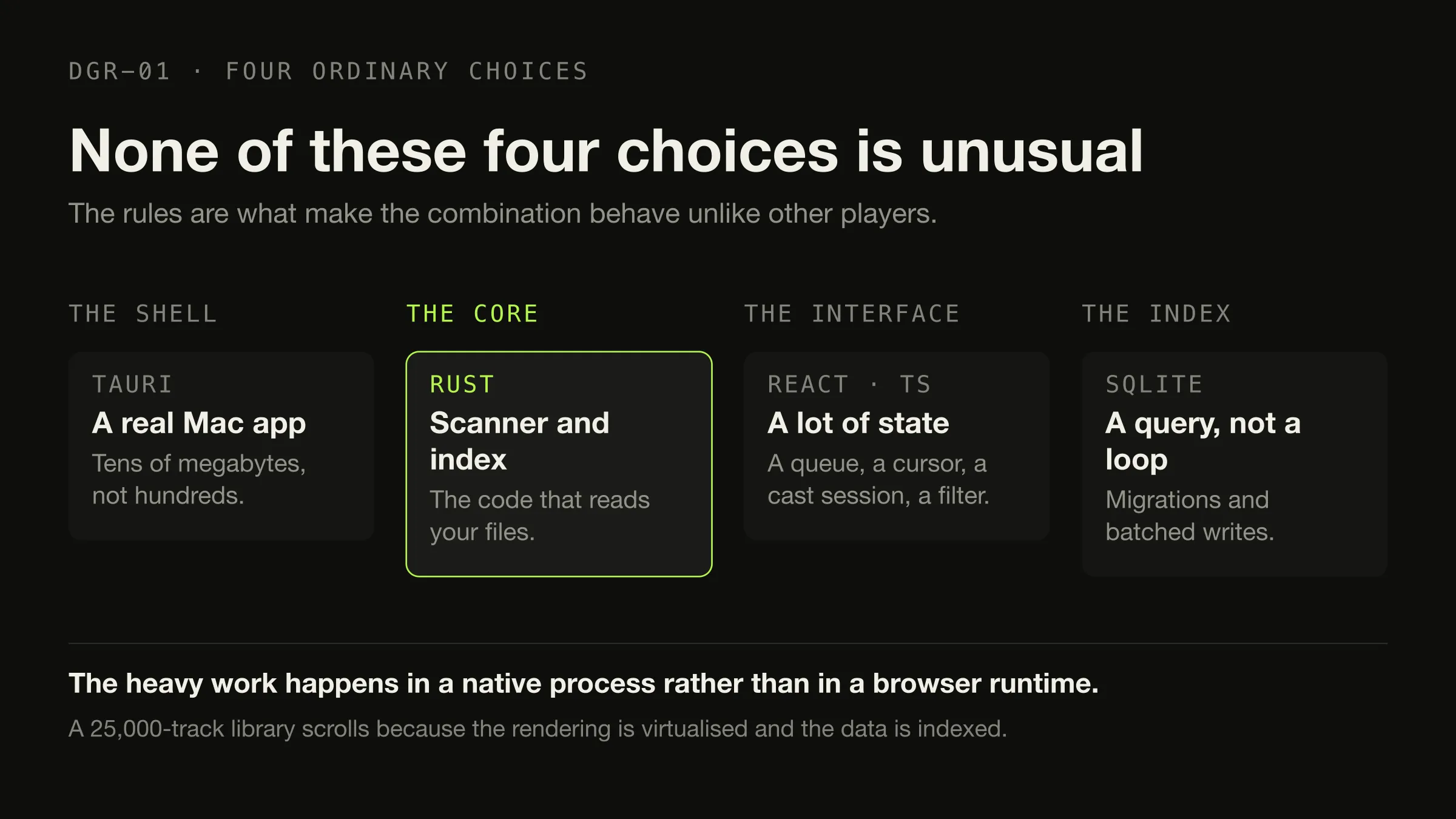
Tauri, rather than Electron. A real desktop app rather than a web page in a window, and a bundle measured in tens of megabytes rather than hundreds. The practical consequence for a music player is that the heavy work — walking a hundred thousand files, parsing tags, hashing artwork — happens in a native process instead of in a browser runtime.
Rust, for the core. The scanner, the index, the local media server and the Cast client all live there. This is the code that touches your files and runs for hours at a time, and the two properties that matter for it are that it does not crash and that it does not corrupt anything.
React and TypeScript, for the interface. Music software is a lot of state — a queue, a cursor, a cast session, a scan in progress, a filter — and this is a stack that handles state well and that a large number of people can read.
SQLite, for the index. Schema migrations, batched writes, and a query language, so that “albums by this artist, ordered by year” is a query rather than a loop over an array in memory. A 25,000-track library scrolls without stutter because the rendering is virtualised and the data is indexed, not because anything was paginated.
None of those four choices is unusual. The rules above are what make the combination behave differently from other players built on the same pieces.
Two places the architecture is visible from outside
The scanner, and drives that come and go
A library on an external drive produces the single most destructive bug a music player can have: the drive is unplugged, the scanner sees an empty folder, and twenty thousand tracks are removed from the library.
Digr’s index handles it as a distinct state. Unplugging an external marks its root offline rather than deleting its tracks. When the drive returns, the volume is matched by identifier or name, the indexed paths are rewritten in place, and anything queued is remapped. Separately, pruning is constrained: a root that could not be fully read is never pruned at all, and that distinction is regression-tested, because getting it wrong once costs somebody their library.
Scanning itself runs on a background thread with throttled progress, so the interface never blocks, and cancelling keeps whatever was already indexed. There are two modes: Fast reads tags only, Full reads tags and artwork, and a library imported in Fast mode can have its covers filled in later by a cancellable background backfill.
Casting, and who owns the queue
Google Cast is architecturally unusual: the receiver fetches the audio rather than the sender pushing it — which is the fact the whole protocol follows from. So Digr runs a local media server that streams the original file to the device with correct MIME types and Range support — never a re-encode — and each track sits behind an unguessable token so file paths never appear in a URL.
Discovery is over mDNS with a bundled resolver, rather than borrowing the operating system’s Bonjour stack, so it does not inherit that stack’s problems.
The part that follows from rule one is the queue. While casting, the local engine is silenced but still owns the queue, shuffle and repeat, so an album progresses on the device and disconnecting hands playback back on the same track, paused. There is one queue with one cursor; the loaded track is derived from the queue position, so the two cannot disagree. The four problems every casting protocol has to solve covers why this is harder than it looks.
Skins: a manifest that cannot supply behaviour
Six skins ship — Digr Dark, Midnight Blue, Tape Deck, Cassette Deck, Brutalist FM and Y2K Chrome — and applying one re-themes the whole application live, with no restart.
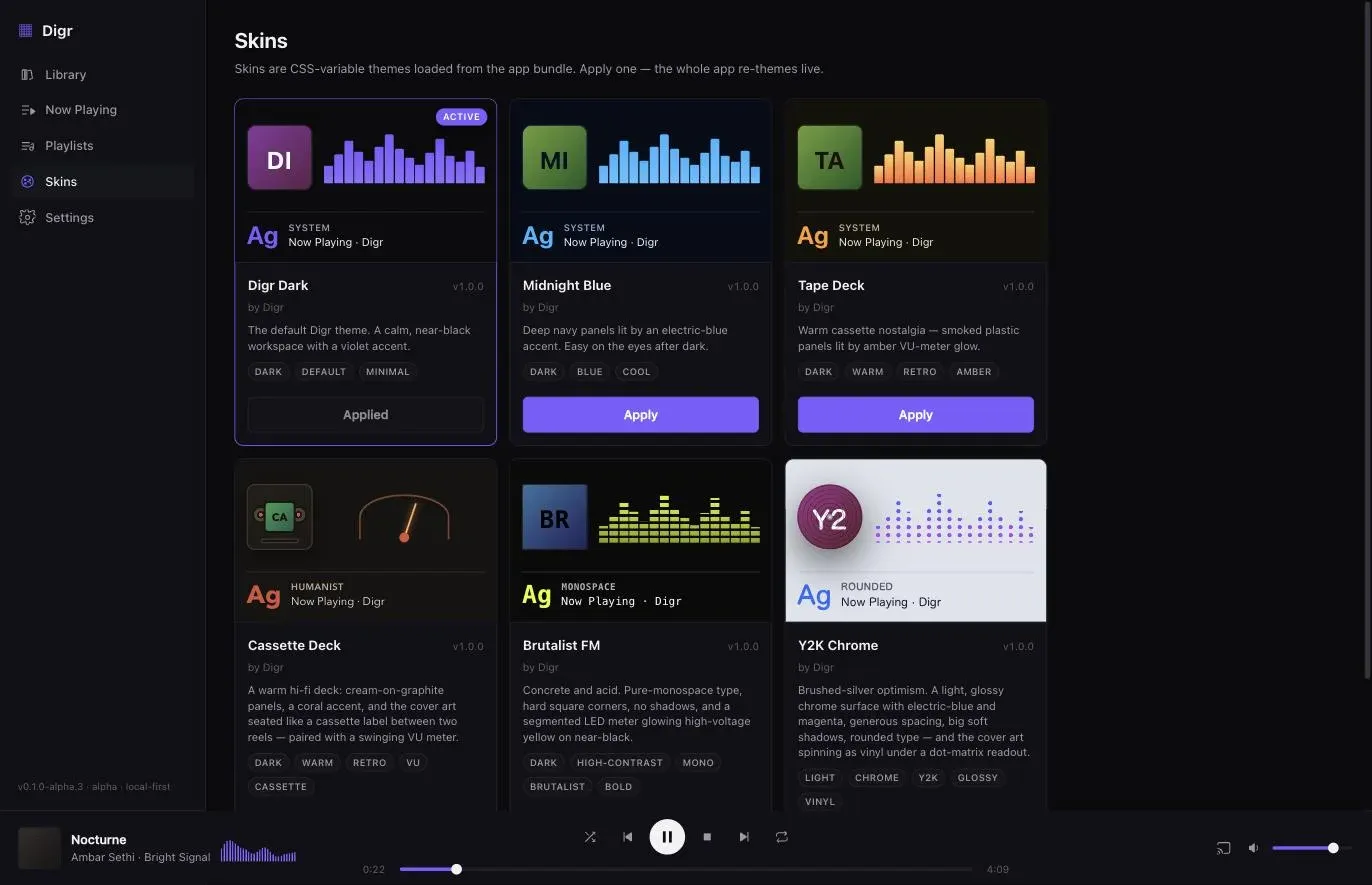
The design rule is the interesting part. A skin is a validated manifest of colour tokens plus a closed set of presentation choices, and it can never supply behaviour. It selects from known options rather than describing new ones.
That is a deliberate ceiling. It means a skin cannot slow the application down, cannot break a layout in a way the developers have never seen, and — when user skins loaded from disk arrive as a 6–12 month roadmap item — cannot become an attack surface. The cost is that some visual ideas require new presentation primitives in the engine before a skin can express them, which is exactly what the planned Classic skin is waiting on.
Diagnostics and updates
Two pieces of foundation that are unglamorous and load-bearing.
Diagnostics. A log buffer records playback, scan and cast failures in production rather than only in development, and writes them to a plain-text file you can read before you attach it to a bug report. Being able to read it yourself is the point: a diagnostic bundle you cannot inspect is a thing you have to trust.
Updates. Every build produces a minisign-verified update payload beside the DMG, and the application checks a manifest on Digr’s public download repository. The mechanism is wired end to end and starts working with the first published release. Digr’s source repository is private, and release assets on a private repository are not anonymously downloadable, so artefacts are published to a separate public repository that contains no source.
What this adds up to
Four rules, and the architecture is mostly a consequence of them: files are the truth, so the index is disposable; nothing is written, so nothing can be lost; there is no server, so there is no account; and shipping and planned are different lists, so the roadmap cannot quietly become a feature list.
The alpha’s limits are real and they are stated above rather than discovered after downloading — which is the same rule applied to writing about the product. The features page carries the exhaustive version of both lists, including the one about what Digr will never do.
Sources
- Digr — features and roadmap — the shipping capability list, where every entry names the code that makes it true, and the roadmap register with its horizons, tiers and permanent refusals
- Digr — pricing — Digr Free and Digr Pro, and the note that Pro is not on sale, there is no checkout and the application has no licence system
- Digr — system requirements — macOS 11 Big Sur or later, Apple silicon
- What “local-first” actually means for a music player — the architectural argument the first rule comes from
Common questions
Does Digr upload my music?
No. There is no server to upload it to and no cloud library. Playback works with the network switched off, and the only outbound traffic Digr generates is casting on your own local network and an update check you press yourself. Your audio, your tags and your listening never leave the machine, because there is nowhere for them to go.
Does Digr require an account?
No. There is no sign-in, no registration and no telemetry. An account exists to connect you to a server, and Digr has no server — so a login screen would be a thing standing between you and your own files rather than a thing granting you access to anything.
Where does Digr store its library database?
In a single application-support folder on your own disk, as a SQLite database with schema migrations. It holds the index, playlists and settings, and it is treated as a cache rather than as your data: delete the folder and a rescan rebuilds the index exactly from your files. Nothing in it is unique except the playlists you made.
Does deleting Digr delete my music?
No. Digr opens your audio files to read tags and artwork and never writes to them — nothing is copied, renamed, moved or re-tagged. Remove the application and your collection is byte-for-byte as it was, in the same folders, ready for whatever you point at it next. That is a deliberate architectural property, not a promise.
What platforms does Digr support?
Digr is launching on Windows and macOS. The current build runs on macOS 11 Big Sur or later, on Apple silicon, at alpha stage. A Windows x64 build has been built and is confirmed for launch, but it is an internal build in release validation, not a published installer. A Universal macOS build that also runs on Intel Macs has been built and passes CI, and is planned for a later release. Linux is on the roadmap for a future release, with no date.
Can Digr cast local music to a speaker?
Yes, over Google Cast, and only Google Cast today. Chromecasts, Google Home speakers and Google Cast speaker groups are discovered over mDNS with nothing to configure, and a local server streams the original file to the device rather than a re-encode. AirPlay, DLNA/UPnP and OpenHome are named roadmap items with no dates against them.
- Digr
- architecture
- Tauri
- Rust
- SQLite
- local-first
- alpha