How Google Cast works, and why a local file needs a server
Cast separates control from delivery — the receiver fetches the media itself. That one fact explains discovery, why your own files need an HTTP URL, and why an unsupported format fails outright.
Google Cast separates control from delivery. Your phone or laptop is the sender: it starts a session, tells the Cast device what to play, and issues play, pause and seek for the rest of the session. The Cast device runs a receiver, and the receiver is what actually retrieves and decodes the media — Google describes it as “responsible for responding to Sender commands and for conveying streaming content” to the device. What crosses the network from the sender is a URL, a MIME type and control messages. Not audio.
Almost everything confusing about casting falls out of that. A Cast receiver
cannot read /Users/you/Music/track.flac, so casting your own file means making
that file reachable over HTTP on your own network — which is why the machine
holding your library has to stay awake, and why the laptop being closed sometimes
stops the music and sometimes does not. An unsupported format fails outright
rather than sounding worse, because the decoding happens on the speaker.
A Cast session is four things, not one
The word “casting” hides four separable mechanisms, and knowing which one has failed is most of the diagnosis. Google’s own sender documentation defines the session as a sequence, and the sequence is the article’s spine: establishing a session “combines the steps of connecting to a device, launching (or joining) a Web Receiver app, connecting to that app, and initializing a media control channel.”
One Cast session, in the order it happens
Mechanism Multicast DNS on the local network. Google tells developers to look for a _googlecast._tcp.local service record, which "will describe your Web Receiver device name and model along with service data".
Requirement "The sender device and the Cast-enabled devices device must be connected to the same WiFi network."
Fails as the device not appearing in the list at all. Nothing to do with formats or files.
Mechanism The sender connects to the device, then launches — or joins, if it is already running — a receiver application identified by an application ID, and connects to that.
Consequence A device already busy with somebody else’s receiver has to hand over or refuse. This is what "taken over by another app" looks like from the sender’s side.
Fails as a device that is visible but will not accept the session.
Mechanism A load request carrying a media object. Its contentId is "typically the URL of the media"; an optional contentUrl takes over as the media URL when present; contentType is "the content MIME type".
Consequence The receiver then goes and gets it. The sender’s audio path is not involved.
Fails as a load error — an unreachable URL, or a codec the receiver does not have.
Mechanism A media control channel initialised as part of the session. Play, pause, seek, volume and state updates travel over it in both directions.
Consequence The sender stays connected as controller for the whole session, even though no audio is passing through it.
Fails as playing audio you cannot control, or a transport that reports the wrong position.
How a Cast device is found
Discovery uses DNS-based Service Discovery over multicast DNS — the same mechanism Apple ships as Bonjour, standardised as DNS-SD in RFC 6763. It is worth one paragraph because it explains both the service string and the failures.
DNS-SD names a service instance as <Instance>.<Service>.<Domain>, where the
service part is “a pair of DNS labels, following the convention already
established for SRV records”: an underscore-prefixed protocol name, then _tcp
or _udp. Hence _googlecast._tcp — the Cast protocol, over TCP. The instance
label is the human-readable device name, the domain is local for multicast.
Two record types then do the work: an SRV record supplies “the port number
and target host name where the service may be found”, and a TXT record
carries “additional information about the service” as key/value pairs — which is
where the device’s model and capability flags live.
Three practical consequences:
- Discovery is local by construction. Multicast does not cross subnets without help, which is why a sender on a guest network, a VLAN, or a VPN that captures all traffic sees nothing. Google states the requirement plainly: sender and device on the same Wi-Fi network.
- Nothing is paired. There is no pairing, no code, no prior association. A device answers a browse query and appears.
- The name in the list is the instance label, chosen when the device was set up. Two speakers with the same name are a naming problem, not a network one.
Some older explanations name DIAL as the discovery mechanism instead. Google’s
current developer documentation is the thing to check against, and it names the
_googlecast._tcp.local service record.
Why a file on your own disk needs a server
Here is the gap between how casting a streaming service works and how casting your own music works, and it is the whole reason this article exists.
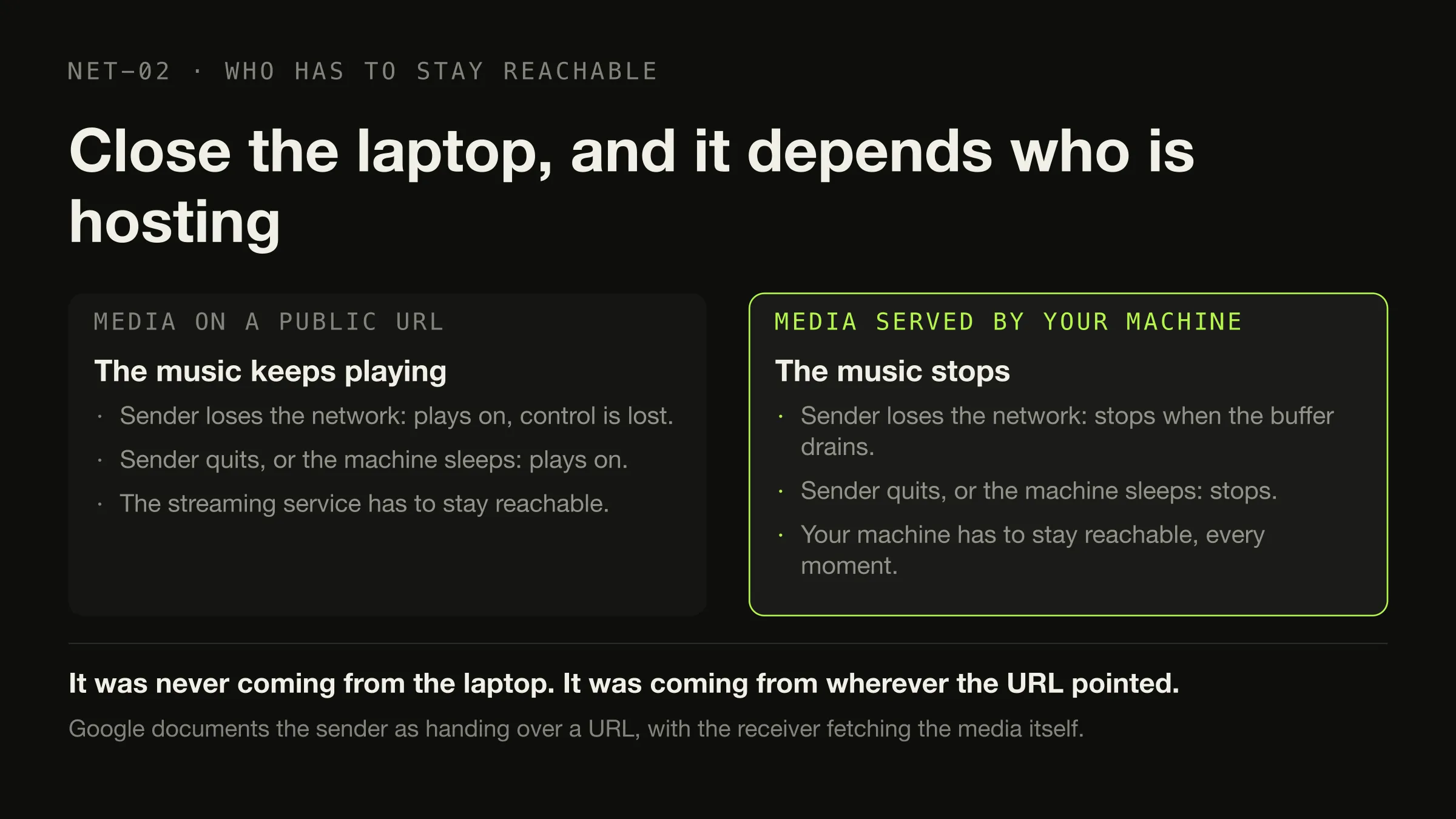
For a streaming service, stage three is trivial. The content is already on a public URL, so the sender hands over that URL and the receiver fetches it from the internet. Your device could be switched off a second later and the music would continue, because your device was never in the path.
A file on your disk has no URL. It has a path, and a path is meaningless to another machine. So an application that casts local files has to manufacture the missing piece: it runs a small HTTP server on the local network, gives the receiver a URL that server answers, and keeps answering for as long as the track plays.
Casting one local file, start to finish
Before anything
A file at a path on your disk /Volumes/Archive/FLAC/Some Album/03.flac — readable by your machine and by nothing else on the network. Not addressable, not fetchable, not castable.Made reachable as
Step 1 · a local HTTP resource
http://192.168.1.x:port/<token> A server on your machine, on your LAN, serving that one file with the right MIME type. This is the piece that did not exist a moment ago and the piece that disappears when the machine sleeps.Handed to the receiver as
Step 2 · a load request
content URL + content MIME type The sender never opens the audio. It describes where the audio is and what kind it is, and the receiver decides whether it can decode that type.Fetched, decoded and played by
Step 3 · the receiver
HTTP GET, possibly with a Range header The device pulls the bytes it needs, when it needs them. Range requests — RFC 9110’s mechanism for partial retrieval, advertised by a server through Accept-Ranges and answered with 206 Partial Content — are what make seeking inside a cast track possible rather than a restart.Controlled, for the rest of the session, over
Step 4 · the control channel
Play, pause, seek, volume, state Small messages, both directions, no audio. When the track ends the sender is the thing that knows what comes next, so it issues another load request.Three failures, one architectural fact
Each of these looks like a different bug and each is the same sentence read from a different angle: the receiver fetches and decodes.
An unsupported format fails outright rather than degrading. The receiver is doing the decoding, so the receiver’s codec list decides what plays. Google publishes it for Chromecast Audio, Google Home and Google Home Mini: FLAC up to 96 kHz and 24-bit, HE-AAC, LC-AAC, MP3, Opus, Vorbis and WAV as LPCM. ALAC does not appear on that list, and neither does AIFF. Nothing in the path is converting anything, so there is no graceful degradation available — the load either succeeds or it errors. For anyone who owns Google speakers this is the strongest practical input into the FLAC versus ALAC decision, and a good reason to know what your files actually are before blaming the network.
The machine holding the files has to stay awake. Not because the protocol demands it, but because your machine is the HTTP server. Close the lid and the URL stops answering mid-track. This is the strongest practical argument for keeping a music library on something that never sleeps, and it is one of four problems that whole-house audio actually consists of.
A gap between tracks is a queue question, not a network one. Stage three delivers one media resource. Whatever holds the queue has to notice the track ending and issue another load request, and the receiver has to fetch and buffer the next file from cold. Whether that gap exists depends entirely on whether the sender pre-loads the next resource on the device before the current one finishes. It is the same failure that makes albums develop seams on a local machine — the next track not being ready before this one ends — happening across a network instead of inside one process.
What happens when the sender goes away
The honest answer is “it depends on who is hosting the media”, and that is not a hedge — it is the most useful thing in this article.
| Media on a public URL | Media served by your machine | |
|---|---|---|
| Sender loses its network connection | Playback continues; control is lost | Playback stops when the current buffer drains |
| Sender application quits | Playback usually continues to the end of the loaded item | Playback stops |
| Sending machine sleeps | Playback continues | Playback stops |
| What advances to the next track | Whatever holds the queue — normally the sender | Whatever holds the queue — normally the sender |
| Who has to be reachable at every moment | The streaming service | Your machine |
The row that surprises people is the first one, because it produces the exact experience the primary question in this article’s title is usually asked about: you close the laptop and the music does not stop. It was never coming from the laptop.
What casting is not
Two wrong models cause most of the confusion, and both are worth discarding explicitly.
Casting is not Bluetooth over Wi-Fi. Bluetooth is a continuous transport: the sending device encodes the audio and transmits it for the whole session, so the source format stops mattering the moment it leaves. Cast is the opposite arrangement — the sender’s audio path is not in the picture at all, and the source format matters enormously because the speaker is the thing decoding it. Anything that follows from “the audio is flowing through my laptop” is wrong for Cast, including the assumption that a busy or throttled machine degrades the sound.
Casting audio is not screen mirroring. Mirroring a browser tab or a desktop is a different mode with different mechanics, and it does continuously encode and transmit from the sender. When people report that casting “re-encodes to something lossy”, they are usually describing mirroring. A media session with a content URL and a MIME type does not re-encode anything, because it never handles the audio.
Where Digr is, precisely
Digr implements the sender side of Google Cast, and only Google Cast. The picker below is the visible output of stage one: everything in that list arrived over multicast DNS with nothing configured, and the resolver is bundled rather than borrowed from the operating system’s Bonjour stack, so discovery does not depend on the state of anything else on the machine.
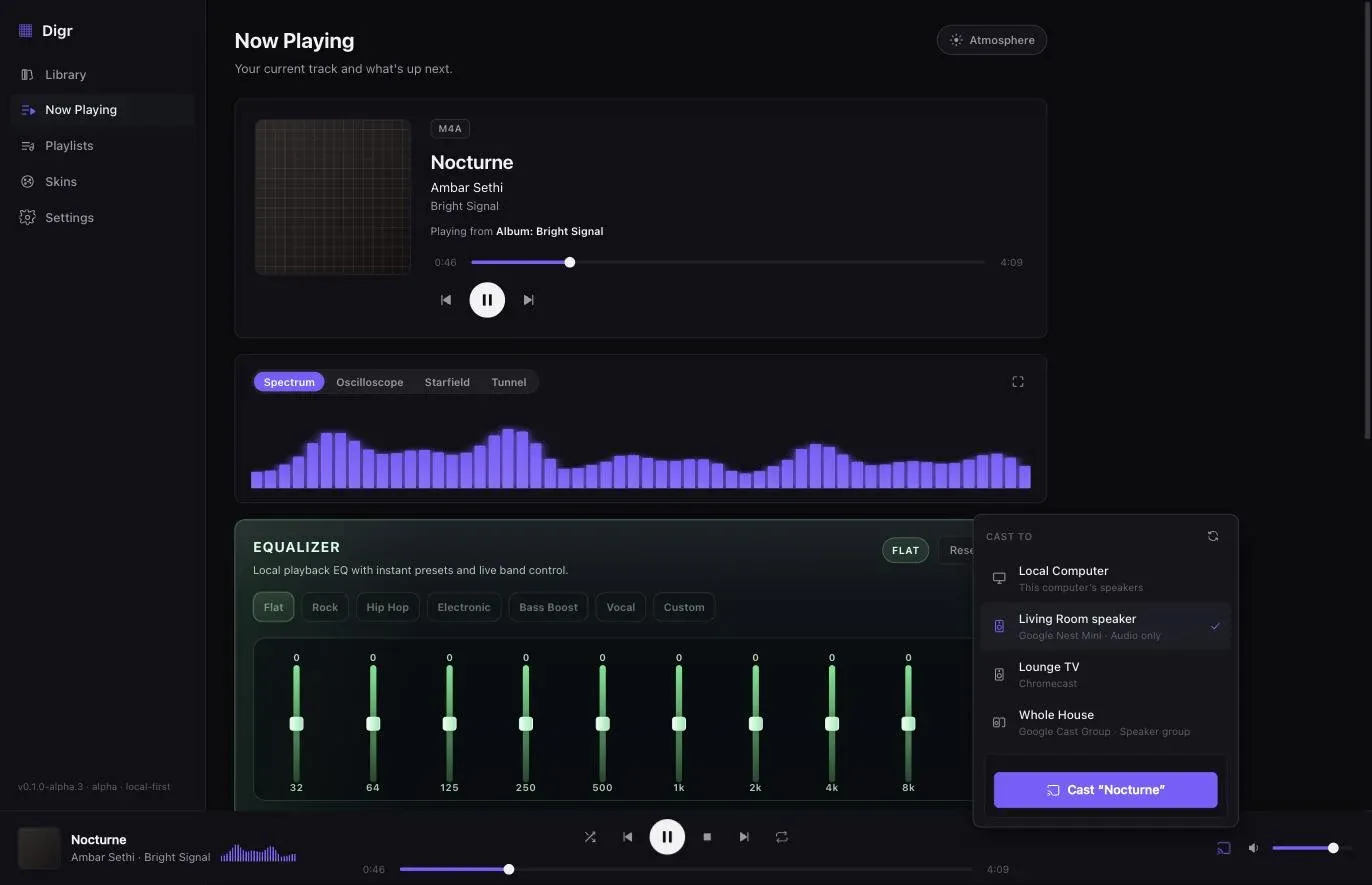
Stages two to four look like this today.
Your original files, not a re-encode. A local media server streams the actual file to the device with correct MIME types and Range support. File paths never appear in a URL — each track is served behind an unguessable token — and nothing leaves your network.
The queue never forks. While casting, the local engine is silenced but still owns the queue, shuffle and repeat, so albums and playlists progress on the device and disconnecting hands playback back on the same track, paused. Receiver volume and mute work, a group’s master volume works, and a fixed-volume receiver is shown as fixed rather than as a slider that silently does nothing. A receiver that is powered off, taken over by another application or lost from the network is detected and reported rather than producing a spinner. The macOS Now Playing panel keeps working, artwork and scrubber included, while the audio is coming out of a speaker in another room.
Two current limits are worth stating plainly. Digr does not ask the device what it can decode and does not convert anything on the way, so a file the receiver cannot handle simply fails — which is exactly the ALAC case above. And the receiver is handed one track at a time, which is why there is a pause between them. Receiver capability detection with conversion only where the receiver cannot decode the original, and Continuous Cast — the next track queued on the receiver before the current one ends — are both named three-to-six-month roadmap items in Digr Free, with no dates against them. Cast buffering controls and in-app Cast diagnostics are in the same block.
Two things Digr will not claim. It does not print a lossless badge over a wireless chain whose final stage it cannot see, and it will not invent synchronised playback across brands that were never designed to share a clock — both are on the permanent not-planned list with the reasoning next to them. What works today is the short version, and the rules the application is built to is the longer one.
Working out which layer broke
The architecture gives you the diagnostic order for free, and it is not “reboot the router”.
- Is the device in the list? If not, it is stage one. Same network, no guest VLAN, no VPN swallowing multicast. Nothing about files or formats can cause this.
- Does the session start but nothing loads? Stage two or three. Something else may hold the receiver, or the URL is not reachable from the device.
- Does one file fail while others play? Stage three, codec. Check the container against the receiver’s list before anything else.
- Does everything play but stop when you walk away with the laptop? Stage three, host. Your machine is the server; it needs to stay awake.
- Does it play and ignore the controls? Stage four. The control channel is the only thing that was broken.
The chain inside one machine — decode, mix, output — is the same set of stages in a different set of boxes, and the habit of asking which stage failed transfers between them.
The short version
- The sender sends a URL and commands. The receiver fetches and decodes. Everything else follows.
- Discovery is DNS-SD over multicast DNS, service
_googlecast._tcp, same network required, nothing paired. - A local file needs an HTTP URL, which means a server on your machine, which means your machine is part of the playback path.
- Formats fail rather than degrade. The receiver’s codec list — FLAC, MP3, AAC, Opus, Vorbis, WAV — is the constraint, and ALAC is not on it.
- Whether closing the laptop stops the music depends on who is hosting the media, not on the protocol.
- Digr casts your original file untouched, hands the receiver one track at a time today, and has Continuous Cast and capability detection as planned Free work.
For the product decision that follows from all of this, the Cast-capable player comparison records which applications serve the file themselves, which need a server, and which vendors do not document Cast support at all.
Sources
- Google Cast — Overview — the Sender “plays the role of controller for the Cast session”, and the Receiver is the app “responsible for responding to Sender commands and for conveying streaming content from an online streaming service to the Cast-enabled device”
- Google Cast — Integrate Cast into your Web Sender app — establishing a session “combines the steps of connecting to a device, launching (or joining) a Web Receiver app, connecting to that app, and initializing a media control channel”, and the load request as the mechanism by which media reaches the receiver
- Google Cast — MediaInformation reference —
contentIdis “typically the URL of the media”,contentUrl“is used as the media URL” when present, andcontentTypeis “the content MIME type” - Google Cast — Supported Media — the receiver audio codec list for Chromecast Audio, Google Home and Google Home Mini: FLAC up to 96 kHz/24-bit, HE-AAC, LC-AAC, MP3, Opus, Vorbis and WAV as LPCM. Checked for ALAC and AIFF; neither appears
- Google Cast — Discovery — “the sender device and the Cast-enabled devices device must be connected to the same WiFi network”, and the
_googlecast._tcp.localservice record that “will describe your Web Receiver device name and model along with service data” - RFC 6763 — DNS-Based Service Discovery — the
<Instance>.<Service>.<Domain>naming, a Service Name as “a pair of DNS labels, following the convention already established for SRV records” with_tcpor_udp, SRV records giving “the port number and target host name where the service may be found”, and TXT records carrying “additional information about the service” - RFC 9110 §14 — HTTP Semantics: Range Requests — partial retrieval of a representation,
Accept-Rangesas the server’s advertisement of support, and206 Partial Content - Digr — features and roadmap — bundled mDNS discovery, the local media server with correct MIME types, Range support and per-track tokens, the queue that stays authoritative while casting, volume and recovery behaviour, and the planned Continuous Cast and receiver-capability work
- No packet capture was performed and no hardware was instrumented for this article. Every protocol claim above is quoted from the documentation cited; the local-file consequences are derived from those claims and the derivation is shown in the body. No port numbers or wire formats are stated, because none was verified from a primary source
Common questions
Does casting send audio from my computer to the speaker?
No. In a Google Cast media session your machine sends a URL and control messages, and the Cast device fetches the media from that URL itself. Google’s own documentation describes the receiver as responsible for conveying the streaming content to the device, and the media object the sender fills in carries a content URL and a MIME type rather than audio. That is the single most useful fact about casting, because almost everything surprising about it follows from it.
Why does music keep playing when I close my laptop, and sometimes stop?
It depends on who is hosting the media. If the receiver was given a public URL — a streaming service — it keeps fetching from that URL and playback survives the sender going away. If the receiver was given a URL pointing at a small server running on your own machine, that server disappears when the machine sleeps and playback stops. Same protocol, opposite outcome, decided entirely by where the file lives.
Can I cast music files from my own computer to a Chromecast?
Yes, but not by handing the speaker a file path. A Cast receiver only accepts a URL it can reach over the network, and /Users/you/Music/track.flac is not one. So an application casting local files runs a small HTTP server on your machine, gives the receiver a URL served by it, and keeps serving the bytes for as long as the track plays. That is why the machine holding your library has to stay awake.
Why will a FLAC file cast but an ALAC file not?
Because the receiver does the decoding, so the receiver’s codec list is the constraint. Google publishes it: FLAC up to 96 kHz and 24-bit, MP3, LC-AAC, HE-AAC, Opus, Vorbis and WAV. Apple Lossless is not on that list, and neither is AIFF. When the format is unsupported the load fails rather than sounding worse, because nothing in the path is transcoding — the file either decodes on the device or it does not.
Does casting need an internet connection?
The Cast session itself is local. Google’s documentation requires only that the sender and the Cast device are on the same Wi-Fi network, discovery happens over multicast DNS on that network, and a locally served file never leaves it. A Cast device may still want the internet for its own reasons — initial setup, firmware, or a streaming service’s content — but playing a file from your own disk to a speaker in the next room is a local-network operation.
Is casting the same as Bluetooth?
Structurally it is the opposite. With Bluetooth your device encodes the audio and transmits it continuously for the whole session, so the source format stops mattering and the link is doing constant work. With Google Cast your device sends a URL and then issues commands, and the speaker retrieves and decodes the media itself — which is why the file format has to be one the speaker understands, and why the audio never passes through the Bluetooth-style bottleneck.
- Google Cast
- Chromecast
- mDNS
- DNS-SD
- local files
- HTTP