How to play your own music on speakers around the house
What actually has to happen for a file on your disk to come out of a speaker in another room — and why four ecosystems solve the same four problems in ways that do not interoperate.
Playing a local file through a speaker in another room sounds like it should be one feature. In practice it is four separate problems — discovery, serving, control and decoding — solved differently by every ecosystem, and when it fails you are usually looking at the wrong one.
The short version: Google Cast makes the speaker fetch the file, so your machine has to serve it and the speaker has to be able to decode it. AirPlay makes the sender decode and stream, so the file format stops mattering and your machine works harder. UPnP AV, which DLNA certifies, puts the playlist on a control point that has to stay awake, unless the renderer speaks OpenHome, in which case it does not.
Streaming services hide all of this, because they control both ends: their app tells their servers to tell the speaker to fetch a URL from their CDN. When the music is a file on your own disk, you are the CDN, and the plumbing becomes visible.
First, the two answers that are not a protocol
Two of them are worth ruling in or out before you go near any of this.
A cable. For one room, a wire from the computer to an amplifier is the cheapest, most reliable option there is, and it sidesteps every problem below. It stops being the answer the moment you want a second room, because the second room needs a second computer or a very long cable.
Bluetooth. It pairs with anything and it is genuinely simple. It is also point-to-point, short-range, and lossy by construction — the audio is re-encoded for the link whatever the source file was. For a kitchen speaker that is fine. For a lossless collection played through a system you care about, you are throwing away the thing you kept the files for, and it will not do two rooms at once.
Everything below is about the network route, which is what you want when the answer is “several rooms” or “without re-encoding my library”.
The four problems between a file and a speaker
From a file on your disk to sound in another room
Cast mDNS on the local network. Devices announce themselves; nothing to configure.
AirPlay Bonjour, Apple's own mDNS implementation.
UPnP SSDP multicast. Renderers and servers announce separately.
Cast The receiver fetches the file itself, so your machine must run an HTTP server on the LAN.
AirPlay The sender pushes an audio stream to the device.
UPnP A media server publishes the library; the renderer fetches from it.
Cast Sender holds the queue and stays connected as controller.
AirPlay Sender holds everything; it is an output, not a player.
UPnP / OpenHome Control point holds the playlist — unless it is OpenHome, where the renderer does.
Cast Fixed codec list. FLAC yes, up to 96 kHz/24-bit. ALAC is not on it.
AirPlay The sender has already decoded, so the file format stops mattering.
UPnP Entirely device-dependent; the renderer advertises what it takes.
Work through them in that order when something breaks. It saves rebooting a router because a speaker cannot decode a file. Stages 2 and 4 are the network version of the same chain a file goes down on your own machine — the difference is which box each stage happens in.
Google Cast: the receiver does the fetching
Cast is the one worth understanding in detail, because its architecture is the least intuitive and the most common.
Google’s own description splits it into a sender — the app you are holding, which controls the session — and a receiver — the app on the device, which is responsible for conveying the streaming content. That second half is the part that surprises people: the sender does not push audio to the speaker. It tells the speaker where to find the audio, and the speaker goes and gets it.
For a streaming service that is trivial, because the content is already on a public URL. For your own files it means the machine holding your library has to become a small web server on your network, serving that file over HTTP, for as long as the track is playing. Close the laptop and the speaker has nowhere to read from.
Two consequences follow that are worth knowing before you blame the speaker:
- The file format has to be one the receiver decodes, because the receiver is doing the decoding. Google publishes the list: FLAC up to 96 kHz/24-bit, MP3, LC-AAC and HE-AAC, Opus, Vorbis, and WAV. ALAC is not on it. An Apple Lossless library will not cast to a Chromecast or a Google Home speaker without being converted on the way, which is a real and frequently confusing limitation — and the strongest practical argument in the FLAC versus ALAC decision for anyone who owns Google speakers.
- The sender stays involved. It keeps hold of the queue and issues playback commands for the whole session, so shutting the sending machine down ends playback even though the audio was never flowing through it.
How a Cast session is actually assembled — the discovery record, the media URL, the control channel, and why a file on your own disk needs an HTTP server — is the full version of this section.
AirPlay: an output, not a player
AirPlay inverts the responsibility. The sending device decodes the audio itself and streams it to the receiver, which mostly just plays what arrives. The file’s format stops mattering at the point it leaves your machine — which is why an ALAC library that will not cast will happily AirPlay.
The trade is that the sender is doing continuous work for the whole session, and that AirPlay support in hardware is gated behind Apple’s licensing programme rather than being something any manufacturer can implement.
DLNA, UPnP and OpenHome: three roles, and a queue in the wrong place
UPnP AV — which DLNA is a certification programme on top of — splits the job into three: a server that publishes a library, a renderer that plays, and a control point that tells the renderer what to play. Any of them can be a different box from any other, which is the design’s strength and the source of its reputation.
The reputation comes from where the playlist lives. In standard UPnP AV the control point holds the queue and has to stay connected to feed the renderer the next track. Close the app on your phone, or let it sleep, and playback stops after the current track — not because anything failed, but because the thing that knew what came next has gone.
OpenHome is the fix for exactly that. It moves the playlist onto the renderer, so the streamer owns what is playing next and can advance through it by itself with no control point running at all. If you have ever wondered why some network streamers keep going when your phone locks and others do not, this is usually the difference.
What “multi-room” actually means, and why it does not cross brands
Every ecosystem offers speaker groups, and they are all native groups: a Google speaker group is implemented by Google, an AirPlay 2 multi-room set by Apple. Within one ecosystem, synchronisation works because one vendor controls the clock, the buffering and the transport on both ends.
Across ecosystems it does not, and the honest answer is that nobody can make it work well by bolting protocols together. Keeping two speakers audibly in sync in the same room is a matter of milliseconds; two protocols that were never designed to share a clock will drift, and the result is not “slightly imperfect multi-room”, it is an echo. Software that claims otherwise is usually either introducing a large delay everywhere or quietly not synchronising at all.
Digr will support each ecosystem’s own speaker groups. It will not invent a cross-brand sync layer and call the result synchronised — that is on the permanent not-planned list, with the reasoning next to it.
Where Digr is, precisely
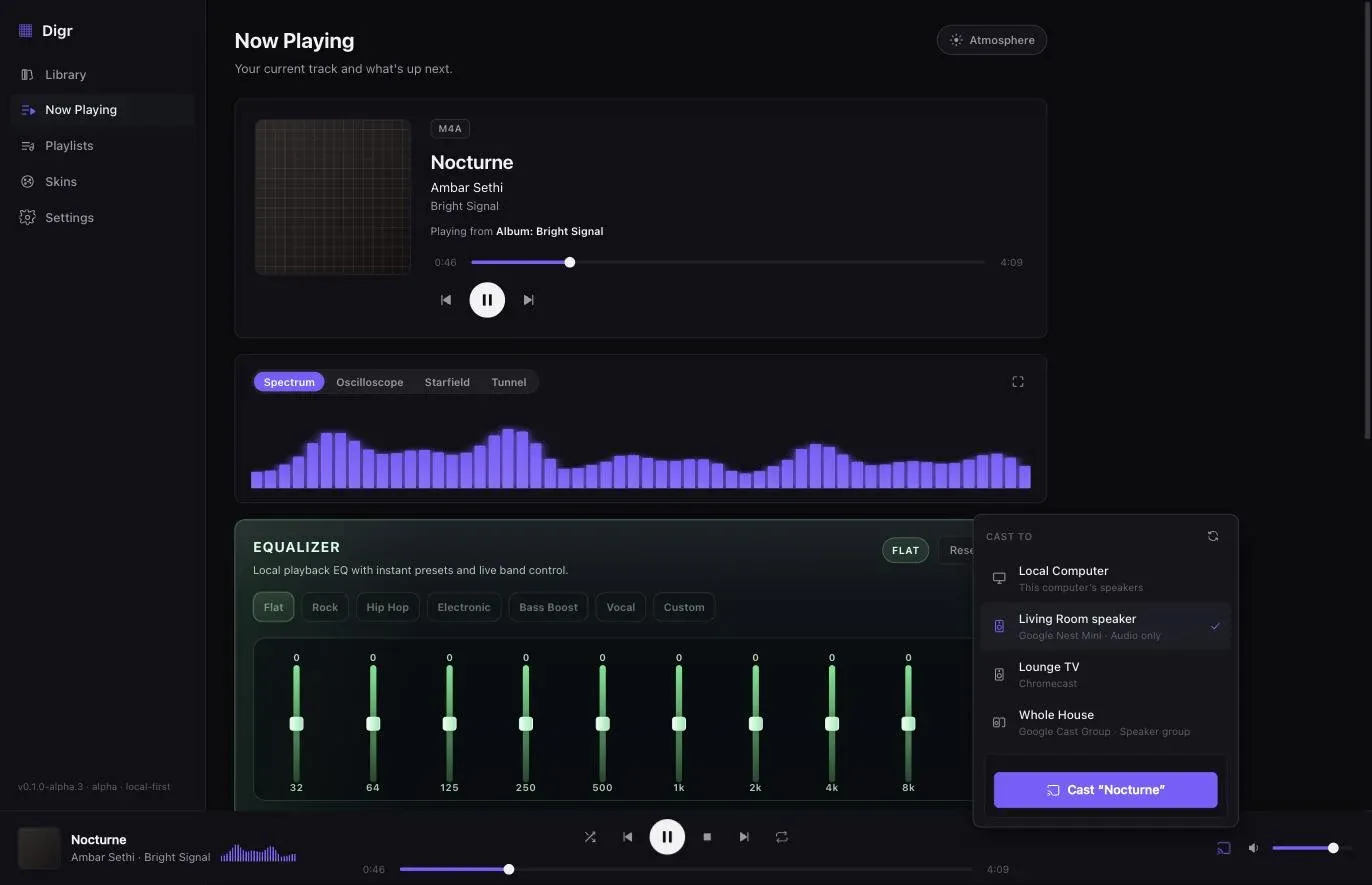
Digr speaks Google Cast, and only Google Cast, today. Chromecasts, Google Home speakers and Google speaker groups are discovered over mDNS with nothing to configure — the resolver is bundled rather than borrowed from the operating system’s Bonjour stack — and a local media server streams the original file to the device with correct MIME types and range support, with each track behind an unguessable token so file paths never appear in a URL.
The queue stays authoritative on your machine while casting: the local engine is silenced but still owns shuffle, repeat and position, so an album progresses on the device and disconnecting hands playback back on the same track, paused.
AirPlay, DLNA/UPnP and OpenHome are not implemented. All three are named roadmap items with no dates against them, and the reason there are no dates is honest rather than coy: each is a protocol implementation with its own certification, discovery and licensing questions to resolve first.
There is also a gap in what Cast can do that Digr has not closed yet. Because the receiver decodes, a file the receiver does not support simply fails — Digr does not currently ask the device what it can handle, and does not convert anything on the way. Receiver capability detection and compatibility conversion are planned work, not current behaviour, so an ALAC library and a Chromecast is a combination to know about in advance.
The five systems you will actually be choosing between
Two of these are protocols you can send to from your own software; two are products that own the whole chain; one is Digr. They are not interchangeable and the differences are structural rather than a matter of quality — and if it is the protocols rather than the products you are weighing up, the architectural comparison of Cast, AirPlay and DLNA organises them by where the playback state lives.
| System | Who fetches the audio | Local files | Multi-room sync | Open or licensed | In Digr today |
|---|---|---|---|---|---|
| Google Cast | The receiver pulls it | Only what the receiver decodes. FLAC to 96/24; no ALAC | Google speaker groups | Google’s SDK, free to send from | Yes — the only one |
| AirPlay | The sender streams it | Any format; it is decoded before it leaves | AirPlay 2, inside Apple’s world | Hardware needs Apple’s licence | No. Roadmap, no date |
| DLNA / UPnP | The renderer pulls from a server | Device-dependent | Not in the spec | Open spec; DLNA certifies on top | No. Roadmap, no date |
| Sonos | Sonos indexes a network share | Share only, and capped — see below | Sonos-to-Sonos, very good | Closed, Sonos hardware | No, and not a roadmap item |
| Roon (RAAT) | An always-on Server feeds endpoints | Excellent; a real library server | Yes — endpoint owns the clock, target 1 ms | RAAT unpatented; hardware is certified | No. A different product category |
Two things fall out of that table that are worth saying plainly.
Sonos and Roon are not protocols Digr could add. They are complete products with their own libraries and their own hardware relationships. Listing them next to Cast and AirPlay is useful because they are the realistic alternatives somebody weighs up — not because Digr support is pending. It is not, and it is not planned.
Sonos’s constraints are the ones people hit first. Files have to live on a network share rather than on the laptop; the ceiling is 65,000 tracks; and the sample-rate limit means a 96 kHz file has to be converted somewhere. None of that is a criticism of Sonos, which does what it does extremely well — it is just a different bargain from “point a player at a folder”.
Why the machine holding your library has to stay awake
This one catches everybody, and it falls out of the architecture rather than being a bug in anything.
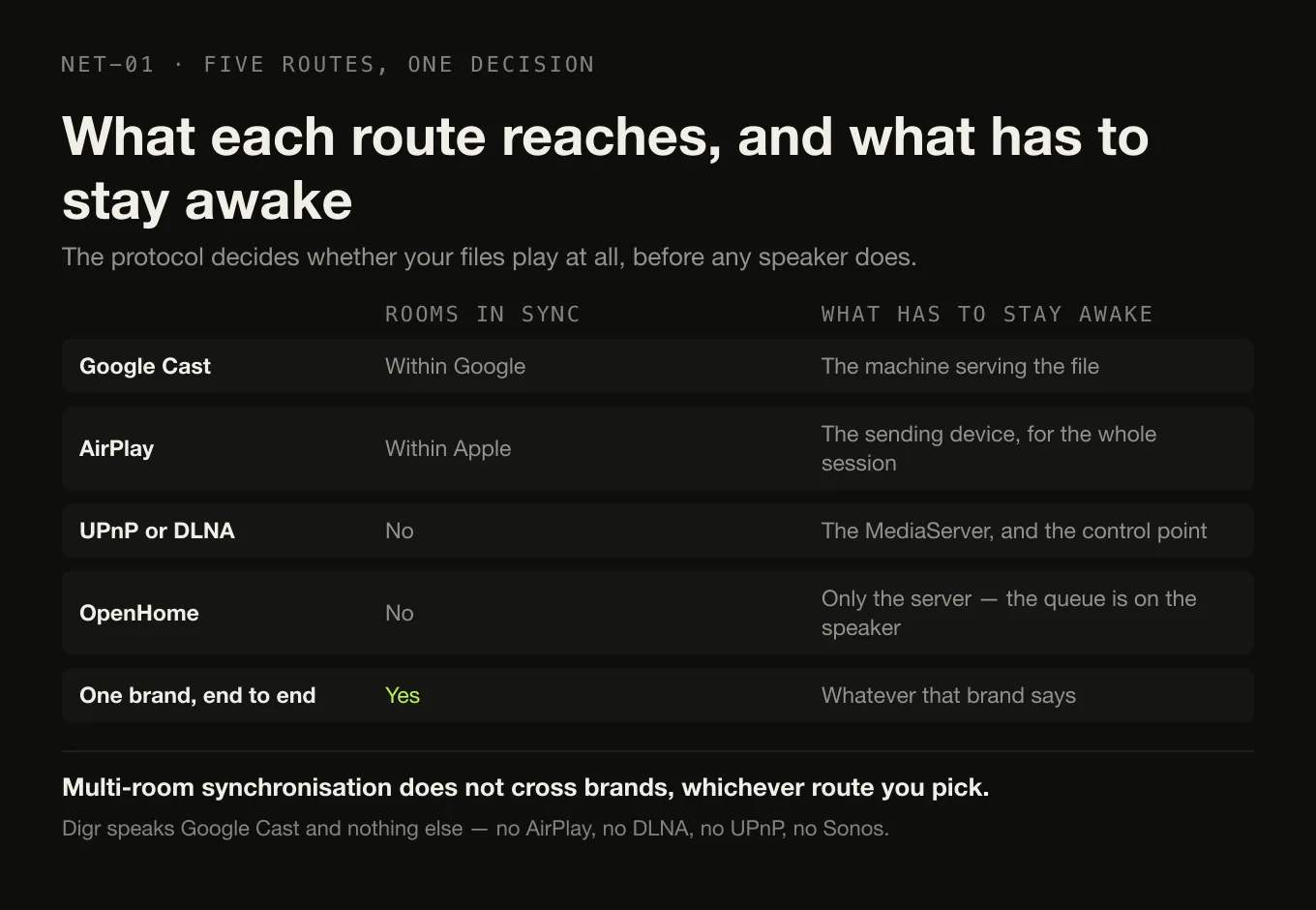
With Cast, your computer is serving the file over HTTP for the duration of the track. With UPnP, the media server is answering requests. With AirPlay, the sender is decoding and streaming continuously. In all three the machine holding the library is doing work for as long as the music plays — so if it sleeps, playback stops, and the failure looks like the speaker’s fault.
On a laptop that means either staying awake with the lid open, adjusting sleep settings for listening sessions, or moving the library somewhere that never sleeps. It is the strongest practical argument for a small always-on machine or a NAS if whole-house audio matters to you, and it is worth knowing before you conclude your network is unreliable.
The one architecture that escapes it is OpenHome, and only partly: because the renderer holds the playlist and fetches tracks itself, the control point can go away. Whatever is serving the files still cannot.
Choosing a route, if you are starting from nothing
- You already own Google or Nest speakers: Cast works, and works with the fewest moving parts. Keep the library in FLAC rather than ALAC.
- You are inside Apple’s ecosystem: AirPlay 2, and accept that the sending device is doing real work throughout.
- You own or want a hi-fi streamer: check whether it does OpenHome as well as UPnP. It is the difference between playback that survives your phone locking and playback that does not.
- You want one library reachable from several ecosystems: run a UPnP media server for the devices that speak it, and use the native protocol for the ones that do not. There is no single protocol that reaches everything, and the setups that claim to are usually a stack of bridges.
The thing not to do is choose speakers first and work out the protocol afterwards. The protocol is what determines whether your files play, whether they play in sync, and whether the music stops when your phone goes to sleep.
Once the route is settled, the software is a separate shortlist: which players actually cast a local file sorts the Cast options by what each one sends to the speaker — the original file, a transcode, or a live encode of your computer’s output.
And if the advice you keep meeting is “run Roon” or “run Plex”, the question before the product is whether a second machine is needed at all. What a music server adds, and the cases where a desktop application is the smaller correct answer, answers that first.
Sources
- Google Cast — Overview — sender and receiver roles, and the receiver conveying the content itself
- Google Cast — Supported Media — the codec list, including FLAC up to 96 kHz/24-bit and the absence of ALAC
- What is OpenHome? — the playlist moving from the control point to the renderer
- Digr’s roadmap — what is implemented, what is planned, and what is refused
Common questions
Can I play music files from my computer on a Google Nest or Chromecast speaker?
Yes, provided the file is in a format the receiver decodes and your machine stays awake. Google Cast works by telling the speaker where to fetch the audio, so the computer holding the library has to run a small HTTP server on your local network for as long as the track plays. Close the laptop and the speaker has nowhere to read from.
Why will my ALAC files not cast to a Chromecast?
Because the Cast receiver does the decoding, and Apple Lossless is not in its codec list. Google’s published supported-media documentation for Chromecast and Google Home covers FLAC up to 96 kHz/24-bit, MP3, LC-AAC, HE-AAC, Opus, Vorbis and WAV. ALAC does not appear. An Apple Lossless library has to be converted somewhere on the way, which is a real and frequently confusing limitation.
What is the difference between Google Cast and AirPlay?
Who fetches the audio. With Google Cast the receiver pulls the file itself, so the file’s format has to be one the speaker decodes. With AirPlay the sender decodes the audio and streams it to the device, so the source format stops mattering the moment it leaves your machine. The trade is that the sending device does continuous work for the whole session.
Why does playback stop when my phone locks?
In standard UPnP AV the control point — the app on your phone — holds the playlist and has to stay connected to feed the renderer the next track. When it sleeps, the renderer finishes the current track and stops. OpenHome is the fix: it moves the playlist onto the renderer, so a network streamer can advance through a queue with no control point running at all.
Can I play the same music in sync across speakers from different brands?
Not reliably, and nobody can make it work well by bolting protocols together. Multi-room synchronisation works within one ecosystem because a single vendor controls the clock, the buffering and the transport at both ends. Two protocols that were never designed to share a clock will drift, and the audible result of drift between speakers in the same room is an echo rather than slightly imperfect sync.
Which protocols does Digr support today?
Google Cast, and only Google Cast. Chromecasts, Google Home speakers and Google Cast speaker groups are discovered over mDNS and streamed the original file from a local media server on your machine. AirPlay, DLNA/UPnP and OpenHome are named roadmap items with no dates against them, and Sonos and Roon are complete products rather than protocols Digr could add.
- Google Cast
- AirPlay
- DLNA
- UPnP
- OpenHome
- multi-room