Lossless vs lossy: what is actually thrown away
Lossless compression is reversible and lossy compression is not. What that guarantee covers, what a psychoacoustic encoder discards, and why audibility is a separate question from loss.
Lossless compression is reversible: decode the file and you get back the exact samples that went in. Lossy compression is not: the encoder permanently discards parts of the signal that a psychoacoustic model predicts you are unlikely to notice, and no amount of later processing recovers them.
That is the whole distinction, and it is a claim about arithmetic rather than about ears. Whether you could hear the difference on your equipment with that material is a separate question with a separate — and much less convenient — answer.
Keeping the two apart is the useful thing this article can do. Almost every argument about lossless audio is two people answering different questions.
Three things that can happen to audio
| What it does | Reversible? | Typical size, 4-minute CD track | What it guarantees | |
|---|---|---|---|---|
| Uncompressed — WAV, AIFF | Writes every sample out as it is | Nothing to reverse | ≈ 42 MB | The samples are the samples |
| Lossless — FLAC, ALAC | Compresses by prediction, like a ZIP that understands audio | Yes, exactly | ≈ 25 MB | Decoding returns bit-identical samples |
| Lossy — MP3, AAC, Vorbis, Opus | Discards signal a psychoacoustic model judges inaudible | No | ≈ 7.7 MB at 256 kbit/s | Only that an encoder judged the loss acceptable |
The uncompressed figure is arithmetic: 44,100 samples a second × 2 bytes × 2 channels × 240 seconds. The lossy figure is bitrate × duration. The lossless figure is a rule of thumb, because how hard a track compresses depends far more on the music than on the codec — sparse acoustic recordings compress much harder than dense modern mastering.
Note what the last column does and does not say. Lossless guarantees you have lost nothing. Lossy guarantees nothing about audibility at all — it is a statement about a model’s prediction, not about your hearing.
The same track, down two different paths
-
Lossless · FLAC, ALAC
Encode → decode
≈ 60% of the original, and back again
The encoder predicts each sample from the ones before it and stores only the error. Nothing is discarded, so decoding reconstructs the original list exactly — and FLAC carries a checksum of that original list so a decoder can prove it.
-
Lossy · MP3, AAC, Vorbis
Analyse → discard → decode
≈ 18%, and never back again
A psychoacoustic model estimates which parts of the signal will be masked by louder parts nearby, and spends few or no bits on them. The decoder reconstructs what survived. There is no path back to the discarded material, because it was never stored.
What a lossless codec actually guarantees
Decoding a valid FLAC or ALAC file reconstructs the original PCM samples exactly. Not approximately, not perceptually — the same numbers.
That is unusually checkable for an audio claim. The FLAC specification puts an
MD5 checksum of the unencoded audio in every file’s STREAMINFO block,
precisely so that a decoder can determine an error exists in the audio “even
when, despite the error, the bitstream itself is valid”. Decode the file, hash
the result, compare. Either it matches or something is wrong with the file.
Two consequences that people frequently get backwards:
- Two lossless files of the same source are the same audio. A FLAC and an ALAC made from the same CD track decode to identical samples, so there is no sound-quality argument available between them — only a tooling argument.
- Lossless does not mean uncompressed. FLAC is compressed, by roughly half, and is exactly as accurate as the WAV it came from. Uncompressed is a storage decision, not a quality tier.
FLAC also has a compression level, -0 through -8. It changes encoding time
and a few percent of file size, and it does not change the decoded audio at all.
Every level is lossless.
What a lossy encoder throws away, and why
A lossy encoder is not a lossless encoder with the quality turned down. It is doing something different: modelling a listener.
The Vorbis I specification describes Vorbis as a “general purpose perceptual audio CODEC” whose design “assumes a complex, psychoacoustically-aware encoder” paired with a much simpler decoder. That asymmetry is characteristic of the whole family — MP3, AAC, Vorbis and Opus all put the intelligence in the encoder — and it is why two MP3 files at the same bitrate from different encoders are not the same quality.
The model exploits two well-established properties of hearing:
The threshold of hearing. Sound quiet enough, at a given frequency, is not perceived at all. Bits spent describing it are wasted.
Masking. A loud sound raises the threshold for other sounds near it in frequency and in time, so quieter detail nearby becomes inaudible. This is the larger effect and it is the one doing most of the work.
Why the encoder can afford to discard something
The encoder does Spends nothing on it. Nobody was going to hear it in any circumstances.
The encoder does Raises its estimate of the threshold around the loud component and spends fewer bits underneath it.
The encoder does The same, in time rather than in frequency — which is why the artefacts that do escape tend to cluster around transients.
The encoder does Spends the remaining bits here. When there are not enough of them, this is where the damage becomes audible.
Why the loss is one-way
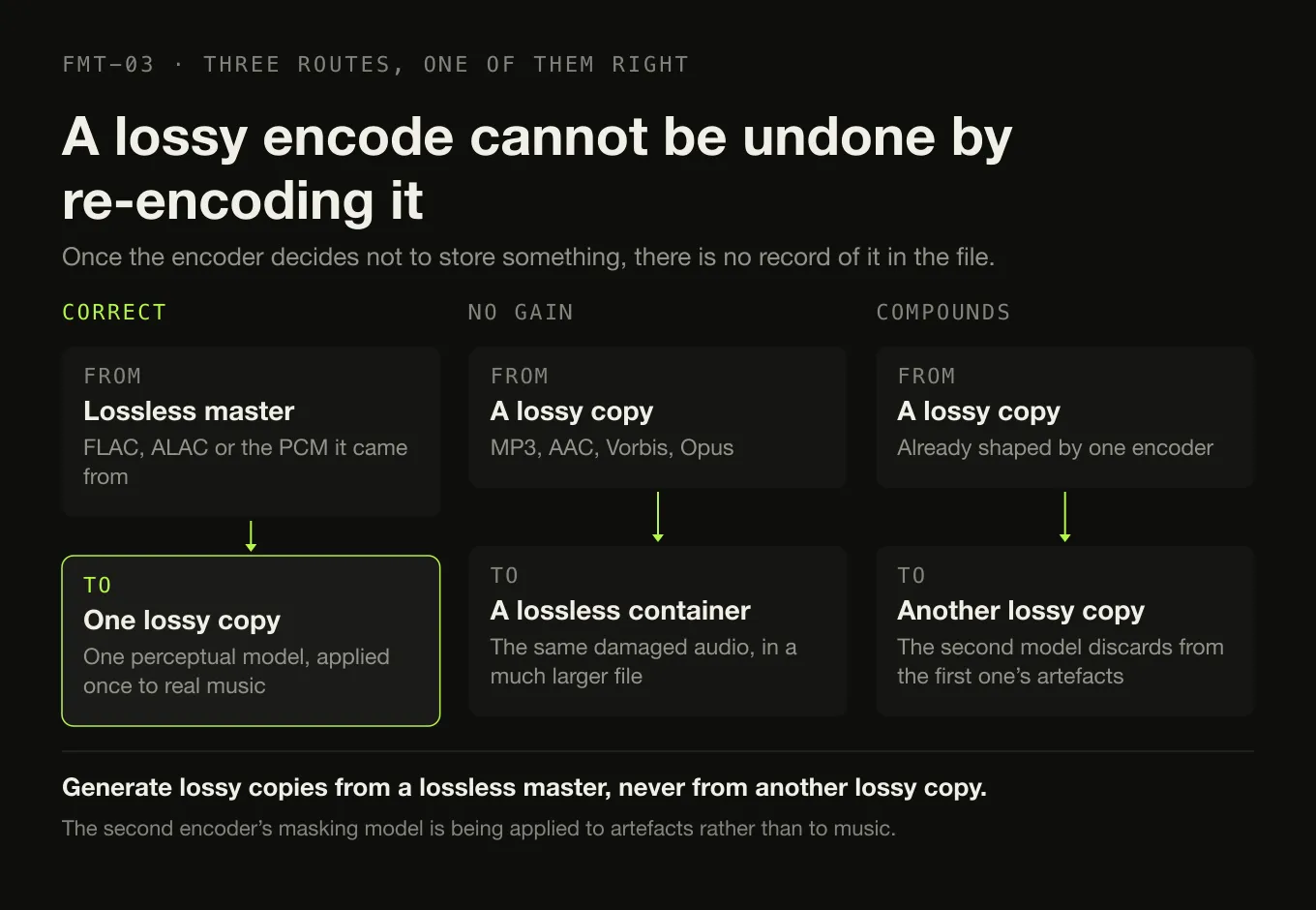
Once the encoder has decided not to store something, there is no record of it anywhere in the file. The decoder is not reversing a transformation; it is reconstructing what survived.
This is why converting a lossy file to a lossless one improves nothing. An MP3 re-encoded as FLAC is a large file containing exactly the damaged audio the MP3 already contained. The only thing that grows is the file size.
It is also why transcoding between lossy formats compounds. Each encoder applies its own model to a signal already shaped by a previous one, and the second model’s assumptions about masking are being made about artefacts rather than about music. Generate lossy copies from a lossless master, not from another lossy copy.
Bitrate means different things on each side
For a lossy codec, bitrate is the budget. It is the single largest determinant of quality, and the relationship is steep at the bottom and flat at the top: the gap between 96 and 128 kbit/s is obvious, the gap between 256 and 320 kbit/s is small enough that it stops being the interesting variable.
For a lossless codec, bitrate is a result. You do not choose it; the encoder produces whatever bitrate the material required, and a quiet solo piano track produces a much lower one than a dense mix. FLAC’s documentation notes that the resulting bitrate is roughly proportional to how much information is in the signal. A “1,000 kbit/s FLAC” is a description of the music, not a setting.
Which is why comparing the two by bitrate alone is meaningless. One number is an instruction and the other is an observation. Bitrate, and which one to choose takes that apart properly, with the lossless span and the CBR-against-VBR difference measured rather than asserted.
Can you actually hear it?
This is the question people mean, and it deserves a straight answer rather than either of the usual ones.
It depends on the bitrate, the codec, the material, the equipment and the listener — and the honest summary is that at low bitrates the difference is easy, at high bitrates it is hard, and where “hard” turns into “impossible” varies between people and between tracks. Anybody quoting a single threshold in kilobits per second as a fact is stating a preference.
What is not in doubt is how you would find out. Subjective audio quality has standardised methodology, because unblinded listening is famously unreliable — knowing which file is playing changes what people report hearing.
- ITU-R BS.1116-3, Methods for the subjective assessment of small impairments in audio systems, is the recommendation for exactly this case: differences small enough that you are not sure they are there.
- ITU-R BS.1534-3, Method for the subjective assessment of intermediate quality level of audio systems — the MUSHRA method — covers the larger differences you get at lower bitrates.
Both use a hidden reference, blind presentation and repeated trials. The point is not that you need a laboratory to choose a file format. It is that “I can clearly hear it” is a claim about a perceptual experiment, and there is a published way to run one.
The practical position that follows is unexciting and correct: keep lossless masters because storage is cheap and the guarantee is free, use lossy copies wherever convenience matters, and do not spend an evening arguing about which one you can hear. Nothing about that requires deciding whether you have good ears.
What to actually do
- Archive lossless. FLAC unless your workflow runs through Apple’s own applications, in which case ALAC. The seven formats a collection actually contains covers the rest.
- Derive lossy copies from the master, never from another lossy file, and treat them as disposable.
- Do not convert lossy to lossless. It recovers nothing and costs disk.
- Do not re-rip a collection that is already in a sensible lossless format. Transcoding between lossless formats is safe and pointless.
- If you genuinely want to know whether you can hear a given encoder, test it blind, on your own equipment, with music you know. Anything else is measuring your expectations.
Sources
- FLAC FAQ — Xiph.Org on lossless decoding returning the original data, compression level not affecting the decoded audio, and bitrate being proportional to the information in the signal
- RFC 9639 §8.2 — the FLAC STREAMINFO block — the MD5 checksum of the unencoded audio, and its purpose of detecting an error in the audio even where the bitstream is valid
- Vorbis I specification — Vorbis as a “general purpose perceptual audio CODEC” assuming a “complex, psychoacoustically-aware encoder”
- Recommendation ITU-R BS.1116-3 — Methods for the subjective assessment of small impairments in audio systems
- Recommendation ITU-R BS.1534-3 — Method for the subjective assessment of intermediate quality level of audio systems
Common questions
Can you hear the difference between lossless and lossy?
Sometimes, depending on the bitrate, the codec, the material and the listener. At low bitrates the difference is obvious; at 256 kbit/s and above with a modern encoder most listeners cannot reliably identify it on most music. The only way to know for yourself is a properly blinded comparison — which is what the ITU listening-test recommendations exist to define, because unblinded impressions of audio are famously unreliable.
Is FLAC better quality than MP3?
FLAC is mathematically exact and MP3 is not, which is a real and checkable difference. Whether it is an audible one depends entirely on the MP3: a 128 kbit/s file from 2004 and a 320 kbit/s file from a modern encoder are not the same object. The safe formulation is that FLAC guarantees you have lost nothing, and MP3 guarantees only that an encoder judged the loss acceptable.
Does converting MP3 to FLAC improve quality?
No. The discarded information is gone from the MP3 permanently, and encoding what remains as FLAC preserves exactly that damaged audio in a file three times the size. Nothing is recovered and nothing becomes archival. The only situation where the conversion is reasonable is a technical one — some tool in your chain requires FLAC — and even then the master is still the MP3.
Is Apple Lossless actually lossless?
Yes. ALAC is a genuine lossless codec: decoding it reconstructs the original PCM samples exactly, the same guarantee FLAC makes. The confusion comes from the container, because ALAC normally lives in an .m4a file and so does AAC, which is lossy. The extension tells you about the wrapper; only the codec inside it tells you whether anything was discarded.
Is WAV better quality than FLAC?
No. WAV is uncompressed and FLAC is losslessly compressed, and both hold exactly the same samples — decoding a FLAC file returns bit-identical audio to the WAV it was made from. FLAC is roughly half the size and carries reliable metadata, which is why it is the better archival choice for a personal collection. Uncompressed is not a quality tier; it is a storage decision.
Does lossless mean uncompressed?
No, and conflating the two causes most of the confusion in this area. Uncompressed means the samples are stored as they are, as in WAV and AIFF. Lossless means the data is compressed by a reversible algorithm, as in FLAC and ALAC, so decoding reconstructs the original exactly. Lossy means the encoder discarded part of the signal and the original cannot be reconstructed at all.
- lossless
- lossy
- MP3
- AAC
- FLAC
- psychoacoustics
- Vorbis