What bitrate means, and which one to choose
Bitrate is data per second of audio, and it means three different things depending on the encoding system. Measured FLAC and AAC figures, CBR against VBR, and why 320 kbit/s is not a threshold.
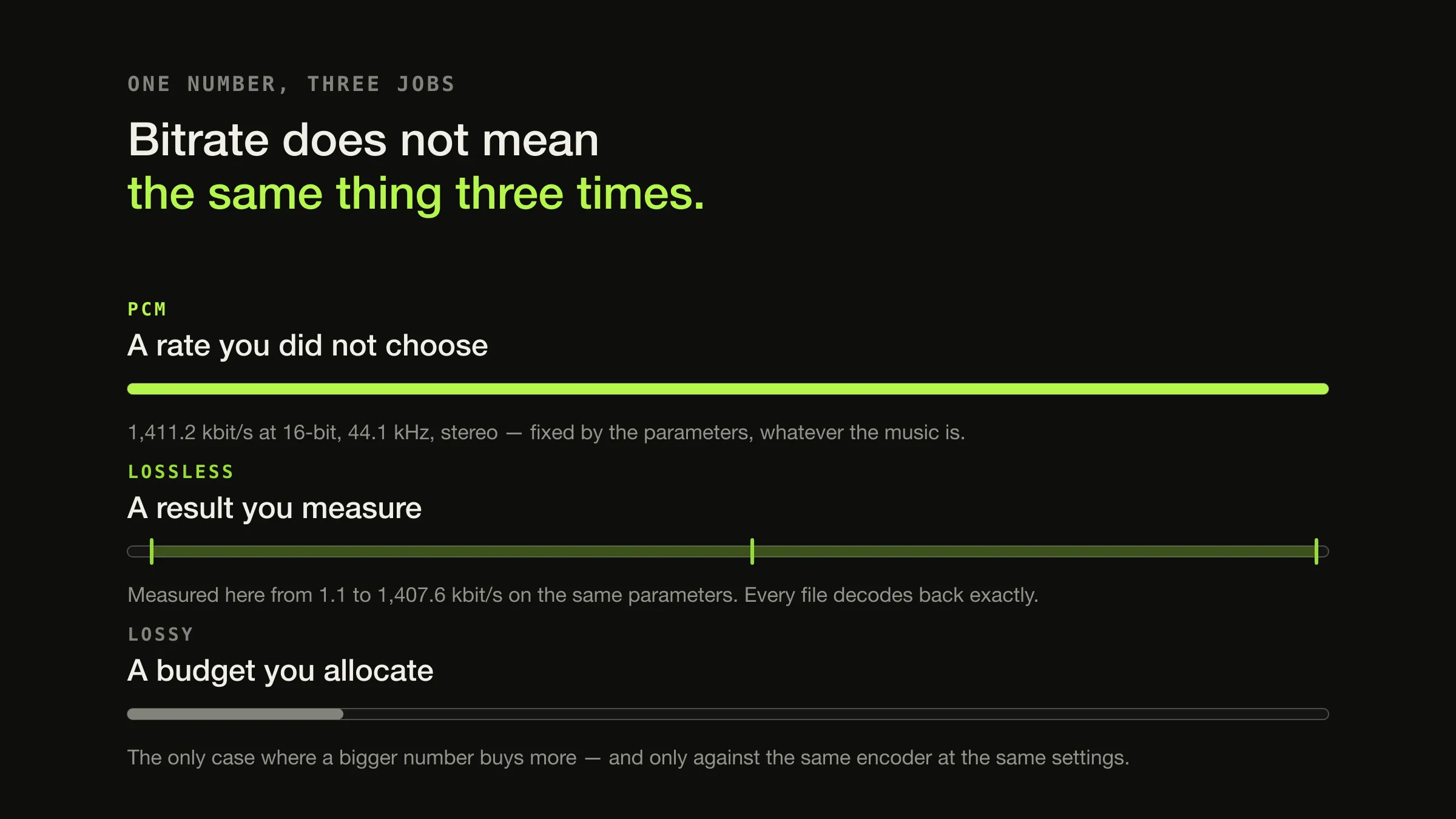
Bitrate is the amount of encoded data used for each second of audio, usually written in kilobits per second (kbit/s or kbps). Its meaning depends entirely on the encoding system: uncompressed PCM has a deterministic data rate fixed by sample rate, bit depth and channel count; a lossless codec produces whatever rate the material happened to need while still decoding back exactly; and a lossy codec is given a bit budget and spends it on a perceptual approximation.
Those three are not rungs on one ladder, which is why “higher bitrate is better quality” is a statement that is sometimes true, sometimes meaningless, and sometimes backwards. A 1,411 kbit/s WAV and a 700 kbit/s FLAC of the same track hold identical samples. Only the third case — the budget — behaves the way the folklore expects.
The same number, three different jobs
-
PCM · WAV, AIFF
A determined rate
1,411.2 kbit/s at 16-bit, 44.1 kHz, stereo
Nothing is chosen. Multiply sample rate by bit depth by channels and the rate falls out. Two PCM files with the same three parameters have the same bitrate whatever the music is, and the number carries no information about quality beyond those parameters.
-
Lossless · FLAC, ALAC
A reported result
Whatever the material required — measured below at 1.1 to 1,407.6 kbit/s
You choose a compression level, which changes encoding time and a few percent of size. You do not choose the bitrate: the encoder predicts each sample from its neighbours and stores the error, so a sparse recording produces a low figure and a dense one a high figure. Every file decodes back to the original samples exactly.
-
Lossy · MP3, AAC, Opus
An allocated budget
Whatever you told it to spend
Here the number really is an instruction, and it really does trade against quality — but only against other files from the same encoder at the same settings. How well a codec spends a given budget varies between codecs and between versions of the same codec.
PCM: the arithmetic, and the file sizes that follow
For uncompressed audio the rate is a multiplication:
sample rate × bit depth × channels = bits per second
44,100 × 16 × 2 = 1,411,200 bit/s = 1,411.2 kbit/s
Divide by eight for bytes, multiply by duration for a file size. Everything in this table is that one calculation, and every container in the formats a collection actually contains that stores PCM — WAV and AIFF — obeys it exactly:
| Configuration | Bitrate | Per minute | Per hour |
|---|---|---|---|
| 16-bit, 44.1 kHz, stereo | 1,411.2 kbit/s | 10.6 MB | 635 MB |
| 16-bit, 48 kHz, stereo | 1,536 kbit/s | 11.5 MB | 691 MB |
| 24-bit, 48 kHz, stereo | 2,304 kbit/s | 17.3 MB | 1,037 MB |
| 24-bit, 96 kHz, stereo | 4,608 kbit/s | 34.6 MB | 2,074 MB |
| 24-bit, 192 kHz, stereo | 9,216 kbit/s | 69.1 MB | 4,147 MB |
Using megabytes of 1,000,000 bytes, as storage manufacturers do. What sample rate and bit depth actually change is a separate question from what they cost, and the two get conflated constantly — the table above is only the cost. Multiplied out across a whole collection, the same arithmetic becomes how much disk space a library of a given size needs.
Lossless: the bitrate is a measurement of the music
This is the part that surprises people, so here it is measured rather than
described. Four thirty-second stereo signals, all 16-bit 44.1 kHz PCM and
therefore all 1,411.2 kbit/s before encoding, put through the FLAC encoder in
Apple’s AudioToolbox via afconvert on macOS 26.5.2 (build 25F84):
| Signal | PCM bitrate | FLAC bitrate | Of the original |
|---|---|---|---|
| Digital silence | 1,411.2 kbit/s | 1.1 kbit/s | 0.1% |
| 440 Hz sine | 1,411.2 kbit/s | 142.4 kbit/s | 10.1% |
| Seven tones plus noise | 1,411.2 kbit/s | 550.3 kbit/s | 39.0% |
| Full-scale white noise | 1,411.2 kbit/s | 1,407.6 kbit/s | 99.7% |
Same parameters, same encoder, same duration — and a range of more than twelve hundred to one in the resulting bitrate. Every one of those files decodes back to its input exactly; the round trip through FLAC and out to PCM was byte-identical to the source on the same machine.
So a track reporting 1,100 kbit/s is not a better FLAC than one reporting 600. It is a denser recording. The specification explains why: compression works because “samples in audio signals tend to be highly correlated with their close neighbors”, and the residual “will require fewer bits per sample than the original signal” only when the predictor is effective. Noise defeats prediction, so noise costs almost the full uncompressed rate.
None of this is a quality setting. FLAC’s -0 to -8 levels change encoding
time and a few percent of size; they do not change a single decoded sample.
Lossless versus lossy covers that guarantee
and how it is verified.
Lossy: the bitrate is a budget, and there are four ways to spend it
Only here does bitrate behave like a quality control, and even then it is the size of the budget rather than the skill of the spending.
- CBR — constant bitrate. Every frame gets the same allocation. Predictable size and bandwidth, wasteful on easy material.
- ABR — average bitrate. Hits a target on average, varying frame to frame.
- Constrained VBR — varies inside a window, which is how MP3 and AAC use a bit reservoir.
- VBR — variable bitrate. You set a quality level; the bitrate is an outcome.
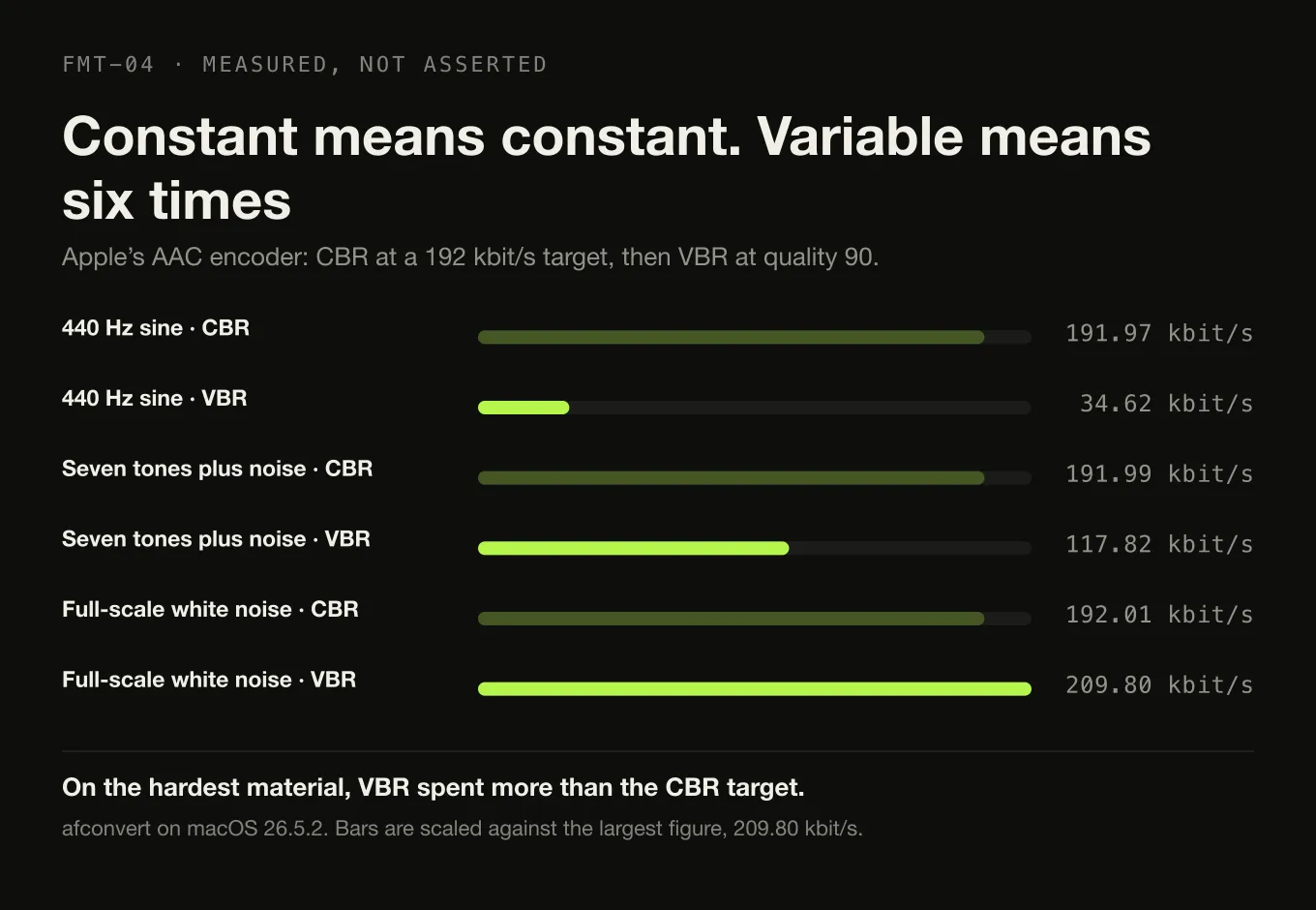
Here is what that difference looks like when measured. The same three signals as above, through Apple’s AAC encoder on macOS 26.5.2 — once at CBR with a 192 kbit/s target, once at unconstrained VBR at quality 90:
| Signal | CBR, 192 kbit/s target | VBR, quality 90 |
|---|---|---|
| 440 Hz sine | 191.97 kbit/s | 34.62 kbit/s |
| Seven tones plus noise | 191.99 kbit/s | 117.82 kbit/s |
| Full-scale white noise | 192.01 kbit/s | 209.80 kbit/s |
The CBR column is flat to within 0.02%, which is what “constant” means. The VBR column moves by a factor of six — and note the last row, which is the honest part: on the hardest possible material, VBR spent more than the CBR target. That is the setting doing its job, and it is also why “VBR is always smaller” is not a claim that survives measurement.
Where the bits go
CBR Spends the full allocation anyway. The surplus bits describe detail that was already adequately described.
VBR Spends a fraction of it. Measured above: 34.6 kbit/s where CBR spent 192.
CBR Spends the same allocation, which is now the constraint. This is where audible artefacts appear first.
VBR Spends more, up to and beyond the nominal figure, because the quality target is the thing being held constant.
CBR The data rate. Useful when a transport needs fixed-size frames, or when the size must be known in advance.
VBR The perceptual quality target. Useful for a file on a disk, where nothing cares how big each second is.
So VBR is not simply better; it is better for files. RFC 6716, the Opus specification, says the codec “is more efficient when operating with variable bitrate (VBR), which is the default”, and gives two reasons to override it: a transport requiring fixed-size frames, and encrypting sensitive audio, where a varying rate leaks information about the content. Neither applies to an album on a hard disk. Both apply to real systems, which is why the mode exists.
Two codecs at the same bitrate are not the same quality
This is the claim that most cleanly kills “bigger number, better sound”, and it has been tested rather than argued.
In the public multiformat listening test of July 2014, Opus 1.1, Apple’s AAC encoder via qaac 2.41 and Ogg Vorbis aoTuV Beta 6.03 were each calibrated to roughly 96 kbit/s and compared against LAME 3.99.5 MP3 that was allowed 136 kbit/s on average — 29% more data. Thirty-eight listeners produced 339 valid results across thirty-five music tracks and five speech samples, using blind ABC/HR methodology against the lossless originals.
Opus won on a mean rating of 4.65, AAC came second on 4.40, and the MP3 tied with Vorbis in third on 4.24 despite its bitrate advantage. The difference between Vorbis and MP3 was not statistically meaningful (p = 0.981); the overall result was (p = 0.000).
Read carefully, that result says nothing about whether any of those files were transparent. It says the ranking of formats at a given data budget is a property of the encoder, not of the budget — so a bitrate quoted without a codec and a version is not a specification.
Why 320 kbit/s is not a threshold
320 kbit/s feels like a guarantee for a structural reason: it is the highest bitrate the MP3 format defines. Nothing sits above it in the rate table, so choosing it removes the anxiety of having chosen wrongly — a real benefit, and a psychological one rather than an acoustic one.
What it is not is a perceptual boundary. Transparency — the point at which a listener cannot reliably distinguish the encoded file from its source — is an outcome of a listening test, not a property of a bitrate. It depends on the codec, the encoder version, the material, the equipment and the listener, and any single number offered as the answer has quietly fixed four of those five variables without saying so. This site will not print one.
Two things can be said without inventing anything. The relationship between bitrate and quality is steep at the bottom and flat at the top — the gap between 96 and 128 kbit/s is not subtle, and the gap between 256 and 320 is where people start needing controlled conditions to find it. And encoder generation matters more than the last 60 kbit/s: a 2004 encoder at 320 against a current one at 192 is not a comparison anyone should assume they know the answer to.
What to actually choose
- Archive lossless and ignore the bitrate. FLAC or ALAC; the reported figure is a property of the recording, and every compression level decodes identically.
- For portable copies, choose a VBR quality level rather than a bitrate, with a current encoder — AAC or Opus where your devices allow, MP3 where compatibility is the constraint.
- Use CBR only for a reason: a streaming transport, a firm device ceiling, a fixed-size requirement. On a disk it buys nothing.
- Never re-encode lossy to lossy. The second encoder is modelling the first one’s artefacts.
- Ignore any bitrate quoted without its codec and encoder version. “256 kbit/s” is not a fidelity claim; “256 kbit/s AAC from qaac 2.41” is at least a reproducible one.
Sources
- RFC 9639 — Free Lossless Audio Codec (FLAC) — §1: FLAC reduces storage “losslessly, i.e., it does so without losing information”, and compresses because “samples in audio signals tend to be highly correlated with their close neighbors”; §4.4: “if the predictor is effective, the residual signal will require fewer bits per sample than the original signal”
- RFC 6716 — Definition of the Opus Audio Codec — §2.1.1: “Opus supports all bitrates from 6 kbit/s to 510 kbit/s”; §2.1.8: Opus “is more efficient when operating with variable bitrate (VBR), which is the default”, with fixed-size transport and encryption of sensitive audio named as the reasons to use CBR, and constrained VBR described as simulating a bit reservoir
- FLAC FAQ — Xiph.Org — compression level affecting encoding time and size but never the decoded audio, and the resulting bitrate being proportional to the information in the signal
- Results of the public multiformat listening test, July 2014 — Opus 1.1, AAC via iTunes 11.2.2 through qaac 2.41, Ogg Vorbis aoTuV Beta 6.03 at ~96 kbit/s against LAME 3.99.5 MP3 averaging 136 kbit/s; 38 listeners, 339 valid results, 35 music and 5 speech samples, blind ABC/HR; means of 4.65 (Opus), 4.40 (AAC) and 4.24 (Vorbis and MP3 tied, p = 0.981)
- LAME MP3 encoder — the project’s own statement that LAME “is considered the best MP3 encoder at mid-high bitrates and at VBR”, used here for the claim that encoder implementation is a variable rather than a constant
- Measurements taken locally on macOS 26.5.2 (build 25F84) with the system
afconvertandafinfotools. FLAC figures:afconvert -f flac -d flac, 30-second 16-bit 44.1 kHz stereo signals. AAC figures:afconvert -f m4af -d aac -s 0 -b 192000for CBR and-s 3 -u vbrq 90for VBR. Round-trip exactness checked by decoding to PCM and comparing the payload byte for byte
Common questions
What does kbps mean in music?
Kilobits per second — the amount of encoded data used for each second of audio. A 320 kbps file spends 320,000 bits, or 40,000 bytes, on every second of sound. Because it is a rate rather than a total, multiplying it by the duration gives the file size: 320 kbps for four minutes is about 9.6 megabytes. Note the lower-case b: bits, not bytes, and a factor of eight between them.
Is 320 kbps good quality?
For MP3 it is the highest rate the format defines, so nothing higher exists to compare it against. That is why it feels like a guarantee, and why it is not one: 320 kbps is the top of a rate table rather than a perceptual threshold, and a modern VBR setting at a lower average often matches or beats it because the bits are allocated where the music needs them. Transparency is an outcome of a listening test, not a property of a number.
Is a higher bitrate always better?
Only within one codec at one setting. Across encoding systems the number changes meaning entirely: an uncompressed PCM file at 1,411 kbps and a FLAC of the same audio at 700 kbps contain identical samples, so the higher figure buys nothing. Even within lossy encoding, a well-implemented codec at 96 kbps has beaten MP3 at 136 kbps in a published blind test. The number is a rate, not a score.
Why does the bitrate of a FLAC file change from track to track?
Because a lossless codec's bitrate is a result rather than a setting. FLAC predicts each sample from its neighbours and stores the error, so how much data a track needs depends on how predictable the audio is. Measured on one machine at 16-bit 44.1 kHz stereo, the same encoder produced 1.1 kbps for digital silence and 1,407.6 kbps for white noise — a range of more than a thousand to one, with every file decoding back exactly.
What is the difference between CBR and VBR?
Constant bitrate spends the same number of bits on every second regardless of content. Variable bitrate spends what each passage needs, so quiet or simple music costs less and dense passages cost more. VBR generally gives better quality per megabyte, which is why it is the default in modern codecs. CBR still exists for a reason: it is required where the transport needs fixed-size frames, and it is the mode that keeps a promise about bandwidth.
Is bitrate the same as sample rate?
No. Sample rate is how many times per second the waveform is measured, in hertz; bitrate is how much data the encoded result uses per second, in bits. For uncompressed PCM the first determines the second, along with bit depth and channel count. For compressed audio they are independent: a 44.1 kHz file and a 96 kHz file can be encoded to the same bitrate, and two files at the same sample rate can have wildly different ones.
- bitrate
- kbps
- CBR
- VBR
- AAC
- MP3
- FLAC
- Opus