What MusicBrainz is, and why your player probably uses it
An open music database built as an entity graph — artists, release groups, releases and recordings — plus what an MBID is, and why MusicBrainz is not the thing that listens to your files.
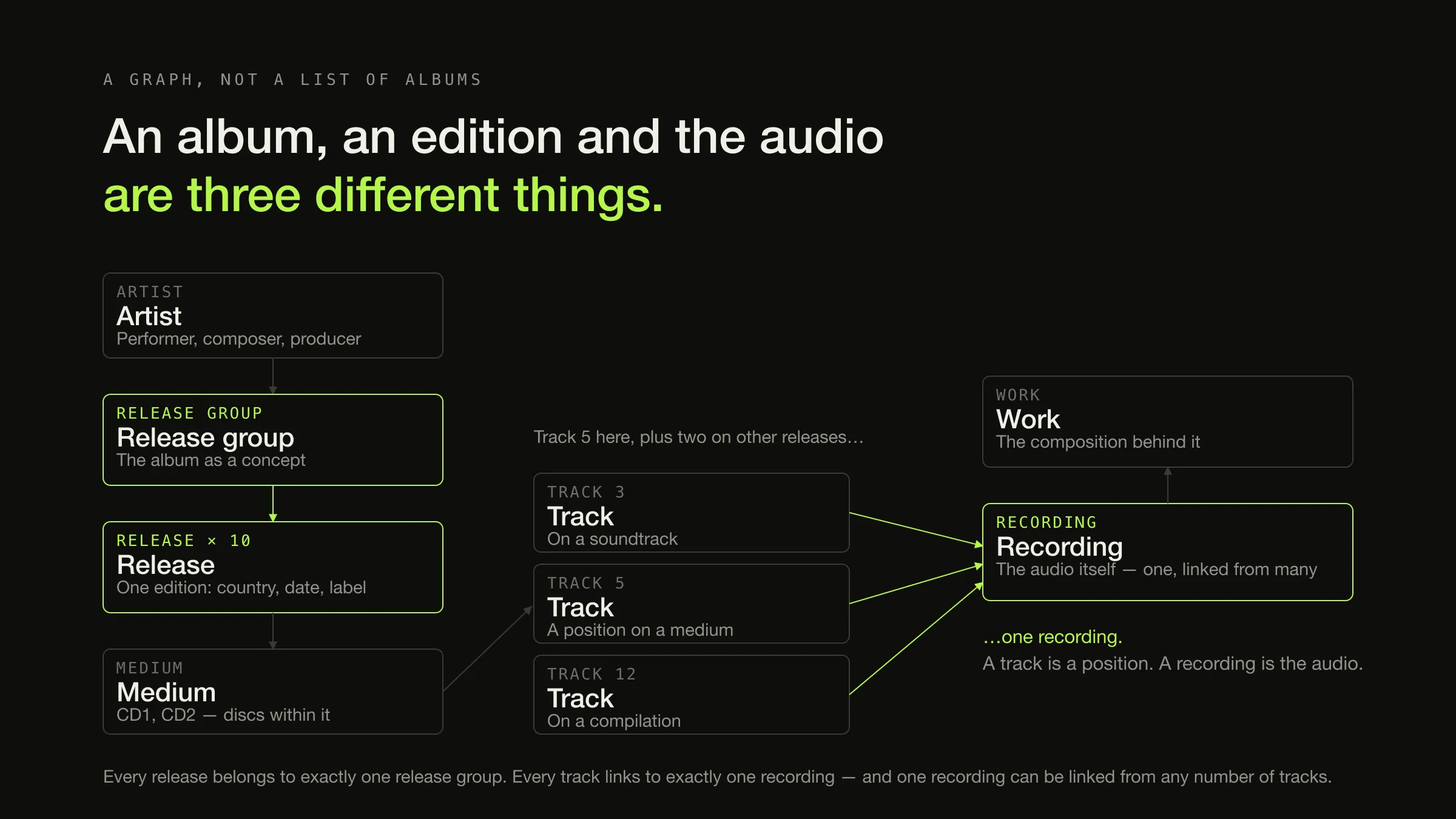
MusicBrainz is an open music metadata database, organised as a graph of identified entities rather than as a list of albums. It stores artists, release groups, releases, recordings, tracks and works as separate things with separate identifiers, and it deliberately does not treat an album, a particular edition of that album, and the audio on it as the same object.
It holds no music. The project’s own words: “we do not actually store or have access to any music recordings.” What it holds is the description — and, more usefully, a permanent 36-character identifier for every entity in it, which is why almost every tagger, ripper and library application is built on top of it.
What it is, in one section
MusicBrainz describes itself as “a community-maintained, open source encyclopedia of music information”, and it is operated by the MetaBrainz Foundation, a California-based 501(c)(3) non-profit. Anyone can contribute; the project says so in as many words.
The data is open in a way that matters for software. The bulk of the database is released under Creative Commons Zero 1.0 Universal — effectively the public domain — with the remainder under Creative Commons Attribution-NonCommercial- ShareAlike 3.0. That licence choice is the reason it is safe for an application to store MusicBrainz identifiers in your files and carry them around indefinitely.
The part almost every explanation stops before is the part that actually matters, so the rest of this article is about the model.
The entity model, which is the whole point
Seven entity types do the work, and the reason for having seven rather than three is that the naive model — artist, album, track — cannot express things that are true.
| Entity | What it represents | The common misunderstanding |
|---|---|---|
| Artist | A musician, a group, or another music professional such as a composer, engineer or producer | That it means the performer only |
| Release group | “An abstract ‘album’ (or ‘single’, or ‘EP’) entity. Technically it’s a group of releases, with a specified type” | That it is just another word for album, or a duplicate of the release |
| Release | Something that was published and you could buy: a specific edition, with its country, date, label, catalogue number and track list | That there is one per album |
| Medium | A disc or unit within a release — “CD1 of the 1984 US release of The Wall” | That multi-disc sets are handled by track numbering alone |
| Track | A position on a medium, with a title and artist credit, and a link to one recording. Not visible on its own — only in the context of a release | That a track is the audio |
| Recording | The audio itself: “a unique mix or edit” | That it is the same thing as a track |
| Work | “One layer above recordings (‘song’, ‘composition’, etc.) … a work represents the composition behind the recording” | That songwriting information belongs on the recording |
Two of those distinctions carry almost all of the practical weight.

One album, ten releases
A release group is the album as a concept; a release is a specific edition of it. MusicBrainz puts it as: a release group is “used to group releases into a single logical entity. Every release belongs to one, and only one, release group”, where a release is “something you can buy, such as a CD or a digital download” and the release group “embraces the overall concept of an album”.
The documentation’s own example is the useful one. Weezer’s self-titled Red Album has ten releases in the database — different countries, several deluxe editions, and one transliteration — all inside one release group.
That number is the answer to a question people meet without recognising it. When a tagger asks which release you have rather than just filling in the album name, this is why: you own one of ten things with the same title and different track lists, and it cannot tell which from the title.
One recording, many tracks
A track is a position on a release. A recording is the audio. MusicBrainz is precise about the direction of that relationship: “each track must always be associated with a single recording, but a recording can be linked to any number of tracks.”
So the same performance appearing on the original album, a greatest-hits compilation and a film soundtrack is one recording linked from three tracks — not three copies of a song. That is the structure that makes it possible to ask “what else is this exact performance on?”, which no album-and-track model can answer.
The definition also settles the question people actually have, which is what counts as a different recording: “a recording represents distinct audio that has been used to produce at least one released track through copying or mastering. A recording itself is never produced solely through copying or mastering.” Read that carefully and it gives you the rule. A remix is a different recording; a live version is a different recording; something that differs only by having been mastered again is not distinct audio in this sense.
Three ways a confident match can be the wrong record
-
A different country edition
Same release group, different release
Same cover, same title, one extra track or a different running order. Your track five is now labelled with track six's title, and everything looks plausible enough that you will not notice until you play it.
-
A deluxe edition or reissue
Same release group, longer track list
Matching a ten-track album against a fourteen-track deluxe release fills in four tracks you do not have and leaves the disc numbering wrong. The album title is identical, which is exactly why the match looked good.
-
A compilation appearance
Right recording, wrong release
The recording is genuinely the one you have, and the release attached to it is a greatest-hits collection. The audio is correctly identified and the album, year and track number are somebody else's.
MBIDs, and what they are actually good for
A MusicBrainz Identifier is, in the project’s words, “a 36 character Universally Unique Identifier that is permanently assigned to each entity in the database”. Every artist, release group, release, recording and work has one:
0383dadf-2a4e-4d10-a46a-e9e041da8eb3The value of having one in your tags is that it identifies rather than describes. An album name is a string that can be spelled two ways, punctuated three ways and transliterated; an MBID is a reference. Correct the spelling of an artist’s name in your library and every tool that matched on the string has to be told again — the MBID never changed.
Two honest qualifications, both from the same MusicBrainz page:
- Permanently assigned is not the same as immutable in meaning. When two entries turn out to be the same thing and are merged, “its MBIDs redirect to the other entity”. Your identifier keeps resolving; what it resolves to has been consolidated.
- An MBID identifies one kind of entity. A recording MBID and a release MBID are not interchangeable, and a tag field that holds one is not a place to put the other. Which tag field holds which is a mapping question with three different answers, because each tagging system carries MusicBrainz identifiers as an extension in its own way.
MusicBrainz is not the thing that listens to your files
This is the most common misconception about the project, and it matters because believing it gives you the wrong mental model of both services involved.
MusicBrainz holds metadata. AcoustID identifies audio. AcoustID describes itself as “a project providing complete audio identification service, based entirely on open source software”, comprising a fingerprinting library and “a large crowdsourced database of audio fingerprints, many of which are linked to the MusicBrainz metadata database using their unique identifiers”.
Two lookups, two questions, two failure modes
Metadata lookup The tags and filename you already have — artist, album, track count, durations. Nothing about the audio.
Fingerprint lookup A compact fingerprint computed from the audio locally, plus the file's duration in seconds. Not the audio itself.
Metadata lookup MusicBrainz, directly. Returns candidate release groups and releases that match the strings and the shape of the track list.
Fingerprint lookup AcoustID first. It returns an AcoustID and a score; only then are the MusicBrainz recordings linked to that AcoustID retrieved.
Metadata lookup Useless on files with no tags, and confidently wrong on a title shared by ten releases. It can only be as good as the strings it was given.
Fingerprint lookup The AcoustID may not exist, or it may exist and be "not associated with any MusicBrainz recording" — Picard's documentation counts both as a failed lookup. And it may be linked to several recordings, so a match still leaves a choice.
The mechanism is worth one paragraph, because it explains why an AcoustID is a cluster rather than a hash. Picard’s documentation describes it directly: “the audio fingerprint captures the characteristics of the recording, but there can be slight differences in the fingerprint of files of the same recording caused by such things as different encoding or bitrate”, and so “the AcoustID server combines fingerprints that are similar enough and assigns them a single AcoustID.” One recording, many fingerprints, one AcoustID that stands for all of them.
Which is also why a fingerprint match is an excellent hint and not a proof: a tagger following that link “matches the file to one of the MusicBrainz recordings linked to the AcoustID” — and there may be more than one. AcoustID is also explicit about its scope: it “has been designed for identifying full audio files”, not short snippets or a phone recording of a room.
Cover art hangs off the model, not beside it
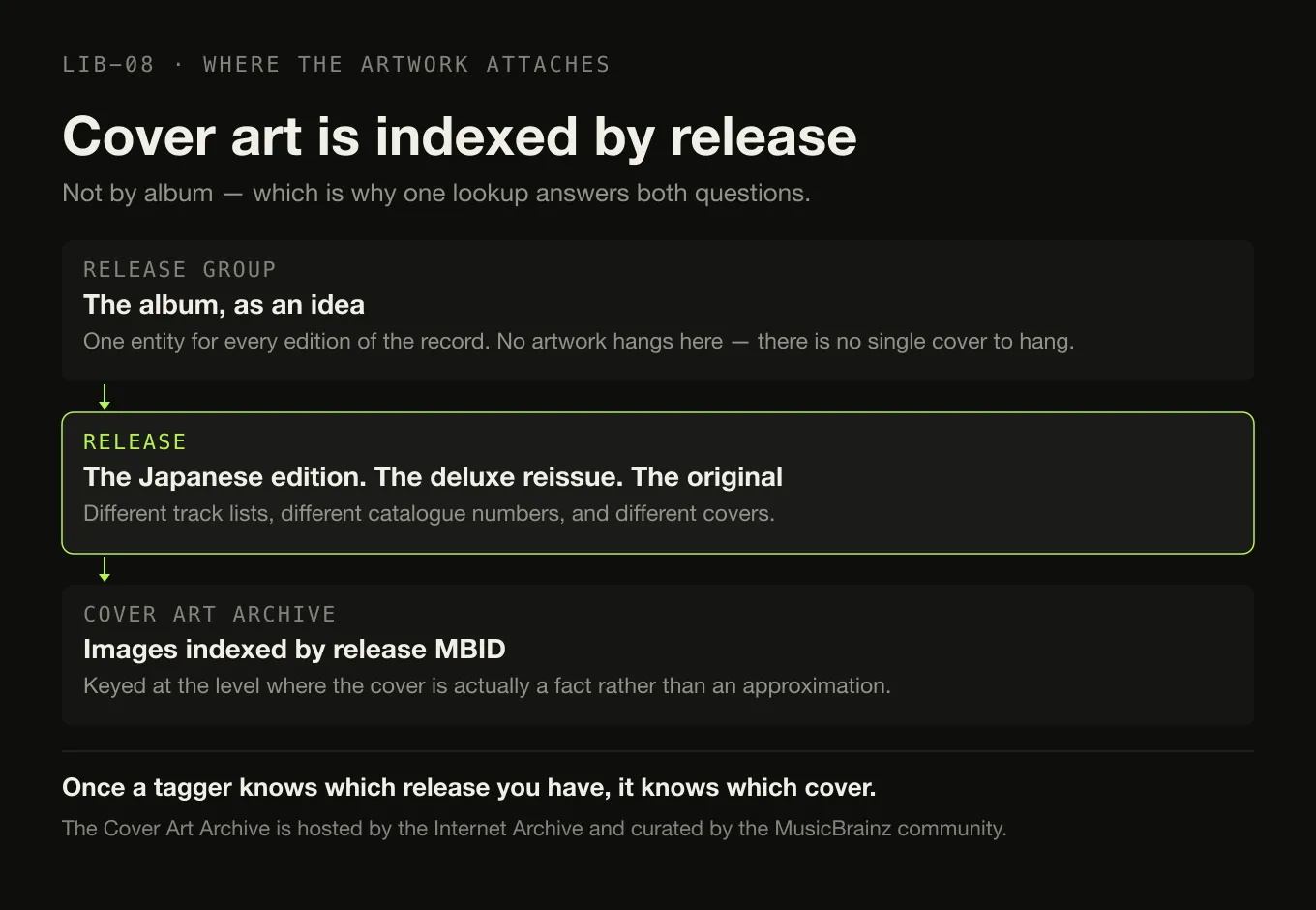
The Cover Art Archive is “a repository of music cover art (such as the covers of CDs) that is freely and easily accessible” — hosted by the Internet Archive, curated by the MusicBrainz community.
The structurally interesting part is where it attaches: images are indexed by release MBID. Not by album, and not by recording. That is correct rather than pedantic — the Japanese edition and the deluxe reissue have different covers, and an archive keyed on the abstract album could not represent that. It is also the reason artwork lookup and metadata lookup are the same operation: once a tagger knows which release you have, it knows which cover.
It is edited by people, which is a feature and a caveat
MusicBrainz is community-maintained, and both halves of that follow.
The caveat: an entry can be incomplete, ambiguous or plainly wrong until somebody corrects it. Regional editions get conflated, a reissue’s date gets attached to the original, two artists with the same name get merged and then separated again. None of this is unusual for a collaboratively edited reference and all of it means a lookup result is evidence rather than an answer.
The feature: when you find something wrong, you can fix it, and the fix applies to everyone who looks it up afterwards. That is a genuinely different proposition from a closed catalogue where a wrong entry is somebody else’s problem forever. If a release you own is missing, adding it is the durable version of fixing your own tags.
Both halves point at the same conclusion about software design: a lookup should propose, and a person should decide. An application that writes whatever the database said is one bad edit away from rewriting your library, and it has moved the authority over your files to a place you do not control — which is the whole argument for keeping the files themselves canonical.
What Digr does with MusicBrainz today, and what it will
Today: nothing. Digr contacts no metadata lookup service at all. Tags are read locally from your files with lofty — title, artist, album, year, genre, disc and track number and duration — and nothing about your library leaves the machine. Everything you see in the app came out of the files on your disk.
Planned: MusicBrainz lookup for releases and recordings, with confidence scoring on every proposed match and an ambiguous-release chooser rather than picking one and hoping — which is the direct product consequence of the three-wrong-matches figure above. Cover Art Archive artwork lookup lands with it, since both keys off the same release. All of that sits in the 3–6 month horizon and is planned as part of Digr Free, alongside manual editing and undoable changes.
Also planned, further out and separately: acoustic fingerprinting. Chromaprint-based analysis and AcoustID-assisted matching are a longer-term Digr Pro initiative rather than part of the metadata work — because, as the two-lookup diagram above shows, they are a different mechanism answering a different question, and their real payoff is telling you that two files are the same recording, or that two files with identical tags are different masterings.
What will not happen is the thing the register rules out explicitly: no “fix my whole library” button that rewrites forty thousand files from a lookup service. When a database that anyone can edit meets a library nobody can un-edit, the correct interface is a proposal. Turning a proposal into a change in your files is the repair workflow, and that is a place where being asked a question is a feature.
The short version
- MusicBrainz is an open metadata database, run by a non-profit, holding no audio, with most of its data effectively in the public domain.
- It is a graph, not a list. Artist, release group, release, medium, track, recording, work — seven entity types because the naive three cannot express what is true.
- A release group is the album; a release is the edition. One album can be ten releases with different track lists.
- A track is a position; a recording is the audio. One recording, any number of tracks.
- An MBID is a 36-character permanent identifier, and it redirects rather than breaks when entries are merged.
- AcoustID does the listening, not MusicBrainz, and a fingerprint match can still leave you a choice to make.
- The data is edited by people, so treat a match as a well-informed proposal.
Picard is not the only application that reads this database, and it is not always the right one for the job in front of you. Which library tools look up MusicBrainz, and what each of them writes to your files, is the comparison to read before pointing any of them at a collection.
Sources
- About — MusicBrainz — “a community-maintained, open source encyclopedia of music information”, operated by “the MetaBrainz Foundation, a California-based 501(c)(3) tax-exempt, non-profit corporation”; the Creative Commons Zero 1.0 and CC BY-NC-SA 3.0 licensing split; and “we do not actually store or have access to any music recordings”
- MusicBrainz Database / Schema — MusicBrainz — the entity definitions used in the table: release group as “an abstract ‘album’ … a group of releases, with a specified type”, recording as “a unique mix or edit”, work as the composition “one layer above recordings”, medium as a disc within a release, and track as an entity “not visible to users on its own, only in the context of a release”
- Release Group — MusicBrainz — “every release belongs to one, and only one, release group”; a release as “something you can buy, such as a CD or a digital download” against a release group that “embraces the overall concept of an album”; and the ten releases of Weezer’s self-titled Red Album
- Recording — MusicBrainz — “each track must always be associated with a single recording, but a recording can be linked to any number of tracks”, and “a recording itself is never produced solely through copying or mastering”
- MusicBrainz Identifier — MusicBrainz — “a 36 character Universally Unique Identifier that is permanently assigned to each entity in the database”, and “when an entity is merged into another, its MBIDs redirect to the other entity”
- AcoustID and the AcoustID web service — “a project providing complete audio identification service, based entirely on open source software”, a fingerprint library plus “a large crowdsourced database of audio fingerprints, many of which are linked to the MusicBrainz metadata database”; a lookup submits fingerprint data and the file duration and returns AcoustID track IDs with a score, optionally with MusicBrainz recording IDs
- AcoustID FAQ — the service “has been designed for identifying full audio files” and is not intended for short snippets or phone recordings
- Understanding Acoustic Fingerprinting and AcoustIDs — MusicBrainz Picard — fingerprints of the same recording differing “by such things as different encoding or bitrate”, the AcoustID server combining “fingerprints that are similar enough” under one AcoustID, an existing AcoustID that is “not associated with any MusicBrainz recording” counting as a failed lookup, and a match being to “one of the MusicBrainz recordings linked to the AcoustID”
- Cover Art Archive — MusicBrainz — “a repository of music cover art (such as the covers of CDs) that is freely and easily accessible”, hosted by the Internet Archive with the MusicBrainz community curating it, indexed by release MBID
- Digr — features and roadmap — tags read locally with lofty, with no lookup service contacted and nothing leaving the machine; MusicBrainz lookup, confidence scoring, an ambiguous-release chooser and Cover Art Archive artwork as planned Free work at the 3–6 month horizon; Chromaprint and AcoustID-assisted matching as a separate longer-term Pro initiative; and no mass metadata overwrite without review
Common questions
What is MusicBrainz?
An open music metadata database, described by the project as a community-maintained, open source encyclopedia of music information, and operated by the MetaBrainz Foundation as a non-profit. It stores structured information about artists, releases, recordings and the relationships between them, and assigns every entity a permanent identifier. It holds no audio at all — the project states plainly that it does not store or have access to any music recordings.
What is an MBID?
A MusicBrainz Identifier: a 36-character universally unique identifier that MusicBrainz describes as permanently assigned to each entity in the database. An artist, a release, a recording and a work each have their own. Because it identifies the entity rather than describing it, an MBID in your tags survives a spelling correction, a punctuation change or a rename — and when two entries are merged, the old MBID redirects to the surviving one rather than dying.
What is the difference between a release and a recording in MusicBrainz?
A release is a thing that was published — a particular CD, pressing or digital edition, with its own country, date, label and track list. A recording is the audio itself. One recording can be linked to any number of tracks across many releases, which is how the same performance appears on an album, a compilation and a soundtrack without being duplicated. Above releases sits the release group, which is the abstract album that all its editions belong to.
Does MusicBrainz identify music by listening to the audio?
No. MusicBrainz is a metadata database and holds no audio. Audio identification is done by AcoustID, a separate open-source service that stores fingerprints generated from audio files and links many of them to MusicBrainz entities. A tagger generates a fingerprint locally, asks AcoustID which AcoustID it belongs to, and then follows the link to whichever MusicBrainz recordings that AcoustID is associated with. Two services, two databases, two different questions.
Is MusicBrainz free to use?
The data is open. MusicBrainz states that the core of the database is released under Creative Commons Zero 1.0 Universal — effectively the public domain — with the remainder under Creative Commons Attribution-NonCommercial-ShareAlike 3.0. The service is run by the MetaBrainz Foundation, a non-profit, and applications querying it are expected to identify themselves and to query gently rather than hammer a charity’s servers.
Can MusicBrainz data be wrong?
Yes, and the interesting cases are structural rather than careless. Anyone can edit, so an entry can carry a mistake until somebody fixes it — but the more common problem is a match that is accurate and not yours: the wrong country edition, a deluxe reissue rather than the original, or a compilation appearance rather than the album. That is why a good tagger proposes a release and asks, instead of picking one and writing it into your files.
- MusicBrainz
- MBID
- AcoustID
- metadata
- Cover Art Archive
- release group