Best music management software for a collection you own
Tools that fix a library rather than play it — which write to your files, which only look, which do MusicBrainz lookups, and what each one costs.
If your tags are wrong, the answer is probably not a music player. The two strongest tools for this job — MusicBrainz Picard and Mp3tag — do not play music, and neither appears on most of the pages ranking for this query. Picard is free and matches against the MusicBrainz database, including by acoustic fingerprint. Mp3tag does batch editing across twenty-odd formats and is $24.99 for the Mac version. beets is the command-line answer, free under the MIT licence, and the only one that documents a mode where it changes nothing.
If you would rather one application played and tagged, MusicBee on Windows and Swinsian on macOS are the strong choices. Digr does not edit tags at all, and for the reader who came here, that makes it the wrong tool.
Product facts and prices in this article were checked on 27 August 2026, each against that product’s own site or documentation.
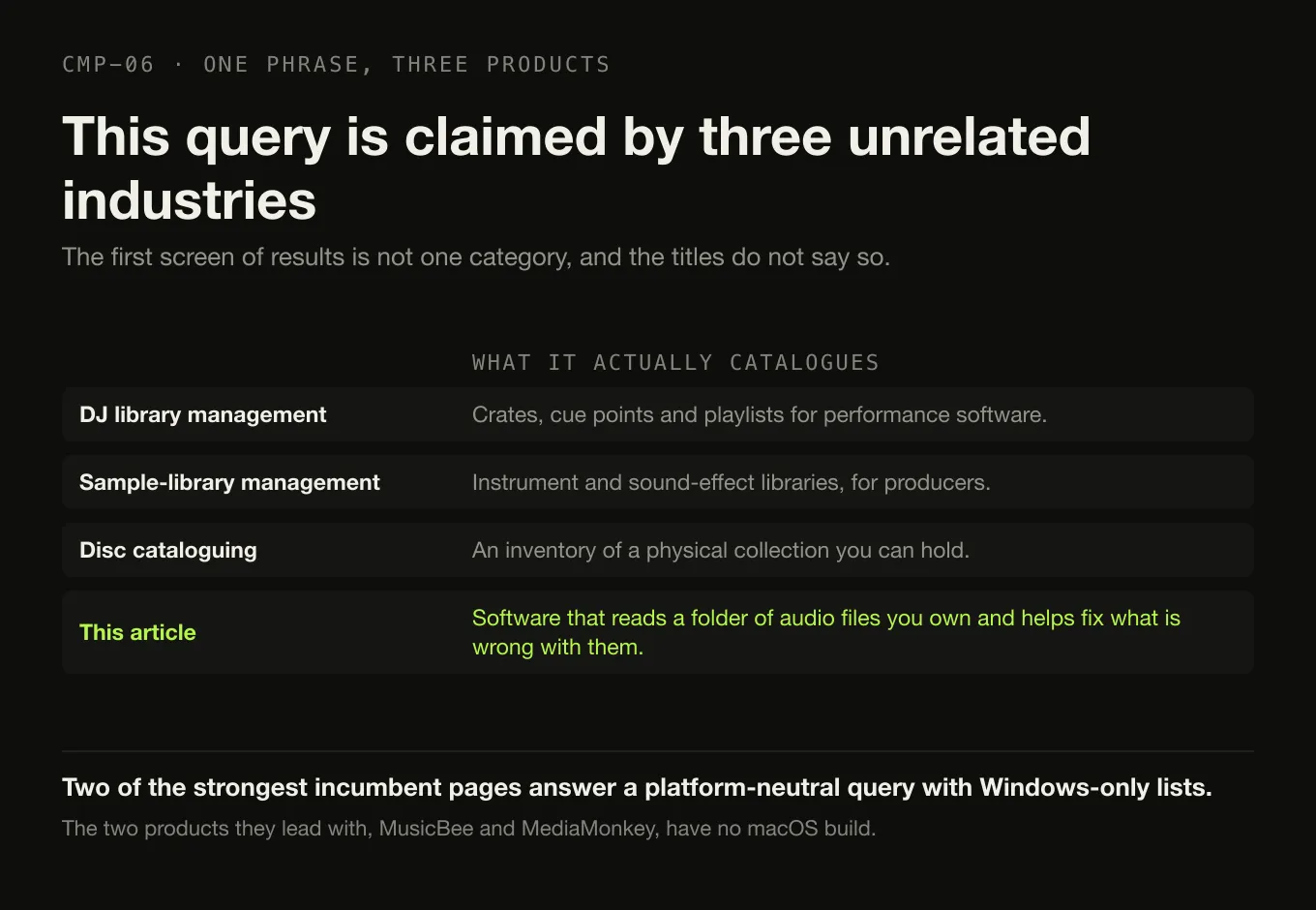
Three unrelated industries answer this query
Search “best music management software” and the results are not one category.
The first screen carries publisher listicles scoped to Windows without saying so, two vendor product pages ranking directly for the category term, a directory farm, an old forum thread — and Lexicon, which is library-management software for DJs. Earlier research on this cluster found the same phrase claimed by sample-library managers for music producers, which catalogue instrument and sound-effect libraries, and by disc-cataloguing tools built for inventorying a physical collection.
Those are three different products for three different people, and this article is none of them. It compares software that reads a folder of audio files you own and helps you fix what is wrong with them.
Two further consequences of that result set are worth naming. The Windows scoping is invisible: two of the strongest incumbent pages answer a platform-neutral query with Windows-only lists, and the two products they lead with — MusicBee and MediaMonkey — have no macOS build. And playing and managing are treated as one job throughout, which is how the two best answers to the question end up on almost none of the pages.
Sort by what it writes, not by what it can do
Every feature list in this category is long. The distinction that actually decides your choice is much shorter: what does this application change, and can you get it back?
Three classes, and the risk is different in each
-
Observe
Reads your files and changes nothing
Navidrome · Digr
Indexes tags and artwork into its own database and surfaces what is missing or inconsistent. Uninstall it and your collection is untouched. Navidrome states the policy outright — it “does not write to your music folder or the files by design” — because an internet-facing server that can delete files is a liability. This class finds problems. It cannot fix them.
-
Propose
Suggests a change; you confirm it
MusicBrainz Picard · Mp3tag
Looks a release up, shows you what it would write, and writes on your instruction. Picard adds AcoustID fingerprints, which identify a track from its audio rather than its tags — the single most useful capability in this article for a badly tagged library. The change is real and lands on disk, but it is never a surprise.
-
Mutate
Rewrites tags, and often filenames and folders
beets · MediaMonkey · MusicBee · Swinsian · JRiver · Strawberry · Music app
The most powerful class and the one to back up before. beets can copy or move your entire collection into a new tree by a naming template; Apple’s Music app copies each imported file into its own Media folder by default. beets’ own guide states it plainly: “Importing can modify and move your music files. Make sure you have a recent backup before proceeding.”
What each one changes
Every cell from the vendor’s own documentation. A capability the vendor does not
document is left blank rather than guessed at — Not stated means exactly that.
| Writes tags | Batch edit | Online lookup | Fingerprint | Renames or moves files | Also a player | Platforms | Price | |
|---|---|---|---|---|---|---|---|---|
| MusicBrainz Picard | Yes | Per release | MusicBrainz | AcoustID | Yes — into folder structures | No | Windows, macOS 10.12+, Linux, FreeBSD | Free, GPL 2.0+ |
| Mp3tag | Yes | Yes — many files at once | Discogs, MusicBrainz, freedb | Not stated | Yes — from tag data | No | Windows 7–11; macOS 10.14+ | Mac $24.99; Windows price not stated |
| beets | Yes | Yes | MusicBrainz, Discogs, Beatport | Yes | Yes — copy, move, or neither | No — command line | Anywhere Python runs | Free, MIT |
| MediaMonkey | Yes | Yes | Yes — source not named | Not stated | Yes — automatic organisation | Yes | Windows and Android. No macOS | $39.95 or $99.95 USD |
| MusicBee | Yes — auto-tagging | Yes | Not verified | Not stated | Not verified | Yes | Windows only | Free |
| Swinsian | Yes — regex find and replace | Yes | Not stated | Not stated | Not stated | Yes | macOS 10.13+ | $34.95 |
| Strawberry | Yes | Not stated | MusicBrainz | Not stated | Not stated | Yes | Linux; macOS 14+ and Windows 10+ for sponsors | Free; 7 USD/month for Mac and Windows builds |
| foobar2000 | Yes — “advanced tagging” | Not stated | Not stated | Not stated | Not stated | Yes | Windows, macOS, Android, iOS | Free |
| JRiver Media Center | Yes | Yes | Not verified | Not stated | Not verified | Yes | Windows, macOS, Linux | $124.98 per major version |
| Music app | Yes | Yes | Matching | No | Copies into its Media folder by default | Yes | macOS, iOS, iPadOS, Windows | Free app |
| Navidrome | No — by design | — | — | — | No | Server | macOS, Linux, Windows, Docker | Free, GPL v3 |
| Digr | No — never | No | No | No | No | Yes | macOS 11+, Apple silicon. Alpha | Free |
Four rows need a sentence.
Picard’s AcoustID support is the capability that separates it from everything
else here. An acoustic fingerprint identifies a recording from the audio
itself, “regardless of existing metadata” in the vendor’s words. For a folder of
files called track01.mp3 with no tags at all, that is the difference between
a solvable problem and an afternoon of typing.
beets is the only product that documents doing nothing. Its guide describes three import behaviours — copy into a new tree, move into it, or “never move or copy files but instead just correct the tags on music” — and a read-only mode where corrected tags live in beets’ own database rather than in your files. No other mutating tool here documents an equivalent.
Mp3tag’s pricing is asymmetric and the vendor does not resolve it. The Mac application is $24.99 on the Mac App Store and requires macOS 10.14 or later. No price for the Windows version appears on the vendor’s own English pages checked, so none is stated here.
Two rows are refusals rather than gaps. Navidrome and Digr do not write to your files, deliberately, and both publish the reason. That is a real design position — and for a reader whose tags are wrong today, it is also a disqualification, which is why neither is recommended below for that job.
How these twelve were chosen
- It has to change the library, or find what is wrong with it. Playback is not a criterion on this page.
- It has to be shipping now, evidenced by a current version or a dated release on the vendor’s own surface.
- Every cell comes from the vendor. Where the vendor does not document a capability, the cell says so rather than borrowing an answer from a roundup.
- Sample-library managers, disc-cataloguing tools and DJ software are named and excluded, not ranked. They answer different questions on the same phrase.
- Nothing was installed or run. No tags were written, no lookup was performed, nothing was renamed. Digr’s row is read from its own shipping code, and that includes every absence in it.
The three that are only managers
MusicBrainz Picard is the reference answer. It is “a cross-platform music tagger powered by the MusicBrainz database”, it renames files and sorts them into folder structures by a script you control, it identifies files by AcoustID fingerprint, it looks up whole CDs in one click, it finds cover art, and it is free under GPL 2.0 or later. Version 2.13.3 builds for Windows, macOS 10.12 or later, Linux, FreeBSD, OpenBSD and Haiku. If you do not know what MusicBrainz is, read that first — Picard makes much more sense once you know what it is matching against.
Mp3tag is the one to reach for when you know what the tags should say and just need to write them to nine hundred files. “It supports batch tag-editing of ID3v1, ID3v2.3, ID3v2.4, iTunes MP4, WMA, Vorbis Comments and APE Tags for multiple files at once”, it renames files from tag data, it replaces strings with regular expressions, and it imports from Discogs, MusicBrainz and freedb. It is Windows-first with a native Mac version at $24.99.
beets is the answer if you are comfortable at a command line and want the library to organise itself according to rules. It fetches metadata “from MusicBrainz, Discogs, or Beatport”, collects album art, lyrics, genres and acoustic fingerprints, finds duplicates and missing album tracks, and files everything into a directory tree by template. It is MIT-licensed and free. It is also the most destructive tool on this page if you point it at a collection without a backup, which its own documentation says in those words.
None of the three plays music. If you want one application that does both, that is the next section — and it is a different comparison entirely.
Which tool, for which problem
Six problems, and the tool that solves each
MusicBrainz Picard AcoustID identifies the recording from the audio, not from the tags. Free, every platform.
beets The same job as an import pipeline, if you prefer rules to a window.
Not Digr It cannot write a tag. This is the problem it does not solve.
Mp3tag Batch editing across formats with regex replace. $24.99 on the Mac; Windows price not stated by the vendor.
Swinsian On macOS, find-and-replace tag editing with regex support, inside a player. $34.95 once.
beets Copies or moves your collection into a tree defined by a path template.
MusicBrainz Picard Renames and sorts into folders by a naming script, as part of tagging.
Back it up first beets’ own guide says so, and it is right.
MusicBee On Windows, free, with auto-tagging.
MediaMonkey On Windows, automatic lookup and organisation, $39.95 for the 2024 line or $99.95 lifetime.
Swinsian On macOS, the strongest tag editing on the platform.
Digr Library Health names missing files, likely duplicates, no artwork, unknown artist and unknown album, and is inspect-only.
Navidrome Indexes and serves without ever writing to the folder.
Then leave Both classes hand you a list. Fixing it needs a tool from one of the rows above.
MusicBrainz Picard Free, native macOS build, the deepest lookup here.
beets Free, and the most capable if the command line is not a barrier.
Not Strawberry The source is free, but the macOS build is behind a 7 USD monthly sponsorship.
Where Digr sits, and why it is not the answer here
Digr is inspect-only, permanently and on purpose, and today that makes it the wrong tool for the reader this article is written for.
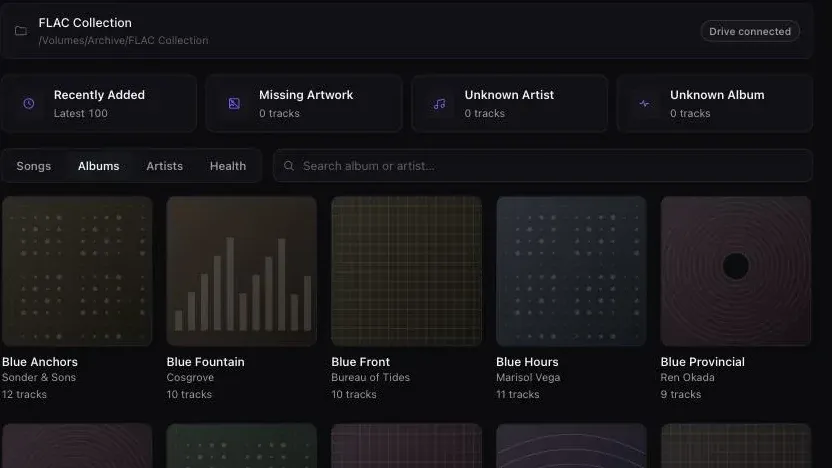
What it does. It reads title, artist, album, year, genre, disc and track number and duration from your files, locally, with no lookup service contacted and nothing about your library leaving the machine. It reads embedded artwork and folder artwork, handling the folder case per directory rather than per track. Its Library Health views name the categories that predict a collection going bad — missing files, likely duplicates, tracks with no artwork, unknown artist, unknown album — using the same fallback rules that drive the browsing views, so the two cannot disagree. All of it is inspect-only: nothing is edited and nothing is deleted.
What it does not do, and this is most of the article’s subject. No tag editing. No writing to an audio file, ever — scanning opens files for tags and artwork and never writes to them, so removing Digr leaves the collection byte-for-byte as it was. No MusicBrainz lookup. No Cover Art Archive lookup. No acoustic fingerprinting. No file renaming or moving. No artwork replacement. No batch operations, because there is nothing to batch.
Planned, undated, and counted nowhere above. Digr’s roadmap names manual metadata editing, “safe explicit tag writing — only what you confirmed, only when you confirm it”, MusicBrainz lookup with confidence scoring, an ambiguous-release chooser, Cover Art Archive artwork, and undoable changes — all at the free tier. None of it ships. It appears in no row of the table above, because a comparison that scores intentions is not a comparison. Two things are on the permanent not-planned list and are relevant here: automatic destructive de-duplication, and mass metadata overwrite without review.
So against Picard, Digr loses on lookup and fingerprinting outright. Against Mp3tag it loses on batch editing. Against beets it loses on organisation. Against Swinsian, MusicBee and MediaMonkey it loses the “one application for everything” case. It runs only on Apple silicon Macs, it is an alpha, and the current capability list is published in full. Digr Pro is not purchasable — there is no checkout, no payment processor and no licence system in the application.
What it has instead is one narrow thing kept exactly: a view of what is wrong with your collection, produced by software that cannot make it worse.
What none of this software decides for you
- What the tags should say. Every tool here writes what you or a database tell it to. Deciding whether the album artist of a compilation is “Various Artists” or the individual performers is a policy question you answer once and then apply.
- Where artwork should live. Embedded, alongside as a folder image, or both — the tools disagree and so do the players.
- Whether two files are the same recording. Every duplicate finder here uses metadata or filenames. The technique, and its failure modes, is its own subject.
- What the folder tree should look like. A renaming tool needs a template, and the template is the decision.
- Whether the change was right. Only beets documents a way to try the operation without touching the files. Everywhere else, the backup is the undo.
The short version
- The best tools for this job are not music players. MusicBrainz Picard (free), Mp3tag ($24.99 on the Mac) and beets (free) do the actual fixing.
- Picard’s AcoustID fingerprinting identifies a recording from the audio rather than the tags, which is the capability that matters most on a badly tagged collection.
- beets is the one that reorganises your disk, and its own guide tells you to back up first. Take that seriously.
- For one application that plays and tags: MusicBee on Windows, Swinsian on macOS at $34.95, MediaMonkey on Windows at $39.95 or $99.95.
- Two products refuse to write to your files: Navidrome, for security reasons it publishes, and Digr, by design.
- Digr does not edit tags, look anything up, or rename anything. If that is what you came for, use one of the three above.
- This search is shared with three other industries. Sample-library managers, disc catalogues and DJ software all rank on the phrase and none of them is this.
Two adjacent questions have their own pages: which application should play the library, and what to do when the library is simply too big. If you have a specific album that is wrong rather than a systemic problem, the repair procedure is shorter than choosing software. On macOS specifically, Swinsian’s tag editor set directly against Digr’s absence of one is the head-to-head behind that recommendation.
Sources
Every product fact above comes from that product’s own site or documentation, checked on 27 August 2026. No affiliate roundup, software directory, forum or review was used as a source for any capability or price.
- MusicBrainz Picard — “Picard is a cross-platform music tagger powered by the MusicBrainz database”; renaming files and sorting “into folder structures according to user preferences”; “Uses AcoustID fingerprints to identify files by their actual audio content, regardless of existing metadata”; CD lookups; cover art; a scripting language; formats “MP3, FLAC, OGG, M4A, WMA, WAV, and more”; “Licensed under GPL 2.0 or later”
- MusicBrainz Picard — downloads — version 2.13.3, with builds for Windows, macOS 10.12 and 10.14 or later, Linux via Flatpak and Snap, FreeBSD, OpenBSD and Haiku
- Mp3tag — “Mp3tag is a powerful and easy-to-use tool to edit metadata of audio files”; “It supports batch tag-editing of ID3v1, ID3v2.3, ID3v2.4, iTunes MP4, WMA, Vorbis Comments and APE Tags for multiple files at once”; lookups from Discogs, MusicBrainz and freedb; “Rename files based on the tag information”
- Mp3tag — download — version 3.35.1 for “Windows 11 | 10 | 8.1 | 8 | 7”, and a native Mac version “available as a standalone version and on the Mac App Store”. No Windows price appears on the page
- Mp3tag for Mac — Mac App Store — “$24.99”, “Requires macOS 10.14 or later”, batch editing and “online database lookups from Discogs and MusicBrainz”
- beets — “Beets is the media library management system for obsessive music geeks”; metadata “from MusicBrainz, Discogs, or Beatport”; album art, lyrics, genres, tempos, ReplayGain levels and acoustic fingerprints; duplicate and missing-track detection; MIT licence
- beets — getting started — copying into a new folder, moving “instead of copying it (saving disk space)”, and configuring beets to “never move or copy files but instead just correct the tags on music”; and the warning “Importing can modify and move your music files. Make sure you have a recent backup before proceeding”
- MediaMonkey — “Manage 100,000+ audio and video files”; “Automatically lookup and tag missing artwork/metadata”; automatic file organisation and renaming; duplicate detection; the platform list is Windows, Android, Apple devices, TVs and DLNA players, and cloud services, with no macOS application
- MediaMonkey — buy — “Version 2024 Gold” at “$39.95USD” covering “all 2024.x upgrades”, and “Lifetime Gold” at “$99.95USD” covering “all future upgrades”
- Swinsian — “Find and replace tag editing, with regex support”, folder watching, a duplicate track finder, album art fetching, and “$34.95”
- Swinsian — FAQ — “Swinsian can be used on any Mac running macOS 10.13 or later”, a thirty-day trial, and importing libraries from iTunes and the Music app
- Strawberry — “A cross-platform music player and music collection organizer. It is aimed at music collectors and audiophiles”; “Edit tags on audio files”; “Automatically retrieve tags from MusicBrainz”; “Album cover art from Last.fm, Musicbrainz, Discogs, Musixmatch, Deezer, Tidal and Spotify”; and “Access to macOS and Windows releases are currently restricted to sponsors, a 7 USD monthly sponsorship is required”
- foobar2000 — “an advanced freeware audio player” with “Advanced tagging capabilities”, on Windows, macOS, Android and iOS
- JRiver Media Center — purchase — the Master Licence at “$124.98”, “valid for a single major version for all available Operating Systems”
- Apple — import items already on your computer — “By default, Music places a copy of each audio file in the Music folder”, with
File > Add To Libraryas the command that does not copy - Navidrome — FAQ — “Navidrome does not write to your music folder or the files by design”, and the reasoning that “users would only be one exploit away from all their music getting deleted”
- Navidrome — overview — “Reads and uses all your beautifully curated metadata”; automatic library monitoring; “Multi-platform, runs on macOS, Linux and Windows”
- MusicBee —
getmusicbee.comreturned HTTP 403 to this environment on 27 August 2026. Its Windows-only platform is corroborated by the Microsoft Store listing, and auto-tagging appears in the vendor’s own copy. Its lookup source, renaming behaviour and fingerprinting are listed as not verified rather than taken from a third party - Digr — features and current capabilities and Digr — pricing — every Digr claim above, including the absence of tag editing, MusicBrainz lookup, fingerprinting and file renaming. Digr Pro is not purchasable
Common questions
What is the best software for editing music tags?
For most collections, one of three tools that are not music players. MusicBrainz Picard matches your files against the MusicBrainz database and can identify them by AcoustID fingerprints regardless of the tags they carry; it is free under GPL 2.0 or later. Mp3tag does batch tag editing across more than twenty formats with lookups from Discogs, MusicBrainz and freedb; the Mac version is $24.99 on the Mac App Store. beets is a command-line library manager under the MIT licence that can also move and rename files. All checked on 27 August 2026.
Can music management software rename and move my files?
Several can, and it is the most consequential thing they do. MusicBrainz Picard renames files and sorts them into folder structures according to your own naming script. beets can copy files into a new tree, move them, or be configured to leave them alone and correct only the tags — and its own guide warns that “Importing can modify and move your music files. Make sure you have a recent backup before proceeding.” MediaMonkey and Mp3tag both offer renaming from tag data as well.
Is MusicBrainz lookup automatic?
Not in the sense of being silent. MusicBrainz Picard proposes matches from the MusicBrainz database and can use AcoustID acoustic fingerprints to identify a file by its audio rather than its existing tags, but nothing is written to disk until you save. beets performs its lookup during import, and Mp3tag offers MusicBrainz and Discogs as sources you invoke. In every case the lookup is a proposal and the write is a separate, deliberate step.
Can I manage a music library without changing the files?
Yes, and two products here refuse to write to your files by design. Navidrome’s own documentation states that it “does not write to your music folder or the files by design”, on the reasoning that an internet-facing server would otherwise be one exploit away from deleting your collection. Digr reads tags and artwork and never writes to an audio file at all. Both will show you what is wrong with a library. Neither will fix it, which for most readers of this article is a disqualification.
Does Digr edit music tags?
No. Digr reads tags and artwork from your files and never writes to them — nothing is copied, renamed, moved or re-tagged, so removing Digr leaves the collection byte-for-byte as it was. It performs no MusicBrainz lookup and no acoustic fingerprinting. Its Library Health views name missing files, likely duplicates, tracks with no artwork, unknown artist and unknown album, and they are inspect-only. If you need tags fixed today, use MusicBrainz Picard, Mp3tag or beets instead.
What is the difference between a music player and a music manager?
A player turns files into sound. A manager changes what is in the files, or where they sit on disk — tags, artwork, filenames and folder structure. Some applications do both, which is why the two jobs get confused: MusicBee, MediaMonkey, Swinsian, JRiver Media Center and Strawberry all play and tag. The strongest dedicated managers, MusicBrainz Picard and Mp3tag, do not play music at all, and that is the clearest sign the two jobs are separable.
- music management software
- music tagger
- MusicBrainz Picard
- Mp3tag
- beets
- MediaMonkey
- Swinsian
- Strawberry
- metadata
- library health