AirPlay vs Google Cast vs DLNA: who holds the queue
A comparison organised by architecture rather than features — where the playback state lives in each protocol, who fetches the audio, and what breaks when the controller walks out of the room.
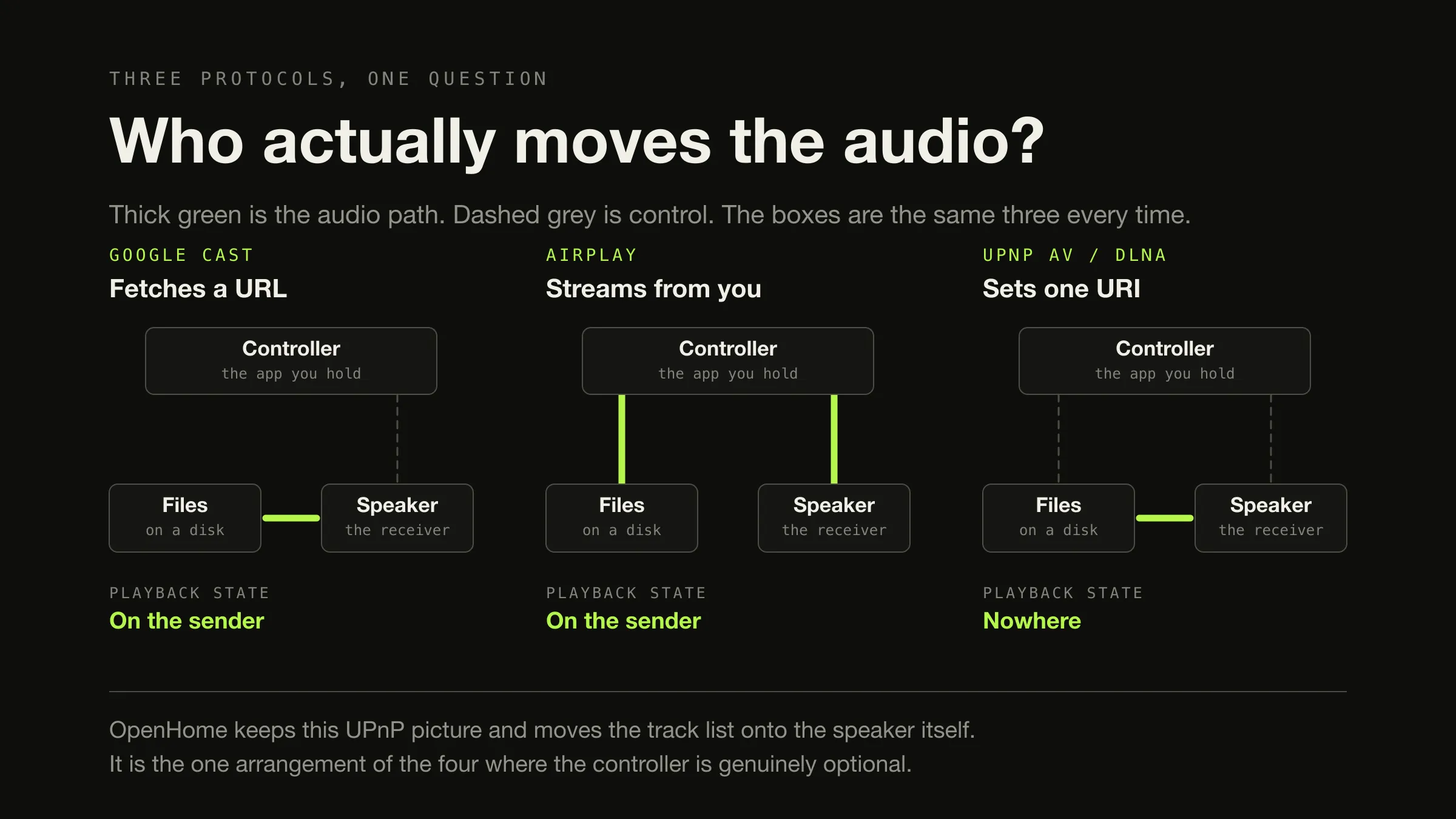
The useful question is not which of these is best. It is where the playback state lives — the queue, the position, the transport — because that decides what breaks when a device leaves the room.
Three answers. Google Cast keeps the state on the sender and gives the receiver a media URL to fetch, so the speaker does the decoding and your machine has to keep serving your own files. AirPlay keeps the state on the sender too, but the sender is in the audio path: an app hands a URL to a player running locally and the audio is streamed to the speaker, so the source format stops mattering and the sending device works throughout. UPnP AV, which DLNA certified, has no playlist at all — a control point sets one URI on a renderer and gets out of the way — which is why the current track survives your phone locking and the next one does not. OpenHome fixes exactly that by moving the track list onto the renderer.
Why push versus pull is the wrong first cut
Almost every comparison of these three organises itself around push against pull: AirPlay pushes audio, Cast pulls it. As a first approximation for those two it is fine. Applied to the third it is simply false, and the specification is unambiguous about why.
The UPnP AV Architecture document sets out the roles and then explicitly parameterises the transfer. Its worked examples are headed “Isochronous-Push (IEC61883/IEEE1394)” and “Asynchronous-Pull (e.g. HTTP GET)” — two named configurations of the same architecture, differing in which device returns the transport instance and therefore which one controls the flow. UPnP AV does not push or pull. It specifies both and lets the two devices negotiate.
So push and pull are a property of a configuration, not of a protocol, and a comparison built on them collapses at the third column. Where the playback state lives does not collapse, and it is also the axis that predicts the things people actually notice.
Google Cast: state on the sender, media somewhere else
Google’s documentation splits the work in two. The Sender “plays the role of
controller for the Cast session”, and the Receiver is the application on the
device “responsible for responding to Sender commands and for conveying streaming
content” to it. The media object the sender fills in carries a contentId that is
“typically the URL of the media” and a contentType that is “the content MIME
type” — a description of where the audio is and what kind it is, rather than the
audio.
Two consequences matter for the comparison, and the mechanism in full is a separate article.
The receiver decodes, so the receiver’s codec list is a hard constraint. Google publishes it for its audio devices: FLAC to 96 kHz/24-bit, MP3, LC-AAC, HE-AAC, Opus, Vorbis and WAV. ALAC is not on it.
The sender holds the queue and stays connected as controller. Nothing on the device knows what track four is.
Discovery is DNS-based Service Discovery over multicast DNS — Google’s own
troubleshooting page points developers at the _googlecast._tcp.local service
record — with the requirement that “the sender device and the Cast-enabled devices
device must be connected to the same WiFi network”.
AirPlay: an output route, with the sender in the data path
AirPlay is the one where the public record is thinnest, so it is worth being precise about what is known and from where.
Apple describes AirPlay as delivering “a seamless audio streaming experience to one or more devices”, and the developer-facing shape of it is telling. The app’s job is to “identify a URL that points to local or cloud content that you want to play”, build a player item from it, and start playback — on the sending device. The player runs on the sender; AirPlay is a route the system audio takes afterwards. That is a different arrangement from Cast, where the URL is handed across to the speaker.
Apple also documents what the newer buffering behaviour does: with the standard players “you automatically get enhanced audio buffering when it is routed to AirPlay”, and “the audio streams faster than real-time playback speed in order to minimize playback interruptions”. Running ahead of real time is what makes multi-room practical, and Apple states the multi-room case plainly — “streaming to one or more HomePods and AirPlay-compatible speakers in perfect sync”.
Three things follow, and one boundary.
- The source format stops mattering at the sender. The decode happens before the audio leaves, so an ALAC library that will not cast will AirPlay without complaint. This is the single biggest practical difference between the two for anyone with an Apple-formatted collection, and it is the other half of the FLAC and ALAC decision.
- The sender works for the whole session, and the state is the sender’s player. Quit the app and there is nothing left holding the queue.
- Buffering ahead of real time trades responsiveness for robustness. Filling a large buffer means the audio you hear was decided some time ago, which is fine for music and is the reason latency-sensitive uses need a different mode.
The boundary: AirPlay’s protocol itself is not public. Third-party AirPlay audio hardware is licensed through Apple’s MFi programme, and Apple does not publish the wire format, the transport, the codec negotiation or the clock synchronisation. Everything above is behaviour Apple documents. This article makes no claim about how AirPlay works underneath, because there is no citable statement of it, and reverse-engineered implementations — however good — are not Apple saying so.
UPnP AV and DLNA: three roles, and no playlist
Be precise here, because the whole reputation of “DLNA” rests on a confusion.
UPnP AV is the architecture. It defines three roles, and the specification calls the arrangement the 3-Box model:
- A MediaServer publishes content. It “is used to locate content that is
available via the home network”, and it contains a
ContentDirectoryservice, aConnectionManagerservice, and an optionalAVTransportservice “depending on the supported transfer protocols”. - A MediaRenderer plays it. It “is used to render (e.g. display and/or listen
to) content obtained from the home network”, and its main feature is that it
“allows the control point to control how content is rendered” — volume, mute and
so on, through a
RenderingControlservice. - A control point is the application you hold. It browses the server, checks formats, and tells the renderer what to play.
DLNA was a certification programme built on top of that. A DLNA logo is a
statement about a device having passed somebody’s test suite; it is not a protocol
with its own semantics. Which is why “DLNA supports FLAC” is not a well-formed
claim: the specification says format support is advertised per device, through
ConnectionManager::GetProtocolInfo(), which “allows a control point to enumerate
the transfer protocols and data formats that are supported by the MediaRenderer”.
Two DLNA-certified renderers can legitimately disagree about FLAC, and one of
them can legitimately not implement AVTransport at all.
Now the part that is almost always reported wrongly. The specification is explicit that the control point is not in the data path:
The control point uses UPnP to initialize and configure both devices so that the desired content is transferred from one device to the other. However, since the content is transferred using an “out-of-band” transfer protocol, the control point is not directly involved in the actual transfer of the content. The control point configures the devices as needed, triggers the flow of content, then gets out of the way. Thus, after the transfer has begun, the control point can be disconnected without disrupting the flow of content.
So the folklore — “UPnP stops when your phone sleeps” — is half right, and the
half it gets wrong is the interesting half. The current track survives. What
does not survive is the next one, because UPnP AV has no playlist: the control
point calls AVTransport::SetAVTransportURI() with one URI and then
AVTransport::Play(), and repeats that for every track. Nothing on the network
knows what comes after the file currently playing. The renderer finishes and
stops, not because anything failed but because the only thing that knew the order
has gone.
That minimalism is also the design’s strength. Any of the three roles can be a
different box, the transfer protocol is deliberately outside the specification,
and a great deal of it is optional — including PrepareForConnection(), where the
specification tells a control point to “fall-back” and assume InstanceID=0 when a
device has not implemented it. This is why no two DLNA devices behave
identically, and why any sentence beginning “DLNA does” needs a device name in
it.
OpenHome: the playlist moves onto the speaker
OpenHome is a set of UPnP services designed to fix precisely that gap, and its
av.openhome.org:Playlist:1 service is the whole idea in one interface.
The service “provides access to a list of tracks, which can be played in
sequence, starting at any point”, with shuffle and repeat modes. The state
variables live on the renderer: the transport state, Repeat, Shuffle, the
current track Id, an IdArray of every track in the list, a ProtocolInfo
listing what the device can play, and TracksMax — “the maximum number of tracks
a playlist can contain. Set on startup and invariant thereafter.” A controller
adds music with Insert, which “adds the given uri and metadata as a new track to
the playlist”.
The clearest evidence that the state genuinely belongs to the device is a warning
in the documentation for one of its own actions. SeekIndex is discouraged
because “it results in an unpredictable track being played in the presence of
multiple control points” — the specification is designed around several
interchangeable controllers coming and going while the renderer keeps the truth.
That is the opposite of the Cast and AirPlay arrangement, where the controller
is the truth.
Practically: a streamer that speaks OpenHome plays an album through with your phone in your pocket and switched off. A streamer that speaks only standard UPnP AV plays one track. If you have ever wondered why two apparently similar network players behave differently here, this is usually it.
Where the playback state lives
The queue, the position, and what is lost when the controller leaves
-
Google Cast
On the sender
Receiver holds one media item
The sender owns the queue and issues a load request per track. Controller leaves → the loaded item finishes if its URL is still reachable, then nothing. If the URL was served by the controller’s own machine, not even that.
-
AirPlay
On the sender
Receiver holds a buffer of audio
The player is on the sending device and the speaker is an output. Controller leaves → the buffer drains and playback ends. The sender is in the data path, so it cannot leave in any sense.
-
UPnP AV, standard
Nowhere
Renderer holds one URI
No playlist exists in the specification. Controller leaves → the current transfer continues to the end, then stops, because the order lived only in the control point.
-
UPnP AV plus OpenHome
On the renderer
Renderer holds the full track list
Track list, shuffle, repeat and position are device state. Controller leaves → nothing changes, and another controller can pick up the same session and see the same truth.
The comparison
| Google Cast | AirPlay | UPnP AV / DLNA | OpenHome | |
|---|---|---|---|---|
| Architecture in one line | Sender controls, receiver fetches a media URL | App plays on the sender; speaker is an output route | Control point configures a server and a renderer, then leaves | UPnP AV with the track list moved onto the renderer |
| Who holds the media | Anywhere reachable by URL | Wherever the sending app can read it | A MediaServer, which can be any box | A MediaServer, or any URI the device can fetch |
| Who moves the audio | The receiver pulls it | The sender streams it | Whichever the two devices negotiated — the spec defines push and pull | As UPnP AV |
| Where the playback state lives | The sender | The sender’s player | Nowhere; one URI at a time | The renderer |
| Controller disconnects mid-track | Current item continues if its URL survives | Playback ends when the buffer drains | Current transfer continues to the end | Nothing changes |
| Advancing to the next track needs | The sender | The sender | The control point | Nothing external |
| Machine holding your files sleeps | Playback stops if that machine served the URL | Playback stops; it was the source | Playback stops if that machine was the MediaServer | Playback stops if that machine was the MediaServer |
| Who decodes | The receiver | The sender | The renderer | The renderer |
| So the source format | Must be on the receiver’s list — no ALAC | Stops mattering once it leaves the sender | Depends on the device, via GetProtocolInfo() | Depends on the device, via ProtocolInfo |
| Discovery | DNS-SD over mDNS, _googlecast._tcp | Bonjour, Apple’s mDNS implementation | SSDP; servers and renderers announce separately | As UPnP AV |
| Multi-room model | Google speaker groups | AirPlay 2, within Apple’s ecosystem | Not in the specification | Not in the Playlist service |
| Specification available | Public SDK reference | Sender API documented; protocol licensed and not public | Published specification | Published service reference |
| In Digr today | Yes — the only one | No. Roadmap, no date | No. Roadmap, no date | No. Roadmap, no date |
One row is the same answer three times, and it is worth saying out loud before the next section takes the other one apart.
“Machine holding your files sleeps.” Whoever is serving the bytes has to be awake, whatever the protocol. The only escape is OpenHome’s, and it is partial: the controller becomes optional, the server does not.
Who decodes, and why that decides whether your format matters
This is the row worth its own section, because it is where a working setup and a broken one diverge — and because the usual way of stating it, as a per-protocol list of supported codecs, is wrong for two of the three.
The same ALAC file, offered to each protocol
Constraint A fixed, published list per device family. Google names FLAC to 96 kHz/24-bit, MP3, LC-AAC, HE-AAC, Opus, Vorbis and WAV for its audio devices.
ALAC Not on the list. The load fails; nothing degrades, because nothing is converting.
So the answer is knowable in advance — you can check your library against a document before you buy a speaker.
Constraint Whatever the sending device can play. The decode happens before the audio leaves, so the receiver never sees the container.
ALAC Plays, on Apple hardware, without anybody thinking about it.
So codec support is not a property of the protocol at all — it is a property of the machine in your hand.
Constraint Whatever that one device advertises. The specification provides the question — ConnectionManager::GetProtocolInfo() — and no answer.
ALAC Depends entirely on the renderer, and two certified devices may legitimately disagree.
So a sentence like “DLNA supports FLAC” is malformed. Only “this renderer advertises FLAC” means anything.
The practical upshot for a local library: if your collection is ALAC and your speakers are Google, one of the two has to change. Converting the library is the usual answer, which is why the FLAC and ALAC decision is worth making with the speakers in mind rather than after buying them.
Multi-room, and the sentence nobody wants to hear
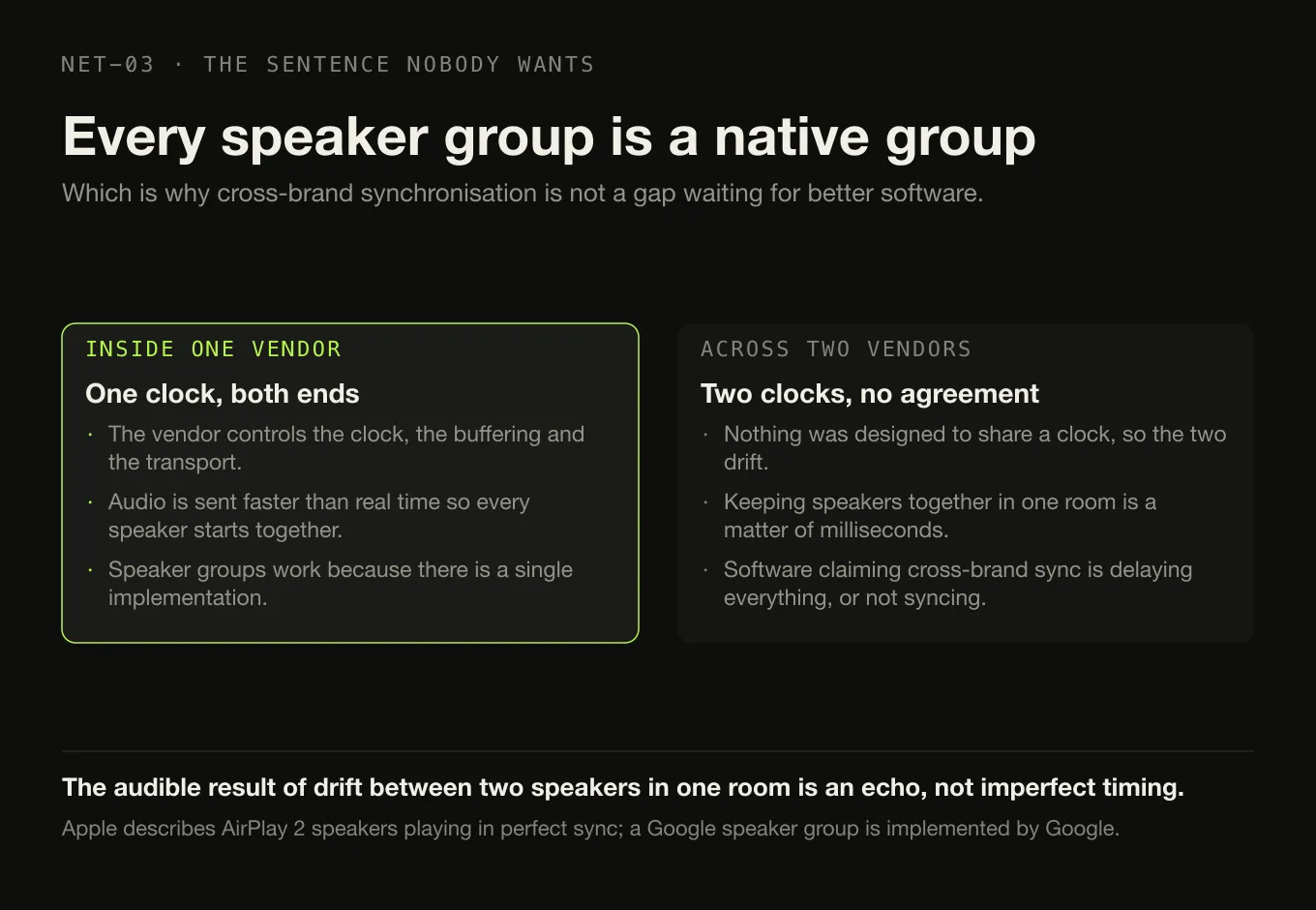
Every ecosystem offers speaker groups, and every one of them is a native group: a Google speaker group is implemented by Google, an AirPlay 2 multi-room set by Apple. Within one vendor’s world synchronisation works because that vendor controls the clock, the buffering and the transport at both ends — which is exactly what Apple is describing when it says audio streams faster than real time to speakers playing “in perfect sync”.
Across ecosystems it does not work, and this is not a gap waiting for better software. Keeping two speakers audibly together in one room is a matter of milliseconds. Two protocols that were never designed to share a clock will drift, and the audible result of drift between speakers in the same room is an echo, not imperfect timing. Software that claims cross-brand sync is generally either inserting a large delay everywhere or not synchronising at all.
What is documented, and what is not
A comparison table can look like test results, so it is worth saying exactly what kind of evidence is behind each column.
| Protocol | Evidence class |
|---|---|
| Google Cast | Public SDK documentation. Roles, media object, session steps, codec list and discovery record all quoted from Google |
| UPnP AV | Published specification. Roles, services, actions, both transfer configurations and the control-point-disconnect behaviour all quoted |
| OpenHome | Public service reference. State variables and actions quoted |
| AirPlay | Partial. Apple documents the sender-side API and the behaviour; the protocol is licensed and not published. Behavioural claims only |
No hardware was tested for this article. No Chromecast, HomePod, network streamer or DLNA renderer was instrumented, no packets were captured, and nothing was timed. Every claim here is either quoted from a specification or from vendor documentation, or derived in the text from something that was — and where it is derived, the derivation is shown. There are no latency figures because none was measured and neither Apple nor Google publishes one.
Where Digr is, and what is planned
Digr speaks Google Cast, and nothing else. Chromecasts, Google Home speakers and Google Cast speaker groups are discovered over multicast DNS with nothing to configure, and a local media server streams the original file to the device with correct MIME types and Range support, each track behind an unguessable token so paths never appear in a URL. While casting, the local engine is silenced but still owns the queue, shuffle and repeat — so Digr sits in the first column of the table above, deliberately and completely.
AirPlay output, DLNA and UPnP output, OpenHome support and native ecosystem speaker groups are all named roadmap items in the longer-term section, with no dates and with the product tier not yet decided. The reason there are no dates is stated rather than implied: each is a protocol implementation with its own certification, discovery and licensing questions to settle first, and AirPlay’s is the licensing one this article has already had to work around.
Cross-brand synchronised playback is not planned, ever. It is on the permanent not-planned list with the reasoning beside it: Digr will support each ecosystem’s own speaker groups, and will not invent a cross-brand sync layer over protocols that were never designed to keep time with each other and then call the result synchronised. The same list carries the refusal to print a lossless badge over a wireless chain whose final stage cannot be verified — which is the honest position for any of the four columns above.
The one route to multi-room that Digr would control end to end — a small Digr endpoint another Digr could stream to — is filed as research rather than plan, because the transport, the clock synchronisation and the discovery are all open questions. What exists today is the list to judge it by.
Choosing by architecture
- You want the fewest moving parts and you own Google or Nest speakers. Cast. Keep the library in a format on the receiver’s list, which in practice means FLAC rather than ALAC.
- You are inside Apple’s ecosystem and your files are ALAC. AirPlay, and accept that the sending device is in the audio path for the whole session.
- You own or want a hi-fi streamer and you resent your phone being load-bearing. Check for OpenHome as well as UPnP. It is the difference between an album that plays through and a track that plays.
- You want one library reachable from several ecosystems. Run a UPnP MediaServer for the devices that speak it and the native protocol for the ones that do not. No single protocol reaches everything, and the products that claim to are a stack of bridges.
- You want everything in sync across brands. Buy one brand. That is the whole answer, and it is also the practical route through the same problem.
The mistake to avoid is choosing speakers first and discovering the architecture afterwards. The protocol determines whether your files play at all, whether they keep playing when you leave, and whether the machine with your library has to stay awake — and none of that is on the box. What happens after the bytes reach the speaker is a separate chain with its own failure modes.
The short version
- Push versus pull is the wrong axis. UPnP AV specifies both. Ask where the playback state lives instead.
- Cast: state on the sender, receiver fetches a URL and decodes. Your format must be on its list.
- AirPlay: state on the sender, sender streams the audio. Format stops mattering; the sender never gets to leave.
- UPnP AV / DLNA: no playlist. Current track survives the controller leaving; the next one does not. DLNA is certification, not a protocol.
- OpenHome: the track list lives on the renderer, so the controller becomes optional.
- Whoever serves the files has to stay awake, in all four.
- Cross-brand sync is not a software problem you can solve. One ecosystem, or accept an echo.
- Digr: Google Cast only. The other three are roadmap with no dates; cross-brand sync is never.
Sources
- UPnP AV Architecture:2, Standardized DCP, 31 March 2013 — UPnP Forum — the 3-Box model; the MediaServer containing “a ContentDirectory service, a ConnectionManager service, and an optional AVTransport service (depending on the supported transfer protocols)”; the MediaRenderer “used to render (e.g. display and/or listen to) content obtained from the home network”;
ConnectionManager::GetProtocolInfo()enumerating “the transfer protocols and data formats that are supported by the MediaRenderer”; the out-of-band transfer and that “after the transfer has begun, the control point can be disconnected without disrupting the flow of content”; theSetAVTransportURI()thenPlay()sequence, one URI at a time; and the Isochronous-Push and Asynchronous-Pull configurations that retire the push-versus-pull framing - OpenHome — Playlist service (
av.openhome.org:Playlist:1) — the service that “provides access to a list of tracks, which can be played in sequence, starting at any point”; the device-side state variables includingIdArrayandTracksMax, “the maximum number of tracks a playlist can contain, set on startup and invariant thereafter”;Insert, which “adds the given uri and metadata as a new track to the playlist”; and theSeekIndexwarning about “the presence of multiple control points” - Tune up your AirPlay audio experience — Apple, WWDC23 — AirPlay delivering “a seamless audio streaming experience to one or more devices”; streaming “to one or more HomePods and AirPlay-compatible speakers in perfect sync”; the app’s job being to “identify a URL that points to local or cloud content” and hand it to a player on the sending device; enhanced audio buffering arriving automatically “when it is routed to AirPlay”; and audio that “streams faster than real-time playback speed in order to minimize playback interruptions”
- Google Cast — Overview and MediaInformation reference — the Sender as “controller for the Cast session”, the Receiver “responsible for … conveying streaming content”, and
contentIdas “typically the URL of the media” - Google Cast — Supported Media — the receiver codec list, in which ALAC does not appear
- Google Cast — Discovery — the
_googlecast._tcp.localservice record, and sender and device on “the same WiFi network” - RFC 6763 — DNS-Based Service Discovery — the service-name convention behind both
_googlecast._tcpand Bonjour - Digr — features and roadmap — Google Cast as the one implemented protocol; AirPlay, DLNA/UPnP, OpenHome and native speaker groups as longer-term items with the tier undecided; and cross-brand synchronised playback on the not-planned list
- AirPlay’s protocol specification is not public. Third-party AirPlay audio hardware is licensed through Apple’s MFi programme, and no wire format, transport, codec negotiation or clock-synchronisation detail is claimed here. No hardware was tested for this article and no timings were measured
Common questions
What is the real difference between AirPlay and Google Cast?
Who moves the audio. On Google Cast the sender hands the receiver a media URL and the receiver fetches and decodes the file itself, so the file has to be in a format the speaker understands. On AirPlay the app hands a URL to a player running on the sending device, and the sending device streams audio to the speaker — so the source format stops mattering once it leaves, but the sender is doing real work for the whole session. Both keep the queue on the sender.
Is DLNA the same thing as UPnP?
No. UPnP AV is the architecture and the specification: a MediaServer that publishes content, a MediaRenderer that plays it, and a control point that tells the renderer what to play. DLNA was a certification programme layered on top of UPnP AV, so a DLNA logo is a claim about a device rather than a description of a protocol. That distinction matters because statements like “DLNA supports FLAC” are not well formed — format support is advertised per device, not by the specification.
Why does playback stop when my phone locks on a UPnP system?
Because standard UPnP AV has no playlist. A control point sets one URI on the renderer and starts it, so the current track survives the control point disconnecting — the specification says so explicitly — but nothing on the network knows what comes next. OpenHome is the fix: its Playlist service puts the whole track list, plus shuffle and repeat, on the renderer itself, so the streamer advances on its own with no controller running.
Does one of these protocols sound better than the others?
There is no basis for ranking them on sound, and this article does not. What differs is who decodes and whether anything is converted on the way, which is a question about whether a given file plays at all rather than about quality. A protocol that hands a receiver an untouched file and a protocol that decodes on the sender can both deliver the original samples, and both can also be fed a lossy file. The transport is not the variable.
Can I play the same music in sync on an AirPlay speaker and a Chromecast?
Not dependably, and no software can make it work well. Synchronisation inside one ecosystem works because a single vendor controls the clock, the buffering and the transport at both ends. Two protocols that were never designed to share a clock will drift, and drift between speakers in the same room is heard as an echo rather than as slightly imperfect timing. Anything claiming otherwise is either adding a large delay everywhere or not really synchronising.
Which of these protocols does Digr support?
Google Cast, and only Google Cast. Chromecasts, Google Home speakers and Google Cast speaker groups are discovered over multicast DNS and streamed the original file from a local media server on your machine. AirPlay output, DLNA and UPnP output, and OpenHome support are all named roadmap items with no dates against them and with the product tier undecided. Cross-brand synchronised playback is on the permanent not-planned list.
- AirPlay
- Google Cast
- Chromecast
- DLNA
- UPnP
- OpenHome