The best format to rip CDs to
Rip once to a lossless master and derive everything else from it. With FLAC, ALAC, WAV, AIFF and AAC measured on real CD-quality audio, and the round trip checked byte for byte.
Rip to a lossless format, once, and derive everything else from it. FLAC is the strongest general-purpose default; ALAC is the better answer if Apple’s Music app manages your library. Do not make WAV or AIFF your library master, and do not make a lossy format your only copy — that is the one decision on this screen you cannot take back later.
What makes that answer easy to justify is that the choice between lossless formats is not an audio choice at all. Decoded, they are the same samples. Two real recordings were encoded to FLAC, ALAC and AIFF, decoded back, and the audio payloads hashed: all three returned byte-for-byte what went in. The same audio through AAC did not. So the format question is really a question about size, metadata and what else in your life has to open the file — and those have answers.
What a rip actually has to preserve
A CD carries linear PCM: 16-bit samples at 44,100 per second, two channels. The Library of Congress names it in exactly those terms when listing acceptable deposit formats — “CD Redbook quality files (44.1 kHz/16 bit) in PCM” — and that is the entire payload a ripper has to recover.
So the format question is downstream of the interesting part. Every candidate here can hold 16/44.1 stereo PCM. What separates them is whether they keep all of it, how much space that takes, and how well they carry the tags and artwork you are about to spend an evening getting right. Reading the disc correctly in the first place — offsets, error handling, verification — is the procedure the whole rip depends on and is not a format setting.
Lossless is a property you can check, not a claim to trust
Every page answering this query asserts that lossless formats lose nothing. Here it is, measured.
Two commercially released 16-bit 44.1 kHz stereo recordings, both under a Creative Commons Attribution licence, were decoded to PCM — which is what a rip produces — then encoded to each candidate format, decoded back to PCM, and the audio payload hashed with SHA-256 after skipping the container header.
The same audio, out and back, four ways
ef1db35d99f4f1a8bb923810.
-
FLAC
Identical
ef1db35d99f4f1a8bb923810
Encoded, decoded, hashed. The same bytes came back.
-
ALAC
Identical
ef1db35d99f4f1a8bb923810
The same bytes again — which is why there is nothing to prefer between FLAC and ALAC on sound.
-
AIFF
Identical
ef1db35d99f4f1a8bb923810
Uncompressed, so trivially identical. It costs 63% more disk to achieve the same result.
-
AAC, 256 kbit/s
Different
1057cfbd606f90062da99acd
A different hash means different samples. Not worse-sounding necessarily — but permanently not the same, and there is no way back to the first hash except the disc.
59cd23a9f709fed1640e7e93 and one of
215a155ad4c04ecc77b2c47d for the AAC path. Notice what the top
three rows mean together — a lossless rip is reversible into any other
lossless format forever, and the fourth row is a door that closes while you
still have the disc.
That table is the whole argument for ripping losslessly, and it also settles two arguments that come up constantly.
“FLAC sounds worse because it has to be decompressed.” It cannot. What comes
out of the decoder is the input, verified. Xiph, who publish FLAC, also note that
the compression level affects encode time and file size and not the decoded
audio — and a FLAC file carries an MD5 of its own unencoded audio in its
STREAMINFO block precisely so that a decoder can confirm it.
“Choose the lossless format that sounds best.” There is no such comparison to make. Choose on the things that differ, which are below.
What the formats actually cost
Same two recordings, same machine, encoded with the system afconvert. “As
published” is the FLAC file as distributed, encoded by somebody else with an
unstated encoder and compression level; the other rows are all one local run.
| Format | “Infinity Robes”, 192.95 s | Of WAV | “Space Journey”, 341.00 s | Of WAV |
|---|---|---|---|---|
| WAV, 16-bit 44.1 kHz | 34,040,476 | 100% | 60,156,496 | 100% |
| AIFF, 16-bit 44.1 kHz | 34,040,476 | 100.00% | 60,156,496 | 100.00% |
| FLAC (local encode) | 20,832,663 | 61.20% | 29,121,439 | 48.41% |
| FLAC (as published) | 20,850,764 | 61.25% | 28,892,465 | 48.03% |
| ALAC | 21,030,682 | 61.78% | 29,892,666 | 49.69% |
| AAC, 320 kbit/s | 7,756,973 | 22.79% | 13,707,662 | 22.79% |
| AAC, 256 kbit/s | 6,212,921 | 18.25% | 10,979,207 | 18.25% |
| AAC, 192 kbit/s | 4,668,869 | 13.72% | 8,250,751 | 13.72% |
| AAC, 128 kbit/s | 3,124,815 | 9.18% | 5,522,294 | 9.18% |
Four things in that table are worth reading twice.
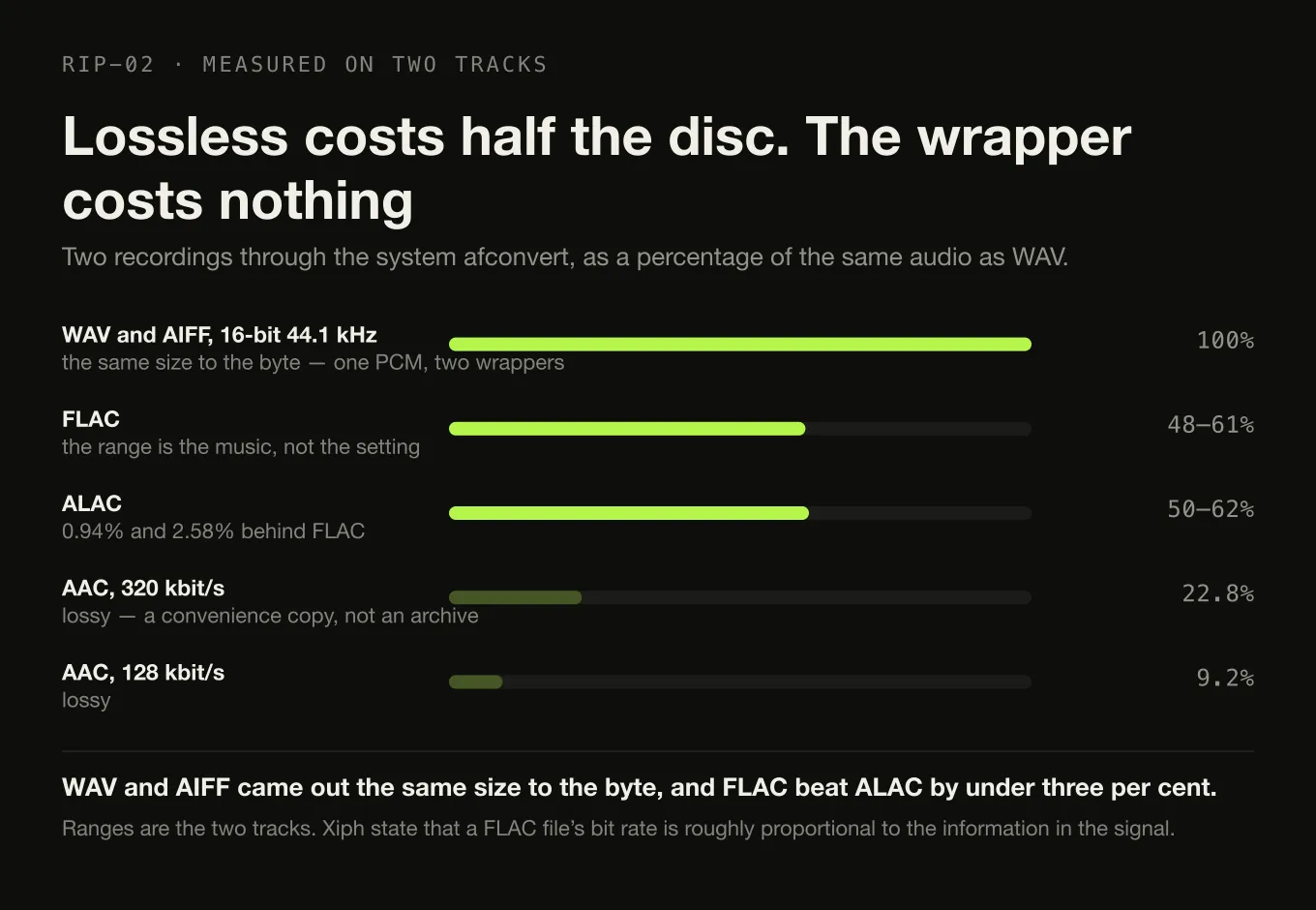
WAV and AIFF are the same size to the byte. 34,040,476 and 34,040,476; 60,156,496 and 60,156,496. They are the same PCM in a different wrapper, so “which uncompressed container” is not a storage question — and neither of them is smaller than the other by a single byte you could spend elsewhere.
Lossless compression is worth 38% to 52% of the disc, and the range is the music rather than the setting. Xiph state plainly that a FLAC file’s bitrate “is roughly proportional to the amount of information in the original signal”, which is why one of these tracks lands at 61% of uncompressed and the other at 48%. Planning ranges across a whole library are the subject of the storage arithmetic.
FLAC came out ahead of ALAC on both tracks — by 0.94% and 2.58%. That is the “few percent” the practical FLAC and ALAC comparison already reports, and it is not a reason to choose either one. Nobody has ever regretted a decision worth two percent of a drive.
The encoder matters less than the material. The published FLAC and the local re-encode of the same audio differ by +0.09% on one track and −0.79% on the other, in opposite directions. Compression level is not a decision with consequences at this scale.
FLAC or ALAC: an ecosystem question with a documented answer
Since the audio is identical and the size difference is a rounding error, the decision rests on two facts that are both a matter of public record.
FLAC is a published specification anyone can implement. It is RFC 9639, an IETF document, which codes PCM “with 1 to 8 channels, sample rates from 1 to 1048575 hertz, and bit depths from 4 to 32 bits”. That is the strongest available form of “open format”: not a licence grant from a vendor, but a specification with an RFC number. It is why FLAC support turns up in players, phones, streamers and Google Cast receivers without anybody negotiating anything.
ALAC is also open, and Apple’s own tools still will not write FLAC. Apple released the Apple Lossless Audio Codec under the Apache 2.0 licence with a reference encoder and decoder, so “ALAC is proprietary” has been out of date for years. But Apple’s importer offers five encoders — AAC, AIFF, Apple Lossless, MP3 and WAV — and FLAC is not among them. If the Music app is what manages your library, ripping to FLAC means adding a second application to the workflow permanently.
So: ALAC if Apple’s software is the library. FLAC otherwise, and FLAC for anything you expect to hand to hardware you have not bought yet. And because both are lossless, choosing wrong is recoverable — a conversion later costs you CPU time and nothing else.
Why not WAV or AIFF, when serious archives prefer them
This is the part where the honest answer is more interesting than the usual one, because the archival advice people are half-remembering is real.
The Library of Congress’s recommended formats statement for audio lists, among its preferences for media-independent digital audio, a “WAVE file with embedded metadata (Broadcast WAVE) rather than without embedded metadata” and “uncompressed files rather than compressed”. Lossless compression appears one column over, as acceptable rather than preferred. So somebody insisting that a real archive uses uncompressed WAVE is not making it up.
They are answering a different question. An institutional deposit is a one-time handover of a defined set of files to a specialist who will manage them with their own tools, on their own storage, possibly for centuries, and who values a format with no decoder between the bytes and the samples. Your library is browsed daily by ordinary software, sits on a drive you pay for, and needs its tags to survive being read by six applications. Those constraints point different ways, and the differences are concrete:
- Size. 63% more than FLAC on one of the tracks above, 107% more on the other. That is real money at collection scale and it buys nothing audible.
- Metadata. FLAC’s tagging system is specified and guaranteed; what each container does with tags varies most for the uncompressed ones, and inconsistent tag handling across tools is exactly the failure that costs an evening.
- Self-verification. A FLAC file carries a checksum of its own decoded audio. A WAV file carries nothing, so a bit that flips in one is silent.
AIFF has one more strike in this specific context. Digr does not index it — see below — and it is not on the Google Cast receiver codec list either. It is a perfectly good container that fewer things in a modern local-music setup will pick up.
Lossy, done deliberately
Lossy formats are useful, and the way to use them is as derivatives generated from the master, never as the master.
One read of the disc, one master, as many derivatives as you like
The disc, read once
16-bit 44.1 kHz stereo PCM The one step you cannot repeat cheaply, because it needs the physical disc and a drive. Everything below is a file operation you can redo whenever you like.Encoded losslessly to
The master · keep forever, back up
FLAC, or ALAC · ~48–62% of the disc Byte-identical to the PCM when decoded, verified above. Tagged once, properly, because this is the copy every other copy inherits from.Derived, whenever needed, into
Derivatives · disposable, regenerable
AAC or MP3 · 9–23% of the disc For a phone, a car, a constrained drive, a share. Measured at 3.1 MB for a three-minute track at 128 kbit/s against 20.8 MB as FLAC. Delete them freely; they can be rebuilt from the master in minutes.The lossy sizes in the table are almost pure arithmetic: measured against
bitrate × seconds ÷ 8, the files came in 1.22% over at 128 kbit/s and 0.50%
over at 320, identically on both recordings. That overhead is the MP4 container,
and it means you can predict a derivative set’s size exactly.
Whether the discarded information matters to you
is a listening question this article deliberately does not answer, because the
archival argument does not depend on it.
What the derivative model does depend on is having somewhere to put the master — which is the same reason a backup scheme that has actually been restored from matters more than the format debate.
The settings that matter more than the format
Two of them, briefly, because they are on the same screen and they cost more when wrong.
One file per track, tagged at rip time. Tagging as you go means each disc leaves the drive finished. Coming back to five hundred untagged albums is the collection-building failure mode that no format choice can rescue.
Consistency across the collection. A library that is half FLAC and half ALAC works, but every tool decision you make afterwards has to accommodate both. Pick once, for the whole run of discs.
Where Digr fits, precisely
Digr does not rip CDs. There is no optical-drive support and no ripping engine in the application today, so nothing above is a description of using Digr — it is general practice for whichever ripper you choose.
What Digr does is index the results. It reads MP3, FLAC, ALAC, M4A, AAC, WAV and OGG for tags, artwork and duration. AIFF is not on that list, which is worth knowing before you rip several hundred discs to it. Indexing is also not the same as decoding: local playback goes through the system media stack, so a container it cannot decode surfaces a clear per-track error rather than silence. What is indexed and what plays today is the longer version of that distinction.
Disc import is planned rather than present. The specified shape of it is a complete standard import workflow with a bundled ripping engine — insert a disc, identify the release, choose tracks, get tagged files — at the six-to-twelve-month horizon and as part of Digr Free, because ripping your own CDs is not an advanced use of a music player. Its default output is FLAC, with MP3 and AAC output and ALAC and WAV to follow.
That default matching this article’s recommendation is a coincidence of the same reasoning rather than evidence for it — the argument above stands on the hash table, not on anybody’s roadmap. There is no date attached to any of it.
Choosing, in one table
| If | Rip to | Because |
|---|---|---|
| You are starting from nothing | FLAC | Specified in an RFC, read by nearly everything, smallest of the lossless options measured here |
| Apple Music manages your library | ALAC | Apple’s importer has no FLAC encoder at all; ALAC is lossless and converts to FLAC later without loss |
| You want the smallest possible library and accept the trade | FLAC master, AAC derivatives | The derivative is 9–23% of the disc and can be regenerated; the master keeps the option open |
| You will hand files to studio or broadcast tooling | FLAC master, WAV exports | Uncompressed WAVE is what those workflows expect; make it on demand from the master |
| You are depositing with an archive or institution | Ask them | Their preference is likely Broadcast WAVE with embedded metadata, which is their problem and not your library’s |
| You are ripping straight to MP3 to save space | Reconsider | The disc is in your hand now. It will not be in five years, and the information is not recoverable |
The short version
- Rip lossless, once. FLAC by default, ALAC if Apple’s software runs your library.
- The lossless formats are the same audio, verified by hashing the decoded payload. Choose on tooling, not sound.
- Skip WAV and AIFF as the master. Same audio, 63–107% more disk, weaker metadata, no self-check. Broadcast WAVE is an institutional deposit format, not a library format.
- Make lossy copies from the master, not instead of it. They are 9–23% of the disc and can always be rebuilt.
- Compression level is noise. Under 1%, and in both directions.
- Digr does not rip today. Disc import is planned Free work at the 6–12 month horizon, and Digr does not index AIFF.
Sources
- RFC 9639 — Free Lossless Audio Codec (FLAC) — FLAC as a published IETF specification; §1 on coding PCM “with 1 to 8 channels, sample rates from 1 to 1048575 hertz, and bit depths from 4 to 32 bits”; and the
STREAMINFOMD5 of the unencoded audio that lets a FLAC file verify its own decode - FLAC FAQ — Xiph.Org — lossless decoding returning the original data; the compression level affecting encode time and size but not the decoded audio; and “the resulting bitrate is roughly proportional to the amount of information in the original signal”
- Apple Lossless Audio Codec — Apple’s Apache 2.0 release of ALAC with a reference encoder and decoder
- Choose import settings in Music on Mac — Apple — Apple’s five import encoders: AAC, AIFF, Apple Lossless, MP3 and WAV, with no FLAC option
- Recommended Formats Statement, Audio Works — Library of Congress — for media-independent digital audio, a preference for a “WAVE file with embedded metadata (Broadcast WAVE) rather than without embedded metadata” and for “uncompressed files rather than compressed”, with lossless compression listed as acceptable; and “CD Redbook quality files (44.1 kHz/16 bit) in PCM” as the description of CD-quality audio
- Digr — features and roadmap — the indexed container list, the distinction between indexing and decoding, and the planned disc import with FLAC output by default
- Measurements taken locally on macOS 26.5.2 (build 25F84). Sources: Artificial.Music — “Infinity Robes” and Caturday & Babasmas — “Space Journey”, both CC BY 4.0, both verified as 16-bit 44.1 kHz stereo with
afinfo. Decoded to PCM withafconvert -f WAVE -d LEI16@44100, re-encoded withafconvert -f flac -d flac,-f m4af -d alac,-f AIFF -d BEI16@44100and-f m4af -d aac -s 0 -b <rate>, decoded back, and the audio payload hashed withshasum -a 256after skipping the container header. No disc was ripped: the machine used has no optical drive. Nothing here describes the reading of a physical disc
Common questions
What format should I rip CDs to?
A lossless one, and FLAC unless your library is managed by Apple’s own software, in which case ALAC. That gives you a master you can convert to anything later. Make MP3 or AAC copies from it afterwards for phones and cars, and treat those as disposable derivatives rather than as the archive. The one expensive mistake is ripping straight to a lossy format, because the discarded information cannot be recovered without going back to the disc.
Is FLAC or ALAC better for ripping CDs?
They decode to identical audio, so the choice is about tooling. FLAC is specified in RFC 9639, is implemented almost everywhere, and was 0.9% and 2.6% smaller than ALAC on the two real recordings measured for this article. ALAC is the sensible answer if Apple’s Music app manages your library, because Apple’s importer offers AAC, AIFF, Apple Lossless, MP3 and WAV — and no FLAC option at all. Converting between the two later is free of loss in both directions.
Should I rip CDs to WAV?
Not as your library master. WAV is genuinely lossless, but it is roughly 60% larger than the same audio as FLAC with no audible difference whatsoever, and its metadata support is the weakest of the candidates. Measured on a real track, WAV was 34,040,476 bytes where FLAC was 20,832,663. Uncompressed WAVE is the right answer for depositing audio with an institution, which is a different problem from keeping a collection you browse.
Does ripping to MP3 lose quality I can actually hear?
Whether you can hear it is a separate question from whether information was removed, and only the second one is decided. Decoding a lossy file never returns the original samples: an AAC round trip changed the audio payload’s hash, where FLAC, ALAC and AIFF all returned it byte for byte. So a lossy rip is a decision that cannot be reversed, taken at the moment you still have the disc in your hand and a free choice.
Can I convert FLAC to ALAC later without losing anything?
Yes. Both are lossless, so a conversion decodes to the same PCM samples and re-encodes them, and the audio that comes out the far end is bit-for-bit what went in. The things worth checking are the metadata and the artwork, which are carried by different mechanisms in the two containers and are what a bad converter actually loses. Converting a lossy file to a lossless one, by contrast, recovers nothing — it just makes the damage bigger.
Does FLAC compression level matter when ripping?
Almost never. The compression level changes how long encoding takes and shifts the file size by a fraction of a percent; it has no effect on the decoded audio, which is identical at every level. Measured on the same recordings, a file encoded by an unknown third-party encoder differed from a local re-encode by +0.09% on one track and −0.79% on the other — in opposite directions. Choose a middle setting and spend the attention on verifying the read instead.
- ripping
- FLAC
- ALAC
- WAV
- AIFF
- archival