How to find duplicate music files, and which copy to keep
Four different relationships get called a duplicate, and only one is safe to resolve automatically. What filenames, tags, hashes and fingerprints each prove — measured — and how to decide safely.
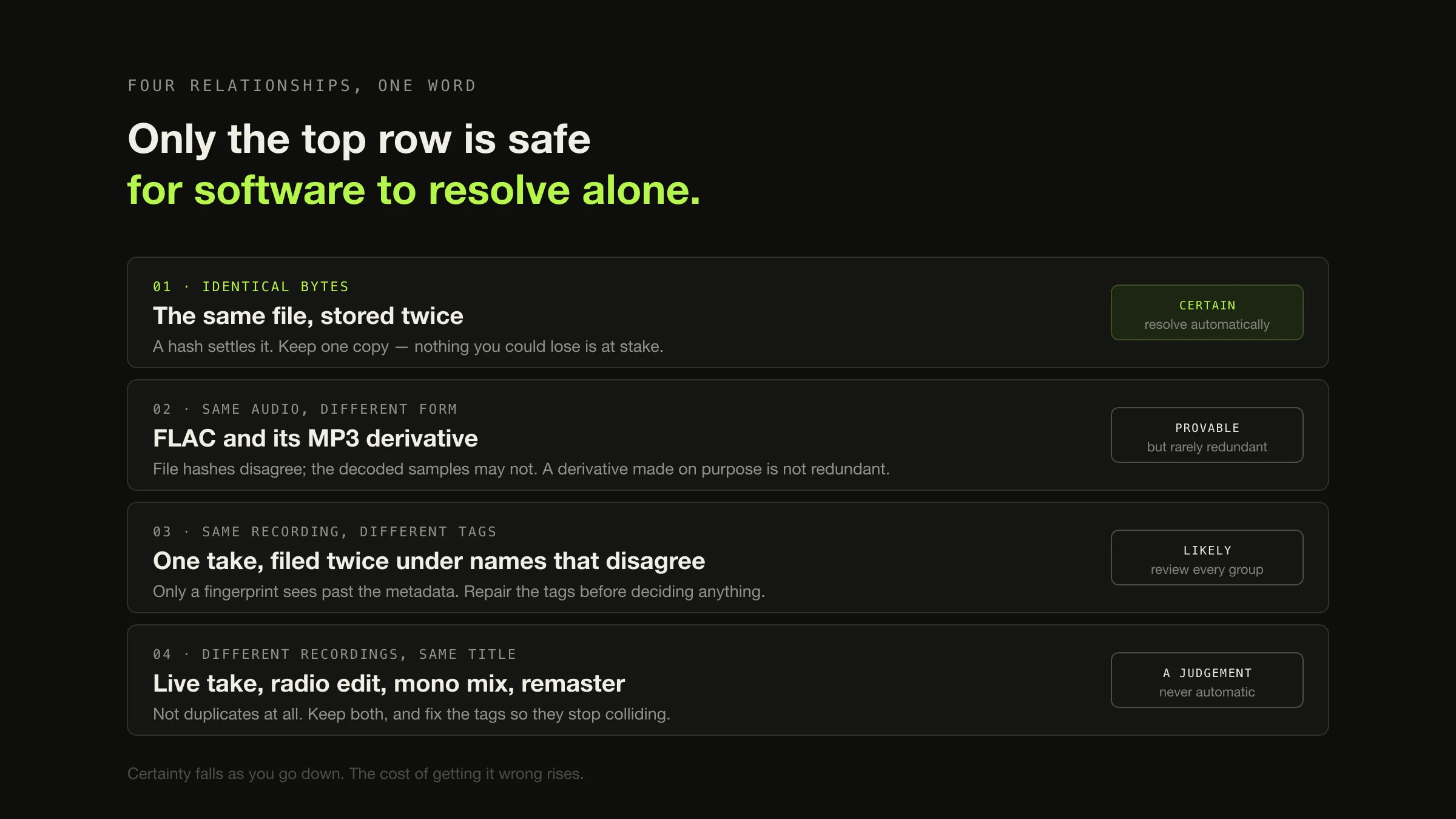
Four different relationships get called a duplicate, and only the first is safe for software to resolve on its own. Two files can hold identical bytes; the same audio in different containers; the same recording under different tags; or different recordings that happen to share a title and an artist. A tool that finds “duplicates” has usually found the third and fourth kinds and reported them as the first.
A cryptographic file hash proves that two files contain identical bytes. It proves nothing about whether they contain the same music — the same audio stored once as FLAC and once as ALAC produces two completely different digests, and two mixes of the same song can produce two files that are equally different. Everything below follows from that gap: which method closes it, which method cannot, and a procedure that puts a reversible step in front of every irreversible one.
The four things people call a duplicate
Sort every candidate into one of these before doing anything else. The classification decides the action, and it is the step that the tools skip.
One word, four relationships
Typical cause A folder copied twice, an interrupted import resumed, a backup restored into the live library.
What settles it A hash of each file. Equal digests, equal bytes.
Safe action Keep one. This is the only class where the decision carries no information you could lose.
Typical cause A portable copy made on purpose, a format migration, a re-encode.
What settles it Comparing the decoded audio, not the files. Two lossless copies of one source decode to identical samples; a lossy derivative never does.
Safe action Usually none. A derivative that exists deliberately is not redundant, and no property of the files says why it was made.
Typical cause Two rips of the same disc, an album track and its appearance on a compilation, a re-tag that missed some files.
What settles it An acoustic fingerprint, which sees past the tags. Nothing in the metadata will.
Safe action Repair the tags first. Whether the second copy is redundant is a separate question, answered after they agree.
Typical cause A live take, a radio edit, a mono mix, a remix, a deluxe-edition bonus version, a remaster next to the original pressing.
What settles it A person. Fingerprints narrow the field; the edition question is a judgement about what the two files are.
Safe action Keep both, and fix the tags so they stop colliding.
What each detection method actually proves
The useful question about a method is not how many candidates it returns. It is what a match establishes — because that is what decides whether acting on the match is safe.
| Method | Proves | Misses | False positives | Safe on its own? |
|---|---|---|---|---|
| Filename comparison | Two files were named the same way | Everything renamed, and every copy filed differently | High — 01 Track.mp3 recurs across a whole library | No |
| File size | Two files occupy the same number of bytes | Any re-encode, any tag edit, any different format | High as a sole signal; useful only as a cheap pre-filter | No |
| Tag comparison (artist, title, album, duration) | Two files were described the same way | Anything mis-tagged, which is the case you are usually hunting | Moderate — live takes, edits and remasters all collide here | No |
| Cryptographic file hash (SHA-256, MD5) | The two files contain identical bytes | Every same-audio pair that differs in container, encoder or tags | Effectively none | Yes, for class 1 only |
| Decoded-audio hash | The two files decode to identical samples | Every lossy pair, and any pair with a different rip offset | Effectively none | Yes, for classes 1 and 2 |
| Acoustic fingerprint | The two files contain near-identical audio | Genuinely different performances of the same song | Low but real — a fingerprint is a similarity judgement | No — review first |
Two precise statements sit behind that table, and both are worth stating on their own.
A file hash is an identity test for bytes, and its failure mode is silence about audio. Feed it two files that hold the same music in different containers and it reports two unrelated files, correctly and uselessly. On the strength of the algorithms: MD5 remains fine for detecting accidental differences, and RFC 6151 is explicit that it “is no longer acceptable where collision resistance is required such as digital signatures” while noting pre-image resistance is still out of reach at “2^123.4”. Nothing in a music library is adversarial, so an MD5 match between two of your own files is trustworthy evidence of identity. SHA-256 costs nothing extra and removes the caveat.
A decoded-audio hash is an identity test for samples, and it is the one most people have never heard of. Decode both files to raw PCM, hash the samples rather than the file, and two lossless copies of one source match no matter what container they are in.
The measurement
Five files, all derived from one deterministic five-second stereo WAV, hashed
twice each: once over the file as stored on disk, and once over the decoded PCM.
Run on macOS with afconvert and Python’s standard library, on 2026-08-26.
Digests are truncated to their first eight bytes for legibility; the comparisons
below were made on the full values.
The same five files, asked two different questions
-
Class 1 · identical bytes
source.wav and source-copy.wav
file 1ac1a4b1… = 1ac1a4b1…
Both digests agree, both times. A file hash settles this pair completely, and it is the only pair in the set it settles.
-
Class 2 · same audio, different container
source.wav and track-alac.m4a
file 1ac1a4b1… ≠ 64173f19…
audio 4ccc7760… = 4ccc7760…882,044 bytes against 208,460, and not a byte in common. The file hashes say two unrelated files. The decoded audio is byte-identical — the same 220,500 sample frames. This row is the whole argument.
-
Class 2 · lossy derivatives
track-aac-192.m4a and track-aac-128.m4a
audio f13cd658… ≠ 205adccb… ≠ 4ccc7760…
Same recording, same source file, one encoder. Every digest differs, including from each other. No hash of any kind will connect either of these back to the original, which is exactly where hashing stops being the right tool.
If your library is FLAC, most of this work is already done for you. The FLAC format stores an MD5 of the decoded audio inside the file. RFC 9639 defines the STREAMINFO field as a 128-bit “MD5 checksum of the unencoded audio data”, computed over “all samples of all channels interleaved in signed, little-endian form”, present so “the decoder can determine if an error exists in the audio data even when, despite the error, the bitstream itself is valid”. Two FLAC files with the same STREAMINFO checksum decode to the same samples — regardless of compression level, tags, artwork or filename — and you can read the value rather than compute it. A value of zero means the encoder did not record one, which is a “do not know”, not a “does not match”.
What an acoustic fingerprint adds, and what it will not settle
Fingerprinting is the only method that reaches class three. It summarises the audio itself into a compact signature, so two files that hold the same recording match even when every tag disagrees — and, more usefully for the class-four problem, two files that hold different recordings can fail to match even when every tag agrees.
The Chromaprint library, which produces the fingerprints behind AcoustID, is unusually honest about its own limits. Its authors describe it as designed to “identify near-identical audio”, with target use cases of “full audio file identification, duplicate audio file detection and long audio stream monitoring”, and then say two things that most write-ups of fingerprinting omit: “It trades precision and robustness for search performance” and “It’s not a general purpose audio fingerprinting solution.” Neither sentence makes it a bad tool. Both make it a shortlisting tool rather than an adjudicating one.
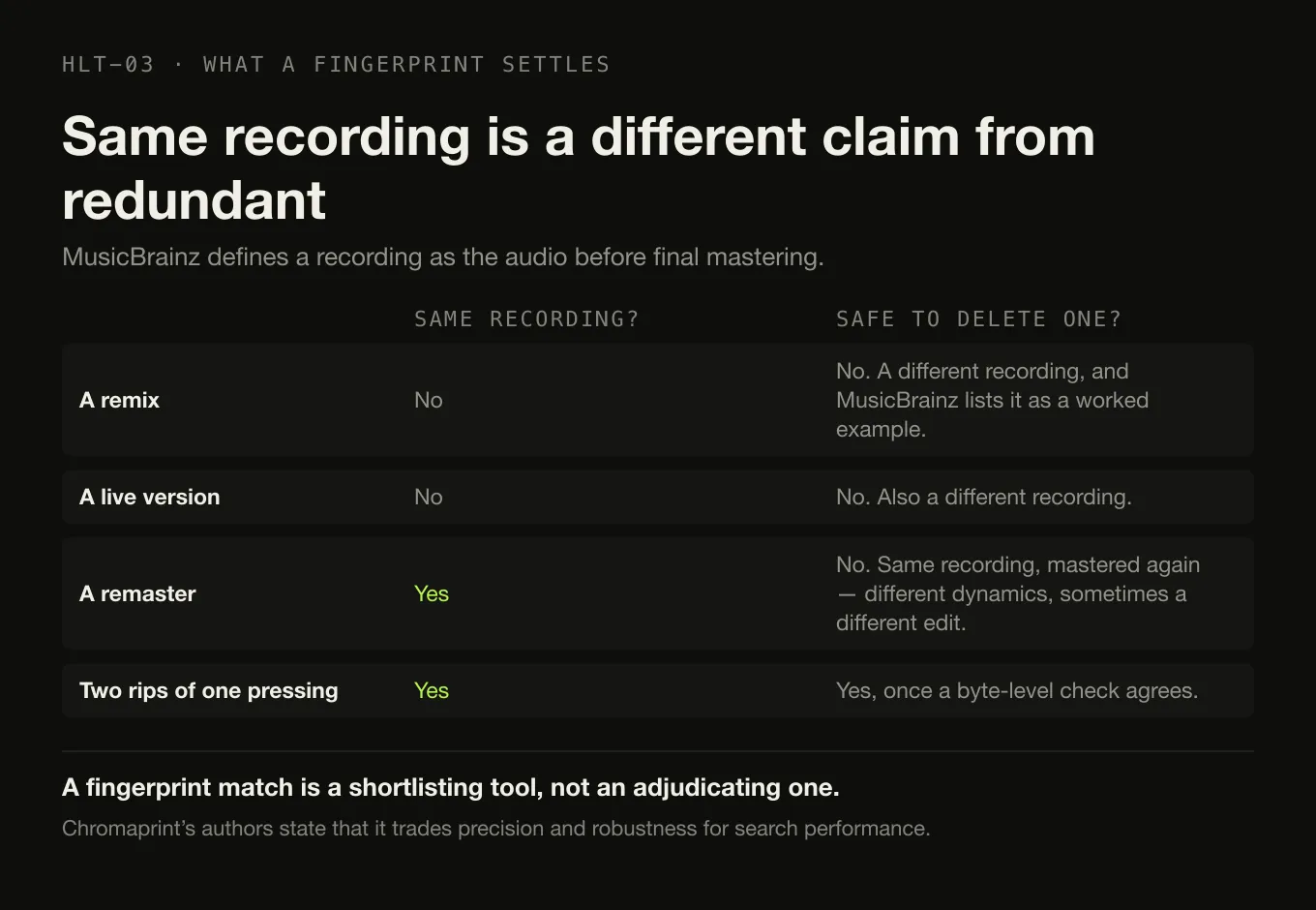
There is a deeper reason not to treat “same recording” as “delete one”. MusicBrainz, which is the vocabulary most tagging software borrows, defines a recording as something that “represents distinct audio that has been used to produce at least one released track through copying or mastering”, corresponding to “the audio at a stage in the production process before any final mastering but after any editing or mixing”. Read the consequence carefully:
- A remix is a different recording. A live version is a different recording. MusicBrainz lists both as worked examples.
- A remaster is not. It is the same recording, mastered again. Two files can be the same recording by this definition and still be audibly different records — different dynamics, different level, sometimes a different edit length.
So “these two files are the same recording” is genuinely useful information and is genuinely not the same statement as “one of these two files is redundant”. Even Apple ships two different definitions of the word: its Music app offers Show Duplicate Items, which finds “every instance of that item in your library”, and — behind the Option key — Show Exact Duplicate Items, which finds “exact duplicates, in which a song, artist, album, and version are all the same”. Neither compares audio.
A procedure that never deletes on a guess
The ordering matters more than the tooling. Every step before the last one is reversible; the last one is not, and it is deliberately the smallest possible step.
Candidate to resolution, with the irreversible step last
Step 0 · before anything
Back up the library A de-duplication pass is a bulk delete with good intentions. If the backup is older than the last import, it is not a backup of what you are about to change.Then, for each group
Step 1 · classify
Which of the four is this? Identical bytes, same audio in another form, same recording mis-tagged, or two different recordings. Everything after this is decided by the answer, and getting it wrong is how the wrong file gets deleted.Step 2 · confirm with the right evidence
Hash for classes 1 and 2, listen for class 4 A hash for byte identity. A decoded-audio comparison — or a FLAC STREAMINFO checksum — for same-audio pairs. For anything that might be a live take, an edit or a remaster, open both and check the duration and the waveform before forming an opinion.Step 3 · choose the copy that stays
Format, tags, artwork, location Lossless over lossy where both came from the same source. Complete tags over sparse ones. Embedded artwork over none. The copy that sits in your real folder structure over the one in a downloads directory. Bitrate alone is a bad tiebreaker and a terrible rule.Step 4 · quarantine, do not delete
Move the loser to a folder outside the library This is the step the tools omit and the one that makes the whole procedure recoverable. A move is undone by moving it back. A delete is undone by restoring a backup, if you made one, and remembering exactly what was lost, which you will not.Then
Step 5 · rescan and live with it
Re-index, then play the affected albums A rescan catches anything the index still points at. Playing the albums catches the thing a rescan cannot: that the copy you kept is the one you wanted.Only now
Step 6 · empty the quarantine
Delete, once, on purpose Weeks later, not minutes. The quarantine folder costs disk space and nothing else, and the space it costs is the cheapest insurance in this entire article.Two rules that fall out of the procedure and are worth stating separately.
Do not run a bulk automatic clean-up on a library you have not backed up. The failure mode is not “some duplicates survive”. It is “the only copy of a pressing you cannot buy again is gone”, and you find out months later. If a current backup of the collection does not exist yet, that is the actual first task and this one can wait a day.
Prefer the lossless copy when both came from the same source, and know why. What a lossy encoder threw away is not recoverable, so keeping the lossless file preserves the option to make a new derivative later. That reasoning stops applying the moment the pair turns out to be class four, where the two files are different music and neither is a copy of the other.
Fix the tags before you decide anything about class three. Two copies of one recording filed under different spellings are a metadata problem wearing a duplicate costume, and repairing the tags frequently reveals that one of the two was never redundant — it was the compilation appearance, and you want it. The underlying question of what those tags are and where they live is worth knowing before a batch edit, and a folder structure that survives every tool is what stops the whole problem recurring next year.
What Digr does about duplicates today
Digr’s library-health views surface likely duplicates now, in Digr Free, and they are inspect-only: nothing is edited, moved or deleted. They sit alongside missing files, tracks with no artwork, unknown artist and unknown album — the categories that predict a collection going bad. The grouping is a metadata comparison. It does not decode your audio and it cannot tell you which of two files is the better encode, which puts it squarely in the shortlisting tier of the table above. Underneath all of it, Digr only ever reads your audio files: scanning opens them for tags and artwork and never writes to them.
Two things are planned and are not available, both in Digr Pro, and both with no dates:
- Byte-identical duplicate detection, with safe duplicate review and storage savings estimates — class one of the four, done properly — is part of the planned Library Health suite. Its stated caveat is that nothing in it ever deletes a file on its own: every repair is previewed, applied on your instruction, and reversible.
- Chromaprint-based acoustic analysis — exact audio duplicate detection on decoded audio, same-recording detection across differing tags, remaster and edition distinction, and AcoustID-assisted metadata matching — is planned further out. That is class three and the hard half of class four.
And one thing is on the permanent not-planned list, in these words: duplicate detection will get very good, it will never delete files on its own, and every removal is reviewed, previewed and reversible — because an algorithm confidently deleting the wrong master is unrecoverable. What works today is the shorter list, and it is the honest one.
The short version
- “Duplicate” is four relationships. Identical bytes; same audio in a different form; same recording under different tags; different recordings sharing a title. Classify before you act.
- A file hash proves byte identity and is silent about audio. Measured here: a WAV and an ALAC file of the same audio share no bytes and decode to identical samples.
- A decoded-audio hash closes that gap — and for FLAC the value is already in the file, as the STREAMINFO MD5 of the unencoded audio.
- Nothing links a lossy derivative back to its source by hashing. That is where acoustic fingerprinting starts, and Chromaprint’s own authors describe it as identifying near-identical audio while trading precision for speed.
- Same recording is not the same question as safe to delete. A remaster is the same recording; a live take is not.
- Quarantine, rescan, live with it, then delete. Five reversible steps in front of one irreversible one.
- Digr flags likely duplicates today and touches nothing. Byte-identical detection and acoustic analysis are planned Pro work; automatic destructive de-duplication never is.
Sources
- RFC 9639 — Free Lossless Audio Codec (FLAC) — the STREAMINFO field defined as a 128-bit “MD5 checksum of the unencoded audio data”, which “allows the decoder to determine if an error exists in the audio data even when, despite the error, the bitstream itself is valid”, computed over “all samples of all channels interleaved in signed, little-endian form”, with “a value of 0” signifying “that the value is not known”
- RFC 6151 — Updated Security Considerations for the MD5 Message-Digest and the HMAC-MD5 Algorithms — “MD5 is no longer acceptable where collision resistance is required such as digital signatures”, alongside the note that for pre-image resistance “the complexity 2^123.4 is still pretty high”
- Chromaprint — AcoustID and the Chromaprint source repository — Chromaprint as “a client-side library that implements a custom algorithm for extracting fingerprints from any audio source”, designed to “identify near-identical audio”, with target use cases of “full audio file identification, duplicate audio file detection and long audio stream monitoring”, and the authors’ own limits: “It trades precision and robustness for search performance” and “It’s not a general purpose audio fingerprinting solution”
- MusicBrainz — Recording — a recording “represents distinct audio that has been used to produce at least one released track through copying or mastering”, corresponding to “the audio at a stage in the production process before any final mastering but after any editing or mixing”, with a remix and a live version given as worked examples of different recordings
- Apple — Find duplicate items in Music on Mac — “Show Duplicate Items” finds “every instance of that item in your library”; “Show Exact Duplicate Items” finds “exact duplicates, in which a song, artist, album, and version are all the same”
- Digr — features and roadmap — the inspect-only library-health views that ship today, the planned Pro byte-identical duplicate detection and safe duplicate review, the planned Pro acoustic fingerprinting work, and the permanent commitment against automatic destructive de-duplication
- The measurement in this article was run on 2026-08-26 on macOS using
afconvertand Python’s standard library, on a five-second deterministic test signal generated for the purpose. Every digest quoted is from that run. No MP3 encoder was involved, because none ships with the operating system, so no claim is made about MP3 encoder behaviour. No duplicate-finder product was tested, and none is recommended
Common questions
Is a FLAC and an MP3 of the same song a duplicate?
They are the same recording in two forms, which is not the same thing as a redundant copy. If the MP3 exists on purpose — for a phone, a car, a device that cannot decode FLAC — it is a derivative and deleting it costs you the thing it was made for. If it is a leftover from before you had the lossless copy, it is redundant. Nothing in the files can tell you which of those two it is; only you know why the second one exists. That is why this class should never be resolved automatically.
How do I know which duplicate copy to keep?
Compare four things before deciding: the format and whether either copy is lossless, the completeness of the tags, whether artwork is embedded, and where each file sits in your folder structure. The higher-bitrate copy is usually right when both files came from the same source, and it is the wrong rule when the pair turns out to be a remaster and its original, or a mono mix and a stereo mix — there the two files are different music and the question of which to keep does not apply.
Is it safe to delete files that a duplicate finder matched on filename or tags?
Not without looking at them. A filename or tag match says two files were described the same way, which is a statement about metadata rather than about audio. Live versions, radio edits, remasters, mono mixes and a track appearing on both an album and a compilation all match on artist and title while being different music. Treat a metadata match as a shortlist to inspect, not as a verdict, and move candidates to a quarantine folder rather than deleting them.
Do two files with the same title and artist contain the same recording?
Often, but the exceptions are common enough to make it an unsafe assumption. MusicBrainz treats a studio version and a live version of one song as different recordings, and a remix as a different recording again. A remaster is the opposite case: it is the same recording put through a different mastering, so two files can genuinely hold the same recording and still sound noticeably different. Title and artist are the weakest evidence available for this question.
What can an acoustic fingerprint prove about a duplicate?
It can tell you that two files hold near-identical audio even when their tags disagree, which is exactly what filename and tag comparison cannot do. The Chromaprint project, which produces the fingerprints behind AcoustID, states plainly that it is designed to identify near-identical audio, that it trades precision and robustness for search performance, and that it is not a general purpose audio fingerprinting solution. A fingerprint match is strong evidence and not a licence to delete unreviewed.
Does Digr find duplicate music files?
Digr’s library-health views surface likely duplicates today, and they are inspect-only: nothing is edited, moved or deleted. The grouping is a metadata comparison, so it will flag two files described identically and will not tell you which is the better encode. Byte-identical duplicate detection and acoustic duplicate analysis are both planned Digr Pro work with no dates against them, and automatic destructive de-duplication is on the permanent not-planned list.
- duplicates
- SHA-256
- MD5
- FLAC
- acoustic fingerprint
- Chromaprint
- AcoustID
- MusicBrainz