Roon alternatives, sorted by the reason you are leaving
Eight reasons people leave Roon, the replacement that answers each one, what it costs you — and the two reasons where nothing here is a replacement at all.
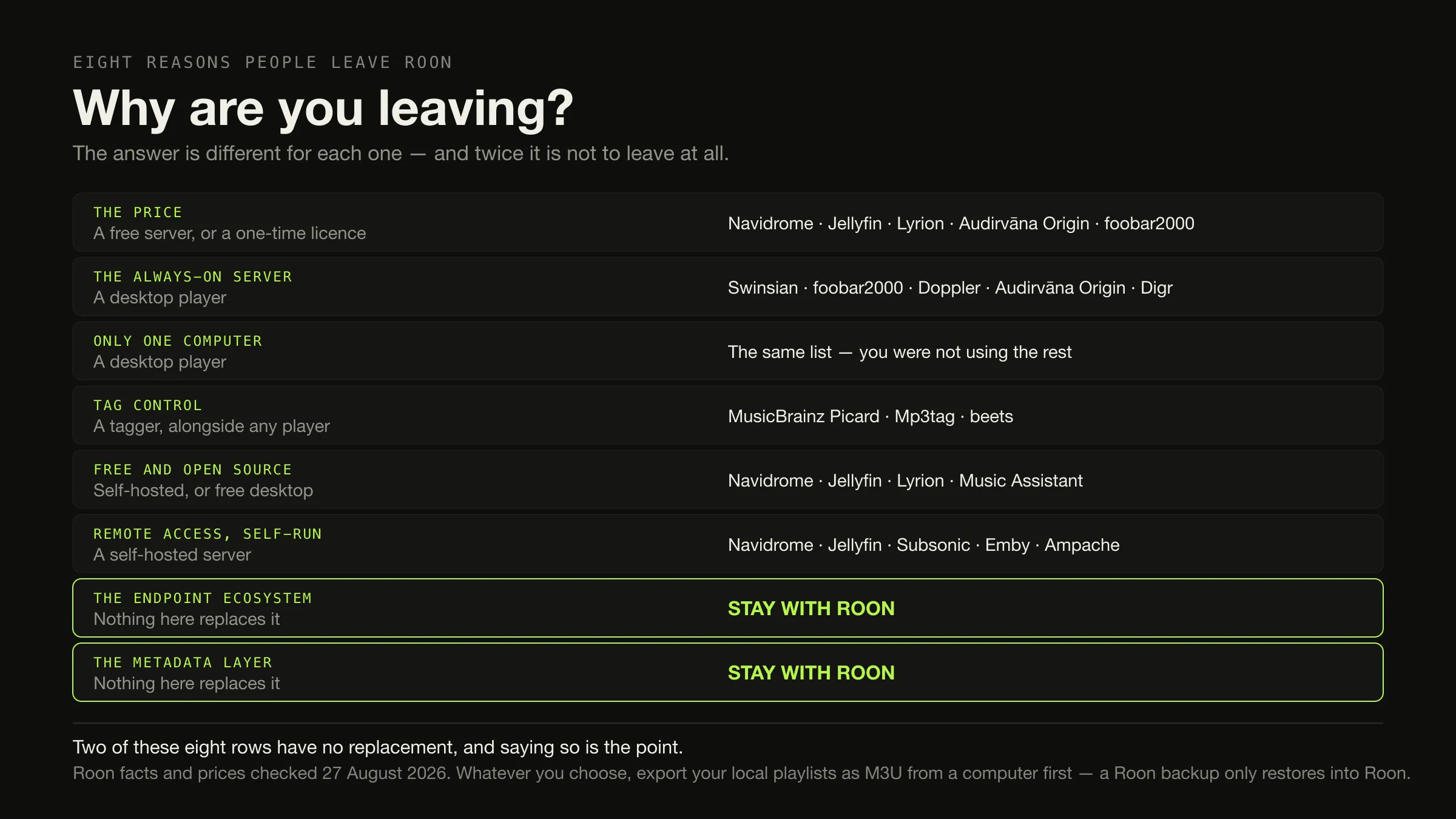
Work out which thing is annoying you before you look at any product. Leaving Roon over the price is a different problem from leaving over the always-on server, and both are different from wanting to fix your own tags. Sorted that way, the answers are: a free self-hosted server — Navidrome, Jellyfin, Lyrion — if the price is the issue; a desktop player — Swinsian, foobar2000, Doppler, Audirvāna Origin — if the server is; and a dedicated tagger alongside whatever you already have, if the tags are.
And twice the answer is stay. Nothing here replaces Roon’s endpoint ecosystem, and nothing here replaces its metadata and credits layer. Whatever you decide, export your local playlists as M3U first, from a computer.
Roon’s prices, architecture and documentation were checked on 27 August 2026. Every source is listed at the foot.
Who is currently answering this question
Search “roon alternatives” and the first two results are Roon’s own community forum. That is unusual enough to change how you read them: the threads are genuinely useful for understanding why people leave, and they are hosted by the company being left.
Below the forums it is directory farms — SourceForge, Slashdot, SoftwareSuggest, AlternativeTo — with titles like “in 2026” and “(Jul 2026)” that will be wrong by the time you read them. Their suggested alternatives to Roon include VLC Media Player, MX Player, PowerDVD and 5KPlayer. Those are video players. The directories are matching on a category tag rather than on anything Roon does, which is a useful signal about how much thought is behind the list.
There is no editorial page on the first screen at all.
What Roon actually is, and what it costs today
Worth restating precisely, because half the switching decisions on this page turn on architecture rather than features.
Roon is three things that have to be running: Roon Server, which Roon’s own documentation calls “the brain of your system” and which “manages your music files, streaming services, and your audio devices”; the Roon app, which “connects to Roon Server at home, letting you browse, discover, and play music via your home network”; and the audio devices at the end — Roon Ready, USB Audio, HDMI, AirPlay, Chromecast, SONOS, Bluetooth, and on Roon’s home page also Squeezebox, smart TVs and smart speakers.

The server runs on Windows 10 or later, macOS 12 or later, Linux, a supported NAS — Roon names QNAP, Synology, Asustor, Unraid and TrueNAS — a Nucleus, or an Intel NUC running ROCK. Roon recommends an Intel Core i3 Ivy Bridge or newer, 4 GB of RAM and an SSD boot drive. And: “A free Roon account is required to get up and running.”
The prices on Roon’s own page on 27 August 2026, in US dollars:
| Plan, as Roon names it | Figure | Billing |
|---|---|---|
| Flexible Plan | $14.99 / month | Billed monthly |
| Value Plan | $12.49 / month | Billed annually — the page says “Save 20%” |
| Lifetime | $829.99 | One-time |
A free trial is offered; the page does not state its length. No tax statement appears. The two monthly figures are not the same kind of number — the second is an annual commitment expressed per month — and the multi-year arithmetic for licence models is worked through elsewhere rather than repeated here.
Reason by reason
The price
The two useful directions are down to zero, or sideways to a single payment.
Down to zero means self-hosting. Navidrome is free under GPL v3, is music-only, and says it “Runs well even on simple Raspberry Pi Zero and old hardware setups”. Jellyfin is free under the GNU GPL — “There are no costs, hidden or otherwise, to use Jellyfin” — and handles video as well. Lyrion Music Server is free and open source and serves the Squeezebox family of players. Music Assistant is free and covers an unusually wide set of speakers: Sonos, Chromecast, AirPlay, Squeezelite, DLNA, HEOS and more.
Sideways to a single payment means a desktop licence. Audirvāna Origin is $149.99 or €149.99 excluding VAT, once. Swinsian is $34.95 once on macOS. Doppler is $30 USD once, on Mac and iPhone.
What you give up either way: Roon’s certified endpoint ecosystem and its editorial metadata. With the free servers you also acquire an administration job — what each server actually asks of you is a comparison of its own.
The always-on server
This is the reason with the cleanest answer, because it is architectural. If you do not want a second machine awake, you do not want a server, and every desktop-local player answers it: Swinsian on macOS at $34.95, foobar2000 free on Windows, macOS, Android and iOS, MusicBee free on Windows, Doppler on Mac and iPhone, Audirvāna Origin, and Digr on Apple silicon Macs.
What you give up: multi-room, remote access from outside your network, and control from a phone. All three are properties of the server, not of Roon.
Only one computer is involved
The same list, and it deserves saying separately because it is the most common version of the price objection in disguise. Roon’s architecture exists so that the machine holding the files is not the machine playing them. If those are the same machine, most of what you are paying for is not being used.
You want to control your own tags
This is not a reason to leave Roon at all, and the article should say so. “Roon watches your music folders without touching the files.” Roon’s edits live in Roon. A tagger — MusicBrainz Picard, free and able to identify files by AcoustID fingerprint “even if they have no metadata”; Mp3tag; beets — works on the files themselves, alongside whatever plays them. Which of those tools writes what to disk is its own comparison.
What you give up: nothing. Add the tagger and keep the player.
You want free and open source
Navidrome, Jellyfin, Lyrion Music Server and Music Assistant are all open source. foobar2000 is free but freeware rather than open source, which is a distinction worth keeping — the payment models in this category are more varied than they look.
You want remote access, run by you
Navidrome — “Access your music from anywhere” — Jellyfin, Subsonic, Emby and Ampache all do this. Jellyfin is notable for the account model: its users “are entirely local and no information or metadata will ever be sent to remote servers during the login process”, which is a different arrangement from Roon’s required free account.
What you give up: somebody else’s operations team. Exposing a server to the internet is a responsibility as well as a feature.
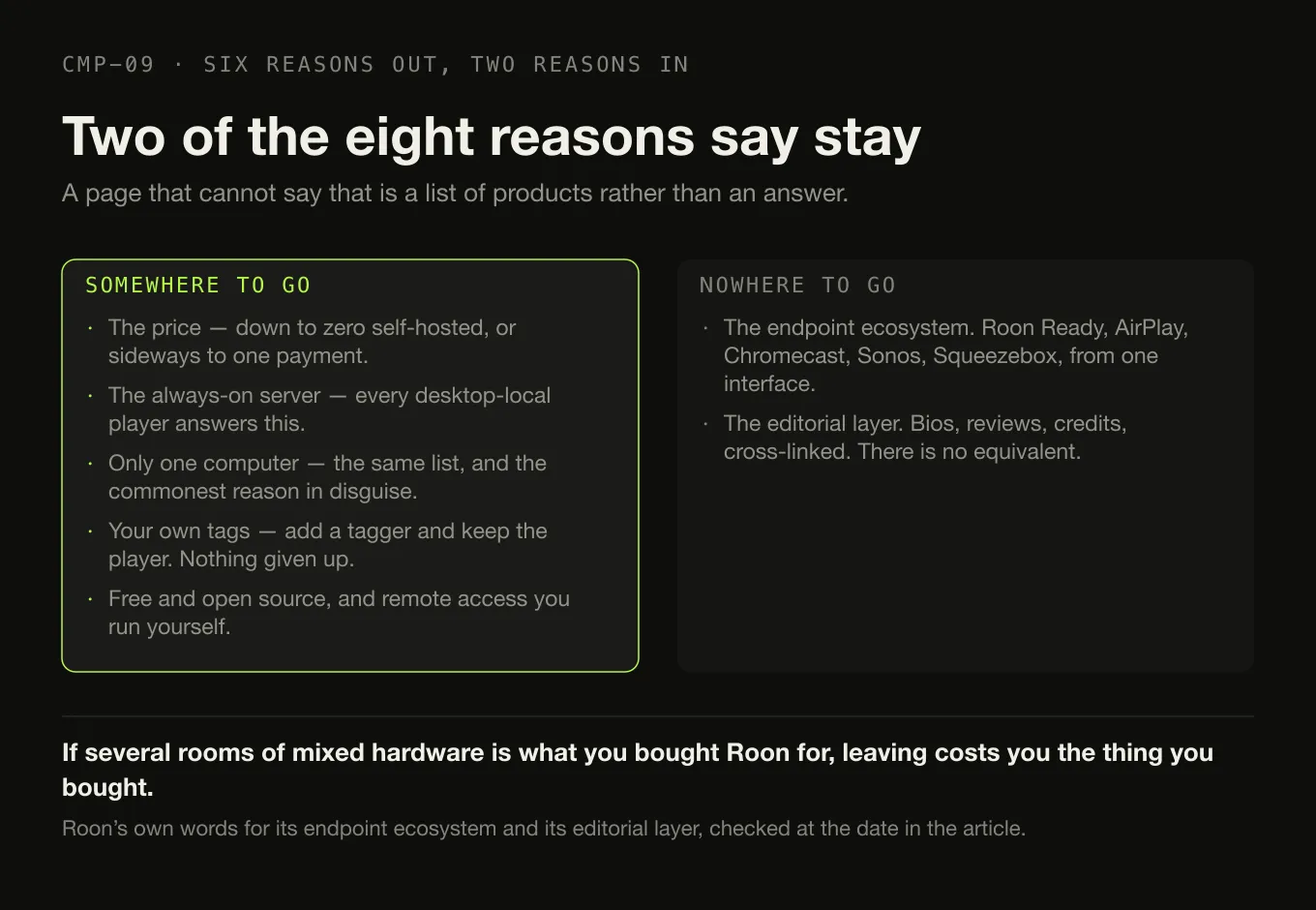
The endpoint ecosystem — stay
Roon’s device list runs from Roon Ready hardware through AirPlay, Chromecast, SONOS, Squeezebox, smart TVs, smart speakers, USB and HDMI. Roon’s own summary is “Roon lets you play music on all the devices around your home.”
Nothing on this page competes with that from one interface. Music Assistant comes closest on breadth and is free, and it is a self-hosted project rather than a supported product with certified partners. If several rooms of mixed hardware is the thing you actually bought Roon for, leaving costs you the thing you bought it for.
The metadata and editorial layer — stay
Roon describes adding “tons of data – bios, reviews, photos, lyrics, tour dates, and cross-linked credits for performers, songwriters, producers, engineers, and composers.”
There is no equivalent. A tagger plus MusicBrainz will give you correct, consistent tags in your own files, which is a genuinely valuable and quite different thing. It will not give you cross-linked credits or editorial writing. If browsing that layer is how you use Roon, this page has nothing for you, and that is the honest answer.
What does not travel with you
The part almost no alternatives page mentions, and the part that should decide your timing. All of it is from Roon’s own documentation.
What Roon holds, and whether you can take it
-
Your files
Yours, and always were
"Roon watches your music folders without touching the files." Nothing Roon knows about your library was ever written into your tags — which is reassuring while you are using Roon and is the root of the problem when you leave.
-
Edits and grouping
Stay behind
Because Roon never wrote them to your files, every correction you made inside Roon exists only in Roon's database. A new application starts from your original metadata, however bad it was when you imported it.
-
Playlists, local
Recoverable, on a computer
Roon's folder export "will also create an M3U playlist file". There is also a Soundiiz CSV route and an Excel export. The catch is stated on the same page: export is "only available on computers and laptops and not tablets and smartphones".
-
Playlists, streaming
Not as files
"Because TIDAL and Qobuz content is not stored locally, it can only be exported to Soundiiz or Excel." A mixed playlist of your files and service tracks does not come out the other side intact.
-
Play history and favourites
Roon-only
A Roon backup contains "edits you've made, your play history, all of your Roon playlists, your favorites, your settings, and more" — and restores to "any Roon Server that is not logged in". It is a Roon artefact. No alternative on this page documents reading one.
-
Play counts and ratings
Undocumented
No product compared here documents importing play counts or ratings from Roon. Swinsian documents importing play counts, but only from iTunes or the Music app. Absent evidence, assume they do not travel.
Five classes of replacement, and what each one costs
The shape of the thing you are moving to
Who Swinsian $34.95 · foobar2000 free · Doppler $30 USD · Audirvāna Origin $149.99 excl. VAT · MusicBee free on Windows · Digr free on Apple silicon.
Answers The always-on server, one computer, and price.
Costs you Multi-room, remote access, and the phone.
Who Navidrome · Lyrion Music Server · Subsonic · Ampache.
Answers Price, open source, and remote access.
Costs you A machine that stays awake, and the administration of it.
Who Jellyfin, free · Emby, free tier with Premiere at $4.99 a month, $54 a year or $119 once.
Answers Price and remote access, if the household also watches things.
Costs you Music-first design. Jellyfin recommends 8 GB of RAM and a GPU.
Who MusicBrainz Picard, free · Mp3tag · beets, free.
Answers Tag control, and nothing else.
Costs you Nothing. It sits beside whatever plays the music.
When Certified endpoints in several rooms; the metadata and credits layer; streaming services inside the local library.
Costs you $14.99 a month billed monthly, $12.49 billed annually, or $829.99 once — plus the server and the account.
Where Digr fits, and where it does not
Digr answers exactly one row of the eight above — the always-on server, for somebody with one Apple silicon Mac — and it is worth being precise about the rest.
What it is. A desktop application on macOS 11 Big Sur or later, Apple silicon only, currently an alpha. No account, no telemetry. It indexes as many local folders as you like into a SQLite index on your own disk, and it only ever reads your audio files. It discovers Google Cast devices over multicast DNS and streams the original file to them on your own network. Why the sending Mac stays in the path is a property of Cast.
Where it loses to Roon, which is most places. No server and no multi-room. No remote access outside your own network. No mobile application and none planned. No Roon Ready, no SONOS, no Squeezebox, no AirPlay, no DLNA or UPnP — Google Cast is the only protocol it speaks. No streaming-service integration. No metadata or editorial layer, no MusicBrainz lookup, no tag editing at all. No gapless playback and no ReplayGain. No Windows, Linux or Intel Mac build. It is an alpha, and the current capability list is published in full, absences included. Digr Pro is not purchasable — no checkout, no payment processor, no licence system in the application.
Named once and counted nowhere above: AirPlay, DLNA, UPnP, OpenHome, a local-network web remote and metadata editing are all undated roadmap items. A table that scores intentions is not a comparison.
So Digr belongs on this page under one heading and no others. If your reason for leaving Roon is anything except “I have one Mac and I do not want to run a server”, it is not the answer. If that is your reason and you want the two products set against each other properly, the row-by-row comparison with Roon runs to twenty-six rows and Roon takes thirteen of them.
How this comparison was made
- Sorted by reason, not by product. Every recommendation is attached to a specific thing a reader might be trying to escape.
- Every fact from the vendor, with the page and the date. Roon’s prices, architecture, export and backup behaviour all come from Roon’s own site and knowledge base.
- Forums were read for reasons, never for facts. Two Roon Labs community threads informed the list of switching reasons above. Not one capability, price or platform claim on this page comes from a forum.
- Nothing was installed, subscribed to or trialled. No product here was run, including Digr, whose row comes from its own shipping code.
- No claim is made about how many people move where. This page has no evidence about that and does not pretend otherwise. It is a map of replacement choices by reason, not a migration study.
- Two rows say stay, because on the evidence they should.
The short version
- Diagnose first. Price, the server, one computer, tags, open source, remote access, endpoints and metadata are eight different complaints.
- Price → free self-hosting (Navidrome, Jellyfin, Lyrion, Music Assistant) or one payment (Audirvāna Origin $149.99 excl. VAT, Swinsian $34.95, Doppler $30 USD).
- The always-on server → a desktop player. You lose multi-room, remote access and the phone.
- Tags → a tagger, alongside whatever you have. Roon never wrote to your files, so this was never Roon’s job.
- Endpoints or the metadata layer → stay. Nothing here replaces either.
- Export your local playlists as M3U before you cancel, from a computer. A Roon backup only restores into Roon.
- Roon today: $14.99 a month billed monthly, $12.49 billed annually, $829.99 lifetime, plus a required free account and a machine that stays awake.
If the question underneath this one is whether you need a server at all, that has its own page and the answer is often no. If it is which desktop application to install, the category sorted by architecture is here. And if you are leaving Plexamp rather than Roon, the same question splits differently. If you have already narrowed to one named rival, the two head-to-heads are separate pages: Roon against Audirvāna is a server ecosystem against an output path, and Roon against JRiver Media Center is a music ecosystem against a media centre.
Sources
Every product fact above comes from that product’s own site or documentation, checked on 27 August 2026. No directory, roundup or review was used as a source for any capability or price. Forum threads are cited as sentiment only, attributed and dated.
- Roon — pricing — “Flexible Plan” at “$14.99 / month” billed monthly; “Value Plan” at “$12.49 / month” billed annually with “Save 20%”; lifetime billing “$829.99”; “Start FREE Trial”. No tax statement and no trial duration appear on the page
- Roon — how Roon works — “The Roon Server is the brain of your system. It manages your music files, streaming services, and your audio devices”; “Roon app connects to Roon Server at home, letting you browse, discover, and play music via your home network”; Roon Ready, USB Audio, HDMI, AirPlay, Chromecast, SONOS and Bluetooth
- Roon — home — “adds tons of data – bios, reviews, photos, lyrics, tour dates, and cross-linked credits for performers, songwriters, producers, engineers, and composers”; “Roon lets you play music on all the devices around your home”; AirPlay, Chromecast, Roon Ready, Squeezebox, smart TVs, smart speakers, USB/HDMI players and mobile devices
- Roon — minimum requirements — Windows 10 or later, macOS 12+, Linux; NAS platforms “QNAP, Synology, Asustor, Unraid, TrueNAS”; recommended “Intel Core i3, Ivy Bridge+”, “4GB RAM”, “SSD boot drive”; remotes on Android 9+ and iOS 12.2+; and “A free Roon account is required to get up and running”
- Roon — music organisation — “Roon watches your music folders without touching the files”
- Roon — backup — a backup contains “edits you’ve made, your play history, all of your Roon playlists, your favorites, your settings, and more”, and restores to “any Roon Server that is not logged in”
- Roon — export — export from “albums, tracks, and more”; “If what you’re exporting is a playlist, it’ll also create an M3U playlist file”; Soundiiz CSV and Excel routes; “Because TIDAL and Qobuz content is not stored locally, it can only be exported to Soundiiz or Excel”; and export is “only available on computers and laptops and not tablets and smartphones”
- Roon — importing playlists — M3U, M3U8, PLS, XSPF and iTunes XML import, and “Playlists imported from Tidal, iTunes, or from M3U files are not editable in Roon at this time”
- Audirvāna — Origin licence price — “$149.99 (without VAT) - €149.99”, and “$119.99 (without VAT) - €119.99 if you bought any Audirvāna version in the past or subscribed to Audirvāna Studio”
- Audirvāna — Studio compared with Origin — both editions include an “Exclusive Core Player”, a library manager and browser for 500K+ tracks, USB DAC and wireless connectivity, and the free Remote App
- Swinsian — “$34.95”; “Find and replace tag editing, with regex support”; “Gapless playback”; “Support for ReplayGain tags”; “Playback over AirPlay”; folder watching and a duplicate track finder
- Swinsian — FAQ — macOS 10.13 or later; iTunes and Music app import where “Playlists and track metadata like play counts will be copied to Swinsian”; “Automatically syncing changes back to iTunes/Music is not possible”
- foobar2000 — “an advanced freeware audio player”; “Gapless playback”; “Full ReplayGain support”; “Advanced tagging capabilities”; “Many built-in DSP effects”; Windows, macOS, Android and iOS; “No strings attached, no telemetry, no data collection”
- Doppler — “$30 USD”; Mac and iPhone; “macOS 11 Big Sur or newer” and “iOS 26 or newer”; transfers over “WiFi, USB or AirDrop”
- Navidrome — “Your Personal Streaming Service”; “Access your music from anywhere”; “open source software distributed free of charge under the terms of the GNU GPL v3 license”
- Navidrome — overview — “Runs well even on simple Raspberry Pi Zero and old hardware setups”; multi-user and multi-library; “Compatible with all Subsonic/Madsonic/Airsonic clients”
- Jellyfin — “Stream to any device from your own server, with no strings attached”; “Free Software, licensed under the GNU GPL”; “Free to download, now and always. There are no costs, hidden or otherwise, to use Jellyfin”
- Jellyfin — users — “Jellyfin users are entirely local and no information or metadata will ever be sent to remote servers during the login process”
- Jellyfin — hardware selection — “At least 8GB is recommended for the average deployment”, and “Not having a GPU is NOT recommended for Jellyfin”
- Lyrion Music Server — “open-source software which can control and serve (stream) music to a wide range of physical and virtual audio players”
- Music Assistant — “A free, open source music library manager”; players including Sonos, Chromecast, AirPlay, Squeezelite, DLNA, HEOS and WiiM
- Emby Premiere — “$4.99/Each Month (recurring)”, “$54/1 Year”, “$119/One-time”
- Subsonic — Premium — “$1 per month”, lifetime “$99”, and “your personal server address: yourname.subsonic.org”
- Ampache — “A web based audio/video streaming application and file manager”; “Completely Free and Open Source since 2001, AGPLv3 license”
- MusicBrainz Picard — “a cross-platform music tagger powered by the MusicBrainz database”; “licensed under GPL 2.0 or later”; AcoustID identification “by the actual music, even if they have no metadata”
- Plexamp — the server requirement quoted above was recorded from plex.tv/plexamp on 26 August 2026; the page returned HTTP 403 to this environment on 27 August 2026
- MusicBee —
getmusicbee.comreturned HTTP 403 on 27 August 2026. Its Windows-only platform is corroborated by the Microsoft Store listing - Sentiment, attributed and dated — Roon Labs Community, “Alternatives to Roon”, 10 February 2024, for update-stability and support reasons, and for the reply “I have tried them all. There is no alternative that comes close.”; and Roon Labs Community, “Roon alternatives”, 22 November 2019, for cost and library-tidying reasons. Both threads are hosted by Roon Labs. No product fact on this page comes from either
- Digr — features and current capabilities and Digr — pricing — every Digr claim above, including the absence of multi-room, remote access, mobile, AirPlay, DLNA, tag editing, gapless and ReplayGain. Digr Pro is not purchasable
Common questions
What is the cheapest way to replace Roon?
Free, if you are willing to run the server yourself. Navidrome, Jellyfin and Lyrion Music Server are all free and open source, and Navidrome describes itself as running well on hardware as small as a Raspberry Pi Zero. If you would rather not run anything, foobar2000 is free on Windows, macOS, Android and iOS. What none of them gives you is Roon’s certified endpoint ecosystem or its editorial metadata, and with the self-hosted options the administration becomes yours. Checked on 27 August 2026.
Can I use Roon without a server?
No. Roon’s own documentation describes the Roon Server as “the brain of your system” and says it “manages your music files, streaming services, and your audio devices”, with the Roon app connecting to it over your home network. Roon also states that “A free Roon account is required to get up and running.” If running a machine that stays awake is the thing you want to stop doing, that is an architectural objection to Roon rather than a settings problem, and a desktop player is the answer.
What is the best Roon alternative without a subscription?
It depends what you use Roon for. For a local library with serious output engineering, Audirvāna Origin is a one-time licence at $149.99 or €149.99 excluding VAT. For a simple Mac player, Swinsian is $34.95 once. For nothing at all, foobar2000 is free on four platforms. For a self-hosted server, Navidrome and Jellyfin are free. None of them has Roon’s endpoint ecosystem, its multi-room synchronisation or its editorial metadata layer. Prices checked on 27 August 2026.
Is Plexamp a Roon replacement?
Only for part of the job, and it swaps one server for another. Plex’s own page stated on 26 August 2026 that “You’ll need the Plex Media Server to use this app with personal music content”, so leaving Roon for Plexamp means keeping an always-on machine and adding a Plex account. What it does replace is the phone-in-your-pocket half of Roon. What it does not replace is Roon Ready endpoints, multi-room synchronisation across brands, or the metadata and credits layer.
Do I lose my playlists if I leave Roon?
Partly, and the rescue has to happen before you cancel. Roon’s export documentation states that when you export a playlist to a folder “it’ll also create an M3U playlist file”, but also that “Because TIDAL and Qobuz content is not stored locally, it can only be exported to Soundiiz or Excel”, and that export is “only available on computers and laptops and not tablets and smartphones”. A Roon backup contains your playlists, edits and play history, but it restores only into Roon.
Should I leave Roon if I only use one computer?
Probably, on cost alone. Roon’s architecture exists so that the machine holding your files is not the machine you listen on — a server, a remote and certified endpoints. If you play music on the same computer that stores it, you are paying $14.99 a month billed monthly, or $12.49 billed annually, for an arrangement you are not using. A desktop player such as Swinsian, foobar2000 or Audirvāna Origin does that job. You give up multi-room, remote access and phone control.
- Roon alternatives
- Roon
- Navidrome
- Jellyfin
- Audirvana
- Swinsian
- foobar2000
- music server
- leaving Roon
- migration