Plexamp alternatives: with and without a server
Looking for Plexamp alternatives? First decide whether your music must reach another device. This guide compares server-based and local desktop options, including what each change costs.
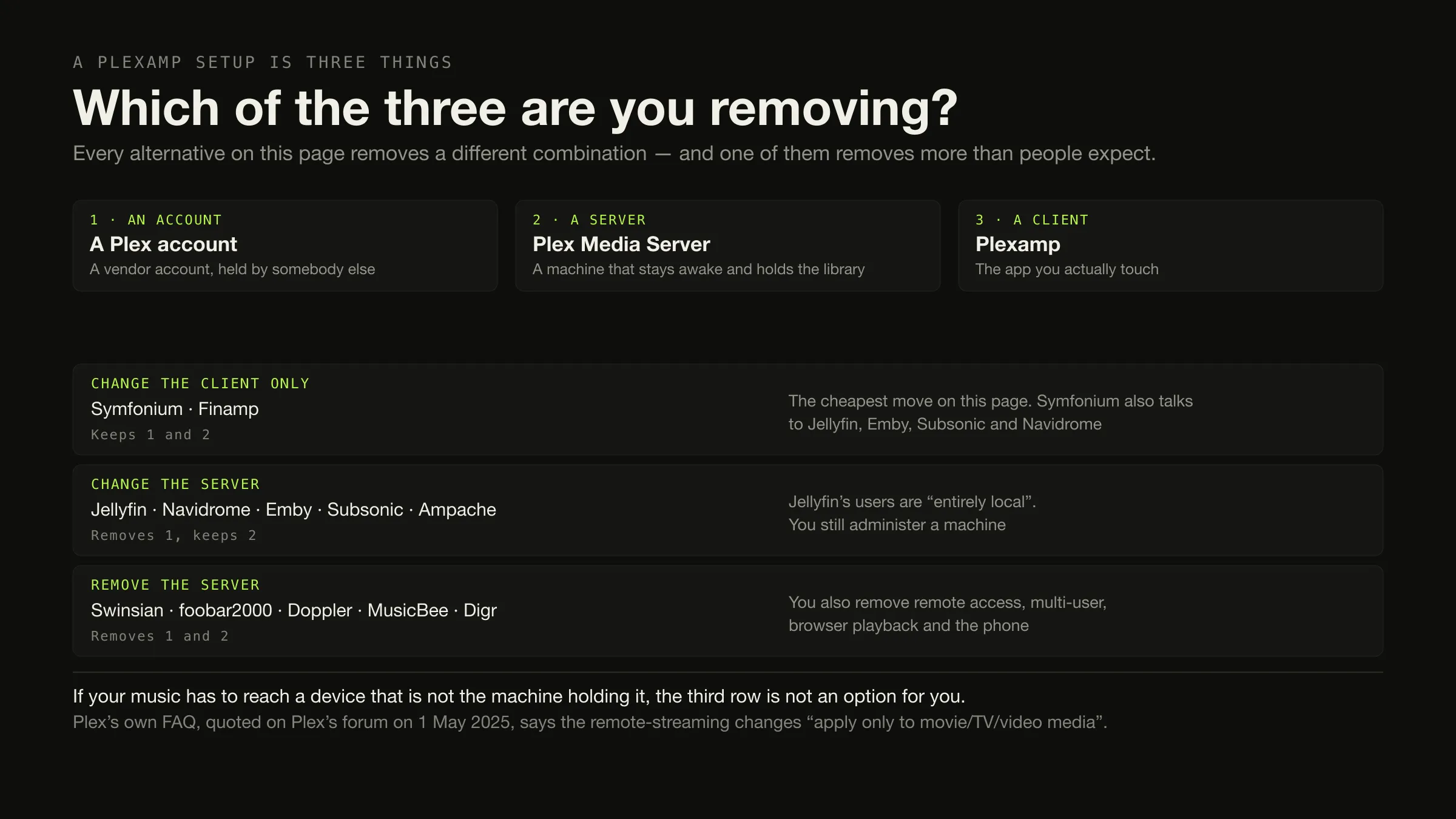
One question decides everything on this page: does your music have to reach a device that is not the machine holding the files?
Yes — a phone, another room, somewhere outside the house — and you need a different server, not a different player. The honest shortlist is Jellyfin with Finamp, or Navidrome with any Subsonic client, both free; Emby or Subsonic if you want a commercial tier; Roon if you want certified endpoints and will pay for them.
No — one computer, local files, maybe a speaker in the kitchen — and you can remove the server entirely: Swinsian, foobar2000, MusicBee, Doppler, Audirvāna Origin, Digr. What you remove with it is remote access, multiple users, browser playback and your phone. For the broader local desktop shortlist, see the best local music players and Digr’s current features.
Facts here were checked on 27 August 2026, with one large exception declared below: Plex’s own pages were unreachable.
Before you leave: one common reason may not apply
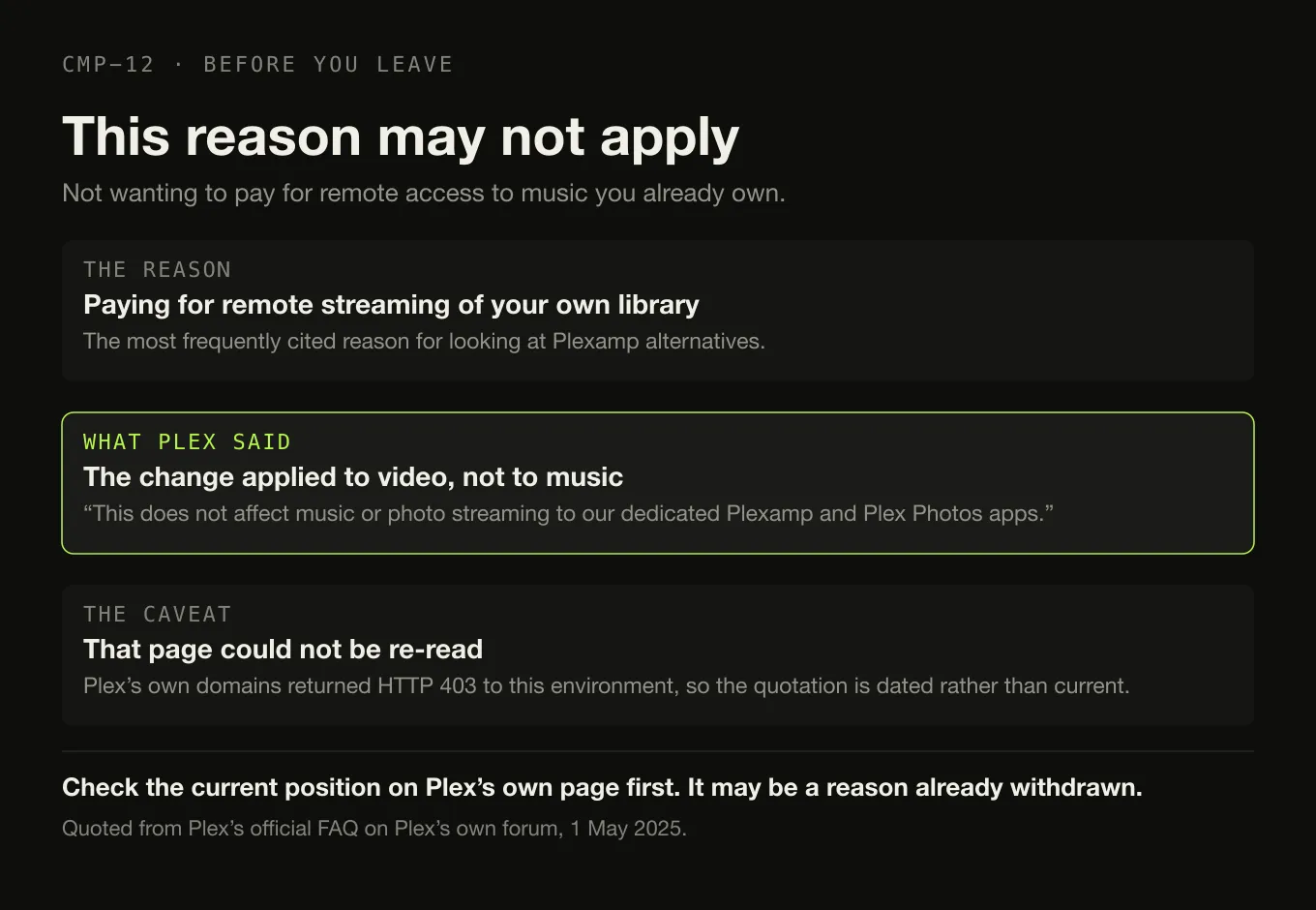
The most frequently cited reason for looking at Plexamp alternatives is not wanting to pay for remote access to music you already own. On Plex’s own statement, that is not what is being charged for.
Plex’s official FAQ, quoted on Plex’s own forum on 1 May 2025:
“The announced changes for remote streaming of personal content from a Plex Media Server apply only to movie/TV/video media. This does not affect music or photo streaming to our dedicated Plexamp and Plex Photos apps.”
That is a statement on Plex’s own surface, and it is dated. The FAQ page itself
could not be re-read on 27 August 2026 — plex.tv, support.plex.tv and
Plex’s blog all returned HTTP 403 to this environment, as they did during earlier
research for this site. So treat it as what it is: Plex’s own words, from May
2025, that this article could not re-verify today.
If remote music access was your reason for leaving, check the current position on Plex’s own page first. It may be a reason that has already been withdrawn.
What could not be verified, said plainly
This page makes a smaller number of claims about Plex than the ranking pages do, because Plex was unreachable and no Plex fact here is filled in from a directory, a roundup or a competitor’s comparison page.
What is sourced: the Plex Media Server requirement for personal music, quoted
from plex.tv/plexamp/ and dated 26 August 2026; the lifetime Plex Pass
price of $749.99 USD from 1 July 2026, up from $249.99, from Plex’s own
announcement on its own forum; and the FAQ quotation above.
What is not: the current split between free Plexamp features and Plex Pass features; Plex Pass monthly and annual prices; whether a Plex account is still required; and the current platform lists for Plexamp and Plex Media Server. None of those appears anywhere in this article, and no figure is guessed.
Branch A — you are keeping a server
Because something has to be awake for music to reach a phone, another room, or the outside world. Whether that is true for you is the general version of this question, and it is worth settling before choosing anything below.
| Alternative | What it is | Account | Price | Not a replacement if… |
|---|---|---|---|---|
| Jellyfin | Media server — video, music, photos, live TV | Local users only: “entirely local” | Free, GNU GPL | …you want it music-first, or you cannot give it the 8 GB of RAM and GPU it recommends |
| Navidrome | Music server, OpenSubsonic API | Its own users | Free, GPL v3 | …you want video. It is music only, deliberately |
| Ampache | Web audio and video streamer | Its own users | Free, AGPLv3 | …you want a polished first-party mobile app |
| Emby | Media server | Not stated | Free tier; Premiere $4.99/mo, $54/yr, $119 once | …you want offline mobile downloads without paying for Premiere |
| Subsonic | Music server | Its own users | Free tier; Premium $1/mo or $99 once | …you want the mobile apps free — Premium unlocks them |
| Lyrion Music Server | Music server | Not stated | Free, open source | …you do not have Squeezebox-family players |
| Music Assistant | Music server | Not stated | Free, open source | …you cannot run Home Assistant or Docker, or give it 2 GB of RAM |
| Roon | Server plus remote plus endpoints | Free Roon account required | $14.99/mo billed monthly, $12.49 billed annually, $829.99 once | …price is the reason you are leaving Plex |
And the cheapest move on this whole page: change only the client. Symfonium connects to Plex, Emby, Jellyfin, Audiobookshelf, Subsonic, OpenSubsonic, Navidrome and Kodi — including the Plex server you already run — and is an Android application sold as a “One-time purchase (no subscription)”. Finamp is a free Jellyfin client for Android and iOS with offline downloads. If your complaint is the app rather than the arrangement, you do not need to migrate anything at all.
Branch B — you are removing the server
| Alternative | Platforms | Price | Not a replacement if… |
|---|---|---|---|
| Swinsian | macOS 10.13+ | $34.95 once | …you are not on a Mac |
| foobar2000 | Windows, macOS 11+, Android, iOS | Free | …you want it configured out of the box |
| MusicBee | Windows only | Free | …you are on macOS or Linux |
| Doppler | macOS 11+, iOS 26+ | $30 USD once | …you want to stream to the phone rather than copy to it |
| Audirvāna Origin | macOS 10.15+, Windows, Linux | $149.99 / €149.99 excl. VAT, once | …you wanted to spend less than Plex was costing you |
| Digr | macOS 11+, Apple silicon. Alpha | Free | …you need tag editing, gapless, ReplayGain, or anything off this machine |
What removing the server actually removes, and none of the ranking pages says it: access from outside your own network; a library several people can each have their own view of; playback in a browser; and music on your phone away from home. Those are properties of the server. A desktop player does not have them and is not going to.
Doppler is the interesting middle case. It has no server and still gets music onto an iPhone — by copying rather than streaming, over “WiFi, USB, or AirDrop”. If your real requirement is “my music, in my pocket” rather than “my library, reachable from anywhere”, that distinction may be the whole answer.
The two mistakes this query produces
One question, two branches, two ways to get it wrong
-
The question
Does the music have to reach a device that is not the machine holding it?
A phone away from home, a speaker in another room controlled by somebody else, a browser at work, a second person with their own library view. If any of those is a real requirement, you are in branch A.
-
Mistake one
Answering a server problem with a desktop player
The directories make this one
Search this query and the lists return foobar2000, MusicBee, Winamp, Audacious and Strawberry. All are good desktop players and none of them will put your library on a phone in another building. If remote access is why you use Plexamp, every one of those recommendations is wrong for you.
-
Mistake two
Answering an app problem by migrating a server
The expensive one
If what you dislike is Plexamp itself, changing servers means re-indexing a library, rebuilding playlists and losing whatever the old server knew. Symfonium talks to the Plex server you already have. Changing the client is hours; changing the server is a weekend.
-
Mistake three
Leaving over a charge that does not apply
Check this first
Plex's own FAQ, quoted on Plex's forum in May 2025, says the remote-streaming restrictions "apply only to movie/TV/video media" and do "not affect music or photo streaming to our dedicated Plexamp and Plex Photos apps". Verify it on Plex's page — but verify it before you spend a weekend migrating.
Server, client, or neither
The distinction the ranking lists never draw.
What each of these things actually is
Free Jellyfin · Navidrome · Ampache · Lyrion Music Server · Music Assistant.
Paid tiers Emby, Premiere at $4.99 a month, $54 a year or $119 once · Subsonic, Premium at $1 a month or $99 once · Roon, $14.99 a month billed monthly.
Gives you Remote access, multiple users, browser playback, the phone.
Finamp Free, MPL-2.0, Android and iOS. "You need your own Jellyfin server to use Finamp." Offline downloads supported.
Symfonium Android, Android Auto, Wear OS and Android TV. Talks to Plex, Emby, Jellyfin, Subsonic, OpenSubsonic, Navidrome and Kodi. One-time purchase; the figure was not stated on the pages reachable.
Not a way out Of running a server. That is the point of the row.
Who Swinsian $34.95 · foobar2000 free · MusicBee free on Windows · Doppler $30 USD · Audirvāna Origin $149.99 excl. VAT · Digr free on Apple silicon.
Gives you No account, no machine to administer, no monthly anything.
Costs you Remote access, multi-user, browser playback and the phone — all four.
What travels with you
Three different moves with three different costs.
Changing the client only costs nothing. The server keeps the library, the playlists and the play counts; you install a different application.
Changing the server means a rebuild. Navidrome, Jellyfin, Emby, Subsonic and
Ampache each build their own index from your folder, and nothing imports a Plex
database — no vendor documents doing so. Your files are untouched throughout;
your server-side history is not. If you have .m3u playlist files on disk,
Navidrome auto-imports them, which is the most likely bridge.
Removing the server rebuilds the library locally and removes four capabilities permanently, as above.
Plex playlist, play-count and rating export could not be verified here, because Plex’s pages were unreachable. This article does not claim that it is possible or that it is not. Check Plex’s own documentation before you switch, and do it while the server is still running.
Where Digr fits, and where it does not
Digr sits in branch B and cannot serve branch A at all.
In branch B. A desktop application on macOS 11 Big Sur or later, Apple silicon only, currently an alpha. No account, no telemetry, no server. It indexes local folders into a SQLite index on your own disk and only ever reads your audio files. It discovers Google Cast devices over multicast DNS and streams the original file to them — with the qualification that the Mac running Digr is serving the file and has to stay awake, which is a property of how Cast works rather than a shortcut around needing a server.
Why it cannot serve branch A. No remote access outside your local network. No mobile application, and none planned — iOS and iPadOS are on the permanent not-planned list. No web interface. No multi-user support. No NAS or network-share support. No AirPlay, DLNA, UPnP or Sonos — Google Cast is the only protocol it speaks. It also has no tag editing, no MusicBrainz lookup, no gapless playback and no ReplayGain, and no Windows, Linux or Intel Mac build. The current capability list is published in full, absences included. Digr Pro is not purchasable — no checkout, no payment processor, no licence system in the app.
Named once and counted in no table: a local-network web remote is a planned, undated roadmap item, and a companion mobile remote is an open research question rather than a commitment.
So if the phone in your pocket is why you use Plexamp, Digr is not the alternative, and this page does not pretend otherwise. The two products compared row by row also records what has since become readable about Plexamp — its account requirement, its Plex Pass figures and its gapless playback — from Plex Inc.’s own App Store listing.
How this comparison was made
- One question first. Every product on this page is filed under the branch it belongs to, and clients are labelled as clients.
- Every fact from the vendor, with the page and the date.
- Plex gaps are published as gaps. Where Plex’s own pages were unreachable, this article prints what it could not verify rather than borrowing a number.
- Forums were read for reasons, never for facts. Two threads informed the list of reasons people leave; not one capability, price or platform claim comes from either.
- Nothing was installed, hosted or containerised. No server was stood up and no client was run, including Digr, whose row comes from its own shipping code.
The short version
- Ask the question first. Does the music have to reach a device that is not the machine holding it?
- Yes → a different server. Jellyfin with Finamp, or Navidrome with a Subsonic client, both free. Emby or Subsonic for a commercial tier. Roon for certified endpoints, at $14.99 a month billed monthly.
- No → no server. Swinsian, foobar2000, MusicBee, Doppler, Audirvāna Origin, Digr.
- Cheapest move of all: change the client. Symfonium talks to the Plex server you already have.
- Removing the server removes four things: remote access, multiple users, browser playback, and your phone.
- Check the remote-music charge before you leave. Plex’s own FAQ, quoted on Plex’s forum in May 2025, says the remote-streaming changes do not affect music to Plexamp.
- Plex’s own pages were unreachable on the day this was written, and every gap that created is named rather than filled.
If the underlying question is whether you need a server at all, that has its own page. If you are keeping local files and want them on a speaker without any of this, the casting shortlist is here. And if it is Roon rather than Plexamp you are leaving, those reasons are sorted the same way.
Sources
Every product fact above comes from that product’s own site or documentation, checked on 27 August 2026 unless a different date is given. No directory, roundup, competitor comparison page or review was used as a source for any capability or price.
- Plexamp — the server requirement. “You’ll need the Plex Media Server to use this app with personal music content”, recorded from plex.tv/plexamp on 26 August 2026. The page returned HTTP 403 to this environment on 27 August 2026
- Plex forum — Plexamp and the Plex Pass requirement for remote streaming — Plex’s official FAQ quoted on Plex’s own forum on 1 May 2025: “The announced changes for remote streaming of personal content from a Plex Media Server apply only to movie/TV/video media. This does not affect music or photo streaming to our dedicated Plexamp and Plex Photos apps.” The FAQ page itself could not be reached on 27 August 2026
- Plex — new Lifetime Plex Pass pricing — lifetime Plex Pass at “$249.99 USD” until 30 June 2026 and “$749.99 USD” from “12:01 a.m. UTC July 1, 2026”. No Plex Pass monthly or annual figure appears in this article, because none could be read from a Plex page
plex.tv,support.plex.tvand Plex’s blog all returned HTTP 403 to this environment on 27 August 2026. The current free-versus-Plex-Pass feature split for Plexamp, the account requirement, and the platform lists are therefore not stated in this article- Jellyfin — “Stream to any device from your own server, with no strings attached”; “Free Software, licensed under the GNU GPL”; “Free to download, now and always. There are no costs, hidden or otherwise, to use Jellyfin”; clients on Web, Desktop, Android and Android TV, iOS and tvOS, Fire TV, Roku and Kodi
- Jellyfin — server downloads — the server installs on Linux, Docker, Windows, macOS and .NET
- Jellyfin — users — “Jellyfin users are entirely local and no information or metadata will ever be sent to remote servers during the login process”
- Jellyfin — hardware selection — “At least 8GB is recommended for the average deployment”; “Not having a GPU is NOT recommended for Jellyfin”
- Navidrome — “Your Personal Streaming Service”; “making it available through a modern Web UI and through a wide range of third-party compatible mobile apps”; “tested with ~900K songs - 2/3 FLAC, 1/3 MP3”; GNU GPL v3, free of charge
- Navidrome — overview — “Runs well even on simple Raspberry Pi Zero and old hardware setups”; multi-user with per-user play counts, playlists and favourites; multi-library with access controls; “Compatible with all Subsonic/Madsonic/Airsonic clients”; auto-import of
.m3uplaylist files - Navidrome — FAQ — “Navidrome does not write to your music folder or the files by design”
- Ampache — “A web based audio/video streaming application and file manager. Allowing you to access your music & videos from anywhere, using almost any internet enabled device.”; “Completely Free and Open Source since 2001, AGPLv3 license”
- Finamp — “Finamp is a Jellyfin music player for Android and iOS.”; “You need your own Jellyfin server to use Finamp.”; MPL-2.0; “Downloading files for offline listening and saving mobile data”
- Symfonium — “Premium Android player for all your music”; connects to Plex, Emby, Jellyfin, Audiobookshelf, Subsonic, OpenSubsonic, Navidrome and Kodi, plus cloud providers and SMB/WebDAV; Android, Android Auto, Wear OS and Android TV; “One-time purchase (no subscription)” with a Play Store trial. The price figure was not stated on the pages reachable from here
- Emby and Emby Premiere — the server runs “on a computer or NAS on your home network”; Premiere at “$4.99/Each Month (recurring)”, “$54/1 Year” and “$119/One-time”, unlocking offline media downloads among other features
- Subsonic and Premium — “Your complete, personal media streamer”; “Available for Windows, Mac, Linux and more”; Premium at “$1 per month” or “$99” lifetime, unlocking the mobile apps, “your personal server address: yourname.subsonic.org”, Chromecast and Sonos streaming and DLNA/UPnP
- Lyrion Music Server — “open-source software which can control and serve (stream) music to a wide range of physical and virtual audio players called Squeezeboxes”
- Music Assistant — “A free, open source music library manager”; “The server is the core”; providers including Plex and Jellyfin; players including Sonos, Chromecast, AirPlay, Squeezelite and DLNA
- Music Assistant — installation — “a MINIMUM of 2GB of RAM on the physical device or the container”, with Home Assistant OS or Docker as the supported installations
- Roon — pricing — “$14.99 / month” billed monthly, “$12.49 / month” billed annually, and lifetime billing at “$829.99”
- Roon — minimum requirements — “A free Roon account is required to get up and running”
- Swinsian — “$34.95”; regex find-and-replace tag editing; gapless playback; ReplayGain tag support; AirPlay playback
- foobar2000 — “an advanced freeware audio player”; gapless playback; full ReplayGain support; Windows, macOS, Android and iOS
- Doppler — “$30 USD”; Mac and iPhone; “macOS 11 Big Sur or newer” and “iOS 26 or newer”; adding music “from other apps and devices over WiFi, USB or AirDrop”
- Audirvāna — Origin licence price — “$149.99 (without VAT) - €149.99”
- MusicBee —
getmusicbee.comreturned HTTP 403 to this environment on 27 August 2026. Its Windows-only platform is corroborated by the Microsoft Store listing - Sentiment, attributed and dated — Plex’s own forum, “Plex Alternatives?”, 23–28 August 2025, for support and reliability reasons, with Jellyfin described there as working “a little better but is quite a bit harder to use”; and What Hi-Fi forum, “Does anybody use Plexamp? Better alternatives?”, April to August 2024, where the app itself is mostly praised. No product fact on this page comes from either thread
- Digr — features and current capabilities and Digr — pricing — every Digr claim above, including the absence of remote access, mobile, web interface, multi-user support, NAS support, AirPlay, DLNA, UPnP, tag editing, gapless and ReplayGain. Digr Pro is not purchasable
Common questions
Can Plexamp work without Plex Media Server?
Not for your own music. Plex’s own page stated on 26 August 2026 that “You’ll need the Plex Media Server to use this app with personal music content.” That page returned HTTP 403 to this environment on 27 August 2026, so the quotation carries the earlier date. If you want to keep Plexamp, you keep the server. If you want to stop running a server, you are changing application as well, and a desktop player is what replaces it.
Do I need a Plex Pass to stream my own music remotely?
On Plex’s own statement, no. Plex’s official FAQ, quoted on Plex’s own forum on 1 May 2025, says: “The announced changes for remote streaming of personal content from a Plex Media Server apply only to movie/TV/video media. This does not affect music or photo streaming to our dedicated Plexamp and Plex Photos apps.” Plex’s own pages were unreachable from here on 27 August 2026, so check the current position on plex.tv before acting on it.
What is a good open-source alternative to Plexamp?
Two arrangements. Jellyfin is a free GNU GPL media server whose users are “entirely local”, paired with Finamp, a free Jellyfin music client for Android and iOS that supports offline downloads. Or Navidrome, free under GPL v3, which is music-only, runs well on hardware as small as a Raspberry Pi Zero, and works with any Subsonic or OpenSubsonic client. Both keep the server; both remove the vendor account. Checked on 27 August 2026.
What can replace Plexamp without running a server at all?
A desktop player, and only if remote access is not why you use Plexamp. Swinsian on macOS at $34.95, foobar2000 free on four platforms, MusicBee free on Windows, Doppler at $30 USD for Mac and iPhone, Audirvāna Origin, or Digr on Apple silicon Macs. What you remove along with the server is real: remote access from outside your network, multiple users, playback in a browser, and streaming to your phone.
Is Navidrome similar to Plexamp?
Architecturally yes, in role no. Navidrome is the server; Plexamp is the client. Navidrome describes itself as “Your Personal Streaming Service”, serving a modern web interface plus “a wide range of third-party compatible mobile apps” over the OpenSubsonic API, and it says it was tested with around 900,000 songs. So the closest equivalent to a Plex-plus-Plexamp setup is Navidrome plus a Subsonic client. Navidrome also “does not write to your music folder or the files by design”.
Is Digr a Plexamp replacement?
Only if you are removing the server, and not otherwise. Digr has no remote access outside your local network, no mobile application, no web interface, no multi-user support and no NAS support. It is a desktop application for Apple silicon Macs running macOS 11 or later, currently an alpha, which indexes local folders and can cast the original file to a Google Cast device on the same network. If the phone in your pocket is why you use Plexamp, Digr does not do that.
- Plexamp alternatives
- Plexamp
- Plex Media Server
- Jellyfin
- Navidrome
- Finamp
- Symfonium
- self-hosted
- no server