Digr vs Plexamp
Plexamp needs a Plex Media Server and a Plex account. Digr needs neither and reaches nothing beyond your network. One question decides it, and both products need Apple silicon on macOS.
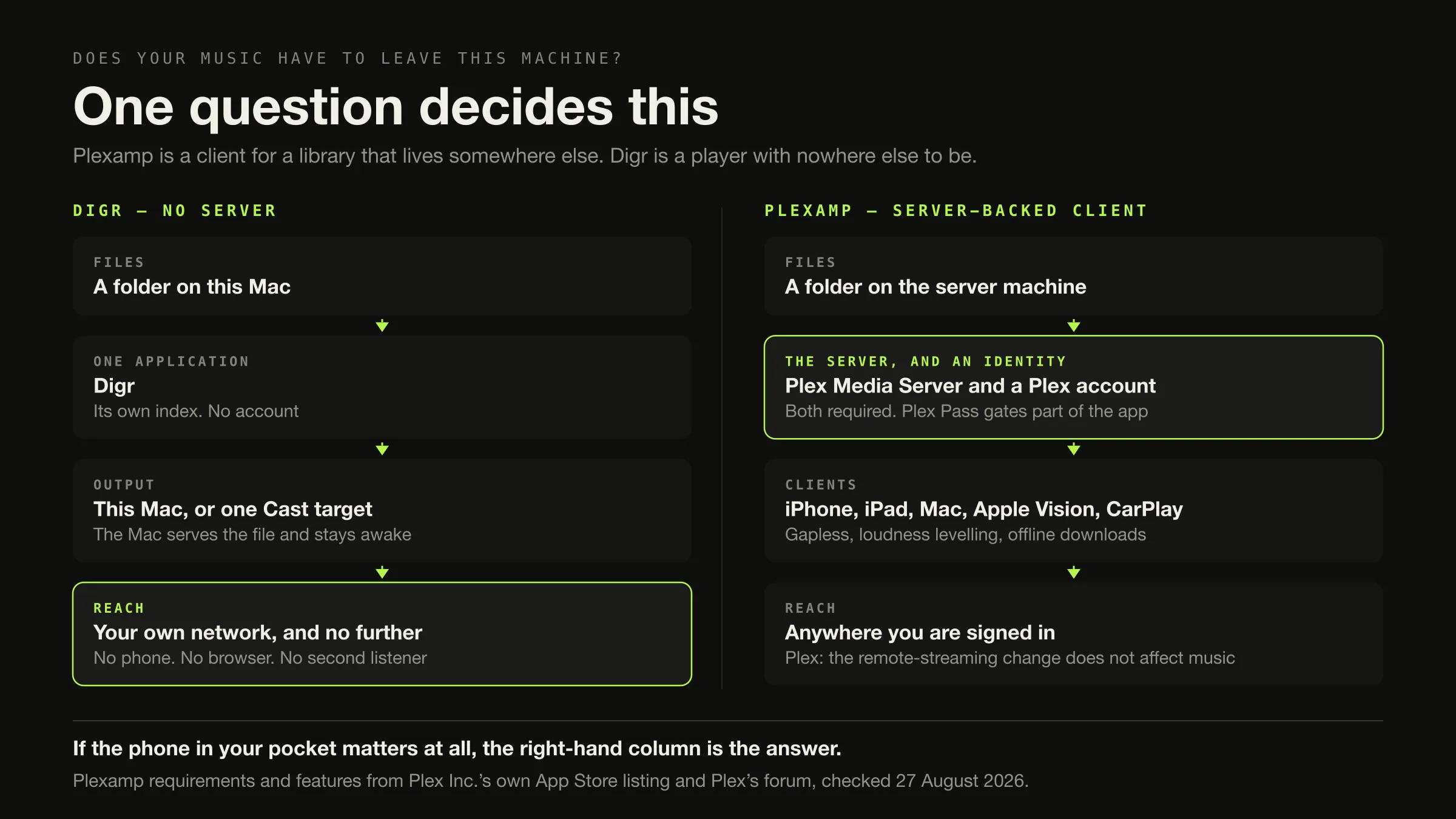
One question decides this: does your music have to reach a device that is not the machine holding the files?
Yes — a phone, another room controlled by somebody else, a browser at work, a second listener — and the answer is Plexamp, and Digr cannot be made to do it. Plexamp is a client for a library that lives on a Plex Media Server, and the server is what provides all of that.
No — one Mac, local files, maybe one speaker in the kitchen — and Digr removes the server, the account and the subscription entirely. It is macOS 11 or later on Apple silicon, currently an alpha, free, with no gapless playback, no loudness levelling and no tag editing.
Counted on what ships today, Plexamp wins nine of twenty-seven rows and Digr wins seven — the closest count in this comparison set and the least meaningful one, for a reason given below. And one row is a dead heat: on macOS both products require Apple silicon and macOS 11 or later.
Plexamp’s requirements, features and prices were checked on 27 August 2026. Plex’s own website returned HTTP 403 to this environment; what could not be read is named as unread.
What could not be verified, first
Unusual placement, and deliberate — because the gaps shape what the rest of this page is allowed to say.
plex.tv, support.plex.tv and Plex’s blog all returned HTTP 403 on 27 August
2026, as they did during earlier research for this site. plexamp.com served a
JavaScript shell with no readable text, and Plexamp’s Google Play listing returned
404.
What is sourced: Plex Inc.’s own listing for Plexamp on the US App Store, which is vendor-written copy and is labelled as such throughout; and two threads on Plex’s own forum. Those give the server and account requirements, the Apple platform list, the named playback features, and Plex Pass figures.
What is not, and therefore does not appear anywhere below: the item-by-item list of which Plexamp features are free and which need a Plex Pass; Plexamp’s Android, Windows, Linux and Raspberry Pi requirements; Plex Media Server’s platform list; and whether Plex can export playlists, ratings or play counts.
One further note on method. A Plexamp FAQ from 2017 is still on Plex’s forum. It is official, and it is useless — it describes Plexamp 1.x as “an experimental app offered as part of Plex Labs” with platform requirements nine years out of date. It was found and deliberately not used. An old official page is not a current fact.
What each product actually is
Plexamp is a client. Plex Inc.’s own App Store listing is unambiguous:

“You’ll need a Plex Media Server and a Plex account to use this app”
The same listing describes “a beautiful, dedicated Plex music player” and names “Loudness leveling, true gapless playback, Sweet Fades™”, a “7-band EQ”, visualisers, offline support — “Grab a few hours of your favorite playlist or stations” — “Radios built from your library”, and mix builders. Apple platforms: iOS 13.0 or later, macOS 11.0 or later with an Apple M1 chip or later, and visionOS 1.0 or later. The listed version is 4.12.4.
Digr is a player with its own library. macOS 11 Big Sur or later, Apple silicon only, currently the alpha 0.1.0-alpha.3. It indexes as many local folders as you like into a SQLite index on your own disk — a derived cache you can delete and rebuild — and only ever reads your audio files. No sign-in, no telemetry, and playback works with the network switched off. It discovers Google Cast devices over multicast DNS and streams the original file to them with correct MIME types and Range support, with the Mac serving that file and staying awake for the duration. That the sending machine stays in the path is a property of Cast rather than a shortcut around needing a server.
Before you leave Plexamp: one common reason may not apply
The most-cited reason for looking elsewhere is not wanting to pay for remote access to music you already own. On Plex’s own statement, that is not what is being charged for.
Plex’s official FAQ, quoted on Plex’s own forum on 1 May 2025 and re-read on 27 August 2026:
“The announced changes for remote streaming of personal content from a Plex Media Server apply only to movie/TV/video media. This does not affect music or photo streaming to our dedicated Plexamp and Plex Photos apps.”
If that was your reason, check the current position on Plex’s own page before acting on it. It may be a reason that was withdrawn before you noticed it.
The comparison, on what ships today
Roadmap is excluded from every row. Unverified means the fact could not be read
from a Plex surface on the day.
| Dimension | Digr, today | Plexamp, today | Row |
|---|---|---|---|
| Server required | No | Yes — Plex Media Server | Digr |
| Account required | No | Yes — a Plex account | Digr |
| Telemetry | None | Not assessed | Unverified |
| Its own library index | Yes, SQLite, on your disk, deletable | No. The server holds the library | Digr |
| Your files are written to | Never | Not assessed; the server is a separate question | Unverified |
| Works with the network off | Yes | Not for a server on another machine; downloads are the offline story | Digr |
| Gapless playback | No, locally or over Cast | Yes — “true gapless playback” | Plexamp |
| Loudness levelling | No | Yes — “Loudness leveling” | Plexamp |
| Crossfade | No | Yes — “Sweet Fades™” | Plexamp |
| Equaliser | Ten bands, 32 Hz–16 kHz, six presets | “7-band EQ” | Digr, on band count alone |
| Visualisers | Four | Named on the listing | Neither |
| Google Cast | Yes, the original file, correct MIME, Range support | Named on Plex’s own pages; not readable on the day | Unverified |
| AirPlay | No | Named on Plex’s own pages; not readable on the day | Unverified |
| Offline downloads | Not applicable — the files are already local | Yes on mobile | Neither |
| Listening away from home | No | Yes, and Plex states music is unaffected by the remote-streaming change | Plexamp |
| A phone in your pocket | No, and not planned | Yes — iOS 13 or later | Plexamp |
| Several devices, one library | No | Yes, a property of the server | Plexamp |
| Several listeners | No | Server-side; not assessed | Unverified |
| CarPlay | No | Named in the listing’s release notes | Plexamp |
| Radio and mixes from your library | No | Yes — “Radios built from your library”, mix builders | Plexamp |
| Tag editing | None at all | Not a client function | Neither |
| External drive disconnected | Root marked offline, volume re-matched, paths rewritten, queue remapped | A server-side question, not assessed | Digr |
| NAS libraries | No | Plex Media Server runs on NAS hardware; not readable on the day | Unverified |
| macOS requirement | macOS 11+, Apple silicon | macOS 11.0+, Apple M1 or later | Neither. Identical |
| Price of the application | Free | Free to download; Plex Pass gates named features | Neither |
| Cost of the arrangement | Free, and nothing to run | Plex Pass at $6.99/mo or $69.99/yr, plus a server | Digr |
| Maturity | Alpha, 0.1.0-alpha.3 | Shipping, version 4.12.4 on the listing | Plexamp |
Plexamp 9, Digr 7, neither 5, unverified 6. Published because the arithmetic should be visible — and it is the most misleading count in this comparison set, so here is why. Digr’s seven rows are all the same fact: it has no server, so there is nothing to run, nothing to sign into and nothing to administer. Plexamp’s nine are mostly the other side of the same fact, plus three that are not — gapless playback, loudness levelling and crossfade are playback engineering that has nothing to do with architecture, and Digr simply does not have them. This is a near-draw between two products that are not substitutes.
The fork, and the two ways to get it wrong
Answer the question honestly, then read one branch
-
The question
Does the music have to reach a device that is not the machine holding it?
A phone away from home. A browser at work. A speaker somebody else controls from their own device. A second person with their own view of the library. If any of those is a real requirement rather than a nice idea, you are in branch A.
-
Branch A · yes
Plexamp, and keep the server
Or a different server — not a player
Something has to be awake for music to reach a phone. Plexamp is a very good client for that arrangement and Digr is not a candidate for it at any setting. If what you want is the same arrangement without a vendor account, that is a different server rather than a different app — and the self-hosted options are compared elsewhere.
-
Branch B · no
Digr, and retire the server
On an Apple silicon Mac
One machine, local files, no account, files never written to, and one Google Cast target on your own network. What you remove along with the server is real and permanent: remote access, the phone, other devices, other listeners.
-
Mistake one
Answering a server problem with a desktop player
The common one
If remote access is why you use Plexamp, every desktop player in existence is the wrong recommendation, including this one. No amount of configuration turns a local player into a service you can reach from a train.
-
Mistake two
Leaving over a charge that does not apply
Check this before anything
Plex's own FAQ says the remote-streaming restrictions "apply only to movie/TV/video media" and do "not affect music or photo streaming to our dedicated Plexamp and Plex Photos apps". Verify it on Plex's page — but verify it before you spend a weekend migrating away from something that still works.
-
Neither
Two cases where the answer is a third thing
You want remote access with no vendor account: that is a self-hosted server with local users, and whether you want to run one is the question to settle first. Or you are on an Intel Mac: neither product runs, because Plexamp's own listing requires an M1 or later and Digr is Apple-silicon only.
Exactly how far Digr reaches
Not a claim, a screenshot. This is Digr’s cast list on an ordinary home network, and it is the whole of the product’s reach.
Read that against a Plex account, which reaches every device it is signed in on. The difference is not a feature gap that a setting closes; it is the consequence of there being no server, which is the same sentence as “nothing to run”.
What Plex Pass costs, and the figure that does not reconcile
Plexamp itself is free to download. A Plex Pass gates a set of features, and there are two published lifetime figures depending on where it is bought. Both are printed here with their source and date, and this article does not attempt to explain the difference.
| Source | Tier | Figure | Billing |
|---|---|---|---|
| Plex Inc., US App Store listing, in-app purchases | Monthly Plex Pass | $6.99 | per month |
| Plex Inc., US App Store listing, in-app purchases | Yearly Plex Pass | $69.99 | per year |
| Plex Inc., US App Store listing, in-app purchases | Lifetime Plex Pass | $979.00 | one-time |
| Plex’s own forum announcement | Lifetime, bought from Plex | $749.99 USD | one-time, from 1 July 2026 |
All figures are US dollars on the US storefront. No tax treatment is stated on either source. The same forum announcement says “Monthly & annual subscription pricing for Plex Pass and Remote Watch Pass will remain unchanged”, and that lifetime was $249.99 USD before 1 July 2026.
One Plex Pass page answered a single request on the day and listed “Plexamp Exclusives”, “The Power to Download” and “Lyrics” among Plex Pass features, with no prices rendered. Every sibling and repeat request returned 403, so that is recorded as one successful read rather than as a source you can check. The full free-versus-Pass split for Plexamp is not stated in this article, because it could not be read.
Digr is free. Digr Pro is priced at £4.99 a month, £49.99 a year or £109.99 once and is not purchasable — no checkout on this site and no licence system in the application. No multi-year comparison against Plex Pass is drawn, because one side of it cannot be bought.
What travels when you retire the server
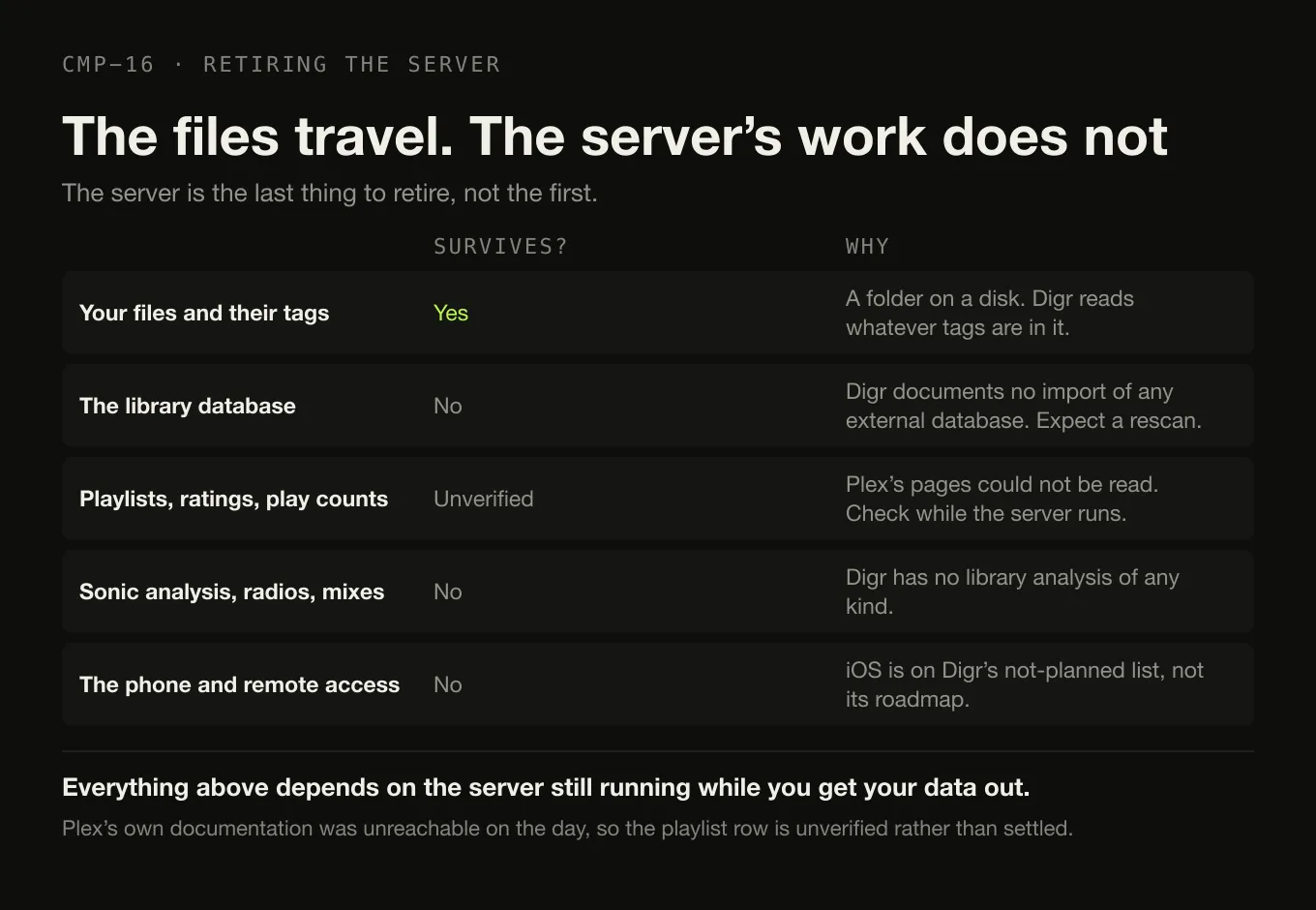
Your files travel — they are a folder on a disk, and Digr will index them and read whatever tags are in them.
The Plex library database stays behind. Digr documents no import of any external database, so expect a rescan. Organising the folder before you rescan is worth an hour.
Playlists, ratings and play counts are unverified. Plex’s own documentation was unreachable on the day, so this article does not claim that export is possible or that it is not. Check Plex’s own pages, and do it while the server is still running.
Sonic analysis, radios and mixes have nowhere to go. Digr has no library analysis of any kind.
The phone, remote access and other people’s access are lost outright, and permanently: iOS and iPadOS are on Digr’s not-planned list rather than its roadmap.
Your Google Cast targets survive; an AirPlay speaker does not.
The server is the last thing to retire, not the first — everything above depends on it still running while you get your data out.
This is product comparison rather than a switching guide. Plexamp alternatives with and without a server covers both branches across a dozen products.
What Digr has planned
Named once, undated, and counted in no row above.
Planned: truly gapless local playback, optional crossfade, ReplayGain and non-destructive loudness normalisation — the three playback rows this comparison turns on, and they win nothing here because they do not exist yet. AirPlay, DLNA and UPnP output, OpenHome, and native ecosystem speaker groups. Continuous Cast. A small web remote served on your own LAN, with Shortcuts and deep links. Sessions and playlists that travel. NAS and network-share recovery. Metadata and tag editing. Windows, then Linux.
Not planned at all: iOS and iPadOS. In the roadmap’s own words, “a phone app is a different product with a different architecture”. That is the row Plexamp wins most decisively, and Digr is not competing for it. The published capability list carries the absences as well as the features.
How this comparison was made
- Nothing was installed, purchased or subscribed to. No Plex Media Server was stood up. Digr was not run for this article — its rows come from its own shipping code and the modules the site is built from.
- No listening test and no measurement. There is no sound-quality claim anywhere.
- Every Plex fact comes from a Plex surface, with the source and the date. Two of the three sources are Plex’s own forum; the third is Plex Inc.’s own App Store listing, which is vendor-written copy on a distribution platform and is labelled as such rather than as plex.tv.
- No Plex fact is filled in from a directory, a roundup or a competitor’s comparison page. Where a Plex page was unreachable, this article prints what it could not verify.
- A nine-year-old official Plex FAQ was found and refused, because an old official page is not a current fact.
- Two lifetime Plex Pass figures are printed side by side and neither is adjudicated, because neither source explains the other.
- Only shipping features are scored. Roadmap is in its own section and decides nothing — including gapless playback, loudness normalisation and a LAN remote, which are exactly the rows a reader might hope would count.
- No community source was used, so this article reports no user sentiment.
The short version
- Answer the question first. Does the music have to reach a device that is not the machine holding it?
- Yes → Plexamp. The phone, remote access, several devices, several listeners. Also gapless playback, loudness levelling, crossfade, CarPlay and offline downloads. Nine reasons, and any one is enough.
- No → Digr. One Apple silicon Mac, no server, no account, files never written to, one Google Cast target, and playback that works with the network off. Free, and an alpha.
- Neither if you want remote access without a vendor account — that is a self-hosted server — or if you are on an Intel Mac, which neither product supports.
- Plexamp requires a Plex Media Server and a Plex account, in Plex’s own words. Digr requires neither and reaches nothing beyond your network.
- On macOS the platform requirement is identical: macOS 11 or later on Apple silicon, for both.
- Plex’s own FAQ says the remote-streaming change does not affect music to Plexamp. Check that before leaving over it.
- Plex Pass is $6.99 a month or $69.99 a year on Plex Inc.’s own App Store listing, with two different lifetime figures published — $979.00 there and $749.99 USD from Plex directly. No tax treatment is stated on either.
- Plex’s own pages were unreachable on the day this was written, and every gap that created is named rather than filled.
If the underlying question is whether you need a server at all, that has its own page and the answer is often no. If you are keeping local files and want them on a speaker without any of this, the casting shortlist is sorted by what actually reaches the device. And if you want the category sorted by architecture before features, that is where this cluster starts.
Sources
Every Plex fact above comes from a Plex surface, checked on 27 August 2026 unless a different date is given. No directory, roundup, review or competitor comparison page was used for any Plex fact. No sound-quality claim appears.
- Plexamp on the US App Store, published by Plex Inc. — apps.apple.com/us/app/plexamp/id1500797510 — “You’ll need a Plex Media Server and a Plex account to use this app”; “a beautiful, dedicated Plex music player”; “Loudness leveling, true gapless playback, Sweet Fades™”; a “7-band EQ”; visualisers; offline support, “Grab a few hours of your favorite playlist or stations”; “Radios built from your library” and mix builders; platforms “iOS 13.0 or later”, “macOS 11.0 or later” with “Apple M1 chip or later”, and “visionOS 1.0 or later”; in-app purchases “Monthly Plex Pass $6.99”, “Yearly Plex Pass $69.99” and “Lifetime Plex Pass $979.00”; version 4.12.4, whose release notes mention a “premium upsell”, smart-playlist downloading, gapless playback for DSD files and CarPlay. This is vendor-authored copy on a distribution platform rather than a page on plex.tv, and is labelled that way throughout
- Plex forum — Plexamp and the Plex Pass requirement for remote streaming — Plex’s official FAQ quoted on Plex’s own forum on 1 May 2025, re-read on 27 August 2026: “The announced changes for remote streaming of personal content from a Plex Media Server apply only to movie/TV/video media. This does not affect music or photo streaming to our dedicated Plexamp and Plex Photos apps.”
- Plex forum — new Lifetime Plex Pass pricing — lifetime Plex Pass at “$249.99 USD” until “12:01 AM UTC on July 1, 2026”, and an “increase to $749.99 USD” from “12:01 a.m. UTC July 1, 2026”; “Monthly & annual subscription pricing for Plex Pass and Remote Watch Pass will remain unchanged.”
- Plex Pass features —
plex.tv/en-ca/plex-pas/answered one request on 27 August 2026 and listed “Plexamp Exclusives”, “The Power to Download” and “Lyrics” among Plex Pass features, with no price figures rendered. Every sibling and repeat request to plex.tv returned HTTP 403, so this is recorded as a single read rather than a reproducible source plex.tv,www.plex.tv/plexamp/,www.plex.tv/plex-pass/and their locale variants,support.plex.tvand Plex’s blog all returned HTTP 403 to this environment on 27 August 2026.plexamp.comserved a JavaScript shell with no readable content, and Plexamp’s Google Play listing returned HTTP 404. The free-versus-Plex-Pass feature split, the Android and desktop platform lists, Plex Media Server’s platform list, and Plex’s playlist, rating and play-count export behaviour are therefore not stated in this article- A Plexamp FAQ from 13 December 2017 on Plex’s own forum was found and deliberately not used: it describes “Plexamp 1.x”, calls it “an experimental app offered as part of Plex Labs” with no official support, and lists platform requirements nine years out of date
- Digr — features and current capabilities and Digr — system requirements — every Digr claim above, including the absence of remote access, a mobile application, a web interface, multi-user support, NAS support, AirPlay, DLNA, UPnP, tag editing, gapless playback, ReplayGain and loudness levelling, and the absence of Windows, Linux and Intel Mac builds. iOS and iPadOS are on the not-planned list
- Digr — pricing — Digr Free, and Digr Pro priced but not purchasable: no checkout on this site and no licence system in the application
Common questions
Does Digr need Plex Media Server?
No. Digr has no server of any kind: it indexes local folders into a SQLite index on the same disk and plays them, and playback works with the network switched off. Plexamp cannot work that way — Plex Inc.’s own App Store listing states “You’ll need a Plex Media Server and a Plex account to use this app”. The cost of Digr having no server is exactly what a server provides: remote access, a phone, other devices and other listeners. Checked on 27 August 2026.
Can Digr replace Plexamp?
Only if you are removing the server, and not otherwise. Digr has no remote access outside your local network, no mobile application, no web interface and no multi-user support, and iOS and iPadOS are on its permanent not-planned list rather than its roadmap. It also has no gapless playback, no loudness levelling and no crossfade, all three of which Plexamp lists as features. If the phone in your pocket is why you use Plexamp, Digr does not do that.
Which one works away from home?
Plexamp. It is a client signed in to a Plex account, so your library follows you to any device you sign in on, and Plex’s own FAQ — quoted on Plex’s forum on 1 May 2025 and re-read on 27 August 2026 — states that the remote-streaming changes “apply only to movie/TV/video media” and do “not affect music or photo streaming to our dedicated Plexamp and Plex Photos apps”. Digr reaches nothing outside your own network at all, and there is no plan for it to.
Which one has a mobile app?
Plexamp. Plex Inc.’s own App Store listing gives iOS 13.0 or later on iPhone, iPad and iPod touch, macOS 11.0 or later with an Apple M1 chip or later, and visionOS 1.0 or later, with offline downloads so a few hours of a playlist can travel without a connection. Digr is a macOS desktop application only. It has no mobile application and none is planned — iOS and iPadOS are explicitly on its not-planned list, because a phone app is a different product with a different architecture.
Do I need a Plex Pass to stream my own music to Plexamp?
On Plex’s own statement, no. Plex’s official FAQ, quoted on Plex’s own forum on 1 May 2025, says: “The announced changes for remote streaming of personal content from a Plex Media Server apply only to movie/TV/video media. This does not affect music or photo streaming to our dedicated Plexamp and Plex Photos apps.” A Plex Pass does gate some Plexamp features, and the exact list could not be read from a Plex page on 27 August 2026 because plex.tv returned HTTP 403 — so it is not stated here.
Which is better for casting to a speaker?
Neither could be compared properly, and that is the honest answer. Digr discovers Google Cast devices over multicast DNS and streams the original file to them with correct MIME types and Range support, with the Mac serving the file and staying awake for the duration. Plexamp’s casting is named on Plex’s own pages, but those pages returned HTTP 403 on 27 August 2026, so no current claim about Plexamp’s Cast behaviour is made here. Digr’s cast playback is not gapless, because each track is loaded separately.
- Digr vs Plexamp
- Plexamp
- Plex Media Server
- Plex Pass
- gapless playback
- Google Cast
- remote access
- no server
- local-first
- comparison