Music server software, and when you do not need one
What a music server actually adds, which ones need an always-on machine and an account, and the cases where a desktop player and a cast device is the smaller correct answer.
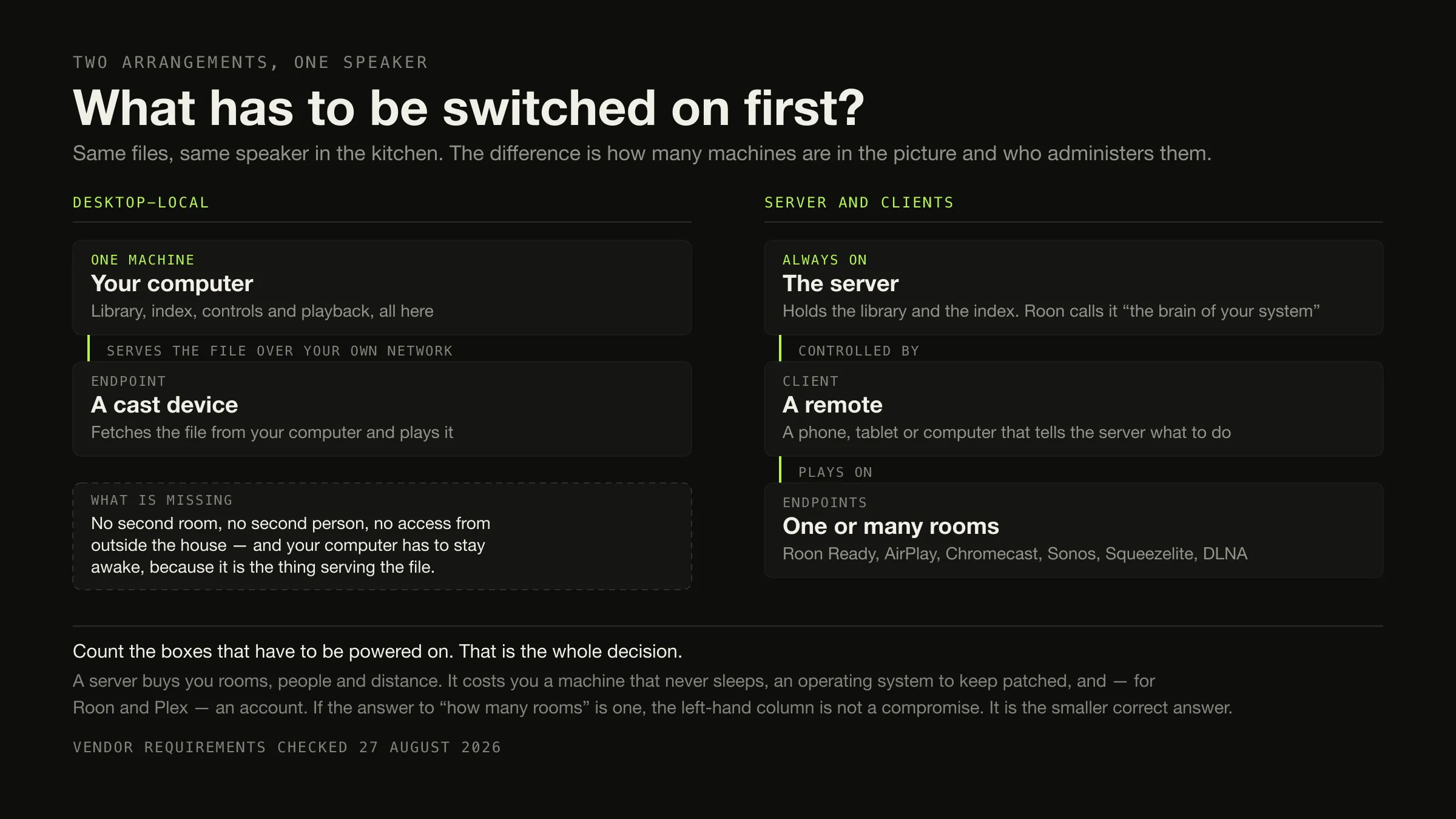
Ask the question before you install anything: is the machine that holds your music the same machine you listen on? If it is, and it is likely to stay that way, you do not need a music server and running one will cost you attention for nothing. A desktop application plus a cast device covers one person, one computer and one or two rooms completely.
You do need a server if you want the library reachable from several rooms at once, by several people, from a machine that is not the one holding the files, or from outside your house. In that case the honest shortlist is Roon if you want it certified and supported and will pay for it, Jellyfin or Navidrome if you would rather run free software, Lyrion Music Server if you own Squeezebox-family hardware, and Music Assistant if the house already runs Home Assistant.
Vendor requirements in this article were checked on 27 August 2026, each against that product’s own documentation.
“Music server” means two things on this result page
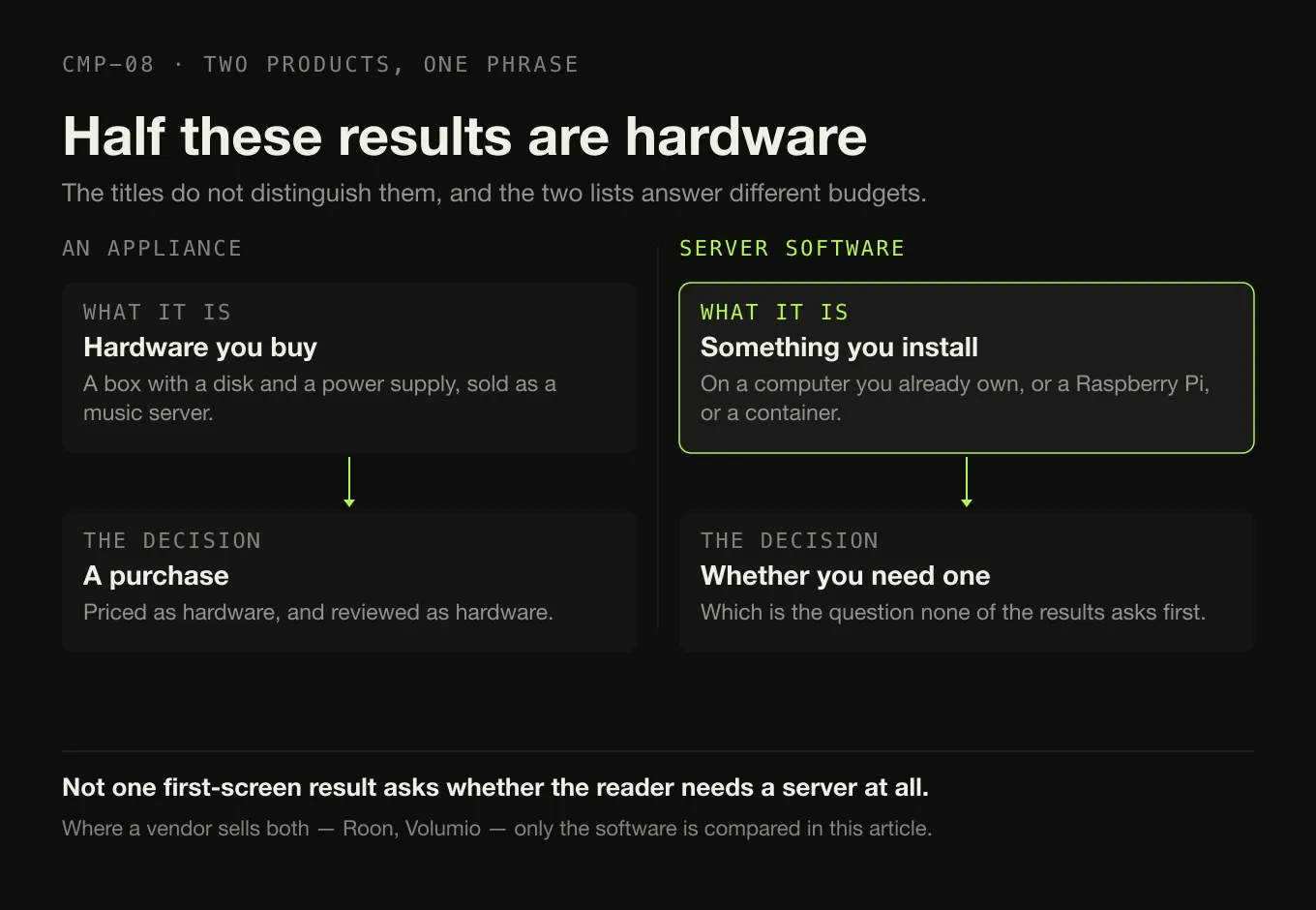
Search the phrase and the first screen mixes two products that are not the same kind of thing at all.
The Absolute Sound’s “Editors’ Choice: Best Music Servers” is a list of appliances — hardware you buy, with a disk and a power supply. Lyrion Music Server, Jellyfin, Navidrome and the rest are software you install on a computer you already own. A reader who does not already know the difference cannot tell from the titles, and the two lists answer completely different budgets.

This article is about the software. Where a vendor sells both — Roon sells Nucleus hardware as well as Roon Server software, Volumio sells streamers as well as an operating-system image — only the software is compared.
The other thing worth naming: not one first-screen result asks whether the reader needs a server. Every page opens on a list. That is the gap this article is built around, and it is why the next section comes before the products.
Five questions, and what each answer implies
Do you actually need a server?
-
1 · Rooms
Do you want music in more than one room at once?
Yes → a server, probably. Synchronised playback across several endpoints is the thing servers are actually for. Roon describes playing "the same music all around your home" as a first-class feature. No → a desktop application casting to one speaker does this today.
-
2 · People
Does more than one person need their own library?
Yes → a server. Navidrome is multi-user, with each user keeping "their own play counts, playlists, favorites", and multi-library with per-user access controls. No desktop application here has an equivalent. No → this row does not apply to you.
-
3 · Distance
Do you need the library from outside your house?
Yes → a server, definitely. This is the capability no desktop application on this page has, and the one most consistently behind a payment: Subsonic sells it as "your personal server address". No → you have just removed the strongest argument for a server.
-
4 · The host
Is there a machine that is already always on?
Yes → a server is cheap. A NAS or a small always-on box turns the ongoing cost from "a new obligation" into "one more service". No → a server means buying or dedicating a machine and keeping it patched, and that is the real price rather than the licence.
-
5 · Appetite
Do you want to administer something?
Yes → the free self-hosted options are genuinely excellent and cost nothing but your time. No → Roon exists precisely to sell you out of this row, and a desktop application removes the row entirely.
The servers, and what each one asks of you
Every cell from the vendor’s own documentation. Not published means the vendor
does not state it.
| Server component | Host platforms | Account | Multi-user | Endpoints named by the vendor | Published minimum hardware | Price | |
|---|---|---|---|---|---|---|---|
| Roon | Roon Server, required | macOS 12+, Windows 10+, Linux, NAS (QNAP, Synology, Asustor, Unraid, TrueNAS), Nucleus, NUC with ROCK | Free Roon account required | Not stated | Roon Ready, AirPlay, Chromecast, USB, HDMI, SONOS, Bluetooth | Core i3 Ivy Bridge or newer, 4 GB RAM, SSD boot drive | $14.99/mo billed monthly, $12.49/mo billed annually, $829.99 lifetime |
| Jellyfin | Jellyfin Server | Linux, Docker, Windows, macOS, .NET | Local users only — “entirely local” | Yes | Web, desktop, Android and Android TV, iOS and tvOS, Fire TV, Roku, Kodi | 8 GB RAM recommended, 100 GB SSD, gigabit Ethernet, a GPU strongly recommended | Free, GNU GPL |
| Navidrome | Navidrome | macOS, Linux, Windows, FreeBSD, Docker, Raspberry Pi | Its own users; external auth optional | Yes, with per-user library access | Any Subsonic or OpenSubsonic client, plus a web player | “Runs well even on simple Raspberry Pi Zero and old hardware setups” | Free, GNU GPL v3 |
| Lyrion Music Server | Lyrion Music Server | Windows, macOS, Linux, Raspberry Pi, Docker | Not stated | Not stated | Squeezeboxes, Squeezelite, piCorePlayer, SqueezePlay, SoftSqueeze | Not published | Free, open source |
| Music Assistant | “The server is the core” | Home Assistant OS, or a Docker container | Not stated | Not stated | Sonos, Google Cast, AirPlay, DLNA, Squeezelite, HEOS, Bluesound, Snapcast, MPD, WiiM, Alexa and more | 2 GB RAM minimum, 4 GB recommended; Pi 4 or newer; same flat network as the players | Free, open source |
| Emby | Emby Server | “a computer or NAS on your home network” | Not stated | Yes | Android, iOS, Fire TV, Xbox, PlayStation and more | Not published | Free tier; Premiere $4.99/mo, $54/yr or $119 once |
| Subsonic | Subsonic | “Windows, Mac, Linux and more” | Its own users | Yes | Android, iPhone, Chrome, Chromecast, Sonos, DLNA/UPnP | Not published | Free tier; Premium $1/mo or $99 once |
| Plex | Plex Media Server, required for personal music | Not verified — HTTP 403 | Plex account required | Yes | Chromecast, AirPlay, and Plexamp everywhere | Not verified | Plex Pass lifetime $749.99 USD; monthly and annual not verified |
| Volumio | Volumio OS — an operating-system image | Raspberry Pi, x86/x64 PC, or Volumio hardware | Not stated | Not stated | Not published on the page checked | Not published | Free tier; Premium €7,49/mo or €69.99/yr |
| JRiver Media Center | Optional | Windows, macOS, Linux | No | Not stated | DLNA, zones, phones | Not published | $124.98 per major version |
Three columns in that table deserve reading twice.
“Published minimum hardware” is empty for half of them, and revealing for the other half. Jellyfin recommends 8 GB of RAM, a 100 GB SSD, gigabit Ethernet rather than Wi-Fi, and says outright that “Not having a GPU is NOT recommended”. Music Assistant states a 2 GB minimum, 4 GB recommended, and a requirement that the server and every player sit on the same flat network. Roon recommends an i3, 4 GB and an SSD boot drive. Those three numbers are the actual cost of the arrangement, and they appear on almost none of the pages ranking above this one.
“Account” means three different things. A Roon account is a vendor account and Roon’s requirements page states it is required. A Jellyfin account is a user on your own machine — the project’s own words are that its users “are entirely local and no information or metadata will ever be sent to remote servers during the login process”. JRiver needs no account at all. Reducing those to a tick would be actively misleading.
Plex has a row of caveats rather than facts. plex.tv and support.plex.tv both returned HTTP 403 to this environment on 27 August 2026. The server requirement quoted here was recorded from Plex’s own page on 26 August 2026 and carries that date; no Plex monthly or annual price appears anywhere in this article, because none could be read from Plex.
One thing a server does not have to mean: writing to your files
Worth a paragraph because it is the reverse of what people assume. Navidrome documents refusing to touch your collection: it “does not write to your music folder or the files by design”, on the reasoning that “with an internet-facing server like Navidrome, users would only be one exploit away from all their music getting deleted.”
That is a security argument rather than a philosophical one, and it is a good one. None of the other servers here documents a policy either way, so this article does not claim one for them. Which software writes to your files, and which only reads them, is its own comparison.
How this was assembled
- Software only. Hardware appliances are named in the first section and compared nowhere.
- The server component is named separately from the client for every product, because that distinction is where the misleading claims live.
- Every requirement comes from the vendor — host platforms, accounts, minimum hardware, endpoint support. An undocumented capability is recorded as not published.
- Nothing was installed, hosted or containerised. No server was stood up, no client was tested, no library was served. This article compares published requirements, and it cannot tell you which of these is pleasant to run.
- HQPlayer and Daphile are named and not compared, because nothing could be verified about them for any column above.
When the desktop application is the smaller correct answer
Four situations where a server is the wrong purchase
What to use Any desktop player. Swinsian on macOS at $34.95, foobar2000 free on four platforms, Doppler at $30 USD, MusicBee free on Windows.
What you avoid A second machine, an operating system to patch, and for Roon and Plex an account.
What to use A desktop application that casts. Digr sends the original file to a Google Cast device; several others cast too.
The cost Your computer is in the playback path and has to stay awake — a server moves that job to a machine that was always on anyway.
What to use A desktop application, and nothing else. A server on a laptop is a server that is asleep half the time.
If you also want it on a phone Doppler transfers over Wi-Fi, USB or AirDrop with no server involved.
What to use A desktop application, or Roon if you want the multi-room result without the self-hosting.
What it costs Roon at $14.99 a month billed monthly, $12.49 billed annually, or $829.99 once — which is the price of not running it yourself.
Where Digr sits, as the counter-model and with its costs
Digr is deliberately not a server, and that position has consequences worth printing rather than glossing.
What it is. One desktop application on one Mac — macOS 11 Big Sur or later, Apple silicon only, currently an alpha. No sign-in, no cloud library, no telemetry. Playback works with the network switched off. It indexes as many local folders as you like into a SQLite index on your own disk, and it only ever reads your audio files.
How it reaches a speaker without a server. Google Cast devices are discovered over multicast DNS with a bundled resolver, and a local server inside the application streams the actual file to the device with correct MIME types and Range support — each track behind an unguessable token, with no file path in the URL, and nothing leaving your network. While casting, the local engine is silenced but still owns the queue, so albums and playlists progress on the device and disconnecting resumes local playback on the same track, paused. Why the sending machine stays in the path is a property of Cast rather than of Digr.
What that costs, stated plainly. The Mac running Digr is serving the file, so it has to stay awake for the whole time the music plays. That is the central trade of the desktop-local model and it is exactly what a server removes.
What Digr cannot do, and where it loses this comparison outright:
- No server component, no web interface, no remote clients, no multi-user support, and no access from outside your local network.
- Google Cast only. No AirPlay, no DLNA, no UPnP, no OpenHome, no Sonos — which is most of the endpoint column in the table above.
- No mobile application, and none planned; iOS and iPadOS are on the permanent not-planned list.
- No NAS or network-share support today.
- No Windows, Linux or Intel Mac build.
Planned, undated, and counted in no row above. AirPlay, DLNA and UPnP output, OpenHome support and native ecosystem speaker groups are named roadmap items. So is a local-network web remote, and so is network-share and NAS recovery. A Digr Receiver and a companion mobile remote are open research questions with no commitment attached. None of it decides anything on this page.
So if you answered yes to rooms, people or distance in the section above, Digr is not your answer and this article says so without hedging: use Roon if you want it supported, Jellyfin or Navidrome if you would rather self-host, Lyrion if you have Squeezebox hardware, Music Assistant if Home Assistant is already running. The full current Digr capability list is published, and Digr Pro is not purchasable — no checkout, no payment processor, no licence system in the application.
What a server does not solve
- Somebody’s machine is still awake. A server moves the obligation; it does not remove it. The only question is whose machine and whether it was going to be on anyway.
- Your tags are still your problem. No server here fixes metadata, and Navidrome explicitly refuses to try. That is a different class of tool.
- Backups are still yours. A server is not a backup, and neither is a NAS with a second disk in it — the copy that matters is the one that is not in the building.
- Format support still ends at the speaker. A server that opens everything does not help if the endpoint cannot decode it, which is the constraint that actually governs network playback.
- Synchronisation across brands is not free. Each ecosystem groups its own speakers; mixing AirPlay, Cast and DLNA in one synchronised zone is not something the protocols were designed for. The three differ in ways that matter here.
The short version
- Answer the five questions first. Rooms, people, distance, host, appetite. Three noes and the answer is a desktop application.
- Remote access is the deciding capability. It is the one thing no desktop player here offers, and it is the most reliable reason to run a server.
- A NAS is convenient, not required. Every server here runs on an ordinary computer, and Navidrome runs on a Raspberry Pi Zero.
- Free and excellent: Jellyfin, Navidrome, Lyrion Music Server, Music Assistant. The cost is your time, plus the hardware they publish — 8 GB of RAM for Jellyfin, 2 GB for Music Assistant.
- Paid and supported: Roon, at $14.99 a month billed monthly, $12.49 billed annually, or $829.99 once, with a free Roon account required on top.
- “Free app” and “free arrangement” are different claims. Plexamp is free and needs a Plex Media Server and a Plex account.
- Digr is not a server and is not becoming one. It casts from one Mac to one Google Cast device on your own network, and the Mac has to stay awake.
If you have decided against a server and now want to pick the application, the category sorted by architecture is here and the casting-capable shortlist is here. If the library is very large, what the vendors publish about scale is worth reading first.
Two narrower versions of this decision have their own pages, for readers who are not starting from nothing. If you already run Plex and are deciding whether to keep the server, the question splits by what you are removing rather than what you are acquiring. If you are weighing Roon specifically, the answer depends on which part of it you were paying for.
Sources
Every product fact above comes from that product’s own site or documentation, checked on 27 August 2026. No homelab blog, roundup, directory or forum was used as a source for any requirement or price.
- Roon — how Roon works — “The Roon Server is the brain of your system. It manages your music files, streaming services, and your audio devices”; the server on “Mac, Windows, Linux, supported NAS systems, and Intel NUC running ROCK”; “Use Roon Remote on all your phones, tablets, and computers”; Roon Ready, AirPlay, Chromecast, USB Audio, HDMI, SONOS and Bluetooth; “play a different song in every room, or play the same music all around your home”
- Roon — minimum requirements — Windows 10 or later, macOS 12+, Linux, and NAS platforms “QNAP, Synology, Asustor, Unraid, TrueNAS”; recommended “Intel Core i3, Ivy Bridge+”, “4GB RAM”, “SSD boot drive”; “A free Roon account is required to get up and running”
- Roon — pricing — “$14.99 / month” billed monthly, “$12.49 / month” billed annually, and lifetime billing “for $829.99”
- Jellyfin — “Stream to any device from your own server, with no strings attached”; “Free Software, licensed under the GNU GPL”; “The Jellyfin server and official clients are free to download, now and always”
- Jellyfin — server downloads — the server installs on Linux, Docker, Windows, macOS and .NET
- Jellyfin — users — “Jellyfin users are entirely local and no information or metadata will ever be sent to remote servers during the login process”
- Jellyfin — hardware selection — “At least 8GB is recommended for the average deployment”; “100GB SSD for your OS, Jellyfin files and transcoding cache”; “Gigabit Ethernet Adapter or faster, WiFi or Powerline not recommended”; “At least 20 Mbps upload bandwidth for remote access”; “Not having a GPU is NOT recommended for Jellyfin”
- Navidrome — “Your Personal Streaming Service”; “tested with ~900K songs - 2/3 FLAC, 1/3 MP3”; “free of charge under the terms of the GNU GPL v3 license”
- Navidrome — overview — “Runs well even on simple Raspberry Pi Zero and old hardware setups”; “Multi-user, each user has their own play counts, playlists, favorites”; “Multi-library support with user-specific access controls”; “Compatible with all Subsonic/Madsonic/Airsonic clients”; jukebox mode
- Navidrome — installation — “Linux (Intel and ARM, 32 and 64 bits), Windows (Intel 32 and 64 bits) and macOS (Intel 64 bits)”, FreeBSD, Docker and Podman
- Navidrome — FAQ — “Navidrome does not write to your music folder or the files by design”, because “users would only be one exploit away from all their music getting deleted”
- Lyrion Music Server — “open-source software which can control and serve (stream) music to a wide range of physical and virtual audio players called Squeezeboxes”; “these services can be distributed across separate devices to support libraries of hundreds of thousands of tracks”
- Lyrion — getting started — installers for Windows, Raspberry Pi OS, Debian and Ubuntu, Red Hat and Fedora, macOS and Docker
- Music Assistant — “Music Assistant is a free, open source music library manager”; “The server is the core. It holds your library, talks to your music sources and streams to your players”; “A project of the Open Home Foundation”
- Music Assistant — installation — the two supported installations, “a MINIMUM of 2GB of RAM on the physical device or the container”, 4 GB recommended, “Raspberry Pi 4 or newer, or equivalent”, and the requirement that server and players share one flat network
- Music Assistant — player support — providers for AirPlay, Google Cast, Sonos, DLNA, Squeezelite, HEOS, Bluesound, Snapcast, MPD, WiiM, Alexa and others
- Emby — “Emby organizes and streams your own videos, music, photos, and live TV from your personal server to every screen you own”, with the server on “a computer or NAS on your home network”
- Emby Premiere — “$4.99/Each Month (recurring)”, “$54/1 Year”, “$119/One-time”
- Subsonic — “Your complete, personal media streamer”; “Available for Windows, Mac, Linux and more”
- Subsonic — Premium — “$1 per month”, lifetime “$99”, “your personal server address: yourname.subsonic.org”, and Chromecast, Sonos and DLNA/UPnP playback
- Volumio and get started — Volumio OS as free software for Raspberry Pi and x86/x64 PCs; “Volumio Standard” “FREE for everyone”; “Volumio PREMIUM” at “€7,49 monthly ($8,49/ £6,49 monthly)” and “€69.99/$79,99/ £59,99” annually
- JRiver Media Center and purchase — “audio, image, television, & video”, “Phones and DLNA too”, and the Master Licence at “$124.98”, “valid for a single major version for all available Operating Systems”
- Swinsian — macOS, “$34.95”, “Playback over AirPlay”
- foobar2000 — freeware, on Windows, macOS, Android and iOS, with no server component named
- Doppler — “$30 USD”, Mac and iPhone, with transfers over “WiFi, USB, or AirDrop”
- Audirvāna — Studio compared with Origin — both editions include a “Library manager & browser (>500K tracks)”, “USB DAC and wireless connectivity” and a free Remote App
- Plex — new Lifetime Plex Pass pricing — the lifetime licence at “$749.99 USD” from “12:01 a.m. UTC July 1, 2026”.
plex.tvandsupport.plex.tvreturned HTTP 403 to this environment on 27 August 2026, and no Plex monthly or annual price appears in this article - Plexamp — the requirement for a Plex Media Server with personal music content and a Plex account was recorded from plex.tv/plexamp on 26 August 2026, before the page began refusing this environment
- Digr — features and current capabilities and Digr — pricing — every Digr claim above, including the absence of a server, remote access, multi-user support, NAS support, AirPlay, DLNA, UPnP and any mobile application. Digr Pro is not purchasable
Common questions
What does a music server actually do?
It holds the library and the index on one machine, and answers requests for that music from other machines. Roon’s own documentation calls its server “the brain of your system” and says it “manages your music files, streaming services, and your audio devices”. The point of the arrangement is that the machine holding the files is not the machine you are standing next to — which is what makes several rooms, several people and access from outside the house possible, and what makes an always-on machine necessary.
Do I need a NAS to run a music server?
No. Every server compared here runs on an ordinary computer. Jellyfin installs on Linux, Docker, Windows or macOS; Navidrome runs on macOS, Linux, Windows, Docker and describes itself as running well on a Raspberry Pi Zero; Lyrion Music Server has installers for Windows, macOS, Linux, Raspberry Pi and Docker. Roon does support NAS platforms — QNAP, Synology, Asustor, Unraid and TrueNAS — but also runs on a Mac, a PC or a Linux box. A NAS is convenient because it is already switched on, not because it is required.
Can I use a Mac as a music server?
Yes. Roon Server runs on macOS 12 or later, and Jellyfin, Navidrome and Lyrion Music Server all publish macOS builds. The real question is not whether the Mac can do it but whether you are willing to leave it awake and patched, because that is what a server is: a machine that answers requests when you are not sitting at it. If the Mac is your laptop, that requirement is usually the thing that decides against a server.
Do I need a server to use Chromecast?
No. A desktop application can serve a file directly to a cast device on your own network — Digr does exactly that, streaming the original file with correct MIME types and Range support and no file path in the URL. The qualification is that the machine running the application is in the playback path for the duration, so it has to stay awake. A server moves that obligation onto a machine that was always going to be awake anyway, which is the actual difference.
What is the difference between Plexamp and a desktop music player?
Plexamp is a client. Plex’s own page states that you will need the Plex Media Server to use the app with personal music content, and a Plex account is required — that quotation was recorded on 26 August 2026, because plex.tv returned HTTP 403 the following day. A desktop player like Swinsian, foobar2000, Doppler or Digr holds the library itself and needs nothing else running. Plexamp being free to download and the arrangement being free are different claims.
Is Digr a music server?
No, and it is not planned to be. Digr has no server component, no web interface, no remote clients, no multi-user support and no access from outside your local network. It is one desktop application on one Mac, which indexes local folders and can send the original file to a Google Cast device on the same network. If you need one library reachable by several people in several rooms, use Roon, Jellyfin or Navidrome instead — that is what they are for and Digr is not competing for it.
- music server
- self-hosted music
- Roon
- Jellyfin
- Navidrome
- Lyrion
- Music Assistant
- Plex
- Subsonic
- NAS