Best music players with Chromecast support
Software for getting your own music files onto a Google Cast speaker, sorted by what actually reaches the device — the original file, a transcode, or a live encode of your computer’s output.
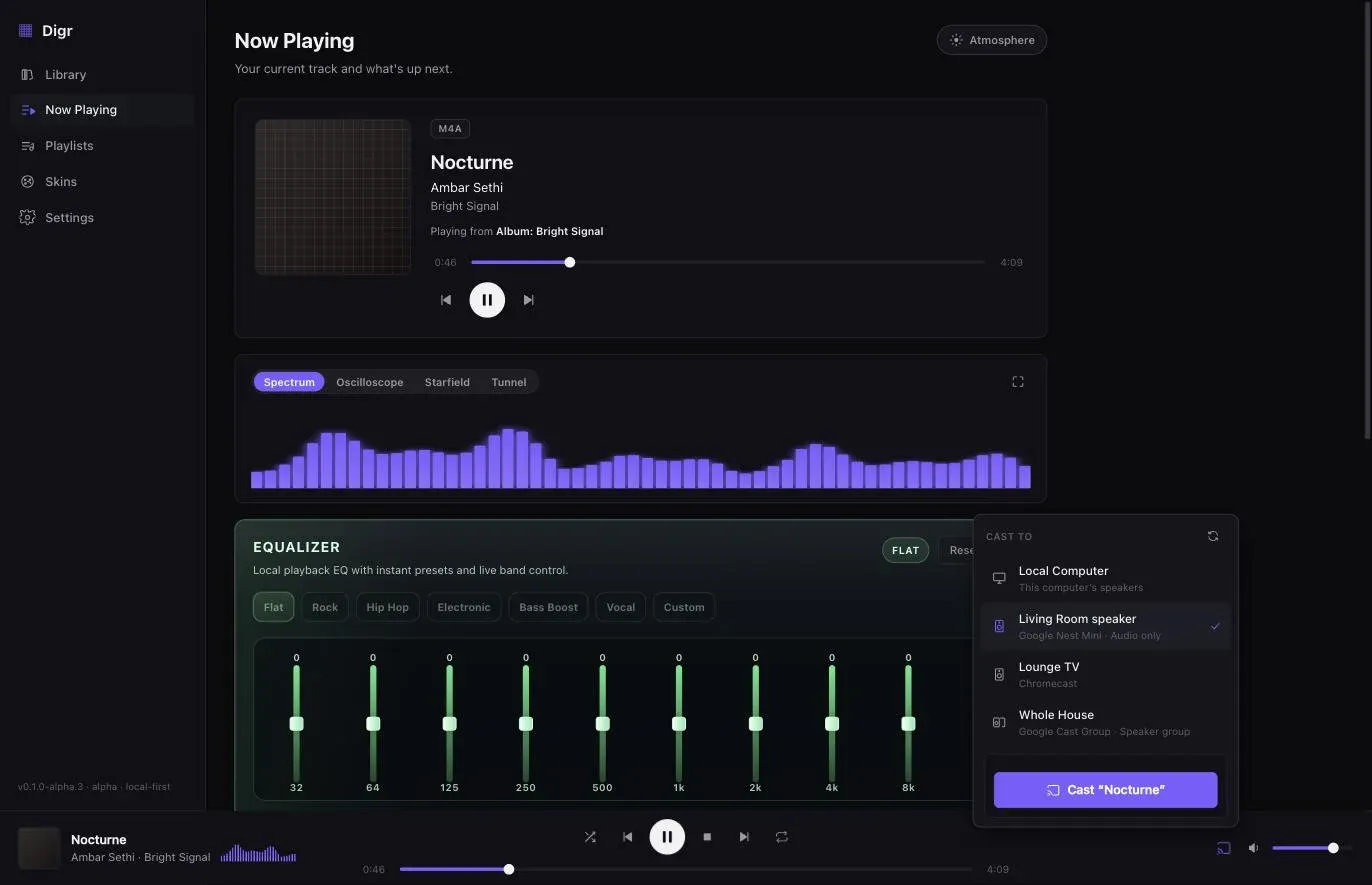
“Supports Chromecast” is not one capability. It covers at least five different arrangements, and the one a product implements decides whether your FLAC arrives as a FLAC, whether the volume control does anything useful, and whether the machine holding your files has to stay awake.
If a Plex server already runs in your house, Plexamp is the shortest path. If you want one library serving every speaker and you are happy to run a machine for it, that is Roon or self-hosted Music Assistant. On Windows, Music Caster casts files and system audio and costs nothing. On an Apple silicon Mac, Digr sends the original file to a Cast device with no server and no account — and hands the receiver one track at a time, so albums have seams. The answer that is not on this list is a Chrome tab, and the reason is in the second section.
Product facts in this article were checked on 27 August 2026 against each vendor’s own documentation, or read from source where the source is available. Two vendor pages refused access and the consequences are stated where they land.
What this search currently returns
Worth saying plainly, because it explains why this page exists. On the day this was written, the first screen for “music player with chromecast support” contained two forum threads, two Android roundups, a directory listing for an Android app, an aggregated how-to, one GitHub repository — and a news story from 2014 about a streaming service that no longer exists.
There is almost nothing here for somebody with a music collection on a computer. The one genuinely relevant result is the GitHub repository, and it is in this article’s table.
Five things “Chromecast support” can mean
What the receiver is actually given
-
One
The application serves your file
Digr · Music Caster
A small server inside the application publishes a URL on your own network; the receiver fetches the original file and decodes it. Nothing is re-encoded, so the device’s codec list is a hard constraint. Your machine has to stay awake and keep serving.
-
Two
A server publishes the library
Roon · Plexamp · Music Assistant
An always-on machine holds the library and serves the receiver, converting where it decides to. Several devices reach one library, and the arrangement outlives whichever laptop is in the room — at the cost of a machine that never sleeps, and usually an account.
-
Three
A browser tab, or the whole screen
Chrome
A live encode of what the tab or the display is producing. Google’s own documentation notes the catch: casting a tab sends the sound to the TV, but casting your screen means “the audio might play on your computer” instead. This is not your file arriving anywhere.
-
Four
A phone app as the controller
Android and iOS players
Convenient, well served by the app stores, and indexing the storage in your hand rather than the library on your desk. This is what most of the pages ranking for this query are about.
-
Five
System audio, captured and encoded
Music Caster, among others
Whatever the machine is playing is encoded live and sent. Any application becomes castable, and nothing about the original file survives the trip. Useful as a fallback, not as a library strategy.
For the mechanism underneath all of this — how a Cast receiver gets told what to play — and for how it compares with AirPlay and DLNA, the protocol comparison covers the architecture. This page is about which software to install.
The comparison
Only products whose Cast behaviour could be verified from their own surface, plus Google’s own tab casting, which has to be in the table to be argued with.
| Arrangement | Sends | Server needed | Account | Platforms | Cost | |
|---|---|---|---|---|---|---|
| Digr | One | The original file, correct MIME type, Range support | No | No | macOS 11+, Apple silicon only. Alpha | Free |
| Music Caster | One and five | Files, URLs and system audio | No | No | Windows, x64 and ARM64 installers; Linux unmaintained | Open source |
| Audirvāna | Unverified | Not stated. Cast support and gapless playback on the Cast path are both documented; what reaches the receiver is not | No | Not stated | macOS 10.15+, Windows 10 1809+, Linux, Synology or QNAP NAS | Studio $7.99/mo or $79.99/yr excl. VAT; Origin $149.99 once excl. VAT |
| Plexamp | Two | Server-mediated | Plex Media Server | Plex account | Broadly available | App free; some features need a Plex Pass |
| Roon | Two | Server-mediated | Roon Server | Free Roon account required | Server on Windows 10+, macOS 12+, Linux, NAS | $14.99/month billed monthly, $12.49/month billed annually, or $829.99 lifetime |
| Music Assistant | Two | HTTP stream, MP3 or FLAC | Always-on machine | No | Docker, Home Assistant add-on, Raspberry Pi, NAS, PC | Free, open source |
| VLC | Two-like | Transcodes where needed — “even in formats not supported natively” | No | No | Everything | Free |
| MediaMonkey | Unverified | Unverified | No | No | Windows, Android | Free tier |
| Chrome tab casting | Three | A live encode of the tab or screen | No | Google account for the browser | Any desktop Chrome | Free |
The six products that are not in that table
Naming them matters more than including them, because every one is a product a roundup would have listed.
- Swinsian documents “playback over AirPlay” and no Google Cast anywhere on its site.
- foobar2000 lists no casting in its own feature set; whatever components exist, the vendor does not document it.
- Doppler documents nothing about casting.
- MusicBee has been unverifiable on two separate research passes — its site returned HTTP 403 again on the day of writing — and plugin-provided casting is exactly the kind of claim that should not be made on somebody else’s behalf.
- Apple’s Music app casts to AirPlay, not to Google Cast.
- Every Android and iOS player on the current result page indexes a phone rather than a computer.
In each case the honest statement is not documented on the pages checked, not cannot do it. If a vendor documents Cast support tomorrow, the row appears.
Audirvāna was on that list and has been moved into the table. Its Studio-versus-Origin page, which was the only Audirvāna source used when this article was written, names “USB DAC and wireless connection” and no Cast support. Its device-connection article, read on 27 August 2026, states that “Any Chromecast device can be selected from the device output list. Once you play on this device, the playback will be gapless”, and that devices can be grouped for multizone playback. What Audirvāna actually sends to a receiver is still not stated, so its arrangement stays unverified — the row-by-row comparison of the two products goes into the rest of it.
What each option actually sends
One FLAC file, four routes to the same speaker
Route one
Application serves the file A local media server inside the player publishes a URL on your LAN. The receiver fetches the original bytes and decodes them. No conversion, no quality question — and a hard failure if the device cannot decode that format.Or
Route two
Server publishes the library Music Assistant states that it “serves all audio streams over a plain HTTP URL”, as MP3 or FLAC, defaulting to 44.1 and 48 kHz at 16 bit and optionally reaching 192 kHz/24 bit for a single player. A server can convert, which is a feature when the device is limited and a loss when it is not.Or
Route three
Browser tab or screen A live encode. Google notes that casting a tab puts the sound on the TV while casting the screen may leave the audio on your computer. Your file is not what arrives.Or
Route four
System audio capture Everything the machine plays, encoded live and sent. Music Caster does this in addition to sending files. Universal, and the furthest from the original file.The ceiling belongs to the device, not the software. Google lists FLAC to 96 kHz/24-bit, MP3, LC-AAC, HE-AAC, Opus, Vorbis and WAV for its Cast audio devices — and no ALAC. Roon documents 48 kHz as the limit on most Chromecast devices, with Chromecast Audio the exception at 96/24.
An ALAC collection is the case where this bites immediately, and it is worth resolving before buying speakers rather than after: FLAC against ALAC on a Mac is the same decision from the format end.
The products, in more detail
Plexamp is the shortest path if the arrangement already exists. Plex’s own page states that you will need the Plex Media Server to use the app with personal music content. That page returned HTTP 403 to this environment on 27 August 2026, so that quotation carries its recorded date of 26 August 2026, and no Plex price appears anywhere in this article because none could be verified. Plex’s own support article on what is sent to a Cast device also refused access, so this article does not describe Plex’s transcoding behaviour at all.
Roon is the mature server answer and the only vendor here that publishes its own Cast limits, which is worth crediting: Chromecast Audio up to 96 kHz/24-bit, other Chromecast devices up to 48 kHz, across a documented device list that runs from Chromecast Gen 1 to Nest Mini and “most devices with ‘Chromecast Built-in’”. It requires a Roon Server — “the brain of your system” — on Windows 10 or later, macOS 12 or later, Linux, a NAS, a Nucleus or a ROCK machine, plus a free Roon account. $14.99 per month billed monthly, $12.49 per month billed annually, or $829.99 lifetime.
Music Assistant is the self-hosted option and is unusually precise about itself: a free, open-source library manager that “brings your streaming services and your own files together into one library”, which must “run on an always-on machine — a Raspberry Pi, a NAS, a spare PC, or as a Home Assistant App”. Home Assistant is optional. Its Cast documentation is the most specific of anything here, including the limitations: “Cast speakers do not support crossfading of audio”, “any device or software that requires HTTPS URLs will not work”, and “Cast Groups containing only a stereo pair will not work”. Higher sample rates are described as unreliable on some devices “despite being officially supported”.
Music Caster is the Windows desktop answer nobody’s roundup has found: an open-source player that casts “audio files, system audio, and URLs to Google Chromecasts, Google Home/Nest Minis, etc.”, with x64 and ARM64 installers. Its own README carries a limitation worth the mention — “Chromecasts only support the AAC version of WMA files” — and its Linux support is noted as unmaintained.
VLC casts, and the citable statement is eight years old: the VLC 3.0 release announcement says it “can stream to Chromecast devices, even in formats not supported natively”, which means it transcodes when it has to. VLC’s current features page does not mention Chromecast at all. That is exactly what this article says about it — no more.
MediaMonkey names Chromecast on its own home page, alongside UPnP/DLNA and Bluetooth, without attributing the capability to a particular platform, and its features page returned HTTP 404. It is in the table with the arrangement marked unverified.
Digr’s cast path today
Digr speaks Google Cast and nothing else. Here is exactly what happens, read from the shipping code rather than from marketing copy.
Discovery. Chromecasts, Google Home and Nest speakers and Google Cast speaker groups appear over multicast DNS with nothing to configure. The resolver is bundled with the app, so it does not depend on the operating system’s Bonjour stack.
What is sent. A local media server on your machine streams the original file.
Each container gets its correct MIME type — a .flac is served as audio/flac,
.mp3 as audio/mpeg, .m4a and .alac as audio/mp4, .aac as audio/aac,
.wav as audio/wav — with HTTP Range support so the device can seek, and an
unguessable token in the URL in place of the file path. Nothing is re-encoded and
nothing leaves your network.
The queue. While casting, the local engine is silenced but still owns the queue, shuffle and repeat, so albums and playlists progress on the device. Disconnecting resumes local playback on the same track, paused.
Volume. Receiver volume and mute, group master volume, and a fixed-volume receiver shown as fixed rather than as a slider that silently does nothing.
Recovery. A receiver that is powered off, taken over by another application or dropped from the network is detected and reported, and playback is handed back rather than hanging.
And the limits, which are real. The receiver is handed one track at a time, so there is a pause at every track boundary — an album recorded continuously will have seams, and gapless playback is not something Digr does locally either. There is no receiver capability detection and no transcoding: if the device cannot decode your file, the cast fails rather than converting. So ALAC will not cast to a Google device, because ALAC is not on Google’s codec list. There is no AirPlay, no DLNA, no UPnP and no Sonos support. Digr runs on macOS 11 or later on Apple silicon only, and it is an alpha. Digr Pro is not purchasable.
Planned, undated, and counted nowhere above. Continuous Cast — pre-loading the next track on the receiver so an album plays through — is a named roadmap item, as are receiver capability detection, compatibility transcoding only where the receiver cannot decode the original, and AirPlay, DLNA/UPnP and OpenHome output. None of them has a date and none of them is in the comparison table. Cross-brand synchronised playback is on the permanently-not-planned list. What Digr does today is published in full, including the absences.
What was tested, and what was not
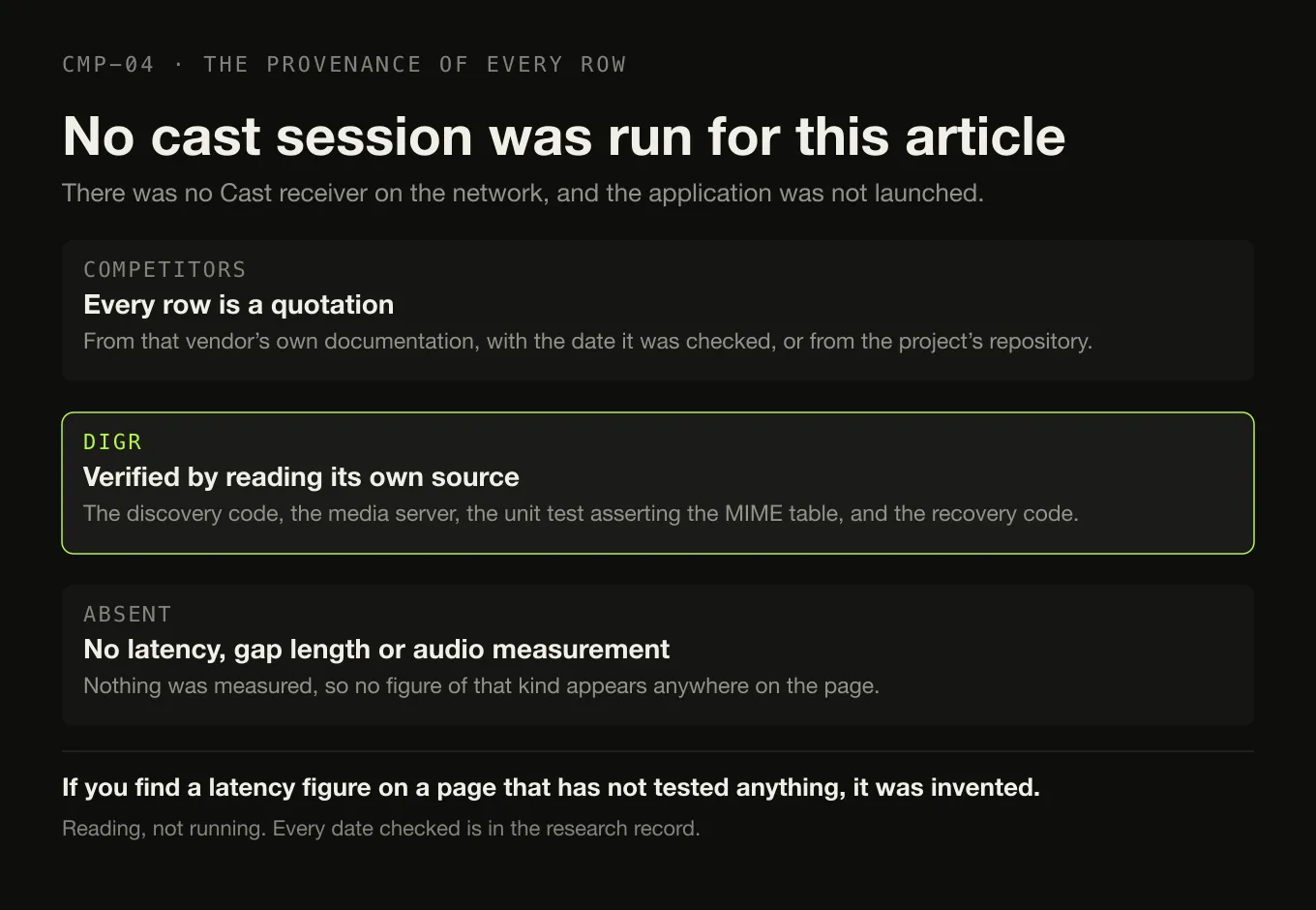
No cast session was run for this article, by anyone, against any product. There was no Cast receiver on the network where this was written and the desktop application was not launched.
What that means for each column:
- Every competitor row is a quotation from that vendor’s own documentation, with the date it was checked, or from the project’s own repository.
- Digr’s row was verified by reading its own source — the discovery code, the media server including the unit test that asserts the MIME table, and the session and recovery code. Reading, not running.
- No latency figure, gap length or audio-quality measurement appears anywhere, because nothing was measured. If you find one of those on a page that also has not tested anything, it was invented.
If you want the procedure rather than the shortlist, getting your own music onto speakers around the house is the how-to, and it is protocol-agnostic.
The short version
- Five arrangements hide behind one phrase. Application-serves-the-file, server, browser tab, phone app, system-audio capture. Only the first two send your actual file.
- A Plex server already running: Plexamp.
- One library, many rooms, and a machine you will leave on: Roon, or self-hosted Music Assistant if you would rather not pay a subscription.
- Windows, free, files and system audio: Music Caster.
- Apple silicon Mac, no server, no account, original file: Digr — with one track at a time and no ALAC.
- The ceiling is the speaker’s. Google documents FLAC to 96 kHz/24-bit and no ALAC; Roon documents 48 kHz on most Chromecast devices.
- Casting is not mirroring. Google’s own caveat is that a cast screen may leave the audio on your computer.
- Six well-known players are absent because their vendors do not document Cast support, and that is stated rather than guessed.
For the wider software decision, the platform-neutral player comparison sorts the field by architecture, and the FLAC-specific shortlist goes further into what each application does with the format that Cast devices care most about.
Sources
Checked 27 August 2026, each against the vendor’s own documentation or the project’s own repository. No forum post, roundup or directory was used as evidence that any product casts.
- Google Cast — supported media — for Cast audio devices: “FLAC (up to 96kHz/24-bit)”, HE-AAC, LC-AAC, MP3, Opus, Vorbis, “WAV (LPCM)” and WebM. Neither ALAC nor AIFF appears
- Google — cast a Chrome tab or your screen — “You can show a Chrome tab or your screen from your PC to your TV”; for a tab, “the sound only plays on your TV”; for the screen, “the audio might play on your computer. To play the audio on your TV instead, cast the tab”
- Roon — Chromecast support — the device list from Chromecast Gen 1 to Nest Mini and “Most devices with ‘Chromecast Built-in’”, and “Chromecast Audio supports high-resolution music (up to 96kHz/24-bit), while other Chromecast devices support a sample rate up to 48kHz”
- Roon — how Roon works — “The Roon Server is the brain of your system”, and Chromecast among the named output technologies
- Roon — minimum requirements — server on Windows 10 or later, macOS 12+, Linux and NAS platforms; “A free Roon account is required”
- Roon — pricing — “$14.99 / month” billed monthly, “$12.49 / month” billed annually, “$829.99” lifetime
- Music Assistant — “a free, open source music library manager”; it must “run on an always-on machine — a Raspberry Pi, a NAS, a spare PC, or as a Home Assistant App”
- Music Assistant — Google Cast player support — “MA serves all audio streams over a plain HTTP URL”; MP3 or FLAC output; “44.1 kHz and 48 kHz at 16 bit” by default and up to “192 kHz / 24 bit for a single player, and up to 96 kHz for a Cast group”; “Cast speakers do not support crossfading of audio”; “Any device or software that requires HTTPS URLs will not work”; “Cast Groups containing only a stereo pair will not work”
- Music Caster — “a modern music player with the ability to cast audio files, system audio, and URLs to Google Chromecasts, Google Home/Nest Minis, etc.”; Windows x64 and ARM64 installers; Linux support unmaintained; “Chromecasts only support the AAC version of WMA files”
- VLC 3.0 release notes — “Can stream to Chromecast devices, even in formats not supported natively”
- VLC — features — the current feature list, which does not mention Chromecast
- MediaMonkey — “Play high quality audio to your TV, stereo or any other UPnP/DLNA, chromecast, or bluetooth device”, with no platform attribution; Windows and Android
- Swinsian — “Playback over AirPlay”, and no Google Cast on the page
- Audirvāna — how can I connect my device — “Any Chromecast device can be selected from the device output list. Once you play on this device, the playback will be gapless”, and multiple devices can be grouped for multizone playback. Also UPnP, AirPlay, Bluetooth, HDMI and USB. What Audirvāna sends to a Cast receiver is not stated on this page, which is why its arrangement is recorded as unverified
- Audirvāna — Studio compared with Origin — “USB DAC and wireless connection”. This page, which was the only Audirvāna source used when this article was first written, names no Cast support; the device-connection article above does
- Plexamp — plex.tv/plexamp and Plex’s own casting support article both returned HTTP 403 to this environment on 27 August 2026. The server requirement quoted above was recorded from the vendor’s page on 26 August 2026; no Plex price and no description of Plex’s transcoding behaviour appears in this article
- MusicBee —
getmusicbee.comreturned HTTP 403 on 27 August 2026, as it did on the previous research pass. It is excluded from the table rather than described - Digr — features and current capabilities and Digr — pricing — Google Cast only; mDNS discovery with a bundled resolver; the original file streamed with correct MIME types, Range support and a token in place of the path; the queue held on the sender; one track at a time; no receiver capability detection and no transcoding; no AirPlay, DLNA or UPnP. Digr Pro is not purchasable
Common questions
Can a Chromecast play music files from my computer?
Yes. A Cast receiver fetches media over the network from a URL it is given, so an application on your computer can run a small local server, hand the receiver a URL pointing at your own file, and let the device fetch and decode it. The condition is that the file has to be in a format the device supports — Google lists FLAC up to 96 kHz/24-bit, MP3, LC-AAC, HE-AAC, Opus, Vorbis and WAV for its Cast audio devices, and ALAC is not among them.
Do I need a server to cast my own music?
No, but several products require one. Roon needs a Roon Server, which its own documentation calls the brain of the system, and Plexamp needs a Plex Media Server for personal music. Music Assistant must run on an always-on machine such as a Raspberry Pi or a NAS. A desktop application that serves the file itself needs nothing extra running — the trade is that your computer has to stay awake for as long as the music plays.
Is casting the same as audio mirroring?
No, and the difference is what gets sent. Casting hands the receiver a URL and lets it fetch and decode the media itself, so the original file can arrive untouched. Mirroring sends a live encode of a browser tab or of your screen. Google documents the practical catch: when you cast a Chrome tab the sound plays on the TV, but when you cast your whole screen “the audio might play on your computer” instead.
Why is there a gap between tracks when I cast an album?
Because most casting arrangements hand the receiver one track at a time. The sender waits for the current track to finish, then loads the next one, and the load takes a moment — which is heard as a short silence at every track boundary. Pre-loading the next track on the device is the fix, and it is a feature a product either implements or does not. Digr does not implement it today: it sends one track at a time, so albums recorded continuously will have seams.
Will a 24-bit high-resolution file cast to a Google speaker?
Up to a point that Google and Roon both publish. Google lists FLAC support to 96 kHz and 24-bit for its Cast audio devices. Roon separately documents that Chromecast Audio handles up to 96 kHz/24-bit while other Chromecast devices are limited to a 48 kHz sample rate. Above those limits something in the chain has to convert the audio, and a player that only ever sends the original file will fail rather than convert.
- Chromecast
- Google Cast
- casting
- Plexamp
- Music Assistant
- Roon
- VLC
- local music
- FLAC