Digr vs JRiver Media Center
A full media centre against a music-only player. Thirty rows on current shipping behaviour, the per-major-version licence explained without invented arithmetic, and seven reasons the answer is JRiver.
If you use any part of JRiver beyond music, this comparison is already decided. Video, images, recorded television, documents, CD ripping, tag editing, room correction, VST plug-ins, zones, DLNA, a phone remote, Windows, Linux, an Intel Mac — JRiver does all of it and Digr does none of it. Any one of those is enough on its own.
If you use JRiver purely as a music player, on an Apple silicon Mac, and want something that indexes a folder and never writes to it, Digr does that for nothing. It is macOS 11 or later on Apple silicon, currently an alpha, with no gapless playback, no ReplayGain and no tag editing at all.
Breadth is not a flaw and narrowness is not a virtue. Counted on what ships today, JRiver wins nineteen of thirty rows and Digr wins four.
JRiver’s version, platforms, licence terms and feature claims were checked on 27
August 2026. wiki.jriver.com returned HTTP 403 again — rechecked on 28 August 2026 with the
same result — so three rows are published as unverified rather than guessed.
Where each product sits on the scope spectrum
From one job to all of them
-
1 · Player
Open a file and hear it
Not where either product sits
The narrowest useful tool. Both products are past this point, because both maintain an index of a collection rather than opening files one at a time.
-
2 · Library player
Index a folder, browse it, play it
Digr is here, and stops here
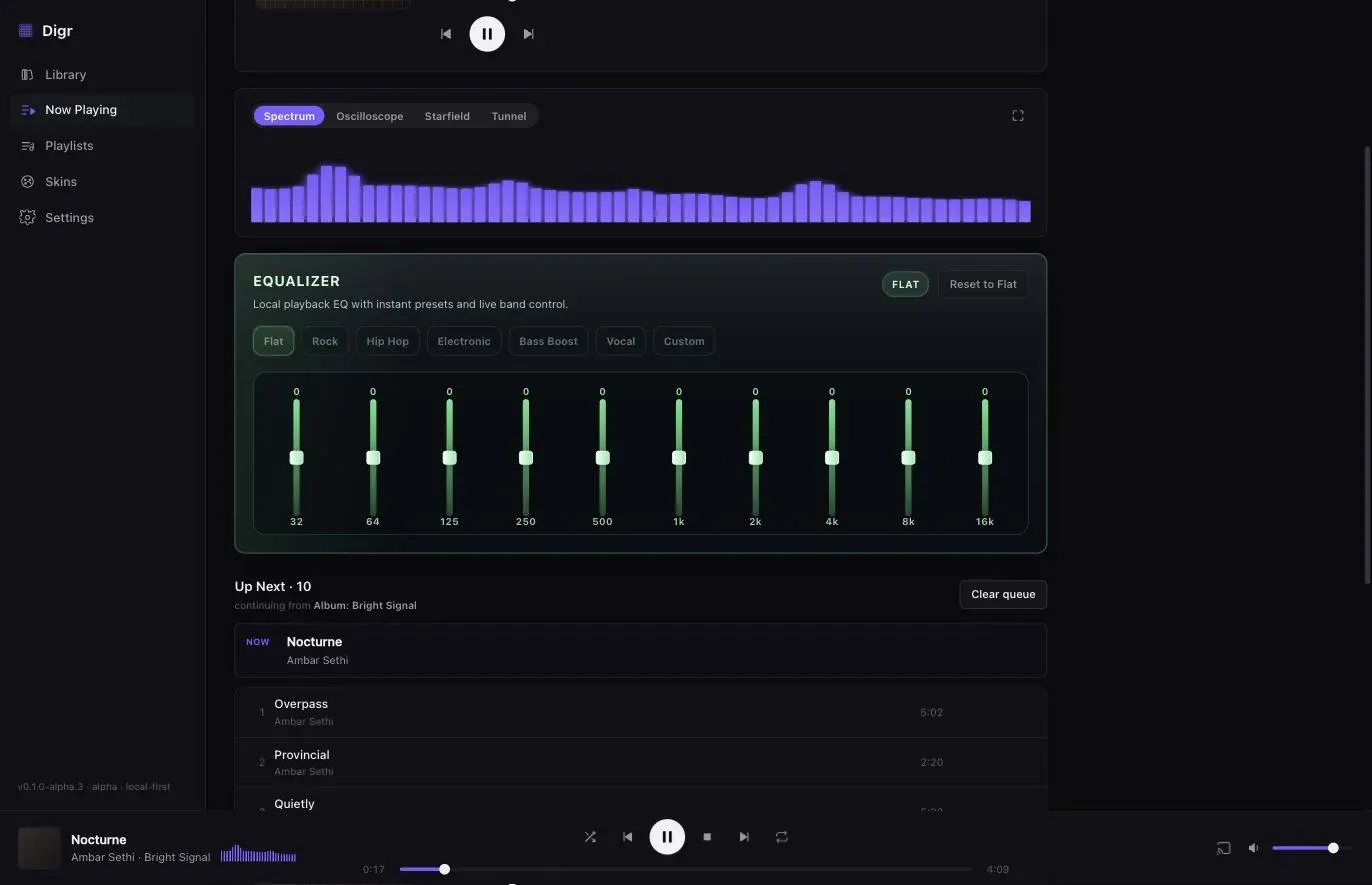
A SQLite index on your own disk built from watched folders, grouped into Tracks, Albums and Artists from your own tags, with a queue, local playlists, a ten-band equaliser and Google Cast out. Files are only ever read. That is the whole product.
-
3 · Library manager
Change what is on disk
JRiver is here — Digr is not
Tag editing, artwork, ripping a CD into the collection. JRiver writes tags to files, including AIFF and WAV, and rips discs. Digr writes nothing, ever, which is a deliberate position and is also simply an absence on this row. The tools that change a library are a different class from the ones that play it.
-
4 · Audio workshop
Change what reaches the hardware
JRiver is here too
"Rich DSP environment (Room Correction, Bass Management, VST plug-in support, ReplayGain, etc.)", with "Bit-perfect, WASAPI, ASIO, VST, 64-bit, DSD" output and "Industry leading DSD support". Digr's contribution to this row is a ten-band equaliser.
-
5 · Media centre
Every kind of file, every room
JRiver's actual position
"audio, video, and images", the ability to "record television" and "manage documents", Theater View, zones that "play audio and video in different zones", a DLNA server and renderer, client transcoding, and remote access over "LAN and Internet connections". Digr indexes audio extensions and nothing else.
What JRiver is today, and what the licence actually means
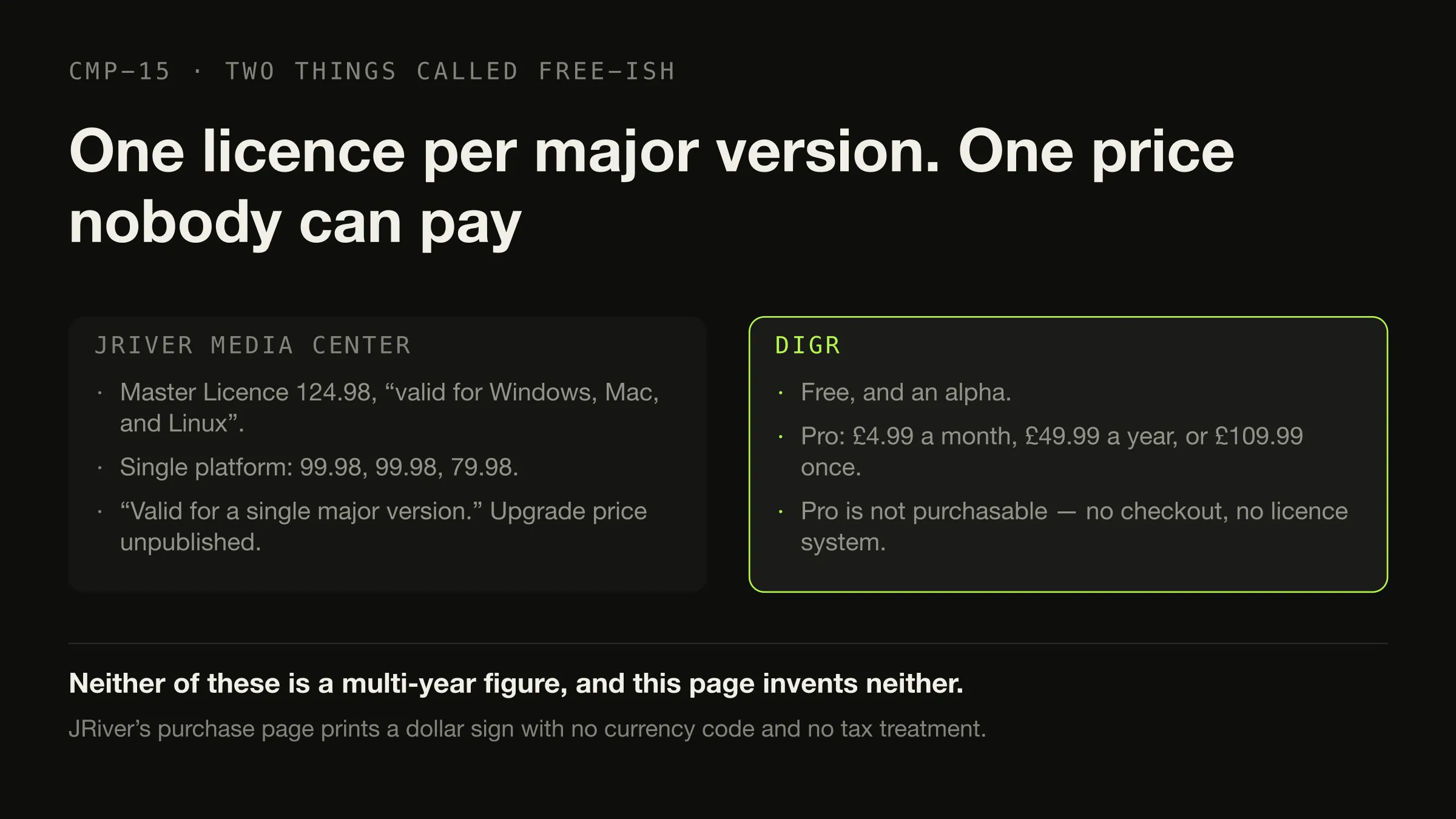
Current major version: 36. The Windows 64-bit build is at 36.0.14 and requires “Windows 10 or newer”; there is a Windows 32-bit build; the macOS build is at 36.0.12 and requires “at least MacOS High Sierra 10.13”; Linux covers all architectures. The trial is stated as “You have 30 days to try the full feature set.” On the day this was checked the macOS build was one point release behind Windows — a snapshot, not a trend.
| Licence | Figure | Covers |
|---|---|---|
| Master Licence | 124.98 | “recommended, since it is valid for Windows, Mac, and Linux” |
| Windows only | 99.98 | “Works only for Windows” |
| Mac only | 99.98 | “only for Mac” |
| Linux only | 79.98 | “only for Linux” |
| Upgrade | No figure published | “you will see a reduced price when you purchase a Master License” |
The wording that governs the whole model, verbatim: “A Master License is valid for a single major version for all available Operating Systems.”
Three honest notes. The purchase page prints a dollar sign and no currency code, so no currency is asserted here. No tax treatment is stated. And the multi-year cost cannot be calculated — JRiver publishes neither how often a major version arrives nor what an upgrade costs in money, so any five-year figure would be invented. This is not an annual subscription and this article does not imply one. Version 36 is current; that is what is known. The licence arithmetic that can honestly be done in this category is worked through elsewhere.
Digr is free. Digr Pro is priced at £4.99 a month, £49.99 a year or £109.99 once and is not purchasable — no checkout on this site and no licence system in the application — so no comparison of long-run cost is drawn.
The comparison, on what ships today
Roadmap is excluded from every row. Unverified means the fact was not stated on
any page that could be read.
| Dimension | Digr, today | JRiver 36, today | Row |
|---|---|---|---|
| Music library and playback | Yes | Yes | Neither |
| Video | No | Yes | JRiver |
| Images | No | Yes | JRiver |
| Television recording | No | Yes — “MC can record TV in high definition” | JRiver |
| Documents | No | Yes — “manage documents” | JRiver |
| Tag editing | None at all | Yes, including AIFF and WAV | JRiver |
| Metadata lookup service | None contacted | “cover art and metadata options”; no service named | Unverified |
| CD ripping | No | Yes — “just put a CD in your drive” | JRiver |
| Transcoding | No | Yes, for network clients | JRiver |
| DSP | A ten-band equaliser on local playback | Room Correction, Bass Management, VST plug-in support, ReplayGain | JRiver |
| ReplayGain | No | Yes, named in the DSP environment | JRiver |
| Exclusive / bit-perfect output | No | “Bit-perfect, WASAPI, ASIO, VST, 64-bit, DSD” | JRiver |
| DSD | No | “ASIO v2.2, DoP, SACD, DFF, DSF” | JRiver |
| Gapless playback | No, locally or over Cast | Unverified — the wiki is unreachable | Unverified |
| Zones — different media at once | No. One output at a time | Yes | JRiver |
| DLNA / UPnP | No | Server and renderer | JRiver |
| Google Cast | Yes, the original file, correct MIME, Range support | Not documented on the pages read | Digr |
| Remote control from a phone | No | iPad, iPhone, Android, Gizmo, WebRemote | JRiver |
| Access from outside the house | No | Yes, over “LAN and Internet connections” | JRiver |
| Plugins | None | VST plug-ins and a plugin ecosystem | JRiver |
| Your files are written to | Never | Unverified for scanning; tags are written when asked | Digr |
| Library index | SQLite, derived, deletable, rebuildable | A proprietary media database | Neither |
| Folder watching | Roots remembered; rescan when you ask | Not verified — the Auto-Import page on JRiver’s wiki is HTTP 403 to us | Unverified |
| External drive disconnected | Root marked offline, volume re-matched, paths rewritten, queue remapped | Not stated | Digr |
| Account required | No | No | Neither |
| Server | None | Optional, and built in | JRiver |
| Platforms | macOS on Apple silicon only | Windows, macOS, Linux | JRiver |
| Skins and visualisers | Six skins, four visualisers | Theater View; not otherwise assessed | Unverified |
| Price | Free | 124.98 Master Licence, per major version | Digr |
| Maturity | Alpha, 0.1.0-alpha.3 | Shipping, mature, version 36 | JRiver |
JRiver 19, Digr 4, neither 3, unverified 4. The count is published because the arithmetic should be visible rather than asserted, and it is deliberately not a score. It is also close to meaningless taken as a total: nineteen rows is what happens when one product does five jobs and the other does one, and it tells you nothing about whether you need five.
The whole of Digr’s signal processing, and the whole of its navigation
Seven reasons the answer is JRiver, and three that are not
If you need this, the product is named
JRiver It is the reason the product exists, and Digr indexes audio extensions only. There is nothing to weigh here.
JRiver One Master Licence covers three desktop platforms. Digr has no published build for any of them: Windows is confirmed for Digr’s launch but not yet downloadable, an Intel Mac build is planned for a later release, and Linux is on the roadmap without a date.
JRiver "To rip CD’s just put a CD in your drive." Digr has no ripping at all — and the method matters more than the software, whichever you use.
JRiver It edits tags and writes them into files. Digr never writes to a file. What lives in a tag and where is the background to why this row is the expensive one.
JRiver Room correction, bass management, VST hosting, ReplayGain, WASAPI, ASIO and DSD. Digr has ten equaliser bands.
JRiver Zones "serve media to several clients, even playing different media at the same time", plus a DLNA server and renderer. Digr has one output at a time. Which protocol promises what is worth understanding before choosing either.
JRiver Theater View is controllable from an iPad, iPhone or Android; Gizmo and WebRemote work over "LAN and Internet connections". Digr has no remote of any kind.
Read both claims carefully JRiver calls its database "the fastest and most powerful media database available; an essential management tool for large collections". Digr virtualises its lists so a 25,000-track library scrolls without stutter. Neither statement is a benchmark. What vendors actually publish about scale is a short and revealing list.
Digr Unplugging a drive marks its root offline instead of deleting the tracks; on return the volume is matched by identifier or name, indexed paths are rewritten and the queue is remapped. A root that could not be fully read is never pruned.
Why it is Digr’s JRiver’s behaviour here is not stated on the pages read, so this is a published-evidence row rather than a tested one.
Digr Scanning opens files to read tags and artwork and never writes to them. Remove Digr and the collection is byte for byte as it was. This is the same fact as "no tag editing", read from the other side, and whether it is a feature depends entirely on what you wanted.
What travels between them
Your tags travel, and it is the best news in this comparison. JRiver writes tags into your files, so every correction you made inside it is in the files themselves, and Digr — which reads tags locally and contacts no service — will read them.
The JRiver database stays behind. Digr documents no import of any external database, so expect a rescan from scratch. With the tags already in the files, that is a wait rather than a loss.
Playlists are unverified. wiki.jriver.com, where playlist export is
documented, returned HTTP 403 to this environment on 27 August 2026, so the
supported formats could not be read and none is claimed. Check the vendor’s wiki
before you migrate. Digr has local playlists with ordered membership in SQLite, so
there is somewhere for them to land.
Ratings and play counts are undocumented in both directions.
Zones, DSP presets, Theater View, DLNA endpoints, and your video, television and photo libraries have nowhere to go. There is no import to attempt, because Digr has no equivalent of any of them.
The licence, at least, is a clean exit. A Master Licence is tied to a major version rather than to a subscription, so leaving means not buying the next one.
This is product comparison rather than a switching guide. Which half of JRiver you use, and what replaces that half covers six jobs and a dozen products rather than one.
What Digr has planned
Named once, undated, and counted in no row above.
Planned: Windows, then Linux. CD ripping, with rip verification. Explicit, reviewable, undoable metadata and tag editing. Truly gapless local playback and ReplayGain. Advanced DSP, loudness and dynamics analysis, and a Signal Chain view. AirPlay, DLNA and UPnP output, and OpenHome. A small web remote served on your own LAN. NAS and network-share recovery.
Research, not planned: exclusive and bit-perfect local output.
Not planned at all: a system-wide equaliser — “processing every other application’s audio is an audio driver, not a music player”. Automatic destructive de-duplication. Mass metadata overwrite without review. Intel Macs, iOS and iPadOS.
Every planned item above is a row JRiver wins today, including the platform row that the Master Licence exists to answer. The published capability list carries the absences as well as the features.
How this comparison was made
- Nothing was installed, purchased or trialled. JRiver’s 30-day trial was not taken, and Digr was not run for this article — its rows come from its own shipping code and the modules the site is built from.
- No usability or interface judgement is made about either product, because making one would require using both. The scope difference is described from published feature sets.
- No listening test and no measurement. There is no sound-quality claim anywhere. JRiver’s DSP list and Digr’s ten-band equaliser are documented mechanisms.
- Every JRiver fact comes from
jriver.com, with the page and the date, including the version number, which came from JRiver’s own downloads page rather than from a review. wiki.jriver.comreturned HTTP 403, rechecked 28 August 2026, so folder watching, gapless playback and playlist export are published as unverified rather than filled in from anywhere else.- No multi-year cost is calculated. The major-version cadence is unpublished and the upgrade price is unpublished, so any such figure would be invented.
- No currency is asserted, because the purchase page prints none.
- Only shipping features are scored. Roadmap is in its own section and decides nothing — including Windows, which is the row JRiver most obviously wins.
- No community source was used, so this article reports no user sentiment, despite four of the current search results being forum threads.
The short version
- JRiver if you need video, television, images, documents, ripping, tag editing, room correction, VST, DSD, zones, DLNA, a phone remote, remote access, plugins, Windows, Linux or an Intel Mac. Seven distinct needs, and any one is enough.
- Digr if you use only the music half, on an Apple silicon Mac running macOS 11 or later, and want a folder indexed and played with nothing written back to it, no account and no server. Free, and an alpha.
- Neither if you want remote listening without administering anything, or a permanently-licensed cross-platform player with no media centre attached.
- JRiver wins nineteen of thirty rows and Digr four, with three to neither and four unverified. No score is derived from that.
- The licence is per major version. Version 36 is current, the Master Licence is 124.98 covering Windows, Mac and Linux, no currency code is printed, and the cadence is unpublished — so the multi-year cost is unknowable and this page does not invent one.
- Your tags come with you, because JRiver wrote them into your files. The database does not.
- Check playlist export on JRiver’s own wiki first. It could not be verified here.
If the underlying question is scale rather than scope, what vendors publish about large libraries is short and revealing. If it is whether you want a server at all, that is worth settling before choosing any player. And if it is which formats a player has to handle in the first place, the container-and-codec distinction comes first. If the real shortlist is JRiver against Roon rather than against Digr, that comparison is written straight, with Digr in neither table.
Sources
Every JRiver fact above comes from JRiver’s own site, checked on 27 August 2026. No directory, roundup, review or forum was used as a source for any capability, price, platform or requirement.
- JRiver Media Center — download — current major version 36; “JRiver Media Center 36.0.14 . 64-bit Windows 10 or newer”; a Windows 32-bit build; “JRiver Media Center 36.0.12 . MacOS 64 bit, requires at least MacOS High Sierra 10.13”; Linux for all architectures; “You have 30 days to try the full feature set”
- JRiver Media Center — purchase — “Master License $124.98 (recommended, since it is valid for Windows, Mac, and Linux)”; “Windows only for $99.98 (Works only for Windows)”; “Mac only for $99.98 (only for Mac)”; “Linux only for $79.98 (only for Linux)”; “A Master License is valid for a single major version for all available Operating Systems. It will work with the most recent updates of JRiver Media Center on Windows, OSX, and Linux.”; and “If you previously purchased MC for Mac or Windows, and it is installed and licensed, you will see a reduced price when you purchase a Master License”. No currency code and no tax treatment appear on the page
- JRiver Media Center — overview — “audio, video, and images”; “record television”; “manage documents”; “plays more file formats than any other player”; “MC can even play audio and video in different zones”; Theater View “controllable by a Media Center Remote, an iPad, iPhone, Android, a Windows netbook or Touchscreen”; “MC can record TV in high definition”; “the fastest and most powerful media database available; an essential management tool for large collections”; “Obsessive taggers will be delighted with cover art and metadata options”; “A Media Network, a whole house music, movie, TV, and photo solution”; and “works with more cell phones, MP3 players, DLNA and other devices than any other player”
- JRiver Media Center — audio — “Rich DSP environment (Room Correction, Bass Management, VST plug-in support, ReplayGain, etc.)”; “Bit-perfect, WASAPI, ASIO, VST, 64-bit, DSD”; “Industry leading DSD support (ASIO v2.2, DoP, SACD, DFF, DSF, etc.)”; “Support for all lossless formats of audio (FLAC, APE, ALAC, WM), AIFF and WAV files (including tagging)”; and “To rip CD’s just put a CD in your drive. MC will step you through the process.”
- JRiver Media Center — Media Network — “JRiver Media Center can take advantage of your LAN and Internet connections, so you can enjoy your media wherever you are.”; “rip and organize on one machine, and play on many others”; “You can use MC’s zones to serve media to several clients, even playing different media at the same time.”; “Media Center will work with thousands of TV’s, Blu-ray players, receivers, and other devices which support the DLNA protocol.”; the Media Center Remote, Gizmo for Android and WebRemote for iPhone and iPad; “Media Center can automatically convert audio and video streams for client playback when your connection isn’t fast enough to play unconverted media.”; and client pairing via “a six character access key”
- JRiver Media Center — home — “The Most Comprehensive Media Software”; “The best choice for seamless audio, image, television, & video”
- JRiver wiki —
wiki.jriver.comreturned HTTP 403 to this environment on 27 August 2026 and again on 28 August 2026, for the Tags, the Gapless Playback and the Auto-Import pages. Folder-watching behaviour, playlist export formats and gapless behaviour are therefore not claimed in this article.jriver.com/television.htmlreturned HTTP 404; the television claims above come from the overview page - Digr — features and current capabilities and Digr — system requirements — every Digr claim above, including the absence of video, images, television, documents, tag editing, ripping, transcoding, DSP beyond a ten-band equaliser, zones, DLNA, UPnP, plugins, a remote, gapless and ReplayGain, and the absence of Windows, Linux and Intel Mac builds
- Digr — pricing — Digr Free, and Digr Pro priced but not purchasable: no checkout on this site and no licence system in the application
Common questions
Is Digr a replacement for JRiver Media Center?
Only if you use JRiver as a music player and nothing else. JRiver handles audio, video and images, records television, manages documents, rips CDs, edits tags, hosts VST plug-ins, plays into separate zones and serves DLNA devices, across Windows, macOS and Linux on one licence. Digr does the music library and playback on macOS 11 or later on Apple silicon, and none of the rest. If any part of the media-centre half is in use, switching is a downgrade rather than a move.
Which one runs on Windows?
JRiver. Its current major version is 36, with the Windows 64-bit build requiring “Windows 10 or newer”, a Windows 32-bit build, a macOS build requiring “at least MacOS High Sierra 10.13”, and Linux for all architectures. A Master Licence at 124.98 covers all three. Digr has no Windows build, no Linux build and no Intel Mac build. Windows and then Linux are on Digr’s roadmap with no date attached, and an undated plan is not a platform you can install.
Can Digr edit tags?
No. Digr opens your audio files to read tags and artwork and never writes to them: nothing is copied, renamed, moved or re-tagged, and removing Digr leaves your collection byte for byte as it was. JRiver does edit tags, and writes them into files including AIFF and WAV. On that row JRiver simply wins, and it also means your JRiver tag work travels with you if you ever move — because it is in the files rather than in a database.
Which has the better DSP?
JRiver, by a wide margin, on what each vendor publishes. JRiver describes a “Rich DSP environment (Room Correction, Bass Management, VST plug-in support, ReplayGain, etc.)” along with “Bit-perfect, WASAPI, ASIO, VST, 64-bit, DSD” output modes. Digr has a ten-band equaliser from 32 Hz to 16 kHz with six presets, applied to its own local playback, and nothing else — no room correction, no convolution, no plugin host and no ReplayGain. This compares published feature sets, not how either one sounds.
Does Digr support DLNA?
No. Google Cast is the only network protocol Digr speaks. JRiver has both a DLNA server and a DLNA renderer, and says it “will work with thousands of TV’s, Blu-ray players, receivers, and other devices which support the DLNA protocol”, along with zones and remote clients. DLNA and UPnP output are undated items on Digr’s roadmap and count for nothing today. Whether JRiver supports Google Cast was not documented on the pages checked on 27 August 2026.
Which is better if I only need music?
It depends on what you need done to the music. If you want CD ripping, tag editing, room correction, zones or a phone remote, JRiver is still the answer even for a music-only library. If you want a folder indexed, browsed and played with nothing written back to it, no account and no server, and you are on an Apple silicon Mac, then Digr covers that for free — as an alpha, with no gapless playback and no ReplayGain.
- Digr vs JRiver
- JRiver Media Center
- media centre
- DSP
- zones
- DLNA
- CD ripping
- tag editing
- local-first
- comparison