JRiver Media Center alternatives: which half do you use?
JRiver alternatives depend on which part you use. Compare music players, servers and media centres honestly, including what you lose when zones, video or Theater View matter.
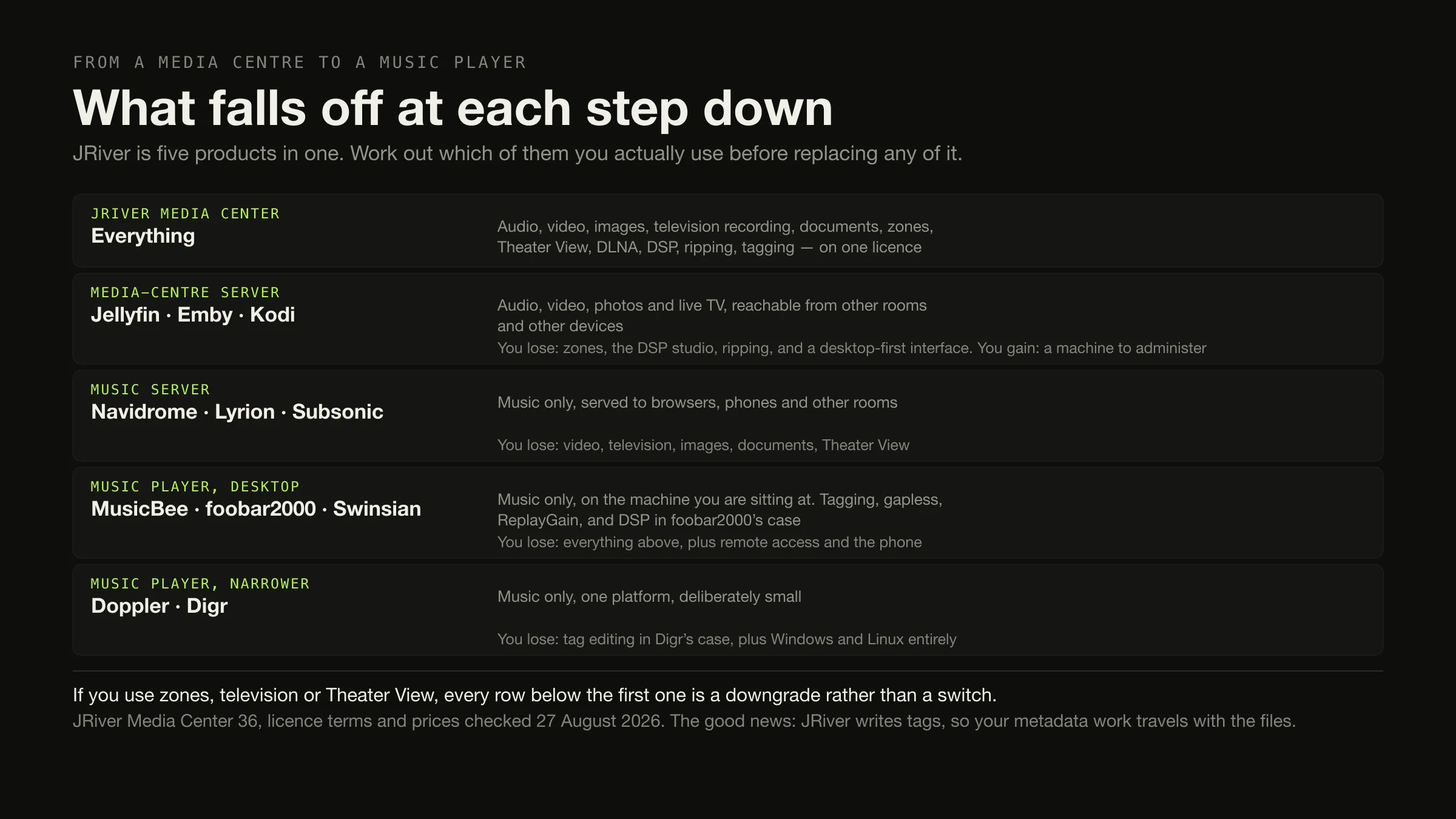
Ask which half of JRiver you use before you look at a single alternative. If you only ever used it as a music player, this is easy: MusicBee free on Windows, foobar2000 free on Windows, macOS, Android and iOS, Swinsian at $34.95 on macOS. If you want browser and phone access as well, Jellyfin or Navidrome, both free, both servers.
If you use the zones, the DSP studio, the television recording, the images, the documents or Theater View, nothing on this page replaces JRiver and switching is a downgrade rather than a move. That is the article’s main finding and it is worth having before you spend an evening on trials.
If your requirement is music playback rather than a full media centre, compare the best music management software with the best local music players before choosing a replacement.
JRiver’s version, licence terms and prices were checked on 27 August 2026.
Nobody has written this page yet
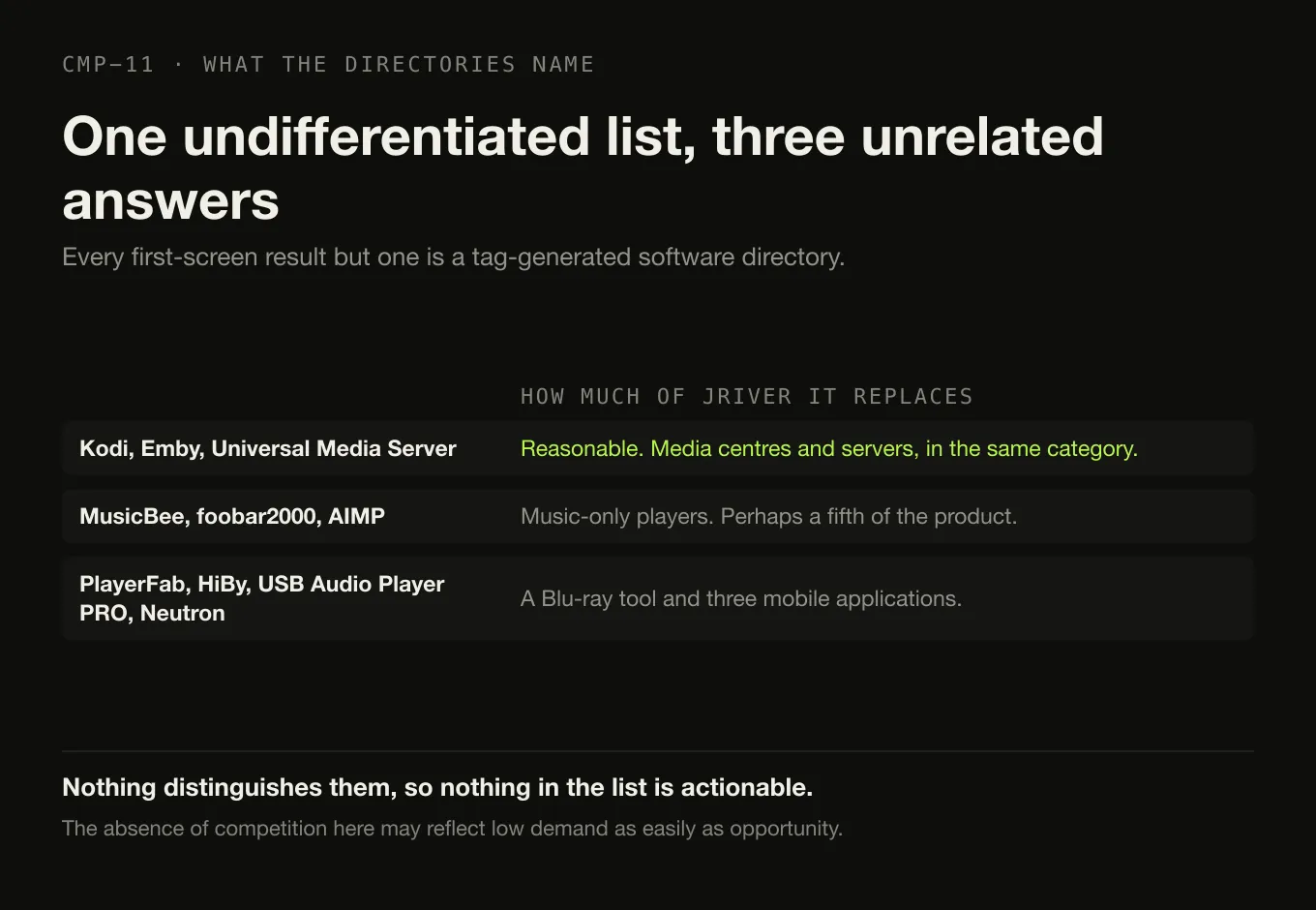
Search “jriver alternatives” and every result on the first screen except one is a tag-generated software directory: SourceForge, Slashdot, SaaSHub, eBool, AlternativeTo, plus a low-quality blog on an unrelated domain. The single non-directory result is a forum thread, and it returned HTTP 403 to this environment so it is not quoted here.
Their suggestions are the giveaway. In one undifferentiated list they name Kodi, Emby and Universal Media Server — media centres and servers, which is reasonable — alongside MusicBee, foobar2000 and AIMP, which are music-only players replacing perhaps a fifth of JRiver, alongside PlayerFab, HiBy Music, USB Audio Player PRO and Neutron Music Player, which are a Blu-ray tool and three mobile applications.
Nothing distinguishes them, so nothing in the list is actionable. That is the gap this page fills, and it is worth saying plainly that the absence of competition here may reflect low demand as easily as opportunity.
JRiver is five products in one
The hero image above is the whole argument. Here it is as a checklist, from JRiver’s own descriptions.
Six things JRiver does — and whether anything here replaces each
-
Music library and playback
Replaceable, easily
MusicBee · foobar2000 · Swinsian · MediaMonkey · Navidrome
The most crowded category in this whole comparison. JRiver calls its database "the fastest and most powerful media database available; an essential management tool for large collections", and what vendors actually publish about library scale is worth reading before you assume any of these is equivalent.
-
Tagging
Replaceable, and improvable
MusicBrainz Picard · Mp3tag · beets · Swinsian
JRiver writes tags. So do all of these, and the dedicated taggers do it better than most players. This is one of the few rows where leaving can be an upgrade.
-
Video, images and documents
Replaceable only by a server
Jellyfin · Emby · Kodi
JRiver handles "audio, video, and images" and can "manage documents". Jellyfin and Emby cover video and photos and are servers, so you swap a desktop application for a machine that stays awake. No music-only player on this page touches this row.
-
Recorded television
Barely replaceable
Emby Premiere · Jellyfin
"MC can record TV in high definition." Emby's DVR is behind Premiere at $4.99 a month, $54 a year or $119 once. If this is a live requirement, the switch is not a simplification.
-
Zones and the DSP studio
Not replaceable here
Nothing on this page
"MC can even play audio and video in different zones." foobar2000 documents "many built-in DSP effects" and Roon has its own processing, but no product compared here reproduces JRiver's zone model. This is a stay row.
-
Theater View and DLNA breadth
Not replaceable here
Nothing on this page
Theater View is "controllable by a Media Center Remote, an iPad, iPhone, Android, a Windows netbook or Touchscreen", and JRiver claims it works "with more cell phones, MP3 players, DLNA and other devices than any other player". Nothing here matches it. This is the second stay row.
What JRiver is today, and what it costs
Checked on 27 August 2026, from JRiver’s own pages.
Current major version: 36. Windows 64-bit at 36.0.14, requiring Windows 10 or newer; Windows 32-bit at the same version; macOS at 36.0.12, requiring macOS High Sierra 10.13 or later; and Linux for all architectures. The trial is stated as “You have 30 days to try the full feature set.”

| Licence | Figure | Covers |
|---|---|---|
| Master Licence | $124.98 | “recommended, since it is valid for Windows, Mac, and Linux” |
| Windows only | $99.98 | “Works only for Windows” |
| Mac only | $99.98 | “only for Mac” |
| Linux only | $79.98 | “only for Linux” |
| Upgrade | No figure published | “you will see a reduced price when you purchase a Master License” |
The wording that matters, verbatim: “A Master License is valid for a single major version for all available Operating Systems.”
Two honest notes. The purchase page shows prices with a dollar sign and does not state the currency code, so this article does not assert one; and no tax treatment is stated.
The multi-year cost cannot be calculated. A per-major-version licence is neither a subscription nor a permanent purchase. JRiver publishes neither how often a major version arrives nor what an upgrade costs in cash, so any five-year figure would be invented. Version 36 is current; that is what is known. The same discipline applies to the other versioned licences in this category, and the arithmetic that can honestly be done is there rather than here.
Reason by reason, with what it costs you
| Reason for leaving | Best fit | Why | Not a replacement if… |
|---|---|---|---|
| I only use it for music | MusicBee (free, Windows) · foobar2000 (free, four platforms) · Swinsian ($34.95, macOS) | They do the library-and-playback job well and two are free | …you also use video, television, images, zones or Theater View |
| I want to stop paying per major version | foobar2000, free · MediaMonkey Lifetime Gold, $99.95 USD | One is free forever; the other is an actual lifetime licence rather than a versioned one | …you need macOS — MediaMonkey is Windows and Android only |
| I want it simpler on a Mac | Swinsian $34.95 · Doppler $30 USD · foobar2000 free | All three are native and small | …you need Windows or Linux too, which the Master Licence covered |
| I want free and open source | Strawberry · Jellyfin · Navidrome · Lyrion | All GPL or equivalent | …you are on macOS or Windows and choose Strawberry, whose builds need a 7 USD monthly sponsorship |
| I want browser and phone access | Jellyfin · Navidrome · Emby · Subsonic | Your library becomes reachable from anywhere you allow | …you wanted to stop administering software. You now run a server |
| I still need video too | Jellyfin, free · Emby, free tier | Both cover video, photos and live TV | …you use zones or the DSP studio. Neither has them |
| I want better tagging | MusicBrainz Picard, free · Mp3tag · beets | AcoustID identification and batch editing beyond what most players offer | …nothing. This one is additive |
| I use zones, DSP, television or Theater View | Stay with JRiver | Nothing here reproduces them | — |
What travels with you
The migration story here is unusually good in one respect, and genuinely unknown in another.
Six things you built, and whether they come with you
Travels JRiver writes tags to your files, so every correction you made inside it is in the files themselves.
Why it matters A product that keeps its edits in a private database gives you nothing to take away. JRiver does not have that problem.
Travels They are a folder. Every alternative on this page indexes a folder.
Stays behind No alternative compared here documents importing a JRiver database.
Consequence Expect to rescan from scratch. With tags already in the files, that is a wait rather than a loss.
Unknown JRiver’s own wiki page on playlist export returned HTTP 403 to this environment on 27 August 2026, so the supported formats could not be read and none is claimed here.
What to do Check the vendor’s wiki first. If you land on a server, Navidrome auto-imports .m3u files, which is the likeliest bridge.
Assume they stay behind No alternative checked documents importing them from JRiver. Swinsian documents importing play counts, but only from iTunes or the Music app.
Nothing to migrate into No music-only alternative on this page has an equivalent, so there is no import to attempt.
The licence, at least, is clean A Master Licence is tied to a major version rather than to a subscription, so leaving simply means not buying the next one.
Where Digr fits, and where it does not
Digr is on this page for one narrow reader and the article should be blunt about the rest.
The narrow reader: somebody who used JRiver purely as a local music player, on an Apple silicon Mac, who wants something small that never touches their files. Digr indexes as many local folders as you like into a SQLite index on your own disk, only ever reads your audio files, has no account and no telemetry, and casts the original file to a Google Cast device on your own network.
Everybody else. Digr has no video, no images, no documents, no television recording, no zones, no DSP studio, no ripping, no transcoding, no DLNA or UPnP, and no plugin system. It has no tag editing at all, which JRiver does have and does well — so on that row JRiver simply wins. No gapless playback and no ReplayGain. No Windows or Linux build and no Intel Mac build, against a Master Licence that covers all three desktop platforms. It is an alpha. The current capability list is published in full, and Digr Pro is not purchasable — no checkout, no payment processor, no licence system in the app.
Named once and counted in no row above: CD ripping, DLNA and UPnP output, and Windows and Linux builds are undated roadmap items.
Against JRiver, Digr loses on media breadth, tag writing, DSP, ripping, zones, DLNA and platform coverage. What it offers instead is a much smaller promise kept: files that are never written to, and nothing to sign in to. The two products compared row by row places both on a five-band scope spectrum and hands JRiver nineteen rows of thirty.
How this comparison was made
- Sorted by which half of the product is in use, because that decides everything else.
- Every fact from the vendor, with the page and the date — including JRiver’s current version number, which came from JRiver’s own downloads page rather than from a review.
- No upgrade cadence invented. Where JRiver does not publish a figure or an interval, this article says so.
- No sentiment used. The only non-directory result on this query returned HTTP 403, and no other community source was read, so this article reports no user sentiment at all.
- Nothing was installed, purchased or trialled. JRiver’s 30-day trial was not taken.
- Two rows say stay, because on the evidence they should.
The short version
- Work out which half you use. Music only, or the media centre.
- Music only → MusicBee (free, Windows), foobar2000 (free, four platforms), Swinsian ($34.95, macOS).
- Music plus browser and phone → Jellyfin or Navidrome, free, and you now run a server.
- Video too → Jellyfin or Emby. Still servers, and neither has zones.
- Zones, DSP, television, Theater View → stay. Nothing here replaces them.
- The licence: version 36 is current; the Master Licence is $124.98 and is “valid for a single major version”. The cadence is unpublished, so the multi-year cost is unknowable.
- Your tags come with you, because JRiver wrote them into your files. The database does not.
- Check playlist export on JRiver’s wiki first — it could not be verified here.
If the question is really about scale rather than scope, what vendors publish about large libraries is short and revealing. If you are weighing a server, whether you need one at all is the question to settle first. And if the alternative you are actually weighing is Roon, the two are compared directly, including what each licence really covers.
Sources
Every product fact above comes from that product’s own site or documentation, checked on 27 August 2026. No directory, roundup or review was used as a source for any capability or price.
- JRiver Media Center — download — current major version 36; Windows 64-bit 36.0.14 requiring “Windows 10 or newer”; macOS 36.0.12 requiring “macOS High Sierra 10.13 or later”; Linux for all architectures; “You have 30 days to try the full feature set”
- JRiver Media Center — purchase — Master Licence “$124.98 (recommended, since it is valid for Windows, Mac, and Linux)”; “Windows only” and “Mac only” at “$99.98”; “Linux only” at “$79.98”; “A Master License is valid for a single major version for all available Operating Systems.”; and “If you previously purchased MC for Mac or Windows, and it is installed and licensed, you will see a reduced price when you purchase a Master License”. No currency code and no tax treatment are stated on the page
- JRiver Media Center — overview — “audio, video, and images”; “record television”; “manage documents”; “MC can even play audio and video in different zones”; Theater View “controllable by a Media Center Remote, an iPad, iPhone, Android, a Windows netbook or Touchscreen”; “MC can record TV in high definition”; “the fastest and most powerful media database available; an essential management tool for large collections”; and works “with more cell phones, MP3 players, DLNA and other devices than any other player”
- JRiver playlist export —
wiki.jriver.comreturned HTTP 403 to this environment on 27 August 2026. No export format is claimed in this article - foobar2000 — “an advanced freeware audio player”; “Gapless playback”; “Full ReplayGain support”; “Advanced tagging capabilities”; “Many built-in DSP effects”; “Support for ripping Audio CDs as well as transcoding all supported audio formats”; “Open component architecture”; Windows, macOS, Android and iOS
- Swinsian — “$34.95”; “Find and replace tag editing, with regex support”; “Gapless playback”; “Support for ReplayGain tags”; “Playback over AirPlay”; folder watching and a duplicate track finder
- Swinsian — FAQ — “Swinsian can be used on any Mac running macOS 10.13 or later”; iTunes and Music app import where “Playlists and track metadata like play counts will be copied to Swinsian”
- Doppler — “$30 USD”; Mac and iPhone; “macOS 11 Big Sur or newer” and “iOS 26 or newer”
- MediaMonkey — buy — “Version 2024 Gold” at “$39.95USD” covering “all 2024.x upgrades”, and “Lifetime Gold” at “$99.95USD” covering “all future upgrades”
- MediaMonkey — “Manage 100,000+ audio and video files”; the platform list is Windows, Android, Apple devices, TVs and DLNA players, with no macOS application
- Strawberry — “Free software released under GPL”; macOS 14 or higher and Windows 10 or higher; “a 7 USD monthly sponsorship is required for new subscribers” for the macOS and Windows releases
- Jellyfin — “Stream to any device from your own server, with no strings attached”; “Free Software, licensed under the GNU GPL”; “Free to download, now and always”; clients on Web, Desktop, Android and Android TV, iOS and tvOS, Fire TV, Roku and Kodi
- Jellyfin — server downloads — the server installs on Linux, Docker, Windows, macOS and .NET
- Jellyfin — hardware selection — “At least 8GB is recommended for the average deployment”; “Not having a GPU is NOT recommended for Jellyfin”
- Emby and Emby Premiere — “Emby organizes and streams your own videos, music, photos, and live TV from your personal server”; Premiere at “$4.99/Each Month (recurring)”, “$54/1 Year” and “$119/One-time”, including “Emby DVR”
- Navidrome and overview — GNU GPL v3, free of charge; multi-user and multi-platform on macOS, Linux, Windows and Docker; auto-import of
.m3uplaylist files - Lyrion Music Server — “open-source software which can control and serve (stream) music to a wide range of physical and virtual audio players”
- Subsonic — Premium — “$1 per month” and a lifetime option at “$99”
- MusicBrainz Picard — “a cross-platform music tagger powered by the MusicBrainz database”; “licensed under GPL 2.0 or later”; AcoustID identification
- Mp3tag — batch tag editing “for multiple files at once”, with Discogs, MusicBrainz and freedb lookups
- MusicBee —
getmusicbee.comreturned HTTP 403 to this environment on 27 August 2026. Its Windows-only platform is corroborated by the Microsoft Store listing - Digr — features and current capabilities and Digr — pricing — every Digr claim above, including the absence of video, television, images, zones, DSP, ripping, transcoding, DLNA, plugins, tag editing, gapless and ReplayGain, and the absence of Windows, Linux and Intel Mac builds. Digr Pro is not purchasable
Common questions
What is the closest alternative to JRiver Media Center?
There is not one, and that is the honest answer. JRiver handles audio, video, images, recorded television and documents, plays in separate zones, has a Theater View interface and covers Windows, Mac and Linux on one licence. No product in this comparison does all of that. If you only use the music half, MusicBee on Windows and foobar2000 on four platforms are strong and free. If you use the video and television half, Jellyfin or Emby are closer, and both are servers rather than desktop applications.
Is MusicBee similar to JRiver Media Center?
For music, partly. MusicBee is a free Windows music manager and player with auto-tagging, and it covers the library-and-playback part of what JRiver does. It is Windows only, so it is no help to a Mac or Linux user, and it does not handle video, recorded television, images or documents. Its own site returned HTTP 403 to this environment on 27 August 2026, so its platform is corroborated by the Microsoft Store listing, which is a Windows listing.
What replaces JRiver Media Center on a Mac?
For music only: Swinsian at $34.95 once, with regex find-and-replace tag editing, gapless playback, ReplayGain tag support and AirPlay; foobar2000, free, which is native on Apple silicon; or Doppler at $30 USD once if an iPhone is involved. For video as well, Jellyfin runs a server on macOS and is free. Nothing on the Mac reproduces JRiver’s zones, DSP studio, television recording or Theater View. Checked on 27 August 2026.
Which JRiver alternative also handles video?
Jellyfin and Emby are the closest. Both are servers rather than desktop applications, which means a machine that stays awake. Jellyfin is free under the GNU GPL with clients for web, desktop, Android, iOS, Fire TV, Roku and Kodi, and its documentation recommends at least 8 GB of RAM and a GPU. Emby has a free tier with Emby Premiere at $4.99 a month, $54 a year or $119 once. Neither offers JRiver’s zones or DSP studio.
Do I have to buy JRiver Media Center again for every major version?
Effectively yes, on the vendor’s own wording: “A Master License is valid for a single major version for all available Operating Systems.” The current major version is 36. A Master Licence covering Windows, Mac and Linux is $124.98, and single-platform licences are $99.98 for Windows or Mac and $79.98 for Linux. JRiver says existing customers “will see a reduced price” but publishes no figure, and does not publish how often a major version arrives — so the multi-year cost cannot be calculated from published information.
Will I lose my tags if I move away from JRiver Media Center?
No, and this is the best news in the comparison. JRiver writes tags to your files, so the metadata work you did inside it lives in the files themselves and travels to whatever you open them with next. What does not travel is the JRiver library database, and no alternative documents importing one. JRiver’s own wiki page on playlist export returned HTTP 403 to this environment on 27 August 2026, so check the supported export formats on the vendor’s wiki before you migrate.
- JRiver alternatives
- JRiver Media Center
- MusicBee
- foobar2000
- Swinsian
- Jellyfin
- MediaMonkey
- media centre
- per major version