Digr vs Roon: a desktop player against a server-based library
Roon is a server, remotes and certified endpoints. Digr is one application on one Mac. Twenty-six rows compared on what ships today, and the eight requirements that make the answer Roon.
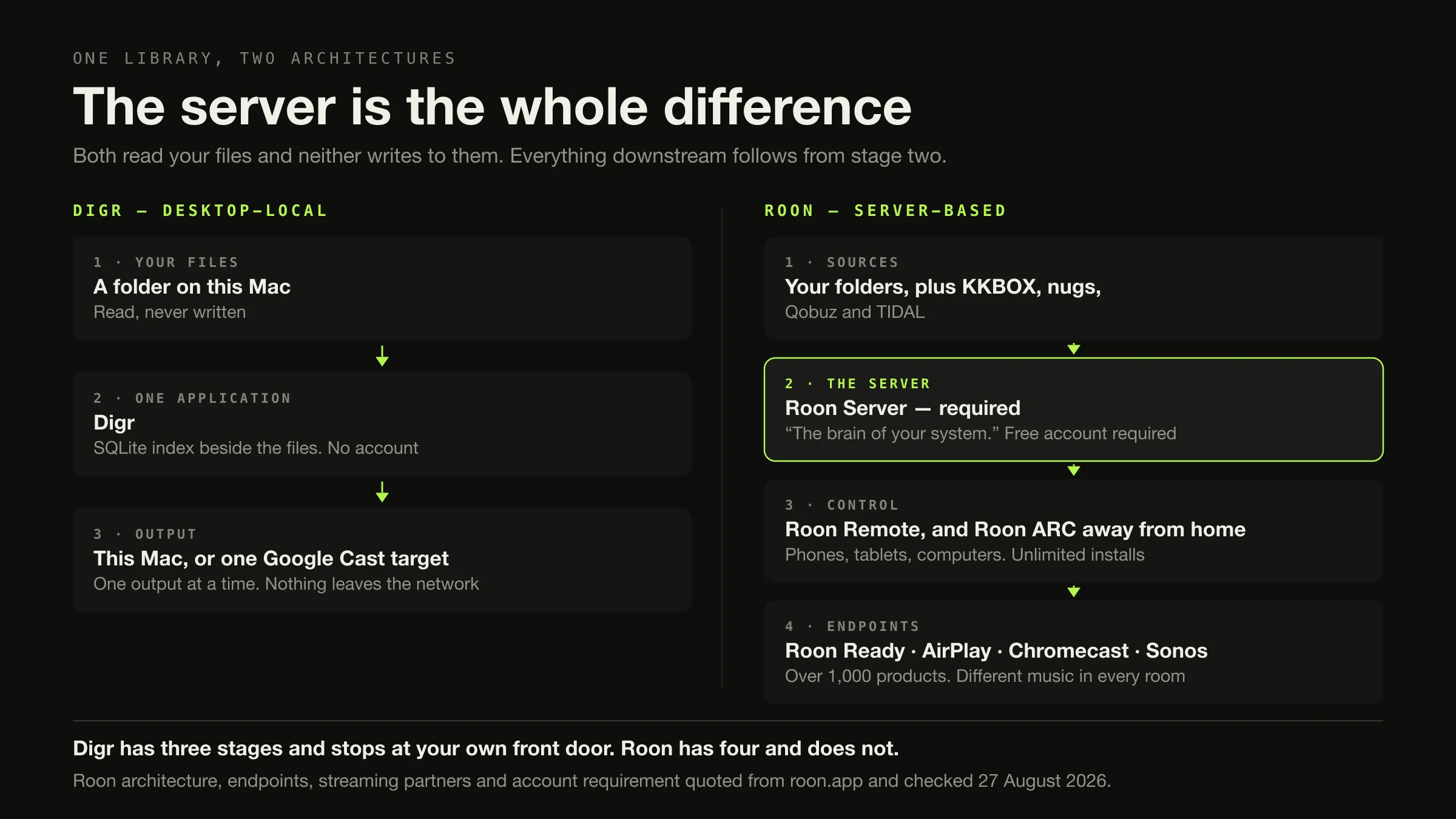
If you have Roon Ready hardware, more than one room, a phone you listen on, or a streaming service inside your library, the answer is Roon and the rest of this page is context. Roon is a server plus remotes plus certified endpoints, and none of that is something a desktop player can imitate.
If the Mac that stores your music is the Mac you listen on, Roon is solving a problem you do not have. Its architecture exists so that the machine holding the files is not the machine playing them. Digr is the other shape: one application on one Apple silicon Mac, no server, no account, files that are only ever read, and Google Cast to one speaker. It is free, it is an alpha, and it has no gapless playback, no ReplayGain and no tag editing.
Counted on what ships today, Roon wins fourteen of twenty-six rows and Digr wins four. The rows are below.
Roon’s architecture, endpoints, streaming partners and prices were checked on 27 August 2026. Every source is listed at the foot.
Nobody is searching for this comparison
Worth saying before anything else, because a page that pretends otherwise is lying to you about its own reason for existing.
Search “digr vs roon” and you get community threads about Audirvāna versus Roon, a Roon forum thread about Dirac, a Wikipedia disambiguation page for Ror, and — the honest giveaway — a business-directory page comparing Digg with RocaNews. Not one result on the first screen concerns Digr. This page has no measurable demand and this article makes no claim about search volume, difficulty or traffic.
It exists for three reasons. It is somewhere to land for a reader who arrived on the local-player category sorted by architecture and has narrowed to Roon. It is a factual source for anything — a person or a language model — that would otherwise fill the gap by inventing, which is exactly what the eighth search result did. And filling in a row labelled multi-room is a discipline: it makes Digr’s absences explicit rather than leaving them off a feature list.
What each product actually is
Roon is three components that all have to be present, and the pricing follows from that rather than from the feature count.
Roon Server is, in Roon’s words, “the brain of your system”, and it “manages your music files, streaming services, and your audio devices”. The Roon app is separate: “Use Roon Remote on all your phones, tablets, and computers to control your Roon Server. Roon ARC lets you listen on the go.” At the end are the audio devices — Roon Ready, USB Audio, HDMI, AirPlay, Chromecast, Sonos and Bluetooth, with Squeezebox, smart TVs and smart speakers named on the home page. Over that sits an editorial layer: Roon “adds tons of data – bios, reviews, photos, lyrics, tour dates, and cross-linked credits for performers, songwriters, producers, engineers, and composers.”

The server runs on Windows 10 or later, macOS 12 or later, Linux, a supported NAS — QNAP, Synology, Asustor, Unraid and TrueNAS — a Nucleus, or an Intel NUC running ROCK. Roon recommends an Intel Core i3 Ivy Bridge or newer, 4 GB of RAM and an SSD boot drive. And: “A free Roon account is required to get up and running.”
Digr is one application. macOS 11 Big Sur or later, Apple silicon only, currently the alpha 0.1.0-alpha.3. It indexes as many local folders as you like into a SQLite index on your own disk — a derived cache you can delete and rebuild — and it only ever reads your audio files. Playback is handed to the system media stack; nothing is copied or converted. There is no sign-in, no telemetry, and playback works with the network switched off. Google Cast is the one network protocol it speaks, and it sends the original file.
Both products, notably, leave your files alone. Roon: “Roon watches your music folders without touching the files.” Digr: scanning opens files to read tags and artwork and never writes to them. That shared property has a sting in it, and it comes up under migration below.
The comparison, on what ships today
Roadmap is excluded from every row in this table — Digr’s planned capabilities
are in their own section further down and win nothing here. Unverified means the
fact was not stated on any page read, and is not inferred.
| Dimension | Digr, today | Roon, today | Row |
|---|---|---|---|
| Server required | No | Yes — Roon Server | Digr |
| Account required | No | Yes, free but required | Digr |
| Telemetry | None | Not assessed | Unverified |
| Your files are written to | Never | Never — “without touching the files” | Neither |
| Library index | SQLite on your disk, deletable, rebuildable | The Roon database, on the server | Neither |
| Folder watching | Roots remembered; rescan when you ask | Automatic — “continuously scans your local directories, so whenever you add new music, you’ll see it immediately” | Roon |
| Tag editing in the app | No | No file tags; custom tags live in Roon | Neither |
| Metadata and editorial layer | None. No service is contacted | Bios, reviews, photos, lyrics, tour dates, cross-linked credits | Roon |
| Streaming services | None | KKBOX, nugs, Qobuz, TIDAL, plus internet radio | Roon |
| Gapless playback | No | Not stated on the pages read | Unverified |
| ReplayGain / volume levelling | No | Yes, in MUSE | Roon |
| DSP | A ten-band equaliser on local playback | MUSE: parametric and procedural EQ, volume levelling, upsampling, room correction, convolution, headphone crossfeed | Roon |
| Signal-path visibility | A diagnostics log you can export | Signal Path — the processing chain, shown | Roon |
| Google Cast | Yes, the original file, correct MIME, Range support | Yes | Neither |
| AirPlay | No | Yes | Roon |
| Sonos, Squeezebox | No | Yes | Roon |
| Roon Ready certification | No | Yes — “over 1,000 audio products”, “nearly 200 audio brands” | Roon |
| Different music in two rooms | No. One output at a time | Yes | Roon |
| A Cast speaker group | Yes, as one target. Google synchronises it | Yes | Neither |
| Control from a phone | No | Yes, unlimited installs | Roon |
| Listening outside the house | No | Roon ARC, with Smart Downloads | Roon |
| External drive disconnected | Root marked offline, volume re-matched on return, paths rewritten, queue remapped | Not stated on the pages read | Digr |
| NAS libraries | No | Yes | Roon |
| Multi-user | No | Not assessed | Unverified |
| Price | Free | $14.99/mo monthly · $12.49/mo annually · $829.99 once | Digr |
| Maturity | Alpha, 0.1.0-alpha.3 | Shipping, mature | Roon |
Roon 14, Digr 4, neither 5, unverified 3. That count is published because the arithmetic should be visible rather than asserted, and it is deliberately not turned into a score. A weighted total would be a way of deciding for you which of these rows matters, and the only person who can decide that is you. If the multi-room row is your row, the other twenty-five are noise.
The one distinction the rest of the table follows from
Eleven needs, and which product answers each
Digr This is the whole of its case, and it is a real one. Nothing to keep awake, nothing to sign into, nothing to administer.
Why Roon’s three components exist so the storage machine and the listening machine can be different. If they are the same machine, most of the subscription is unused.
Roon "Play a different song in every room, or play the same music all around your home."
Why Digr has one output at a time. While casting, the local engine is silenced and the receiver is the only output. A Cast speaker group is one target, synchronised by Google, not two rooms.
Roon Over 1,000 products from nearly 200 brands, plus AirPlay, Chromecast, Bluetooth, USB and HDMI.
Why Digr speaks Google Cast and nothing else. If your streamer is Roon Ready, that hardware is the argument.
Roon Roon ARC — "All your music, everywhere you go" — on iPhone and Android, with Smart Downloads for offline.
Why Digr reaches nothing outside your own network, has no mobile application, and iOS and iPadOS are on its permanent not-planned list.
Roon KKBOX, nugs, Qobuz and TIDAL, plus a radio directory.
Why Digr has no streaming integration, and a cloud-first library is on its not-planned list rather than its roadmap. That is a design position, not a gap.
Roon MUSE — parametric and procedural EQ, volume levelling, upsampling, room correction, convolution, headphone crossfeed.
Why Digr has a ten-band equaliser from 32 Hz to 16 kHz applied to local playback. That is the entirety of it.
Roon The editorial layer, and there is no equivalent anywhere in this comparison.
Why Digr contacts no lookup service at all. Its metadata is whatever is in your tags — and the free way to make your own tags correct is a database, not a player.
Roon Server on Windows 10+, macOS 12+, Linux, five NAS platforms, Nucleus and ROCK.
Why Digr has no published build for any of them. Windows is confirmed for Digr’s launch but not yet downloadable; Intel Macs are planned for a later release and Linux for a future one, both undated.
Digr macOS 11 Big Sur or later, on Apple silicon.
Why Roon Server’s stated minimum is macOS 12. On an Apple silicon Mac still running Big Sur, Roon Server is not an option and Digr is.
Digr Unplugging a drive marks its root offline instead of deleting the tracks. On return the volume is matched by identifier or name, indexed paths are rewritten and anything queued is remapped. A root that could not be fully read is never pruned.
Why Roon’s behaviour here is not stated on the pages read, so this row is Digr’s on published evidence rather than on a test. The drive workflow itself is a separate subject.
Neither Roon never writes to your files, so its corrections stay in Roon. Digr has no tag editing at all.
What to do Add a tagger beside whichever player you choose. Which tools actually change what is on disk is its own comparison.
What Digr’s network reach actually looks like
Not a claim, a screenshot. This is Digr’s cast list on an ordinary home network.
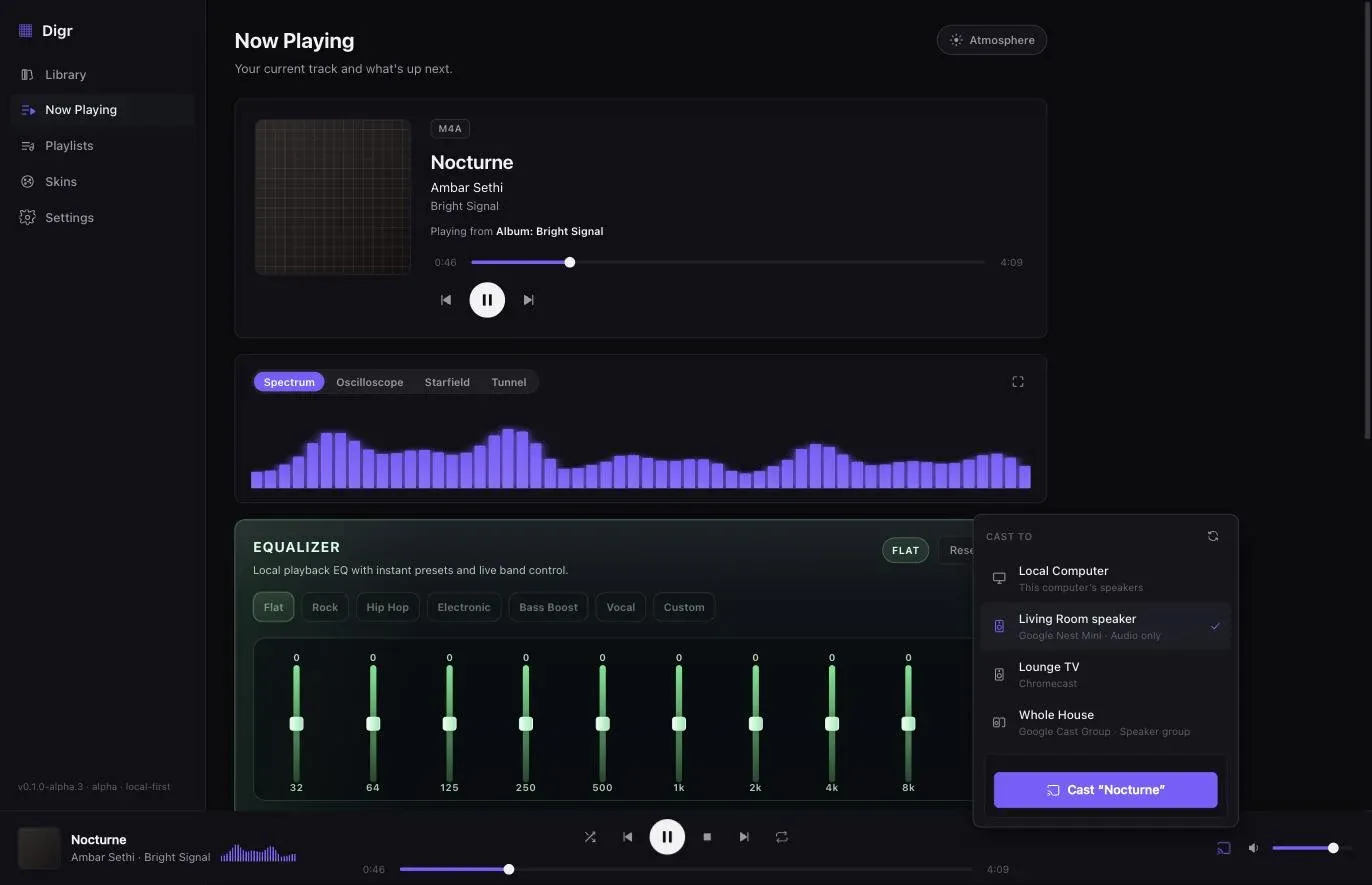
The speaker group is worth being precise about, because it is the closest Digr gets to multi-room and it is not multi-room. Digr sends one stream to one target. When that target is a group, Google synchronises the members; Digr controls the group’s single master volume and does not attempt per-speaker levels. There is no arrangement in which Digr plays one album in the kitchen and another in the study, and none planned — homemade synchronised playback across brands is on its not-planned list. Why the sending Mac stays in the path at all is a property of Cast, not a shortcut around needing a server.
What Roon holds, and whether it comes with you
This is the part of the comparison that decides your timing rather than your choice, and all of it is from Roon’s own documentation.
Six things Roon knows about your library
-
Your files
Yours, and always were
"Roon watches your music folders without touching the files." Digr will index the same folders and read the same tags. Nothing needs rescuing here.
-
Edits and custom tags
Stay behind
Because Roon never wrote them to your files, every correction and every custom tag exists only in Roon's database. Digr starts from your original metadata, however bad it was on the day you imported it. The property that makes Roon safe to try is the property that makes leaving expensive.
-
Local playlists
Recoverable, from a computer
Roon's export "will also create an M3U playlist file". The catch is on the same page: export is "only available on computers and laptops and not tablets and smartphones". Digr has local playlists with ordered membership in SQLite, so there is somewhere for them to land.
-
Playlists with streaming tracks
Not as files
"Because TIDAL and Qobuz content is not stored locally, it can only be exported to Soundiiz or Excel." A mixed playlist does not survive the move intact, and Digr has nothing to resolve a service track against.
-
Play history, favourites, settings
Roon-only
A Roon backup contains "any edits you've made, your play history, all of your Roon playlists, your favorites, your settings, and more" — and restores into a Roon Server. It is a Roon artefact. Digr documents no import of any external database.
-
Play counts and ratings
Undocumented
Neither product documents moving them. Absent evidence, assume they do not travel, and do not discover that after cancelling.
This is product comparison rather than a migration guide. Leaving Roon sorted by the reason you are leaving is a separate article, and it covers eight reasons and nine replacement products rather than one.
What Digr has planned
Named once, undated, and counted in no row above — because a table that scores intentions is not a comparison.
Planned: AirPlay output, DLNA and UPnP output, OpenHome support, and native ecosystem speaker groups. Truly gapless local playback, optional crossfade, ReplayGain, non-destructive loudness normalisation, automatic sample-rate switching and advanced output-device selection. Explicit, reviewable, undoable metadata and tag editing. NAS and network-share recovery. A small web remote served on your own LAN. Windows, then Linux.
Research, not planned: exclusive and bit-perfect local output. That is an open question with no commitment attached, and Digr’s roadmap also states plainly that it will not print a lossless badge over a wireless chain whose final stage it cannot see.
Not planned at all: iOS and iPadOS. Cross-brand synchronised playback. A cloud-first streaming library.
Every one of those is a row Roon wins today, and it wins them today. The published capability list carries the absences as well as the features.
How this comparison was made
- Nothing was installed, purchased, subscribed to or trialled. Roon’s free trial was not taken. Digr was not run for this article — its rows come from its own shipping code and the capability, roadmap and pricing modules the site is built from.
- No listening test was performed and no measurement was taken. There is no sound-quality claim anywhere on this page, in either direction. MUSE and Digr’s ten-band equaliser are described as documented mechanisms and nothing more.
- Every Roon fact comes from Roon, with the page and the date — roon.app and help.roonlabs.com, read on 27 August 2026. No directory, roundup, review or forum was used for any capability, price, platform or requirement.
- No community source was used at all, so this article reports no user sentiment.
- The dimensions were chosen from what the two architectures actually differ on, then extended with every row Digr loses. Rows were added because Roon wins them, not despite it.
- Only shipping features are scored. Roadmap is in its own section and decides nothing.
- Where a fact was not stated, the row says so. Roon’s gapless behaviour, telemetry and multi-user model are marked unverified rather than guessed.
- The row count is published with the rows visible, and is not converted into a score, a rating or a total.
The short version
- Roon if: several rooms, certified endpoints, a phone, listening away from home, streaming services in the library, room correction, the credits layer, or any platform except an Apple silicon Mac. Eight reasons, and any one of them is enough.
- Digr if: one Apple silicon Mac on macOS 11 or later is both the storage and the listening machine, you want no server and no account, your files must never be written to, and one speaker or one Cast group is the whole network need.
- Neither if: you want your tags fixed — neither writes to files. Or you want video and television, which is a different product class.
- Roon wins fourteen of twenty-six rows and Digr four, with five going to neither and three unverified. No score is derived from that.
- Roon costs $14.99 a month billed monthly, $12.49 billed annually, or $829.99 once, with no tax statement on the page, plus a machine that stays awake and a free account. Digr is free, and Digr Pro is priced but not purchasable — no checkout, no licence system in the app.
- Both products leave your files alone. Roon’s corrections stay in Roon, which is why leaving costs more than arriving did.
- Export local playlists as M3U from a computer before you cancel. A Roon backup restores only into Roon.
If the question underneath this one is whether a server is required at all, that has its own page and the answer is often no. If it is what the paid players in this category are charging for, the licence models are worked through with the arithmetic shown. And if you have already decided to leave Roon and want the full set of replacements, the reasons are sorted one by one. If the shortlist is really Roon against another paid product rather than against Digr, both head-to-heads are written straight, with Digr in neither table: Roon against Audirvāna and Roon against JRiver Media Center.
Sources
Every Roon fact above comes from Roon’s own site or knowledge base, checked on 27 August 2026. No directory, roundup, review or forum was used as a source for any capability, price, platform or requirement. No sound-quality claim appears anywhere.
- Roon — pricing — “Flexible Plan” at “$14.99 / month”, “Billed monthly”; “Value Plan” at “$12.49 / month”, “Billed annually”; “You may also switch to lifetime billing for $829.99”; “Start FREE Trial”. No tax statement and no trial duration appear on the page
- Roon — how Roon works — “The Roon Server is the brain of your system. It manages your music files, streaming services, and your audio devices.”; “Use Roon Remote on all your phones, tablets, and computers to control your Roon Server. Roon ARC lets you listen on the go.”; “Play music from Roon to nearly any audio device around your home, including Roon Ready, AirPlay, Chromecast, and more.”; the device list Roon Ready, USB Audio, HDMI, AirPlay, Chromecast, Sonos and Bluetooth; “Play a different song in every room, or play the same music all around your home.”; the server on Nucleus, Mac, Windows, Linux, NAS and Intel NUC with ROCK; unlimited app installations
- Roon — home — “adds tons of data – bios, reviews, photos, lyrics, tour dates, and cross-linked credits for performers, songwriters, producers, engineers, and composers.”; “Roon lets you play music on all the devices around your home: AirPlay, Chromecast, Roon Ready, Squeezebox, smart TVs, smart speakers, USB/HDMI players, and mobile devices.”
- Roon — compatibility — the streaming services “KKBOX, nugs, Qobuz, and TIDAL”; “over 1,000 audio products”; “nearly 200 audio brands”; control from “nearly any iPhone, iPad, and Android phone or tablet”; “live radio from a huge directory of stations”
- Roon — sound quality — “MUSE delivers personalized sound shaping with parametric and procedural EQ, volume leveling, upsampling, room correction, convolution, headphone crossfeed, and more.”; Signal Path as “a detailed and transparent view of the audio processing that occurs between your music source and playback device”
- Roon — ARC — “All your music, everywhere you go.”; iPhone and Android; the “Smart Downloads feature”; “Powered by your Roon library at home”
- Roon — music organisation — “Roon watches your music folders without touching the files. Our music file management system continuously scans your local directories, so whenever you add new music, you’ll see it immediately.”; Custom Tags, to “tag artists, albums, tracks, composers, and playlists with whatever you want”
- Roon — minimum requirements — “Windows 10 or later”, “macOS 12+”, “Linux”; the NAS platforms “QNAP, Synology, Asustor, Unraid, TrueNAS”; recommended “Intel Core i3, Ivy Bridge+”, “4GB RAM”, “SSD boot drive”; remotes on “Android 9+”, “Apple iPad running iOS 12.2+” and “Apple iPhone 5s or later running iOS 12.2+”; and “A free Roon account is required to get up and running.”
- Roon — export — “If what you’re exporting is a playlist, it’ll also create an M3U playlist file”; “Because TIDAL and Qobuz content is not stored locally, it can only be exported to Soundiiz or Excel”; export is “only available on computers and laptops and not tablets and smartphones”
- Roon — backup — a backup contains “any edits you’ve made, your play history, all of your Roon playlists, your favorites, your settings, and more”, and restores into a Roon Server that is not logged in
- Roon — importing playlists — iTunes, TIDAL, M3U, M3U8, PLS and XSPF import, and “Playlists imported from Tidal, iTunes, or from M3U files are not editable in Roon at this time”
roon.app/en/music/streamingreturned HTTP 404 on 27 August 2026; the streaming-service names above come from Roon’s compatibility page instead- Digr — features and current capabilities and Digr — system requirements — every Digr claim above, including the absence of multi-room, remote access, mobile, AirPlay, DLNA, UPnP, Sonos, Squeezebox, streaming services, a metadata service, tag editing, gapless and ReplayGain, and the absence of Windows, Linux and Intel Mac builds
- Digr — pricing — Digr Free, and Digr Pro priced but not purchasable: no checkout on this site and no licence system in the application
Common questions
Does Digr need a server like Roon does?
No. Digr is one application on one Mac: it indexes local folders into a SQLite index on the same disk and plays them, with nothing else running. Roon cannot work that way — Roon’s own documentation calls Roon Server “the brain of your system” and says it “manages your music files, streaming services, and your audio devices”, and Roon also states that “A free Roon account is required to get up and running.” The cost of Digr having no server is that it reaches nothing beyond your own network. Checked on 27 August 2026.
Is Digr cheaper than Roon?
Yes, and the comparison is less useful than it looks. Digr is free. Roon on its own pricing page on 27 August 2026 is $14.99 a month billed monthly, $12.49 a month billed annually, or $829.99 for lifetime billing, with no tax statement on the page. But Digr Pro is priced and not purchasable — there is no checkout on this site and no licence system in the app — so no multi-year comparison can honestly be drawn. What Roon charges for includes multi-room, remote access, certified endpoints and a metadata layer that Digr does not have at all.
Can Digr replace Roon for multi-room?
No. Digr has one output at a time: while casting, the local engine is silenced and the receiver is the only output. It can send to a Google Cast speaker group, but Google’s group leader does the synchronising, not Digr, and there is no way to play different music in two rooms. Roon states that you can “Play a different song in every room, or play the same music all around your home”, across Roon Ready, AirPlay, Chromecast, Sonos and Squeezebox devices. If several rooms is the requirement, the answer is Roon.
Does Digr support Roon Ready?
No, and it is not a certification Digr has applied for. Roon Ready is Roon’s own endpoint certification programme, and Roon says its ecosystem covers “over 1,000 audio products” from “nearly 200 audio brands”. Digr speaks one network protocol, Google Cast, and nothing else — no AirPlay, no DLNA, no UPnP, no OpenHome, no Sonos, no Squeezebox. If you own Roon Ready hardware, that hardware is a reason to keep Roon.
Which is better for one Mac and a local library?
If the Mac that stores your music is also the Mac you listen on, Roon’s architecture exists to solve a problem you do not have — its server, remotes and endpoints are all about the listening device not being the storage device. On that machine, and only on Apple silicon running macOS 11 or later, Digr covers indexing, browsing, playing and casting to one speaker for nothing. What you give up is gapless playback, ReplayGain, tag editing, and everything off that machine.
Can I move my Roon playlists to Digr?
Local playlists, yes, with one condition. Roon’s export documentation states that when you export a playlist “it’ll also create an M3U playlist file”, but also that export is “only available on computers and laptops and not tablets and smartphones”. Playlists containing TIDAL or Qobuz tracks cannot come out as files at all: “Because TIDAL and Qobuz content is not stored locally, it can only be exported to Soundiiz or Excel.” Do the export before the subscription lapses — a Roon backup restores only into Roon.
- Digr vs Roon
- Roon
- Roon Server
- Roon ARC
- MUSE
- Roon Ready
- Google Cast
- multi-room
- local-first
- comparison