Roon vs JRiver Media Center: a music ecosystem against a media centre
A music-first server ecosystem against a desktop media centre that also does video, images, television and documents. Current facts from both vendors, dated 28 August 2026.
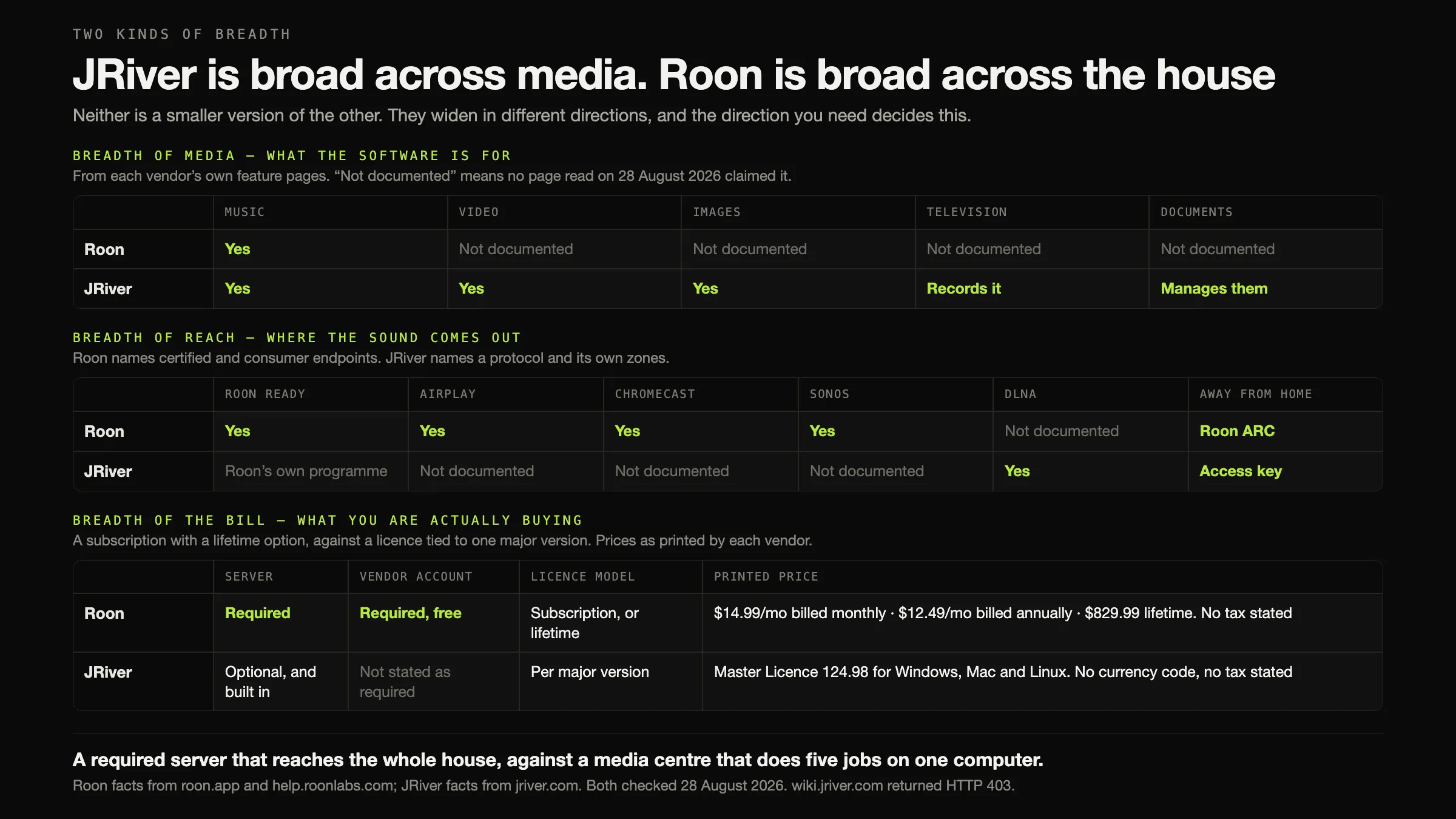
These two products are named together far more often than they compete.
Roon is a music-first server ecosystem. Roon Server is required — “the brain of your system” — along with a free Roon account. What that buys is reach and context: Roon Ready plus AirPlay, Chromecast, SONOS and Squeezebox across “over 1,000 audio products”, different music in every room, streaming services inside the same library as your files, an editorial layer of biographies and cross-linked credits, and Roon ARC for listening away from home.
JRiver Media Center is a media centre. Its own scope “includes almost all formats of audio, video, and images”, and it “can also record television and manage documents”. It rips CDs, edits tags, hosts VST plug-ins, does room correction and bass management, serves zones and speaks DLNA. It is licensed per major version rather than rented.
The decision, in one line. If anything other than music is in your library, JRiver. If it is music only and your hardware or your habits want reach, Roon.
Every fact below was checked on 28 August 2026 against each vendor’s own site. Neither product was installed, trialled or listened to, and there is no sound-quality claim anywhere on this page.
Two framings this page refuses
“Modern versus old” is not the difference, and this article will not use it. Both products ship current builds — Roon’s endpoint list is being certified against new hardware continuously, and JRiver’s download page today shows version 36.0.14 on Windows and 36.0.12 on macOS. Neither product’s interface was opened here, so no usability judgement is offered about either. Judging an interface you have not used is not criticism, it is guessing.
“Breadth equals bloat” is not the difference either. JRiver’s five media types are the reason a large number of people should buy JRiver, not evidence of a product that lost focus. And Roon’s narrowness is the reason a different group should buy Roon: everything it does is aimed at one library of music, and that concentration is where the metadata layer and the endpoint programme come from.
The real difference is what each one is architecturally, and the next section is that.
The architecture, and why calling both “server software” is wrong
Roon: the server is foundational. “The Roon Server is the brain of your system. It manages your music files, streaming services, and your audio devices.” Roon Remote is a control surface; the endpoint is an output. Remove the server and nothing plays. It runs on “Mac, Windows, Linux, or on a dedicated appliance like Nucleus or mini-PC using ROCK”, plus QNAP, Synology, Asustor, Unraid and TrueNAS. “A free Roon account is required to get up and running.”
JRiver: the server is a capability inside a desktop application. Media Center plays media on the machine it runs on. Its Media Network features — zones served to several clients, DLNA to “thousands of TV’s, Blu-ray players, receivers and other devices”, and access from outside the house via “a six character access key” — are things it can do. Turn all of them off and you still have a working media centre.
The consequence for your electricity bill and your patience: Roon obliges you to keep a machine running. JRiver lets you, and does not require it. Whether you want a server at all is a question worth settling before either purchase.
The same question asked of both: what happens when the server is off?
Roon Nothing plays anywhere. Roon Remote is a control surface for a server, and the endpoint is an output from one. There is no Roon without Roon Server.
JRiver Media Center keeps playing on the computer it is installed on. Zones, DLNA serving and the access-key route stop; the media centre does not.
Roon A Mac, a Windows or Linux box, a NAS, a Nucleus, or a mini-PC running ROCK. Minimum stated: “Intel Core i3, Ivy Bridge+”, “4GB RAM”, “SSD boot drive”.
JRiver Only if you want the network half. No NAS installation is documented on the pages read, and no minimum hardware is published either.
Roon “A free Roon account is required to get up and running.” Not optional, and not removable.
JRiver A licence. No page read states that a vendor account must be signed in to play — recorded here as not stated rather than as a confirmed absence.
Roon Roon ARC, on iPhone and Android, “powered by your Roon library at home”, with Smart Downloads for offline listening.
JRiver “Just use Media Center on your server to generate a six character access key. Then enter that key on any client you want to use.” Plus Gizmo on Android and WebRemote in a browser.
The comparison, on what ships today
Roadmap is excluded from every row. Not documented means the fact was not
on any page read on 28 August 2026, and no inference is drawn from its absence.
wiki.jriver.com returned HTTP 403 to this environment on 27 and again on 28
August, which is why several JRiver rows say Unverified rather than something
more useful.
| Dimension | Roon, today | JRiver Media Center, today |
|---|---|---|
| Server | REQUIRED — “the brain of your system” | OPTIONAL, AND BUILT IN |
| Vendor account | REQUIRED — “A free Roon account is required to get up and running” | Not stated as required on any page read |
| Current version | Not stated as a version number on the pages read | 36 — “36.0.14” on Windows, “36.0.12” on macOS |
| Windows | Server: “Windows 10 or later” | “64-bit Windows 10 or newer”, plus a 32-bit build |
| macOS | Server: “macOS 12+” | “requires at least MacOS High Sierra 10.13” |
| Linux | Server: “Linux” | Builds on the MC36 Linux board |
| Apple silicon | Not stated in those terms | Not stated on the download page |
| NAS | QNAP, Synology, Asustor, Unraid, TrueNAS | Not documented |
| Dedicated appliance | Nucleus, or a mini-PC running ROCK | Not documented |
| Music | Yes | Yes |
| Video | Not documented | Yes |
| Images | Not documented | Yes |
| Television | Not documented | Yes — “can also record television” |
| Documents | Not documented | Yes — “manage documents” |
| Live radio | “a huge directory of stations” | Not documented |
| Streaming services | KKBOX, nugs, Qobuz, TIDAL | No partner named on any page read |
| Editorial metadata | Yes — “bios, reviews, photos, lyrics, tour dates, and cross-linked credits” | Not documented. Cover art and tagging tools are a different thing |
| Tag editing | Not documented — “without touching the files” | Yes, including “AIFF and WAV files (including tagging)” |
| Where its own edits live | The Roon database, which “is not the same thing as your music library” | Its media database, plus the files where tags were written |
| CD ripping | Not documented | Yes — “just put a CD in your drive” |
| Transcoding | Not documented | Yes — automatic conversion “when your connection isn’t fast enough” |
| Folder watching | Automatic — “continuously scans your local directories” | Unverified — documented on the 403 wiki |
| Library ceiling | Not stated | Not stated. “the fastest and most powerful media database available” is a claim without a number |
| DSP | MUSE — parametric and procedural EQ, upsampling, room correction, convolution, headphone crossfeed | “Room Correction, Bass Management, VST plug-in support, ReplayGain, etc.” |
| VST plug-ins | Not documented | Yes |
| Bit-perfect output | Not documented in those terms | Yes — “Bit-perfect playback”, “WASAPI, ASIO” |
| DSD | “DSD512 (stereo and multi-channel)” | “ASIO v2.2, DoP, SACD, DFF, DSF” |
| ReplayGain / volume levelling | MUSE — “volume leveling” | “ReplayGain” |
| Signal-path view | Signal Path | Not documented |
| Gapless | Not documented | Unverified — the wiki page is HTTP 403 |
| Certified endpoints | Roon Ready — “over 1,000 audio products”, “nearly 200 audio brands” | Roon Ready is Roon’s own programme. Not applicable |
| AirPlay | Yes | Not documented |
| Chromecast | Yes | Not documented |
| Sonos | Yes | Not documented |
| Squeezebox | Yes | Not documented |
| DLNA | Not documented | Yes — “thousands of TV’s, Blu-ray players, receivers, and other devices” |
| Several rooms | “Play a different song in every room” | Zones — audio and video in different zones, several clients at once |
| Away from home | Roon ARC | Yes — “a six character access key” |
| Phone and tablet control | Roon Remote; Android 9+, iOS 12.2+ | iPad, iPhone, Android, Gizmo, WebRemote, and a hardware remote |
| Playlist import | iTunes, TIDAL, M3U, M3U8, PLS, XSPF | Unverified — the wiki page is HTTP 403 |
| Playlist export | Folder export writes M3U; Soundiiz or Excel for TIDAL and Qobuz | Unverified — same reason |
| Backup of its own database | Documented | Not documented |
| Licence model | Subscription, or lifetime | Per major version |
| Trial | “Start FREE Trial” — duration not stated | “You have 30 days to try the full feature set” |
| Price | $14.99/mo monthly · $12.49/mo billed annually · $829.99 lifetime. No tax statement | Master 124.98 · Windows 99.98 · Mac 99.98 · Linux 79.98. No currency code, no tax statement |
No row count is published here and no winner is declared. Counting would reward JRiver for four media types a music-only reader will never open, and would reduce the Roon Ready ecosystem — which settles the question outright for anybody who already owns a certified streamer — to a single tick.
Where Roon is straightforwardly the better answer
Say it plainly, in the section where a reader is deciding.
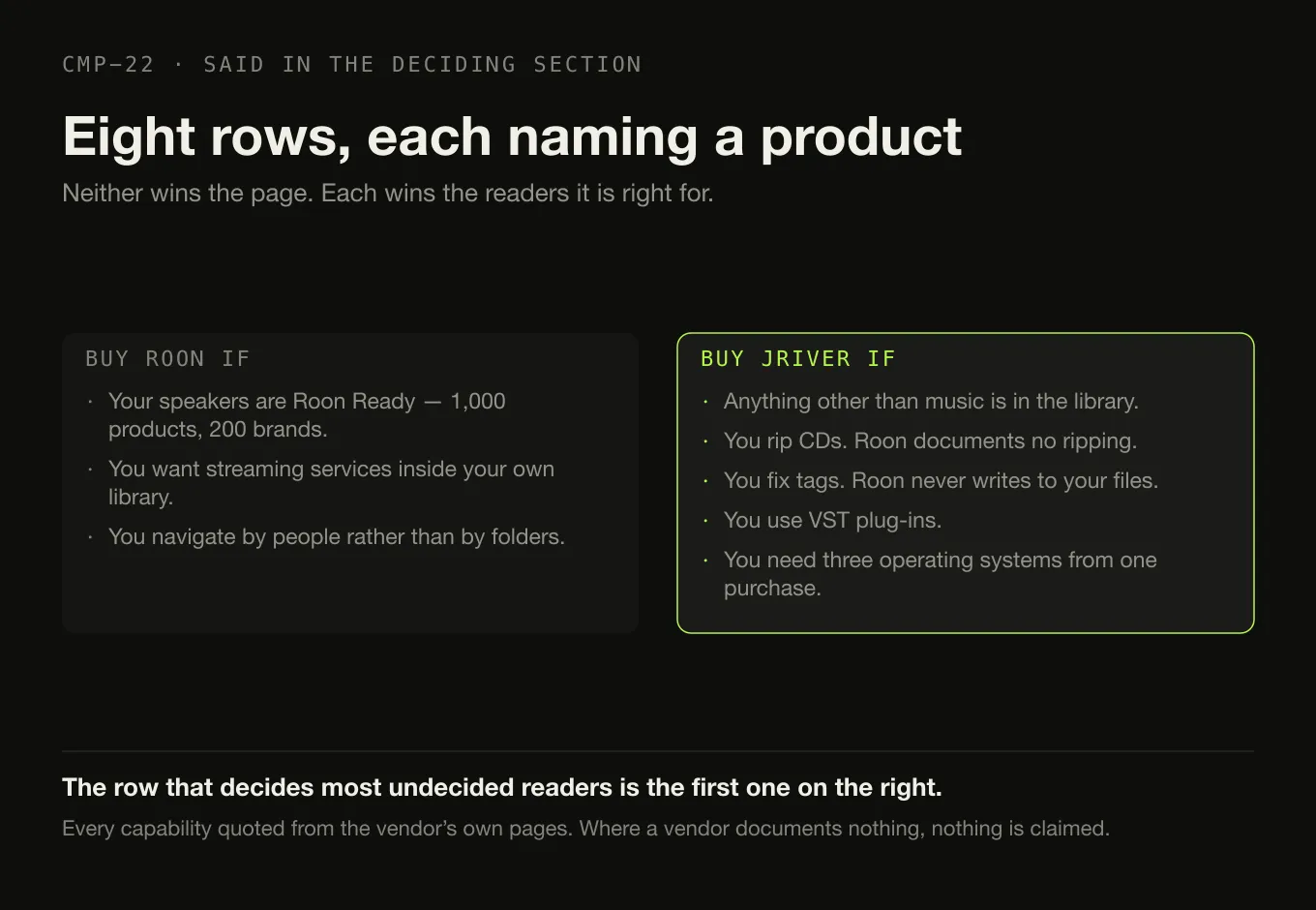
If your speakers are Roon Ready, buy Roon. Roon Ready is a certification programme with hardware built to it: “over 1,000 audio products” from “nearly 200 audio brands”. No JRiver page read documents Roon Ready, AirPlay, Chromecast or Sonos output. JRiver’s route to other rooms is DLNA and its own zones, and those reach a different set of boxes. Which protocol your hardware speaks is the first question, not the last.
If you want streaming services inside your own library, buy Roon. KKBOX, nugs, Qobuz and TIDAL, browsed alongside the files you own. No JRiver page read names a streaming partner at all, so none is claimed here.
If you navigate by people rather than by folders, buy Roon. “Bios, reviews, photos, lyrics, tour dates, and cross-linked credits for performers, songwriters, producers, engineers, and composers.” JRiver’s “cover art and metadata options” are tagging tools — genuinely good ones, by the sound of its own copy — and they are a different capability from an editorial graph.
Where JRiver is straightforwardly the better answer
If anything other than music is in the library, buy JRiver. “Its scope includes almost all formats of audio, video, and images. Media Center can also record television and manage documents.” Four capabilities, and no Roon page read documents any of them. This is the row that decides most of the readers who arrive at this comparison genuinely undecided.

If you rip CDs, buy JRiver. “To rip CD’s just put a CD in your drive. MC will step you through the process.” Roon documents no ripping. Ripping a collection properly is a job with a method, whatever software does it.
If you fix tags, buy JRiver. “Support for all lossless formats of audio (FLAC, APE, ALAC, WM), AIFF and WAV files (including tagging)”, and “Obsessive taggers will be delighted with cover art and metadata options”. Roon takes the opposite position by design — it never writes to your files — which means Roon’s corrections do not travel with the music. Where tags actually live inside a file is worth understanding before choosing a tool to edit them.
If you use VST plug-ins, buy JRiver. “VST plug-in support” sits in JRiver’s DSP list. Roon’s MUSE covers parametric and procedural EQ, upsampling, room correction, convolution and headphone crossfeed — a serious list — but plug-in hosting is not on it.
If you need Windows, macOS and Linux from one purchase, buy JRiver. “A Master License is valid for a single major version for all available Operating Systems.”
Price, and the number this page will not invent
Prices as printed on each vendor’s own page on 28 August 2026, with billing period and tax treatment exactly as each vendor gives them — including where a vendor gives none.
| Printed price | Scope | Tax as stated | |
|---|---|---|---|
| Roon Flexible | $14.99 / month | “Billed monthly” | No tax statement on the page |
| Roon Value | $12.49 / month | “Billed annually” — an effective monthly figure, not a monthly plan | No tax statement on the page |
| Roon lifetime | $829.99 | One payment | No tax statement on the page |
| JRiver Master Licence | 124.98 | “valid for a single major version for all available Operating Systems” | No currency code and no tax statement on the page |
| JRiver Windows only | 99.98 | Windows, one major version | Same |
| JRiver Mac only | 99.98 | macOS, one major version | Same |
| JRiver Linux only | 79.98 | Linux, one major version | Same |
JRiver’s page prints a $ and nothing else — no currency code, no tax
treatment, and “Prices are subject to change without notice.” The upgrade route
exists but its price does not: “If you previously purchased MC for Mac or
Windows, and it is installed and licensed, you will see a reduced price when you
purchase a Master License.” The reduced amount is not published.
Roon over five years, assuming no price change, no discount and one household:
| Route | Arithmetic | Five years |
|---|---|---|
| Roon, billed monthly | $14.99 × 60 | $899.40 |
| Roon, billed annually | $12.49 × 12 × 5 | $749.40 |
| Roon, lifetime | one payment | $829.99 |
JRiver over five years cannot be calculated, and no figure for it appears anywhere on this page. The licence is per major version, and JRiver publishes neither the cadence nor the upgrade price. Two honest statements are available and they are the only two:
- Floor — 124.98 once. Buy the Master Licence for version 36 and never buy another major version. Nothing in the licence terms says the software stops.
- Ceiling — 124.98 multiplied by however many major versions you choose to buy, at whatever those cost when they arrive.
JRiver is not converted into an annual subscription here. That conversion needs a cadence the vendor does not publish, and any comparison that performs it has supplied the missing number itself. What can be said without inventing anything: JRiver’s floor is lower than every Roon route, its ceiling is unbounded, and only you know how often you upgrade software you already own. What the paid players are charging for is a general question with a general answer.
If you need this, buy that
JRiver All four documented on its own overview page. This is the single largest difference between the two products and it is not about audio at all.
Roon Not documented, in any of the four. No Roon page says it does them and none says it does not.
Roon The certification programme itself, across “over 1,000 audio products” from “nearly 200 audio brands”, plus AirPlay, Chromecast, SONOS and Squeezebox.
JRiver DLNA instead — “thousands of TV’s, Blu-ray players, receivers, and other devices”. A different set of boxes, and worth checking yours against both.
JRiver Tagging, including on AIFF and WAV. The work lands in the files, so it travels to whatever you use next.
Roon “Roon watches your music folders without touching the files.” Corrections live in the Roon database — which Roon itself says “is not the same thing as your music library”.
JRiver “Room Correction, Bass Management, VST plug-in support, ReplayGain”, bit-perfect output, WASAPI and ASIO, and DSD by several routes.
Roon MUSE covers parametric and procedural EQ, upsampling, room correction, convolution and headphone crossfeed, and Signal Path shows the chain. Plug-in hosting is not documented.
Roon KKBOX, nugs, Qobuz and TIDAL, plus live radio.
JRiver No streaming partner is named on any page read, so none is claimed. If this matters to you, it is a Roon row.
JRiver A Master Licence for one major version, at 124.98, covering Windows, macOS and Linux. Buy once; a future major version is a future purchase at an unpublished price.
Roon lifetime 829.99 in one payment, with no stated tax treatment. More money, no future decision.
JRiver A Linux build, and the Master Licence covers it alongside Windows and macOS.
Roon Roon Server runs on Linux, but that is the server. The control application is the remote, on a phone, tablet or computer.
Choose neither if
- You want a simple local player. Both of these are considerably more machinery than “index a folder and play it”, and the field of straightforward local players is wide.
- Free or open-source is a requirement. Neither is free.
- You want no server and no media centre, just a library manager. The management tools are compared separately, and what people move to when they leave Roon and what replaces each of the jobs JRiver does are sorted by the job rather than by the product.
- Your library is enormous and that is the whole problem. Neither vendor publishes a track ceiling, and what vendors actually publish about scale is a short and revealing list.
Moving between them, and what stays behind
Roon to JRiver. Your files travel and so do the tags already inside them — both products index in place. Roon’s own edits do not, because Roon never wrote them to disk. Roon’s folder export produces an M3U alongside the files and runs on computers only; whether JRiver imports M3U is on the wiki page that is HTTP 403 to us, so it is not claimed. Ratings, play counts, favourites and Roon’s editorial edits live in the Roon database, which Roon documents as a backup rather than an export — assume they do not travel. TIDAL and Qobuz content “can only be exported to Soundiiz or Excel”. And check your speakers before cancelling: a Roon Ready streamer is not documented as a JRiver output, and JRiver’s route is DLNA.
JRiver to Roon. Files, tags and anything you ripped all travel, and this is the easier direction because JRiver’s tagging put the work in the files. What does not travel is everything that is not music — Roon documents no video, photograph, television or document handling, so if JRiver was doing those jobs you need something else for them, not a replacement for Roon. JRiver’s media database, its zone configuration, its DSP chains and its VST setup have no documented export; assume none of it moves. Roon imports M3U, M3U8, PLS and XSPF, but whether JRiver exports any of those is on the 403 wiki and is not claimed here. And this direction adds two obligations: a Roon Server that stays on, and a free Roon account that is required.
Nothing above claims that proprietary data migrates. Where a vendor does not document a route, this page says so rather than guessing.
How this comparison was made
- Nothing was installed, purchased or trialled. JRiver’s 30-day trial was not taken and Roon’s free trial was not started. No zone was configured, no DLNA renderer addressed, no VST loaded, no CD ripped and no library imported.
- No listening test and no measurement. There is no sound-quality claim anywhere on this page, in either direction.
- No usability or interface judgement, because neither interface was used. The “modern versus old” framing that dominates published comparisons of these two is refused in the body rather than quietly avoided.
- Every fact comes from the vendor’s own site, with the date:
roon.appandhelp.roonlabs.comfor Roon,jriver.comfor JRiver. All read on 28 August 2026, and Roon’s pages were re-fetched for this article rather than reused from the sibling comparison. wiki.jriver.comreturned HTTP 403 on 27 August and again on 28 August. Folder watching, gapless playback, playlist import and export and the precise tag-writing rules are therefore published as unverified, not filled in from a forum or a review.- No multi-year cost is calculated for JRiver. The major-version cadence and the upgrade price are both unpublished, so any such figure would have been invented. The two honest bounds are given instead.
- Only shipping behaviour is compared. Neither vendor’s future plans appear in any row.
- Absences are labelled as absences from the documentation. “Not documented” means no page read said it — which is the honest state of Roon and video, and of JRiver and Chromecast.
- No row count and no winner. A tally exists in this site’s research record for internal discipline and is deliberately not published here.
The short version
- Roon requires a server and a free vendor account. JRiver requires neither — its network features are optional capabilities inside a desktop application.
- JRiver handles audio, video, images, television and documents. Roon documents music, and live radio.
- Roon has the certified endpoint ecosystem — Roon Ready across “over 1,000 audio products”, plus AirPlay, Chromecast, SONOS and Squeezebox. JRiver’s route is DLNA and its own zones.
- Both reach outside the house. Roon ARC, and JRiver’s six-character access key with Gizmo and WebRemote.
- Only JRiver rips CDs, edits tags and hosts VST plug-ins.
- Only Roon integrates streaming services and adds an editorial metadata layer of biographies, reviews and cross-linked credits.
- JRiver’s current major version is 36 — 36.0.14 on Windows, 36.0.12 on macOS, with Linux builds and a 30-day full-feature trial.
- Prices, 28 August 2026: Roon $14.99 monthly, $12.49 a month billed annually, or $829.99 lifetime, with no tax treatment stated. JRiver Master Licence 124.98 for Windows, macOS and Linux, one major version, with no currency code and no tax treatment printed.
- No five-year JRiver figure appears, because the cadence and the upgrade price are unpublished. Floor 124.98 once; ceiling unbounded.
- No winner is declared, because the deciding row is usually “is there anything in the library that is not music” — and only you can answer it.
Where Digr sits, in one paragraph
Digr is not in any table above and does not belong in one. It is a free, alpha, Apple silicon–only desktop application that indexes local folders into a SQLite index and never writes to an audio file: no account, no server, no subscription, no tag editing, no CD ripping, no video, no zones, no certified endpoints and no remote. It is not competing with either product here — it is the much smaller architecture that exists when you want none of this machinery. What “local-first” means, and why an architecture that small exists at all, is the argument underneath it. The row-by-row comparison against Roon is a separate page, as is the one against JRiver Media Center, and Roon against Audirvāna is the sibling to this comparison.
Sources
Every Roon and JRiver fact above was read from that vendor’s own site on 28 August 2026. No forum, roundup, directory or review supplied any capability, price, platform or requirement. No sound-quality claim and no interface judgement appears anywhere on this page.
- Roon — pricing — “Flexible”, “$14.99 / month”, “Billed monthly”; “Value”, “$12.49 / month”, “Billed annually”; “You may also switch to lifetime billing for $829.99”; “Start FREE Trial”. No tax statement, no currency statement and no trial duration on the page
- Roon — how Roon works — “The Roon Server is the brain of your system. It manages your music files, streaming services, and your audio devices.”; “Run it on Mac, Windows, Linux, or on a dedicated appliance like Nucleus or mini-PC using ROCK.”; Roon Remote; Roon Ready, USB Audio, HDMI, AirPlay, Chromecast, SONOS and Bluetooth; “Play a different song in every room, or play the same music all around your home.”
- Roon — home — “Roon lets you play music on all the devices around your home: AirPlay, Chromecast, Roon Ready, Squeezebox, smart TVs, smart speakers, USB/HDMI players, and mobile devices.”; “Roon brings all your music together and adds tons of data – bios, reviews, photos, lyrics, tour dates, and cross-linked credits for performers, songwriters, producers, engineers, and composers.”
- Roon — compatibility — “KKBOX, nugs, Qobuz, and TIDAL”; “over 1,000 audio products”; “nearly 200 audio brands”; “play live radio from a huge directory of stations”
- Roon — sound quality — “MUSE delivers personalized sound shaping with parametric and procedural EQ, volume leveling, upsampling, room correction, convolution, headphone crossfeed, and more.”; “Signal Path provides you with a detailed and transparent view of the audio processing that occurs between your music source and playback device.”; “up to 768kHz/32-bit PCM and DSD512 (stereo and multi-channel)”
- Roon — ARC — “All your music, everywhere you go.”; iPhone and Android; “powered by your Roon library at home”; Smart Downloads
- Roon — music organisation — “Roon watches your music folders without touching the files. Our music file management system continuously scans your local directories, so whenever you add new music, you’ll see it immediately.”; Custom Tags
- Roon — minimum requirements — “Windows 10 or later”, “macOS 12+”, “Linux”; NAS “QNAP, Synology, Asustor, Unraid, TrueNAS”; “Intel Core i3, Ivy Bridge+”, “4GB RAM”, “SSD boot drive”; remotes on “Android 9+” and “Apple iPad running iOS 12.2+”; “A free Roon account is required to get up and running.”
- Roon — export — a folder export “will also create an M3U playlist file”; “Because TIDAL and Qobuz content is not stored locally, it can only be exported to Soundiiz or Excel”; “only available on computers and laptops and not tablets and smartphones”
- Roon — backup — a backup contains “any edits you’ve made, your play history, all of your Roon playlists, your favorites, your settings, and more”; “Your Roon Database is not the same thing as your music library (your collection of music albums and tracks contained in Watched Folders).”
- Roon — importing playlists — iTunes, TIDAL and M3U import, plus “pls, m3u8, xspf”; “Playlists imported from Tidal, iTunes, or from M3U files are not editable in Roon at this time”
- JRiver Media Center — download — current major version 36; “JRiver Media Center 36.0.14 . 64-bit Windows 10 or newer”; a Windows 32-bit build; “JRiver Media Center 36.0.12 . MacOS 64 bit, requires at least MacOS High Sierra 10.13”; Linux builds on the MC36 Linux board; “You have 30 days to try the full feature set”. No Apple silicon statement appears
- JRiver Media Center — purchase — “Master License $124.98 (recommended, since it is valid for Windows, Mac, and Linux)”; “Windows only for $99.98 (Works only for Windows)”; “Mac only for $99.98 (only for Mac)”; “Linux only for $79.98 (only for Linux)”; “A Master License is valid for a single major version for all available Operating Systems. It will work with the most recent updates of JRiver Media Center on Windows, OSX, and Linux.”; “If you previously purchased MC for Mac or Windows, and it is installed and licensed, you will see a reduced price when you purchase a Master License”; “Prices are subject to change without notice.” No currency code and no tax treatment appear on the page
- JRiver Media Center — overview — “Its scope includes almost all formats of audio, video, and images. Media Center can also record television and manage documents.”; “the fastest and most powerful media database available; an essential management tool for large collections”; “Obsessive taggers will be delighted with cover art and metadata options”; “MC can even play audio and video in different zones”; “A Media Network, a whole house music, movie, TV, and photo solution”; Theater View “controllable by a Media Center Remote, an iPad, iPhone, Android, a Windows netbook or Touchscreen”
- JRiver Media Center — audio — “Rich DSP environment (Room Correction, Bass Management, VST plug-in support, ReplayGain, etc.)”; “Bit-perfect playback”; “WASAPI, ASIO, VST, 64-bit, DSD”; “Industry leading DSD support (ASIO v2.2, DoP, SACD, DFF, DSF, etc.)”; “Support for all lossless formats of audio (FLAC, APE, ALAC, WM), AIFF and WAV files (including tagging)”; “To rip CD’s just put a CD in your drive. MC will step you through the process.”; a “fully 64 bit” path in which “any adjustments to volume, bitdepth and sample-rate are mathematically lossless”
- JRiver Media Center — Media Network — “JRiver Media Center can take advantage of your LAN and Internet connections, so you can enjoy your media wherever you are.”; zones serving several clients different media at once; “Media Center will work with thousands of TV’s, Blu-ray players, receivers, and other devices which support the DLNA protocol.”; the Media Center Remote; Gizmo for Android; “iPhones and iPads can use MC’s WebRemote, a browser based solution.”; “Just use Media Center on your server to generate a six character access key. Then enter that key on any client you want to use.”; “Media Center can automatically convert audio and video streams for client playback when your connection isn’t fast enough.”
- JRiver wiki —
wiki.jriver.comreturned HTTP 403 to this environment on 27 August 2026 and again on 28 August 2026, for the Gapless Playback and Auto-Import pages. Folder watching, gapless behaviour, playlist import and export formats and the precise tag-writing rules are therefore published as unverified, and no claim is made about them beyond whatjriver.comitself states
Common questions
Is JRiver Media Center an alternative to Roon?
Only if your library is music and nothing else. JRiver’s own overview describes a scope that “includes almost all formats of audio, video, and images” and adds that it “can also record television and manage documents” — four jobs Roon does not document at all. Going the other way, Roon has a certified endpoint programme, an editorial metadata layer and remote listening through Roon ARC that JRiver has no documented equivalent of. For a music-only library they compete; for anything wider they do not. Checked on 28 August 2026.
Which is better for multi-room audio, Roon or JRiver?
It depends entirely on your hardware. Roon plays to Roon Ready, AirPlay, Chromecast, SONOS, Squeezebox, USB and HDMI across “over 1,000 audio products” from “nearly 200 audio brands”, and states that you can “play a different song in every room”. JRiver serves zones to several clients at once and works with “thousands of TV’s, Blu-ray players, receivers, and other devices which support the DLNA protocol”. If your speakers are Roon Ready or Sonos, Roon. If they are DLNA renderers, JRiver.
Does JRiver Media Center require a server the way Roon does?
No, and this is the sharpest architectural difference between them. Roon Server is foundational — Roon calls it “the brain of your system” and requires a free Roon account to get started. JRiver Media Center is a desktop application that plays media on the machine it runs on; its Media Network features, zones, DLNA serving and the six-character access key for use from outside the house are capabilities inside it rather than what it is. Turn all of them off and JRiver still works.
Which one can edit tags and rip CDs?
JRiver, on both counts. Its audio page names “Support for all lossless formats of audio (FLAC, APE, ALAC, WM), AIFF and WAV files (including tagging)” and says “To rip CD’s just put a CD in your drive. MC will step you through the process.” Roon documents neither: its position is the opposite one — “Roon watches your music folders without touching the files” — so Roon’s own corrections stay in the Roon database, which Roon states “is not the same thing as your music library”.
Does Roon play video as well as music?
No Roon page read on 28 August 2026 describes video, photograph, television or document handling, and no Roon page saying it does not do those things was found either — so this is recorded as an absence from the documentation rather than a confirmed limitation. JRiver documents all four: its scope “includes almost all formats of audio, video, and images”, and “Media Center can also record television and manage documents”. If anything beyond music is in the library, that row usually decides the choice on its own.
Is JRiver cheaper than Roon over five years?
It cannot be calculated, and no figure here pretends otherwise. JRiver’s Master License is 124.98 US dollars and is “valid for a single major version for all available Operating Systems” — but JRiver publishes neither how often a new major version appears nor what an upgrade costs, so a five-year total needs two numbers the vendor does not give. The honest bounds are 124.98 once if you never upgrade, and 124.98 multiplied by however many major versions you choose to buy. Roon over five years is 899.40 monthly, 749.40 annually, or 829.99 lifetime.
- Roon vs JRiver
- JRiver Media Center
- Roon
- Master License
- Roon Ready
- DLNA
- zones
- VST
- media centre
- comparison