Best music players for a large library, and what breaks at size
Which players and servers publish real evidence about scale, what those figures actually say, and which of them publish nothing at all — with no benchmark that was not run.
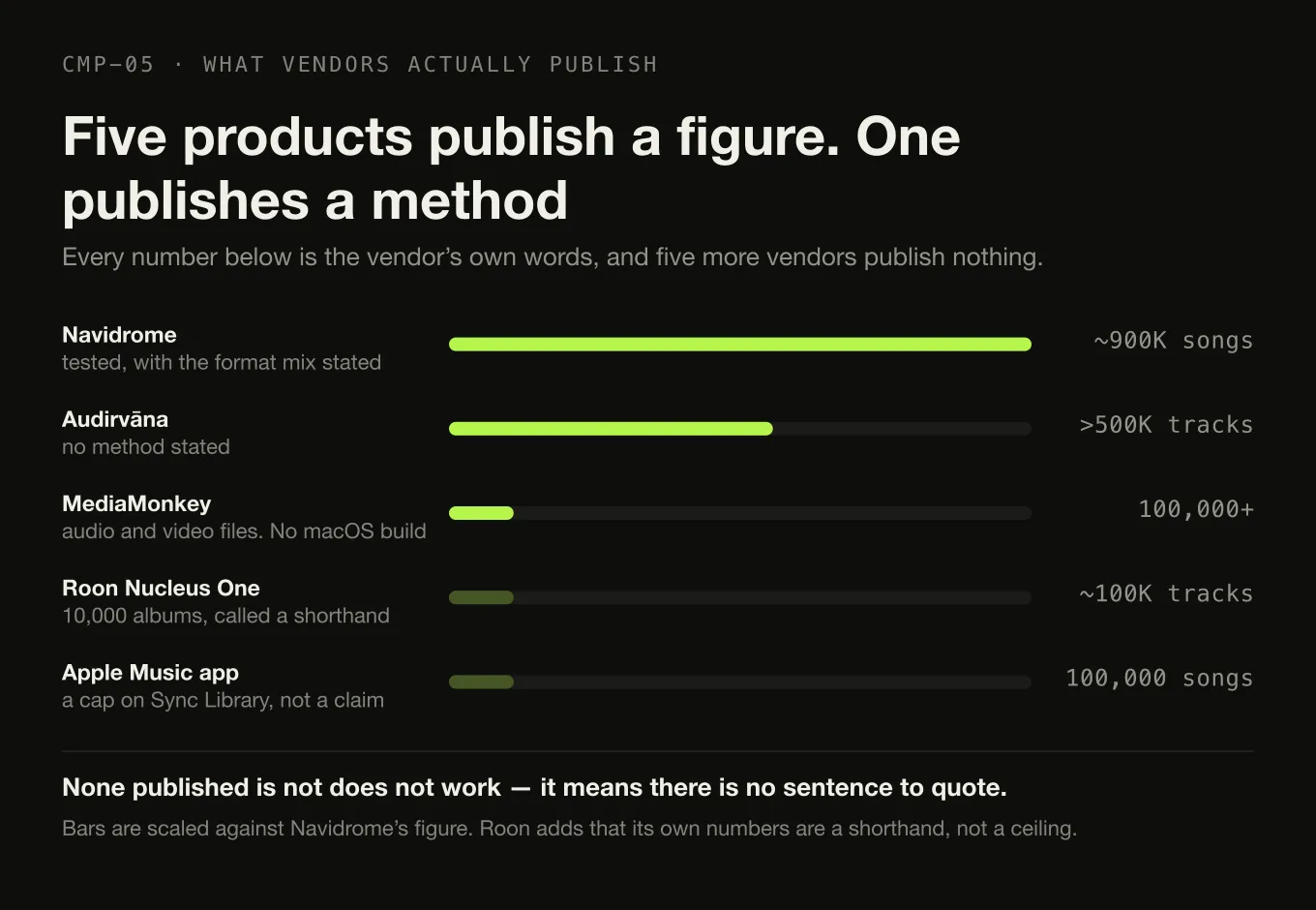
Nothing on this page was benchmarked, and that is the point. The results for this query are anecdotes with no method behind them, and answering them with more anecdotes would not help. What follows is narrower and more useful: what each vendor publishes about scale, quoted, dated, and set beside the products that publish nothing.
The short version. If your library is in the hundreds of thousands of tracks, the only product here that publishes a tested figure is Navidrome — and it is a server, not a desktop player. Roon publishes a track figure and immediately says it is not a ceiling. Audirvāna documents a library browser for over 500,000 tracks. Apple’s Music app publishes the only hard cap in the set. Digr publishes nothing above 25,000 tracks and loses this comparison on evidence.
Competitor facts in this article were checked on 27 August 2026, each against that product’s own site, documentation or support pages. Every source is listed at the foot.
What this search returns, and why none of it is measurement
On the day this was written the first screen carried a Steve Hoffman Music Forums thread, an AudioKarma thread, a YouTube video, an AlternativeTo category page and the repository for somebody’s personal Python player. The two forum threads outrank every publisher, which is unusual and is the clearest available signal that the demand is real and badly served.
Read those threads and a pattern appears immediately. Track counts are quoted constantly. Methods are quoted never. Nobody states the machine, the storage medium, the format mix, whether the scan was warm or cold, or what “handles it” was taken to mean. Two people can report opposite experiences of the same application at the same size and both be telling the truth, because they are measuring different things on different hardware.
This article does not adjudicate any of that, and it does not repeat a single number from it.
Six things that get slower, and they fail for different reasons
“Slow at scale” is six separate problems wearing one coat. Sorting them is the first useful thing you can do, because the fix for one is irrelevant to another.
Where a growing library actually hurts
-
1 · Walking the files
Finding out what is there
A recursive directory walk over tens of thousands of files, on a volume that may be spinning rust or at the end of a USB cable. This is where "the scan takes hours" usually comes from, and it is mostly a storage problem rather than a software one.
-
2 · Reading tags
Opening every file for its metadata
Every track has to be opened and parsed. Applications differ in whether they do this once, on a background thread, in batches, or lazily — and in whether cancelling halfway keeps what was already read.
-
3 · Artwork
The most expensive part of a full scan
Cover images are large, are frequently duplicated across every track of an album, and have to be decoded before they can be shown. This is why several applications separate a fast tag-only pass from a full pass that also collects art.
-
4 · The index
Where the library actually lives
A real database with batched writes behaves differently at a hundred thousand rows than a file that is loaded whole into memory. Almost no vendor documents which of these they are, which is why this article does not guess from how the interface feels.
-
5 · Grouping and filtering
Turning rows into albums and artists
Album identity, compilation handling and multi-disc ordering are computed from your tags. Bad tags make this worse at every size, and a large library has more of them in absolute terms even if the proportion is the same.
-
6 · Drawing the list
The only one you can see
Fifty thousand rows in a document is a stutter. Virtualised rendering keeps only the visible rows in the page and is the standard answer — but it fixes scrolling and nothing else on this list.
Two of those have their own pages here. Folder structure decides how much work the walk in step one has to do, and tag quality decides how much of step five is wasted. Both are worth doing before you change software, because neither is fixed by changing software.
What each vendor actually publishes about scale
Every cell below is the vendor’s own words or the absence of them. None published means the vendor’s site and documentation state no library-size
figure — it is not a judgement about the product.
| Architecture | Published scale evidence | Method stated? | Platforms | |
|---|---|---|---|---|
| Navidrome | Server, self-hosted | “tested with ~900K songs - 2/3 FLAC, 1/3 MP3” | Yes | macOS, Linux, Windows, Docker |
| Roon | Server plus remote | Nucleus One “designed for libraries up to 10,000 albums (approximately 100,000 tracks)”; Titan “for libraries over 10,000 albums” | No — and Roon says the figures are “a convenient shorthand, not a precise technical ceiling” | Server on macOS, Windows, Linux, NAS, ROCK |
| Audirvāna | Desktop | “Library manager & browser (>500K tracks)”, in both Studio and Origin | No | macOS, Windows, Linux |
| Lyrion Music Server | Server | “libraries of hundreds of thousands of tracks”, via distributing services across devices | No | Windows, macOS, Linux, Raspberry Pi, Docker |
| MediaMonkey | Desktop plus mobile | “Manage 100,000+ audio and video files” | No | Windows and Android. No macOS |
| Music app | Ecosystem library | A cap: “Up to 100,000 songs… files can be no larger than 200 MB”, for Sync Library | No | macOS, iOS, iPadOS, Windows |
| Swinsian | Desktop | “designed to be responsive even with the largest libraries” — no number | No | macOS 10.13+ |
| foobar2000 | Desktop | None published | — | Windows, macOS, Android, iOS |
| MusicBee | Desktop | None published | — | Windows |
| JRiver Media Center | Media centre | None published | — | Windows, macOS, Linux |
| Strawberry | Desktop | None published | — | Linux; macOS 14+ and Windows 10+ for sponsors |
| Digr | Desktop | None published. Design targets of ~3,000 and ~25,000 tracks; nothing above that | Targets, not measurements | macOS 11+, Apple silicon only. Alpha |
Four cells deserve a sentence rather than a figure.
Navidrome’s is the only figure in the category with a method attached. “Tested with ~900K songs - 2/3 FLAC, 1/3 MP3” tells you the size and the format mix, which is two more facts than anybody else provides. Navidrome is a self-hosted server rather than a desktop application, and it is also the only product here that documents refusing to write to your files.
Roon publishes a number and then undermines it, honestly. Its Nucleus manual says the album and track figures on the product pages “are a convenient shorthand, not a precise technical ceiling”, and that library complexity — metadata richness, streaming integrations, custom tags, editing history — matters more than raw track count. That is the most useful sentence any vendor has written about scale, and it is why “how many tracks can it handle” does not have a clean answer.
Apple’s is a cap rather than a claim. Apple documents that a synced library can keep “Up to 100,000 songs, not including songs (or music videos) purchased from the iTunes Store; files can be no larger than 200 MB”. A 200 MB limit is reachable by a long lossless track, and the cap applies to Sync Library rather than to local playback.
None published is not does not work. foobar2000, MusicBee, JRiver and
Swinsian are all used at large sizes by people who report no trouble. None of
them makes a statement about it that can be quoted, so this article does not
manufacture one on their behalf.
Three kinds of evidence, and what each is worth
The whole failure mode of this category is treating these three as one thing.
What is actually behind a scale claim
Who Navidrome, and nobody else.
Why it is better The size and the format mix are both stated, so you can tell whether the test resembles your library.
Still missing Hardware, scan time, and what "plays well" was taken to mean.
Who Roon, Audirvāna, Lyrion, MediaMonkey, and Apple’s cap.
Worth having It is a commitment the vendor has published and can be held to.
Worth doubting Roon says so itself: the figures are “a convenient shorthand, not a precise technical ceiling”.
Who Two forum threads outranking every publisher on this query.
What it is good for Knowing which applications people at that size are actually running, and what annoys them.
What it is not A measurement. No thread checked states a machine, a medium or a timing method, and not one figure from them appears above.
Who Digr, whose own scanner record sets expectations at ~3,000 and ~25,000 tracks.
What it means Somebody wrote down what the software should do. That is weaker than a vendor claim, not stronger.
Where it belongs Bottom of this list, which is where this article puts it.
How this comparison was made
No score, no weighting, no “we tested dozens”.
- Every scale figure is quoted from the vendor, with the page it came from
and the date it was read. Where the vendor states no figure, the cell says
None published. - Nothing was installed. Not one of these twelve products was run for this article — Digr included. No library was imported, nothing was timed, no memory was sampled, no scan was started.
- No forum number was used. The threads that dominate this result page are described and not quoted.
- Internal architecture is not inferred from behaviour. Where a vendor does not document how its index works, this article does not describe it.
- Digr’s own figures are labelled as targets from its design record, not as measurements of the shipping build.
The cost of that discipline is real and worth stating: this article cannot tell you which application is fastest, because nobody here measured it. What it can tell you is which vendors have committed to anything in public, which is the only durable information available today.
Which one, at which size
Organised by the situation rather than by rank, because the deciding factor is usually not the track count.
Five situations, five different answers
Navidrome The only tested figure in the category — around 900,000 songs, format mix stated. Free, GPL v3, runs on macOS, Linux, Windows or a Raspberry Pi.
Lyrion Music Server Publishes a hundreds-of-thousands claim tied to spreading the work over several devices.
The cost Both are servers. That is a machine to administer, covered on the server page.
Audirvāna Documents a library manager and browser for more than 500,000 tracks, in both Studio and Origin.
JRiver Media Center The mature answer if video and television are also involved, though it publishes no size figure.
Not Digr Digr publishes nothing above 25,000 tracks. At this size it is the wrong choice today.
Swinsian Says it is “designed to be responsive even with the largest libraries”, has folder watching and a duplicate finder, and is $34.95 once.
foobar2000 Free, native on Apple silicon, and the most configurable thing on the list.
Digr, conditionally Its design record targets ~25,000 tracks and it is an alpha. That is the size it was written for, and no larger.
MediaMonkey The only desktop product here that publishes a file-count claim: “Manage 100,000+ audio and video files”. Windows and Android only.
MusicBee Free, and built for collections. Publishes no size figure.
Not Digr There is no Windows build and none exists to try.
Ask about pruning first The question is what the application does to its index when the volume is missing, and almost nobody documents it.
Digr Documents marking the root offline, rewriting paths when the volume returns, and refusing to prune a root it could not fully read.
Everyone else Not documented on the pages checked, and not tested here.
Where Digr is on scale today
Digr is a local-first music player for macOS, and this is its position on 27 August 2026 rather than its intention.
What exists. A SQLite index on your own disk with schema migrations and batched writes, described in its own documentation as a cache derived from your files — delete it and a rescan rebuilds it. Recursive scanning of as many watched folders as you like, on a background thread, with throttled progress, cancellable, keeping whatever was already indexed. Fast and Full scan modes, where Fast reads tags only and artwork can be backfilled later by a cancellable background pass. Virtualised rendering for tracks, albums and artists. Library Health views that are inspect-only. And the external-drive behaviour above: unplugging a volume marks its root offline rather than deleting the tracks, and pruning refuses to run against a root it could not fully read.
What does not exist, and this is the part that decides the comparison. There is no published maximum library size. There is no measured figure above 25,000 tracks. The only numbers Digr has are in its own scanner design record, and they are expectations rather than results: at around 3,000 tracks, “scans without freezing; progress visible; completes quickly”; at around 25,000 tracks, “app stays responsive throughout; progress ticks; cancellable… the track list stays usable afterwards via virtualization.”
And it is on the roadmap, which means it has not happened. “Validation against libraries of 100,000 tracks and beyond” is a named, undated planned item, alongside wider large-library hardening and NAS recovery. It is not counted anywhere above, because a table that scores intentions is not a comparison.
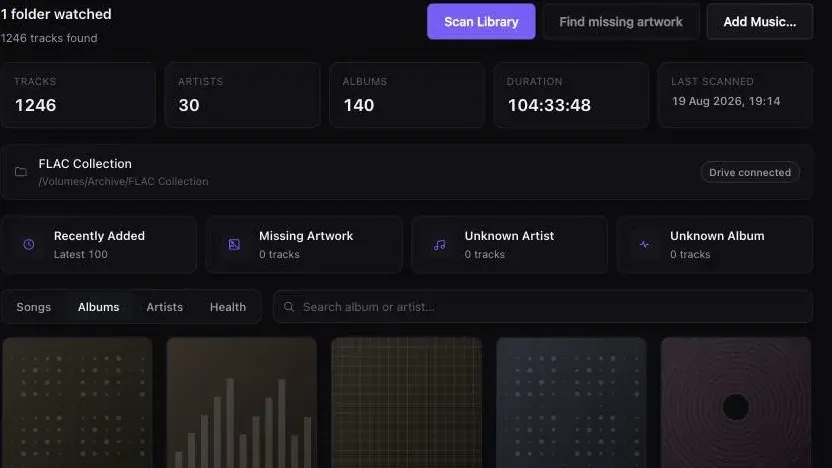
The capture at the top of this article is the same demo library used for every Digr screenshot on this site. It holds 1,246 tracks. There is no large-library capture, because there is no validated large library.
So: against Navidrome, Digr has no tested figure. Against Roon and Audirvāna, no published figure at all. Against MediaMonkey, no figure and no Windows build. Against Swinsian and foobar2000 on a Mac, it is an alpha with a smaller feature list. It also has no tag editing, no gapless playback, no ReplayGain, no MusicBrainz lookup, no NAS support and no remote access, and it runs only on Apple silicon. The full current capability list is published, and Digr Pro is not purchasable — there is no checkout, no payment processor and no licence system in the application.
What none of them tells you
- What “handles it” means. Six different things degrade at size and no vendor says which ones their figure covers.
- What the hardware was. Not one figure on this page comes with a machine, a storage medium or a scan time.
- How long the first scan takes. The number everyone actually wants, and the number nobody publishes.
- What happens to the index when a scan is interrupted. Only Digr documents it, and only for Digr.
- Whether your library is the hard kind. Roon’s point stands generally: metadata richness and edit history load a database in ways a track count does not capture.
- What it costs in bytes. That is arithmetic rather than a product property, and it is the one number on this subject you can work out for yourself.
The short version
- Sort the problem first. Scanning, tag reading, artwork, indexing, filtering and rendering are six problems, and only the last one is visible.
- Published, tested evidence exists for exactly one product: Navidrome, “tested with ~900K songs - 2/3 FLAC, 1/3 MP3”. It is a server.
- Published figures without a method exist for Roon, Audirvāna, Lyrion and MediaMonkey — and Roon states in its own manual that its figures are not a ceiling.
- The only hard cap in the category is Apple’s: 100,000 songs and 200 MB per file, for Sync Library.
- foobar2000, MusicBee, JRiver, Strawberry, Swinsian and Digr publish nothing. That is a fact about their documentation, not about their code.
- Digr publishes the least of all, has no measurement above 25,000 tracks, and has validation at 100,000 tracks sitting on its roadmap. At six figures it is not the answer.
- Nothing here was benchmarked. Every figure is a quotation with a date.
If the library is large and a mess, the tools that fix it are a different category. If MusicBee is the name that brought you here, what it does that a Mac-only player does not is set out directly. If the conclusion you are reaching is that you need a server, that decision has its own page, and the answer is often no. If you have not yet settled the folder layout and the tags, do that before changing software — it is the only work on this subject that survives changing your mind about the application.
Sources
Every product fact above comes from that product’s own site or documentation, checked on 27 August 2026. No forum, roundup, directory or review was used as a source for any capability, figure or price.
- Roon — Nucleus manual — “Nucleus One is designed for libraries up to 10,000 albums (approximately 100,000 tracks).”; “Nucleus Titan is built for libraries over 10,000 albums.”; “The album and track figures on the Nucleus product pages are a convenient shorthand, not a precise technical ceiling.”
- Roon — minimum requirements — recommended “Intel Core i3, Ivy Bridge+”, “4GB RAM”, “SSD boot drive”; Windows 10 or later, macOS 12+, Linux and NAS platforms; “A free Roon account is required to get up and running”; and “Performance and quality of experience will depend on the size of your music collection”, with no track figure
- Roon — how Roon works — “The Roon Server is the brain of your system. It manages your music files, streaming services, and your audio devices”
- Audirvāna — Studio compared with Origin — “Library manager & browser (>500K tracks)”, listed for both editions
- Navidrome — “Handles large libraries! Plays well with gigantic music collections (tested with ~900K songs - 2/3 FLAC, 1/3 MP3)”, and the GNU GPL v3 licence
- Navidrome — overview — “Very low resource usage. Runs well even on simple Raspberry Pi Zero and old hardware setups”; “Multi-platform, runs on macOS, Linux and Windows. Docker images are also provided”; automatic library monitoring
- Navidrome — FAQ — “Navidrome does not write to your music folder or the files by design”
- Lyrion Music Server — “open-source software which can control and serve (stream) music to a wide range of physical and virtual audio players called Squeezeboxes”; “Because of its scalability, all of these services can be distributed across separate devices to support libraries of hundreds of thousands of tracks”
- MediaMonkey — “Manage 100,000+ audio and video files, contemporary and classical music, audiobooks, podcasts or music videos”; the platform list is Windows, Android, Apple devices, TVs and DLNA players, and cloud services, with no macOS application
- MediaMonkey — buy — “Version 2024 Gold” at “$39.95USD” for “all 2024.x upgrades”, and “Lifetime Gold” at “$99.95USD” for “all future upgrades”
- Apple — access your music library on all your devices — “Up to 100,000 songs, not including songs (or music videos) purchased from the iTunes Store; files can be no larger than 200 MB”
- Apple — use Sync Library — “Sync Library requires a subscription to Apple Music. You can also use Sync Library with an iTunes Match subscription”
- Swinsian — “designed to be responsive even with the largest libraries”, folder watching, a duplicate track finder, “Find and replace tag editing, with regex support”, and “$34.95”
- Swinsian — FAQ — “Swinsian can be used on any Mac running macOS 10.13 or later”, and a thirty-day free trial. No library-size statement appears on the page
- foobar2000 and for macOS — “an advanced freeware audio player”, version 2.25.10, “macOS 11 ‘Big Sur’ or newer”. No library-size statement appears
- JRiver Media Center — purchase — the Master Licence at “$124.98”, “valid for a single major version for all available Operating Systems”. No library-size statement appears
- Strawberry — “a cross-platform music player and music collection organizer”, GPL, macOS 14 or higher and Windows 10 or higher, and “Access to macOS and Windows releases are currently restricted to sponsors, a 7 USD monthly sponsorship is required”. No library-size statement appears
- MusicBee —
getmusicbee.comreturned HTTP 403 to this environment on 27 August 2026. Its Windows-only platform is corroborated by the Microsoft Store listing. No library-size statement could be read from the vendor - Digr — features and current capabilities and Digr — pricing — every Digr claim above, including the absence of a published maximum library size. The ~3,000 and ~25,000-track figures are targets from Digr’s own scanner design record, not measurements. Digr Pro is not purchasable
Common questions
How many tracks counts as a large music library?
There is no agreed threshold, so the useful answer is where the vendors themselves start drawing lines. Roon’s Nucleus manual puts Nucleus One at “libraries up to 10,000 albums (approximately 100,000 tracks)” and sends larger collections to Nucleus Titan. Apple caps Sync Library at 100,000 songs. Audirvāna documents a library browser for more than 500,000 tracks in both editions. Navidrome says it was tested with around 900,000 songs. On that evidence, tens of thousands of tracks is ordinary, and six figures is where products start naming themselves. All checked on 27 August 2026.
Do I need a music server for a large music library?
Size on its own is not the reason to run one. A server exists to serve more than one client, from more than one room, usually when the machine holding the files is not the machine playing them. Several desktop applications document large libraries — Audirvāna states a library browser of more than 500,000 tracks — and several servers run on very modest hardware, with Navidrome describing itself as running well on a Raspberry Pi Zero. Choose a server for rooms, people and distance, not for track count.
Which music players publish a maximum library size?
Very few. On 27 August 2026, figures could be found on the vendor’s own pages for Roon (Nucleus One at roughly 100,000 tracks), Audirvāna (more than 500,000 tracks), Navidrome (tested with around 900,000 songs), Lyrion Music Server (hundreds of thousands of tracks) and MediaMonkey (100,000-plus files). Apple publishes a hard cap of 100,000 songs for Sync Library. foobar2000, MusicBee, JRiver Media Center, Strawberry, Swinsian and Digr publish no library-size figure at all.
What happens to a music library when the external drive is unplugged?
It depends entirely on the application, and almost none of them documents it. Digr marks the root offline rather than deleting the tracks, matches the volume by identifier or name when it returns, rewrites the indexed paths, and refuses to prune a root it could not fully read. No equivalent behaviour is documented by the other products compared here, so this article does not claim any — it was not tested, and an undocumented capability is not a capability.
Is Apple Music limited to 100,000 songs?
Sync Library is. Apple’s own documentation states that your music library can keep “Up to 100,000 songs, not including songs (or music videos) purchased from the iTunes Store; files can be no larger than 200 MB” available in the cloud. That is the only hard, vendor-published ceiling found anywhere in this comparison. Playing local files in the Music app without Sync Library turned on is a different arrangement and Apple states no equivalent limit for it.
Can Digr handle a library of 100,000 tracks?
Nobody knows, and Digr does not claim it. Its own design record sets targets at roughly 3,000 and roughly 25,000 tracks, and its roadmap lists validation against libraries of 100,000 tracks and beyond as work still to do. There is no published maximum, no measurement above 25,000 tracks and no large-library capture. On published evidence Digr is the weakest product in this comparison for a very large collection, and it is an alpha for Apple silicon Macs only.
- large music library
- music library software
- Roon
- Navidrome
- Audirvana
- MediaMonkey
- Lyrion
- Swinsian
- foobar2000
- library index