Audirvāna alternatives, when you may not need one
The subscription objection is usually answered inside the product family. What Origin costs, what it gives up, and which alternatives cover which of Audirvāna's four jobs.
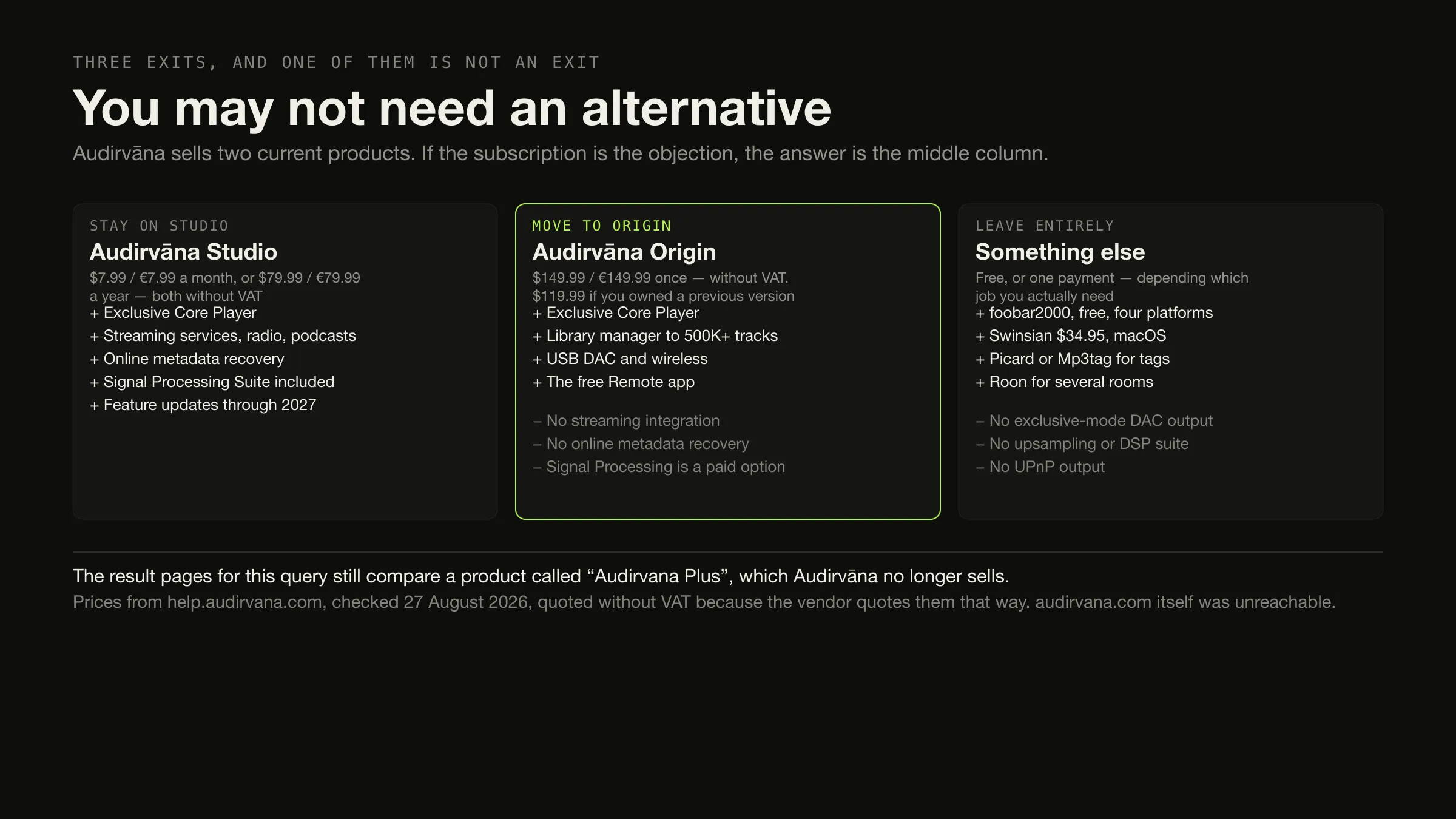
Check whether you actually need an alternative first. Audirvāna sells two current products, and the most common reason people search for a replacement — the subscription — is answered by the other one. Audirvāna Origin is a one-time licence at $149.99 or €149.99 excluding VAT, and it contains the same Exclusive Core Player, the same library manager for over 500,000 tracks and the same USB DAC handling as Studio.
If you genuinely want out: foobar2000 free if the goal is zero cost; MusicBrainz Picard or Mp3tag if the goal is fixing tags; Roon if the goal is several rooms; Swinsian or Doppler if the goal is something simpler on a Mac. Each of those gives up Audirvāna’s output engineering.
Prices and product facts were checked on 27 August 2026.
The results for this query compare a product that is not sold
Search “audirvana alternatives” and four of the visible results compare “Audirvana Plus”. Audirvāna’s own current support documentation describes two products, and neither of them is called that: Audirvāna Studio and Audirvāna Origin.
Everything on the first screen is a software directory — SaaSHub, topbestalternatives, progsoft, AlternativeTo — plus one publisher page whose title already carries a year that has passed. There is no editorial coverage at all, and the alternatives they name are matched on the category tag “audio player”: VOX, Colibri, AIMP, Clementine, Banshee.
That matters more here than on most queries, because Audirvāna’s product structure is the answer to the most common version of the question, and a page comparing a retired edition cannot tell you that.
What Audirvāna actually is — four separable jobs
Audirvāna is usually described as one thing. It is four, and which one you use decides your whole answer.
Four jobs, and who else does each
-
1 · Exclusive output
Taking control of the audio device
Both editions
Audirvāna documents an "Exclusive Core Player" and USB DAC and wireless connectivity in both Studio and Origin, plus a playback console and processing toolkit. Among the alternatives here, foobar2000 documents "many built-in DSP effects"; Swinsian, Doppler and Digr document none of this. This article makes no claim about how any of it sounds.
-
2 · The local library
Browsing files you own
Both editions — "500K+ tracks"
The most replaceable of the four. Swinsian, foobar2000, MusicBee, Doppler and Digr all do this, and several of them do more with it — what each vendor publishes about library scale is a short and revealing list.
-
3 · Streaming integration
Services inside the local library
Studio only
"Online streaming content (Streaming service, radios, podcasts) and integration" is a Studio feature and is absent from Origin. Among the alternatives, only Roon and Music Assistant do anything comparable. If this is why you subscribe, moving to Origin removes it.
-
4 · Metadata recovery
Identifying your files for you
Studio only
"Online metadata recovery (universal track ID identification)" is Studio-only. MusicBrainz Picard does the equivalent job free, including identification by acoustic fingerprint, and writes the result into your files rather than into a library database.
The two current products, priced
All figures from Audirvāna’s own support documentation on 27 August 2026.
Audirvāna’s own site and pricing page returned HTTP 403 to this environment, so
everything below comes from help.audirvana.com, which was reachable.
| Product | Figure | Billing | Tax |
|---|---|---|---|
| Studio Access | $7.99 / €7.99 | per month | Without VAT |
| Studio Access | $79.99 / €79.99 | per year | Without VAT |
| Studio Classic | $59.99 / €59.99 | first year only, “if you bought any Audirvāna version in the past” | Without VAT |
| Studio Classic | $49.99 / €49.99 | first year only, “if you purchased Audirvāna Origin” | Without VAT |
| Origin | $149.99 / €149.99 | one-time | Without VAT |
| Origin | $119.99 / €119.99 | one-time, past owners or Studio subscribers | Without VAT |
| Origin upgrade | $49.99 / €49.99 | one-time, original Origin owners from before June 2024 | Without VAT |
Three things a price table without them would misrepresent.
Every figure excludes VAT, in the vendor’s own words, and Audirvāna states that “The final price can be seen on your account and depends on your country and currency” across sixteen currencies. What you pay is higher than what is quoted.
Audirvāna prices the move in both directions. There is a discounted Origin for Studio subscribers and a discounted first-year Studio for Origin owners. That is evidence the move between editions is a supported path rather than a workaround, which is useful to know before you go looking outside.
Requirements are the same for both: macOS 10.15 or newer with 4 GB of RAM, Windows 10 64-bit 1809 with 4 GB, or Linux via a Debian or RPM package with 1 GB. A 64-bit processor, and storage for the Audirvāna database file.
This article makes no sound-quality claims
Worth stating plainly, because the alternatives results for this query are full of them.
Nothing here was listened to, measured or compared. No claim is made that any player sounds better, warmer, cleaner or more transparent than any other, and no bit-perfect claim is made or repeated, because the end of the chain was not observed.
Where the article describes a difference, it is a documented mechanism and nothing more: Audirvāna documents an exclusive-mode core player, USB DAC handling and a signal processing suite; foobar2000 documents built-in DSP effects; Swinsian, Doppler and Digr document none of those things. That is a statement about what vendors publish. What actually happens between a file and a speaker is a separate subject, and it is where the real differences live.
Reason by reason
Eight reasons, and what each costs you
Answer Stay — move to Audirvāna Origin. $149.99 / €149.99 once, excluding VAT, or $119.99 if you have owned a version before.
You give up Streaming integration, online metadata recovery, and the Signal Processing Suite becomes a paid option.
Answer foobar2000, free on Windows, macOS, Android and iOS, with gapless, full ReplayGain, advanced tagging and DSP effects.
You give up Exclusive-mode output, upsampling, UPnP, and a vendor to ask.
Answer MusicBrainz Picard, free, with AcoustID. Or Mp3tag for batch editing. Or Swinsian at $34.95 if you want it inside the player.
You give up Nothing — a tagger sits beside a player.
Answer Roon, at $14.99 a month billed monthly, $12.49 billed annually or $829.99 once. Or Music Assistant, free and self-hosted.
You give up A one-time licence, and you acquire a server plus, for Roon, a required free account.
Answer Swinsian at $34.95 once, or Doppler at $30 USD once if an iPhone is involved.
You give up Exclusive-mode output, upsampling, DSP and UPnP.
Answer A self-hosted server: Navidrome or Jellyfin, both free. Neither is a desktop player.
You give up The local output path entirely, and you acquire an always-on machine.
Answer foobar2000, Swinsian, Doppler or Digr — none requires an account for local playback.
You give up Audirvāna’s output engineering, and in Digr’s case a great deal more.
Answer Stay on Studio, or move to Roon, which is the only paid alternative here with comparable streaming integration.
You give up Nothing, if you stay. If you move to Origin you lose both by design.
What travels with you, and what does not
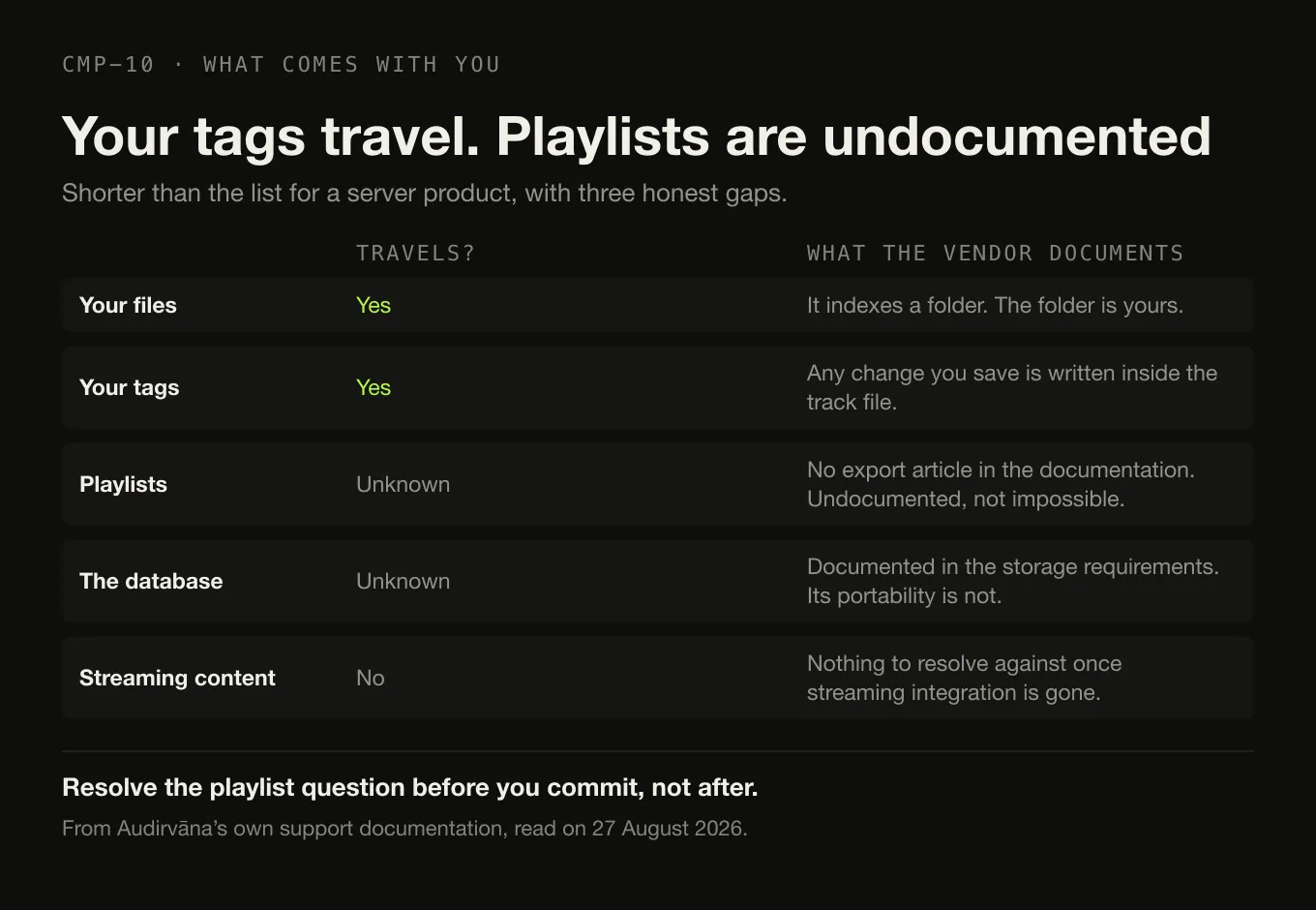
Shorter than the equivalent list for a server product, and with three honest gaps.
Your files are untouched. Audirvāna indexes a folder; the folder is yours.
Your tags travel, including the ones you fixed inside Audirvāna. Its metadata-editing documentation, read on 27 August 2026, states plainly: “Any change you save will be automatically written inside the track file.” So the work you did on titles, artists, composers, genres, ratings and the extended classical fields is in the files themselves rather than in Audirvāna’s database, and it travels to whatever you open them with next. The one thing that page does not separately state is whether edited album artwork and artist pictures land in the file as well.
Playlists are the real gap. Audirvāna’s support documentation has a Playlists section covering manual, smart, streaming-service and folder playlists. No playlist-export article appears in it. That is not evidence that export is impossible; it is evidence that it is undocumented, and it is worth resolving before you commit.
A database exists. Audirvāna’s own requirements mention storage “for the Audirvāna database file”. Its portability is undocumented.
Streaming content does not survive the move to Origin. This follows directly from the vendor’s own feature split: mixed playlists containing service tracks have nothing to resolve against once streaming integration is gone.
Moving Studio to Origin is priced by the vendor, which is the strongest signal on this page that it is a normal thing to do.
Where Digr fits, and where it does not
Digr overlaps with Audirvāna Origin in exactly one respect — a local library, no subscription, no server — and differs everywhere that matters to an Audirvāna user.
What it is. macOS 11 Big Sur or later, Apple silicon only, currently an alpha. No account, no telemetry. Files are only ever read: scanning opens them for tags and artwork and never writes to them. A SQLite index on your own disk. Google Cast output on your own network.
What it does not have, against the four jobs above. No exclusive-mode output and no control of the audio device. No upsampling. No signal processing suite. No UPnP output — Google Cast is the only protocol it speaks. No streaming integration. No online metadata recovery, no MusicBrainz lookup and no tag editing at all. No gapless playback and no ReplayGain. No Windows, Linux or Intel Mac build. The full current capability list is published, absences included, and Digr Pro is not purchasable — no checkout, no payment processor, no licence system in the app.
One roadmap note, counted nowhere. Exclusive and bit-perfect local output is listed as research rather than as a planned feature — an open question with no commitment attached — and it decides nothing on this page.
So: if what you value in Audirvāna is job one, Digr is not an alternative and this article does not present it as one. If what you value is job two, and you are on an Apple silicon Mac, and you can accept an alpha with no tag editing, then it is on the list — under that heading and no other. The two products set against each other row by row runs to twenty-eight rows, and Audirvāna takes seventeen of them.
How this comparison was made
- Current product names verified first. Studio and Origin were both confirmed current on Audirvāna’s own support documentation before anything else was written.
- Every price from the vendor, with currency, billing basis, tax treatment
and date. Audirvāna’s main site was unreachable, so the source is
help.audirvana.comand the article says so. - No sound-quality comparison. Nothing was listened to and no listening claim is made or repeated.
- No sentiment. No community source appeared on the current result page and none was used, so this article reports no user sentiment at all.
- Nothing was installed, purchased or trialled, including Digr, whose row comes from its own shipping code.
- Undocumented is published as undocumented — playlist export and database portability are named as gaps. Metadata write behaviour was one of them and is now sourced: Audirvāna’s own documentation says saved changes are written into the track file.
The short version
- The current products are Studio and Origin. Every ranking page for this query still compares “Audirvana Plus”, which is not sold.
- If the subscription is the objection, the answer is Origin — $149.99 / €149.99 once excluding VAT, $119.99 if you have owned a version before.
- What Origin gives up: streaming integration, online metadata recovery, and the Signal Processing Suite becomes a paid option.
- Free instead: foobar2000, on four platforms, with gapless, full ReplayGain and DSP effects — and no exclusive-mode output.
- Tags: MusicBrainz Picard or Mp3tag, free or cheap, alongside any player.
- Several rooms: Roon or Music Assistant. That is an architecture change, not an upgrade.
- Your tags come with you, because Audirvāna writes saved metadata changes into the track file. Check playlist export before you move — that, it does not document.
- No sound-quality claim appears anywhere on this page, deliberately.
Two narrower questions have their own pages: which player to use on a Mac and what the paid players are actually charging for. If you are weighing Roon rather than Audirvāna, the reasons people leave it are sorted the same way — and the two set directly against each other is its own comparison, with the server requirement, the endpoint ecosystem and the five-year arithmetic for both.
Sources
Every product fact above comes from that product’s own site or documentation, checked on 27 August 2026. No directory, roundup or review was used as a source for any capability or price. No sound-quality claim appears.
- Audirvāna — Studio compared with Origin — both editions include “Multiple installs (one simultaneous use)”, “Audio Quality: Exclusive Core Player”, a library manager and browser for “500K+ tracks”, USB DAC and wireless connectivity, a playback console and processing toolkit, and the free Remote App. Studio adds the Signal Processing Suite included, “Online streaming content (Streaming service, radios, podcasts) and integration”, “Online metadata recovery (universal track ID identification)”, an extended two-month Qobuz trial and a minimum of one feature update a year through 2027. Origin carries “Preferred price for older version owners”. Both product names confirmed current on this page
- Audirvāna — Studio subscription price — “Audirvāna Studio Access: $79.99 (without VAT) or €79.99” yearly and “$7.99 (without VAT) or €7.99” monthly; “Audirvāna Studio Classic: $59.99 (without VAT) - €59.99 for the first year if you bought any Audirvāna version in the past” and “$49.99 (without VAT) - €49.99 for the first year if you purchased Audirvāna Origin”; “The final price can be seen on your account and depends on your country and currency”, across sixteen currencies
- Audirvāna — Origin licence price — “$149.99 (without VAT) - €149.99”; “$119.99 (without VAT) - €119.99 if you bought any Audirvāna version in the past or subscribed to Audirvāna Studio”; and a “$49.99 (without VAT) - €49.99” upgrade for original Origin owners from before June 2024
- Audirvāna — system requirements — “OS: macOS 10.15 or newer” with “Memory: 4GB”; “OS: Windows 10 64-bit 1809” with “Memory: 4 GB RAM”; Linux via “Debian or RPM Package” with “Memory: 1GB”; a 64-bit processor, and storage “for the Audirvāna database file”
- Audirvāna — how can I edit metadata of my local library — “Any change you save will be automatically written inside the track file.” Album fields Title, Artist, Label, Release date and Rating; track fields Title, Grouping, Artist, Track #, Disc #, Composer, Genre, Year, BPM, Rating and Comment; extended classical fields Soloist, Conductor, Ensemble, Style and Period; and “In case you select streaming content, you can only see the metadata”
- Audirvāna — support home — the current support structure, with separate Audirvāna Studio and Audirvāna Origin sections, a Playlists section, and “How can I edit metadata of my local library in Audirvāna?”. No playlist-export article appears in the listing
audirvana.comandaudirvana.com/price/returned HTTP 403 to this environment on 27 August 2026. Every Audirvāna figure above is taken fromhelp.audirvana.cominstead- foobar2000 — “an advanced freeware audio player”; “Plays all mainstream audio formats out of the box”; “Gapless playback”; “Full ReplayGain support”; “Advanced tagging capabilities”; “Many built-in DSP effects”; Windows, macOS, Android and iOS; “No strings attached, no telemetry, no data collection”
- Swinsian — “$34.95”; “Find and replace tag editing, with regex support”; “Gapless playback”; “Support for ReplayGain tags”; “Playback over AirPlay”; folder watching and a duplicate track finder
- Swinsian — FAQ — “Swinsian can be used on any Mac running macOS 10.13 or later”
- Doppler — “$30 USD”; Mac and iPhone; “macOS 11 Big Sur or newer” and “iOS 26 or newer”; formats “MP3, AAC and M4A as well as high-quality lossless formats like FLAC, ALAC and WAV”
- Strawberry — “A cross-platform music player and music collection organizer”; “Free software released under GPL”; macOS 14 or higher and Windows 10 or higher; “a 7 USD monthly sponsorship is required for new subscribers” for the macOS and Windows releases; “Edit tags on audio files” and automatic tag retrieval from MusicBrainz
- MusicBrainz Picard — “a cross-platform music tagger powered by the MusicBrainz database”; “licensed under GPL 2.0 or later”; AcoustID identification “by the actual music, even if they have no metadata”
- Mp3tag — “It supports batch tag-editing of ID3v1, ID3v2.3, ID3v2.4, iTunes MP4, WMA, Vorbis Comments and APE Tags for multiple files at once”; lookups from Discogs, MusicBrainz and freedb
- Roon — pricing — “$14.99 / month” billed monthly, “$12.49 / month” billed annually, and lifetime billing at “$829.99”
- Roon — how Roon works — “The Roon Server is the brain of your system”; Roon Ready, USB Audio, HDMI, AirPlay, Chromecast, SONOS and Bluetooth
- Roon — minimum requirements — “A free Roon account is required to get up and running”
- Music Assistant — “A free, open source music library manager”; the server is the core; players including Sonos, Chromecast, AirPlay, Squeezelite and DLNA
- Navidrome — “Your Personal Streaming Service”; “Access your music from anywhere”; GNU GPL v3, free of charge
- Jellyfin — “Free Software, licensed under the GNU GPL”; “Free to download, now and always”
- Digr — features and current capabilities and Digr — pricing — every Digr claim above, including the absence of exclusive-mode output, upsampling, DSP, UPnP, tag editing, MusicBrainz lookup, gapless and ReplayGain. Digr Pro is not purchasable
Common questions
Is Audirvāna Origin a subscription?
No. Audirvāna sells two current products: Studio, which is a subscription, and Origin, which is a one-time licence. Audirvāna’s own support documentation prices Origin at $149.99 or €149.99 without VAT, reduced to $119.99 or €119.99 “if you bought any Audirvāna version in the past or subscribed to Audirvāna Studio”. Origin includes the same Exclusive Core Player as Studio. Prices checked on 27 August 2026 and quoted without VAT because the vendor quotes them that way.
What is the difference between Audirvāna Studio and Audirvāna Origin?
Both include what Audirvāna calls the Exclusive Core Player, a library manager and browser for over 500,000 tracks, USB DAC and wireless connectivity, a playback console and processing toolkit, and the free Remote app. Studio adds the Signal Processing Suite as standard — it is a paid option on Origin — plus “Online streaming content (Streaming service, radios, podcasts) and integration”, “Online metadata recovery (universal track ID identification)”, an extended Qobuz trial, and a minimum of one feature update a year through 2027.
What is a free alternative to Audirvāna?
foobar2000 is the strongest, and it is free on Windows, macOS, Android and iOS. Its own feature list includes gapless playback, full ReplayGain support, advanced tagging and many built-in DSP effects, with no telemetry or data collection. On Linux, Strawberry is free under the GPL — but its macOS and Windows builds are behind a sponsorship the vendor prices at 7 USD a month. What free software does not document is Audirvāna’s exclusive-mode output engineering. Checked on 27 August 2026.
Which Audirvāna alternative can properly edit tags?
Two of the best options are not players at all. MusicBrainz Picard is free under GPL 2.0 or later and can identify files by AcoustID fingerprint even when they carry no metadata. Mp3tag does batch tag editing across more than twenty formats with Discogs and MusicBrainz lookups. If you want tagging inside a player, Swinsian on macOS documents find-and-replace tag editing with regex support at $34.95 once. A tagger sits alongside a player rather than replacing one.
Is Roon better than Audirvāna for playing music in several rooms?
For multiple rooms, Roon is the different architecture rather than the better product. Roon requires a server it calls “the brain of your system”, a free Roon account, and it names Roon Ready, AirPlay, Chromecast, SONOS, Squeezebox, USB and HDMI among its outputs, describing playback on “all the devices around your home”. Audirvāna is a desktop application with a remote app and no server. If several rooms is the requirement, that is an architectural difference, not a sound-quality one.
Does Digr replace Audirvāna?
No. Digr has no exclusive-mode output to a DAC, no upsampling, no signal processing suite and no UPnP output — the things Audirvāna documents as its core. It is also macOS-only on Apple silicon, currently an alpha, with no tag editing, no gapless playback and no ReplayGain. It overlaps with Audirvāna Origin only in being a local-library player with no server and no subscription. If Audirvāna’s output engineering is why you use it, Digr is not the alternative.
- Audirvana alternatives
- Audirvana
- Audirvana Origin
- Audirvana Studio
- foobar2000
- Swinsian
- Roon
- one-time licence
- subscription