Roon vs Audirvāna: a server ecosystem against an output path
Roon puts a required server between your files and every room. Audirvāna puts the application on the machine that plays. Current facts from both vendors, dated 28 August 2026.
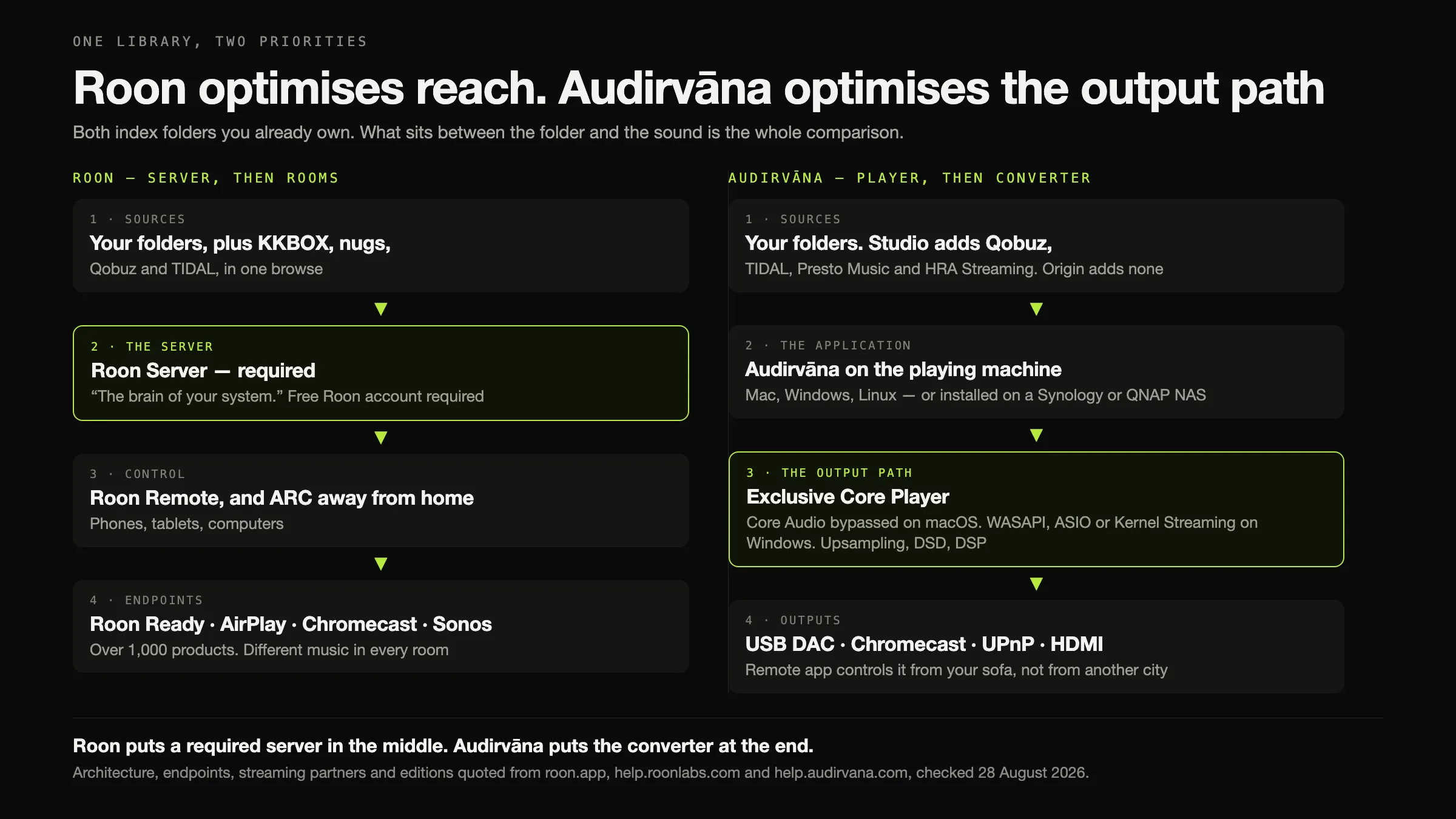
Two products, two different bets about where the interesting problem is.
Roon puts a required server between your files and everything else. Roon Server is, in Roon’s words, “the brain of your system”; a free Roon account is required; and what you get for that architecture is reach — Roon Ready and a certified endpoint list spanning “over 1,000 audio products”, different music in every room, streaming services browsed alongside your own files, an editorial metadata layer of biographies and cross-linked credits, and Roon ARC for listening away from home.
Audirvāna puts the application on the machine that plays, and spends its engineering on what leaves it: exclusive device access, upsampling with the filter parameters exposed, DSD, room correction — and tag edits that are “automatically written inside the track file”. No server. Origin is a one-time licence.
The decision, in one line each. More than one room, or listening away from home? Roon. One system, a DAC, and tags you want fixed in the files themselves? Audirvāna.
Every fact below was checked on 28 August 2026 against each vendor’s own site and knowledge base. Neither product was installed, purchased or listened to, and there is no sound-quality claim anywhere on this page.
Why this comparison is usually about the wrong thing
The first screen of results for “roon vs audirvana” on 28 August 2026 was six forum threads, three reviews and no vendor page. Two of the six threads are on the vendors’ own community forums, and one of them is titled “Why Audirvana Sounds Better Than Roon”. One of the three reviews was published in June 2021, by its own URL.
That is the gap this page is for. Whether one of them sounds better is not answerable from documentation, was not tested here, and is not addressed anywhere below. What is answerable is what each product is, what it requires, what it reaches, what it does to your files and what it charges — and those five questions decide the purchase for almost everybody.
The architectural fork, which decides everything downstream
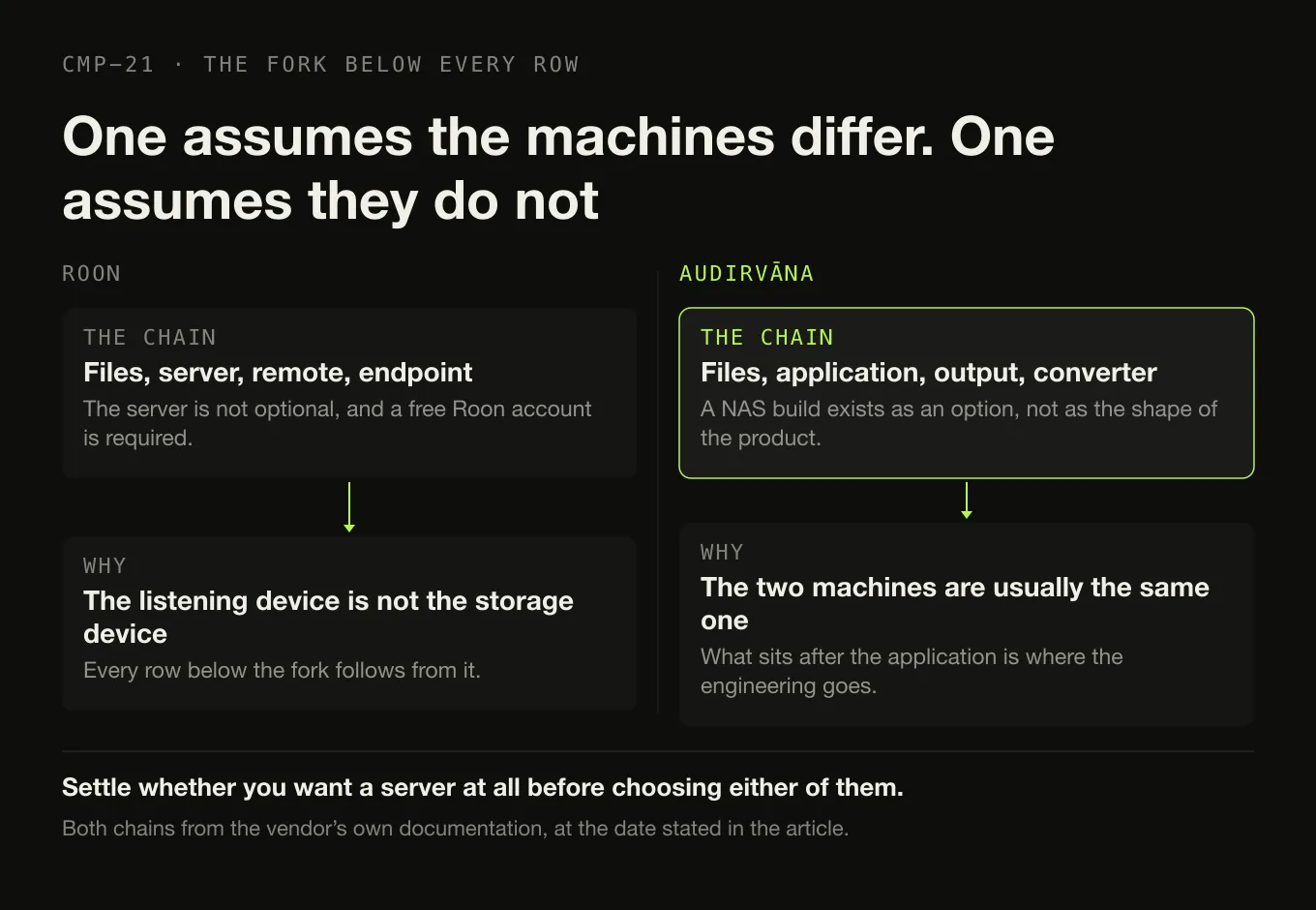
Roon: files → server → remote → endpoint. The server is not an optional component. Roon Server “manages your music files, streaming services, and your audio devices”, and it runs on “Mac, Windows, Linux, or on a dedicated appliance like Nucleus or mini-PC using ROCK” — plus QNAP, Synology, Asustor, Unraid and TrueNAS. Roon Remote is a control surface. The endpoint is where the sound comes out. A free Roon account is required to get up and running, in Roon’s own words.
Audirvāna: files → application → output path → converter. The application on the playing machine is the player. There is a NAS build — “Synology DSM7 or QNAP QTS 4.2.6” — but it is an option rather than the shape of the product. What sits after the application is where the money goes: “Audio Quality: Exclusive Core Player” is listed for both editions.
The consequence, stated once. Roon’s architecture exists because the listening device is usually not the storage device. Audirvāna’s exists because they usually are. Whether you want a server at all is worth settling before choosing either.
The comparison, on what ships today
Roadmap is excluded from every row. Not documented means the fact was not
on any page read on 28 August 2026, and no inference is drawn from its absence.
Audirvāna’s column notes where Studio and Origin differ.
| Dimension | Roon, today | Audirvāna, today |
|---|---|---|
| Server | REQUIRED | NOT REQUIRED — the application is the player |
| Vendor account | REQUIRED — “A free Roon account is required to get up and running” | A licence held on the vendor’s portal. Not stated as required to play a local file |
| Desktop platforms | Server on “Windows 10 or later”, “macOS 12+”, “Linux” | macOS “10.15 or newer”; Windows 10 64-bit 1809; Linux “Debian or RPM Package” |
| NAS | QNAP, Synology, Asustor, Unraid, TrueNAS | “Synology DSM7 or QNAP QTS 4.2.6” |
| Dedicated appliance | Nucleus, or a mini-PC running ROCK | Not documented |
| Folder watching | Automatic — “continuously scans your local directories” | Automatic — a change in a synced drive “is automatically applied and will trigger a sync” |
| Published library ceiling | Not stated | “>500K tracks”, both editions |
| Tag edits reach your files | NO — “Roon watches your music folders without touching the files” | YES — “automatically written inside the track file” |
| Where its own edits live | The Roon database, which “is not the same thing as your music library” | In the files, and in its own database |
| Editorial metadata | Yes — “bios, reviews, photos, lyrics, tour dates, and cross-linked credits” | Studio only, and narrower: “online metadata recovery (universal track ID identification)” |
| Streaming services | KKBOX, nugs, Qobuz, TIDAL | Studio only — Qobuz, TIDAL, Presto Music, HRA Streaming, plus radio and podcasts. Origin: none |
| Live radio | “a huge directory of stations” | Studio, with podcasts |
| Certified endpoints | Roon Ready — “over 1,000 audio products”, “nearly 200 audio brands” | None. No certification programme documented |
| AirPlay | Yes | macOS only, with a vendor-stated Apple regression since OS X 10.11 |
| Chromecast | Yes | Yes, and gapless on that path |
| Sonos | Yes | Not documented |
| Squeezebox | Yes | Not documented |
| UPnP | Not documented | Yes — WAV-capable renderers by default |
| USB, HDMI, Bluetooth | Yes | Yes |
| Exclusive device access | Not documented in those terms | Yes — “Core Audio is completely bypassed” on macOS; WASAPI, ASIO or Kernel Streaming on Windows |
| Several rooms | “Play a different song in every room” | One stream to a grouped set of Chromecast devices. Not different music per room |
| Listening away from home | Roon ARC, “powered by your Roon library at home” | NO — “You need to be on the same local network”, and the vendor documents no plan to change it |
| Phone app | Roon Remote, plus ARC. Android 9+, iOS 12.2+ | Remote — control only. iOS 12.0+, Android 5.0+ |
| Upsampling | MUSE — “upsampling” | SoX and r8brain, with bandwidth, filter length, anti-aliasing and phase exposed |
| DSD | “DSD512 (stereo and multi-channel)” stated | DoP on both platforms; ASIO for full DSD on Windows |
| Room and acoustic correction | MUSE — “room correction, convolution”, parametric and procedural EQ, headphone crossfeed | Signal Processing Suite — included on Studio, a paid option on Origin |
| Volume levelling | MUSE — “volume leveling” | Replay Gain, “calculate it for you in the background”, album or track |
| Signal-path view | Signal Path — “a detailed and transparent view of the audio processing” | Not documented under any name |
| Gapless, local | Not documented | Not documented |
| Playlist import | iTunes, TIDAL, M3U, M3U8, PLS, XSPF — imported ones “are not editable in Roon at this time” | Not documented |
| Playlist export | Folder export writes M3U; TIDAL and Qobuz to Soundiiz or Excel; computers only | No export article in the support centre |
| CD ripping | Not documented | Not documented |
| Format conversion | Not documented | Not documented |
| Backup of its own database | Documented — edits, play history, playlists, favourites, settings | Not documented |
| Licence model | Subscription, or lifetime | Subscription (Studio) or one-time (Origin) |
| Trial | “Start FREE Trial” — duration not stated | A trial exists; duration not read |
| Update commitment | Not stated | Origin: feature updates “Min. 1/year until 2027”; OS compatibility “Min. 2 years” |
No row count is published here and no winner is declared. A tally would be a way of deciding for you which of these rows matters, and two of them decide it for most people on their own: whether you listen away from home, and whether a tag correction ends up in the file. Everything else is detail beside those.
Reach: what Roon’s architecture buys
The endpoint ecosystem is the thing Audirvāna has no answer to, and it is worth being precise about why. Roon Ready is a certification programme: hardware manufacturers build Roon’s protocol into their streamers and Roon lists the result — “over 1,000 audio products” from “nearly 200 audio brands”. Beside it sit the consumer protocols: “AirPlay, Chromecast, Roon Ready, Squeezebox, smart TVs, smart speakers, USB/HDMI players, and mobile devices.”
Audirvāna’s outputs are real and, for one room, complete: USB with exclusive access, Chromecast, UPnP, AirPlay on macOS, Bluetooth and HDMI. What it has no equivalent of is a certified hardware programme. If the box on your shelf says Roon Ready, that is not a marketing badge — it is a protocol Audirvāna does not speak.
Multi-room is not the same claim in both columns. Roon: “Play a different song in every room, or play the same music all around your home.” Audirvāna: group several Chromecast devices in the Google Home app and select the group. That is one stream to a set of speakers — genuinely useful, and not the same capability. AirPlay, Google Cast and DLNA are three different protocols rather than three brands of one, and which of these two products is useful in your house depends on which of them your hardware speaks.
And then there is the row that ends the argument for a particular reader. Roon ARC is an iPhone and Android app, “powered by your Roon library at home”, with Smart Downloads that “automatically pulls recently played favorites, new discoveries, go-to playlists, and forgotten gems”. Audirvāna’s Remote app is a control surface only: “You won’t be able to play tracks from Audirvāna directly on your phone”, and “You need to be on the same local network”. The vendor is not describing a missing feature — it is describing a decision: “we do not plan to add the capability to control or access content from your local network outside your home due to security concerns.”
Two defensible positions. One of them means you cannot listen to your library on a train.
The output path: what Audirvāna’s engineering buys
Everything in this section is a mechanism, not a sound. Nothing here was listened to and nothing was measured.
Exclusive access, with the mechanism named. On macOS USB, Audirvāna documents that “Core Audio is completely bypassed”, and that DSD travels by “the DSD over PCM standard” because macOS will not carry a raw DSD stream. On Windows, three modes: WASAPI as the default on Windows 10 and 11, bypassing “the mixer and audio processing objects”; ASIO, “recommended for full DSD capability”; and Kernel Streaming as the most direct route.
Upsampling with the parameters exposed. Two algorithms. SoX offers bandwidth as “limit of the low-pass filter as a percentage of the Nyquist frequency”, maximum filter length, anti-aliasing depth and phase. r8brain offers bandwidth, “Cutoff Band Attenuation … expressed in dB per octave”, and a choice of linear or minimum phase. Audirvāna also states a limit worth knowing before you buy for this reason: “only PCM tracks can be upsampled to DSD”.
Correction and levelling. The Signal Processing Suite — included with Studio, a paid option on Origin — plus an integrated equaliser and acoustic-correction articles in an eight-article Audio Processing section. And Replay Gain: “Volume leveling—or Replay Gain—allows you to listen to music at an even volume”, which “Audirvāna can calculate for you in the background”, at album level or per track — what ReplayGain is actually doing to the signal is worth knowing before turning it on.
Roon is not absent from this territory, and pretending otherwise would be dishonest. MUSE “delivers personalized sound shaping with parametric and procedural EQ, volume leveling, upsampling, room correction, convolution, headphone crossfeed, and more”, and Roon states a ceiling of “768kHz/32-bit PCM and DSD512”. Roon also publishes something Audirvāna does not: Signal Path, “a detailed and transparent view of the audio processing that occurs between your music source and playback device.”
So the honest summary of this section is not “Audirvāna wins DSP”. It is that Audirvāna documents exclusive device access as a named product feature and exposes its resampling filter parameters, and Roon documents a comparable DSP range plus a visible signal path — inside an architecture that requires a server. What happens between a file and a speaker is worth understanding before paying either of them.
Your tags, and the row with the longest consequences
This is the difference that outlives the subscription, and it deserves its own section because both vendors are being deliberate.
Audirvāna writes to your files. “Any change you save will be automatically written inside the track file.” Album fields: Title, Artist, Label, Release date, Rating. Track fields: Title, Grouping, Artist, Track #, Disc #, Composer, Genre, Year, BPM, Rating, Comment. An extended classical tab: Soloist, Conductor, Ensemble, Style, Period. Album artwork and artist pictures are editable too. On streaming content, “you can only see the metadata”.
Roon does not. “Roon watches your music folders without touching the files.” Roon’s edits, Custom Tags, favourites and play history live in the Roon database, and Roon says so explicitly in its backup documentation: “Your Roon Database is not the same thing as your music library.”
Neither is careless. They are opposite policies, and each has a real cost. Audirvāna’s cost is that a bad bulk edit is in your files. Roon’s cost is that five years of corrections are in an application you might one day stop paying for. Which tag fields actually exist, and where they live in a file, is a separate subject worth knowing first.
What you need, and which product it points at
Roon “Play a different song in every room, or play the same music all around your home.” Endpoints across “over 1,000 audio products”.
Audirvāna Group Chromecast devices in Google Home and select the group. One stream to several speakers, not several streams.
Roon Roon ARC, on iPhone and Android, “powered by your Roon library at home”, with Smart Downloads.
Audirvāna No. “You need to be on the same local network”, and the vendor documents a decision not to add it.
Audirvāna “Core Audio is completely bypassed” on macOS. WASAPI, ASIO or Kernel Streaming on Windows. Exclusive Core Player on both editions.
Roon MUSE covers EQ, upsampling, room correction and convolution, and Signal Path shows the chain — but exclusive device access is not documented in those terms.
Audirvāna “Any change you save will be automatically written inside the track file.” The correction belongs to the file afterwards.
Roon Never writes to a file. The correction belongs to the Roon database, which Roon says is not your music library.
Roon KKBOX, nugs, Qobuz and TIDAL, plus live radio, in the same library as your files.
Audirvāna Studio only: Qobuz, TIDAL, Presto Music and HRA Streaming, plus radio and podcasts. Origin has none of it.
Roon “Bios, reviews, photos, lyrics, tour dates, and cross-linked credits for performers, songwriters, producers, engineers, and composers.”
Audirvāna Not comparable. “Online metadata recovery” identifies tracks; no editorial layer of any kind is documented.
Audirvāna Origin One payment. 149.99 US dollars, “without VAT”. Feature updates a minimum of once a year until 2027; OS compatibility a minimum of two years.
Roon lifetime One payment of 829.99 US dollars, with no stated tax treatment. Same product, no expiry, five and a half times the price.
Audirvāna No server, no vendor account documented as required for local playback. Install it on the machine that plays.
Roon A server that stays on — your Mac, a NAS, a Nucleus or a ROCK mini-PC — and a free Roon account that is required.
Studio or Origin: the split inside the Audirvāna column
Flattening Audirvāna into one product would hide the fact that one of its two editions answers the subscription objection outright and the other does not.
The Audirvāna editions, and what the split actually costs
Shared “Audio Quality: Exclusive Core Player”. “Library manager & browser (>500K tracks)”. “USB DAC and wireless connection”. “Playback console & processing toolkit”. “Free Remote App”. “Multiple installs (one simultaneous use)”.
Streaming “Online streaming content (Streaming service, radios, podcasts) and integration”. The named partners are Qobuz, TIDAL, Presto Music and HRA Streaming, each needing its own account.
Metadata recovery “Online metadata recovery (universal track ID identification)”.
Signal Processing Suite Included. On Origin it is “available via paid option”, so the DSP comparison against Roon changes depending on which edition you bought.
Updates Feature updates “Min. 1/year until 2027”. OS-compatibility updates “Min. 2 years”. A five-year horizon sits outside both, which is a statement about what the vendor promises rather than a prediction that anything stops working.
If you want streaming in the library Compare Roon with Studio. Origin does not do it at all, and no amount of configuration will make it.
If you only play files you own Compare Roon with Origin, and the licence-model difference becomes the loudest thing on the page.
What each costs, with the arithmetic shown
Prices as printed on each vendor’s own page on 28 August 2026. Currency, billing period and tax treatment are given exactly as each vendor gives them — including where a vendor gives none.
| Printed price | Billing | Tax as stated | |
|---|---|---|---|
| Roon Flexible | $14.99 / month | “Billed monthly” | No tax statement on the page |
| Roon Value | $12.49 / month | “Billed annually” — this is an effective monthly figure, not a monthly plan | No tax statement on the page |
| Roon lifetime | $829.99 | One payment | No tax statement on the page |
| Audirvāna Studio | $7.99 or €7.99 | Monthly | “without VAT” |
| Audirvāna Studio | $79.99 or €79.99 | Yearly | “without VAT” |
| Audirvāna Origin | $149.99 or €149.99 | One payment | “without VAT” |
Two notes that belong beside those figures rather than in a footnote. Roon’s $12.49 is not a monthly plan — it is what the annual plan works out to per month, and Roon’s actual monthly plan is $14.99. And Audirvāna’s final charge varies: “The final price can be seen on your account and depends on your country and currency”, across sixteen currencies. Discounted routes exist on both sides — Roon’s lifetime switch, Audirvāna’s returning-customer and Origin-owner prices — and none of them is used in the arithmetic below.
Over five years, assuming no price change, no discount and one household:
| Route | Arithmetic | Five years |
|---|---|---|
| Roon, billed monthly | $14.99 × 60 | $899.40 |
| Roon, billed annually | $12.49 × 12 × 5 | $749.40 |
| Roon, lifetime | one payment | $829.99 |
| Audirvāna Studio, monthly | $7.99 × 60 | $479.40 excl. VAT |
| Audirvāna Studio, yearly | $79.99 × 5 | $399.95 excl. VAT |
| Audirvāna Origin | one payment | $149.99 excl. VAT |
Audirvāna is cheaper on every route, and the totals are still not comparable — Roon’s page states no tax treatment and Audirvāna’s states “without VAT”, so what lands on the card differs by jurisdiction in ways neither page settles. Origin against Roon lifetime is the sharpest single comparison on this page: $149.99 against $829.99, both one-time, with the difference being everything in the reach column and the editorial metadata layer. What the paid players are actually charging for is a question with a general answer.
Choose Roon if
- You listen in more than one room, and want different music in them.
- You already own Roon Ready hardware, or are buying a streamer and want the widest certified list.
- You want your own library on a phone away from home. Roon ARC is the only route between these two.
- You want streaming services and owned files in one browse.
- You navigate by credits, biographies and reviews rather than by folder.
- You have a machine that can stay on — a NAS, a Nucleus, a ROCK mini-PC or a computer you do not turn off — and you do not mind holding a vendor account.
- You want a documented backup of edits, play history, playlists, favourites and settings.
Choose Audirvāna if
- You have one primary listening system, with a DAC on the end of it.
- You want exclusive device access with the mechanism named, rather than implied.
- You want upsampling you can configure — two algorithms, with bandwidth, filter length, anti-aliasing and phase exposed.
- You want tag corrections written into the files, so the work survives the application.
- You want no server and no vendor ecosystem beyond a licence.
- You would rather buy once. Origin at $149.99 excl. VAT is the cleanest answer to the subscription objection on either side of this comparison.
- Your listening happens at home.
Choose neither if
- Free or open-source is a requirement. Neither of these is free, and the free field is genuinely strong on both platforms.
- Bulk tagging is the actual job. Audirvāna edits tags well and writes them to disk, but a dedicated tag editor is a different tool and the managers are compared separately.
- You need video, photographs or recorded television. That is a media centre, and Roon against JRiver Media Center is where that comparison lives.
- You want a shortlist rather than a duel. The local-player field is wider than these two, and what people move to when they leave Roon and what replaces each of the jobs Audirvāna does are sorted separately.
Moving between them, and what does not survive the trip
Roon to Audirvāna. Your files and the tags inside them travel, because neither product moves anything — both index in place. Roon’s own edits do not, because Roon never wrote them to disk. Roon’s export can produce an M3U alongside a folder export, and it runs on computers only; Audirvāna documents no playlist import, so treat that M3U as a record you keep rather than a transfer you perform. Ratings, play counts, favourites and Roon’s editorial edits are in the Roon database, which Roon documents as a backup rather than an export — assume they do not travel. TIDAL and Qobuz content “can only be exported to Soundiiz or Excel”, and Roon “does not support syncing playlists back to TIDAL”. And check your hardware before you cancel: a Roon Ready streamer is not documented as an Audirvāna output.
Audirvāna to Roon. This is the easier direction, for exactly one reason: Audirvāna wrote its corrections into your files, so Roon reads work you have already done. Ratings saved in Audirvāna’s metadata editor are a tag field, and therefore in the file — whether Roon imports that field is not documented on any page read, and is not claimed here. Play counts, favourites and Audirvāna’s own database have no documented export. Roon imports M3U, M3U8, PLS and XSPF, but no Audirvāna playlist-export article appears in its support centre, so the gap is on the export side. What this direction adds is administration: a server that stays on, and a free Roon account that is required.
Nothing above claims that proprietary data migrates. Where the vendors do not document a route, this page says so instead of guessing.
How this comparison was made
- Nothing was installed, purchased, subscribed to or trialled. Roon’s free trial was not started and no Audirvāna licence was bought. No DAC was connected, no endpoint configured, no library imported and no upsampling filter auditioned.
- No listening test and no measurement. There is no sound-quality claim anywhere on this page, in either direction. The dominant published answer to this query is a sound-quality argument, and this page declines it rather than joining it.
- Every fact comes from the vendor’s own surface, with the date:
roon.appandhelp.roonlabs.comfor Roon,help.audirvana.comfor Audirvāna. All read on 28 August 2026. audirvana.comitself has returned HTTP 403 to this environment, so every Audirvāna figure and capability above comes from the vendor’s help centre instead. That is stated rather than hidden.- No forum, roundup, directory or review supplied a fact. Six of the ten first-screen results for this query are forum threads. None is quoted, none is adjudicated, and no user sentiment is reported.
- Only shipping behaviour is compared. Neither vendor’s future plans appear in any row. The one forward-looking statement quoted — Audirvāna’s position on remote access — is quoted because it explains a current absence, not because it scores anything.
- Absences are labelled as absences from the documentation. “Not documented” means no page read said it. Gapless playback for both products, Sonos and Squeezebox output from Audirvāna, and any Audirvāna signal-path view are all rows where the honest answer was silence.
- No row count and no winner. A tally exists in this site’s research record for internal discipline and is deliberately not published here, because two rows outweigh the rest for most readers and a total would bury them.
- The Studio and Origin editions are kept apart wherever the distinction changes the answer, which is streaming, metadata recovery, the Signal Processing Suite and the licence model.
The short version
- Roon requires a server and a free vendor account. Audirvāna requires neither. That is the architectural fork, and everything else follows it.
- Roon reaches further. Roon Ready across “over 1,000 audio products”, different music in every room, and Roon ARC away from home.
- Audirvāna controls the output path. Exclusive Core Player, “Core Audio is completely bypassed” on macOS, SoX and r8brain upsampling with the filter parameters exposed, DSD by DoP.
- Only Audirvāna writes tags into your files — “automatically written inside the track file”. Roon’s corrections stay in Roon’s database.
- Only Roon lets you listen away from home, and Audirvāna documents that as a decision rather than a gap.
- Roon adds editorial metadata — biographies, reviews, tour dates and cross-linked credits. Audirvāna documents nothing comparable.
- Streaming is Studio-only on the Audirvāna side. Origin does not do it.
- Prices, 28 August 2026: Roon $14.99 monthly, $12.49 a month billed annually, or $829.99 lifetime, with no tax treatment stated. Audirvāna Studio $7.99 monthly or $79.99 yearly; Origin $149.99 once — all “without VAT”.
- Over five years Audirvāna is cheaper on every route, and the totals are not like for like because the two vendors state tax differently.
- No winner is declared here, because the two rows that decide it — away-from-home listening and tag writing — point in opposite directions.
Where Digr sits, in one paragraph
Digr is not in any table above and does not belong in one: it is a third architecture rather than a third competitor. It is a free, alpha, Apple silicon–only desktop application that indexes local folders into a SQLite index, never writes to an audio file, has no account, no server, no subscription, no tag editing, no DSP beyond a ten-band equaliser and no remote of any kind. It answers neither of the two questions this page is about — it does not reach other rooms and it does not control an output path — which is exactly why it is mentioned once and left out of the comparison. The row-by-row version against Roon is a separate page, as is the one against Audirvāna, and what “local-first” actually means is the argument underneath both.
Sources
Every Roon and Audirvāna fact above was read from that vendor’s own site or knowledge base on 28 August 2026. No forum, roundup, directory or review supplied any capability, price, platform or requirement. No sound-quality claim appears anywhere on this page.
- Roon — pricing — “Flexible”, “$14.99 / month”, “Billed monthly”; “Value”, “$12.49 / month”, “Billed annually”; “You may also switch to lifetime billing for $829.99”; “Start FREE Trial”. No tax statement, no currency statement and no trial duration on the page
- Roon — how Roon works — “The Roon Server is the brain of your system. It manages your music files, streaming services, and your audio devices.”; “Run it on Mac, Windows, Linux, or on a dedicated appliance like Nucleus or mini-PC using ROCK.”; “Use Roon Remote on all your phones, tablets, and computers to control your Roon Server.”; Roon Ready, USB Audio, HDMI, AirPlay, Chromecast, SONOS and Bluetooth; “Play a different song in every room, or play the same music all around your home.”
- Roon — home — “Roon lets you play music on all the devices around your home: AirPlay, Chromecast, Roon Ready, Squeezebox, smart TVs, smart speakers, USB/HDMI players, and mobile devices.”; “Roon brings all your music together and adds tons of data – bios, reviews, photos, lyrics, tour dates, and cross-linked credits for performers, songwriters, producers, engineers, and composers.”
- Roon — compatibility — streaming services “KKBOX, nugs, Qobuz, and TIDAL”; “over 1,000 audio products”; “nearly 200 audio brands”; control from “iPhone, iPad, and Android phone or tablet”; “play live radio from a huge directory of stations”
- Roon — sound quality — “MUSE delivers personalized sound shaping with parametric and procedural EQ, volume leveling, upsampling, room correction, convolution, headphone crossfeed, and more.”; “MUSE Precision Audio Control lets you adjust your sound to better suit your listening environment by correcting for room acoustics, optimizing speaker placement, and adjusting the sound to personal preferences.”; “Signal Path provides you with a detailed and transparent view of the audio processing that occurs between your music source and playback device.”; “up to 768kHz/32-bit PCM and DSD512 (stereo and multi-channel)”
- Roon — ARC — “All your music, everywhere you go.”; iPhone and Android; “powered by your Roon library at home”; Smart Downloads, which “automatically pulls recently played favorites, new discoveries, go-to playlists, and forgotten gems”
- Roon — music organisation — “Roon watches your music folders without touching the files. Our music file management system continuously scans your local directories, so whenever you add new music, you’ll see it immediately.”; drag and drop “to copy it to your system”; Custom Tags, to “tag artists, albums, tracks, composers, and playlists with whatever you want”
- Roon — minimum requirements — “Windows 10 or later”, “macOS 12+”, “Linux”; NAS “QNAP, Synology, Asustor, Unraid, TrueNAS”; “Intel Core i3, Ivy Bridge+”, “4GB RAM”, “SSD boot drive”; remotes on “Android 9+”, “Apple iPad running iOS 12.2+”, “Apple iPhone 5s or later running iOS 12.2+”; “A free Roon account is required to get up and running.”
- Roon — export — a folder export “will also create an M3U playlist file”; “Because TIDAL and Qobuz content is not stored locally, it can only be exported to Soundiiz or Excel”; export is “only available on computers and laptops and not tablets and smartphones”
- Roon — backup — a backup contains “any edits you’ve made, your play history, all of your Roon playlists, your favorites, your settings, and more”; “Your Roon Database is not the same thing as your music library (your collection of music albums and tracks contained in Watched Folders).”
- Roon — importing playlists — iTunes, TIDAL and M3U import, plus “pls, m3u8, xspf”; “Playlists imported from Tidal, iTunes, or from M3U files are not editable in Roon at this time”; “Roon does not support syncing playlists back to TIDAL”
- Audirvāna — Studio compared with Origin — both editions: “Preferred price for older version owners”, “Multiple installs (one simultaneous use)”, “Audio Quality: Exclusive Core Player”, “Library manager & browser (>500K tracks)”, “USB DAC and wireless connection”, “Playback console & processing toolkit”, “Free Remote App”. Studio only: the Signal Processing Suite included where Origin has it “available via paid option”, “Online streaming content (Streaming service, radios, podcasts) and integration”, “Online metadata recovery (universal track ID identification)”, “Extended 2 months free trial with Qobuz for new subscribers”. Origin: feature updates “Min. 1/year until 2027”, OS compatibility “Min. 2 years”. Both product names confirmed current
- Audirvāna — Origin licence price — “$149.99 (without VAT) - €149.99”; “$119.99 (without VAT) - €119.99 if you bought any Audirvāna version in the past or subscribed to Audirvāna Studio”; “$49.99 (without VAT) - €49.99” for first-generation owners; “The final price can be seen on your account and depends on your country and currency”; sixteen currencies
- Audirvāna — Studio subscription price — “Audirvāna Studio Access: $79.99 (without VAT) or €79.99” yearly, and “$7.99 (without VAT) or €7.99” monthly; “Audirvāna Studio Classic: $59.99 (without VAT) - €59.99 for the first year if you bought any Audirvāna version in the past”; “$49.99 (without VAT) - €49.99 for the first year if you purchased Audirvāna Origin”
- Audirvāna — system requirements — macOS “10.15 or newer”, processor minimum “Intel i5 750” and recommended “M1”; Windows “10 64-bit 1809” minimum and “11 64-bit 22H2” recommended; Linux “Debian or RPM Package”, “Intel/AMD 64-bit or ARMv8”; NAS “Synology DSM7 or QNAP QTS 4.2.6”; “more storage may be required to store Audirvāna database file”
- Audirvāna — how can I connect my device — Chromecast: “Any Chromecast device can be selected from the device output list. Once you play on this device, the playback will be gapless”, with grouping in the Google Home app for multizone. UPnP: “By default, Audirvana only outputs audio from UPNP devices that support WAV format”. USB on macOS: “Core Audio is completely bypassed”, with DSD via “the DSD over PCM standard”. USB on Windows: WASAPI as the default on Windows 10 and 11, ASIO for full DSD, Kernel Streaming as the most direct mode. AirPlay: macOS only, with an Apple regression that leaves “the AirPlay device unavailable to any application other than iTunes”. Plus Bluetooth and HDMI for multichannel
- Audirvāna — how to add or remove my music — adding a folder in “Local/Library settings”; “When a drive is synced with Audirvāna, each change you make in this drive (add/remove/edit tracks) is automatically applied and will trigger a sync for the drive.”; the optional “Rescan network folders at each start”; and that the sync stores metadata rather than copying files
- Audirvāna — how can I edit metadata of my local library — “Any change you save will be automatically written inside the track file.”; album fields Title, Artist, Label, Release date and Rating; track fields Title, Grouping, Artist, Track #, Disc #, Composer, Genre, Year, BPM, Rating and Comment; classical fields Soloist, Conductor, Ensemble, Style and Period; album artwork and artist pictures; “In case you select streaming content, you can only see the metadata”
- Audirvāna — how to calculate Replay Gain — “Volume leveling—or Replay Gain—allows you to listen to music at an even volume”; “Audirvāna can calculate it for you in the background”; per-track recomputation in the metadata editor, and the “Volume leveling” section of Audio settings
- Audirvāna — how upsampling works — SoX, with bandwidth as the “limit of the low-pass filter as a percentage of the Nyquist frequency”, maximum filter length, anti-aliasing and phase; r8brain, with bandwidth, “Cutoff Band Attenuation … expressed in dB per octave” and a choice of linear or minimum phase; and that “only PCM tracks can be upsampled to DSD”
- Audirvāna — how to connect to my streaming service in Audirvāna Studio — “Our streaming partners are Qobuz, TIDAL, Presto Music, and HRA Streaming.”; “You must create an account on their website and start a free trial to use any of them in Audirvāna Studio.”; the article’s own applicability marks Origin as excluded
- Audirvāna — what are the limitations of the mobile Remote app — “You won’t be able to play tracks from Audirvāna directly on your phone”; “You need to be on the same local network”; and “we do not plan to add the capability to control or access content from your local network outside your home due to security concerns.”
- Audirvāna — system requirements for Audirvāna Remote — “Requires iOS 12.0 or later”; “Requires Android 5.0 or later”
- Audirvāna — support home — the current section structure, including Playlists, Metadata, Audio Processing, Remote Mobile App, and Streaming & Scrobbling. No playlist-export article appears in the listing
audirvana.com,audirvana.com/price/andaudirvana.com/universal-hd-wireless-connection/have returned HTTP 403 to this environment. Every Audirvāna figure and capability above comes fromhelp.audirvana.cominstead
Common questions
Does Audirvāna need a server like Roon does?
No. Roon requires Roon Server — Roon calls it “the brain of your system” — and a vendor account: “A free Roon account is required to get up and running.” Audirvāna is a desktop application that plays on the machine it runs on, with no separate server component and no Roon-style account requirement documented. Audirvāna does publish a NAS build for Synology DSM7 and QNAP QTS 4.2.6, but that is an option rather than the architecture. Checked on 28 August 2026.
Which one lets me listen to my own library away from home?
Roon, through Roon ARC — an iPhone and Android app that Roon describes as “powered by your Roon library at home”, with Smart Downloads for offline listening. Audirvāna does not, and states it as a position rather than a gap: its Remote app documentation says “You need to be on the same local network”, and “we do not plan to add the capability to control or access content from your local network outside your home due to security concerns.” If you listen away from home, this row settles the comparison on its own.
Which one edits tags and writes them into my music files?
Audirvāna. Its metadata documentation is unambiguous: “Any change you save will be automatically written inside the track file.” It covers album and track fields, an extended classical tab with Soloist, Conductor, Ensemble, Style and Period, and album artwork. Roon takes the opposite policy — “Roon watches your music folders without touching the files” — so Roon’s corrections stay in Roon’s database, which Roon itself says “is not the same thing as your music library”. Neither is careless; they are opposite policies.
Do Roon and Audirvāna both support Chromecast?
Yes, both do. Roon names Chromecast among its outputs alongside Roon Ready, AirPlay, SONOS, Squeezebox, USB and HDMI. Audirvāna documents it too, with a detail Roon does not publish: “Any Chromecast device can be selected from the device output list. Once you play on this device, the playback will be gapless”, and several Chromecast devices can be grouped in the Google Home app for multizone playback. Where they differ is breadth — Roon adds a certified endpoint programme that Audirvāna has no equivalent of.
Is Roon or Audirvāna cheaper over five years?
Audirvāna, on every published route, assuming no price change and no discount. Roon: 14.99 US dollars a month billed monthly is 899.40 over five years; 12.49 a month billed annually is 749.40; lifetime is a single 829.99. Audirvāna: Studio at 7.99 a month is 479.40 and at 79.99 a year is 399.95; Origin is a single 149.99. Audirvāna prints “without VAT” on every figure and Roon’s pricing page states no tax treatment at all, so the two totals are not like for like. Prices read 28 August 2026.
What is the difference between Audirvāna Studio and Audirvāna Origin?
Origin is a one-time licence for a local library; Studio is a subscription that adds three things Origin does not include. Studio has streaming integration — “Online streaming content (Streaming service, radios, podcasts) and integration”, with Qobuz, TIDAL, Presto Music and HRA Streaming named as partners — plus “Online metadata recovery (universal track ID identification)” and the Signal Processing Suite included rather than as a paid option. Origin’s published update commitment is a minimum of one feature update a year until 2027.
- Roon vs Audirvana
- Roon
- Audirvana Studio
- Audirvana Origin
- Roon ARC
- Roon Ready
- exclusive mode
- upsampling
- one-time licence
- comparison