Digr vs Audirvāna
Audirvāna is bought to change what reaches a converter. Digr does not attempt that. Twenty-eight rows on current shipping behaviour, Studio and Origin kept apart, and no sound-quality claim anywhere.
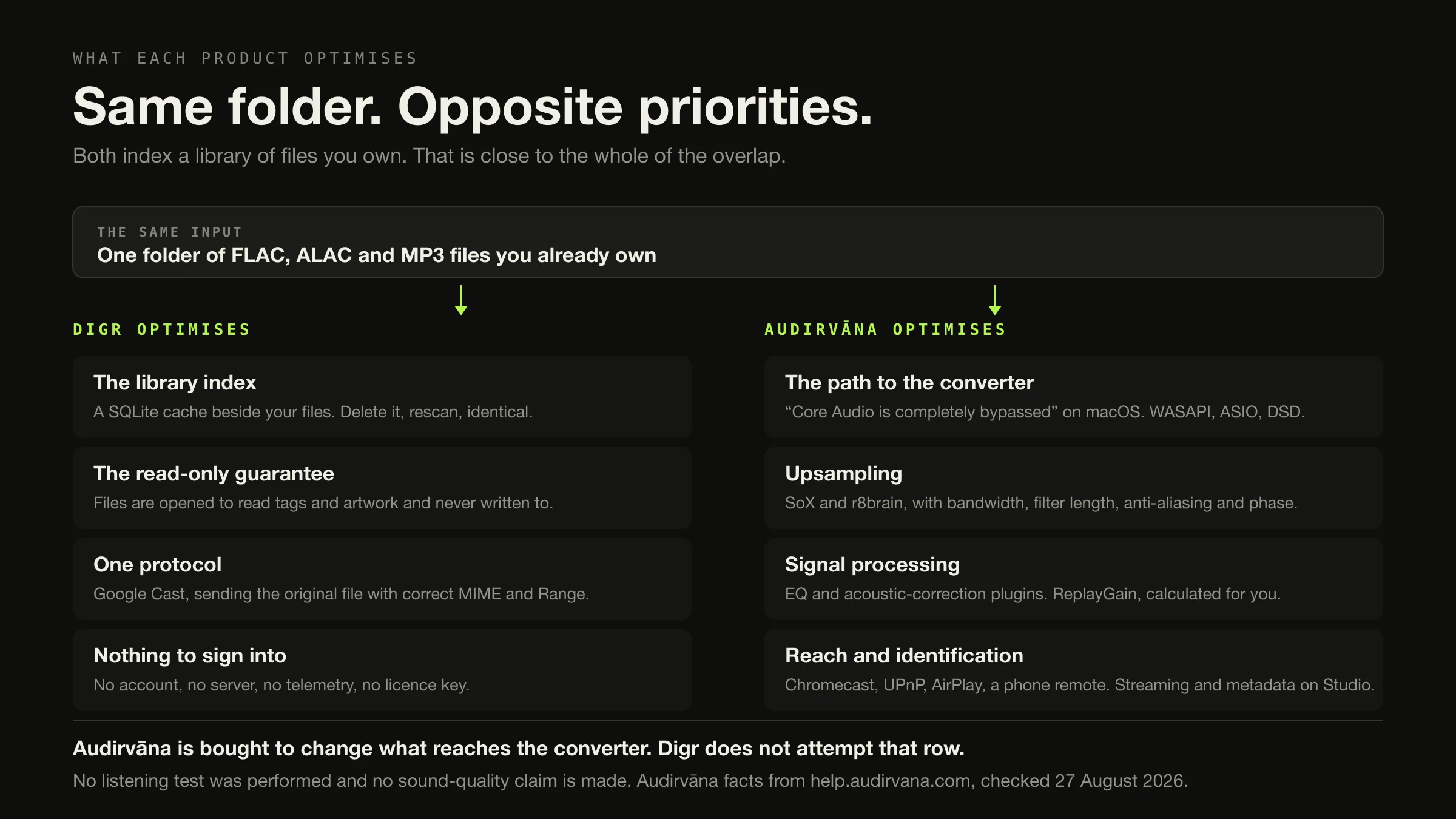
If you are buying software to change what reaches your converter, buy Audirvāna. Exclusive device control, upsampling with real filter parameters, acoustic-correction plugins, DSD, ReplayGain calculated for you — Digr has none of it and does not attempt any of it. That is not a gap in a plan; it is a different product.
If what you want is a library index that never writes to your files, no account, and one speaker on your own network, Digr does that for nothing — on an Apple silicon Mac running macOS 11 or later, as an alpha, with no gapless playback, no ReplayGain and no tag editing.
Both index a folder of files you already own. That is close to the whole of the overlap. Counted on what ships today, Audirvāna wins eighteen of twenty-eight rows and Digr wins two — the heaviest loss in this comparison set, and the rows are below.
Audirvāna’s editions, prices, platforms and output behaviour were checked on 27 August 2026. Every source is listed at the foot. No listening test was performed and no sound-quality claim is made anywhere on this page.
Two products, and the results still compare a third
Audirvāna sells Audirvāna Studio and Audirvāna Origin. Search this comparison and three of the visible results are filed under Audirvana Plus, which is not sold, and the first result is a subjective thread about whether Studio sounds like the older version.
Nothing on the first screen concerns Digr at all. This page has no measurable demand and makes no claim about search volume, difficulty or traffic. It exists to be a factual destination for a reader who arrived on the Audirvāna alternatives page and narrowed to one product, to be a source that something else can read instead of inventing, and to make Digr’s absences explicit rather than leaving them off a feature list.
It also exists in a register the current results do not use. The rest of this page contains no claim about how either product sounds.
What each edition includes, because the recommendation depends on it
From Audirvāna’s own Studio-versus-Origin documentation, read on 27 August 2026.
| Origin | Studio | |
|---|---|---|
| Exclusive Core Player | Yes | Yes |
| Library manager and browser | Yes, “500K+ tracks” | Yes, “500K+ tracks” |
| USB DAC and wireless connection | Yes | Yes |
| Playback console and processing toolkit | Yes | Yes |
| Free Remote app | Yes | Yes |
| Multiple installs, one simultaneous use | Yes | Yes |
| Signal Processing Suite | A paid option | Included |
| Streaming services, radio, podcasts | No | Yes |
| Online metadata recovery | No | Yes |
| Extended Qobuz trial | No | Yes, two months |
| Feature updates | Minimum one a year until 2027 | Regular |
| OS-compatibility updates | Minimum two years | Regular |
| Licence | One-time | Subscription |
Two of the four things people buy Audirvāna for are in both editions and two are Studio-only. Every recommendation on this page therefore says which edition it means, and where a row applies to only one of them the table says so.
What each product is built around
The output path, stage by stage, and what each product does at each stage
-
Stage 1 · the file
Reading it off the disk
Both do this from a folder you nominate — Audirvāna resyncs it on its own when the contents change, Digr rescans it when you ask. Digr indexes MP3, FLAC, ALAC, M4A, AAC, WAV and OGG into a SQLite index and only ever reads them. Audirvāna indexes a library it publishes a 500,000-track ceiling for, and its metadata editor writes changes back into the track file when you ask it to.
-
Stage 2 · decode
Turning the container into samples
Digr hands the file to the macOS media stack through Tauri's asset protocol — no bytes pass through JavaScript and nothing is converted, but the decoder is the system's. Audirvāna decodes in its own engine, which is what makes the stages below possible at all.
-
Stage 3 · processing
Changing the samples on purpose
The row Audirvāna is bought for
Audirvāna: upsampling with SoX or r8brain, with bandwidth as a percentage of the Nyquist frequency, maximum filter length, anti-aliasing depth and a choice of linear or minimum phase. Plus an integrated equaliser, EQ and acoustic-correction plugins, and the Signal Processing Suite. Plus ReplayGain, which it can calculate for your library in the background. Digr: a ten-band equaliser from 32 Hz to 16 kHz with six presets, applied to local playback. That is the whole list.
-
Stage 4 · the device
Handing samples to hardware
The other row Audirvāna is bought for
Audirvāna for USB on macOS: "Core Audio is completely bypassed." On Windows: WASAPI as the default, ASIO for native DSD, or Kernel Streaming, with DSD over PCM where required. Digr: whatever the system output is, with no exclusive mode, no device selection of its own and no DSD. Exclusive and bit-perfect local output is on Digr's roadmap as research, not as a planned feature.
-
Stage 5 · the network, instead
Sending the file somewhere else entirely
Both cast. Audirvāna lists Chromecast, UPnP, AirPlay, Bluetooth and HDMI, with gapless playback stated for the Chromecast path and grouping for multizone. Digr lists Google Cast, and sends the original file with correct MIME types and Range support — but its cast playback is not gapless, because each track is loaded onto the receiver separately.
-
Stage 6 · the room
Not assessed
What any of the above sounds like in your room, on your converter, with your ears. No listening test was carried out for this article and no DAC was connected. Every difference described above is a documented mechanism, and whether a mechanism is audible is a separate question that this page cannot answer. What actually happens between a file and a speaker is its own subject.
The comparison, on what ships today
Roadmap is excluded from every row. Where a row applies to one Audirvāna edition
only, it says which. Unverified means the fact was not stated on any page read.
| Dimension | Digr, today | Audirvāna, today | Row |
|---|---|---|---|
| Server required | No | No | Neither |
| Account required to play a local file | No | Not stated | Unverified |
| Telemetry | None | Not assessed | Unverified |
| The scanner writes to your files | Never | Not stated for scanning | Unverified |
| Tag editing | None at all | Yes — saved changes are “automatically written inside the track file” | Audirvāna |
| Published library ceiling | 25,000 tracks scroll without stutter | “500K+ tracks”, both editions | Audirvāna |
| Folder watching | Roots remembered; rescan when you ask | Automatic — “each change you make in this drive (add/remove/edit tracks) is automatically applied and will trigger a sync for the drive” | Audirvāna |
| Online metadata recovery | None. No service is contacted | Studio only | Audirvāna |
| Streaming services | None | Studio only — services, radio, podcasts | Audirvāna |
| Exclusive device control | No | Yes — “Core Audio is completely bypassed” on macOS; WASAPI, ASIO or Kernel Streaming on Windows | Audirvāna |
| DSD | No | Yes, DoP on both platforms; ASIO for native DSD on Windows | Audirvāna |
| Upsampling | No | Yes — SoX and r8brain, with bandwidth, filter length, anti-aliasing and phase controls | Audirvāna |
| Equaliser and DSP | Ten bands, 32 Hz–16 kHz, six presets, local playback only | Integrated equaliser; EQ and acoustic-correction plugins; Signal Processing Suite — included on Studio, a paid option on Origin | Audirvāna |
| ReplayGain / volume levelling | No | Yes, and Audirvāna can calculate it in the background | Audirvāna |
| Gapless, local output | No | Not stated on the pages read | Unverified |
| Gapless over Chromecast | No — each track is a fresh load | Yes — “the playback will be gapless” | Audirvāna |
| Google Cast | Yes, the original file, correct MIME, Range support | Yes, selectable from the device list | Neither |
| Cast grouping | A Cast speaker group is one target; Google synchronises it | Devices “can be grouped for multizone playback” | Neither |
| UPnP | No | Yes, with stated caveats — WAV by default, positioning and gapless may not work | Audirvāna |
| AirPlay | No | Listed, macOS only, with a stated Apple regression caveat | Audirvāna |
| Bluetooth and HDMI out | Not a product feature | Both listed as connection methods | Audirvāna |
| Remote control from a phone | No | Free Remote app, both editions | Audirvāna |
| NAS install | No | Synology DSM7 or QNAP QTS 4.2.6 | Audirvāna |
| Reads a library held on a NAS | No | Not separately stated | Unverified |
| External drive disconnected | Root marked offline, volume re-matched, paths rewritten, queue remapped | Not stated | Digr |
| Signal-path visibility | A diagnostics log you can export | “Playback console & processing toolkit”, both editions | Audirvāna |
| Price | Free | Studio $7.99/mo or $79.99/yr excl. VAT · Origin $149.99 once excl. VAT | Digr |
| Maturity | Alpha, 0.1.0-alpha.3 | Shipping | Audirvāna |
Audirvāna 18, Digr 2, neither 3, unverified 5. That count is published because the arithmetic should be visible rather than asserted, and it is not converted into a score. It is also not the point: the eighteen rows are not eighteen separate advantages but two — the output path and reach — expressed several ways each, and a reader who wants neither of those things is not badly served by the two rows Digr takes.
The entirety of Digr’s signal processing
Rather than describe it, here it is.
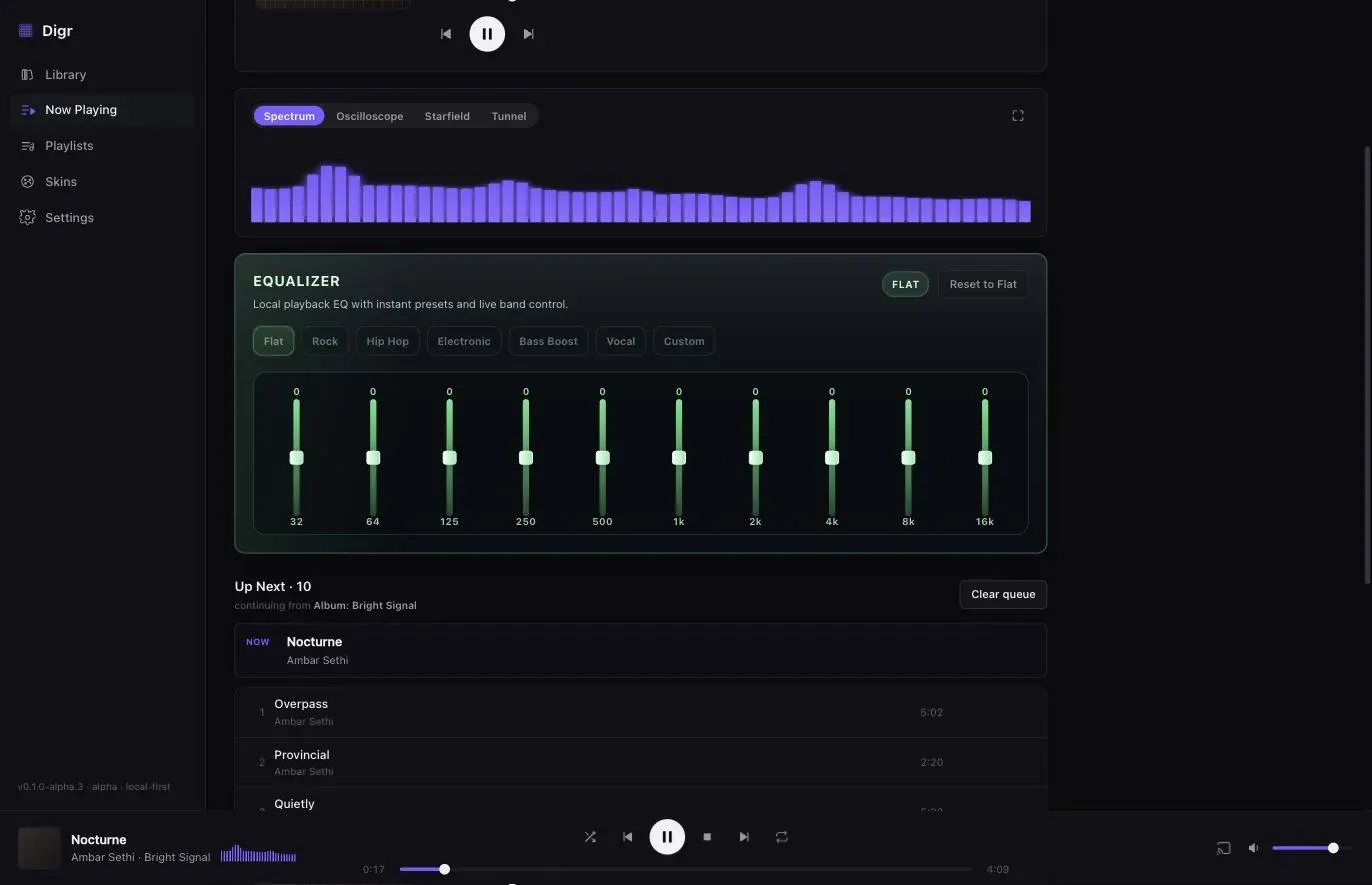
Worth adding what the caption cannot: this equaliser applies to Digr’s own local playback and nothing else. It is not a system-wide equaliser, and a system-wide equaliser is on Digr’s not-planned list — “processing every other application’s audio is an audio driver, not a music player”. While casting, the local engine is silenced and the receiver is the only output.
Where the two products actually stop competing
Three products, and the question that separates them
Choose it if you want streaming services and radio inside the same library as your files, or you want your files identified for you by online metadata recovery, or you want the Signal Processing Suite without buying it separately.
Cost $7.99 or €7.99 a month, or $79.99 or €79.99 a year, both excluding VAT in the vendor’s own words, with the final figure depending on your country across sixteen currencies.
Choose it if you want the output engineering and the library and none of the online services: the Exclusive Core Player, USB DAC handling, upsampling, ReplayGain, tag editing, the Remote app and UPnP — with Signal Processing as a paid option.
Cost $149.99 or €149.99 once, excluding VAT; $119.99 or €119.99 if you have owned any Audirvāna version before or subscribed to Studio.
Choose it if the answer to "what should the software do to the audio on the way out" is nothing. Index the folder, never write to it, play it, cast it to one speaker, and require no account.
Cost Nothing. Digr Pro is priced at £4.99 a month, £49.99 a year or £109.99 once and is not purchasable — no checkout on this site and no licence system in the application.
Several rooms, different music in each. Neither product does it. Audirvāna groups Chromecast devices for multizone, which is one stream to many speakers. Digr has one output at a time. Getting music into more than one room is a protocol question first.
Listening away from home. Neither reaches outside your network. That needs a server, and whether you want one is worth settling before choosing a player.
What travels between them
Better than most migrations in this category, with two genuine unknowns.
Your tags travel, and this is the good news. Audirvāna’s metadata editor writes into the file: “Any change you save will be automatically written inside the track file.” So the corrections you made in Audirvāna are in your files, and Digr — which reads tags with lofty and contacts no service — will read them. What is actually stored in a tag, and where is the background to why that matters.
Playlists are the real gap. Audirvāna’s support structure has an eleven-article Playlists section covering manual, smart, streaming and folder playlists, and no export article appears in it. That is not evidence that export is impossible; it is evidence that it is undocumented, and it is worth resolving before you commit. Digr has local playlists with ordered membership in SQLite, so there is somewhere for them to land if you can get them out.
Ratings and play counts are undocumented in both directions. Audirvāna’s metadata editor includes a Rating field, which means ratings may be in your files; neither vendor documents importing or exporting play counts. Absent evidence, assume they do not travel.
The Audirvāna database stays behind. Its own requirements mention storage “for the Audirvāna database file”; its portability is undocumented, and Digr documents no import of any external database.
You lose the Remote app, UPnP and AirPlay outright. Digr has no remote of any kind and speaks Google Cast only. Your Chromecast targets survive the move; your UPnP renderer and your AirPlay speaker do not.
You lose every processing setting, because there is nothing to migrate into.
Going the other way, from Digr to Audirvāna, the friction is close to nil: your files are untouched, your tags are in them, and Digr’s index is a cache you can delete. This is what a replaceable index is for.
What Digr has planned
Named once, undated, and counted in no row above.
Planned: truly gapless local playback, optional crossfade, ReplayGain, non-destructive loudness normalisation, a native decoder for containers macOS will not play, automatic sample-rate switching, advanced output-device selection and per-device playback preferences. Advanced DSP, loudness and dynamics analysis, and a Signal Chain view. Explicit, reviewable, undoable metadata and tag editing. AirPlay, DLNA and UPnP output, and OpenHome. A small web remote served on your own LAN. NAS and network-share recovery. Windows, then Linux.
Research, not planned: exclusive-mode local output and bit-perfect output verification. That is an open question with no commitment attached, and it is the row this comparison most obviously turns on — which is exactly why it is not allowed to count. Digr’s roadmap also states that it will not print a lossless badge over a chain whose final stage it cannot see, and this page respects that: no bit-perfect claim is made for Digr’s current local path, because it has not been verified as bit-perfect.
The published capability list carries the absences as well as the features.
How this comparison was made
- Nothing was installed, purchased, subscribed to or trialled, including Digr, whose rows come from its own shipping code and the capability, roadmap and pricing modules the site is built from.
- No listening test was performed. No DAC was connected. No measurement was taken. There is no claim on this page that either product sounds better, identical, cleaner, warmer or more transparent than the other, and no bit-perfect claim is made or repeated for either.
- Every difference described is a documented mechanism, in the vendor’s own words: exclusive output, the bypass of Core Audio, WASAPI, ASIO, DSD over PCM, two upsampling algorithms and four filter parameters, ReplayGain calculation, and a ten-band equaliser. Whether a mechanism is audible is outside what this article can know, and it says so rather than implying otherwise.
- Product names were verified before anything was written. Studio and Origin were both confirmed current on Audirvāna’s own documentation; the retired product still occupying the search results is named as retired.
- Every Audirvāna fact comes from Audirvāna.
audirvana.comreturned HTTP 403 to this environment, so the source ishelp.audirvana.com, which was reachable, and this article says so. No directory, roundup, review or forum was used for any capability, price, platform or requirement. - No community source was used at all, deliberately, on a query whose current results are made almost entirely of subjective sound-quality argument.
- Only shipping features are scored. Roadmap is in its own section and decides nothing.
- Undocumented is published as undocumented — playlist export, local gapless behaviour, the account requirement and rating portability are named as gaps rather than filled.
The short version
- Audirvāna if you want anything done to the audio on the way out: exclusive device control, upsampling, DSD, acoustic correction, ReplayGain. Also if you want tag editing, a phone remote, UPnP, AirPlay, a NAS install, Windows, Linux or an Intel Mac. Studio specifically if you want streaming services or online metadata recovery.
- Digr if the answer is that nothing should be done to the audio: one Apple silicon Mac, a folder that is only ever read, no account, and one Cast target. Free, and an alpha.
- Neither if you want several rooms with different music, or listening away from home.
- Audirvāna wins eighteen of twenty-eight rows and Digr two, with three to neither and five unverified. No score is derived from that.
- The current products are Studio and Origin. Studio is $7.99 a month or $79.99 a year; Origin is $149.99 once. Every figure excludes VAT in the vendor’s own words, and the final price depends on your country across sixteen currencies.
- Both products cast to Chromecast, and Audirvāna’s cast playback is gapless where Digr’s is not.
- Your tags travel, because Audirvāna writes them into the file. Check playlist export before you move — Audirvāna does not document it.
- No sound-quality claim appears anywhere on this page, deliberately.
Two narrower questions have their own pages: which player to use on a Mac and what the paid players in this category are charging for, with the licence arithmetic shown. If you have already decided to leave Audirvāna and want the full set of replacements, those are sorted by the job you use it for. And if the question is really about what a sample rate is, that is a fundamentals piece rather than a product one. If you are weighing Audirvāna against Roon rather than against Digr, that comparison is written straight, with Digr in neither table.
Sources
Every Audirvāna fact above comes from Audirvāna’s own support documentation, checked on 27 August 2026. No directory, roundup, review or forum was used as a source for any capability, price, platform or requirement. No sound-quality claim appears.
- Audirvāna — Studio compared with Origin — both editions include “Multiple installs (one simultaneous use)”, “Audio Quality: Exclusive Core Player”, a “Library manager & browser (>500K tracks)”, “USB DAC and wireless connection”, a “Playback console & processing toolkit” and the “Free Remote App”. Studio adds the Signal Processing Suite included where Origin has it as a paid option, “Online streaming content (Streaming service, radios, podcasts)”, “Online metadata recovery”, an “Extended 2 months free trial with Qobuz”, regular feature updates where Origin is a minimum of one a year until 2027, and OS-compatibility updates where Origin is a minimum of two years. Both product names confirmed current on this page
- Audirvāna — how can I connect my device — Chromecast: “Any Chromecast device can be selected from the device output list. Once you play on this device, the playback will be gapless”, and multiple devices can be grouped for multizone playback. UPnP: “By default, Audirvana only outputs audio from UPNP devices that support WAV format”, with stated caveats on track positioning and gapless. USB on macOS: “Core Audio is completely bypassed”, with DSD via the “DSD over PCM standard”. USB on Windows: WASAPI as the default on Windows 10 and 11, ASIO for DSD capability, and Kernel Streaming. AirPlay: macOS only, with a stated Apple regression since OS X 10.11. Plus Bluetooth and HDMI for multichannel
- Audirvāna — how to add or remove my music — adding a folder in “Local/Library settings”; “When a drive is synced with Audirvāna, each change you make in this drive (add/remove/edit tracks) is automatically applied and will trigger a sync for the drive.”; the optional “Rescan network folders at each start” setting. Checked 28 August 2026, and the reason the folder-watching row above is Audirvāna’s rather than neither’s
- Audirvāna — how can I edit metadata of my local library — “Any change you save will be automatically written inside the track file.” Album fields Title, Artist, Label, Release date and Rating; track fields Title, Grouping, Artist, Track #, Disc #, Composer, Genre, Year, BPM, Rating and Comment; extended classical fields Soloist, Conductor, Ensemble, Style and Period; album artwork and artist pictures editable; and “In case you select streaming content, you can only see the metadata”
- Audirvāna — how to calculate Replay Gain — “Volume leveling—or Replay Gain—allows you to listen to music at an even volume”; “The Replay Gain value sometimes needs to be added to your local library albums or tracks. But Audirvāna can calculate it for you in the background.”
- Audirvāna — how upsampling works — two built-in algorithms, “SOX -SoundExchange” and “R8 Brain”; oversampling filter parameters for bandwidth as a percentage of the Nyquist frequency, maximum filter length, anti-aliasing, and a choice between linear and minimum phase
- Audirvāna — Origin licence price — “$149.99 (without VAT) - €149.99”; “$119.99 (without VAT) - €119.99 if you bought any Audirvāna version in the past or subscribed to Audirvāna Studio”; a “$49.99 (without VAT) - €49.99” upgrade for original Origin owners from before June 2024; “The final price can be seen on your account and depends on your country and currency”, across sixteen currencies
- Audirvāna — Studio subscription price — “Audirvāna Studio Access: $79.99 (without VAT) or €79.99” yearly, marked “-17% vs Classic”, and “$7.99 (without VAT) or €7.99” monthly; “Audirvāna Studio Classic: $59.99 (without VAT) - €59.99 for the first year if you bought any Audirvāna version in the past”; and “$49.99 (without VAT) - €49.99 for the first year if you purchased Audirvāna Origin”
- Audirvāna — system requirements — macOS “10.15 or newer”, minimum processor “Intel i5 750”, recommended “M1”, 4 GB then 8 GB of RAM; Windows “10 64-bit 1809” minimum and “11 64-bit 22H2” recommended; Linux via a “Debian or RPM Package” on “Intel/AMD 64-bit or ARMv8”; NAS “Synology DSM7 or QNAP QTS 4.2.6” on “Intel/AMD 64-bit or ARMv8”; 1 GB of storage, and “more storage may be required to store Audirvāna database file”
- Audirvāna — support home — the current support structure, including an eleven-article Playlists section, a Metadata section, Audio Processing with upsampling and EQ or acoustic-correction articles, a Remote mobile app section and a Streaming & scrobbling section. No playlist-export article appears in the listing
audirvana.com,audirvana.com/price/andaudirvana.com/universal-hd-wireless-connection/all returned HTTP 403 to this environment on 27 August 2026. Every Audirvāna figure and capability above is taken fromhelp.audirvana.cominstead- Digr — features and current capabilities and Digr — system requirements — every Digr claim above, including the absence of exclusive output, upsampling, DSD, acoustic correction, ReplayGain, gapless, tag editing, a metadata service, UPnP, AirPlay, a remote and NAS support, and the absence of Windows, Linux and Intel Mac builds
- Digr — pricing — Digr Free, and Digr Pro priced but not purchasable: no checkout on this site and no licence system in the application
Common questions
Is Digr an alternative to Audirvāna Origin?
Only in the narrowest sense. Both are local-library players that need no server and no subscription, and both index a folder of files you own. Everything Audirvāna Origin is bought for — its Exclusive Core Player, USB DAC handling, upsampling, the Signal Processing option, ReplayGain, a phone remote and UPnP output — Digr does not have. Digr is also macOS-only on Apple silicon and currently an alpha, where Origin runs on macOS, Windows, Linux and a NAS. Checked on 27 August 2026.
Which is better for a USB DAC?
Audirvāna, on published mechanism. Its own documentation states that for USB output on macOS “Core Audio is completely bypassed”, and on Windows it offers WASAPI, ASIO and Kernel Streaming, with DSD over PCM in the relevant modes. Digr hands files to the macOS media stack and has no exclusive output, no device selection beyond the system default and no DSD. This is a statement about what each vendor documents, not about how either one sounds — no listening test was performed for this comparison.
Does Digr have exclusive-mode output?
No. Digr hands files to the system media stack through Tauri’s asset protocol: nothing is copied or converted on the way, but the system mixer is not bypassed and no converter is taken under exclusive control. Exclusive and bit-perfect local output sits on Digr’s roadmap under research rather than planned, which means it is an open question with no commitment attached. No bit-perfect claim is made for Digr’s current local path, because it has not been verified as bit-perfect.
Do both Digr and Audirvāna support Chromecast?
Yes, and this is a correction to earlier writing on this site. Audirvāna’s own documentation states that “Any Chromecast device can be selected from the device output list. Once you play on this device, the playback will be gapless”, and that multiple devices can be grouped for multizone playback. Digr also casts, sending the original file with correct MIME types and Range support — but Digr’s cast playback is not gapless, because each track is loaded onto the receiver separately. Checked on 27 August 2026.
Does Digr have gapless playback or ReplayGain?
Neither, today. Digr has no gapless playback locally, because playback is handed to the system media stack, and none while casting, because each track is loaded onto the Cast receiver as a fresh command. It has no ReplayGain support and no volume levelling of any kind. Audirvāna documents gapless playback over Chromecast and can calculate Replay Gain values for your library in the background. Both are undated items on Digr’s roadmap and neither counts in any comparison row.
Which is better if I only play local files?
Both are local-library players, so the question becomes what you want done to the files on the way out. If the answer is upsampling, exclusive device control, acoustic correction, ReplayGain, tag editing or a phone remote, it is Audirvāna. If the answer is nothing at all — index the folder, never write to it, play it, and send it to one Cast speaker — then Digr does that for free on an Apple silicon Mac, as an alpha, with no account.
- Digr vs Audirvana
- Audirvana
- Audirvana Origin
- Audirvana Studio
- exclusive mode
- upsampling
- ReplayGain
- Chromecast
- local-first
- comparison