Digr vs MusicBee
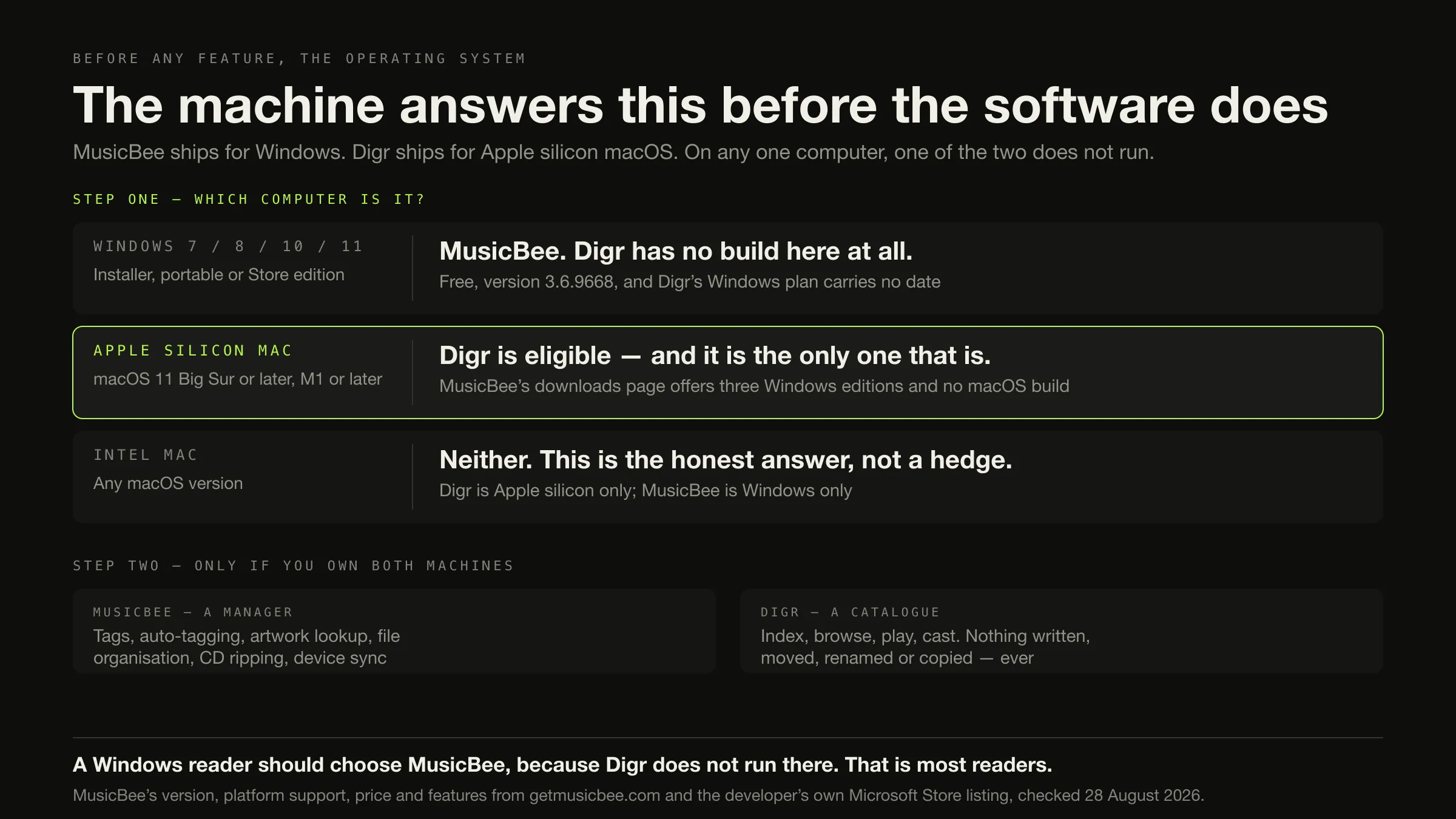
MusicBee is Windows. Digr is Apple silicon macOS. On any one computer only one of them runs, and that answers the question before a single feature is compared.
Start with the machine, because on most machines this is not a choice.
- Windows 7, 8, 10 or 11 — MusicBee. It is free, mature, still shipping, and Digr has no Windows build at all. This is where most readers stop.
- An Apple silicon Mac on macOS 11 or later — Digr is eligible, and MusicBee is not: its downloads page offers three Windows editions and nothing else.
- An Intel Mac — neither. Digr is Apple silicon only. That answer is honest rather than evasive, and the macOS shortlist has products that do run there.
Only if you own both machines does the feature comparison matter. It goes heavily MusicBee’s way: twenty-one of thirty-six rows on what ships today, against two for Digr, with six rows unverified because most of MusicBee’s documentation was unreachable.
MusicBee’s version, platform support, price and features were checked on 28
August 2026. Its home page, downloads page, feed and privacy statement answered
normally; getmusicbee.com/help/ and its add-ons directory returned HTTP 403, and
every row those pages would have filled is published as unread.
What could not be read, and what that costs this page
Named up front, because the gaps shape what the rest of the article is allowed to claim.
What is sourced: getmusicbee.com’s home page and downloads page, its RSS feed, its privacy statement, and the Microsoft Store listing published by MusicBee’s own developer — Steven Mayall, with getmusicbee.com given as the app website. That listing is vendor-authored copy on a distribution platform and is labelled as such throughout, exactly as this site labels an App Store listing.
What returned HTTP 403 to this environment: the FAQ, the release notes, the press page and the entire add-ons directory. Consequently the following are absent from this article rather than filled in: whether MusicBee supports Google Cast or UPnP; how its library database is designed and whether it is portable; which playlist formats it imports and exports; how it behaves when a drive is unplugged; which tag standards it writes and whether batch edits are reviewed; and the plugin catalogue itself.
This is an improvement rather than a complaint. When this cluster was planned, getmusicbee.com was unreachable altogether and MusicBee’s platform position had to be corroborated from the Store. The version, release date, price, format list and privacy position are now first-party.
The two designs, once the platform question is settled
MusicBee calls itself “The Ultimate Music Manager and Player”, and the noun order is the point. Its own home page: “MusicBee makes it easy to manage, find, and play music files on your computer. MusicBee also supports podcasts, web radio stations and SoundCloud integration”. Version 3.6.9668, released 20 June 2026, free with a voluntary donation, in development since 2008. Three editions, one of which runs from a USB stick.
Among the features on the developer’s own Store listing: “Powerful tagging tools”, “Supports automatic music file organization”, “Can automatically download missing album artwork and artist photos”, “Enables creation of automated playlists” and “Synchronizes playlists and tracks to Android devices”.
Digr is macOS 11 Big Sur or later, Apple silicon only, currently the alpha
0.1.0-alpha.3. It indexes any number of local folders into a SQLite index on
the same disk — a derived cache you can delete and rebuild — and only ever reads
your audio files. Nothing is copied, renamed, moved or re-tagged. No sign-in, no
telemetry, and playback works with the network switched off. Google Cast out over
multicast DNS, streaming the original file.
So the second question, after the machine, is who owns the shape of your music folder. MusicBee will take that job. Digr cannot take it under any setting.
The same folder, two ideas of what an application is for
MusicBee Tagging tools plus auto-tagging, and artwork and artist photos fetched automatically. The corrections end up in the files.
Digr Nothing. It will name the records that look wrong in its Library Health view and cannot change one of them.
MusicBee "Supports automatic music file organization" — it will lay the folder out for you, which is a feature and is why people choose it.
Digr Yours entirely. There is no write path, so the layout you built is the layout that stays. A layout that survives every tool is a real asset.
MusicBee CD ripping, podcasts, web radio and SoundCloud, in one application.
Digr None of it. Files arrive by some other means and Digr indexes them afterwards.
MusicBee Syncs playlists, tracks, podcasts and audiobooks to Android devices, converting formats on the fly for devices that cannot decode them.
Digr One Google Cast target on your own network. No device sync, no phone, no remote.
MusicBee Plugins, skins, a visualiser category and "some WinAmp plugins". You can make it into something else.
Digr Six bundled skins from a validated manifest that can never supply behaviour. You cannot, and that is deliberate rather than unfinished.
The comparison, on what ships today
Roadmap is excluded from every row. Not readable means the fact sits on a page
that returned HTTP 403 on the day, and no inference is drawn from that.
| Dimension | Digr, today | MusicBee, today | Row |
|---|---|---|---|
| Runs on Windows | No build | Yes — Windows 7, 8, 10, 11 | MusicBee |
| Runs on an Apple silicon Mac | Yes, macOS 11 or later | No macOS build offered | Digr |
| Runs on an Intel Mac | No | No | Neither |
| Price | Free | Free, voluntary donation | Neither |
| Source available | No — repository private | No — “All Rights Reserved” | Neither |
| Telemetry | None | None — collects no statistics, personal information or analytics | Neither. Both clean |
| Account | None | None; optional service credentials, stored locally | Neither |
| Tag editing | None at all | Yes — “Powerful tagging tools” | MusicBee |
| Auto-tagging | No | Yes | MusicBee |
| Artwork and artist-photo lookup | No | Yes, automatic | MusicBee |
| Your audio files are written to | Never — no write path exists | Yes, by design | Digr |
| Automatic file organisation | No | Yes | MusicBee |
| Automated playlists | No | Yes | MusicBee |
| Local playlists | Yes, ordered, in SQLite | Yes | Neither |
| Gapless playback | No | Yes | MusicBee |
| ReplayGain | No | Yes — “for automatic playback volume adjustment” | MusicBee |
| Volume normalising | No | Yes, plus logarithmic volume scaling | MusicBee |
| Equaliser | Ten bands, 32 Hz–16 kHz, six presets | 10 or 15 bands, plus DSP effects | MusicBee |
| Upmixing and resampling | No | Yes — stereo to 5.1, and resampling | MusicBee |
| Exclusive audio output | No | Yes — WASAPI and ASIO | MusicBee |
| Plugin architecture | None, and none planned | Yes, including some WinAmp plugins | MusicBee |
| Skins | Six bundled, live-switched, behaviour-free | Bundled and downloadable; users author and share them | MusicBee |
| CD ripping | No | Yes | MusicBee |
| Podcasts and web radio | No | Yes, both | MusicBee |
| Streaming-service integration | No, and not planned | Yes — SoundCloud named on its home page | MusicBee |
| Device sync | No | Yes — playlists, tracks, podcasts, two-way audiobooks, Android, format conversion on the fly | MusicBee |
| Google Cast | Yes — mDNS discovery, original file, Range support | Not readable | Unverified |
| AirPlay | No | Not readable | Unverified |
| UPnP or DLNA | No | Not readable — “various network transports” is all the privacy statement says | Unverified |
| Containers indexed | Seven | Eight named on the Store listing | MusicBee |
| Portable install | No | Yes — a portable edition that runs from a USB drive | MusicBee |
| Library index | SQLite on your disk, deletable, rebuildable | Not readable | Unverified |
| Large libraries | Virtualised rendering; 25,000 tracks scroll without paginating | “about 25-70 MB ram”, measured on 200 albums | Neither, on published evidence |
| External drive disconnected | Root marked offline, volume re-matched, paths rewritten, queue remapped | Not readable | Unverified |
| Library health views | Missing, duplicates, no artwork, unknown artist, unknown album — inspect-only | Not readable | Unverified |
| Maturity | Alpha, 0.1.0-alpha.3 | 3.6.9668, in development since 2008 | MusicBee |
MusicBee 21, Digr 2, neither 7, unverified 6. Published because the arithmetic should be visible — and it is the least useful count on this site, for a reason that has nothing to do with either product’s quality: on any given computer, one of the two does not run. A row total is a description of two designs, not advice. The advice was the numbered list at the top.
The row where both products win
One row deserves lifting out, because a local-first site quoting its own privacy position while ignoring a competitor’s would be exactly the kind of page this one is trying not to be.
MusicBee’s privacy statement, in full on the relevant point:
“‘MusicBee’ does not collect any statistics, personal information, or analytics from users.”
That is as clean as Digr’s position, and MusicBee has had thirteen more years in which to change its mind. Digr’s own claim — no sign-in, no cloud library, no telemetry, with the only outbound requests being casting on your own LAN and an update check you press yourself — is a design decision, not a differentiator against this competitor. What “local-first” is actually claiming is worth pinning down, and part of pinning it down is admitting when somebody else got there first.
MusicBee’s statement adds one qualification worth carrying across: “Some optional services such as Last.fm and X-Box music can log the songs played. Authentication credentials can be stored optionally on the user’s local device upon the user’s explicit request.” Digr has no such services to opt into.
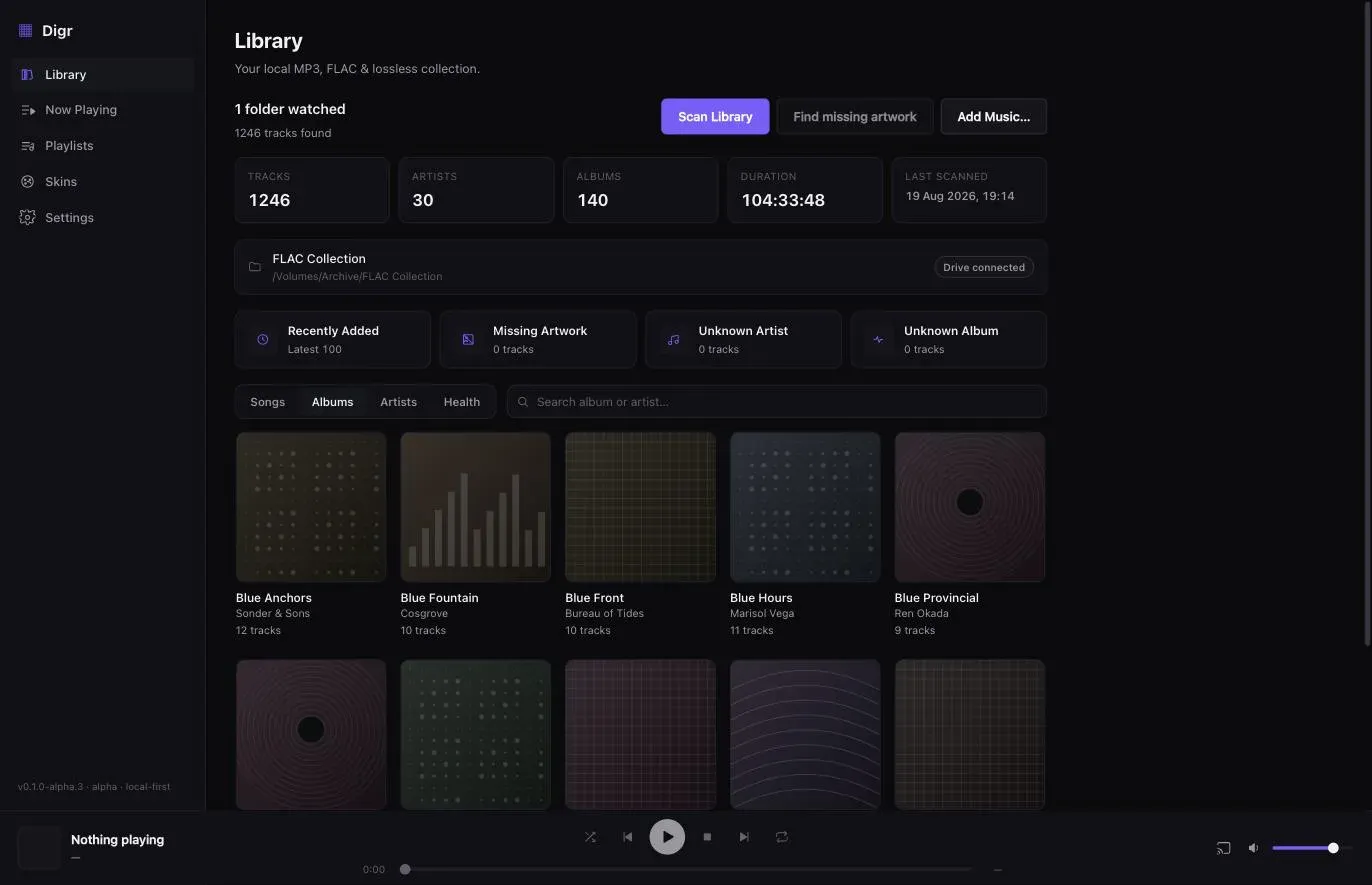
The sidebar is the argument
Not a claim, a screenshot. This is Digr’s library window.
Two Windows floors for the same application
Small, and it matters if the machine in question is old.
- The installer and portable editions are labelled “For Windows 7/ 8/ 10/ 11” on getmusicbee.com.
- The Windows Store edition carries a different requirement on the developer’s own listing: “OS: Windows 10 version 14393.0 or higher”, with “Available on: PC”.
If you are on Windows 7 or 8, the installer edition is the one that fits and the Store edition is not. Neither page explains the difference and this article does not speculate about it.
One stale paragraph on a live page
Recorded because it affects how much weight the home page can carry, and for no other reason.
getmusicbee.com still advertises Groove Music integration: “MusicBee has native support for Groove Music (formerly Xbox Music). You can stream directly from MusicBee or add to your existing playlist, get song recommendations from the vast Groove catalog.” Microsoft retired that service years ago.
No inference is drawn about whether the feature works, because that is a claim about software and this is an observation about a web page. It is here because a page that has not been fully revised is a page whose other claims deserve a date attached — which is why every MusicBee fact above carries one.
The lightweight-memory claim gets the same treatment. “One of the most lightweight player using about 25-70 MB ram” is footnoted on MusicBee’s own page as “Tested with MusicBee 3 with a library of 200 albums, sized around 3GB”. Two hundred albums is not a large library, so the figure is evidence about a small one. What large-library performance actually depends on is a separate question.
Migration, and why nobody actually does it
There is no meaningful migration path between these two, because the move is a change of computer.
Your files travel — copy the folder. Both index files in place.
Your tags travel, into Digr. MusicBee wrote them into the files, so Digr reads whatever is there. Nothing travels the other way, because Digr has never written anything. Which tag standard the value sits in depends on the container.
Your folder structure travels, whatever MusicBee’s organiser made of it.
Your artwork travels if it is embedded or beside the file. Anything held in a MusicBee-only store does not, and where that store lives could not be verified. Embedded and folder artwork behave differently and both are worth having.
Your playlists are unverified in one direction and impossible in the other. MusicBee’s export formats are on a page that returned 403. Digr documents no playlist import of any kind, so plan to rebuild by hand regardless of what MusicBee can produce.
Your ratings, play counts and automated playlists do not travel. Digr has no rating field, no play-count field and no rule-based playlists.
Your plugins and skins do not travel, and there is nothing to travel to. Digr has no plugin architecture, by design.
Your Android sync relationship does not travel. Digr does not manage devices.
Neither library database imports the other’s. Expect a full rescan, and an hour spent tidying the folder first is an hour well spent.
What Digr has planned
Named once, undated, and counted in no row above.
Planned: Windows, then Linux — no date, and this is precisely the row the roadmap is not allowed to touch. Also: metadata and tag editing with MusicBrainz and Cover Art Archive lookup; CD import with FLAC output; truly gapless local playback, crossfade, ReplayGain and non-destructive loudness normalisation; automatic filesystem watching and incremental rescanning; AirPlay, DLNA and UPnP output and OpenHome; Continuous Cast; a small web remote served on your own LAN, with Shortcuts and deep links; skins from your own disk; and a parametric equaliser with loudness analysis as planned Pro work.
An undated plan is not a platform you can install. If you are on Windows today, the roadmap is irrelevant to your decision and MusicBee is the answer.
Not planned at all: Intel Macs, iOS and iPadOS, and a cloud-first streaming library. The published capability list carries the absences as well as the features.
How this comparison was made
- Nothing was installed, downloaded or run. No Windows machine was used. Digr was not run for this article — its rows come from its own shipping code and the modules this site is built from.
- No listening test and no measurement. There is no sound-quality claim anywhere, and MusicBee’s own “Sound Quality Matters” heading is quoted as vendor framing rather than adopted as a finding.
- Every MusicBee fact comes from a MusicBee surface, with the date: four pages on getmusicbee.com, and the Microsoft Store listing published by MusicBee’s own developer — which is vendor-written copy on a distribution platform and is labelled that way rather than as documentation.
- The unreachable pages are named, and the rows they would have filled are left visibly empty. Six rows read “unverified” for that reason and not because the answer was inconvenient.
- No directory, roundup, review, wiki or forum supplied a product fact. The results for this query were three directory sites, a crowd-voted comparison and a page-six alternatives listing. None was used, so this article reports no user sentiment.
- Only shipping features are scored. Roadmap sits in its own section and decides nothing — including the Windows build, which is the row a reader would most want it to decide.
- A stale paragraph and a footnoted memory figure on MusicBee’s own page are reported as observations about the page, not as claims about the software.
- One inconsistency surfaced while writing and is recorded rather than papered over: Digr’s “watched folders” are remembered roots that rescan when you ask them to. Automatic filesystem watching is a roadmap item, so that row is not claimed here.
The short version
- On Windows, MusicBee. Free, mature, shipping since 2008, and Digr does not run there. No feature comparison is needed to reach that.
- On an Apple silicon Mac, Digr is the only one of the two that runs. MusicBee offers no macOS build.
- On an Intel Mac, neither.
- If you own both machines, MusicBee is the more capable application by a wide margin: tags, auto-tagging, artwork lookup, file organisation, automated playlists, gapless playback, ReplayGain, WASAPI and ASIO, CD ripping, podcasts, web radio, plugins, skins, Android sync and a portable install.
- Digr’s two wins are the Apple silicon build and the read-only guarantee. Both are real; neither is a feature you can list against twenty-one others.
- Both collect nothing. MusicBee’s privacy statement is as clean as Digr’s, and that row is a draw rather than a Digr talking point.
- Six rows are unverified because MusicBee’s documentation was unreachable — including casting, UPnP, playlist formats and drive handling. They are named rather than guessed.
- Nobody migrates between these two. They change computer, and then choose again.
If the real question is which local player to use rather than which of these two, the category is sorted by architecture before features here. If the job is metadata rather than playback, the managers and taggers are compared separately. And if you need the library to reach a room you are not in, the first thing to settle is whether you want a server at all.
Sources
Every MusicBee fact above comes from a MusicBee surface, checked on 28 August 2026. No directory, roundup, review, wiki, forum or competitor comparison page was used for any product fact. No sound-quality claim appears.
- MusicBee — “The Ultimate Music Manager and Player”; “MusicBee makes it easy to manage, find, and play music files on your computer. MusicBee also supports podcasts, web radio stations and SoundCloud integration”; “For Windows 7/ 8/ 10/ 11”; “Fine-tune the sound with the 10-band or 15-band Equalizer and DSP effects”; “Utilize high-end audio cards with WASAPI and ASIO support”; “Listen to music without interruption with gapless playback”; “Upmix stereo to 5.1 surround sound, or resample track to lower bitrate”; “Use logarithmic volume scaling or normalize volume streaming”; “MusicBee supports some WinAmp plugins”; skins, device sync, “last.fm, CD Ripping, Tagging tools”; the Groove Music paragraph; “about 25-70 MB ram” with its “200 albums” footnote; “Copyright © Steven Mayall 2008-2026, All Rights Reserved”; the voluntary PayPal donation
- MusicBee — Downloads — “MusicBee 3.6.9668”, “Released on June 20, 2026”, “For Windows 7/ 8/ 10/ 11”, and the Installer, Portable and Windows Store editions. No macOS build is offered
- MusicBee — update feed — “MusicBee v.3.6.9668 released”, June 20, 2026
- MusicBee — Privacy Statement — “‘MusicBee’ does not collect any statistics, personal information, or analytics from users.”; “‘MusicBee’ does allow for music files to be played via various network transports.”; the Last.fm and X-Box Music qualification
- MusicBee on the Microsoft Store, published by Steven Mayall with getmusicbee.com as the app website — apps.microsoft.com/detail/9p4clt2rj1rs — “Available on: PC”; “OS: Windows 10 version 14393.0 or higher”; a price of zero; and the feature list: “Plays a wide range of music formats: MP3, M4A, FLAC, Musepack, WavPack, Ogg, Opus, Tak.”, “Supports WASAPI and ASIO for high-end audio cards.”, “Gapless playback.”, “Supports ReplayGain for automatic playback volume adjustment.”, “Supports many WinAmp plugins to enhance your music.”, “Supports automatic music file organization.”, “Powerful tagging tools.”, “Can automatically download missing album artwork and artist photos.”, “Enables creation of automated playlists.”, “Synchronizes playlists and tracks to Android devices.” This is vendor-authored copy on a distribution platform rather than a page on getmusicbee.com, and is labelled that way throughout
getmusicbee.com/help/faq/,getmusicbee.com/help/release-note/,getmusicbee.com/help/press/andgetmusicbee.com/addons/all returned HTTP 403 to this environment on 28 August 2026. MusicBee’s Google Cast and UPnP/DLNA behaviour, its library-database design and portability, its playlist import and export formats, its removable-drive handling, the tag standards it writes, and its plugin catalogue are therefore not stated in this article- Digr — features and current capabilities and Digr — system requirements — every Digr claim above, including the absence of a Windows build, an Intel Mac build, tag editing, CD ripping, device sync, gapless playback, ReplayGain, a plugin architecture and streaming integration
- Digr — pricing — Digr Free, and Digr Pro priced but not purchasable: no checkout on this site and no licence system in the application
Common questions
Is MusicBee available on Mac?
Not from its own downloads page. On 28 August 2026 getmusicbee.com offered three editions of MusicBee 3.6.9668 — Installer, Portable and Windows Store — all labelled “For Windows 7/ 8/ 10/ 11”, and no macOS build of any kind. The developer’s own Microsoft Store listing gives “Available on: PC”. Running it on a Mac through an emulation or compatibility layer is not a vendor-supported configuration and this article makes no claim about it.
Is Digr available on Windows?
No. Digr’s release workflow builds a single artefact for Apple silicon macOS, and there is no Windows or Linux build to download. Windows and then Linux are on Digr’s roadmap, and both are undated — an undated plan is not a platform you can install, and it wins nothing in this comparison. If you are on Windows today, MusicBee is a mature free application and Digr is not an option at any setting.
Which one edits tags?
MusicBee. Its Microsoft Store listing names “Powerful tagging tools” and its own home page describes auto-tagging to “clean up your messy music library”, along with automatic download of missing album artwork and artist photos. Digr has no tag editor at all: it opens your audio files to read tags and artwork and never writes to them, so nothing is copied, renamed, moved or re-tagged. Tag editing is on Digr’s roadmap with no date and counts for nothing today.
Which one supports gapless playback?
MusicBee. Gapless playback is named on its own home page and on the developer’s Microsoft Store listing, alongside ReplayGain for automatic playback volume adjustment, WASAPI and ASIO output, and a 10-band or 15-band equaliser. Digr has no gapless playback locally or over Google Cast, and no ReplayGain support of any kind. Both are roadmap items with no date attached. Checked on 28 August 2026.
Which one is free, and is either open source?
Both are free, and neither is open source. MusicBee is freeware supported by a voluntary PayPal donation, and its site carries “Copyright © Steven Mayall 2008-2026, All Rights Reserved”. Digr Free costs nothing and its source repository is private. Digr Pro is priced at £4.99 a month, £49.99 a year or £109.99 once and is not purchasable — there is no checkout and no licence system in the application. There is no price comparison to draw between them.
Is Digr a MusicBee replacement?
No, in two separate senses. It does not run on the same operating system, and it does not do the same job: MusicBee edits tags, auto-tags, organises files on disk, rips CDs, syncs Android devices and hosts plugins, and Digr does none of those. Digr indexes folders you nominate, browses and plays them, casts to a Google Cast device, and never writes to an audio file. Somebody moving from Windows to an Apple silicon Mac is choosing again rather than migrating.
- Digr vs MusicBee
- MusicBee
- Windows music player
- Apple silicon
- tag editing
- CD ripping
- device sync
- gapless playback
- ReplayGain
- comparison