Digr vs Swinsian
The closest comparison in this set, and the one Digr loses. Swinsian takes twenty-three of thirty-three rows on what ships today. Digr takes five, and one of them is Google Cast.
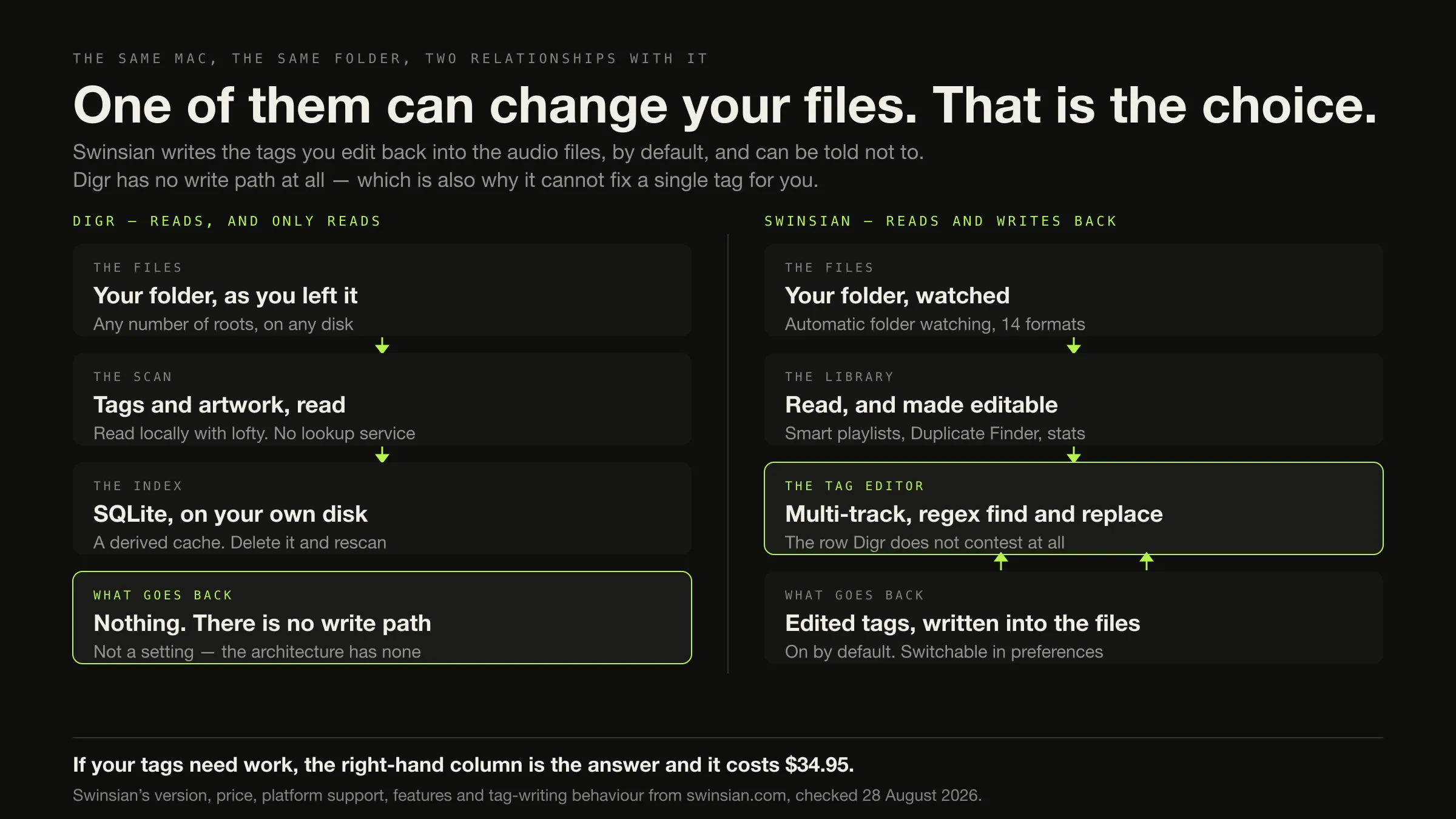
If your tags need work, buy Swinsian. It edits tags across many tracks at once, has regex find and replace, and writes the corrections back into your files — which is also why the work travels with you afterwards. Digr has no tag editor at all, in any form.
If you want an application that cannot write to your audio files, and you cast to a Chromecast or a Nest speaker, Digr fits. It is macOS 11 or later on Apple silicon, currently an alpha, free, with no gapless playback and no ReplayGain.
On an Intel Mac, only Swinsian runs. Digr has no Intel build.
Counted on what ships today, Swinsian wins twenty-three of thirty-three rows and Digr wins five. This is the closest like-for-like comparison on this site and the one Digr loses most comprehensively, which are the same fact.
Swinsian’s version, price, platform support, features and tag-writing behaviour were checked on 28 August 2026 against swinsian.com, which answered every request.
What you are actually choosing between
Both are single native macOS applications with their own library over a folder of files you own. No server, no account, no subscription, no cloud on either side. That makes this unusual: everywhere else in this comparison set the architecture does the deciding, and here it does not.
Swinsian describes itself as “a sophisticated music player for macOS with wide format support, folder watching, advanced tag editing and designed to be responsive even with the largest libraries.” Version 3.0.8, released 16 March 2026, from a changelog with eight releases in the preceding thirteen months. macOS 10.13 High Sierra or later, native on Apple silicon and Intel. $34.95 once, thirty-day trial.
Digr is macOS 11 Big Sur or later, Apple silicon only, currently the alpha
0.1.0-alpha.3. It indexes any number of local folders into a SQLite index on
the same disk — a derived cache you can delete and rebuild — and only ever reads
your audio files. No sign-in, no telemetry, and playback works with the network
switched off. It discovers Google Cast devices over multicast DNS and streams the
original file to them.
So the difference that remains is not where the library lives. It is what each application is permitted to do to the files, and how much of the job it does once it is there.
The row that decides it, in Swinsian’s own words
Swinsian’s FAQ answers this more clearly than most vendors answer anything:
“Yes, Swinsian will write any tags you edit back to the original files. You can customise this behaviour in the preferences if you would prefer to leave the files unchanged.”
Read that twice, because it is not the story a local-first site would be tempted to tell. Swinsian writes by default and offers an opt-out. It is not reckless with your collection; it is doing the job it was bought for, and it lets you stop it.
Digr’s position is different in kind rather than in degree. There is no preference, because there is no write path: scanning opens your files to read tags and artwork and nothing in the application can write to them. That is a genuine guarantee, and the price of it is exact — Digr cannot fix a single wrong album title for you, now or under any setting.
Fixing metadata is a real job with a real method, and an application that refuses to write is not a tool for it.
The comparison, on what ships today
Roadmap is excluded from every row. Not stated means the fact was not on any
page of swinsian.com read on the day, and no inference is drawn from its absence.
| Dimension | Digr, today | Swinsian, today | Row |
|---|---|---|---|
| Runs on an Intel Mac | No build at all | Yes, native | Swinsian |
| macOS floor | 11 Big Sur | 10.13 High Sierra | Swinsian |
| Price | Free | $34.95 once, thirty-day trial | Digr |
| Account | None | None — a licence key, no sign-in | Neither |
| Telemetry | None | Not stated for the application | Unverified |
| Tag editing | None at all | Multi-track, with regex find and replace | Swinsian |
| Your audio files are written to | Never — no write path exists | By default yes; switchable in preferences | Digr |
| Duplicate handling | Inspect-only list of likely duplicates | Duplicate Finder with flexible criteria, and removal | Swinsian |
| Folder watching | Roots remembered; rescan when you ask | Automatic folder watching | Swinsian |
| Smart playlists | No | Yes, with playlist-folder rules | Swinsian |
| Local playlists | Yes, ordered, in SQLite | Yes | Neither |
| Playlist import | None documented | Yes — M3U, and iTunes or Music XML | Swinsian |
| Library export | No | M3U, multiple playlists at once, optional file copies, iTunes-style XML | Swinsian |
| Gapless playback | No, locally or over Cast | Yes | Swinsian |
| ReplayGain | No | Reads ReplayGain and SoundCheck tags and adjusts volume | Swinsian |
| Equaliser | Ten bands, 32 Hz–16 kHz, six presets | 10 or 31 bands, over twenty presets | Swinsian |
| Sample rate and bit depth | Inherited from the system stack | Optionally matched to the source | Swinsian |
| Exclusive device access | No | Yes — “hog mode” | Swinsian |
| Cue sheets | No | Yes, separate files and embedded | Swinsian |
| Containers indexed | Seven | Fourteen, including WMA, APE, WavPack, DSF | Swinsian |
| Google Cast | Yes — mDNS discovery, original file, Range support | Not documented on any page checked | Digr |
| AirPlay | No | Yes, including HomePod, marked experimental in 3.0.4 | Swinsian |
| iPod sync | No | Classic models fully; iOS devices read-only, needing FUSE | Swinsian |
| CD ripping or burning | No | No — “does not currently support burning or ripping CDs” | Neither |
| Podcasts | No | Yes, with automatic downloading | Swinsian |
| Last.fm scrobbling | No | Yes | Swinsian |
| Music-app library import | No | Yes — playlists and play counts | Swinsian |
| Scripting | No | Yes — AppleScript | Swinsian |
| Desktop widget | No | Yes, customisable, with themes | Swinsian |
| Visualisers | Four, from a real Web Audio analyser | Not stated | Digr |
| Library health views | Missing, duplicates, no artwork, unknown artist, unknown album — one screen | Duplicate Finder and library stats, separately | Partial each |
| External drive disconnected | Root marked offline, volume re-matched, paths rewritten, queue remapped | Not stated | Digr |
| Maturity | Alpha, 0.1.0-alpha.3 | 3.0.8, shipping, actively released | Swinsian |
Swinsian 23, Digr 5, neither 3, partial 1, unverified 1. Published because the arithmetic should be visible rather than asserted, and with two honest notes attached.
First, two of Digr’s five wins are the same fact seen twice: it never writes to your files, which is why it also has no tag editor. Counting both is fair only if you read them as a pair.
Second, Swinsian’s twenty-three are not padding. Gapless playback, ReplayGain handling, playlist import, library export, an Intel build and thirteen years of releases are each a reason on their own.
What each one is genuinely good at
Pick the row that describes you, then read only that lane
-
Tags are the problem
Swinsian, and it is not a close call
Multi-track editing, regex find and replace, classical fields including Movement and Work, custom sort fields, and album-art fetching. Then the corrections are in the files, so every other application you ever use will see them. $34.95, thirty-day trial. Digr contributes nothing to this lane at any setting.
-
An Intel Mac
Swinsian, by default
Or macOS 10.13 to 10.15
Swinsian’s own version 3 post: “native support for Apple Silicon and Intel Macs”, with a 10.13 floor. Digr’s release workflow builds only for Apple silicon, and an Intel owner who downloads it has wasted the download. There is no configuration that changes this.
-
A Chromecast or Nest speaker
Digr, on published evidence
Digr discovers Cast devices over multicast DNS and streams the original file with correct MIME types and Range support. Cast is documented nowhere on swinsian.com. Swap the speaker for an AirPlay one and the lane reverses completely — Swinsian lists AirPlay and Digr has none.
-
Nothing may touch the files
Digr, and this is the whole reason it exists
Swinsian’s writing can be turned off in preferences, which is a setting somebody has to have set. Digr has no write path to turn off. If the requirement is a guarantee rather than a configuration, that is a real difference — and it comes at the cost of every row above.
-
Gapless, ReplayGain, cue sheets
Swinsian
Digr has none of the three. It has a ten-band equaliser and the macOS media stack, and that is the extent of its playback engineering. Gapless is a property of the decode path rather than a checkbox, which is why it is not a small gap to close.
-
A shelf of CDs
Neither. Both lose this row
Swinsian says so itself
“No, Swinsian does not currently support burning or ripping CDs.” Digr has no optical-drive support either. Ripping properly is a separate job with separate tools, and choosing between these two players will not get a single disc onto a disk.
Digr finds the problems Swinsian fixes
Not an argument, a screenshot. This is Digr’s Library Health view, and it is inspect-only by design.

The counters are worth having. A number that stops being zero is the first visible sign of an import that went wrong, and a large library goes bad quietly rather than loudly. But a health view that cannot act is a shortlist, and somebody still has to fix the list.
Money, and what the licence actually covers
Swinsian is $34.95, in US dollars, on swinsian.com, as a one-time payment per major version. The trial is thirty days. Payment goes through FastSpring. No tax treatment is stated on Swinsian’s own page or on the linked purchase page, and none is asserted here.
Three details that a price alone hides, all from Swinsian’s FAQ:
- The licence is per person, not per machine: “Swinsian licenses are per user rather than per computer, so you can use the same license on as many computers as you own.”
- Version 3 was a paid upgrade. “Swinsian 3 is a paid update so if you bought a Swinsian 2 licence and then upgraded the application will no longer be registered and you will start a new trial period.” Existing version 2 licensees get 40% off a new licence.
- Version 2 is still downloadable for OS X 10.8 or later and is no longer supported. Worth knowing before an older Mac finds that link.
Digr is free. Digr Pro is priced at £4.99 a month, £49.99 a year or £109.99 once and is not purchasable — there is no checkout on this site and no licence system in the application. No multi-year cost comparison is drawn against Swinsian, because one side of it cannot be bought. What the paid players in this category charge for is a separate question.
What travels, in each direction
The asymmetry here is the useful part.
Digr → Swinsian is cheap. Your files are a folder on a disk; Swinsian indexes it, reads whatever tags are in it, and can also import a Music-app library including playlists and play counts. Digr has written nothing, so there is nothing of Digr’s to carry across and nothing to lose. Cost: $34.95 and an afternoon.
Swinsian → Digr costs real things.
Your tag work travels, and this is worth saying plainly in Swinsian’s favour: because Swinsian wrote the corrections into the files, Digr reads them. Work done in a tag editor that writes to files is portable by construction. Which tag standard it lands in depends on the container.
Your playlists do not. Swinsian exports M3U and iTunes-style XML; Digr documents no playlist import of any kind. Export them anyway, as a record, and plan to rebuild by hand.
Your ratings and play counts do not. Digr has neither field, so there is nowhere for them to land.
Your smart playlists do not. Digr has no rule-based playlists, so the rules have no equivalent.
Your duplicate work survives if you acted on it, because you deleted files. Finding them again is possible but slower.
Neither library database imports the other’s. Expect a full rescan.
Your AirPlay speakers stop working, and your Cast targets start.
What Digr has planned
Named once, undated, and counted in no row above.
Planned: metadata and tag editing, with MusicBrainz lookup, confidence scoring, an ambiguous-release chooser, Cover Art Archive artwork and undoable changes. Truly gapless local playback, optional crossfade, ReplayGain support and non-destructive loudness normalisation. Automatic filesystem watching and incremental rescanning. AirPlay, DLNA and UPnP output, and OpenHome. Continuous Cast. CD import with FLAC output. Automatic sample-rate switching. Skins from your own disk. Windows, then Linux.
Every item on that list is a row Swinsian wins today. That is exactly why none of them counts here. A planned tag editor does not fix a tag, and a reader choosing software this month is choosing between what exists.
Not available today: Intel Macs. Not planned at all: iOS and iPadOS. The Mac build targets Apple silicon. A Universal build that also runs on Intel Macs exists and is planned for a later release, but it is not in a release yet — and like the tag editor, a planned build does not run on anybody’s Mac this month. The published capability list carries the absences as well as the features.
How this comparison was made
- Nothing was installed, purchased or trialled. Swinsian was not run. Digr was not run for this article — its rows come from its own shipping code and the modules this site is built from.
- No listening test and no measurement. There is no sound-quality claim anywhere on this page, in either direction.
- Every Swinsian fact comes from swinsian.com, with the date: the product page, the About page, the FAQ, the changelog, the version 3 release post and the privacy policy. All six answered normally on 28 August 2026.
- No directory, roundup, review or forum supplied a product fact. One forum thread and one converter-vendor review appeared in the results for this query and were deliberately not used, so this article reports no user sentiment.
- Only shipping features are scored. Roadmap sits in its own section and decides nothing — including tag editing, gapless playback and ReplayGain, which are precisely the rows a reader might hope would count.
- Absences are labelled as absences from the documentation, not from the software. Google Cast, telemetry and removable-drive behaviour are three rows where swinsian.com says nothing and this article says nothing either.
- The row count is published with the rows visible, and there is no score, no weighting and no rating.
- One inconsistency surfaced while writing and is recorded rather than papered over: Digr’s “watched folders” are remembered roots that rescan when you ask them to, not automatic filesystem watching. Two earlier comparisons on this site score that row as a plain yes. Here it is drawn accurately and lost.
The short version
- Tags? Swinsian. $34.95, thirty-day trial, and the corrections end up in your files where every other application can see them.
- Intel Mac? Swinsian. Digr has no Intel build available; a Universal build is planned for a later release.
- Chromecast or a Nest speaker? Digr. Cast is undocumented on swinsian.com. AirPlay speaker? Swinsian, and Digr has nothing.
- A guarantee that nothing writes to your files? Digr, because there is no write path rather than a preference. Everything above is the price.
- A CD shelf? Neither. Swinsian says so itself, and Digr has no optical support.
- Swinsian also wins gapless playback, ReplayGain and SoundCheck tag handling, smart playlists, playlist import, library export, cue sheets, iPod sync, podcasts, scrobbling, AppleScript, a wider equaliser, hog mode, twice the container list, and thirteen years of maintenance against one alpha.
- Digr also wins price, four visualisers and a documented answer for a drive that comes and goes.
- Both refuse to sell you a bad idea: neither has an account, a subscription, a server or a cloud library.
If what you actually want is the macOS field rather than these two, the shortlist is sorted by maintenance status and Apple-silicon nativeness. If the job is tags rather than playback, the dedicated taggers are compared separately. And if you want the category arranged by architecture before features, that is where this cluster starts.
Sources
Every Swinsian fact above comes from swinsian.com, checked on 28 August 2026 unless a different date is given. No directory, roundup, review, forum or competitor comparison page was used for any product fact. No sound-quality claim appears.
- Swinsian — “The Advanced Music Player for Mac”; “a sophisticated music player for macOS with wide format support, folder watching, advanced tag editing and designed to be responsive even with the largest libraries”; folder watching, Apple Music library import, album art fetching, global keyboard shortcuts, playback notifications, “Duplicate track finder”, Last.fm scrobbling, separate playlist windows, “Regex search”, “Find and replace tag editing, with regex support”, smart playlists, library stats, “Playback over AirPlay”, automatic podcast downloading and AppleScript control; “10 or 31 band Graphic Equalizer”; the fourteen-format list; “Gapless playback”; “Support for ReplayGain tags”; “Automatic changing of device sample rate”; cue-file support; “Buy for $34.95”
- Swinsian — About — “Swinsian requires a Mac running macOS 10.13 or later”
- Swinsian — FAQs — “Swinsian can be used on any Mac running macOS 10.13 or later”; Swinsian 2 “no longer supported” but still available for OS X 10.8 or later; “Swinsian licenses are per user rather than per computer”; “there is a 30 day free trial”; the paid-upgrade behaviour and the 40% discount; the fourteen-format list; “Yes, Swinsian will write any tags you edit back to the original files. You can customise this behaviour in the preferences if you would prefer to leave the files unchanged.”; Music-app and iTunes library import including playlists and play counts; iPod support and its FUSE requirement; “No, Swinsian does not currently support burning or ripping CDs.”
- Swinsian — Changelog — version 3.0.8, 16 March 2026, and the 3.0.x history, including “Adds support for playing over HomePod speaks using AirPlay (experimental)” in 3.0.4 and “Fixes toolbar button glitches on macOS 10.13” in 3.0.2
- Swinsian 3, 19 August 2025 — “The cost of a licence is $34.95”; the 40% upgrade discount; the classical tagging fields and custom sort fields; ReplayGain and SoundCheck tag recognition; over twenty equaliser presets; hog mode and sample-rate or bit-depth matching; custom start and stop times and per-track volume; playlist export with file copies and iTunes-style XML library export; “Swinsian now requires a minimum of macOS 10.13. There is native support for Apple Silicon and Intel Macs.”
- Swinsian — Privacy Policy — a website policy; FastSpring handles payment. It says nothing about the application’s own data collection, which is why the telemetry row above reads as unverified
- Digr — features and current capabilities and Digr — system requirements — every Digr claim above, including the absence of tag editing, gapless playback, ReplayGain, AirPlay, smart playlists, playlist import, ratings, play counts, CD support, podcasts, scrobbling and device sync, and the absence of an Intel Mac build
- Digr — pricing — Digr Free, and Digr Pro priced but not purchasable: no checkout on this site and no licence system in the application
Common questions
Is Digr better than Swinsian for tags?
No, and it is not close. Digr has no tag editor at all — it opens your audio files to read tags and artwork and never writes to them. Swinsian edits tags on multiple tracks at once and includes regex-compatible find and replace, and its own FAQ says it “will write any tags you edit back to the original files”, with a preference to turn that off. If fixing metadata is why you are reading this, buy Swinsian: it is $34.95 once with a thirty-day trial. Checked on 28 August 2026.
Does Swinsian work on Intel Macs?
Yes. Swinsian’s own release post for version 3, dated 19 August 2025, states: “Swinsian now requires a minimum of macOS 10.13. There is native support for Apple Silicon and Intel Macs.” Its About page and FAQ both give macOS 10.13 or later. Digr has no Intel build you can install — the release workflow targets Apple silicon only. A Universal build that also runs on Intel Macs has been built and is planned for a later release, but it is not available today. On an Intel Mac this comparison has one answer today and it is Swinsian.
Which one supports Chromecast?
Digr. It discovers Google Cast devices over multicast DNS with nothing to configure and streams the original file to them with correct MIME types and Range support, with the Mac serving the file and staying awake. Google Cast and Chromecast appear nowhere on swinsian.com — not on the product page, the About page, the FAQ or any changelog entry read on 28 August 2026 — so this article says Cast is undocumented there rather than claiming it is absent from the software. Swinsian does list AirPlay, which Digr does not have.
Which one changes my music files?
Swinsian, by default, and only when you edit something. Its FAQ: “Yes, Swinsian will write any tags you edit back to the original files. You can customise this behaviour in the preferences if you would prefer to leave the files unchanged.” Digr never writes to an audio file under any setting — nothing is copied, renamed, moved or re-tagged, and removing it leaves the collection byte for byte as it was. Neither behaviour is a fault; they are two different answers to who owns the contents of your files.
Can either one rip a CD collection?
Neither. Swinsian’s FAQ is explicit: “No, Swinsian does not currently support burning or ripping CDs.” Digr has no optical-drive support either, and CD import is a roadmap item with no date. This is the row both products lose together, and if a disc shelf is the reason you are choosing software, the answer is a dedicated ripper rather than either of these players. Checked on 28 August 2026.
Can I move playlists between Digr and Swinsian?
In one direction at best. Swinsian exports playlists as M3U, can export the files that make up a playlist alongside it, and can export the whole library as an iTunes-style XML file. Digr documents no playlist import of any kind, so a Swinsian export is a record rather than a transfer and you should expect to rebuild playlists by hand. Ratings and play counts do not travel either: Digr has neither field.
- Digr vs Swinsian
- Swinsian
- Mac music player
- tag editing
- gapless playback
- ReplayGain
- Google Cast
- Apple silicon
- Intel Mac
- comparison