Digr vs foobar2000
foobar2000’s own component directory listed 215 components for Windows and six for macOS on 28 August 2026. Four of the six decode game music. That is the comparison.
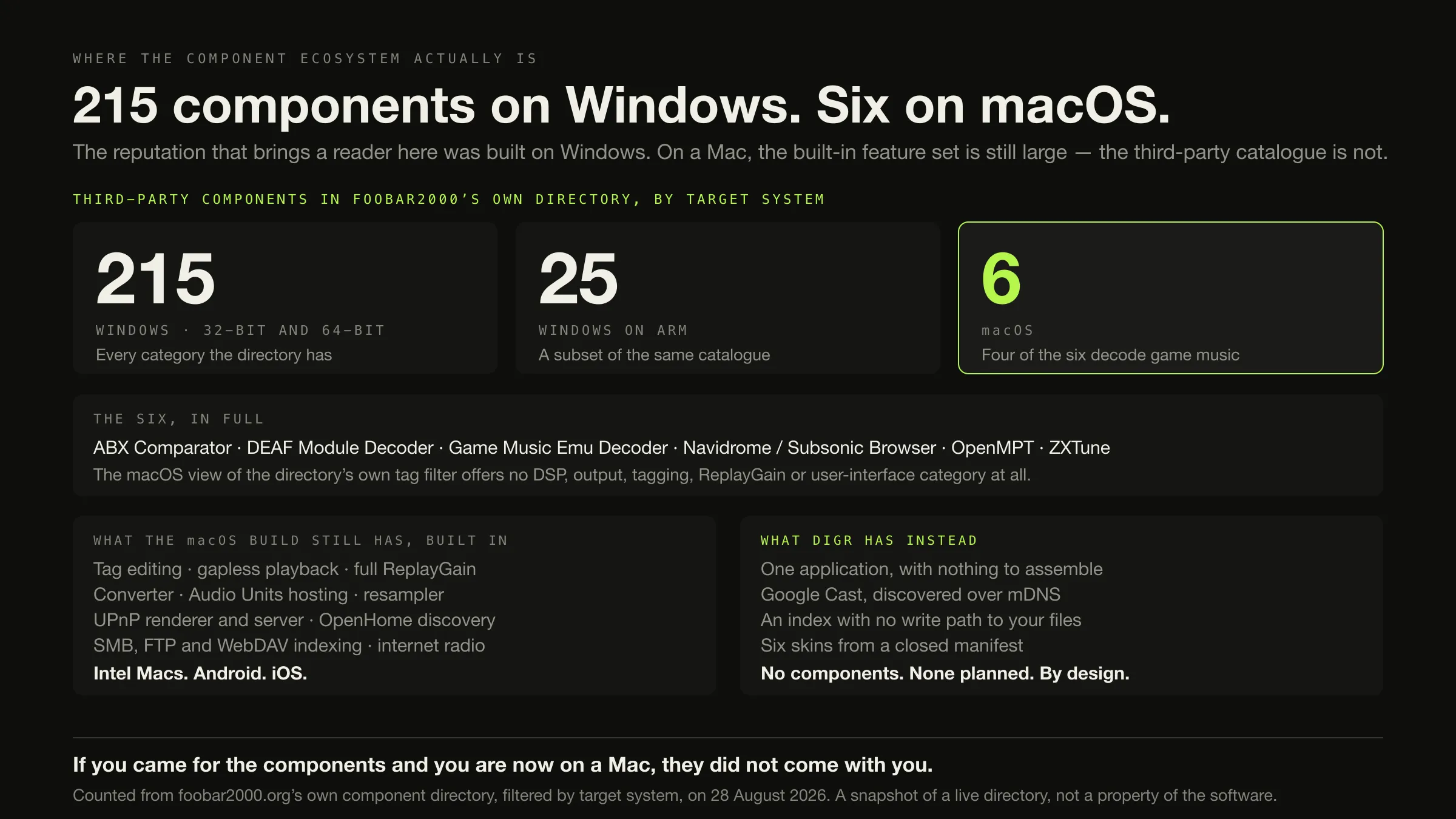
215 components for Windows. Six for macOS. Those are counts from foobar2000’s own component directory, filtered by target system on 28 August 2026, and four of the six macOS components decode chiptune formats.
That number is why this page exists, and it is not the whole answer.
If you want to edit tags, convert files, scan ReplayGain, play gaplessly, index a NAS over SMB, output to a UPnP or OpenHome renderer, or use an Intel Mac, Android phone or iPhone — foobar2000, and it is not close. All of that is built in, on macOS, without a single component installed.
If you cast to a Chromecast or a Nest speaker, or you want an application with no write path to your audio files, Digr fits. It is macOS 11 or later on Apple silicon, an alpha, free, with no components and none planned.
Counted on the macOS builds only, foobar2000 wins twenty-two of thirty-six rows and Digr wins three.
Why the component count is the interesting fact
foobar2000 arrives in most conversations as “the configurable one” — a small core plus twenty-plus years of third-party components, from which you build the player you want. That reputation is earned. It is also, on the evidence of the vendor’s own directory, almost entirely a Windows reputation.
Counts read from the listing table at foobar2000.org/components, filtered by
target system, on 28 August 2026:
| Target system | Components listed |
|---|---|
| Windows, 32-bit and 64-bit | 215 |
| Windows on ARM | 25 |
| macOS | 6 |
And the six, in full, with the directory’s own tags and dates:
| Component | What the directory tags it | Last updated |
|---|---|---|
| ABX Comparator 2.2.3 | ABX, comparator, utility | 2025-09-19 |
| DEAF Module Decoder 0.5 | decoder, game music | 2023-06-14 |
| Game Music Emu Decoder 0.5.4 | decoder, game music, Nintendo | 2024-03-08 |
| Navidrome / Subsonic Browser 1.11.0 | Browser, media library viewer, network | 2026-08-26 |
| OpenMPT Module Decoder 0.8.3 | Amiga, decoder, demoscene, game music | 2025-09-23 |
| ZXTune Player 0.0.10 | decoder, game music, and eleven platform tags | 2026-04-23 |
The directory corroborates this a second way, which is what makes it evidence
rather than an anecdote. Its own tag filter changes shape depending on the
platform you select. On the Windows view the filter offers DSP, output,
tagging, ReplayGain, user interface, Columns UI panel, Default UI element, visualization, converter, resampler, media library viewer,
remote control, streaming, playlist, lyrics, search, SQL and
synthesizer. On the macOS view it offers exactly six options: all, decoder,
game music, Amiga, Nintendo and untagged. Filter the macOS view to DSP
and the page answers “No components match the criteria.”
Three things this finding is not. It is not a claim about software quality — foobar2000’s built-in macOS feature set is large, and most of this article is about how large. It is not a claim about components distributed outside the official directory. And it is not permanent: the Navidrome browser in that list was updated two days before the count, so the directory is alive. It is a snapshot of one page on one day, which is exactly how it is presented.
What the two designs actually are
foobar2000 is “an advanced freeware audio player” — its words. Freeware, not open source: the licence page reads “All rights reserved” and permits redistribution only of unmodified installers. Version 2.25.10 on both Windows and macOS, released 26 June 2026, with mobile builds at 2.25.8 and a 2.26 preview in circulation. macOS 11 Big Sur or newer, Intel or Apple silicon. And, on its overview: “No strings attached, no telemetry, no data collection.”
Digr is macOS 11 Big Sur or later, Apple silicon only, the alpha
0.1.0-alpha.3. It indexes local folders into a SQLite index on the same disk and
only ever reads your audio files. No account, no telemetry, offline playback,
Google Cast out over multicast DNS.
The architectural difference is not client-versus-server, as it is elsewhere in this comparison set. Both are one application over one folder. The difference is whether the application can be extended by somebody other than its author.
foobar2000 can: an “open component architecture allowing third-party developers to extend functionality of the player”. Digr cannot, and this is a rule rather than a gap. A Digr skin is a validated manifest of colour tokens plus a closed set of presentation choices — artwork framing, corner radius, shadow weight, layout density, a typography pack — and a skin that asks for anything outside that set is rejected by the validator rather than partially honoured. Presentation is selectable; behaviour is not, and no future version changes that. The rules Digr is built to are published, including this one.
Neither position is obviously better. One gives you a player that becomes whatever you build; the other gives you a player that is the same on every machine and cannot be broken by an add-on. Describing that as simple-versus-powerful would be flattering the wrong side, because on macOS foobar2000 is both more capable and arrives working.
The comparison, on what ships today
This table compares Digr against foobar2000 for macOS, not against
foobar2000 on Windows, because that is the choice a Mac reader is making. Roadmap
is excluded from every row. Not documented means the fact was not on any page of
foobar2000.org read on the day.
| Dimension | Digr, today | foobar2000 for macOS, today | Row |
|---|---|---|---|
| macOS requirement | macOS 11 Big Sur or later | macOS 11 Big Sur or newer | Neither. Identical |
| Runs on an Intel Mac | No build | Yes | foobar2000 |
| Other platforms | None | Windows including ARM, Android 7+, iOS 12.1+ | foobar2000 |
| Price | Free | Free | Neither |
| Source available | No — repository private | No — freeware, “All rights reserved” | Neither |
| Telemetry | None | None — “no telemetry, no data collection” | Neither. Both clean |
| Account | None | None | Neither |
| Tag editing | None at all | Yes — “Advanced tagging capabilities”, Properties dialog | foobar2000 |
| Your audio files are written to | Never — no write path exists | Yes — tags, and File Operations renames and moves | Digr |
| Renaming and moving files | No | Yes — File Operations | foobar2000 |
| Format conversion | No | Yes — the Converter, “transcoding all supported audio formats” | foobar2000 |
| Gapless playback | No, locally or over Cast | Yes, locally and over UPnP | foobar2000 |
| ReplayGain | No | Yes — “Full ReplayGain support”, with a scan in Properties | foobar2000 |
| DSP and plugin hosting | Ten-band equaliser, six presets, local playback only | Built-in DSP effects, Audio Units hosting, resampler, Advanced Limiter | foobar2000 |
| CD ripping | No | No — the formats page reads “Audio CD (Windows only)” | Neither |
| Containers decoded | Six of seven indexed play locally | Twenty-plus natively, plus FFmpeg as built-in functionality | foobar2000 |
| Internet radio | No | Yes, with Radio Browser integration | foobar2000 |
| Library index | SQLite on your disk, deletable, rebuildable | Media Library over local folders | Neither |
| Network shares | None | Native FTP, SMB and WebDAV indexing, read-only | foobar2000 |
| Folder watching | Roots remembered; rescan when you ask | Automatic | foobar2000 |
| Google Cast | Yes — mDNS discovery, original file, Range support | Not documented on any page checked | Digr |
| UPnP output | No | Yes — built-in media renderer, client and server | foobar2000 |
| OpenHome | No | Yes — OpenHome devices discovered as output devices | foobar2000 |
| AirPlay | No | Not documented | Unverified |
| Player-to-player streaming | No | Yes — another instance appears as an output device | foobar2000 |
| Remote control | No | Yes — UPnP remote control, driven by a control app | foobar2000 |
| A phone in your pocket | No, and not planned | Yes — first-party Android and iOS builds | foobar2000 |
| Local playlists | Yes, ordered, in SQLite | Yes, FPL format | Neither |
| Playlist import | None documented | Yes — M3U handling, and FPL between instances | foobar2000 |
| Playback statistics | No | Yes — the Playback Statistics component ships in the macOS build | foobar2000 |
| Interface customisation | Six bundled skins from a closed manifest | Layout editing, named for both Windows and macOS | foobar2000 |
| Third-party components | None, and none planned | Six listed for macOS, against 215 for Windows | foobar2000 |
| Visualisers | Four, from a real Web Audio analyser | Named on the Windows change log; not enumerated for macOS | Unverified |
| External drive disconnected | Root marked offline, volume re-matched, paths rewritten, queue remapped | Not documented | Digr |
| Library health views | Missing, duplicates, no artwork, unknown artist, unknown album — one screen | Verifier and Decoding Speed Test | Different scope |
| Maturity | Alpha, 0.1.0-alpha.3 | 2.25.10, released 26 June 2026, project since 2002 | foobar2000 |
foobar2000 22, Digr 3, neither 8, unverified 2, different scope 1. Published with the rows visible, and worth reading with one thing in mind: Digr’s three wins are one protocol, one architectural guarantee and one piece of documentation. None of them is a feature you can set against twenty-two others, and the article does not pretend otherwise.
The identical-macOS-requirement row deserves a note too. Both products floor at macOS 11 Big Sur. The difference is entirely on the other side of it: foobar2000 runs on Intel hardware and Digr does not.
Where the two philosophies actually bite
The configuration axis, and what sits at each end of it
-
Out of the box
Both are usable immediately, and foobar2000 does more
This is the finding that upsets the usual framing. A fresh foobar2000 install on a Mac already edits tags, converts files, scans ReplayGain, plays gaplessly, indexes an SMB share and outputs to a UPnP renderer. A fresh Digr install indexes a folder, browses it, plays it and casts. “Arrives finished” is not a distinction between them.
-
One step further
foobar2000 on Windows, and nowhere else
215 components against six
If the answer to “can it do X” has ever been “yes, with a component”, check which platform that component targets. On macOS the directory’s DSP, output, tagging, ReplayGain and user-interface categories are empty. Digr’s answer to the same question is a flat no on every platform, which at least does not depend on where you are standing.
-
The one thing you cannot configure
Digr, and it is the reason to pick it
foobar2000 writes tags and renames files, which is what its users want from it. Digr has no write path — not a preference, an absence. If the requirement is a guarantee about your files rather than a setting somebody has to remember, that is a real difference, and everything above is its price.
-
Getting to a speaker
A clean swap, and the shelf decides
Digr speaks Google Cast and nothing else. foobar2000 speaks UPnP and OpenHome and, on its own pages, not Cast. These are genuinely different protocols rather than brands of the same thing, so this row is settled by the hardware you already own.
-
A NAS, or a phone
foobar2000, outright
Native SMB, FTP and WebDAV indexing on one side; no network-share support at all on the other. First-party Android and iOS builds on one side; no mobile application on the other, and iOS is on Digr’s permanent not-planned list rather than its roadmap.
-
A shelf of CDs on a Mac
Neither. Both lose this row
foobar2000’s formats page says so
“Audio CD (Windows only)”. Digr has no optical-drive support either. Ripping properly is a separate job with separate tools, and neither of these two will get a disc onto a disk on macOS.
Two more places the platforms diverge
Both from foobar2000’s own pages, and both easy to miss if you read the overview without reading the footnotes.
Plugin hosting is not the same plugin library. The overview: “can load VST effects via VST adapter on Windows, Audio Units on macOS.” Those are two different ecosystems. A Windows user’s VST chain does not come across, and a Mac user gets Audio Units instead — which is the right answer on macOS, and is not the same answer.
The FAQ is Windows-shaped. foobar2000’s own troubleshooting content talks about component DLLs, rerunning the Windows installer, “Preferences → Shell Integration” and, in one place, Windows XP. A Mac reader working through a problem from that page will find advice that does not apply to their build. That is a documentation consequence rather than a software fault, and it is here because it affects what a new Mac user’s first hour looks like.
The part of Digr that cannot be extended
Not a claim, a screenshot. These are the six skins Digr ships with.
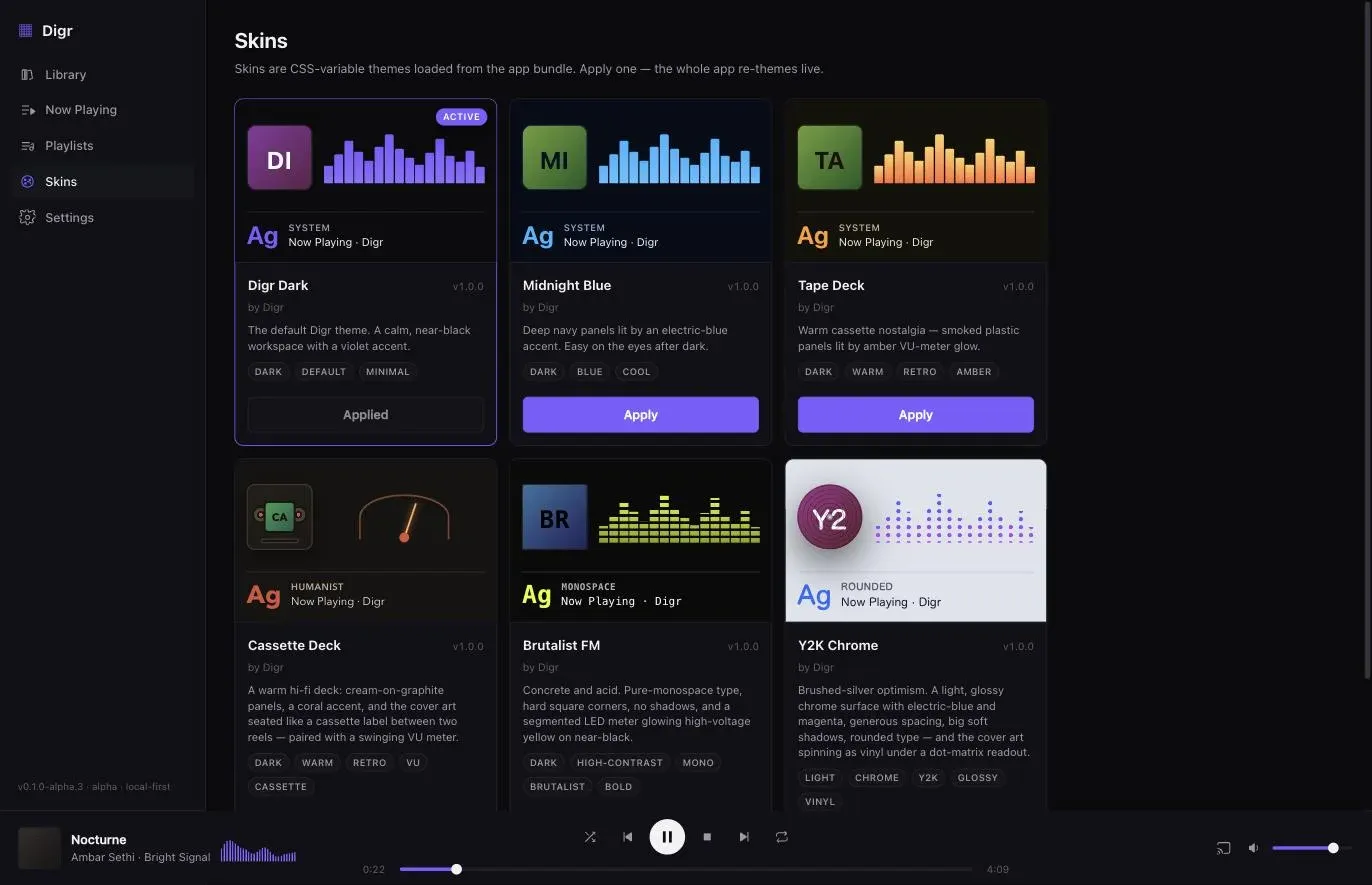
Loading skins from your own disk is a planned Free item. A plugin interface is not on the roadmap at all, in any horizon.
Money, briefly, because there is nothing to compare
Both are free. foobar2000 is freeware with no strings attached and no upsell of any kind. Digr Free costs nothing, and Digr Pro is priced at £4.99 a month, £49.99 a year or £109.99 once and is not purchasable — no checkout on this site and no licence system in the application.
The one distinction worth stating is that neither is open source, which is often assumed of both. foobar2000’s licence reserves all rights and permits only unmodified installers to be redistributed; Digr’s source repository is private. Free, freeware, free-and-open-source and free-tier are four different things.
What travels, and what has nowhere to go
Your files travel. Both index a folder in place, and neither needs it moved.
Your tags travel, into Digr. foobar2000 wrote them into the files, so Digr reads them. Which tag standard they landed in depends on the container.
Your ReplayGain tags survive and are ignored. They stay in the files; Digr does nothing with them. What those values are and how they are meant to be used is worth knowing before you discard the player that wrote them.
Your artwork travels if it is embedded or beside the file, including anything foobar2000 embedded — HEIC and JXL included.
Your playlists do not, practically. foobar2000 uses FPL and handles M3U; Digr documents no playlist import of any kind. Export them as a record and plan to rebuild.
Your playback statistics do not. Digr has no play-count or rating field.
Your components and your layout do not, and there is nothing to migrate to. For anybody who has spent years assembling a foobar2000 configuration, this is the whole cost: the configuration is the product, and Digr has no interface that could accept it.
Your NAS library does not come across at all. Digr has no SMB, FTP or WebDAV support. Network share and NAS recovery is a roadmap item.
Your phone stops. Digr has no mobile build and none is planned.
What Digr has planned
Named once, undated, and counted in no row above.
Planned: truly gapless local playback, optional crossfade, ReplayGain support and non-destructive loudness normalisation; a native decoder for containers macOS will not play; automatic sample-rate switching; metadata and tag editing with MusicBrainz and Cover Art Archive lookup; AirPlay, DLNA and UPnP output, and OpenHome; Continuous Cast; network share and NAS recovery; automatic filesystem watching; a small web remote served on your own LAN, with Shortcuts and deep links; skins from your own disk; and, as planned Pro work, a parametric equaliser, loudness analysis and Signal Chain. Windows, then Linux.
Nearly every item there is a row foobar2000 wins today, which is precisely why none of them counts.
Not on the roadmap in any form: a plugin or component interface. A Digr Receiver and a companion mobile remote are research questions rather than plans, and iOS and iPadOS are on the permanent not-planned list — “a phone app is a different product with a different architecture”. The published capability list carries the absences as well as the features.
How this comparison was made
- Nothing was installed or run — not on macOS, not on Windows, not on a phone. Digr was not run for this article; its rows come from its own shipping code and the modules this site is built from.
- No listening test and no measurement. There is no sound-quality claim anywhere.
- Every foobar2000 fact comes from foobar2000.org, with the date: the overview, the macOS page, the Windows page, the Android and iOS pages, the audio-formats page, the licence, the version 2.25 release notes, both change logs, the FAQ and the component directory. All answered normally on 28 August 2026.
- The component counts were read from the vendor’s own directory, filtered by target system, by counting rows in its listing table. They are published with the date attached and described as a snapshot of a live page rather than a property of the software.
- The comparison table is Digr against the macOS build, deliberately. Scoring Digr against foobar2000’s Windows capabilities would have been easier and would have described a choice nobody is making.
- No directory, roundup, review, wiki or forum supplied a product fact. foobar2000’s own forum and the Hydrogenaudio wiki are linked from foobar2000.org and were not used: a wiki is not the vendor. This article reports no user sentiment.
- Only shipping features are scored. Roadmap sits in its own section and decides nothing — including gapless playback, ReplayGain, UPnP and network shares, which are four of foobar2000’s clearest wins.
- Absences are labelled as absences from the documentation. Google Cast, AirPlay, the macOS visualiser set and removable-drive behaviour are four rows where foobar2000.org says nothing and this article says nothing either.
- One inconsistency surfaced while writing and is recorded rather than papered over: Digr’s “watched folders” are remembered roots that rescan when you ask them to, not automatic filesystem watching. That row is drawn accurately here and lost.
The short version
- Six components for macOS against 215 for Windows, from foobar2000’s own directory on 28 August 2026, with four of the six decoding game music. If the ecosystem is why you are here, it is not on your Mac.
- The built-in macOS build is still far ahead of Digr. Tag editing, a converter, gapless playback, full ReplayGain, Audio Units hosting, internet radio, native SMB, FTP and WebDAV indexing, a UPnP renderer and server, OpenHome discovery, player-to-player streaming, UPnP remote control, playback statistics and layout editing — all without installing anything.
- foobar2000 also runs on Intel Macs, Windows, Android and iOS. Digr runs on one architecture of one platform.
- Digr wins three rows: Google Cast, an architecture with no write path to your files, and a documented answer for a drive that comes and goes.
- Both are free, both collect nothing, and neither is open source.
- Both lose the CD row on macOS. foobar2000’s formats page reads “Audio CD (Windows only)”.
- The macOS floor is identical — macOS 11 Big Sur, on both.
- A foobar2000 user with a configuration has nothing to migrate, because the configuration is the product.
If the question is really which player handles a FLAC library rather than which of these two, that comparison separates opening a FLAC from managing a library of them. If it is the platform-neutral category, the shortlist is sorted by architecture first. And if the speaker is the reason you are choosing, Cast is worth understanding before you buy for it.
Sources
Every foobar2000 fact above comes from foobar2000.org, checked on 28 August 2026. No directory, roundup, review, wiki, forum or competitor comparison page was used for any product fact. No sound-quality claim appears.
- foobar2000 — “foobar2000 is an advanced freeware audio player”; “Plays all mainstream audio formats out of the box”; “Gapless playback”; “Stream music on your local network; foobar2000 can be used to control network audio players or foobar2000 running on another device”; “Easily customizable user interface layout on Windows and macOS”; “Advanced tagging capabilities”; “Support for ripping Audio CDs as well as transcoding all supported audio formats”; “Full ReplayGain support”; “Many built-in DSP effects, additional available through DSP components; can load VST effects via VST adapter on Windows, Audio Units on macOS”; internet radio with Radio Browser; “Open component architecture allowing third-party developers to extend functionality of the player”; “No strings attached, no telemetry, no data collection.”
- foobar2000 for Mac — “Latest stable version 2.25.10”; “macOS 11 “Big Sur” or newer.”; “Intel or Apple Silicon processor.”
- foobar2000 for Windows — 2.25.10 in 32-bit, 64-bit and ARM; “A computer not older than 20 years, running Windows 7 or newer.”
- foobar2000 for Android — 2.25.8; “Android 7.0 or newer.” — and foobar2000 for iOS — 2.25.8; “iOS / iPadOS 12.1 or newer.”
- foobar2000 — audio formats — the native format list; “Audio CD (Windows only)”; FFmpeg as “macOS: Built-in functionality”
- foobar2000 — licence — “All rights reserved.”; “Only unmodified installers can be redistributed; redistribution of foobar2000 binaries in any other form is not permitted.”
- foobar2000 v2.25 release notes — “Built-in UPnP media renderer, both client (play to another device) and server (be controlled by another device)”; “Other foobar2000 instances on your local network, with UPnP remote control feature active, will be listed as output devices”; “foobar2000-to-foobar2000 playback shows tags with album covers on the other end, using Ogg FLAC as stream container”; “Can natively index FTP/WebDAV/SMB network shares”; “Native FTP/SMB/WebDAV support is read-only”
- foobar2000 for Mac — change log — 2.25.10 “released on 2026-06-26”; “Enabled discovery of OpenHome UPnP devices as output devices”; “implemented gapless playback compatible with popular UPnP control apps”; the Audio Unit, SMB, folder-watching, ReplayGain-scan, File Operations, HEIC and JXL artwork, Ogg FLAC tagging and M4A tag-writing entries cited above; the Playback Statistics component shipping in the macOS build
- foobar2000 — change log, Windows — the Windows-only entries, for comparison
- foobar2000 — FAQ — the Windows-shaped troubleshooting content, including component DLLs, the Windows installer and “Preferences → Shell Integration”
- foobar2000 — components, and the target-system views for macOS, Windows 32/64-bit and Windows on ARM — the counts of 6, 215 and 25, the six named macOS components with their tags and dates, and the per-platform tag filters. Filtering the macOS view to DSP returns “No components match the criteria.”
- Digr — features and current capabilities and Digr — system requirements — every Digr claim above, including the absence of components, a plugin interface, tag editing, a converter, gapless playback, ReplayGain, internet radio, UPnP, DLNA, OpenHome, AirPlay, network shares, playback statistics, playlist import and a mobile build, and the absence of an Intel Mac build
- Digr — pricing — Digr Free, and Digr Pro priced but not purchasable: no checkout on this site and no licence system in the application
Common questions
Is foobar2000 available on Mac?
Yes, and it is a real build rather than a port of convenience. foobar2000.org gives the latest stable macOS version as 2.25.10, released 26 June 2026, requiring “macOS 11 “Big Sur” or newer” on an “Intel or Apple Silicon processor”. That is the same macOS floor Digr has, except that foobar2000 also runs on Intel Macs and Digr does not. There are first-party Android and iOS builds too, at version 2.25.8.
Which one supports ReplayGain?
foobar2000. Its own overview lists “Full ReplayGain support”, and the macOS change log shows the analysis running inside the Properties dialog — version 2.25.7 fixed that scan not being cancellable, which is direct evidence it exists on the Mac build. Digr has no ReplayGain support of any kind: it does not read gain tags and does not write them. ReplayGain and non-destructive loudness normalisation are roadmap items with no date and count for nothing today.
Which one supports gapless playback?
foobar2000, on both platforms and over the network. Gapless playback is named on its overview, and version 2.25.10 “implemented gapless playback compatible with popular UPnP control apps” on macOS as well as Windows. Digr has no gapless playback locally or over Google Cast — each cast track is loaded separately, so there is a seam. Truly gapless local playback and Continuous Cast are both planned, undated, and excluded from every row of this comparison.
Which one supports Chromecast?
Digr, and it is one of only three rows Digr wins. Digr discovers Google Cast devices over multicast DNS with nothing to configure and streams the original file with correct MIME types and Range support. Google Cast appears nowhere on foobar2000.org — not on the overview, the macOS page, either change log, the release notes or the component directory — so this article says Cast is undocumented there rather than absent from the software. foobar2000’s network path is UPnP and OpenHome, which Digr does not speak at all.
Can foobar2000 edit tags on macOS?
Yes. Its overview names “Advanced tagging capabilities”, and the macOS change log is specific about them: the Properties dialog embeds HEIC and JXL artwork, Ogg FLAC tag handling was rewritten with embedded album art, M4A field mapping was updated, and tag writing on fragmented M4A and MP4 files was fixed. It also has a File Operations feature that renames and moves files. Digr has no tag editor at all and never writes to an audio file.
Do foobar2000’s components work on a Mac?
Six do, according to foobar2000’s own component directory on 28 August 2026: ABX Comparator, DEAF Module Decoder, Game Music Emu Decoder, Navidrome / Subsonic Browser, OpenMPT Module Decoder and ZXTune Player. Four of those six decode chiptune or game-music formats. The same directory listed 215 components for Windows 32-bit and 64-bit and 25 for Windows on ARM. Its macOS tag filter offers no DSP, output, tagging, ReplayGain or user-interface category at all.
- Digr vs foobar2000
- foobar2000
- components
- macOS
- UPnP
- OpenHome
- Google Cast
- ReplayGain
- gapless playback
- comparison